


Most failed IGA rollouts weren't killed by bad implementation. They were lost months earlier, at selection, when nobody defined what the tool actually needed to cover.
The pattern is consistent enough to be predictable. An organization buys IGA software after a demo cycle, the platform works exactly as demonstrated, and eighteen months later the governance program is still mostly manual. That's usually a failure pattern that started at selection, not at rollout.
Not because the tool broke, but because it was chosen against the wrong criteria: evaluated on features nobody ended up using, never tested against the environment it would actually govern, and priced on an app count that doubled within a year.
Choosing IGA software well is less about comparing vendors and more about doing your own homework first, because every vendor demo looks complete when you don't know what your environment actually contains.
In this guide, we'll walk you through that process in order, whether or not Zluri ends up on your shortlist:
- Define what's actually driving the purchase
- Map your environment before you look at any vendor
- Get the right stakeholders in before the shortlist
- Evaluate against criteria that predict rollout success
- Shortlist by category, not by brand recall
- Design the proof of concept as a test, not a tour
- Pressure-test the cost and the references
Once you've chosen, our phased implementation guide picks up where this one ends.
Step 1: Define What's Actually Driving the Purchase
IGA purchases are driven by one of three things, and the right platform differs depending on which one is yours.
- Compliance-driven: a SOC 2, SOX, ISO 27001, or HIPAA requirement, an upcoming audit, or an enterprise customer's security questionnaire. Weight audit-ready reporting, access review flexibility, and certification evidence most heavily, and treat time-to-first-completed-review as your defining metric.
- Security-driven: a near-miss, a breach post-mortem, a penetration test finding, or leadership concern about standing access and offboarding gaps. Weight discovery depth, deprovisioning coverage beyond SSO, non-human identity governance, and least-privilege enforcement, the same priorities that define identity-first security.
- Efficiency-driven: IT drowning in access tickets, onboarding taking days, offboarding checklists run from memory. Weight lifecycle automation depth, self-service requests, and granular in-app actions.
Most organizations have all three pressures, but one is paying for the project. Name it explicitly, because it becomes the tiebreaker in every disagreement later, including inside your own evaluation committee.
Step 2: Map Your Environment Before You Look at Any Vendor
You cannot evaluate coverage claims without knowing your own footprint. Before the first demo, assemble four numbers.
- Your real application count, versus your federated count. Pull the app list from your identity provider, then compare it against finance and expense data for software spend. The gap between the two is your shadow IT surface, and in most organizations it means the IdP sees only 30 to 40 percent of what's actually in use, the same gap that makes IGA rollouts fail in SaaS-first environments when it goes unmeasured. This single number determines whether IdP-based governance add-ons can even cover your environment.
- Your non-SCIM and legacy app inventory. Which business-critical systems lack modern provisioning APIs? These are where "300+ integrations" claims go to die, so name them explicitly in every vendor conversation.
- Your non-human identity estate. Service accounts, API keys, tokens, and AI agents, the population at the center of our manifesto on AI-first governance. Even a rough count matters, because platforms differ enormously on whether these are governed identities or invisible ones.
- Your identity sources. Which HRIS is the source of truth, what directories exist, and where contractor and vendor identities live, since these populations are where lifecycle governance most often fails.
This step also produces your baseline: current provisioning time, offboarding completeness, review cycle length, and hours spent per certification. Without a baseline, you'll never be able to prove the purchase worked, the same discipline behind measuring governance value after you've bought something.
Ground this mapping in what's actually broken. Your specific pain points should weigh your evaluation criteria more heavily than generic feature comparisons. A few scenarios worth naming explicitly as you build your requirements:
- Employees complaining that access requests take days. If your help desk is fielding "still waiting on my Salesforce access" tickets three days after a request, that's a provisioning automation problem. Weight self-service and automated approval workflows higher.
- An audit finds former employees who still have access. This is one of the most common and most damaging findings in identity audits, and it's almost always a deprovisioning coverage problem, not a policy problem. The offboarding process worked fine for the applications the platform could see. It failed for the ones it couldn't. If this has happened to you, discovery completeness and deprovisioning automation should carry more weight in your evaluation than access review capability alone.
- Access reviews take months and reviewers rubber-stamp everything. This points to a workflow and context problem. Reviewers without clear information about what access actually does default to approving everything, which defeats the purpose of the review.
- Nobody can answer "who has access to what" without a multi-day data pull. This is a visibility problem at the foundation, usually meaning discovery and reporting are both weak.
Are acquisitions or mergers part of your near-term plan? M&A is one of the most underestimated stress tests for IGA software. An acquired company shows up overnight with its own application portfolio, its own identity data, and often its own (or no) governance practices. A platform built for comprehensive discovery absorbs this cleanly. A platform built around a known, stable app list struggles, and you end up running a parallel manual process to govern the acquired company's environment while the "real" platform handles everyone else. If M&A is even a possibility in the next two to three years, weight discovery flexibility accordingly now, not after the acquisition closes.
Naming your specific failure mode, rather than defaulting to generic "governance and compliance" language, changes which criteria matter most in every step that follows.
Step 3: Get the Right Stakeholders In Before the Shortlist, Not After
IGA touches more teams than almost any other security purchase, and rollouts stall when a team discovers the tool after it's bought. Most IGA implementations that fail don't fail because the platform was wrong. They fail because the evaluation was run as an IT or security project, the exact root cause behind most stalled programs, when IGA actually touches four distinct stakeholder groups, each with a different definition of success. If only one of these groups shapes the requirements, the platform gets selected against a fraction of what it actually needs to do, and the other stakeholders discover the gaps after go-live, when it's expensive to fix.
- IT owns the joiner, mover, leaver problem. JML automation is what prevents the majority of access-related tickets from ever reaching the help desk: a new hire who gets correct access day one without a ticket, a role change that adjusts permissions automatically, an account that gets flagged the moment HRMS shows a termination. This is where IT's evaluation weight should concentrate.
- Security owns deprovisioning completeness and risk reduction. A deprovisioning gap is a security gap. Security's evaluation lens is about coverage (are we certain every application gets access revoked, not just the ones connected to SSO) and about ongoing risk (over-provisioned accounts, dormant credentials, segregation of duties violations). Security should be the stakeholder pushing hardest on discovery completeness, because they're the group who has to explain a former-employee-access finding to leadership.
- Compliance owns access reviews and access control evidence. Compliance cares less about how fast provisioning happens and more about whether you can prove, on demand, that access is appropriate and that it was reviewed on schedule. A platform that automates provisioning beautifully but produces messy, incomplete review evidence will pass IT's evaluation and fail compliance's, often not until the first real audit.
- HR owns the employee experience. HR is the stakeholder most often left out of IGA evaluations entirely, which is a mistake, because employee experience is where governance failures become visible to the rest of the company. A new hire who can't log into anything on day one, a manager fielding "why don't I have access yet" complaints, an offboarding process that feels chaotic to a departing employee: these shape how the organization perceives IT and security long after the technical problem is fixed.
- Finance and app owners round out the table. Finance sees the spend data that powers discovery, since expense and procurement records surface shadow IT that no identity signal catches on its own. A sample of app owners and managers matters too, since they'll actually perform reviews and approvals, and they'll tell you whether a review interface is something they'd genuinely use or rubber-stamp through in thirty seconds.
Why this matters for evaluation: build your requirements document with input from all these groups before vendor conversations start, the same stakeholder alignment work that determines whether a program survives its first year, not as a formality but because their priorities genuinely conflict at the margins:
- IT wants automation speed.
- Security wants coverage even where it slows things down.
- Compliance wants documentation even where it adds friction.
- HR wants the friction removed entirely.
A platform that scores well against only one group's priorities will get championed by that group and quietly resented by the others, which is exactly the dynamic that turns a technically successful deployment into a stalled or reversed one six months later.
Stakeholder alignment is also how you secure budget and buy-in. Budget is one of the most common reasons IGA projects stall or get cancelled before implementation, and the pattern is predictable: IT or security builds the business case alone, pitches it as a security or compliance line item, and competes for budget against every other IT initiative that quarter. A pitch built with IT, security, compliance, and HR together carries more weight than any single department's request, because it's no longer "IT wants a new tool," it's "four departments have independently confirmed this solves problems they each own." Shared ownership of the problem tends to translate into shared ownership of the budget ask.
A bonus lever worth knowing about. Some IGA platforms, Zluri among them, bundle SaaS management capability into the same platform. Because the platform is already discovering every application and tracking usage to govern access, it's simultaneously positioned to flag unused licenses, duplicate tools, and SaaS spend that isn't tied to any active user. That visibility translates directly into cost savings, often enough to offset a meaningful portion of the platform's own cost.
It also changes the finance conversation entirely: instead of finance being a budget gatekeeper you need to convince, finance becomes a stakeholder who benefits directly from the project. If finance is skeptical of the spend, ask vendors directly whether SaaS spend visibility and license optimization are included, since this can be the detail that turns a hesitant budget approver into an advocate. We wrote about why we kept both on one platform when every bit of market advice said to pick a lane.
Step 4: Evaluate Against Criteria That Predict Rollout Success
Feature checklists reward whoever lists the most features. The criteria below reward the platform that will actually work in your environment, along with what to test and what to ask for each one.
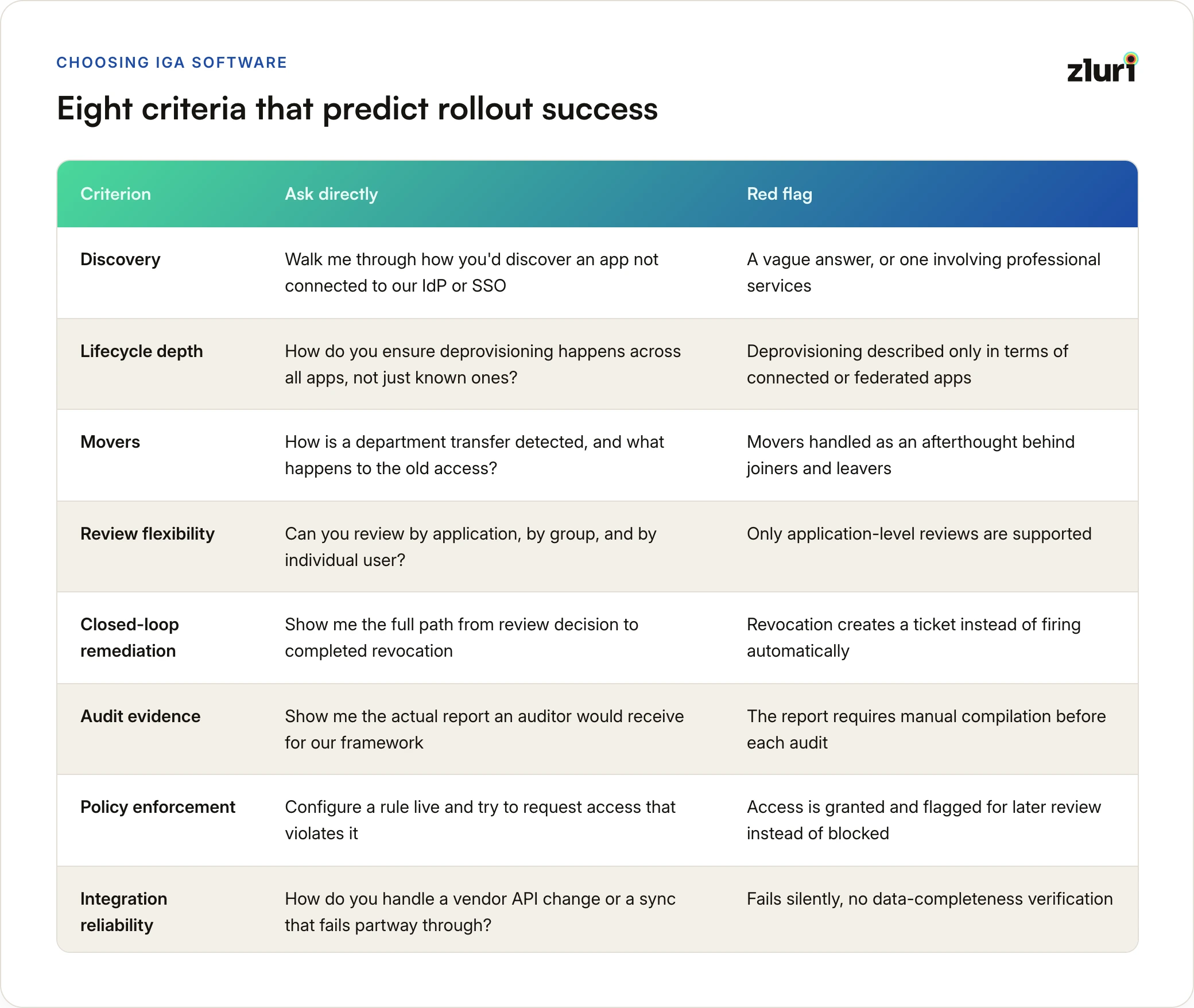
Discovery: does it find what you don't know about? This is the single most important evaluation criterion, and the one most evaluations underweight.
- What to test: give vendors a list of 20 to 30 real applications from your environment, mixing well-known SaaS tools with niche or internal ones, and ask them to show you what surfaces beyond your IdP's list.
- What separates platforms: connector-based discovery finds applications with pre-built integrations, typically 150 to 300 common apps. Multi-method discovery (SSO/IdP as one signal among several, alongside HR, finance, browser and desktop agents, and APIs) finds 90 percent or more of your actual portfolio.
- Ask directly: "Walk me through exactly how you would discover an application that isn't connected to our IDP and SSO." A vague answer, or one that involves professional services engagements, is a signal.
Lifecycle depth: does automation reach inside the app, and past the IdP boundary? "Automated provisioning" can mean anything from "creates an account" to "assigns the right license tier, sets the in-app role, and adds the user to the right channels."
- Ask for the granular action count and specific examples in your critical apps.
- Ask directly: "How do you ensure deprovisioning happens across all applications when a user leaves, not just the apps we already know about?" A confident answer walks through how discovery and offboarding stay connected on an ongoing basis. A weak answer describes deprovisioning only in terms of connected or federated apps, which is exactly the gap that shows up as an audit finding months later.
Movers, not just joiners and leavers. Role changes are where access accumulates silently. Ask how a department transfer is detected (real-time HRIS sync or a nightly batch?) and what happens to the old access when the new access is granted. Platforms that handle joiners and leavers well often handle movers as an afterthought, and movers are where over-provisioning quietly builds up.
Review flexibility: can you scope a review to the question being asked? Application-level reviews are table stakes. Ask whether you can review by access group and by individual user too, since your auditor's questions will come in all three shapes, and platforms that only support one force you to reconstruct answers from overlapping campaigns. Walk through edge cases live:
- A manager doesn't respond within the deadline. What happens?
- A user has access to an app with no owner. How is it handled?
- A contractor needs a review cycle different from an employee's. Native support, or a workaround?
Closed-loop remediation: what happens after a reviewer clicks revoke? In many platforms, the answer is a ticket. In a converged platform, revocation fires through the same provisioning workflows automatically, and recurring findings can be converted into automation rules so the same issue stops reappearing every cycle. Ask to see the full path from review decision to completed revocation, with no human handoff.
Audit evidence: generated or assembled? Ask to see the actual report an auditor would receive for your specific framework, and whether it reflects current state or requires manual compilation before each audit. Also ask what percentage of provisioning and deprovisioning actions complete without human intervention, and ask for that number with evidence, not just a claim.
Policy enforcement, not just policy definition. Many platforms let you define segregation of duties policies beautifully. Fewer platforms actually enforce them at the point of access request, blocking violations before they happen rather than detecting them after. Configure a rule during evaluation (a user cannot have both expense submission and expense approval rights, for example) and attempt to request access that violates it. Does the platform block it, or grant access and flag the violation for later review? Pre-provisioning enforcement and post-provisioning detection are architecturally different capabilities.
Integration reliability: what happens in month eight? Every vendor's integrations work in a demo. Ask how the platform handles a vendor API change, a rate limit, or a sync that fails partway through, and whether it verifies data completeness or fails silently. Hand-coded, per-app connectors and schema-based engines behave very differently here, directly underneath your compliance evidence.
Step 5: Shortlist by Category, Not by Brand Recall
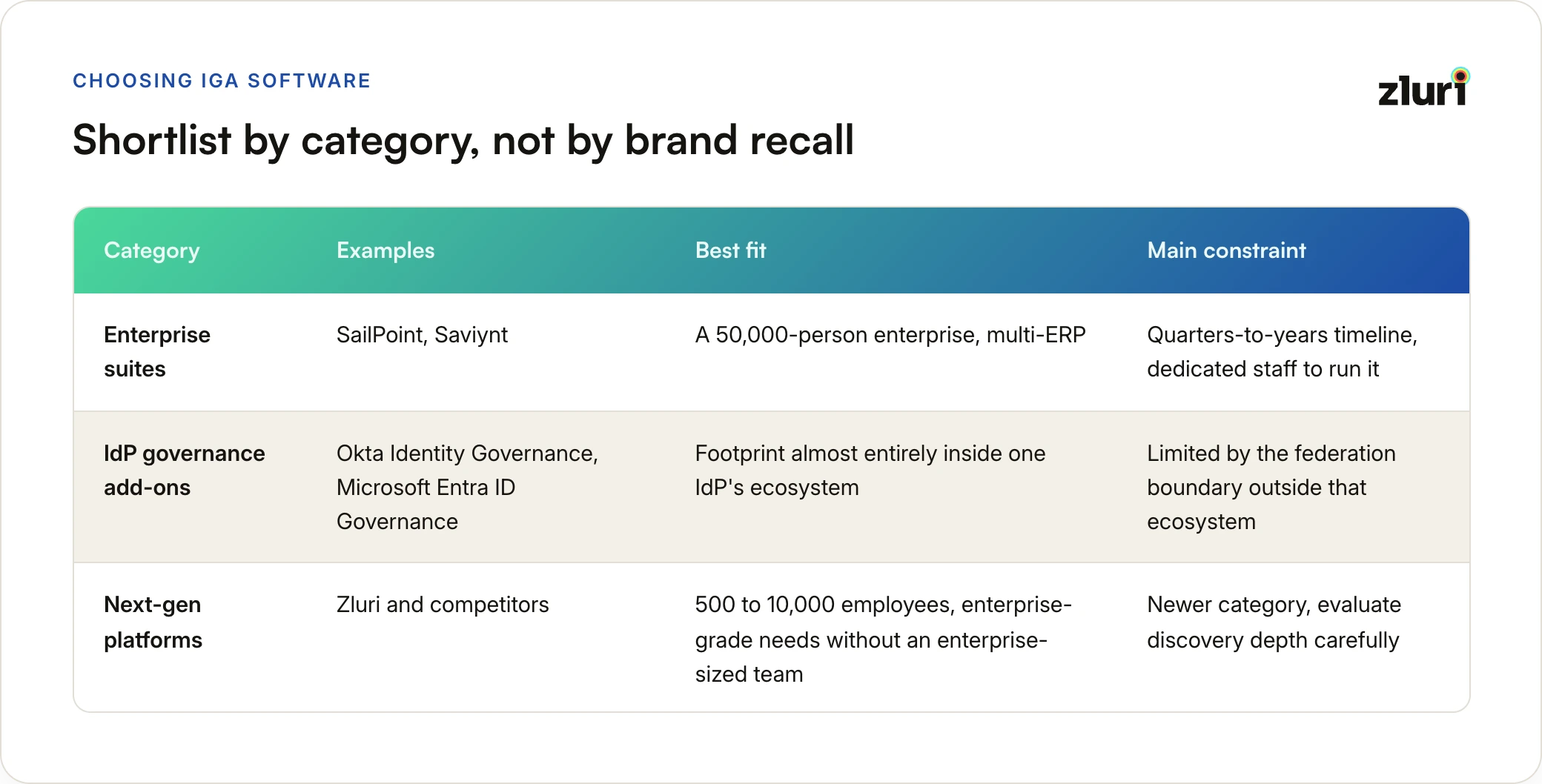
The IGA market sorts into three broad groups, and knowing which group fits you eliminates half the market before the first call.
- Enterprise suites (SailPoint, Saviynt): the deepest governance for large, complex, multi-ERP environments, at the cost of implementation timelines measured in quarters-to-years and a program you need dedicated staff to run. The right answer for a 50,000-person enterprise; heavy for most others.
- IdP governance add-ons (Okta Identity Governance, Microsoft Entra ID Governance): extend the identity provideryou already own. Fastest path if your footprint lives almost entirely inside that vendor's ecosystem; structurally limited by the federation boundary if it doesn't. Your Step 2 numbers answer this one for you.
- Next-gen platforms (Zluri and competitors): built around discovery-first inventories, granular automation, and mid-market-friendly deployment timelines, the shift covered in legacy vs next-gen IGA. The fit for organizations, typically 500 to 10,000 employees, that carry enterprise-grade requirements without an enterprise-sized identity team.
Shortlist two, maximum three, and make them comparable: one from the wrong category wastes everyone's POC.
Step 6: Design the Proof of Concept as a Test, Not a Tour
A vendor-led POC is a longer demo. A buyer-led POC has pass/fail conditions written before it starts. Four tests cover most of what matters.
- The discovery test. Connect your real environment and count the applications surfaced beyond your IdP's list. You already know the expected gap from Step 2; now you're checking whether the platform finds it.
- The lifecycle test. Run a real onboarding and a real offboarding for one department, including at least one app outside SSO and one app with granular in-app roles. Time both, and check the offboarding actually reached everything.
- The review test. Run one access review scoped the way your auditor would actually ask (pick your hardest shape: a group across five apps, or one contractor's full footprint). Time reviewer effort, and follow one revocation all the way to completion.
- The month-eight simulation. Ask the vendor to show you what a failed or partial sync looks like in their platform, and how you'd know it happened. Silent failure here is silent corruption of every review downstream.
Timelines: two to four weeks for a meaningful test, not two hours of guided demo. If a vendor resists a genuine proof of concept and pushes hard toward signing based on demos alone, treat that resistance as information.
Step 7: Pressure-Test the Cost and the References
Several questions close the process, beyond the four tests above.
- "What does this cost at twice my current app count?" Per-integration fees, add-on modules, and connector tiers mean the quote you're holding may be the floor. Get two-year TCO in writing against a realistic growth assumption, including implementation and any partner or consulting costs, which for enterprise suites routinely run into six figures on their own.
- "How is pricing structured as we grow? What happens to cost per user as we scale from 1,000 to 2,000 employees?" Some platforms price attractively at your current size and become dramatically more expensive at scale.
- "What's included versus what requires professional services?" Discovery, certain integrations, or advanced workflow configuration sometimes require paid professional services engagements that aren't obvious from the initial pricing conversation.
- "Give me a reference who went from contract to first completed access review." Not first login, not go-live. Push for a reference matching your industry and size specifically. If they can't provide one, your implementation might not follow their marketed timeline either.
- "What does your platform not do well? What would you tell me to evaluate carefully elsewhere?" Genuinely useful vendors will answer this honestly, because they know overselling leads to churn. Evasive answers here are a signal worth noting.
- "If we signed today, what would week one actually look like?" Contrast this against your requirements from Step 2 and Step 3. A vague answer here predicts vague execution later.
A few red flags are worth watching for as you go through this step, regardless of which vendor you're talking to:
- The demo only shows their sandbox environment, never your data.
- Reference customers are all much larger or much smaller than you.
- Pricing requires a call instead of a straightforward explanation.
- The sales engineer can't answer technical questions without looping in someone else repeatedly.
- "Custom development" comes up frequently during discovery of your specific needs.
Making the Final Decision
After all seven steps, decisions typically come down to genuine tradeoffs rather than one platform winning every category.
- When comprehensive discovery wins over polish: if your Step 2 numbers showed significant shadow IT or unfederated applications, prioritize discovery completeness even if the interface feels less refined than competitors. Governance gaps from missed applications create more risk than a less elegant user interface.
- When simplicity wins over comprehensiveness: if your team is small and stretched thin, a platform with fewer advanced features but genuine ease of configuration and maintenance often produces better real-world outcomes than a more powerful platform that requires expertise you don't have.
- When industry-specific capability matters: healthcare, financial services, and government organizations often have compliance requirements generic platforms handle poorly. Industry-specific features (HIPAA-specific workflows, SOX-specific segregation of duties templates) can outweigh general capability advantages.
- When cost structure matters more than sticker price: a platform with a higher year-one cost but transparent, predictable scaling often proves cheaper over three years than a lower-cost platform with expensive add-on modules for capabilities you'll eventually need.
Where We Fit in This Process
Zluri is built for the third category in Step 5: mid-market and growing organizations that need enterprise-grade governance without an enterprise-grade identity team or timeline. If that's your profile, we'd make one specific request: run us through Step 6 against your real environment, not a demo tenant. The discovery test is the one we most want you to run, because a platform whose premise is visibility-first governance should be able to show you your own environment more completely than you've seen it, in the first week, before you've signed anything. And if Step 1 told you you're a 50,000-person enterprise with a dozen legacy ERPs, we'd genuinely point you at the enterprise suites first.
Frequently Asked Questions
How long should an IGA software evaluation take?
For a mid-market organization, six to ten weeks is realistic: two weeks for internal mapping and requirements (Steps 1 to 3), two to three weeks for shortlisting and demos, and three to four weeks for a proper proof of concept and reference checks. Compressing the internal homework is the most common false economy, since everything downstream depends on it.
What's the biggest mistake companies make when choosing IGA software?
Evaluating platforms against the vendor's demo environment instead of their own. Every platform governs a clean demo tenant well. The differences that matter (discovery beyond the IdP, offboarding outside SSO, review scoping, sync reliability) only show up against your real footprint, which is why the proof of concept should run on production data.
Should we choose our identity provider's governance add-on or a dedicated IGA platform?
Run the Step 2 math first. If nearly all of your applications are federated to your IdP and your governance needs are basic reviews and lifecycle workflows, the add-on is the path of least resistance. If a meaningful share of your footprint lives outside federation, which is the case for most organizations, the add-on governs the minority of your environment, and a platform with independent discovery closes the rest.
How much does IGA software cost?
Ranges are wide. Enterprise suites typically involve six-to-seven-figure annual licensing plus implementation costs that can reach $300,000 to $500,000 even for mid-sized deployments. Modern SaaS platforms price by employee or identity count on subscription, but watch for per-integration fees and paid add-on modules that grow the price with your stack. Always evaluate two-year total cost of ownership at projected growth, not the first-year quote.
What team do we need to run IGA software after purchase?
For enterprise suites, plan on dedicated identity engineering staff or an ongoing partner relationship. Modern and next-gen platforms are designed for existing IT and security teams to operate without specialists, which is precisely what makes them viable for organizations without a standing identity program. Confirm this in references: ask how many people the customer actually has running the platform day to day.
Should IT operations or just security and compliance run the evaluation?
Neither alone. Security and compliance define what the platform needs to prove. IT operations will maintain the platform daily and can identify configuration complexity or integration gaps that compliance-focused evaluators might miss. HR and finance, as covered in Step 3, round out the requirements that get missed when only two departments run the process.
Is it worth paying more for a platform with broader discovery capability if our shadow IT problem seems small?
Most organizations underestimate their shadow IT footprint until they run comprehensive discovery. What looks like a small problem often turns out to be 30 to 40 percent of the application portfolio once multi-method discovery actually runs, which is exactly what the Step 2 mapping and Step 6 discovery test are designed to surface before you sign anything, and exactly the kind of number measuring an IGA program will ask you to keep tracking after you do.


.svg)











