You're not provisioning late because you're slow. You're discovering events 3 days late.
Friday, 5:00 PM: Your finance manager terminates an employee in Workday. The employee's last day ends.
Friday, 5:01 PM: You don't know about it.
Monday, 10:00 AM: You check your email. HR sent the termination notice Sunday night.
Monday, 10:15 AM: You start deprovisioning.
Time former employee had production access: 65 hours.
Your compliance policy: Deprovision within 24 hours.
You just failed a compliance audit. Not because you didn't do your job. Because you discovered the termination 3 days late.
You're accountable for access security and compliance. But you discover employee lifecycle events days late—through Slack messages, email threads, or weekly CSV files.
The gap between when events happen and when you discover them? That's where policy enforcement fails. That's where compliance violations occur. That's where security risks emerge.
This article explains why you can't enforce policies when you discover events late, how HR-driven provisioning fixes this, and what it actually means to make HRIS your authoritative source for lifecycle events.
HR-driven provisioning means: HRIS triggers events automatically. You receive them immediately. You enforce policies on time. No manual coordination, no Slack discovery, no CSV delays.
This is also Prerequisite #1 for zero-touch provisioning. Without HRIS integration triggering events automatically, you'll always have manual touch points and delayed policy enforcement. (See our complete guide to zero-touch provisioning.)
The Accountability Without Control Problem
As IT Director, you're accountable for:
- Enforcing security policies (least privilege, separation of duties)
- Maintaining compliance (SOC 2, ISO 27001, GDPR, HIPAA)
- Preventing unauthorized access
- Auditing all access changes
- Deprovisioning within 24 hours of termination
Your current reality:
- HR updates HRIS when lifecycle events happen (they do their job)
- You discover events later through Slack, email, or CSV exports
- Gap between event and discovery = policy enforcement failure
The accountability gap:
HR says: "I'm accountable for updating HRIS when employees join, transfer, or leave. I did my part—I updated Workday immediately."
You say: "I'm accountable for security and compliance. But I didn't know about the termination until 3 days later. I can't enforce what I don't know about."
Auditor says: "You both failed because your systems aren't integrated. Former employee had access for 3 days. Who's responsible?"
The problem: You're both accountable for things outside your control.
- HR is accountable for lifecycle events but has no control over whether provisioning actually happens
- You're accountable for security but have no control over when you discover lifecycle events
HR-driven provisioning solution:
- HR becomes stakeholder in access management (HRIS triggers provisioning)
- HR gets accountability WITH control (HRIS update triggers system automatically)
- You can enforce policies immediately (receive events in real-time, not days later)
- Clear audit trail (HRIS timestamp → policy enforcement → verification)
Why This Matters Now
Five forces making this critical for IT Directors:
1. Compliance Audit Requirements Tightened
Audit question: "Show us proof that terminated employees lose access within 24 hours."
Your current process:
- Friday 5pm: Employee terminated (you don't know)
- Sunday night: HR emails termination notice
- Monday 10am: You see email
- Monday 11am: You deprovision
Time to deprovision: 65 hours
Audit requirement: 24 hours
Result: Failed audit finding
SOC 2 Type II requires demonstrable timely deprovisioning. You can't prove it when you discover terminations days late through email.
Failed audits mean:
- Lost enterprise customers (require SOC 2 compliance)
- Revenue impact (deals blocked)
- Remediation costs (months of additional audits)
You can't pass compliance audits when you discover events through Slack/email.
2. Remote Work + Scale Eliminated "IT Knows Everyone"
Pre-2020 (and 500 employees):
- Most employees in office
- You physically saw new hires
- Manager mentioned: "Josh joins Monday"
- You provisioned based on hallway conversations
Post-2020 (and >500 employees):
- Employees distributed across regions/countries
- You never meet 60% of employees
- Managers don't chat with you
- No hallway conversations
- Only way you know someone exists: HRIS
At scale (beyond 100+ employees):
- You can't personally know every employee
- You can't rely on informal communication
- You need systematic integration
- Manual coordination completely breaks
Reality check: If your company has >500 employees or >20% remote, you don't know who's joining/leaving until HRIS tells you. Manual coordination doesn't scale.
3. Hiring Velocity Makes Discovery Delay Costly
Traditional hiring (2010-2019):
- 4-6 week hiring process
- 2-3 new hires per month
- You could manually coordinate (3 hours per hire = 9 hours/month)
Modern hiring (2025+):
- 1-2 week hiring process
- 15-20 new hires per month
- Manual coordination (3 hours × 15 hires = 45 hours/month)
The math: At 15 hires/month, you or your team spend >1 week/month just coordinating with HR on new hire provisioning. That's before handling offboarding, role changes, and access requests.
The breaking point: Most IT teams realize manual coordination doesn't scale around 50-100 employees and 10+ hires/month. After that, you're perpetually behind.
You can't enforce policies quickly when you're always playing catch-up.
4. Tool Sprawl (+ Shadow IT + AI Tools) Means Provisioning = 35+ Apps
2010: Provision 5 apps (email, file share, VPN, intranet, CRM)
2026: Provision 35+ sanctioned apps (GitHub, Slack, Jira, AWS, Google Workspace, Zoom, Figma, Notion, Linear, Confluence, Datadog, PagerDuty, 1Password, Salesforce, HubSpot, Zendesk, Intercom, Amplitude, Mixpanel, Segment, Snowflake, Looker, Tableau, Miro, Lucidchart, Asana, Monday, ClickUp, Airtable, Retool...)
Plus shadow IT: Employees adopt tools without your approval
- Design team starts using Canva
- Engineering starts using Cursor AI
- Sales starts using Apollo
- You discover these 3 months later
Plus AI tools explosion:
- ChatGPT Enterprise
- Claude for Work
- GitHub Copilot
- Cursor
- v0
- Each with their own provisioning requirements
Time per new hire:
- 2010: 30 minutes (5 apps × 6 min each)
- 2026: 3 hours (35+ apps × 5 min each, plus troubleshooting shadow IT/AI tools)
Shadow IT and AI tools make it worse: You can't enforce policies on tools you don't know employees are using. Late discovery of shadow IT means employees had unapproved access for months.
You can't enforce least privilege policies when you're discovering tools employees adopted months ago.
5. Security Incidents from Stale Access
#1 audit finding: Former employees with active access
Common scenarios:
- Terminated employee: Access for 3 days post-termination (you discovered late)
- Transferred employee: Engineer → PM, kept GitHub write to production repos (you didn't know about transfer)
- Contractor expired: 6-month contract ended, still has access (contract end date not in your system)
- Manager departed: Team's access requests still routing to departed manager (manager field outdated)
Real security risks:
- Insider threat: Disgruntled ex-employee deletes production database
- Data breach: Former employee downloads customer data
- Compliance violation: Auditor finds 10 ex-employees with active access
You can't prevent security incidents from stale access when you discover lifecycle events days late.
How Late Discovery Breaks Policy Enforcement
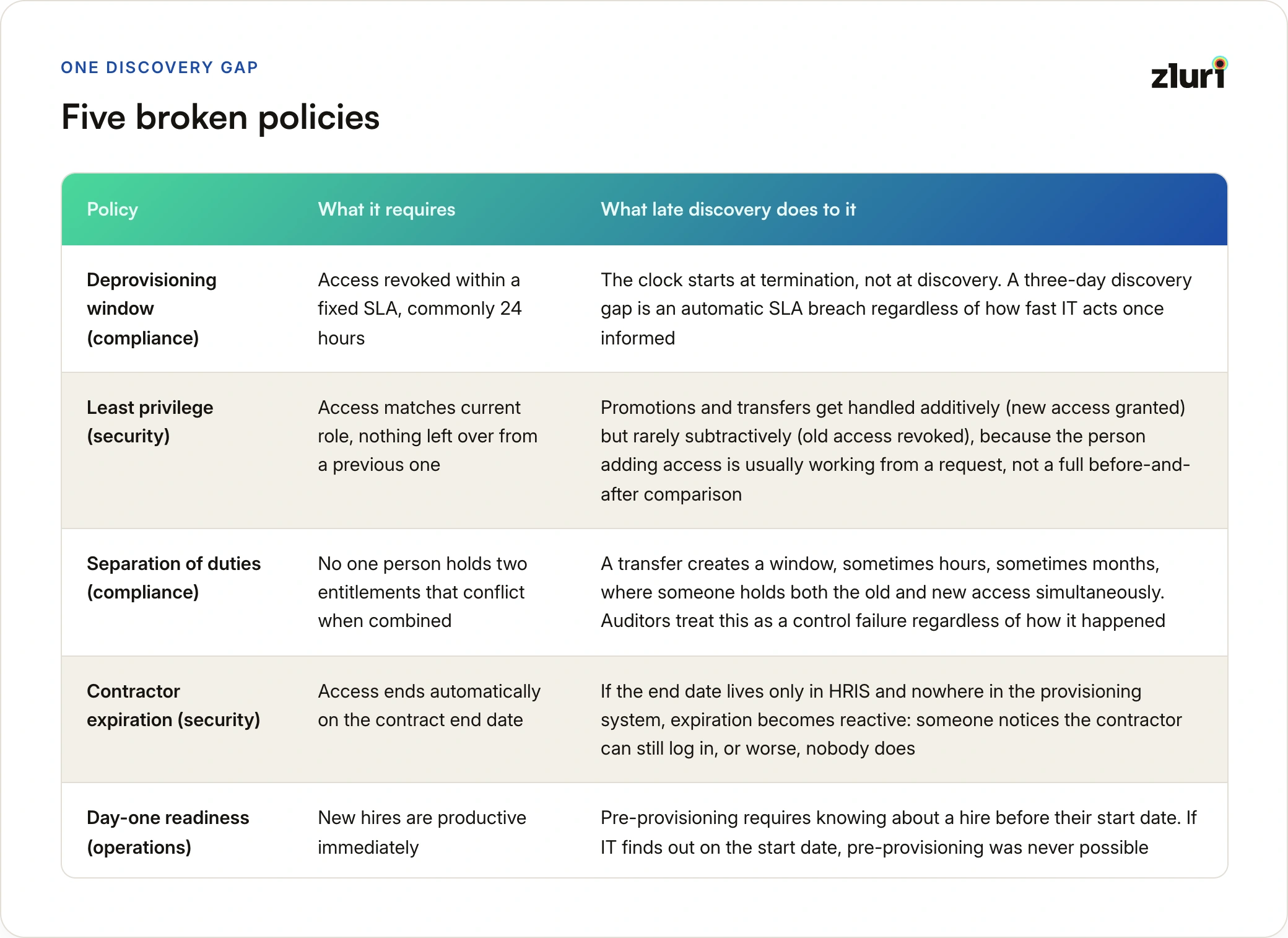
Five specific policy enforcement failures caused by late discovery:
Policy 1: Deprovisioning Within 24 Hours (Compliance)
Your policy: Deprovision all access within 24 hours of termination
Current process:
- Friday 5:00pm: Employee's last minute
- Friday 5:01pm: HR marks terminated in Workday
- Friday 5:01pm: You don't know
- Sunday night: HR emails termination notice (weekend delay)
- Monday 10:00am: You check email
- Monday 10:15am: You start deprovisioning
- Monday 11:00am: Deprovisioning complete
Time from termination to deprovisioning: 65 hours
Policy requirement: 24 hours
Failure: You violated compliance policy because you discovered the event 65 hours late.
Why you failed: You did your job as soon as you knew. But you knew too late.
Policy 2: Least Privilege (Security)
Your policy: Users should have only the access their current role requires
Scenario: Sarah promoted from Software Engineer → Product Manager
Current process:
- Monday 9am: HR updates job_title in Workday
- Monday 9am: You don't know
- Wednesday 10am: You receive weekly CSV export
- Wednesday 11am: You provision PM tools (add PM access)
- Wednesday 11am: You forget to remove Engineer access
Result (6 months later):
- Sarah has: Engineer access (GitHub write to all repos, AWS production) + PM access (product tools)
- Over-provisioned: Sarah has more access than role requires
- Security risk: PM doesn't need production write access
Policy violation: Sarah had excessive access for 6 months because you discovered the promotion 2 days late AND only added access (didn't remove old access).
The problem: Late discovery + manual execution = you only remember to add (additive), not remove (subtractive).
Policy 3: Separation of Duties (Compliance)
Your policy: Developers and security auditors can't be the same person (SOD)
Scenario: Josh transfers from Platform Team → Security Team
Current process:
- Monday: HR updates team in Workday
- Monday: You don't know
- Wednesday: You receive CSV export
- Wednesday: You provision Security team access (add)
- Wednesday: You forget to remove Platform team access
Result:
- Josh has: Platform access (development systems) + Security access (audit systems)
- SOD violation: Same person has developer AND auditor access
- Compliance failure: Auditor flags this as control failure
Time Josh had SOD violation: 2 days (Monday to Wednesday) minimum, potentially 6 months if you never removed old access
Policy failure: You can't enforce separation of duties when you discover transfers days late and manually manage access changes.
Policy 4: Time-Bound Access for Contractors (Security)
Your policy: Contractor access expires automatically on contract end date
Scenario: Contractor's 6-month contract ends
Current process:
- Friday: Contract ends (date was in HRIS but not in your system)
- Friday: You don't know
- Monday: Contractor tries to log in, fails
- Monday: Contractor messages Slack: "My access doesn't work"
- Monday: You investigate, discover contract ended
- Monday: You realize access should have been revoked Friday
But actually:
- Contractor's access worked until they tried to log in
- If contractor never tried to log in, access would remain active
- You discovered expiration reactively, not proactively
Policy failure: Time-bound access requires proactive enforcement on exact dates. Late discovery = reactive deprovisioning (or never, if the contractor doesn't report it).
Policy 5: Pre-Provisioning for Day 1 Productivity (Operations)
Your policy: New hires productive from Day 1, Hour 1 (everything ready when they arrive)
Current process:
- Friday: HR enters new hire in Workday (start date: Monday)
- Friday: You don't know
- Monday 8am: New hire arrives
- Monday 9am: You receive email: "New hire starting today"
- Monday 9am-12pm: You provision access (3 hours)
- Monday 12pm: New hire can start working
Time new hire waited: 4 hours (8am arrival to 12pm access ready)
Policy failure: You can't pre-provision before Day 1 if you don't know about new hire until Day 1.
Why pre-provisioning matters:
- Discover and fix provisioning issues before Day 1 (no time pressure)
- New hire impressed (everything just works)
- New hire productive immediately (no 4-hour wait)
Late discovery makes pre-provisioning impossible.
The Four Reasons HR Should Be Your Source of Truth
Reason 1: HR Knows WHEN (You Need Timing to Enforce Policies)
HR knows in HRIS:
- When someone joins (can pre-provision)
- When someone gets promoted (can adjust access immediately)
- When someone transfers teams (can revoke old, grant new)
- When someone terminates (can deprovision on time)
- When contractor expires (can auto-revoke on exact date)
- When someone goes on extended leave (can suspend access)
You need this timing to:
- Schedule deprovisioning for exact termination time (Friday 5pm, not Monday 10am)
- Pre-provision before Day 1 (troubleshoot issues before new hire arrives)
- Adjust access immediately upon role change (within minutes, not days)
- Maintain compliance audit trail (HRIS timestamp = authoritative source)
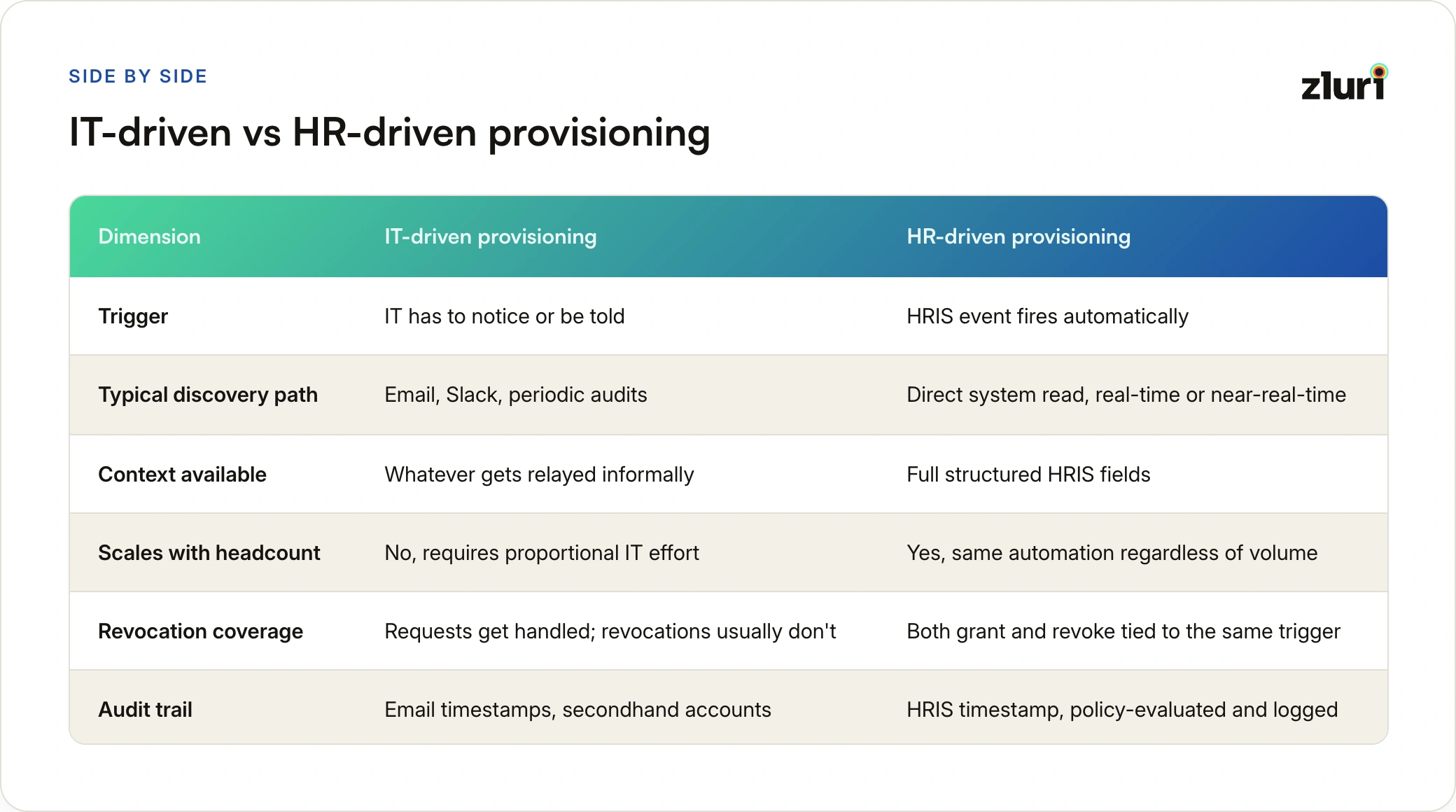
Current reality: You discover WHEN through Slack/email (days late)
Solution: HRIS tells you WHEN automatically (real-time webhooks or 15-min API polling)
Example:
Without HR-driven provisioning:
Friday 5pm: Termination happens (HRIS updated)
Friday 5pm: You don't know
Monday 10am: You discover via email
Monday 11am: You deprovision
Discovery delay: 65 hours
With HR-driven provisioning:
Friday 5pm: Termination happens (HRIS updated)
Friday 5:01pm: Webhook fires → Your system receives event
Friday 5:02pm: Your system begins deprovisioning
Friday 5:15pm: Deprovisioning complete
Discovery delay: 1 minute
HR controls WHEN (lifecycle timing). You control WHAT/HOW (policy enforcement). Integration connects them.
Reason 2: HR Has Complete Context (You Need Context to Apply Correct Policies)
When someone joins, HR knows in HRIS:
- Job title (determines base access policy)
- Department (determines departmental tools)
- Team (determines team-specific access)
- Manager (determines approval routing)
- Employment type (Full-Time vs. Contractor → different policies)
- Location (determines compliance requirements - EU vs. US)
- Start date (enables pre-provisioning)
- Contract end date (for contractors, enables auto-expiration)
You get via email: "Josh starts Monday as an engineer"
What's missing:
- Which engineering team? (Platform vs. Security = different access)
- Full-Time or Contractor? (different access duration policies)
- Senior or Mid-level? (different permission levels)
- Remote or office? (different device policies)
- Which office/country? (different compliance requirements)
You can't apply correct policies without complete context. HR has it, email doesn't.
Example:
Email says: "Josh Martinez starts Monday as an engineer on the Platform team."
Your questions:
- Senior Engineer or Software Engineer? (determines permission level)
- Full-Time or Contractor? (determines if access expires)
- San Francisco or London office? (determines GDPR compliance requirements)
- Manager? (determines approval routing for elevated access)
You guess:
- Provision mid-level access (might be wrong if Senior)
- No expiration set (might be wrong if Contractor)
- No GDPR considerations (might be wrong if London)
- Route approvals to team lead (might be wrong if reports to Staff Engineer)
With HR-driven provisioning:
HRIS has:
Name: Josh Martinez
Job title: Senior Software Engineer
Department: Engineering
Team: Platform
Manager: Jane Smith
Employment type: Full-time
Location: San Francisco
Start date: 2026-12-09
Your system reads attributes:
- Senior Software Engineer → Senior-level permissions
- Full-time → No expiration
- San Francisco → US compliance requirements
- Manager: Jane Smith → Route approvals correctly
Result: Correct policies applied automatically, no guessing.
Reason 3: HR Controls the Lifecycle (You Need Single Source of Truth)
The data drift problem:
6 months ago: Sarah promoted to Engineering Manager
Today:
- HRIS says: "Sarah is Engineering Manager"
- Your spreadsheet says: "Sarah is Software Engineer" (you never got notified)
- Sarah's access reflects: Software Engineer (missing manager tools)
Sarah complains: "I can't approve budgets. I don't have access to finance tools."
You investigate: Sarah was promoted 6 months ago. You never knew.
Why drift happens:
- HR updates HRIS (their system of record)
- You maintain separate employee database (spreadsheet, Airtable, or "in your head")
- No integration = data diverges over time
- You discover drift when someone complains (months later)
Cost of drift:
At 500-employee company:
- 50 promotions per year
- You miss 10 updates (20% miss rate due to email coordination)
- 10 employees have wrong access for average 3 months
- 10 employees × 3 months × 2 hours/week blocked = 240 hours of productivity lost
Solution: HRIS is single source of truth
- Your system reads from HRIS (never duplicates employee data)
- When HRIS updates, your system knows immediately
- No drift, no state mismatch, one authoritative source
If you maintain a separate employee database, that's a red flag you don't have true integration.
Reason 4: HR Sees Changes First (You Need to Act Immediately)
The timing gap:
Monday 9am: Sarah promoted from Software Engineer → Engineering Manager
Current (email coordination):
- 9:00am: HR updates HRIS
- 9:01am: You don't know yet
- 2:00pm: Sarah needs to approve team budget, can't access finance tool
- 2:15pm: Sarah messages you on Slack: "I can't access the budget system"
- 2:30pm: You investigate, discover Sarah was promoted this morning
- 3:00pm: You provision manager tools
Time to enforce policy: 6 hours (Sarah blocked for 6 hours)
With HR-driven provisioning:
- 9:00am: HR updates HRIS
- 9:01am: Webhook fires → Your system receives event
- 9:02am: System provisions manager tools
- 9:05am: Sarah has full manager access
Time to enforce policy: 5 minutes
The pattern: HR always knows first (they update HRIS). The question is: How long until you know?
Email/CSV: Days
Slack message: Hours
HRIS webhook: Seconds
You can't enforce policies quickly when you're always reacting late.
Evidence needed: [Customer data: Time from role change to correct access enforcement]
What HR-Driven Provisioning Actually Means
HR-driven provisioning means HRIS triggers, you enforce:
The Flow
1. HR updates HRIS (Josh joins as Platform Engineer, December 9)
2. Your system receives event (employee.created webhook fires OR API poll detects new employee)
3. Your policies evaluate:
- Role: Software Engineer → Birthright access (GitHub org, Slack, email, Zoom)
- Team: Platform → Team-specific access (platform-api write, platform AWS account)
- Department: Engineering → Department access (engineering Slack channels, Confluence)
- Location: San Francisco → US compliance requirements
4. Your system enforces (provisions access according to policies):
- Creates accounts in all required apps
- Configures permissions per role/team/department
- Sets compliance controls per location
5. Your system verifies:
- Tests that provisioned access actually works
- Logs all actions for audit trail
- Alerts if any verification fails
6. Your system notifies:
- Josh: "Your access is ready"
- Manager: "Josh provisioned successfully"
- You: "Provisioning completed, 29 apps configured"
The Roles
HR's role: Update HRIS when lifecycle events happen (WHEN)
- New hire joins → Create employee in HRIS
- Employee promoted → Update job_title in HRIS
- Employee transfers teams → Update team in HRIS
- Employee terminates → Mark terminated in HRIS
Your role: Receive events, enforce policies, maintain compliance (WHAT + HOW)
- Define policies (Platform Engineer = GitHub write + Jira developer + AWS dev)
- Receive events from HRIS (real-time)
- Enforce policies (provision according to role/team/department)
- Verify enforcement (test access works)
- Audit trail (log everything for compliance)
HR doesn't decide what access. You enforce policies based on role/team/department determined by business leaders, managers, and security requirements.
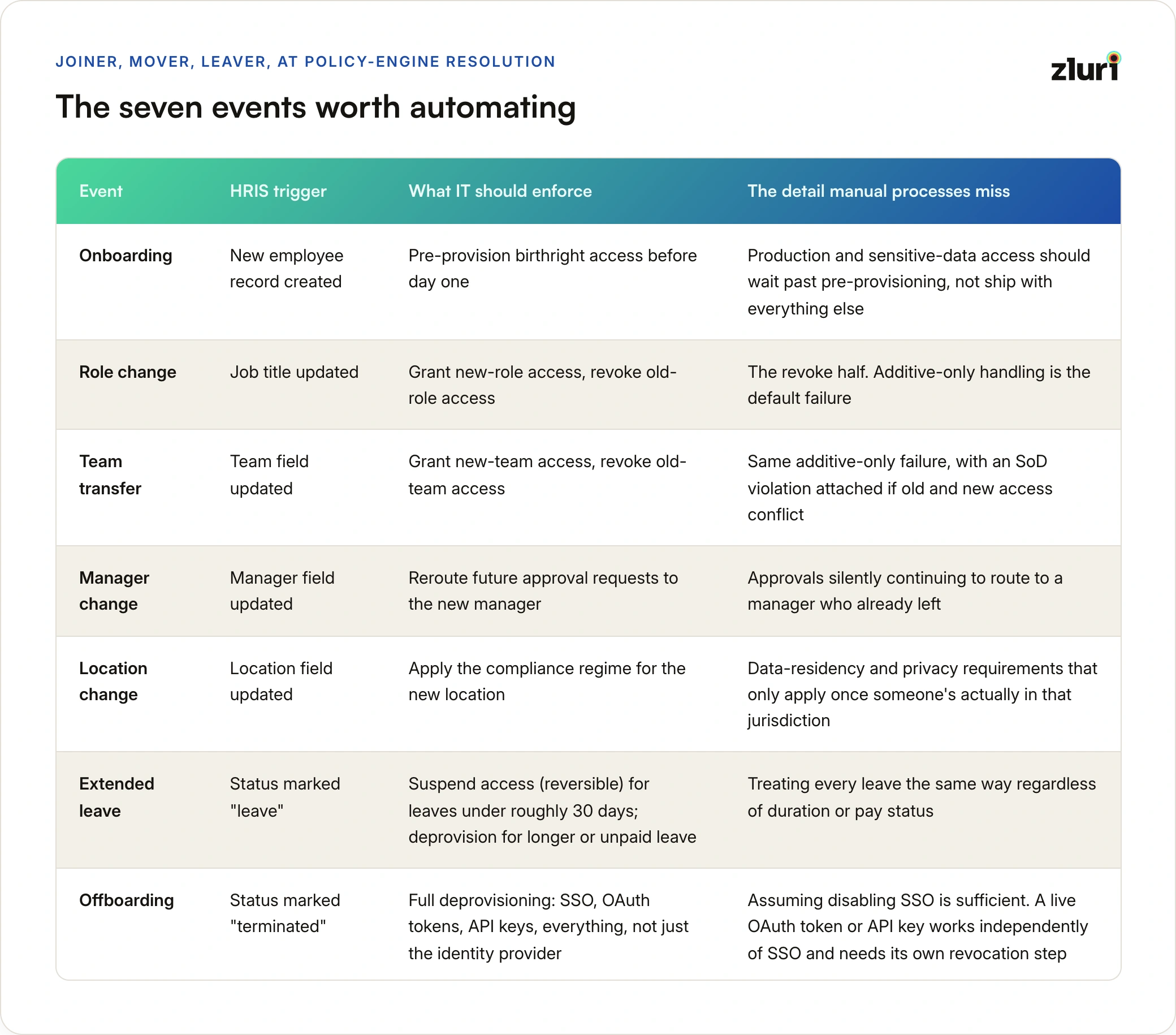
The 7 Lifecycle Events You Need to Enforce On Time
Every employee lifecycle event should trigger policy enforcement automatically. Here's what each event looks like:
Event 1: Onboarding
HR action: Create employee record in HRIS
Trigger: employee.created webhook OR API poll detects new employee
Your enforcement: Pre-provision birthright access before Day 1
Policy enforced: "Everything ready Day 1, Hour 1"
Why pre-provisioning matters:
- Discover issues before Day 1 (troubleshoot without time pressure)
- New hire impressed (everything just works)
- New hire productive immediately (no waiting for IT)
What not to pre-provision:
- Production access (wait until training complete)
- Sensitive data access (wait until compliance training)
- Admin permissions (evaluate after probation period)
Event 2: Role Change (Promotion/Lateral Move)
HR action: Update job_title in HRIS
Trigger: employee.updated (job_title changed)
Your enforcement: Add new role access, remove old role-specific access (subtractive)
Policy enforced: Least privilege (only access for current role)
The critical part: SUBTRACTIVE enforcement
Most companies fail here: They add new role access but forget to remove old role access.
Example:
- Sarah: Software Engineer → Product Manager
- Add: PM tools (product analytics, roadmap software)
- MUST ALSO REMOVE: Engineer-specific access (GitHub write to production, AWS prod access, on-call rotation)
- Keep: Core company access (email, Slack, Zoom)
Why this matters: Over-provisioning = security risk. PM doesn't need production write access.
How HR-driven provisioning fixes this:
System compares:
- Old role (Software Engineer): Required GitHub write, AWS prod, on-call
- New role (Product Manager): Required PM tools, analytics
- Common (keep): Email, Slack, Zoom
- Remove: GitHub write, AWS prod, on-call
- Add: PM tools, analytics
Result: Sarah has exactly PM access, nothing more.
Event 3: Team Transfer
HR action: Update team in HRIS
Trigger: employee.updated (team changed)
Your enforcement: Add new team access, remove old team access
Policy enforced: Separation of duties (no cross-team access)
Example:
- Josh transfers Platform Team → Security Team
- Remove: Platform-specific access (platform repos, platform AWS, #platform-team Slack)
- Add: Security-specific access (security repos, security tools, #security-team Slack)
- Keep: General engineering access (GitHub org, Jira, engineering Slack channels)
Why this matters: Josh shouldn't have access to both Platform and Security team resources (separation of duties violation).
Late discovery problem: If you discover transfer 3 days late, Josh had cross-team access for 3 days (SOD violation).
Event 4: Manager Change
HR action: Update manager in HRIS
Trigger: employee.updated (manager changed)
Your enforcement: Update approval workflows
Policy enforced: Correct approval routing
What changes:
- Future access requests route to new manager (not old manager)
- Pending approvals remain with old manager (they approved, they own it)
What doesn't change:
- Current access (manager change alone doesn't change job duties)
- Team membership (unless manager change implies team change—handle separately)
Why this matters:
Approval workflows rely on manager field. If outdated:
- Access requests route to departed manager → Approvals never happen
- Compliance issues (auditor asks: "Who approved this elevated access?" Answer: "Manager who left 6 months ago")
HR-driven provisioning ensures: Approval workflows always read current manager from HRIS.
Event 5: Location Change
HR action: Update location in HRIS
Trigger: employee.updated (location changed)
Your enforcement: Apply location-specific compliance requirements
Policy enforced: Geographic compliance (GDPR, data residency, etc.)
Example:
- Sarah relocates San Francisco → London
- Add: GDPR compliance training required
- Change: Data access (EU data residency requirements)
- Update: Device policies (EU privacy controls)
Why this matters: Different countries have different compliance requirements. You can't enforce location-based policies if you don't know when location changes.
Event 6: Long-Term Leave of Absence
HR action: Mark status = "Leave" in HRIS
Trigger: employee.updated (status changed)
Your enforcement: Suspend access (reversible) OR deprovision (clean slate)
Policy enforced: No active access during extended leave
Important: This is for LONG leaves (vacation, maternity/paternity, medical, sabbatical), not 1-2 day absences.
Two options:
Option 1: Suspend access (reversible)
- Disable SSO (can't log in)
- Keep all permissions (ready when they return)
- Mark as "suspended" in all systems
- On return: Re-enable SSO, immediately productive
Option 2: Deprovision (clean slate)
- Remove all access (treat like termination)
- On return: Re-provision from scratch (treat like new hire)
Policy decision:
- Short leaves (<30 days): Suspend access
- Extended leaves (>30 days): Deprovision access
- Paid leave (maternity, paternity): Suspend access
- Unpaid leave: Deprovision access (security risk if prolonged)
Why HR knows this: HR tracks leave types and durations in HRIS. You need this information to enforce correct policy.
Event 7: Offboarding
HR action: Mark status = "Terminated" in HRIS
Trigger: employee.updated (status = terminated) OR termination_date reached
Your enforcement: Comprehensive deprovisioning (all apps, all access types)
Policy enforced: Access revoked within 15 minutes
Critical: Timing
Bad approach:
- Employee leaves Friday 5pm
- HR marks terminated Monday morning
- You deprovision Monday 10am
- Time with access: 65 hours
Good approach:
- Employee leaves Friday 5pm
- HR marks terminated Friday 5pm (scheduled in advance in HRIS)
- System detects termination Friday 5:01pm
- Deprovisioning completes Friday 5:15pm
- Time with access: 15 minutes
What gets deprovisioned:
- SSO (Okta, Google Workspace, Azure AD)
- OAuth tokens (all third-party apps)
- API keys (GitHub, AWS, any service with API access)
- Slack channels (or deactivate account)
- Mobile device access
- VPN
- Shared passwords (if employee had access, rotate them)
- All application permissions (comprehensive, not just SSO)
Critical insight: Disabling SSO isn't enough. Employee might have OAuth tokens or API keys that work independent of SSO. Comprehensive deprovisioning means revoking everything.
Evidence needed: [Customer data: Average time from termination to complete deprovisioning]
Why "Better HR-IT Collaboration" Doesn't Work
Most companies' solution to provisioning problems: "HR and IT should communicate better."
What this looks like in practice:
- Weekly sync meetings between HR and IT
- HR emails IT list of new hires every Monday
- IT emails HR when provisioning complete
- Slack channel for coordination
Why this fails:
It Doesn't Scale
- 10 hires/month: Weekly email works
- 50 hires/month: Weekly email overwhelms IT
- 100 hires/month: Weekly email completely breaks
The math: If each "collaboration" takes 15 minutes (read email, provision, respond), 100 new hires = 25 hours of "collaboration" per month. That's one IT person spending 60% of their time just coordinating with HR.
At scale, "better collaboration" means hiring more IT people just to coordinate.
It's Still Manual
Every step is manual:
- HR exports CSV from HRIS → Manual
- HR emails CSV to IT → Manual
- IT imports CSV → Manual
- IT provisions → Manual (unless you've automated this separately)
Reality check: If your team is still manually clicking through app UIs to provision, you haven't automated provisioning. You've just formalized the manual coordination process.
It Creates Bottlenecks
- HR waits for you to respond
- You wait for HR to clarify
- New hire waits for both
Real scenario:
- Monday 9am: HR emails about new hire
- Monday 2pm: You respond: "What team is Josh on?"
- Tuesday 10am: HR responds: "Platform team"
- Tuesday 2pm: You provision
- Wednesday: New hire arrives, some access works
3-day delay because of back-and-forth clarification.
With HRIS integration: All context is in HRIS. No clarification needed. Provisioning happens immediately.
It Still Has No Source of Truth
- HR has data in HRIS
- You have data in provisioning system (or Excel spreadsheet)
- Which is correct when they differ?
Six months later:
- HRIS says: Josh is Engineering Manager
- Your spreadsheet says: Josh is Software Engineer
- Who's right? Neither system is authoritative.
- You and HR have to manually reconcile.
With HRIS integration: HRIS is authoritative. Your system reads from HRIS. When HRIS updates, you know immediately. No manual reconciliation.
The Real Solution: Integration, Not Just Collaboration
Good collaboration:
- HR and IT agree on data requirements
- HR ensures HRIS data quality
- IT defines provisioning policies
- Security defines compliance requirements
Good integration:
- HRIS automatically pushes data to your provisioning system
- Your system automatically enforces policies based on data
- No manual coordination needed for ongoing operations
The difference:
Collaboration = Humans coordinating (doesn't scale)
Integration = Systems coordinating (scales infinitely)
You need both:
- Collaboration for initial setup (define requirements, agree on policies, ensure data quality)
- Integration for ongoing operations (automatic policy enforcement)
Most companies mistake collaboration for integration:
- "We have great HR-IT collaboration" (weekly meetings, email coordination)
- But no technical integration (still manual CSV exports)
- Result: Expensive collaboration (human time) with no scalability
Common Mistakes: Why HR-IT Integration Fails
Even with good intentions, HR-IT integration fails. Here's why:
Mistake 1: You're Not Integrating, You're Just Emailing Spreadsheets
What it looks like:
- HR exports CSV from HRIS weekly
- HR emails CSV to you
- You import CSV manually
- You provision based on CSV
Why you think this works:
- "We integrated HR and IT" (sharing data)
- "We automated provisioning" (you use scripts)
Why it doesn't work:
This isn't integration. This is manual data transfer with extra steps.
- Delayed: Weekly batch, not real-time (new hire waits up to 7 days)
- Manual: Requires human to export, email, import (breaks when person on vacation)
- No delta tracking: Re-provision everyone? Only changes? Who decides?
- Breaks at scale: Works for 50 employees, breaks at 500
- No audit trail: CSV is not authoritative source (can't prove when termination happened)
Real costs:
- HR spends 30 min/week exporting and emailing CSV
- You spend 2 hours/week importing and troubleshooting
- New hires wait average 3 days for access
- Total waste: 10 hours/month of manual coordination
At 100 employees, that's 1/4 of one person's job dedicated to manually transferring data that systems could share automatically.
You can't enforce 24-hour deprovisioning policy with weekly CSV exports.
Mistake 2: You Automated Accounts But Not Permissions
What it looks like:
- SCIM enabled for 20 apps (accounts created automatically)
- You still manually configure permissions in each app
Why you think this works:
- "We automated provisioning" (accounts created via SCIM)
- "New hires get access faster" (SCIM is fast)
Why it doesn't work:
Account created ≠ Access granted
Real scenario:
- SCIM creates GitHub account instantly ✓
- But: Josh has no repo access (account exists, permissions don't)
- You manually grant repo access (2 hours)
- Josh waits 2 hours before productive
This is 60% automation:
- 60% of apps support SCIM (account creation automated)
- 40% of apps don't support SCIM (manual provisioning)
- 100% of apps need permission configuration (manual)
You automated the easy part (accounts). You didn't automate the hard part (permissions).
Why this happens:
- SCIM creates accounts, doesn't configure roles/permissions
- You still need to manually grant GitHub repo access, AWS IAM permissions, Jira project roles
You can't enforce least privilege policy if you're manually configuring permissions under time pressure.
Mistake 3: You Maintain a Shadow Employee Database
What it looks like:
- HR maintains employee data in HRIS
- You maintain separate database of employees in Excel, Airtable, or "in your head"
- You manually update when HR sends notification
Why you think this works:
- "We need our own system to track IT-specific data"
- "HRIS doesn't have fields we need"
Why it doesn't work:
Six months later:
- HRIS says: Sarah is Engineering Manager (promoted 6 months ago)
- Your spreadsheet says: Sarah is Software Engineer (never updated)
- Sarah's access reflects: Software Engineer (no manager tools)
- Sarah complains: "I can't approve budgets"
What happened: Data drift. Your data and HRIS data diverged. No single source of truth.
Why this is expensive:
- Double data entry: HR updates HRIS, you update separate database
- Inconsistency: Your data doesn't match HRIS (which is right?)
- Discovery latency: Issues discovered months later when someone complains
Real scenario at 500-employee company:
- 50 promotions per year
- You miss 10 updates (20% miss rate due to manual coordination)
- 10 employees have wrong access for average 3 months
- 10 employees × 3 months × 2 hours/week lost productivity = 240 hours lost
If you maintain a separate employee database, that's a red flag you don't have true integration.
The fix:
- HRIS is single source of truth
- Your system reads from HRIS (never duplicates employee data)
- You maintain only provisioning-specific data (policies, access logs, audit trails)
Mistake 4: No Data Validation Means Silent Policy Failures
What it looks like:
- HRIS integration set up (webhook or API)
- New hire created in HRIS
- Your system reads data
- Employee has incomplete data (e.g., "team" field empty)
- System can't apply policy (policy requires team)
- System provisions nothing
- No alert, no notification
- New hire arrives Day 1, has zero access
Why you think this works:
- "Integration is running" (webhook fires, API calls work)
- "Provisioning is automated" (system processes data)
Why it doesn't work:
Garbage in, garbage out. No validation = silent policy failures.
Real scenario:
- Josh's HRIS record: job_title = "Engineer" (generic, not specific)
- Your policy requires: "Software Engineer" or "Platform Engineer" or "Security Engineer"
- System tries to match "Engineer" to policy
- No match found
- System provisions nothing
- No alert
- Josh arrives Monday, can't log in to anything
- Josh complains, you investigate, discover incomplete HRIS data
- You fix HRIS data, re-provision
- Josh lost 4 hours of Day 1 productivity
Why this is insidious: System appears to work (integration firing, API calls succeed), but policy enforcement silently fails due to bad data.
The fix:
- Validate data before attempting policy enforcement
- Required fields present? (job_title, department, team, employment_type)
- Values match expected format? (team = "Platform", not "platform team engineering")
- Values match known good values? (team = "Platform" exists in company org structure)
- Alert when validation fails (don't silently provision nothing)
- Block enforcement until fixed (fail safe, not fail silent)
Mistake 5: You Think This Is Just an IT Project
What it looks like:
- You decide to implement HR-driven provisioning
- You build integration alone
- You don't involve HR upfront
- Integration fails because HRIS data isn't structured for provisioning
Why you think this works:
- "This is provisioning, provisioning is IT's domain"
- "We don't want to burden HR"
Why it doesn't work:
HR-driven provisioning requires HR + IT + Security collaboration on requirements.
Real scenario:
- You build integration that reads "team" field from HRIS
- Your policies require team to enforce correctly
- You discover: 40% of employees have empty "team" field
- HR never populated it (wasn't required field for their purposes)
- Policy enforcement fails for 40% of employees
- You go back to HR: "Can you populate team field?"
- HR: "We don't track teams in HRIS, we track departments"
- You: "We need teams for policy enforcement"
- HR: "Can you use department instead?"
- You: "Department is too broad, we need team-level granularity"
- HR: "Okay, we'll add custom team field, but it'll take 3 months to populate historically"
Integration delayed 3 months because you didn't involve HR upfront.
The right approach:
- You define requirements: "We need these fields: job_title, department, team, manager, employment_type, location, contract_end_date"
- HR reviews: "We have job_title, department, manager, employment_type, location. We don't have team or contract_end_date."
- HR and IT collaborate: "Can we add those fields to HRIS?"
- HR: "Yes, we'll add custom fields, takes 2 weeks to configure"
- HR populates historically: "Takes 4 weeks to populate for all existing employees"
- You wait for data quality before launching integration
HR-driven provisioning is an HR-IT-Security partnership, not an IT-only project.
Data Quality: The Hidden Prerequisite
You can only enforce policies if HRIS data is accurate. Garbage in = policy enforcement failure.
The Four Data Quality Problems
Problem 1: Incomplete Data
Employee record:
- job_title: "Software Engineer" ✓
- department: "Engineering" ✓
- team: [empty] ✗
Your policy requires: job_title, department, team
Result: Can't enforce policy, falls back to manual provisioning
Problem 2: Inconsistent Data
Employee 1: team = "Platform"
Employee 2: team = "platform"
Employee 3: team = "Platform Team"
Your policy expects: team = "Platform"
Result: Only Employee 1 matches, other 2 don't get correct access
Problem 3: Outdated Data
HRIS: Josh's manager = Sarah Jones (left company 6 months ago)
Your policy: Route elevated access requests to manager for approval
Result: Approvals never happen (Sarah no longer has account)
Problem 4: Ambiguous Data
job_title: "Engineer" (which kind? Software? Platform? DevOps?)
department: "Product" (Product Management or Product Engineering?)
team: "Growth" (Growth Product or Growth Engineering?)
Your policy needs specificity to enforce correctly
Result: Can't determine which policy applies
The Data Quality Checklist
Before implementing HR-driven provisioning, verify:
✓ Required Fields:
- Every employee has: job_title, department, employment_type, employment_status
- Full-time employees have: team, manager
- Contractors have: contract_end_date
- Remote employees have: home_office or region
✓ Standardized Values:
- Team names are consistent (Platform, not platform, not Platform Team)
- Job titles follow pattern (Senior Software Engineer, not Sr. SWE)
- Departments match org structure (Engineering, not Eng)
✓ Current Data:
- Manager field updated when manager leaves
- Team updated when reporting structure changes
- Department accurate after re-orgs
- Employment status reflects current state
✓ Custom Fields (if needed):
- Add fields your policies need (seniority_level, cost_center, etc.)
- Ensure HR populates them consistently
- Document what each field means
The HR-IT Data Quality Partnership
Data quality is HR's responsibility, but you must communicate requirements:
You to HR: "We need 'team' field populated for all employees to enforce policies correctly"
HR to you: "What teams exist? Can you provide list?"
You to HR: "Here are valid values: Platform, Security, Data, Mobile"
HR: Updates HRIS to use dropdown with valid values
Result: Consistent team names, reliable policy enforcement
This is collaboration (humans aligning on requirements) enabling integration (systems enforcing automatically).
Evidence needed: [Customer data: Policy enforcement failure rate due to incomplete HRIS data]
Discovering Events 3 Days Late Isn't Slow — It's the Wrong Architecture
As IT Director, your job is to:
- Enforce security policies
- Maintain compliance
- Prevent unauthorized access
- Provide audit trails
Your current reality:
- You team discover employee lifecycle events days late (Slack/Teams, email, CSV)
- You can't enforce policies on time
- Compliance violations happen before you even know events occurred
- Security risks emerge from stale access you didn't know to revoke
HR-driven provisioning solution:
- HRIS triggers events automatically (real-time webhooks or 15-min API polls)
- You receive events immediately (can enforce policies on time)
- HR accountable WITH control (HRIS update triggers provisioning automatically)
- Clear audit trail (HRIS timestamp → policy enforcement → verification)
- Complete lifecycle coverage (onboarding, role changes, transfers, terminations)
The goal:
- HR updates HRIS when lifecycle events happen (they control WHEN)
- Your system enforces policies automatically within minutes (you control WHAT/HOW)
- No manual coordination required for ongoing operations
- Full compliance audit trail from authoritative source
Good HR-driven provisioning:
- Real-time (automatic triggers via webhook or frequent API polling)
- Accurate (structured data from HRIS, validated before use)
- Complete (all lifecycle events handled: onboarding, role change, transfer, termination, leave)
- Policy-driven (you define policies, system enforces automatically)
- Auditable (complete trail from HRIS event → policy enforcement → verification)
Bad HR-driven provisioning:
- Batch-based (weekly CSV exports = not real-time)
- Manual (email coordination between HR and IT = doesn't scale)
- Incomplete (only handles new hires, ignores role changes/terminations)
- Unvalidated (provisions bad data, silent failures)
- Shadow databases (you maintain separate employee data = data drift)
This is prerequisite #1 for zero-touch provisioning. You can't achieve zero-touch if you're manually discovering employee lifecycle events or coordinating via Slack/email. The only way to reduce manual touch points is to make HRIS the authoritative source that automatically triggers all downstream policy enforcement.
Frequently Asked Questions
Q: What is HR-driven provisioning?
HR-driven provisioning means your HRIS (Workday, BambooHR, ADP) automatically triggers provisioning and deprovisioning events — rather than you discovering them through Slack, email, or weekly CSV exports. When HR marks an employee as terminated in HRIS at 5pm Friday, your system knows at 5:01pm via webhook. Not Monday morning via email.
Q: How is HR-driven provisioning different from what we do today?
Most IT teams discover lifecycle events through informal channels:
- Slack message: "Can you set up access for Josh? He starts Monday"
- Email: "Termination notice — please deprovision"
- Weekly CSV: 5-day-old snapshot of employee data
HR-driven provisioning replaces informal discovery with systematic integration. HRIS becomes the single authoritative trigger. Events flow to you in real-time, not days later.
Q: Isn't this just HRIS integration? We already have Okta syncing with Workday.
HRIS integration (HRIS → IdP sync) is a component of HR-driven provisioning, but it's not the complete picture. Most HRIS → IdP integrations sync user attributes (name, email, department) for authentication purposes. HR-driven provisioning uses those same signals to enforce access policies — deprovisioning within 24 hours, adjusting access on role changes, auto-expiring contractor access on contract end date. Integration creates the connection; policy enforcement is what you build on top of it.
Q: What's the difference between HR-driven provisioning and zero-touch provisioning?
HR-driven provisioning is Prerequisite 1 for zero-touch provisioning. HR-driven provisioning solves when and what — HRIS triggers events automatically, and those events carry the context (role, team, department) needed to apply correct policies. Zero-touch provisioning is the full automation of everything downstream — account creation, permission configuration, verification — triggered by those HRIS events. You can't have zero-touch without HR-driven provisioning as the foundation.
Q: Does HR need to change how they work?
No. HR continues doing exactly what they do today: updating HRIS when employees join, transfer, get promoted, or leave. The difference is on the IT side — your systems listen to HRIS in real-time instead of waiting for HR to additionally send you an email. HR does their job once (HRIS update). Your system handles the rest automatically.
Q: Which HRIS systems support this?
Any HRIS with webhook support or API access works. This includes:
- Workday (webhooks + REST API)
- BambooHR (webhooks)
- ADP (API)
- Namely (API)
- Gusto (webhooks)
- Rippling (webhooks)
- Personio (webhooks)
- UKG (API)
If your HRIS doesn't support webhooks, 15-minute API polling achieves near-real-time discovery (vs. the current 1-3 day delay).
Q: How long does implementation take?
Basic HRIS integration (new hire triggers + termination triggers) typically takes 2-4 weeks. Full implementation including role change policies, contractor expiration, and policy-based provisioning takes 6-12 weeks. The technical work is straightforward — the longer timeline usually reflects getting clean data out of HRIS (missing team fields, inconsistent job titles) and aligning with HR on which attributes map to which policies.
Q: What's the biggest implementation blocker you see?
HRIS data quality. Most IT teams discover during implementation that HRIS lacks the fields needed for policy-based provisioning. Common gaps: no "team" field (only department), inconsistent job titles (20 variations of "Engineer"), missing contract end dates for contractors. Fixing this requires collaboration with HR before implementation, not after. The technical integration is fast; the data cleanup takes time.
Q: How does this help with SOC 2 Type II?
SOC 2 Type II requires demonstrable timely deprovisioning — you need to prove access is revoked within 24 hours of termination. With manual/email discovery, your audit trail looks like: "Terminated Friday 5pm, deprovisioned Monday 11am = 65 hours." Audit finding: failed.
With HR-driven provisioning, your audit trail looks like: "Terminated in HRIS: Friday 5:00pm. Deprovisioning triggered: Friday 5:01pm. Completed: Friday 5:15pm = 15 minutes." The HRIS timestamp is your authoritative source. Auditors accept this.
Q: What about role changes — not just new hires and terminations?
Role changes are actually the harder problem that most IT teams get wrong. When someone is promoted from Engineer to Engineering Manager, you add manager access (add). But you rarely remove engineer-level access (remove). Over time, employees accumulate access from every role they've ever had.
HR-driven provisioning handles role changes as a complete transition: detect the role change from HRIS, apply the new role's policy (grant new access), and remove access that doesn't apply to the new role (revoke old access). This is additive and subtractive, not just additive.
Q: What about separation of duties (SOD) violations?
SOD violations typically happen during lateral transfers — Josh moves from Platform Team (development access) to Security Team (audit access). With manual discovery, you add Security access but forget to remove Platform access. Josh now has both — a SOD violation.
HR-driven provisioning detects the transfer from HRIS, applies Security team policies (grant), and removes Platform team policies (revoke) as a single atomic operation. No SOD violation, no compliance gap.
Q: What if an employee has a contract end date — do we need separate automation?
HRIS contains contract end dates for contractors. HR-driven provisioning reads that field and schedules access revocation for the exact end date and time — without you needing to track it separately. Contractor's 6-month contract ends Friday at midnight? Access revoked at midnight. Not when someone remembers to tell you.
Q: What if HR updates HRIS late or incorrectly?
HR-driven provisioning doesn't fix HRIS data quality — it amplifies it. If HR marks someone as terminated 2 days late, your deprovisioning will also be 2 days late. This is why the implementation conversation with HR matters: the goal is to make HRIS update timing a shared accountability, not just an IT problem. With HR-driven provisioning, the audit trail clearly shows when HRIS was updated. If there's a compliance gap, the audit trail surfaces whether it was an HRIS update delay (HR's responsibility) or a provisioning delay (your responsibility).
Q: What about contractors, consultants, and agency workers who aren't in HRIS?
This is a real gap. Many contractors are managed outside HRIS (purchase orders, vendor management systems, email). HR-driven provisioning only works for people in HRIS. For contractors not in HRIS, you need either: (a) a policy to get all workers into HRIS regardless of type, or (b) a separate tracking system with its own expiration triggers. We recommend option (a) — HRIS should be the single source of truth for all worker types.
Q: What about employees with multiple roles or part-time employees in different departments?
HRIS typically handles this through primary role/department assignment. Your provisioning policies map to those primary attributes. For employees with genuinely split roles, the right approach is to create a specific policy for that role combination rather than trying to combine two separate policies. This keeps audit trails clean — one policy applied, not two overlapping ones.
Q: What if our HRIS doesn't support webhooks — only CSV exports?
You have two options. First, schedule API polling every 15 minutes (near-real-time vs. days-late CSV). This catches terminations within 15 minutes instead of 65 hours. Second, if the HRIS has no API at all (older systems), you can automate ingestion of CSV exports on a schedule. Still slower than webhooks but significantly better than relying on HR to remember to email you.
Q: We use multiple HRIS systems for different regions — how does this work?
Multi-HRIS environments are common in global companies (Workday for US, Personio for Europe, etc.). The approach is to normalize events from each HRIS into a unified employee record before triggering provisioning policies. This way, your policies are consistent globally even if the HRIS source differs by region. The complexity is in the normalization layer — ensuring field names, date formats, and employment types are standardized across systems.
Q: We already have Okta. Doesn't that handle this?
Okta handles authentication — verifying that users are who they say they are when logging in. HRIS integration with Okta syncs user attributes for authentication purposes. HR-driven provisioning extends this to access policies: Okta knows who Josh is. HR-driven provisioning determines what Josh can access based on his HRIS attributes, enforces those policies on role changes, and revokes access on termination — across all apps, not just SSO-connected ones.
Q: What's the relationship between HR-driven provisioning and access reviews?
They're complementary. HR-driven provisioning ensures access is correct at key moments (joining, transferring, leaving). Access reviews ensure access remains correct between those moments — catching drift that accumulates when policies aren't applied consistently. Together, they cover the full lifecycle: automated correctness at key events + periodic review for ongoing correctness.
Q: Is this only about new hire provisioning, or does it cover the full lifecycle?
Full lifecycle:
- Hire: Pre-provision before Day 1 based on start date
- Onboarding period: Time-limited elevated access for setup tasks
- Transfer/Promotion: Add new role access, remove old role access
- Contractor expiration: Auto-revoke on contract end date
- Leave: Suspend access for duration (parental leave, sabbatical)
- Termination: Deprovision within 15 minutes, not 65 hours
- Rehire: Re-provision based on new role (not restore old access)
Most teams focus on hire and termination first, then expand to transfers and contractors once the foundation is stable.
XII. Evidence Needed
- [ ] Time from lifecycle event to policy enforcement: Current (email/CSV) vs. HR-driven (webhook)
- [ ] Compliance audit failure rate: Late deprovisioning violations
- [ ] Manual coordination hours per month: HR + IT time spent coordinating on provisioning
- [ ] Data drift incidents: Frequency of HRIS data differing from IT system data
- [ ] Over-provisioning rate: % of employees with role/team change who retain old access inappropriately
- [ ] Policy violation rate: % of employees whose access doesn't match current role
- [ ] Policy enforcement failure rate: Due to incomplete HRIS data (validation catches)
Zluri positioning: Complete HR-driven provisioning enabling IT Directors to enforce policies on time. Native HRIS integrations (Workday, BambooHR, ADP, Namely, Gusto) with real-time webhook triggers and API polling. Policy engine enforces security and compliance requirements immediately upon lifecycle events. Data validation catches incomplete HRIS data before policy enforcement fails. Complete audit trail from HRIS event → policy enforcement → verification. Prerequisite #1 for zero-touch provisioning.
Word count: ~9,500 words