



An RBAC matrix maps roles to applications and access levels in one grid. It's the source of truth for your entire access model, and it fails in a predictable way: it gets built once, approved, and abandoned while real access drifts somewhere else. Here's the template, the worked examples, and the part most guides skip, which is how the matrix becomes enforcement instead of documentation.
Every RBAC implementation produces a matrix. Roles down the rows, applications across the columns, access decisions in the cells. It's the one artifact everyone agrees on.
It's also the artifact with the shortest useful life in access management. The matrix gets built during the implementation project, reviewed in a meeting, stored in a shared drive, and then reality departs from it one exception at a time. Two years later the matrix says the Finance role has four applications and reality says finance people hold eleven, and nobody can tell you when the two stopped matching.
So this guide does two things. First, the template itself: structure, columns, worked examples you can adapt. Second, the part that determines whether the template matters: how the matrix stays synchronized with actual access, which is a tooling question, not a discipline question.
What an RBAC Matrix Is
An RBAC matrix is a grid that documents your complete role-based access model:
Rows are roles. Job-function roles like Sales Rep, Sales Manager, Software Engineer, Finance Analyst, HR Business Partner. Not job titles, which proliferate, and not individuals, which defeats the purpose.
Columns are applications. Every application in the governed portfolio, which means the matrix is only as complete as your application inventory. A matrix covering 60 of your 140 applications is a 43 percent access model.
Cells are access decisions. Not checkmarks. A checkmark says someone gets in; it says nothing about what they can do inside, and the inside part is where most access risk lives. Each populated cell records the access tier: Viewer, Member, Admin, or the application's specific role name.
The matrix answers the two questions every audit, review, and incident investigation starts with: what should this role be able to access, and at what level. If your answer to those questions currently lives in the heads of two IT admins, the matrix is where it moves.
The Template Structure
The core grid, plus four columns of metadata that separate a usable matrix from a wall of checkmarks.
The core grid:
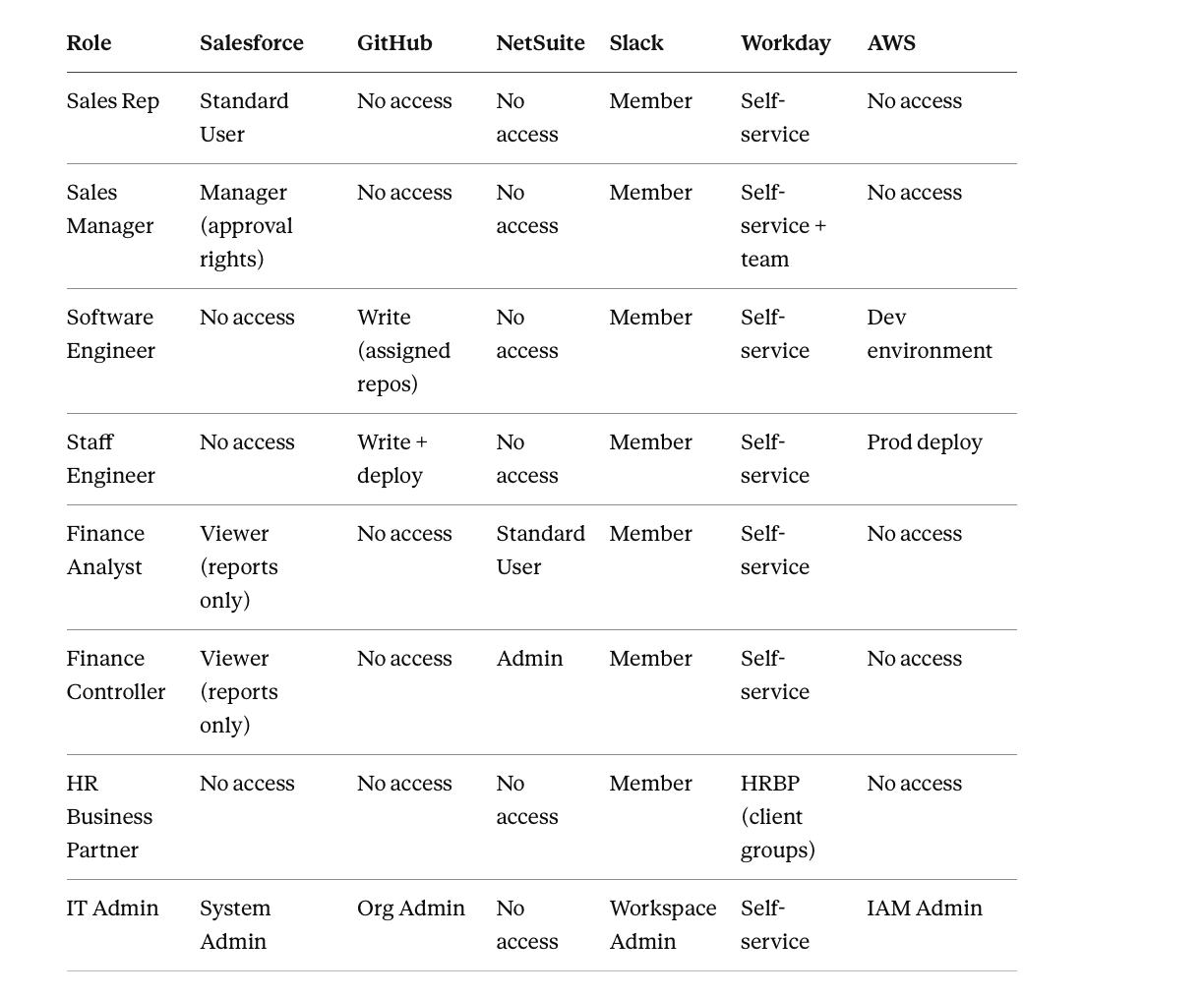
Three things this example does deliberately:
Access tiers, not checkmarks. Finance Analyst gets Salesforce as Viewer, reports only. That single cell prevents the most common over-provisioning pattern, which is granting edit access to people who only read.
Explicit "No access." An empty cell is ambiguous: not decided, or decided against? Writing "No access" records that the decision was made. Ambiguity in the matrix becomes inconsistency in provisioning.
Adjacent roles differ narrowly. Sales Rep and Sales Manager differ by approval rights in one application and team visibility in another. If two adjacent roles differ in most of their cells, they aren't adjacent roles; if they differ in none, they're one role.
The metadata columns, per role:
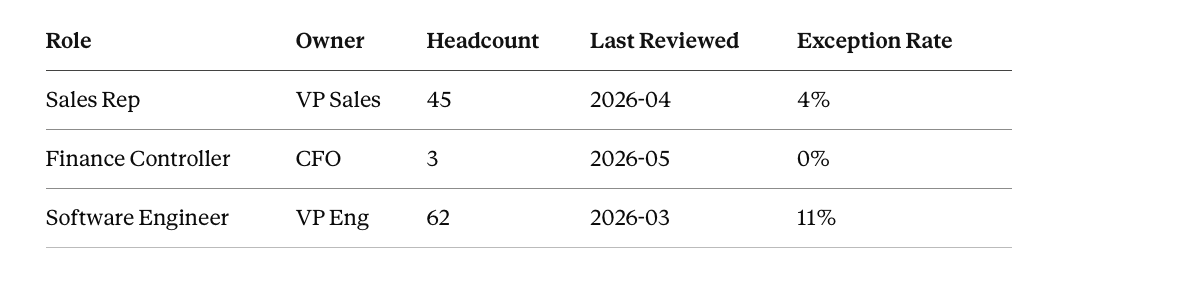
The owner is accountable for the role definition staying correct. Headcount tells reviewers the blast radius of a wrong definition. Last Reviewed exposes staleness at a glance. Exception Rate is the vital sign: the percentage of role holders granted access outside the role's definition. Software Engineer at 11 percent is a role definition drifting away from the actual job, and it's flagged before it becomes a shadow layer.
The justification layer, per sensitive cell:
For every cell touching a flagged sensitive system (financial platforms, production infrastructure, customer data, HR systems), one line of business justification:
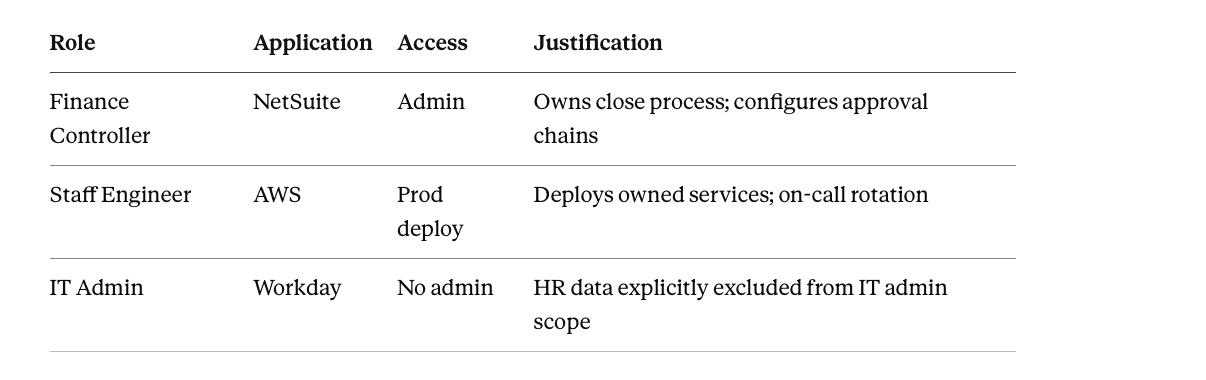
Note the third row: justifications for access deliberately withheld are as valuable as justifications for access granted. Auditors ask both questions.
Worked Examples by Department
Marketing block:
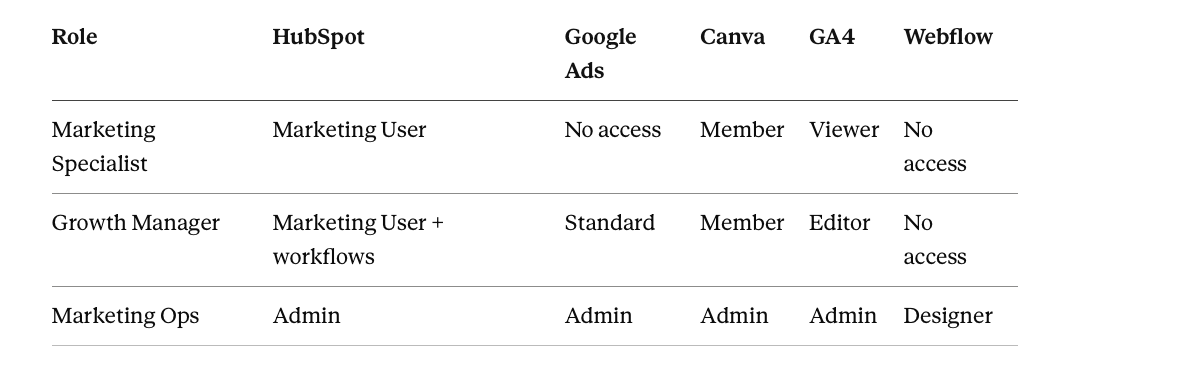
One Admin-heavy role per function, held by few people, is the pattern. Marketing Ops holds the admin tiers so specialists don't have to, which keeps the specialist roles clean and the admin count auditable.
Contractor block, which is where matrices usually fail:
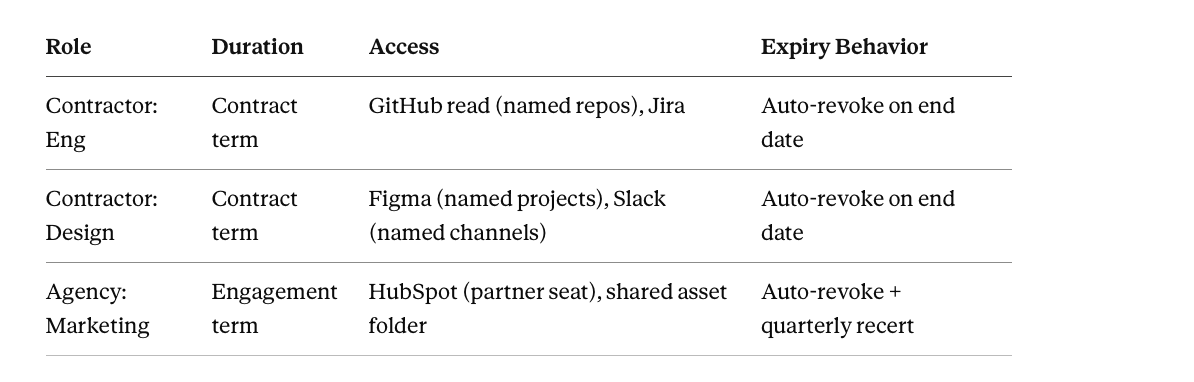
Contractor roles are purpose-built and time-bound, never copies of employee roles. The Expiry Behavior column exists because contractor access without automatic expiry is how former vendors keep reading your repositories a year after the engagement ended.
Building the Matrix: Four Steps
Step 1: Inventory first. The columns come from your actual application portfolio, discovered properly, including the tools that never touched SSO. Building the matrix from the applications IT knows about produces the 43 percent access model. This step is why matrix projects that start in a spreadsheet should actually start in a discovery tool.
Step 2: Derive rows from usage. Pull current access and usage per team. Roles come from what job functions genuinely use, consolidated at function level, 20 to 40 roles for most mid-market organizations. Where usage data shows finance hasn't opened the BI tool in six months, the matrix says No access, whatever the original provisioning assumed.
Step 3: Decide cells at the lowest workable tier. Default every cell to the minimum tier that supports the job, and make the tier explicit. The two questions per cell: does this role need this application at all, and what's the least they need inside it. Escalate tiers only with justification, and record the justification for sensitive systems.
Step 4: Pressure-test with exceptions. For each role, estimate what share of holders will need something beyond the row. Under 10 percent, ship it. Over 25 percent, the row is wrong: split the role or expand the definition. Exceptions are design feedback before launch and drift signals after.
The Part That Matters: Making the Matrix Live
Here's the uncomfortable truth about RBAC matrices: as standalone documents, they're already dying the day they're approved. Every manual provisioning decision is a chance for reality to depart from the grid, and reality takes every chance. The matrix survives only if it stops being a reference document and becomes the logic that provisioning actually executes.
That translation is concrete in Zluri:
Rows become playbooks. Each role in the matrix becomes an onboarding playbook. The row's populated cells become the playbook's application blocks.
Cell decisions become conditions. An Add Condition at the application-block level encodes the row-column intersection: run the GitHub block only if Designation equals Software Engineer. An Apply Condition at the action level encodes the tier inside the cell: grant admin-level access only if Role equals Manager. The matrix translates cell by cell, which is why ambiguous cells and missing tiers in the template stage become provisioning bugs later.
Role attributes come from the source of truth. Zluri's Directory Management syncs Designation and Department from your HRMS or identity provider onto each user record, and application-level roles are tracked per app, per instance. Identically named roles across different instances of the same application are separate entitlements, and the matrix should treat them that way: one cell per instance, not one cell per application name.
Automation Rules execute the rows. WHEN a user is marked for onboarding, IF Designation equals Sales Manager, THEN run the Sales Manager playbook. The row provisions itself. Promotions re-evaluate against current attributes, so a role change updates access the way the matrix says it should, without anyone consulting the matrix.
Exceptions route through request rules. Access outside the row goes through Zluri's request automation: auto-approve low-risk tiers, route sensitive tiers to designated approvers, apply time bounds. The exception rate column in your matrix stops being an estimate and becomes reportable data.
Reviews check the matrix in both directions. Role-based reviewer assignment (App Owner, Reporting Manager) certifies that the right people hold each role, and review findings surface where actual access has drifted from the row, which is your signal to update either the access or the matrix.
Once this wiring exists, the matrix and reality can't silently diverge, because the matrix is what produces reality. Updates flow one way: change the playbook conditions, and provisioning changes with them. The document version of the matrix becomes what it should have been all along, a human-readable view of enforced logic.
Maintenance: The Matrix Rhythm
Quarterly: review role membership through access reviews. Update Last Reviewed per role.
Semi-annually: review role definitions against actual usage. Rows drift as teams reorganize and tools change. A definition review that removes two stale applications and adds one new tier is a healthy review; a review that changes nothing across 40 roles for a year means nobody looked.
On every reorg: reorganizations change job functions, and job functions are your rows. Matrix review belongs in the reorg checklist alongside the org chart update, not six months after.
Watch exception rates continuously. A role climbing past 10 percent is telling you its row no longer matches the job. Fix the row.
Common Matrix Mistakes
Checkmark cells. Access without tiers. The matrix that says who gets in but not what they can do inside documents the least important half of the decision.
Empty cells as decisions. Ambiguity about whether access was denied or never considered. Write No access.
Titles as rows. Two hundred rows, one per job title, most differing by nothing. Consolidate to functions.
Attributes in row names. Sales Manager EMEA is a row name hiding a condition. Keep the row as Sales Manager; let region live as an attribute in the automation layer.
No owner column. A matrix nobody owns is a matrix nobody updates. Every row gets a name.
The matrix as the deliverable. The deepest mistake. The matrix is the design artifact; enforcement is the deliverable. A perfect grid that provisioning ignores is a compliance prop.
Make the Matrix Produce Access, Not Describe It
The RBAC matrix is the one place your entire access model is visible: roles as rows, applications as columns, tiered decisions in the cells, owners and justifications and exception rates around the edges. Build it from a real inventory, derive it from real usage, decide every cell at the lowest workable tier, and write down what you deliberately withheld. Then do the part that determines whether any of it mattered: wire the rows into automated provisioning so the matrix stops describing access and starts producing it. A matrix that enforces itself stays accurate by construction. Every other kind is a snapshot aging toward fiction.
Frequently Asked Questions
What's the difference between an RBAC matrix and an access control list?
An ACL maps individual users to permissions on a resource, one grant at a time. An RBAC matrix maps roles to access across the whole application portfolio, and individuals inherit through role membership. The matrix operates one level of abstraction up, which is what makes it reviewable: auditing 30 rows is feasible, auditing 40,000 individual grants is not.
How detailed should the access tiers in each cell be?
Match the application's actual role model, at the level provisioning decisions get made. Salesforce cells should distinguish Standard User from Manager from System Admin, because those are real provisioning choices. Going deeper than the application's own tiers, down to individual object permissions, belongs in the application's configuration, not the matrix. The matrix records which tier; the application defines what the tier contains.
Should the matrix include applications with only one or two users?
Yes, because the long tail is where ungoverned access hides. A niche tool with three users and no assigned role decisions is exactly the application that keeps a former employee's account active for two years. Long-tail applications can share consolidated rows, a Specialist Tools column group owned by the relevant function, but they appear.
How do we handle access that doesn't fit any role?
Through a formal exception path, not a new role per exception and not a quiet direct grant. Exceptions get an approver, a justification, and an expiry date, and they get counted: the exception rate per role is the signal that tells you when a row needs redesign. In Zluri this runs through access request rules with routing and time bounds, so exceptions are visible data rather than shadow access.
Can the matrix live in a spreadsheet?
It can start there, and for the design phase a spreadsheet is fine. It can't end there, because a spreadsheet enforces nothing and drifts from reality with every manual provisioning decision. The durable version of the matrix is the set of condition-based playbooks and automation rules that execute it, with the spreadsheet regenerated as a view of that logic when humans need to read it.



.svg)











