
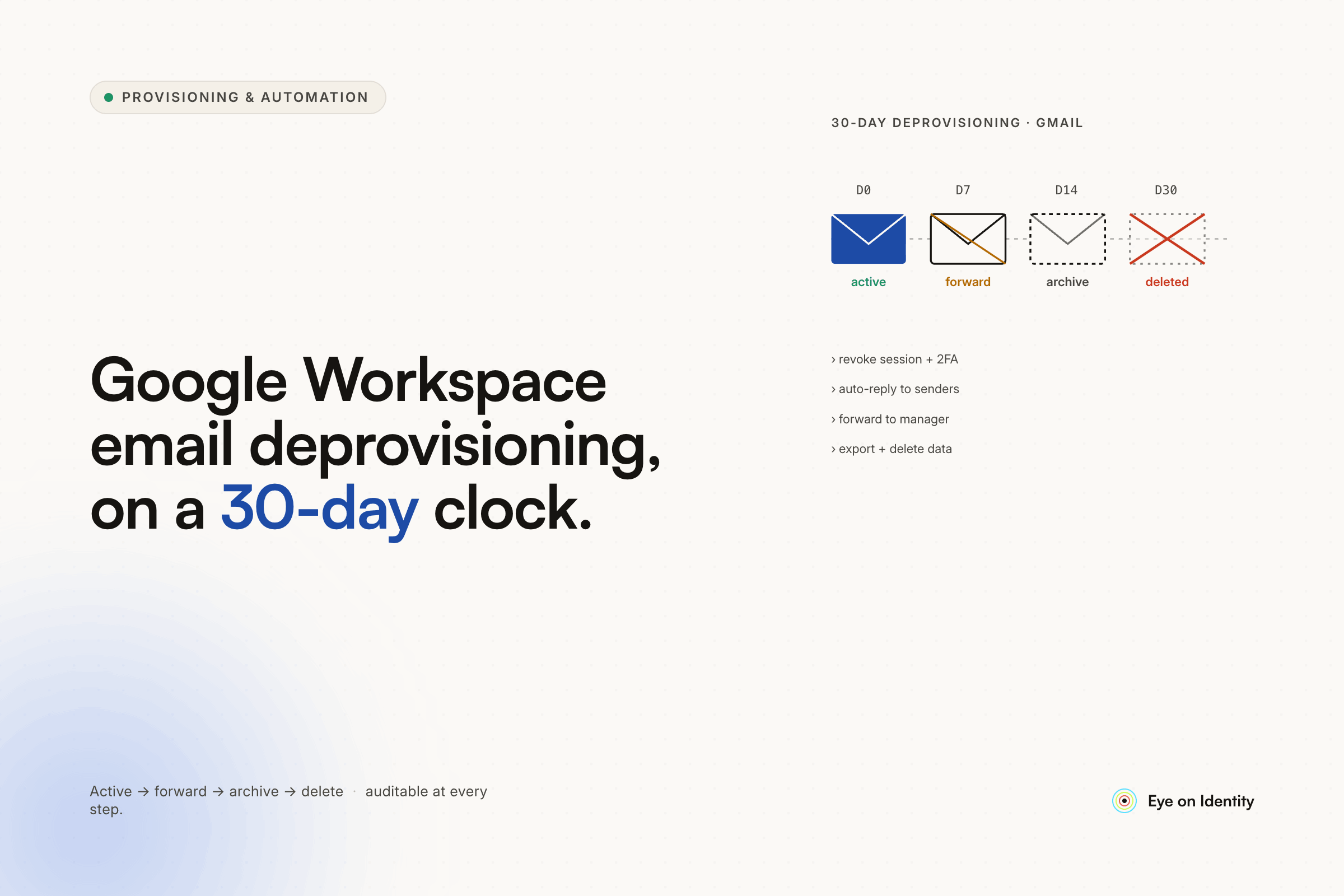


You have active Google Workspace accounts for ex-employees that managers don't want deleted, you're paying for them, and you're heading toward a license limit that will force the issue. The 30-day sunset process you're considering — suspend, forward email to a manager group, transfer Drive data, then delete — is exactly how mature Google Workspace environments handle this. The problem is doing it consistently for every departure without manually tracking timers in a spreadsheet or chasing managers for sign-off. Here's how other sysadmins handle it and how to automate the parts that currently require human memory.
Why Ex-Employee Accounts Stay Active (And Why Managers Resist Deletion)
The thread this question generated is worth reading in full because the reasons managers resist email deletion are legitimate, and any policy that ignores them will fail.
The two real concerns: email continuity (someone might reply to an old thread and the response needs to go somewhere useful) and data continuity (there are files in that account that someone might need). Both are solvable without keeping the account active. The issue is that managers don't necessarily know what tools exist to solve them, and the path of least resistance is keeping the account running and paying for it indefinitely.
The other concern — particularly for accounts of managers or executives — is forwarding. If someone left with ongoing vendor relationships or client threads, their email needs to reach whoever picked up those responsibilities. One commenter described setting up routing rules to forward the departed person's emails to the recipient with tags, leaving the rule active until the recipient asked to turn it off. Another described delegating the account to the recipient so they could access old threads directly.
These are all valid approaches. The problem with all of them is that they require someone to set them up manually, someone to track the 30-day window, and someone to eventually clean up the forwarding rules — or they run indefinitely, forwarding rules start chaining together, and the commenter who warned about email loops was describing a real outcome.
The Standard Deprovisioning Process That Sysadmins Use
The most-endorsed process in the thread, confirmed by multiple sysadmins as their actual workflow:
Sign out all sessions immediately. The first action when someone is terminated — before anything else — is invalidating all active sessions and resetting sign-in cookies. This prevents the ex-employee from accessing email, Drive, or any other Google service while the rest of the offboarding process runs.
Run a Google Takeout (data export). Before suspending or deleting the account, export the account data. Some organizations skip this if everything important was already in shared drives; others run it as a standard step regardless. The commenter with Google Vault noted that Vault makes this easier by allowing exports without logging into the account — which removes the awkward step of sharing credentials to access a departed employee's account.
Transfer Drive data. Any files owned by the departed user that live in their personal Drive (not shared drives) transfer to their manager or a designated service account. Shared drive files aren't affected because shared drive ownership is organizational, not individual.
Handle email forwarding. The approach the OP proposed — creating a group with the old email address and adding the manager as a member — is the clean version. The group receives incoming email addressed to the old address; the departed user's personal account is suspended or deleted. Aliases assigned to the manager work too but can create identity management issues in some configurations. The group approach is cleaner for organizational purposes.
Suspend the account for the grace period. Suspended accounts in Google Workspace don't count toward the license limit in the same way active accounts do — verify this against your specific license type — and the account data remains accessible during the suspension period if anything needs to be retrieved.
Delete the account after the grace period. Thirty days is the most common timeline. Some organizations use 90 days for compliance or legal hold reasons. One commenter noted that their policy is 90 days to minimize discoverable data retention — the fewer email archives you keep, the less litigation exposure you have if legal discovery requests come in.
Audit the group. The commenter who flagged this was right: when the manager who inherited an email forwarding group eventually leaves, that group still exists pointing to their account. Regular group membership audits prevent cascading forwarding loops and orphaned groups.
The Automation Gap in Manual Deprovisioning
Every step above is straightforward to execute manually for one person. For an organization with regular turnover, the consistency problem is where manual processes fail. The 30-day timer is the most common failure point: someone suspends the account, sets a calendar reminder, and the reminder gets missed or ignored. Accounts accumulate. License counts drift upward. The review that catches this happens once a year if it happens at all.
The sysadmin who mentioned that HR handles account creation and suspension in their environment — because the HR person realized it was faster to do it herself than to go through IT — was describing the organizational fix rather than the technical one. It works, but it depends on a specific person's initiative and technical comfort level, and it doesn't survive personnel changes.
Okta handling provisioning and suspension automatically came up as the automation approach one organization uses. That works for the suspension trigger — Okta fires when HR marks a termination — but it doesn't handle the 30-day grace period, the Drive data transfer, the group creation for email forwarding, or the eventual deletion. Those steps still require either manual follow-through or a separate automation layer.
Automating the Full 30-Day Deprovisioning Workflow
Zluri's offboarding playbooks handle the complete Google Workspace deprovisioning sequence, including the timed delay, without requiring manual tracking or follow-up.
When HR marks an employee as terminated in the connected HRIS, Zluri detects the status change and triggers the offboarding workflow automatically. The playbook executes the immediate steps first: signing the user out of all active sessions and devices, initiating Drive data transfer to the manager or a designated service account, and creating the email forwarding group with the manager added as a member. The original email address is preserved as a group alias; future emails addressed to the departed employee reach the manager through the group.
After the immediate actions, the playbook enters a configurable wait period — 30 days is the standard, configurable to match whatever policy leadership agrees to. During that period, no additional action is needed. The manager receives forwarded email through the group. The account data is accessible if something needs to be retrieved.
When the wait period expires, the playbook automatically resumes: the Google Workspace license is reclaimed, the user account is archived or deleted according to the organization's data retention policy, and the deprovisioning is complete. The full sequence — from termination trigger to license reclamation — runs without manual tracking or IT intervention.
For organizations with leadership who resist account deletion, the 30-day policy becomes a documented organizational agreement rather than an ad hoc decision. The automation enforces it consistently. The manager receives email forwarding through the group for the grace period and has 30 days to retrieve anything they need from the Drive transfer. After that, the account is gone and the license is reclaimed.
The alias vs. group question the OP raised is worth addressing: assigning an alias to the manager ties the departed employee's email identity directly to the manager's account, which can cause identity management systems to conflate the two identities and inflate active user counts. The group approach keeps the identities separate and is the cleaner option for organizational hygiene.
Frequently Asked Questions
How do you deprovision Google Workspace email accounts when employees leave?
The standard process is: sign out all sessions immediately, run Google Takeout or use Vault to export data, transfer Drive ownership to the manager, create a Google Group with the old email address for forwarding, suspend the account, wait 30–90 days, then delete and reclaim the license. The policy and timing should be documented and agreed with leadership rather than decided case by case.
Should you delete or just suspend ex-employee Google Workspace accounts?
Suspend first, then delete after the grace period. Suspension preserves data access during the transition while preventing login. Deletion after the grace period reclaims the license. Immediate deletion risks losing data and removes email forwarding capability before the organization has time to route important threads.
How do you handle email for ex-employees without keeping their account active?
Create a Google Group with the departed employee's email address and add their manager as a member. The group receives incoming email addressed to the old address. The personal account can be suspended or deleted without losing the email routing. This is cleaner than using aliases, which can cause identity management issues in some configurations.
How do you automate the 30-day deprovisioning timer in Google Workspace?
An IGA platform like Zluri handles this with a "wait for" step in the offboarding playbook — the workflow executes the immediate offboarding actions, pauses for the configured grace period, then automatically resumes to complete the deletion and license reclamation. This eliminates the need for calendar reminders, spreadsheet tracking, or manual follow-up.
What happens to Google Drive files when an employee account is deleted?
Files owned by the departed user in their personal Drive become inaccessible when the account is deleted unless ownership is transferred before deletion. Transfer ownership to the manager or a service account as part of the offboarding process. Files in shared drives are not affected — shared drive ownership is organizational and persists regardless of individual account status.
See How Zluri Automates the Full Google Workspace Offboarding Workflow
Most Google Workspace environments have ex-employee accounts still active because nobody tracked the 30-day window. See how Zluri's offboarding playbooks handle the complete sequence — session revocation, Drive transfer, group-based email forwarding, timed deletion, and license reclamation — triggered automatically when HR marks a termination.



.svg)













