
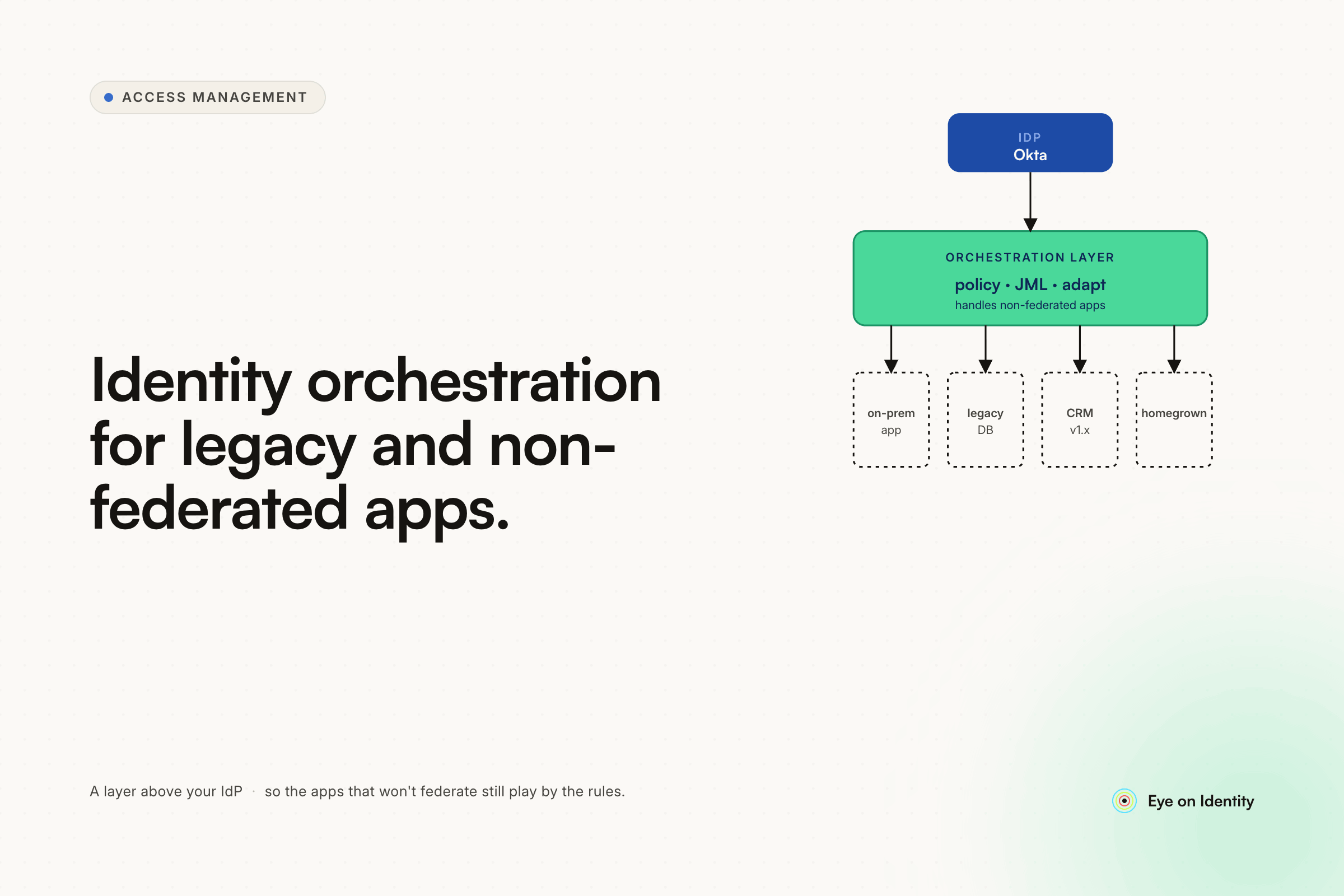


Okta solves the SSO problem cleanly. The problem is that most organizations have 20 to 40 internal tools and legacy systems that were never federated — custom databases from a decade ago, homegrown applications different teams built, old file servers with local accounts. For those systems, Okta provides no lifecycle automation. New employee onboarding means manual tickets to each app owner. Offboarding means hoping someone remembers which non-Okta systems the person had access to. Role changes go untracked entirely.
The reflex response is to evaluate a full enterprise IGA platform. When the pricing comes back north of $300,000 for an organization that size, the math does not work — particularly when many of those legacy apps lack APIs that would justify the connector investment.
The actual middle ground is an orchestration layer that sits above Okta and the HR system and handles lifecycle automation for everything Okta cannot reach. Here is how that architecture works and what it takes to cover the long tail of non-federated apps without building a pile of unmaintainable scripts.
Why the Long Tail of Apps Stays Manual
The root issue is that Okta's lifecycle automation requires applications to support SSO through SAML or OIDC, and automated provisioning through SCIM. Enterprise SaaS applications mostly support both. Legacy apps, homegrown tools, and older internal systems mostly support neither.
The result is a two-tier identity environment: the modern stack that Okta governs automatically, and everything else. In a 300-person company with 30-40 internal tools, "everything else" is often half the actual application footprint or more.
The pattern is well understood: Okta is excellent at 100% SAML/SCIM coverage, and for most organizations that just is not reality. You end up with half your source of truth in Okta and the other half distributed across ticketing systems, spreadsheets, and whoever each app owner happens to remember when someone leaves. That split is what makes offboarding unreliable and access reviews difficult to complete.
Adding more scripts to the pile solves individual apps temporarily. It does not solve the pattern — each new hire, role change, or departure still requires someone to know which scripts to run for which systems, and the scripts require ongoing maintenance as the systems change. The organizations that have gotten out of the script trap describe adding an orchestration layer rather than adding scripts.
What an Orchestration Layer Actually Does
An identity orchestration layer sits between your HR system and your application stack. It treats HR events — new hire, role change, termination — as triggers, and translates each trigger into a set of actions across every connected system, federated and unfederated alike.
The key distinction from a pure IdP like Okta: the orchestration layer is not dependent on the target application supporting SCIM or SAML. It can reach applications through APIs where they exist, through on-prem agents for systems that require local command execution, through browser automation for web applications without APIs, and through structured ticket routing for systems that require human intervention. The coverage model is the application stack, not the subset of the application stack that supports modern integration standards.
When a new employee's HR record is created, a single onboarding playbook handles the full provisioning sequence: Okta provisioning for SSO-connected apps, direct provisioning for API-accessible systems, browser automation for homegrown web apps without APIs, on-prem agent execution for custom databases and legacy systems, and automatically routed tickets to app owners for anything that requires a human step. The same sequence runs in reverse for offboarding — systematically, not from memory.
Four Mechanisms That Cover Non-API Legacy Apps
Automated ITSM ticket routing for fully disconnected systems. For file servers, old on-premise systems, and anything that requires a human to make the access change, the orchestration layer automates the workflow rather than the technical execution. When a user is terminated, the platform generates a ticket in Jira, ServiceNow, or Slack automatically — pre-populated with the specific access to revoke, routed to the correct app owner, with a defined SLA. When the app owner closes the ticket, the status syncs back to the orchestration platform as completed. The audit trail exists regardless of whether the underlying system supports any integration. For SOC 2 and similar compliance requirements, a documented, timestamped ticket trail showing that access revocation was requested, assigned, and confirmed is auditable evidence even for fully disconnected systems.
On-prem agents for custom databases and legacy infrastructure. For custom databases from the early 2010s and on-prem systems that require local command execution, lightweight agents deployed within the network receive instructions from the cloud orchestration layer and execute provisioning actions directly. This handles the database-backed systems that neither Okta nor SCIM can reach, without requiring custom scripts that your team owns and maintains. Okta's on-premises provisioning agent is one option for organizations already in the Okta ecosystem — it supports a SCIM interface that can connect to databases and legacy apps including through a generic database connector configured in the admin console without custom code. Mid-market IGA platforms offer similar agent-based connectivity as part of the broader orchestration layer.
AI-assisted browser automation for homegrown web apps. For web-based applications built without APIs — internal tools, custom portals, older web apps that predate REST APIs — modern orchestration platforms use deterministic browser automation to execute provisioning actions through the application's UI. The platform navigates the application the way a human administrator would: finds the user management screen, makes the access change, confirms the result. AI fallbacks handle UI changes that would break traditional RPA scripts — if a button moves or a form field is renamed, the automation adapts rather than failing silently. This closes the coverage gap for apps that are API-less but web-accessible.
HR-driven triggers that unify the full sequence. The orchestration layer integrates with the HR system as the authoritative source of identity events. When HR records a departure, the offboarding playbook fires across all four mechanisms simultaneously — Okta for SSO apps, agents for on-prem systems, browser automation for homegrown web apps, and ITSM tickets for manually managed systems. Nothing requires someone to remember which systems the departing employee had access to. The system knows because discovery mapped it at onboarding.
The Build-vs-Buy Decision at This Scale
The alternative most teams consider before an orchestration layer is building their own: scripts that react to HR events and call each system's API or execute local commands. That approach works for individual systems. It does not scale to 30-40 applications for two structural reasons.
First, each script creates a maintenance obligation. When an application changes its API, updates its authentication requirements, or modifies the database schema the script depends on, someone has to update the script. Across 30-40 systems, that is 30-40 maintenance obligations distributed across a team that has other responsibilities.
Second, scripts provide no orchestration. Each script handles one system in isolation. There is no unified view of whether the full offboarding sequence completed, no automatic retry if one step failed, no audit trail that shows the full sequence across all systems. The compliance problem — proving that access was revoked across all relevant systems — remains even if the individual scripts work correctly.
The organizations that describe getting out of the script trap consistently describe the same shift: moving from individual scripts that each team owns to a platform that owns the sequence and provides visibility across it.
What to Evaluate in an Orchestration Platform
Coverage model. Does the platform reach non-SCIM, non-API applications through browser automation and on-prem agents, or only applications that support modern integration standards? The long tail of legacy apps is exactly where the coverage model matters most.
HR system integration. Does the platform integrate directly with your HRMS as the event source, or does it require manual triggers? Real-time or near-real-time HR integration is the difference between automated offboarding and a process that still depends on someone initiating it.
Ticket routing for manually managed systems. For the systems that will always require a human step, does the platform generate structured, routed, trackable tickets automatically, or does it stop at the boundary of what it can automate directly?
Audit trail across all mechanisms. Can the platform produce evidence that the full lifecycle sequence completed — across Okta, on-prem systems, browser-automated apps, and manually managed systems — in a format that serves a SOC 2 or similar audit? The audit trail for the manual steps is as important as the automation for the automated ones.
Implementation timeline. At this scale and with this problem, a deployment that takes six months to reach initial value is not the right fit. Mid-market orchestration platforms are typically measured in weeks to initial production use, not quarters.
FAQ
What is identity orchestration and how does it differ from an IdP like Okta?
An IdP like Okta manages authentication and SSO for federated applications. Identity orchestration handles lifecycle automation — joiner, mover, leaver workflows — across the full application stack including non-federated, non-API, and legacy systems that the IdP cannot reach. The orchestration layer sits above the IdP and uses multiple mechanisms (agents, browser automation, ticket routing) to cover the applications outside SSO coverage.
How do you automate offboarding for apps without APIs or SCIM support?
Three mechanisms cover non-API applications: on-prem agents that execute local commands for database-backed and legacy infrastructure, AI-assisted browser automation for homegrown web applications, and automated ITSM ticket routing for systems that require human intervention. Each mechanism creates an audit trail that documents the offboarding action regardless of whether the underlying system supports integration.
Is an enterprise IGA platform like SailPoint necessary for lifecycle automation?
For organizations with complex on-prem infrastructure and large-scale compliance requirements, full enterprise IGA covers capabilities that mid-market platforms do not. For organizations with 100-500 employees and primarily SaaS stacks plus a long tail of legacy apps, mid-market orchestration platforms cover the core lifecycle automation and audit requirements at a fraction of the cost and implementation complexity.
How does an identity orchestration layer integrate with Okta?
The orchestration layer sits above Okta rather than replacing it. Okta continues to handle SSO and authentication for federated applications. The orchestration layer integrates with the HR system as the event source, uses Okta for provisioning SSO-connected apps, and handles everything outside Okta's reach through its own mechanisms. The result is unified lifecycle automation across the full application stack with Okta handling the federated layer.



.svg)













