
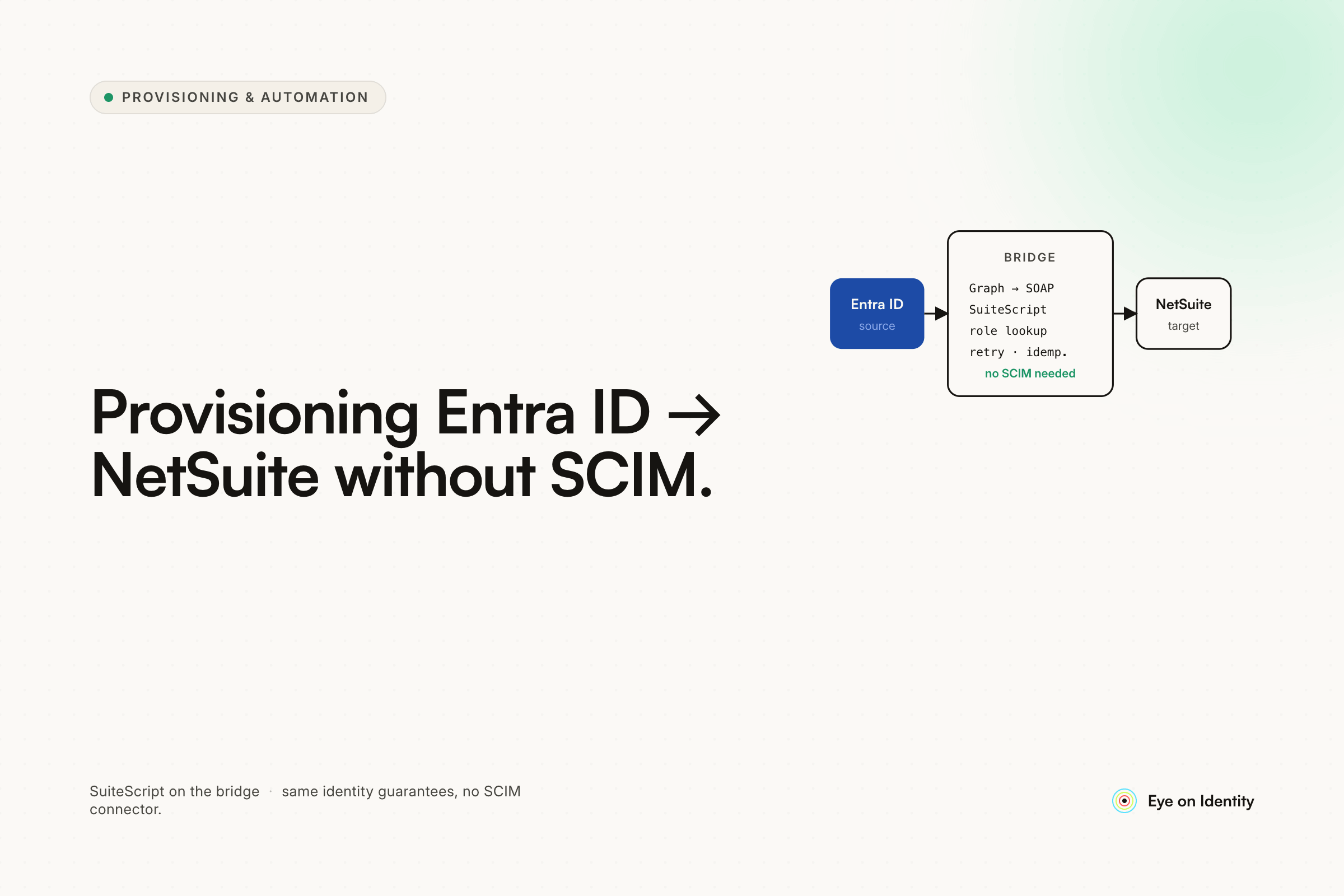


You've set up SAML SSO from Entra ID to NetSuite without issues. Now you want to automate employee provisioning — creating accounts, assigning roles, keeping the employee list in sync with your directory — and you've discovered that NetSuite doesn't support SCIM. The CSV upload is technically there, but maintaining it for hundreds of employees isn't a real automation strategy. The OP in this thread eventually solved it by writing a SuiteScript that calls the Microsoft Graph API and syncs users into NetSuite, handling account creation, profile attributes, and role assignments. His summary of the experience: "still pretty dumb that I had to write it myself." He's right, and that frustration is widely shared.
Why NetSuite Doesn't Support SCIM (And Why Everyone Is Surprised)
NetSuite is a robust enterprise ERP that handles complex financial operations, inventory management, and revenue recognition for thousands of organizations. It is not a SaaS-native application in the modern sense of identity integration. SCIM support requires the application vendor to explicitly build SCIM endpoints — the infrastructure for receiving and processing standardized user provisioning payloads from an identity provider. Oracle NetSuite has not built this.
The result is that every IT team trying to automate provisioning from Okta, Entra ID, or any other modern IdP to NetSuite hits the same wall. There's no SCIM. There's no JIT provisioning that creates users on first login. The documentation points to CSV uploads. The community forums point to the API. Multiple engineers in the thread expressed genuine surprise that a product of NetSuite's scale and maturity doesn't have an out-of-the-box provisioning integration — and that surprise is reasonable.
The practical consequence: every organization using NetSuite with an IdP is either doing one of the following:
Using CSV uploads on a schedule, which is manually triggered, error-prone, and doesn't handle real-time changes or terminations cleanly.
Writing custom code — a SuiteScript that calls the Graph API, a middleware service, an iPaaS integration — to bridge the gap. The OP's SuiteScript approach is the most common custom solution mentioned in these threads.
Using Rippling, which integrates NetSuite provisioning if you're using Rippling for payroll — but that's an $8 per user per month dependency on an HR platform to solve a provisioning problem.
Using a third-party IGA or integration platform that maintains an API integration with NetSuite, so you don't have to build or maintain the custom code yourself.
The Custom SuiteScript Approach: What It Does and What It Doesn't
The OP's solution — a scheduled SuiteScript that calls the Microsoft Graph API and syncs users into NetSuite — is technically sound and covers the core provisioning requirements: account creation, profile attribute population, and role assignment. Several engineers in the thread asked to see the script, which reflects how common the need is.
The architecture: the SuiteScript runs on a schedule within NetSuite, calls Graph API to retrieve current user data from Entra ID, compares it against the current NetSuite employee list, and creates or updates records accordingly. Role assignment is handled with conditional logic in the script: if the user's department or job title in Entra ID matches a defined condition, they get assigned to the corresponding NetSuite role.
What the custom approach does well: full control over the sync logic, no third-party licensing cost, and NetSuite-native execution that doesn't require an external service to be running for provisioning to work.
What it leaves unaddressed: the OP acknowledged the script doesn't fully handle offboarding. When an employee is terminated in Entra ID, disabling their Entra account revokes SSO access — but the SuiteScript running on a sync schedule may not catch the termination in time or handle the NetSuite account deactivation cleanly without additional logic. The thread commenter who asked about offboarding handling didn't get a detailed answer, which suggests it's either incomplete or handled separately.
Maintenance is the other cost: SuiteScript updates when NetSuite changes its API, Graph API changes when Microsoft updates its schema, and any changes to role assignment logic require code changes rather than configuration changes.
The iPaaS Path for Teams That Don't Want to Write SuiteScript
One commenter mentioned using an iPaaS (integration platform as a service) for other integrations and not wanting to spend heavily on an endpoint just for the Entra-to-NetSuite sync. iPaaS platforms like Azure Logic Apps, Boomi, or Workato can handle the Entra-to-NetSuite data flow with less custom code than a SuiteScript — you configure the trigger (user created or modified in Entra ID), the transformation (map Entra ID attributes to NetSuite fields), and the action (create or update employee record in NetSuite via REST API).
The trade-off: iPaaS platforms have their own licensing costs, and the NetSuite REST API integration still requires configuration and maintenance when either system changes. The advantage over pure SuiteScript is that the integration logic is visible and maintainable in a UI rather than in code — lower barrier to updates and easier for the next IT admin to understand.
How an IGA Platform Handles Entra ID to NetSuite Provisioning
For organizations that want Entra ID to drive NetSuite provisioning without writing custom code or configuring iPaaS integrations, an IGA platform with a native NetSuite API integration handles the full lifecycle.
Zluri connects to Entra ID as the source of truth and to NetSuite via Token-Based Authentication — generating consumer keys and tokens in NetSuite's setup to create a direct API pipeline. When a new user is detected in Entra ID or an existing user's attributes change, Zluri triggers a provisioning playbook that executes the appropriate NetSuite API calls: creating the employee record, setting profile attributes, and assigning roles based on conditional logic.
The role assignment logic that the OP implemented in SuiteScript — "if department equals Finance, assign Accounting role in NetSuite" — is configured as conditional rules within the playbook rather than as code. Changing the role mapping for a department or adding a new role assignment rule requires a configuration change rather than a SuiteScript update and redeployment.
Offboarding is handled as part of the same architecture: when an employee is terminated in Entra ID, the offboarding playbook deactivates the NetSuite account via API rather than waiting for the next scheduled sync cycle. The access is revoked at the identity event, not at the next time the script runs.
For organizations where some employees don't use NetSuite at all — a common situation where only finance and operations staff need NetSuite access — the provisioning scope is limited to the relevant Entra ID groups, so the full directory doesn't get synced to NetSuite.
What to Evaluate Before Choosing Your Approach
Volume and frequency of changes. For small organizations with low turnover and infrequent NetSuite user changes, the CSV upload or a simple SuiteScript may be sufficient. For organizations with regular hiring, role changes, and terminations across hundreds of NetSuite users, a real-time or near-real-time integration matters more.
Offboarding coverage. The custom SuiteScript approach typically handles provisioning better than deprovisioning. If a terminated employee's NetSuite access needs to be revoked immediately rather than on the next sync cycle, the approach needs to handle that case explicitly.
Maintenance capacity. Custom SuiteScript and iPaaS integrations both require maintenance when NetSuite or Entra ID updates their APIs. An IGA platform with a maintained NetSuite connector shifts that maintenance responsibility to the vendor.
Role assignment complexity. Simple role assignment (one department equals one role) is manageable in a SuiteScript. Complex role assignment logic with multiple conditions, role combinations, or dynamic role mapping based on multiple Entra attributes is easier to manage as configurable rules than as code.
Cost. The custom SuiteScript has no licensing cost but has development and maintenance cost. iPaaS has licensing cost and configuration cost. An IGA platform has licensing cost and implementation cost. The break-even depends on the engineering time the custom approach requires ongoing.
Frequently Asked Questions
Does NetSuite support SCIM provisioning from Entra ID?
No. NetSuite does not support SCIM, and Oracle has not announced plans to add it. Automated provisioning from Entra ID to NetSuite requires either a custom integration (SuiteScript calling Graph API, iPaaS connector, or similar), Rippling if you're using Rippling for payroll, or a third-party IGA platform with a native NetSuite API integration.
How do you automate user provisioning from Entra ID to NetSuite?
The three main approaches are: a scheduled SuiteScript that calls the Microsoft Graph API to sync users from Entra ID into NetSuite (custom, full control, requires development); an iPaaS platform configured to bridge Entra ID events to NetSuite REST API calls (lower code, has licensing cost); or an IGA platform like Zluri with a native NetSuite integration that handles provisioning, role assignment, and deprovisioning as configured playbooks.
How do you assign NetSuite roles automatically based on Entra ID group membership or department?
Conditional logic in whichever integration layer handles the provisioning — if department equals X in Entra ID, assign role Y in NetSuite. In a custom SuiteScript, this is coded logic. In an iPaaS, it's configured transformation logic. In an IGA platform like Zluri, it's configurable rule conditions within the provisioning playbook, editable without code changes.
What happens to NetSuite accounts when employees are terminated in Entra ID?
Disabling an employee in Entra ID revokes their SAML SSO access to NetSuite immediately. It does not deactivate their NetSuite employee record unless the integration layer explicitly handles deprovisioning. A scheduled sync script may not catch terminations until the next run. A real-time offboarding workflow triggered by the Entra ID account status change handles deactivation immediately.
Is Rippling a viable solution for Entra ID to NetSuite provisioning?
Rippling integrates with NetSuite for user provisioning and deprovisioning if you use Rippling for payroll. The cost is approximately $8 per user per month, which is an additional HR platform dependency for organizations that aren't already using Rippling. For organizations already on Rippling, it's a reasonable path. For those that aren't, the cost and dependency may not be justified.
See How Zluri Handles Entra ID to NetSuite Provisioning Without Custom Code
Most organizations using NetSuite with Entra ID are either running CSV uploads or maintaining custom SuiteScripts. See how Zluri's NetSuite API integration handles account creation, role assignment, and deprovisioning — without writing or maintaining custom code.



.svg)













