.png)




Group-Based Access Control makes the group itself, not the individual, the actual unit of access management. Join the group, get the access. Leave it, lose it. Zluri treats a group as a genuinely synced relationship with real downstream consequences, not a static label, which is what makes membership changes a legitimate trigger for real access automation rather than just an organizational chart update.
GBAC grants, changes, and revokes access based on group membership rather than configuring each person's access individually. Its core promise is consistency at scale: everyone in a given group gets identical treatment, and a membership change alone, without any separate access request or admin action, is what actually moves someone's access.
This piece covers how Zluri implements that promise directly, plus one honest limitation worth knowing before relying on group-level data for a purpose it isn't built for.
Where Groups Actually Come From
Zluri's Groups mirror collections sourced from connected identity providers, not a structure someone builds manually inside Zluri itself.
- Sourced from: Azure AD, Google Workspace, Okta, OneLogin, and JumpCloud
- Auto-classification: a group account created through specific steps in a supported SSO automatically lands under the Group classification; otherwise it's treated as regular employee data by default
- Structural weight: Group is one of Zluri's four defined Account Types, alongside Employee, External, and Service, so group-based access is a first-class identity classification, not a loosely defined convenience feature
The Core Mechanism: Access and Licensing Tied Directly to Membership
The foundational GBAC capability is applying consistent access to everyone in a role or department at once by acting on the group rather than each member individually.
Licenses can be assigned at the group level instead of per user, meaning every current and future member automatically receives the associated license without a separate provisioning step per person.
This is genuinely different from a role-based playbook that has to be triggered per new hire. The group assignment itself is the ongoing mechanism. Membership is the trigger, not a separate workflow run.
Automating Provisioning and Deprovisioning Off Membership Changes
This is where GBAC becomes a real automation engine rather than just a licensing convenience.
- Provisioning: workflow automation fires directly off group-join events, granting access the moment someone's added to a group
- Deprovisioning: the same automation fires off group-leave events, entirely independent of whether a formal, separate offboarding process has been started
A contractor pulled from an access group when their engagement ends triggers deprovisioning in real time through this path, without waiting on a formal HR-driven exit process to catch up. This is often meaningfully faster than relying on a termination event as the only deprovisioning trigger available.
Reviewing Group Membership as Its Own Governance Object
Access Reviews supports Groups as a distinct entity type, separate from reviewing application access, letting a certification specifically evaluate who belongs to a given group rather than who has access to a given app.
This matters because the actual decision a reviewer makes differs meaningfully:

Group reviews also carry their own reviewer model, worth noting precisely:
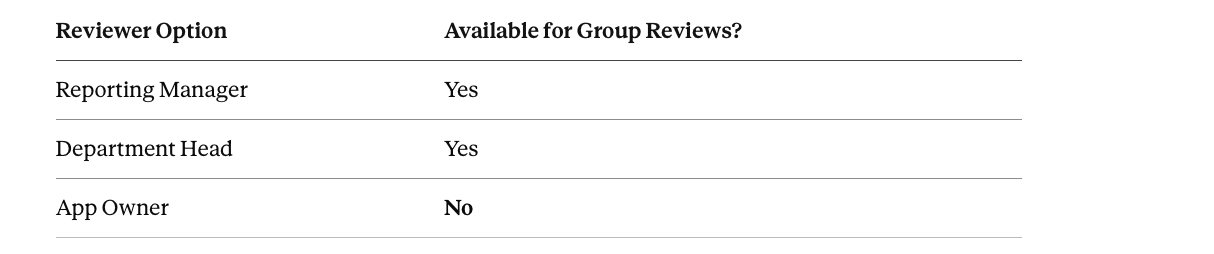
App Owner isn't available because a group doesn't have an application owner in any meaningful sense. This is an intentional, specific difference from how application-based reviews are configured, not an oversight.
Remediation Scoped to the Group Itself
Where a group review finds membership that should be revoked, remediation runs through Group-Based Playbooks, created specifically under the source application where the group actually lives (Okta, Google Workspace, Azure AD, JumpCloud).
Typical actions include:
- Remove User from Group
- Modify Group Membership, moving someone to a different group or downgrading their role if the source system supports it
This is a distinct playbook type from an application-level deprovisioning playbook. The action being taken is against the membership relationship itself, not against a specific application permission.
Group Membership as a Real Entitlement in Combination Risk
Group membership isn't only an access-provisioning mechanism. It's also formally recognized as one of the three entitlement types Segregation of Duties evaluates, alongside Roles and Permissions.
A toxic combination rule can be built directly against Group Name, Group Source, or Group Tag. A conflict defined as "membership in Group A combined with membership in Group B" is a fully legitimate SoD rule on its own, not something that has to be translated into an equivalent role or permission check first.
This closes a real gap. A lot of practical access risk actually accumulates through group membership specifically, especially in organizations that provision heavily through groups rather than individual role assignments.
An Honest Limit: Group Spend Data Isn't Additive
This is worth stating directly since it's an easy mistake to make.
Group-level spend and cost figures can overlap when a single user belongs to multiple groups. The same person's spend gets reflected in each group they're a member of, which means summing spend across every group does not produce an accurate total organizational spend figure. It double-counts anyone in more than one group.
- Use group-level figures for: access and license management specifically
- Use application-level figures for: genuine financial totals and reporting that needs to add up correctly across the whole organization
A Practical Implementation Sequence
- Confirm groups are syncing correctly from the relevant identity provider, and check whether that provider supports group-to-app linkage (Okta does; not every provider does), since this affects how much automation can actually key off group data.
- Identify which applications and licenses make sense to assign at the group level rather than individually. Roles or departments with consistent, predictable access needs are the strongest fit.
- Build automation rules triggering off group-join and group-leave events specifically for populations where membership changes are a faster or more reliable signal than a formal HR event. Contractor and vendor access is the clearest case.
- Set up Group-Based Playbooks under the correct source application for any group where membership itself, not just application access, needs a defined remediation path.
- Scope a recurring Access Review using the Groups entity type for any group whose membership carries real access consequences, using Reporting Manager or Department Head as the reviewer rather than expecting an App Owner option that doesn't exist for this entity type.
- Where group membership could plausibly combine into a toxic combination, define that conflict directly using Group Name, Source, or Tag in an SoD rule set rather than assuming it's already covered by role- or permission-based rules.
Frequently Asked Questions
Does every identity provider Zluri connects to support the same level of group-based automation?
Not entirely. Group-to-app linkage specifically (showing which apps are connected to a given group) is only populated for providers that support it natively, Okta being a named example. The depth of group-driven automation available can vary somewhat depending on which identity provider a group is actually sourced from.
Can offboarding be triggered by a group removal alone, without a formal termination event?
Yes, and this is one of the more practically useful GBAC patterns. A person removed from a relevant group can trigger deprovisioning automation directly, which is often faster and more reliable for contractors and vendors than waiting on a separate, formal offboarding process to be manually initiated.
Is Application Owner an available reviewer option for a group-based Access Review?
No. Group reviews specifically support Reporting Manager and Department Head as role-based reviewer options, not Application Owner, since a group doesn't have an application owner in any meaningful sense. This is a deliberate structural difference from how application-based certifications are configured.
Can I add up every group's spend figure to get total organizational SaaS spend?
No, and doing so will overstate the real total. Group-level spend can double-count anyone who belongs to more than one group, so it's useful for group-scoped access and license management specifically. Application-level cost and spend figures are the correct source for an accurate, non-overlapping organizational total.