


Tickets track work. They don't govern access. This guide covers what access request management actually requires, where email and Jira fall short, and how to build a workflow that handles requests, enforces least privilege, and deprovisions the access that usually survives offboarding.
Every week, someone on your team needs access to something they don't have. And when they leave or change roles, that access needs to come back.
The requests arrive from every direction:
- A new hire needs their full app stack on day one
- A contractor needs temporary access to one system
- A manager needs the same three apps provisioned for every person who joins their team
- A leaver needs every grant they ever accumulated revoked, completely
If you're managing this through an IT service management tool, email threads, and shared spreadsheets, you already know where it breaks. Requests get lost. Approvals happen without context. Access accumulates faster than it's reviewed. And when compliance comes asking who approved what and when, the answer is somewhere in someone's inbox.
Access request management is the structured approach that replaces all of that.
What's inside:
- What access request management is, and the five-stage workflow it should follow
- The types of access request tickets and who raises them
- What a governed process delivers, and the stakes in every failure mode
- Why email chains fail at coordination and tickets fail at governance
- Six best practices, from JML automation to offboarding request-based access
- How to evaluate access request tools, and how Zluri handles the full lifecycle
What Is Access Request Management?
Access request management is the structured process by which employees request access to applications, systems, or data, and those requests are evaluated, approved or denied, provisioned, and eventually removed.
Done well, it achieves two things simultaneously: it keeps the business moving (employees get the tools they need without waiting days for a ticket to resolve) and it keeps security intact (access is granted only to who needs it, at the level they need it, for as long as they need it). The underlying principle is least privilege, and access request management is the operational mechanism that enforces that principle at scale. It's a core access governance function, not a service desk convenience.
Done well, access request management governs access. Done through generic tickets, it merely tracks requests, and the difference is invisible until an audit or a breach makes it visible.
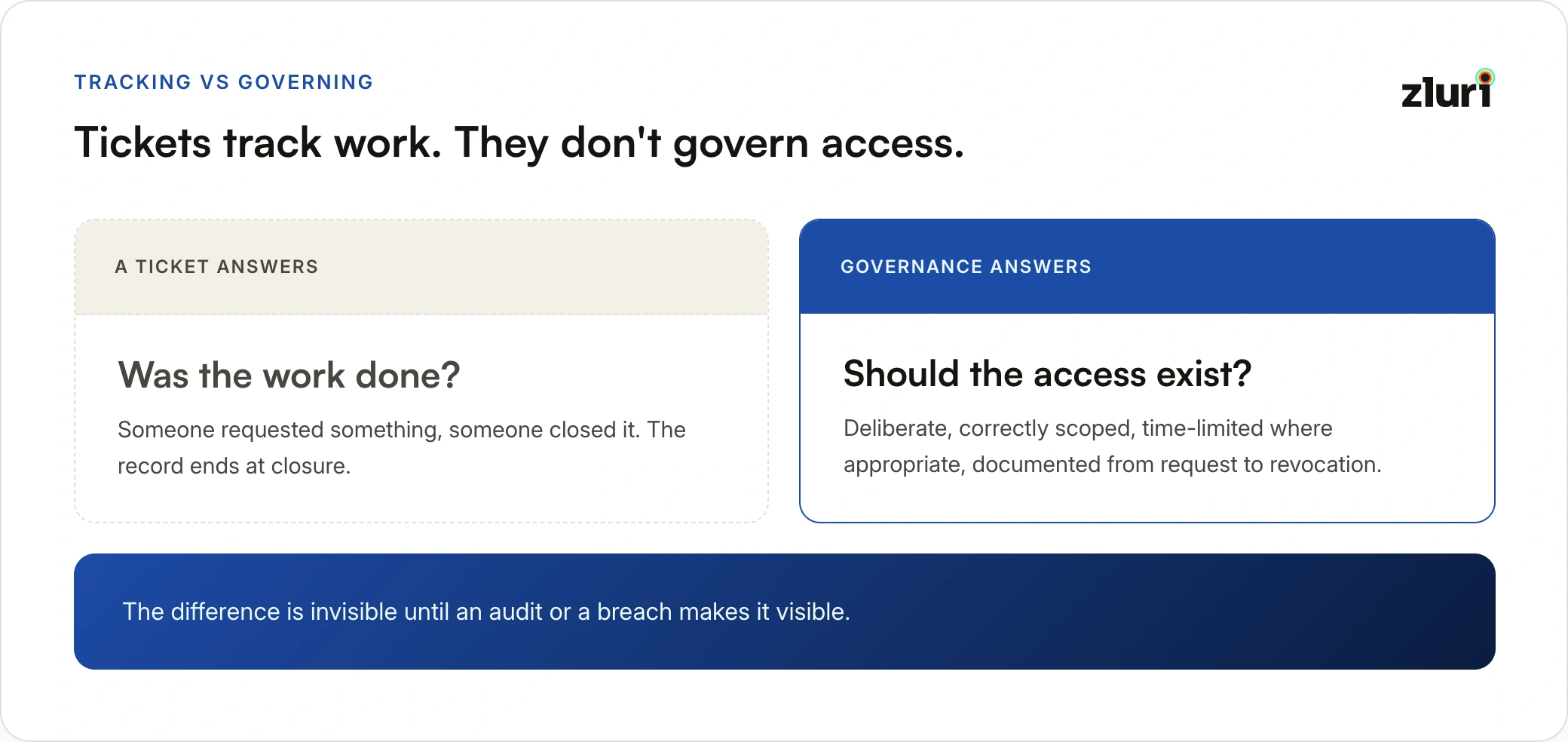
The distinction that matters: done well, every grant is deliberate, correctly scoped, time-limited where appropriate, and fully documented from request to revocation. Done through generic tickets in an internal ticketing system, it degrades into request tracking without governance, and what actually happens in the applications drifts further from what was authorized with every closed ticket.
The scale is what makes structure non-negotiable. Mid-market organizations running 50 to 150 SaaS applications generate thousands of access events in a month. Manual triage, one-off approvals through Slack, and spreadsheet tracking don't scale. They also don't audit.
The Five-Stage Access Request Workflow
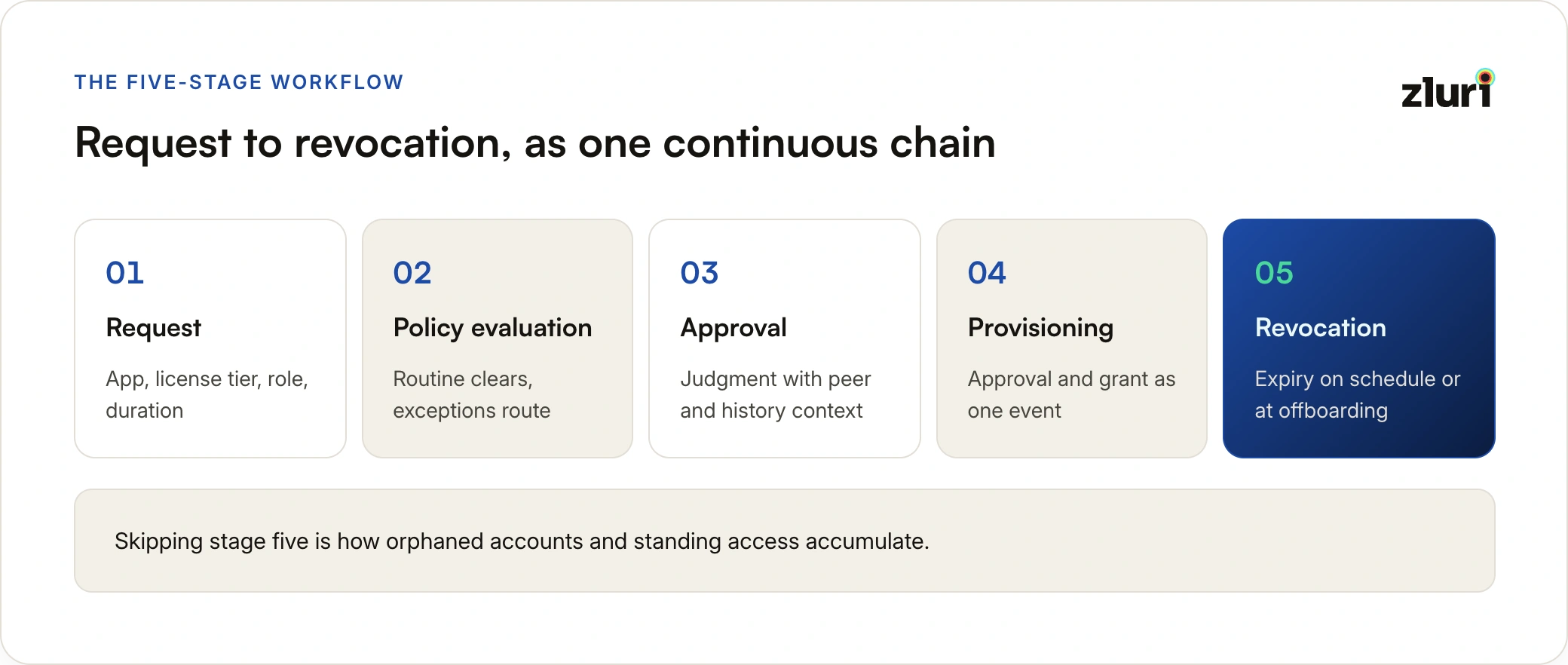
A complete access request workflow has five stages, and the quality of the overall process depends on what happens at each one.
In summary: the request stage captures what's needed and for how long, policy evaluation clears routine requests and routes exceptions, approval applies human judgment with full context, provisioning executes the approval automatically at the exact specified level, and revocation removes access on schedule or at offboarding. The table below maps each stage to its purpose and its most common failure point in ticket-based workflows.
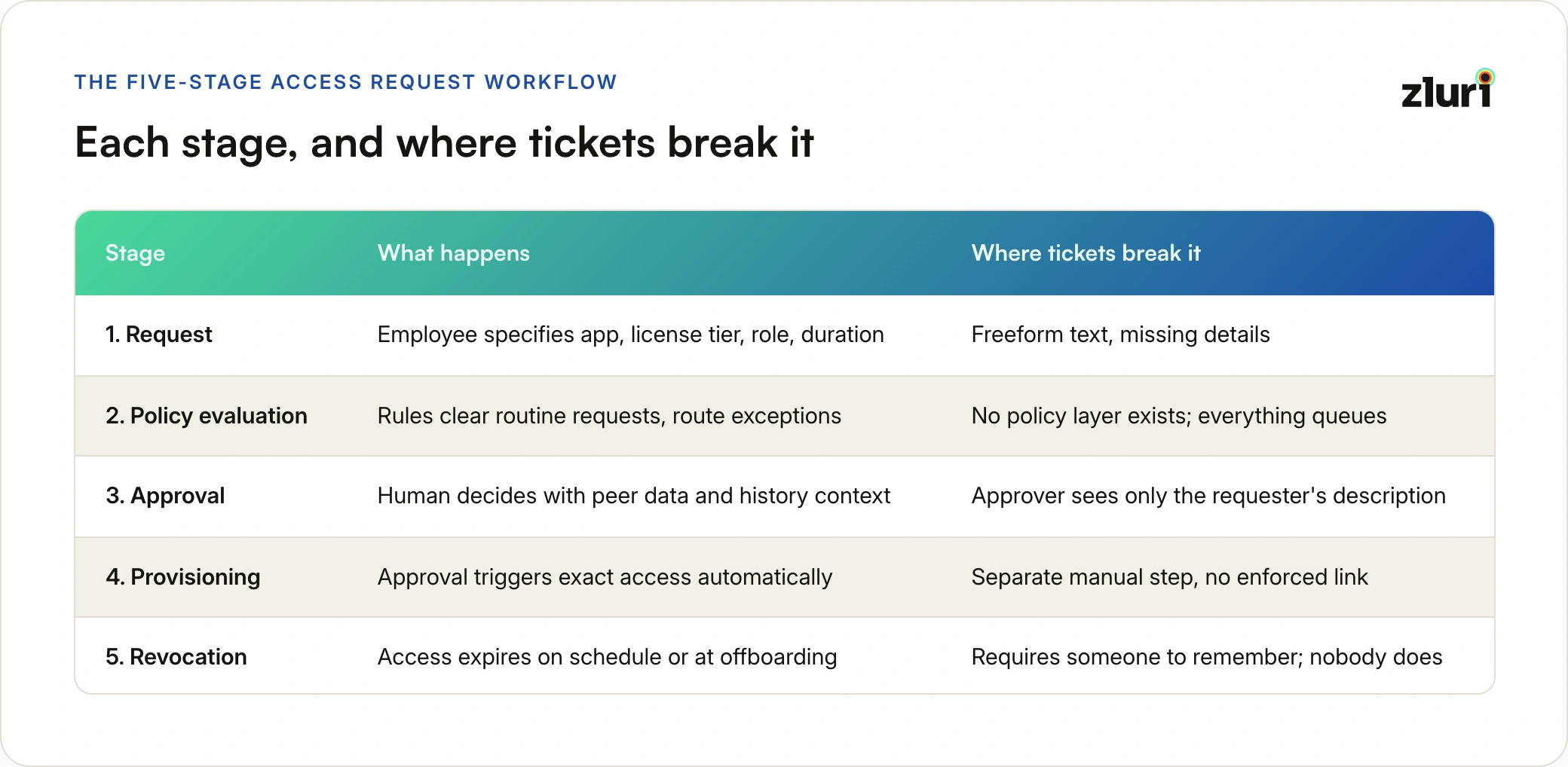
Stage 1: Request. The employee specifies what they need: which application, what license tier or role, and for how long. A request that says "need Salesforce" forces every later stage to guess at the details. A request that specifies the application, the license tier, the role, and the duration gives the approval and provisioning stages exactly what they need to execute correctly.
Stage 2: Policy evaluation. Before any human sees the request, it should be evaluated against pre-configured rules. Is this a routine request that matches a pre-approved pattern for this role and department? Is it an elevated request that needs manager sign-off? Does it conflict with existing access or create a separation of duties issue? Routine requests clear instantly, and human attention goes only to requests that need it.
Stage 3: Approval. For requests that need human judgment, the approver should see full context: what exactly is being requested, what percentage of peers in the same role already have this access, the requester's history with this application, and whether the requested level is standard or elevated. An approval made with context is a decision rather than a formality.
Stage 4: Provisioning. The approval triggers the provisioning directly: the exact license tier, role, and group memberships defined for this request type are created in the application automatically, the moment the approval lands. The approval and the provisioning are one event, not two separate actions.
Stage 5: Revocation. Access granted for a project should end with the project. Access granted to a contractor should end with the engagement. The duration is part of the original request, and revocation happens automatically when the window closes or the offboarding event fires. Skipping this stage is how orphaned accounts and standing access accumulate.
Types of Access Request Tickets
Everything that flows through an access request workflow falls into a small number of recurring types. Naming them matters because each type carries a different risk profile and deserves a different handling path: some should auto-approve, some need elevated scrutiny, and some shouldn't be requests at all. The table below summarizes the ten types, what each involves, and how each should be handled.
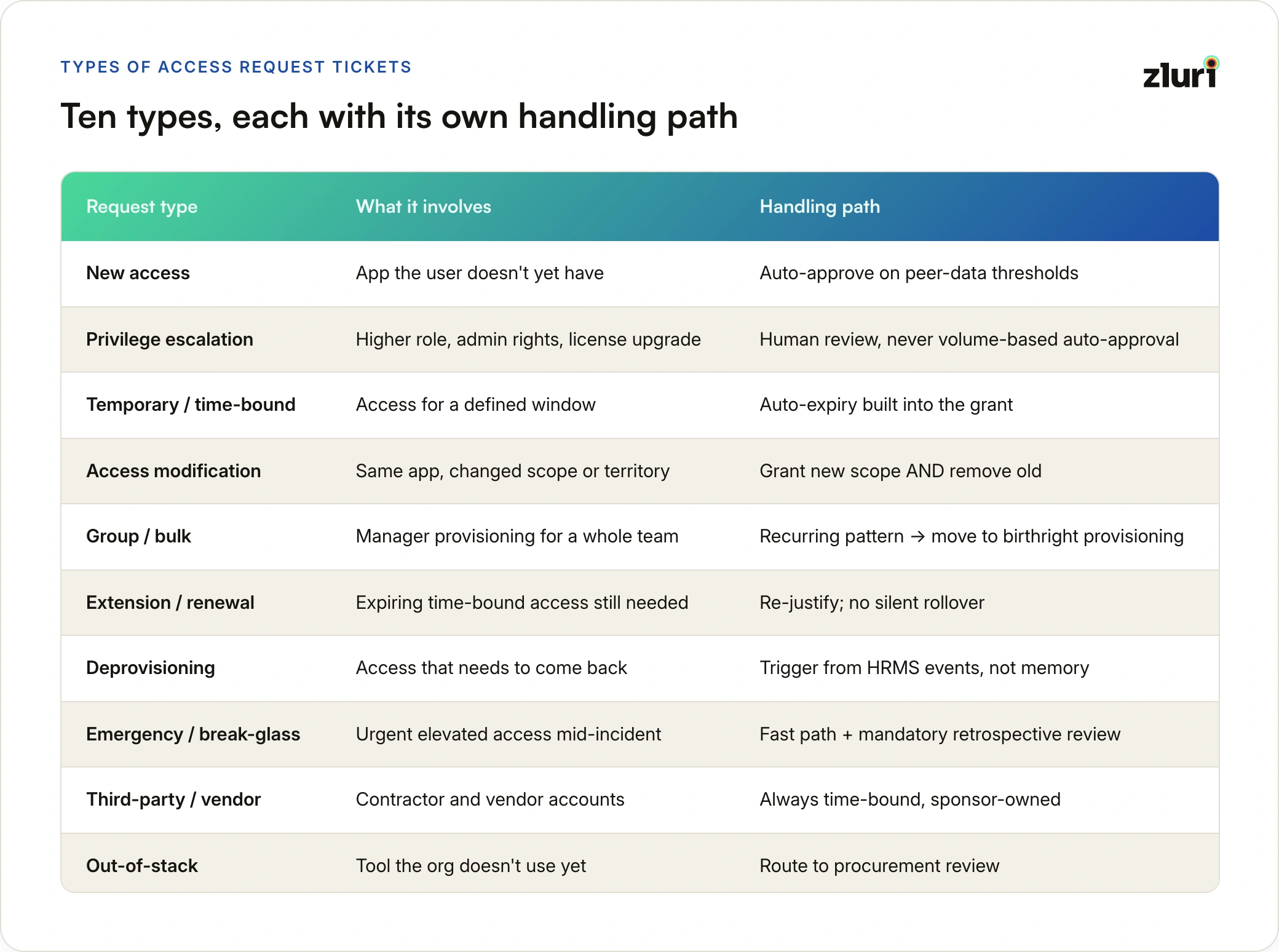
New access requests. An employee needs an application they don't currently have: a marketer requesting the design tool, an analyst requesting the BI platform. The highest-volume type, and the one where peer-data auto-approval clears the most queue.
Privilege escalation requests. An existing user needs a higher permission level: standard to admin, viewer to editor, a license tier upgrade. The highest-risk type per request, because elevation is what attackers and insider misuse both depend on. These should never auto-approve on volume logic alone.
Temporary and time-bound access requests. Access needed for a defined window: a project, an audit, an incident, a demo environment. The request should carry the duration, and expiry should fire automatically. This is where just-in-time patterns apply.
Access modification requests. The user keeps the application but their scope changes: a new territory in the CRM, a different workspace, a changed data scope after a role move. Often mishandled as new-access requests, which grants the new scope without removing the old one.
Group and bulk access requests. A manager provisioning the same stack for every new team member, or a team lead requesting a tool for the whole team at once. If the same bulk request recurs every hiring cycle, it's a signal that access belongs in role-based birthright provisioning, not the request queue.
Access extension and renewal requests. Time-bound access that's expiring but still needed. The renewal should require the same justification as the original grant; silent rollover defeats the purpose of setting a duration.
Deprovisioning requests. Access that needs to be removed: a leaver, a role change, a completed project, or a user flagging access they no longer need. The most under-filed type, because nothing pushes anyone to file it. This asymmetry, requests for access arrive constantly while requests for removal almost never do, is the root cause of access accumulation.
Emergency and break-glass requests. Urgent elevated access outside normal approval windows: an incident at 2 AM, a production issue during a release. These need a fast path with a mandatory retrospective review, not a workaround that bypasses logging.
Third-party and vendor access requests. Contractors, agencies, and vendor support accounts needing scoped access to internal systems. These carry defined engagement end dates and should always be time-bound. Vendor access management covers this category in depth.
Out-of-stack application requests. An employee wants a tool the organization doesn't currently use. This isn't an access decision, it's a procurement decision, and routing it to a procurement review rather than a dead end is what keeps it from becoming shadow IT.
Who Raises Access Requests
The type of access being requested is one axis. Who's requesting it is the other, and the origination path changes how the request should be handled. The table below maps each requester to their typical scenario and the governance consideration that path carries.
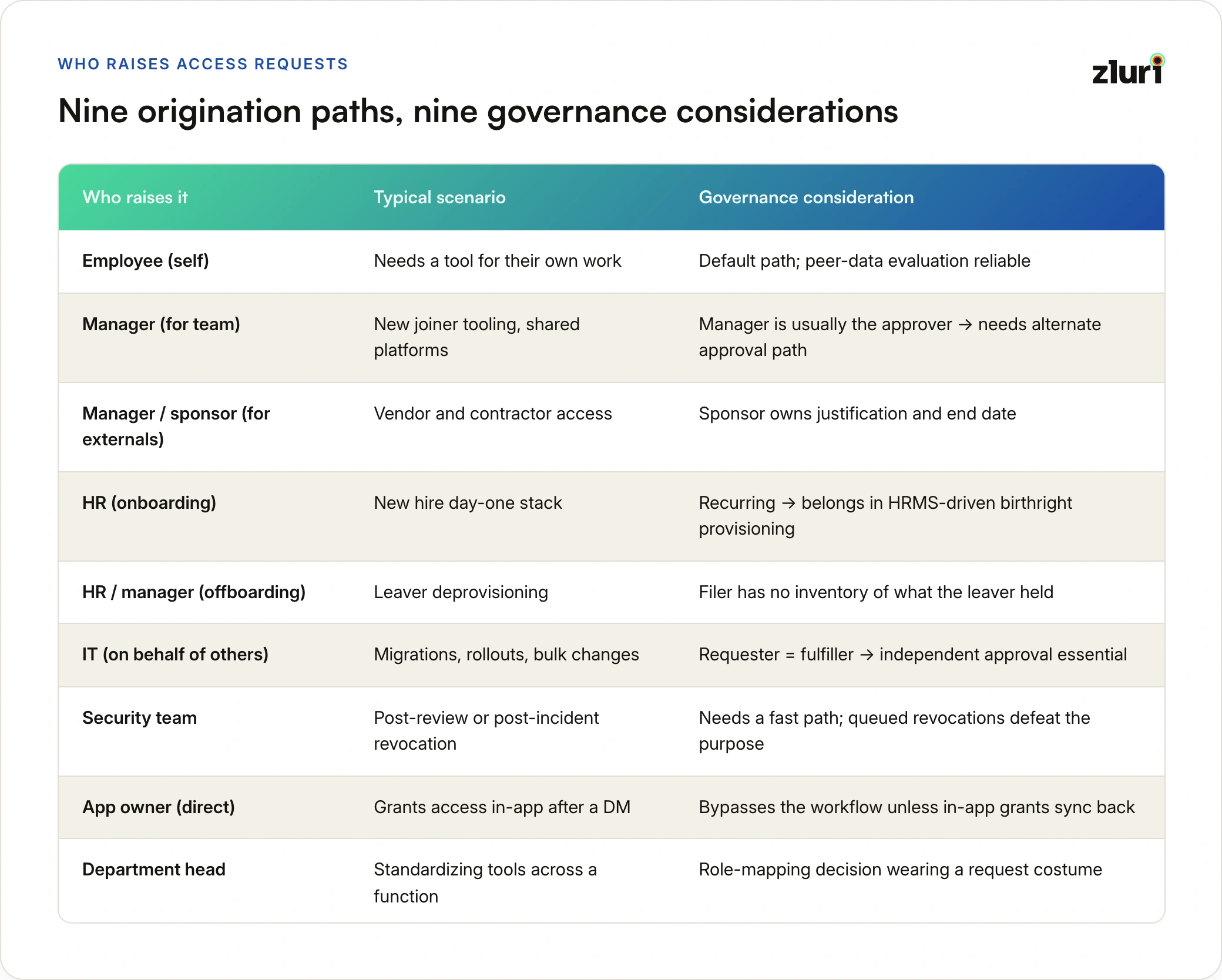
Employees requesting for themselves. The default self-service path: an individual needs a tool for their own work. The requester and the beneficiary are the same person, which makes justification straightforward and peer-data evaluation reliable.
Managers requesting for their team. A manager provisioning tools for a new joiner, or requesting a shared platform for everyone they manage. The approver logic inverts here: the manager is often the default approver for their reports, so the workflow needs a different approval path when the manager is the requester.
Managers or sponsors requesting for vendors and contractors. External people can't file internal requests, so an internal sponsor requests on their behalf. The sponsor relationship matters for governance: the sponsor owns the justification, the engagement end date, and the accountability when the access outlives the contract.
HR raising requests during onboarding. A new hire's day-one stack, triggered by the HR team ahead of the start date. If this happens as individual requests per new hire, it's a signal the access belongs in automated birthright provisioning driven by the HRMS event, not the request queue.
HR or managers triggering deprovisioning at exit. The offboarding counterpart: HR files the leaver event, and every grant tied to that person needs to come back. This origination path fails most often, because the person filing it has no inventory of what the departing employee actually held.
IT raising requests on behalf of others. Migrations, tool rollouts, license tier changes, and bulk moves during reorgs. IT is both requester and fulfiller here, which is exactly the situation where an independent approval step and a logged record matter most.
Security teams initiating revocations. After an access review finding, an incident, or an anomaly flag, security requests removal or downgrade of existing access. These need a fast path: a revocation that waits a week in a queue defeats its purpose.
App owners adding users directly. The owner of an application grants access to someone who asked them in a hallway or a DM. This path bypasses the workflow entirely unless the platform pulls direct-in-app grants back into the governed record, which is why connecting the request system to actual application state matters.
Department heads requesting at the team level. A function head standardizing tooling across their department. Like recurring manager bulk requests, this is usually a role-mapping decision wearing a request costume: the durable fix is updating the department's standard stack, not approving the same request every quarter.
Each origination path needs its own routing and approval logic. When every path funnels into the same generic intake, the workflow treats an HR onboarding batch, a security revocation, and a contractor sponsorship as the same kind of event, and handles all three badly.
A governed workflow handles each type differently by design. A ticket queue handles them all identically, which is precisely the problem: the same generic form and routing for a routine new-access request and a production admin escalation.
The Key Benefits of Governed Access Request Management
Before looking at how the process typically fails, it helps to be clear on what a governed process delivers, because these are the stakes in every failure mode that follows.
Faster access for employees without more work for IT
Self-service access request portals let employees find and request what they need without generating a ticket. Automated routing gets the request to the right approver immediately. Automated provisioning gets approved access in place without manual steps. Employees get access faster. IT teams spend less time on routine requests.
Audit-ready compliance by default
Every request, approval, rejection, and provisioning action is logged with timestamps and, in modern systems, with documented reasons for each decision. When a SOC 2 auditor or an internal compliance review asks who approved access to a sensitive system and why, the answer is in the system rather than scattered across email threads.
For organizations subject to PCI-DSS, HIPAA, SOX, GLBA, or GDPR, this matters directly. Each of these frameworks requires demonstrating that access to sensitive data or systems is controlled, documented, and periodically reviewed. A structured access request process generates that evidence as a byproduct of normal operation rather than as a separate audit preparation exercise.
Time-bound access adds another layer of compliance assurance. Rather than granting permanent access by default, requests can be approved for a defined duration, after which access expires automatically. A contractor who needs system access for a 90-day engagement doesn't need a manual deprovisioning step at the end; the expiration fires on schedule. Pre-approved time-bound workflows also implement just-in-time access: employees request on demand, the policy grants immediately, and the access terminates automatically at the end of its window. This closes a common compliance gap where access granted for a temporary purpose stays active indefinitely because no one was tracking when it should have ended.
The remaining benefits compound from the same foundation. Enforced least privilege shrinks the insider threat surface, because justification and review checkpoints stop access from accumulating past what roles require. Tracked grants surface unused licenses that no other lens makes visible. And when an account is compromised, identifying its blast radius becomes a query instead of a weeks-long investigation.
The Coordination Problem: What Manual Access Requests Actually Look Like
Before organizations adopt ticketing for access requests, and often alongside it, the real workflow runs on email chains and Slack threads. The failure here is different from the ticketing failures below. Tickets fail at governance. Email fails earlier, at basic coordination. The table below lists the nine coordination failures and the consequence each produces.
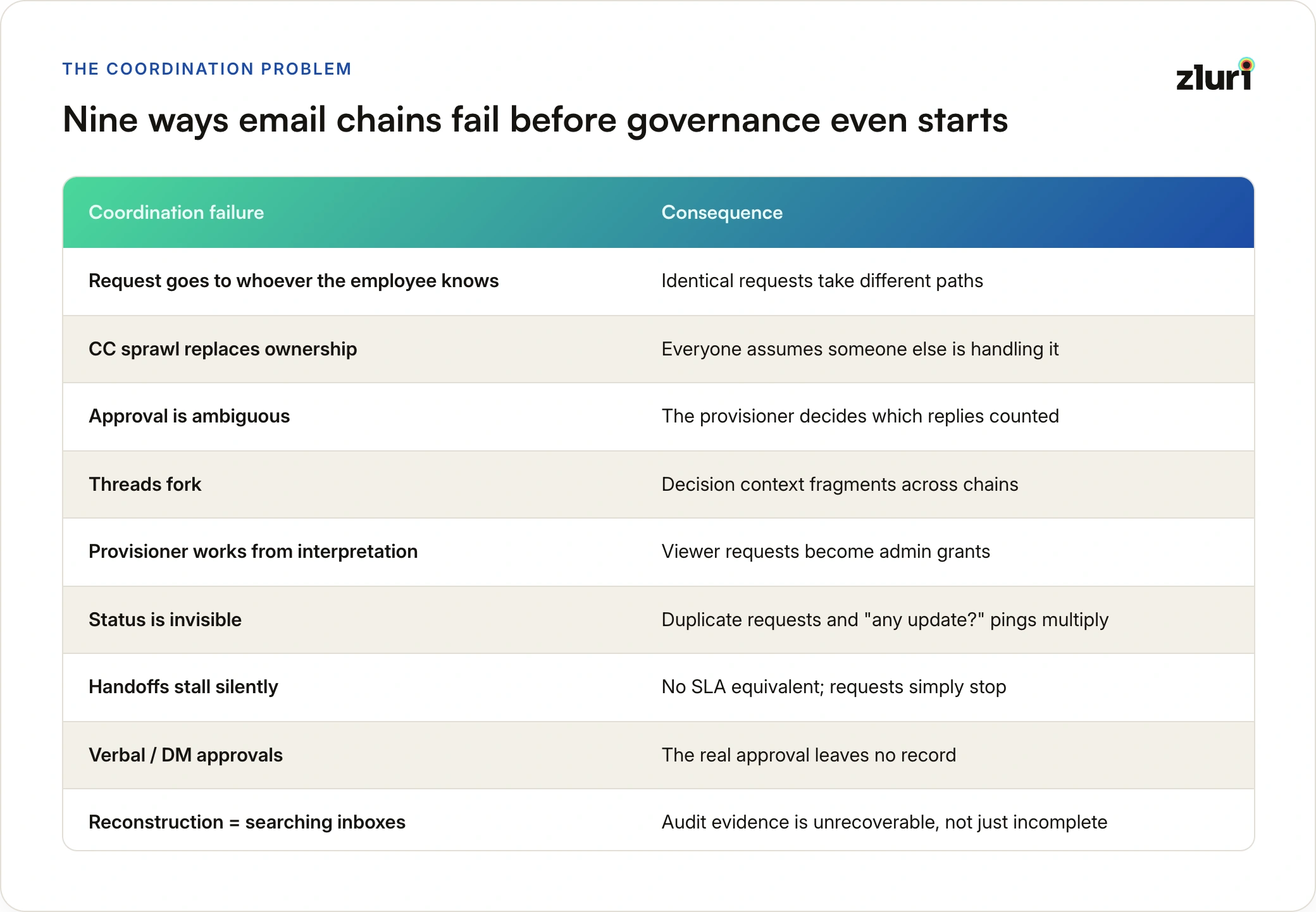
The request goes to whoever the employee knows. Not to a defined intake, but to the IT person they met at onboarding, or their manager, or a general helpdesk alias. Where a request lands determines whether it moves, and identical requests take different paths depending on who received them.
CC sprawl replaces ownership. The manager, two IT people, and the app owner are all copied. Everyone assumes someone else is handling it. Nobody is. The thread goes quiet until the requester follows up, at which point the cycle restarts.
Approval is ambiguous. A manager replies "fine by me" in the thread. Is that an approval? Is the manager the right approver for this application at this access level? Was the security team supposed to weigh in? Email has no concept of an approval chain, so whoever provisions decides which replies counted.
Threads fork and decisions split. Someone replies off-thread, someone forwards to a new person, and the decision context fragments across chains no single person can see. The approval lives in one fork, the license tier discussion in another, and the person provisioning saw neither.
The provisioner works from interpretation. The IT admin who finally creates the account often wasn't in the thread where details were discussed. They provision from the subject line and a skim, which is how a request for viewer access becomes an admin grant.
Status is invisible, so duplicates multiply. The requester can't see where things stand, so they follow up, re-request, or ask a different IT person, creating parallel chains for the same access. "Any update?" messages become a meaningful share of IT's inbox.
Handoffs stall silently. Manager approves, IT needs the app owner to assign the license, the app owner is on leave. Nothing escalates, nothing alerts, and the request simply stops until someone notices. There's no equivalent of an SLA breach warning for an email thread.
Verbal and DM approvals leave no record. The approval that actually unblocked the request happened in a hallway or a private Slack message. At audit time, it doesn't exist.
Reconstruction means searching inboxes. When the employee leaves, or when an auditor asks who approved their access, the answer is distributed across the mailboxes of people who may themselves have left. The evidence isn't incomplete. It's unrecoverable.
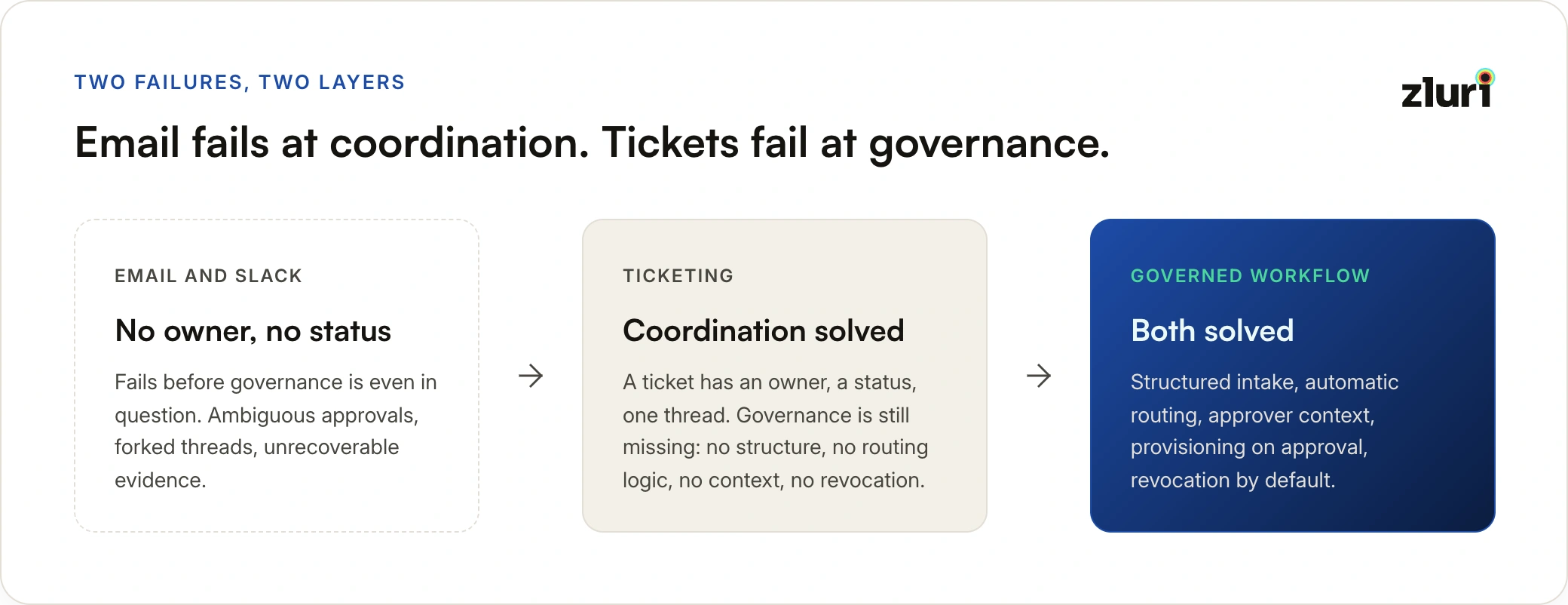
Email chains don't just record access decisions badly. They make the decisions themselves worse, because no one making them can see the full picture.
Ticketing systems fix most of these coordination failures, which is why organizations adopt them: a ticket has an owner, a status, and a single thread. What tickets don't fix is governance, which is the next problem.
Why IT Tickets Fail at Access Request Management
Most organizations default to Jira, ServiceNow, or email when they need a way to handle access requests. The reasoning is understandable: the tool is already there, IT knows how to use it, and a ticket is at least better than a Slack message with no paper trail.
The asymmetry is worth noticing. JML automation gets real focus and investment: HRMS integrations, provisioning playbooks, dedicated tooling, project budgets. Access requests, the larger and less predictable half of all access changes, get at most moved from email into ITSM tickets. That's an upgrade in tracking, not in governance, and it's why the highest-volume access workflow in the organization runs on the least purpose-fit infrastructure.
The problem is that general-purpose ticketing systems were built to track work, not to govern access. The gap between those two jobs is where access security breaks down, and it holds whether the tickets run through ServiceNow or Jira, and whether your IT function operates as a help desk or a service desk.
No structure on what gets requested
A Jira ticket for access is a blank text field. The requester writes whatever they think is relevant. Sometimes they include the application name, the access level, and a business reason. Sometimes they write "need access to Salesforce pls." The approver has to read between the lines, follow up for missing information, and make a judgment call without a consistent data set. Multiply that by 40 requests a week and it becomes a time sink. Multiply it by an audit requirement and it becomes a liability.
A dedicated access request system enforces what gets captured: business justification, license type, application role, access duration. The form is the policy.
No routing intelligence
Jira tickets route to whoever is assigned the ticket, manually, by whoever triaged it. If the triage person is out, the ticket waits. If they assign it to the wrong approver, it sits until someone notices. If the app has a specific owner who should be approving requests for it, there's no mechanism to enforce that. No amount of tightening the ticket handling process fixes this, because the routing logic access requests need (application ownership, requester role, access level) doesn't exist in a generic ticket workflow.
Governed access request workflows route automatically based on the application, the requester's role, and the access level being requested. The right approver gets it immediately, without a human triage step.
Approvers have no context
When an approver opens a Jira ticket requesting Salesforce admin access, they see a text description written by the requester. They don't see what Salesforce access the requester already has, whether their peers typically have admin access at this role level, how many times this person has requested this before, or whether admin is even standard for their job function.
Without that context, approvals become rubber stamps. The approver sees a reasonable-sounding request, sees no immediate red flags, and approves. That's not governance. That's a log entry that happens to say "approved."
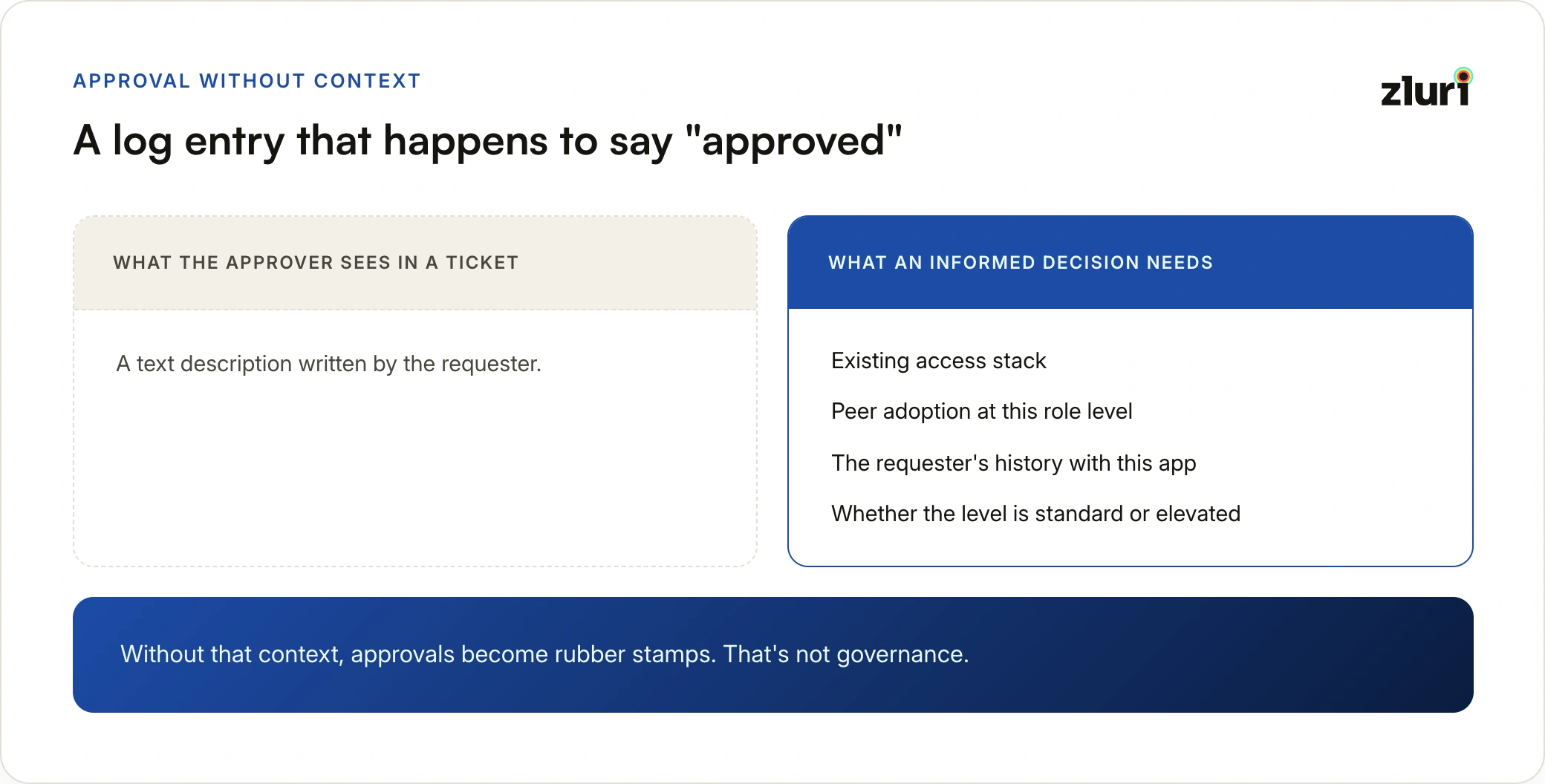
Modern access request platforms surface peer adoption data, user request history, existing access stacks, and access level classification before the approver acts. The decision becomes informed rather than instinctive.
Provisioning is a separate manual step
One person said yes. A different person decided what yes means. The gap between those two decisions is where over-permissioning lives, and it exists on every ticket-based access grant.
Approving a Jira ticket doesn't provision anything. Once approved, someone still has to go into the application, create the account, assign the license, configure the role, and update whatever tracking system tracks who has what. That step takes time, introduces error, and has no automatic connection to the approval that preceded it.
When the access request system is connected to the application stack, approval triggers provisioning. The user is added, licensed, and configured automatically. No separate step, no delay, no missed configurations.
Deprovisioning is invisible
When someone leaves or changes roles, their Jira access request history doesn't help anyone figure out what they have. That information is buried in closed tickets, disconnected from the current state of any application, so the obvious accounts get revoked and the less obvious ones persist. This failure mode is deep enough that it gets its own best practice below.
The audit trail is incomplete
A Jira ticket can tell you that someone requested access and the ticket was closed. It can't tell you who approved it, what they saw when they approved it, what their documented reason was, or what provisioning actions resulted. For SOC 2, ISO 27001, or any compliance framework that asks you to demonstrate access governance, a closed ticket is not sufficient evidence. This is also why the access lifecycle never shows up in standard service desk metrics: the part that matters happens outside the system being measured.
The comparison in practice
Ticket-based access management captures unstructured requests, routes them manually, presents approvers with no context, provisions through a separate manual step, has no deprovisioning path, and produces an audit trail that ends at ticket closure. Governed access request management enforces structured intake, routes automatically by application and role, gives approvers peer and history context, provisions on approval, revokes automatically at expiry or offboarding, and logs the full chain of custody.
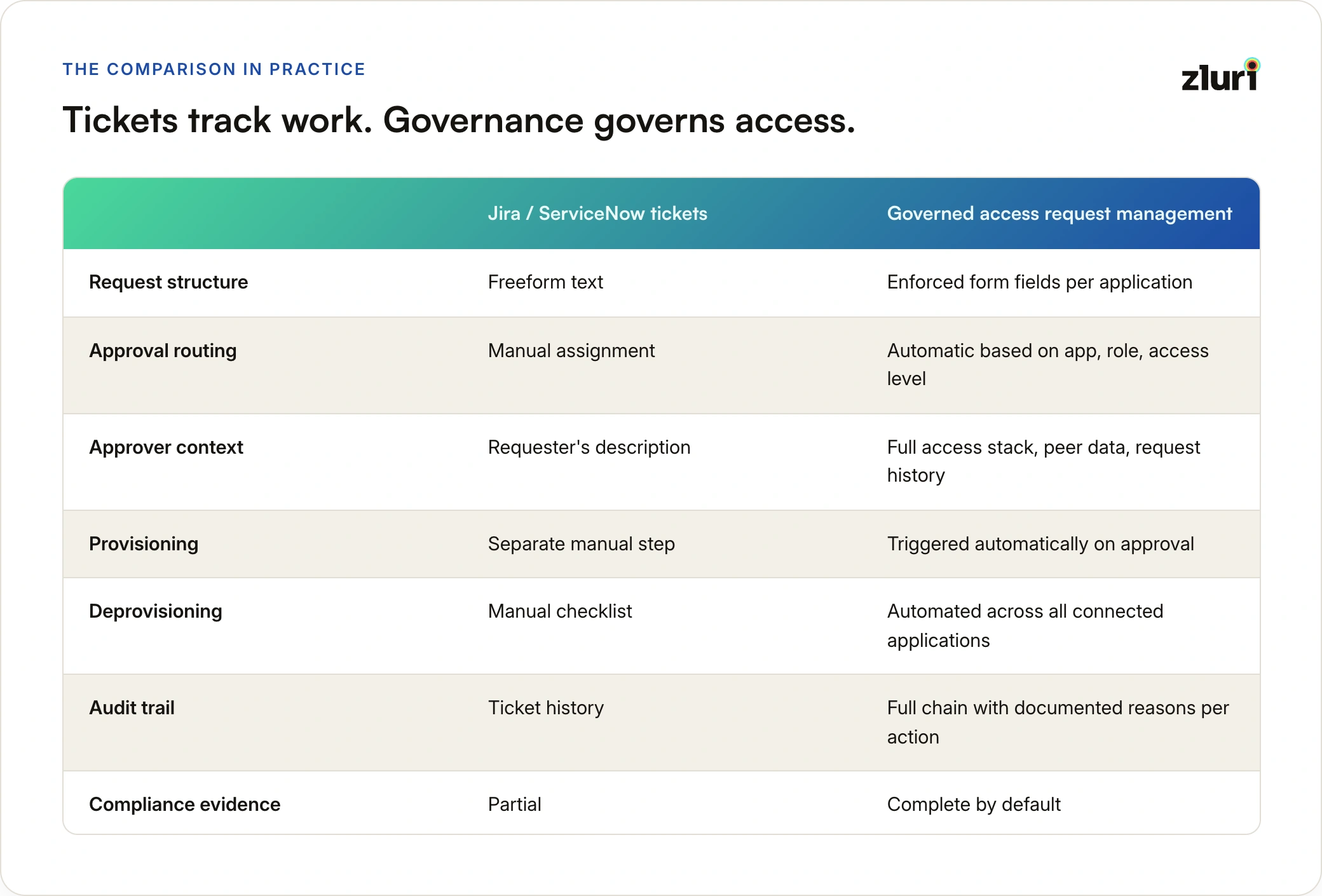
Jira and ServiceNow are not wrong tools. They're the right tools for tracking bugs, managing projects, and running IT operations, and applying help desk best practices genuinely improves those categories. They're the wrong tool for governing access, because governance requires structure, routing intelligence, contextual decision-making, and lifecycle automation that general-purpose ticketing was never designed to provide.
Best Practices for Access Request Management
1. Automate JML access so the request queue handles only genuine exceptions
The biggest source of unnecessary access requests is the absence of automated joiner-mover-leaver (JML) provisioning. When a new hire joins, they shouldn't need to request Slack, Google Workspace, or the project management tool their entire team uses. That access should be waiting for them on day one, triggered automatically by an HRMS event and mapped to their role.
The same logic applies to movers. When a sales rep becomes a sales manager, their birthright access should update automatically: new tools added, old ones removed, permissions adjusted. If every change requires a manual request, the request queue fills with work that should never have been routed there in the first place.
Reserve the request workflow for what genuinely requires individual evaluation:
- Access to sensitive systems where every grant deserves scrutiny
- Elevated permissions above the standard level for the role
- Tools outside the standard stack for the requester's role or department
- Time-bound access for a specific project or engagement
If 90% of the sales team has Gong, a new sales manager requesting Gong isn't an access decision. It's a provisioning task that should have already happened.
The practical rule: if access to an application is standard for a role or department, automate it through JML. If it's not standard, route it through the request workflow with justification.
2. Use peer data to set auto-approval thresholds
Not every request that reaches the queue needs a human decision. When 80% of people in the same role and department already have access to an application at the same level, an additional request from someone in that role is a routine provisioning task, not a security judgment.
Configure auto-approval rules based on peer adoption thresholds. Set conditions: if the requester's role matches, the application is standard for their department, and the access level is not elevated, approve automatically and trigger provisioning immediately. This eliminates the approval backlog for routine requests while preserving human review for requests that fall outside the norm.
The corollary: when peer adoption for a requested access level is near zero, that's a signal to route to closer review, not approve quickly. Low peer adoption at a specific role or permission level is one of the clearest early warning signals for anomalous access requests.
3. Bring shadow apps inside the governance perimeter
Most organizations govern a fraction of the applications their employees actually use. The rest are shadow apps: tools procured outside IT, paid for on personal or departmental cards, connected to business data, and invisible to any access governance process.
Shadow apps are where access governance breaks down at the edges. An employee connects a third-party automation tool to your CRM using their own credentials. A contractor uses a personal account in a collaboration tool that has access to internal files. A team buys a project management subscription outside procurement. None of this is visible, none of it is governed, and none of it gets cleaned up when the people involved leave the organization.
Access request management needs to start with application discovery, not with the application catalog you already have. Identify what's actually being used across your organization through every available signal:
- Browser extensions catching app usage SSO never sees
- SSO and IdP logs for sanctioned application activity
- Expense reports and card transactions surfacing department-level purchases
- Direct integrations revealing third-party tools connected to core systems
Bring the ones that matter into managed status. For employees requesting tools outside the current stack, route those requests through a procurement review rather than a dead end. Shadow apps don't disappear when you ignore them. They just operate without controls.
4. Treat access reviews as the cleanup mechanism for what requests missed
Access request management controls what gets in. User access reviews control what stays in. Both are necessary, and they're most effective when they're connected to the same system.
Run access reviews on a cadence calibrated to risk. High-sensitivity systems warrant quarterly reviews. Lower-risk tools can be reviewed annually. The review should answer a specific question: does this person's current role still justify this access? Not whether they requested it correctly when they got it, but whether it should still exist today.
When a review surfaces access that should be revoked, the remediation should be automated where possible. Identifying stale access and then manually revoking it introduces the same delay and error risk as manual provisioning. The review finds it; the system removes it.
Access reviews also catch what JML automation misses. A role change that didn't trigger an HRMS event. A project that ended without a formal offboarding. A contractor whose engagement was extended informally. These show up in reviews if the review is comparing current access against current role, not just checking whether requests were filed correctly.
5. Track and deprovision request-based access at offboarding, not just role-based access
Most offboarding processes are built around two things: revoking the SSO account and removing role-based or group-based access that was provisioned through JML. Both of those are handled by the identity provider or the HRMS integration, and both are reasonably well-automated in most organizations.
What gets forgotten is everything else: the access that didn't come from a role assignment or a JML playbook. The Tableau access a data analyst requested six months into the job because they needed it for a specific project. The elevated Salesforce permissions a sales manager requested when they took on a new territory. The staging environment access a developer requested for a migration that wrapped up two quarters ago. None of this is attached to a role. None of it gets cleaned up when the role is removed. It was granted through a ticket, an email, a Slack message, or a request form, and when the person leaves, it just stays.
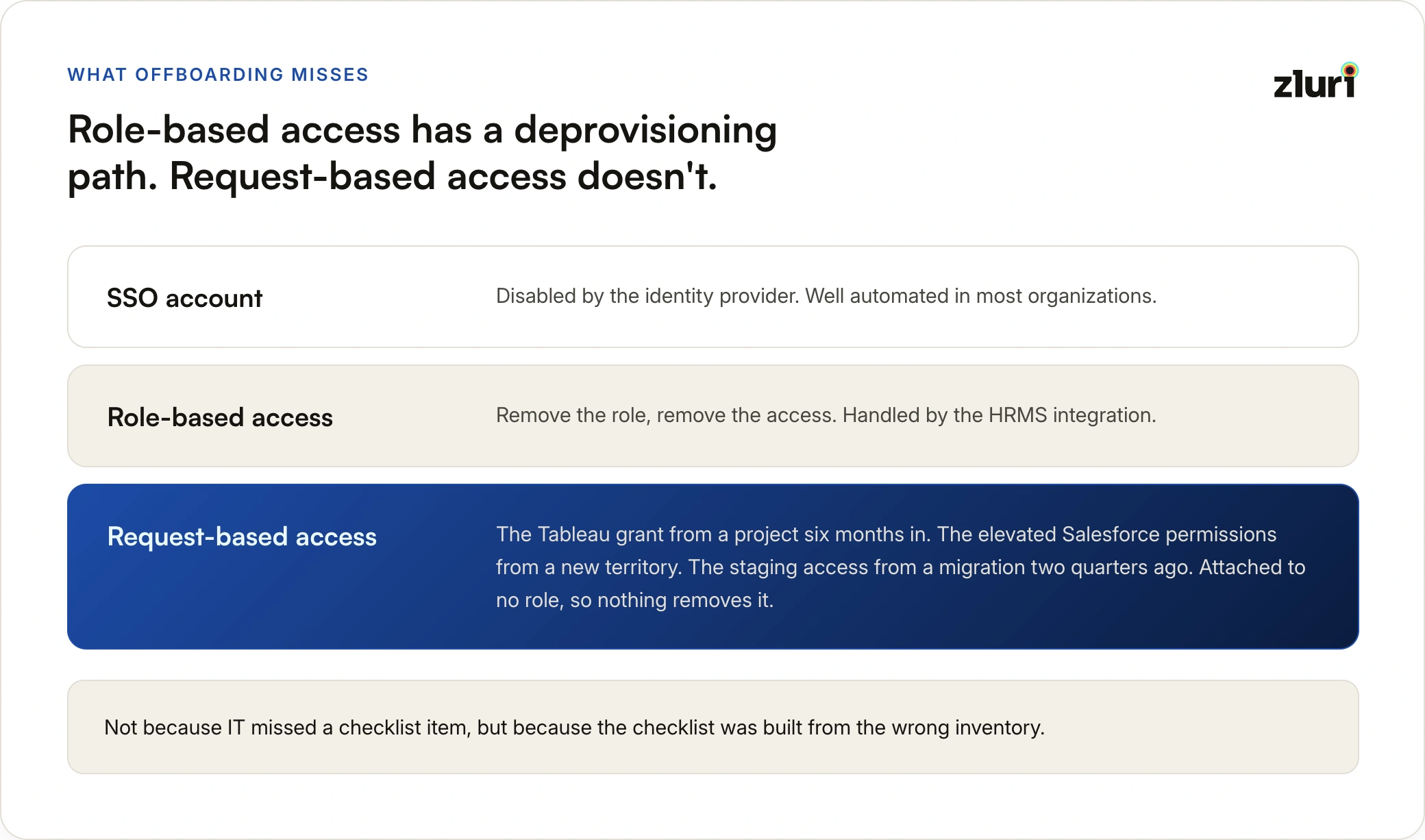
This is the specific failure mode that request-based access creates if it isn't tracked properly. Role-based access has a clear deprovisioning path: remove the role, remove the access. Request-based access has no automatic deprovisioning path unless the system that processed the request also tracks what it granted and feeds that into the offboarding workflow.
When access requests are handled through Jira tickets, email approvals, or Slack messages, that inventory doesn't exist anywhere in a usable form. IT works through the standard offboarding checklist, revokes the role-based access, disables the SSO account, and marks the ticket complete. The request-based access, granted separately through a different tool or channel, is invisible to that process. It persists.
The fix is connecting the request workflow to offboarding. When access request management runs through the same platform as JML provisioning, the system holds a complete record of everything granted to that user: birthright access from onboarding, role-based access from RBAC, and every additional access grant that came through a request. When the offboarding event fires, deprovisioning covers all of it, not just the access the identity provider can see.
Request-based access that isn't tracked is access that survives offboarding. Former employees retain active sessions weeks after their SSO account was disabled, not because IT missed a checklist item, but because the checklist was built from the wrong inventory.
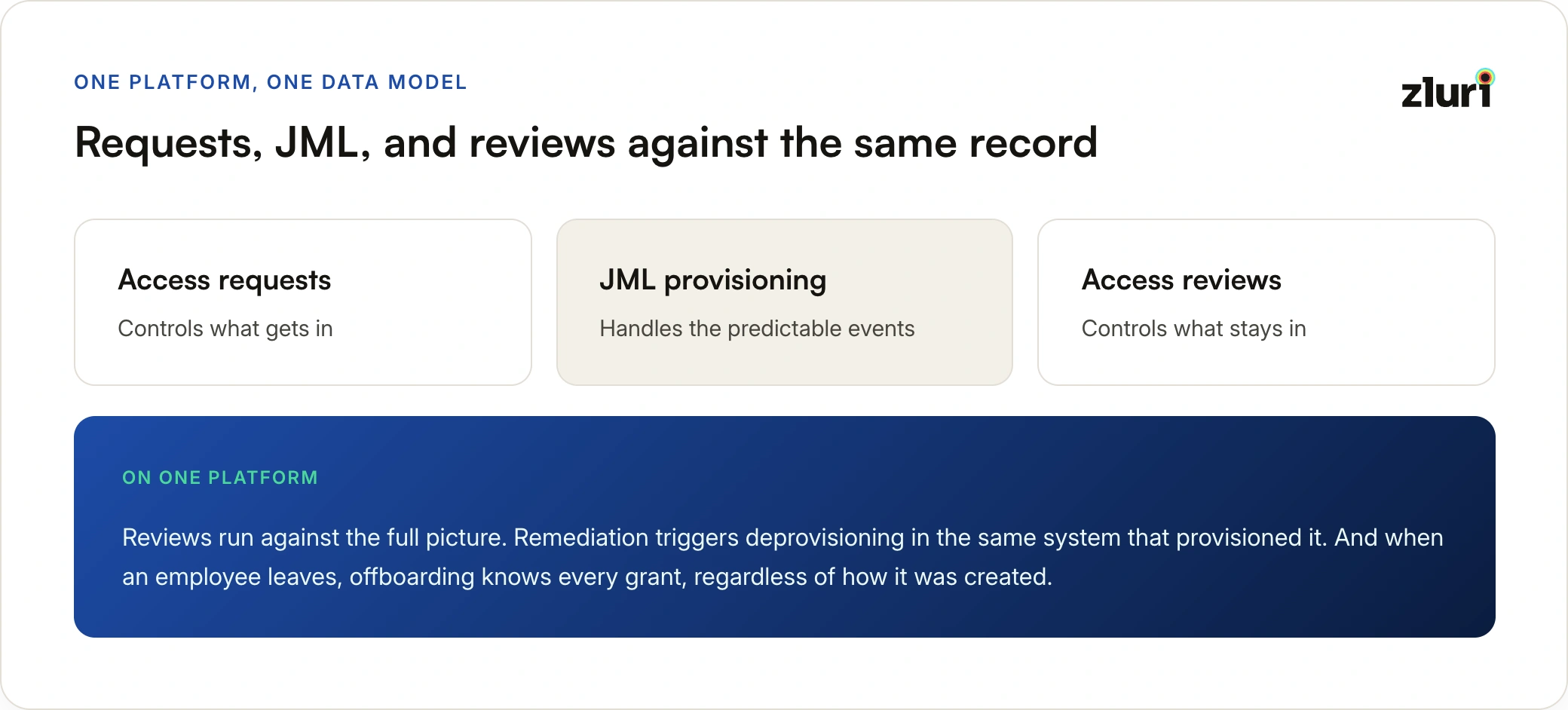
6. Run access requests, JML, and reviews from a single platform
Access request management is one piece of a larger access governance picture. When it runs on a different system from JML provisioning, or when access reviews are conducted separately from the tooling that manages requests, the result is fragmented visibility and duplicated effort.
If a request is approved in one tool, provisioned manually in another, and reviewed in a third, nobody has a complete picture of what access exists, how it got there, or whether it's still appropriate. Audit evidence has to be assembled from multiple systems. Remediation from a review has to be manually coordinated back to the provisioning system. Shadow apps discovered in one tool don't automatically appear in the request catalog of another.
A single platform for access provisioning, access requests, and access reviews changes the data model. Access that was auto-provisioned through JML shows up in the same place as access that came through a request. Access reviews run against the full picture, not just what the review tool can see. Remediation from a review triggers deprovisioning in the same system that originally provisioned the access. And when an employee leaves, the offboarding workflow knows every access grant in the system, regardless of how it was originally created.
That's what complete access governance looks like. Not just a better request form, but a unified view of every access decision, from initial provisioning through eventual removal.
How to Evaluate Access Request Management Tools
The evaluation criteria follow directly from the failure modes above:
- Structured intake per application, with forms calibrated to risk level
- Automatic routing by app ownership, requester role, and access level
- Approver context built in: peer adoption, request history, existing access
- Approval-triggered provisioning with no separate manual step
- Time-bound access with automatic expiry, not manual revocation
- Grants that feed into offboarding and reviews, not just a request log
Two resources go deeper here: our comparison of the top access request management tools evaluates the leading platforms against exactly these criteria, and our analysis of what ITSM software gets wrong about access requests explains why adding forms and automations to a ticketing platform doesn't close the governance gap.
How Zluri Handles Access Request Management
Zluri is an identity security platform built for mid-market and enterprise organizations managing SaaS-heavy environments. Its access request system covers the full lifecycle through a single governed workflow. The table below maps each capability to the lifecycle stage it governs.
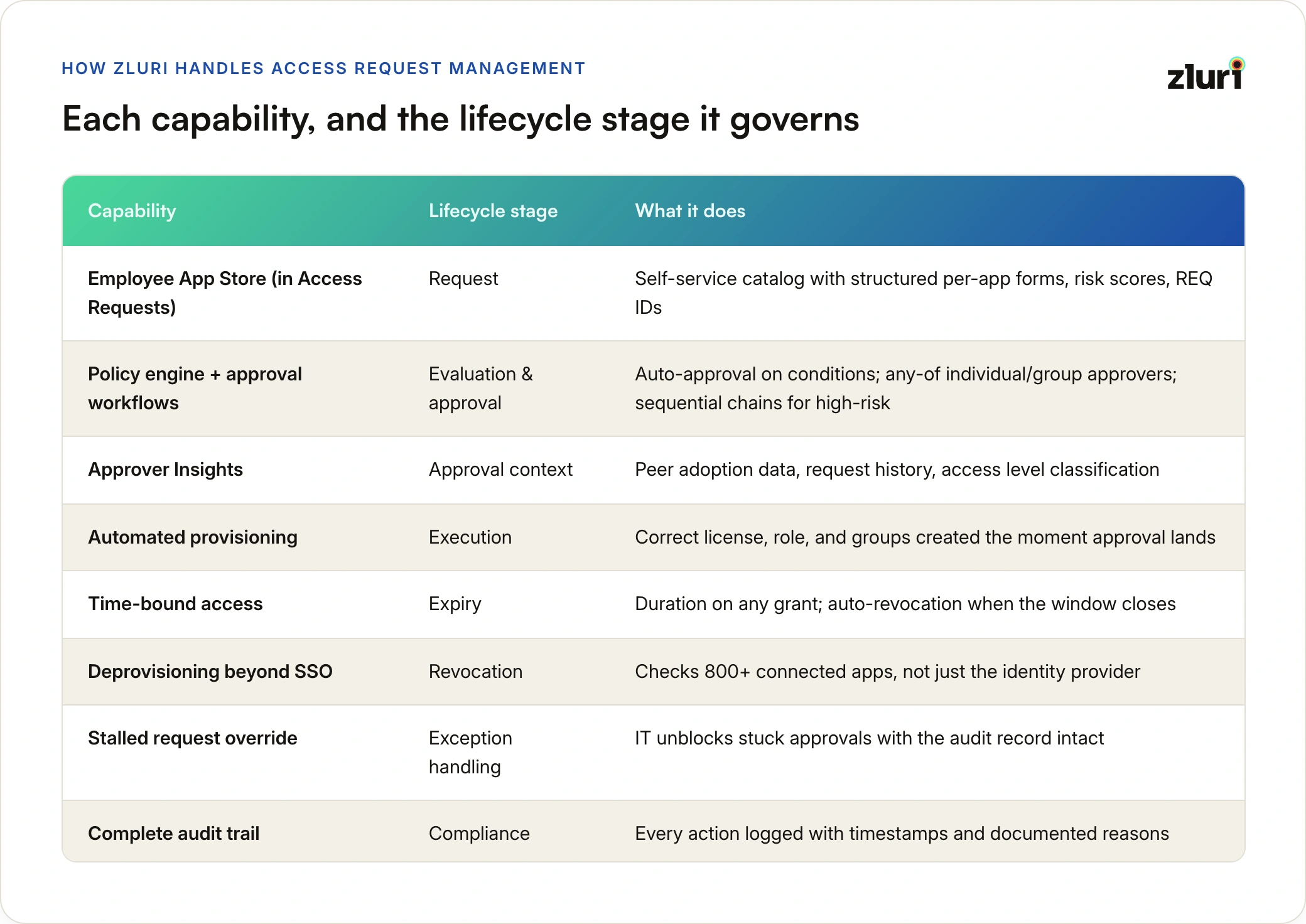
Access Requests, Zluri's dedicated module under its IGA product (alongside Access Management, Access Reviews, and SoD), handles this entire workflow. Its employee-facing layer is the Employee App Store: a curated catalog with self-service access requests where employees discover, request, and track access. Apps are surfaced by organization, department, and personal assignment. Each app page shows compliance badges (SOC 2, ISO 27001), risk scores, and ownership information before a request is even submitted. Request forms capture business justification, license type, role, and access duration. Every request gets a unique REQ ID and real-time status tracking.
Configurable approval workflows let IT teams define the routing structure per application, matched to the risk of what's being requested. For routine access, approvals can be assigned to any one of multiple individuals or an entire group, so the first available approver clears the request and no single person's absence stalls it. For high-risk access, sequential multi-level chains enforce order: the manager approves first, then the app owner, then security, each with the full record of prior decisions. Auto-approval covers requests that meet defined conditions (role, department, app type) without any human step. Approvers receive full context with every request: the requester's existing access stack, their business justification, supporting documents, and the app's risk profile. Approver Insights adds peer adoption data, request history, and access level classification so approvers can distinguish routine requests from anomalous ones at a glance.
Automated provisioning runs immediately when a request is approved and an integration exists. The user is added to the application, assigned the correct license and role, and added to relevant groups without manual steps. This extends what just-in-time provisioning delivers for account creation into the full permission lifecycle. When automation isn't available, Zluri creates a tracked Task for the designated owner with instructions and a due date. Nothing falls through the gap between approval and actual access.
Time-bound access by default option. Any request can carry a duration, and pre-approved time-bound workflows implement just-in-time patterns: the employee requests on demand, the policy grants instantly, and access is revoked automatically when the window closes. A contractor's 90-day grant ends on day 90 without anyone filing a deprovisioning ticket.
Deprovisioning that goes beyond SSO checks usage signals and audit logs across all 800+ connected applications when someone leaves or changes roles, not just what's visible through the identity provider. Access that persists in individual apps after an SSO token is revoked gets identified and removed.
Stalled request override for IT admins. When a designated approver is unavailable, on leave, or simply not responding, a request sits. The employee waiting on access has no visibility into why, and IT has no way to unblock it without breaking the workflow entirely. Zluri lets IT admins override stalled requests and move them forward without losing the audit record. The override is logged, the reason is captured, and the approval chain continues. This is a detail most access request tools don't address, because they are designed for the happy path. In practice, approver availability is one of the most common reasons access provisioning falls behind SLA.
A complete audit trail by default. Every action across the access request lifecycle is logged with timestamps. Approvers who act from email notifications are required to document a reason on the confirmation page before the action is confirmed. That reason appears in the request's changelog alongside every other decision in the chain.
Anzu moved from email-based access requests to Zluri's App Catalog and saw an 88% reduction in turnaround time. Guesty implemented Zluri's Slack-based access request workflow and saved more than 15,000 hours annually while achieving 8x faster request handling.
"Zluri has streamlined our access request and approval workflows with seamless Slack integration. Automation has drastically cut down IT workload — what once took hours or even days for provisioning now happens in minutes." — Ben Tibi, Head of IT, Guesty
How Zluri Works With Your Existing ITSM
Access request management doesn't replace your ITSM platform. It removes one category of ticket from it, the highest-volume category, and handles that category with the governance it requires.
Zluri integrates with ServiceNow, Jira Service Management, Freshservice, and other platforms. When an access request is approved in your existing tool, Zluri picks up the signal and provisions automatically. When a request originates in Zluri and needs to follow your ITSM workflow for compliance reasons, Zluri converts it into a ticket automatically, keeping the audit trail intact.
This holds whichever direction your ITSM evaluation goes: whether you're weighing ServiceNow against Freshservice, comparing Freshservice and Jira, assessing Zendesk against Jira for internal IT, or shortlisting Zendesk alternativesentirely. The access request gap is identical across every option, because it's structural to ticketing rather than specific to any vendor. The same applies across adjacent tool categories: service desk software, ticket management software, and service request management platforms all route access requests without governing them. Which ITSM platform you choose still matters for everything else IT does.
Your ITSM continues doing what it does well: incidents, hardware requests, change management, and general service delivery, applying the ITSM best practices that genuinely improve those categories. Zluri governs access. The two are complementary layers, not competing tools.
Frequently Asked Questions
What is the difference between access request management and identity and access management (IAM)?
IAM is the broader category covering how identities are created, authenticated, and managed across an organization. Access request management is a specific operational process within IAM focused on how users request access, how those requests are evaluated, and how the resulting access is provisioned and eventually removed. IAM provides the infrastructure; access request management is the governed process that runs on top of it.
Who should own the access request management process?
Typically IT or IT security teams own the process design, tooling, and audit function. Individual approvals are distributed to app owners, direct managers, or department heads depending on the application and access level. The key is that ownership of the process is centralized even when approval authority is distributed.
What is the difference between access request management and access reviews?
Access request management governs how access is requested and granted in the first place. Access reviews are periodic certifications where managers or app owners verify that existing access is still appropriate. Both are necessary: access request management controls what goes in, access reviews control what stays in.
What is the difference between access request management and JML (joiner-mover-leaver) automation?
JML automation runs on defined, scheduled events connected to HR: someone joins, someone leaves, someone goes on leave. The HRMS fires the event, and provisioning or deprovisioning follows automatically. Access request management handles everything that has no HR event behind it, and that's a much larger category than it sounds. Most mover scenarios never touch the HRMS: taking on a new project, covering for a colleague, joining a cross-functional initiative, needing elevated access for a quarter. None of these have a schedule or an HR trigger, so the only way access happens is that someone requests it. JML without access requests isn't just incomplete; it covers only the small fraction of access changes that HR systems can see. The two work as a pair: JML automates the predictable events, access requests govern everything in between.
What should an access request form capture?
At minimum: the application being requested, the access level or role, the business justification, and the requested duration (permanent or time-bound). High-risk applications may require additional context such as specific permissions needed, project or cost center attribution, or supporting documentation. The form should be calibrated to the risk level of the application, not set identically for every request.
How do you handle access requests for applications not in your current stack?
A well-designed access request process routes out-of-stack requests to procurement or a defined exception review rather than dropping them. This closes the shadow IT gap: employees who can't get what they need through the formal process will find it outside the process, which creates unmanaged access and unmanaged spend.
What should an audit trail for access requests include?
At minimum: who submitted the request, when, for what access level, the approval chain (who was asked, who approved or rejected, and when), the documented reason for each decision, and the provisioning outcome. For compliance purposes, the trail should be tamper-evident and retained according to the regulatory requirements applicable to your industry.


.svg)













