.png)




Time-based access control is usually reduced to one pattern: access that expires after a set period. That's real, but it's only one of four genuinely distinct temporal patterns Zluri supports. Access can start at a defined future moment, be bounded to a duration, automatically re-trigger on a recurring schedule, or have its timing anchored to an external date entirely. Treating time as one dimension misses how much of it is actually available to build with.
Most discussions of time-based access control start and end with expiry: granting something for thirty days and revoking it automatically afterward. That's a real and useful pattern, covered in depth as part of Just-In-Time access elsewhere, but it's only one piece of a broader temporal model.
Zluri supports at least four distinct time-based patterns:
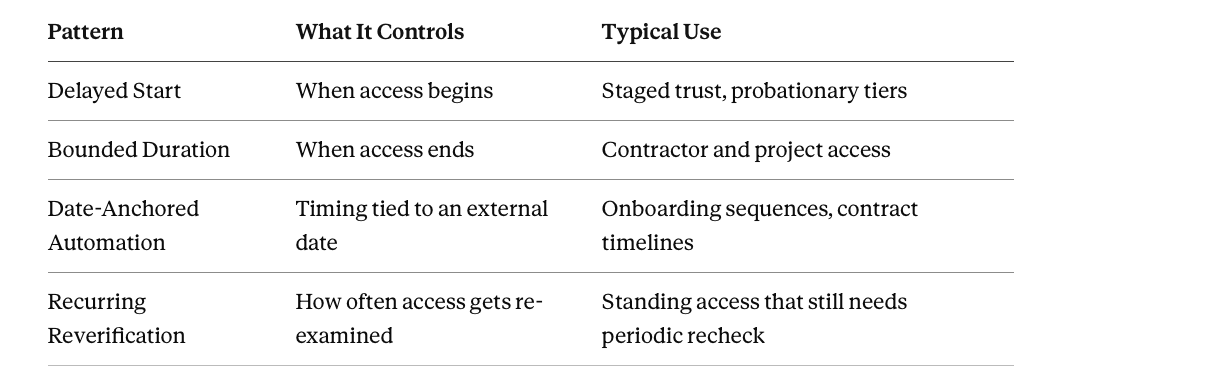
This piece covers all four.
Delayed Start: Access That Begins Later, on Purpose
Access can be deliberately delayed rather than granted immediately, through two mechanisms operating at different scopes.
Add Delay, available on any workflow action, lets a specific grant fire only after a defined wait, weeks, days, hours, or minutes, from its trigger. Useful for staged trust: a new hire's baseline access provisions on day one, while a more sensitive tier only activates after a defined probationary period.
Scheduled Runs extends this to an entire workflow or playbook, locking in an exact future date and time for the whole thing to fire. It's gated behind a required typed CONFIRM specifically to prevent an accidental scheduling mistake.
The distinction from duration-limited access matters: with a delayed start, the access hasn't started yet at all. It's scheduled to begin at a specific, planned future moment, useful for coordinating provisioning to a known start date, a project kickoff, an onboarding date, rather than firing the instant a workflow is configured.
Bounded Duration: Access That Ends on Its Own
The second, more commonly discussed pattern is access with a built-in expiry.
- Access Requests supports specifying a duration, predefined or custom, at the point of request
- A linked Deprovisioning Playbook executes automatically once that window closes
This pattern, and the reasoning behind why it matters specifically for reducing standing risk, is covered in full depth as part of Just-In-Time access. The point worth restating here is that it's one of four temporal patterns, not the entirety of what time-based access control means in Zluri.
Date-Anchored Automation: Time Tied to Something External
The third pattern anchors access timing to a date that lives outside the grant itself entirely: a hire date recorded in an HR system, a project's known end date, a contract's renewal timeline.
Automation Rules' scheduling options let a playbook action's timing tie directly to that external date rather than to when the rule itself was configured or activated:
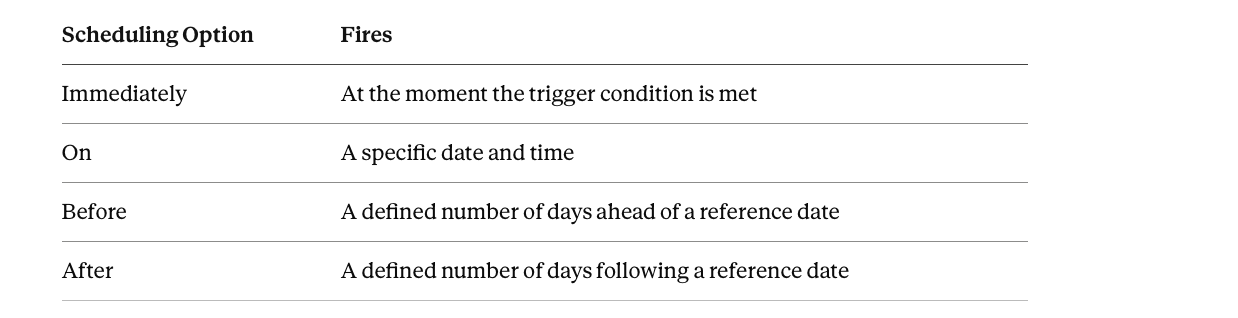
This is what makes a staged sequence possible around a single real-world event. For example, anchored to a known start date:
- 7 days before: identity creation
- 2 days before: communication access
- On the date itself: full access
All three stages tie to a real external calendar event rather than a fixed offset from rule activation.
Recurring Reverification: Time as a Repeating Check, Not Just an Expiry
The fourth pattern is subtly different from the first three. It isn't about when access starts or ends at all. It's about how often access gets re-examined.
Recurring Access Reviews anchor every future certification instance to the original certification's start date, keeping the interval between review and remediation consistent across every recurrence, monthly, quarterly, or a custom cadence up to twelve months, rather than drifting over time.
A genuinely well-handled edge case: if the anchor date doesn't exist in a shorter month (the 31st, for a monthly cadence), the next instance shifts to that month's actual last day rather than skipping the cycle or throwing an error. The recurring pattern stays intact rather than silently developing irregular gaps purely as an artifact of calendar arithmetic.
Time-Bound Exceptions: The Same Discipline Applied to Policy Overrides
This temporal discipline extends past access grants into governance exceptions specifically.
Segregation of Duties exemptions always require a defined duration, with the underlying violation automatically reopening once that period closes. The same time-bounding logic that Access Duration applies to a standard access grant applies here to a tolerated policy exception.
A Practical Implementation Sequence
- Identify which of the four patterns actually fits a given access scenario. Delayed start for staged trust, bounded duration for defined engagements, date-anchored automation for access tied to a known external event, or recurring reverification for standing access that still needs periodic recheck. Each requires a different mechanism.
- For staged trust scenarios, build Add Delay into the relevant workflow actions rather than granting everything immediately at once.
- For access that needs to start at a specific planned moment rather than immediately, use Scheduled Runs with the required CONFIRM step as a deliberate safeguard against accidental timing mistakes.
- For access genuinely tied to an external date, hire date, project timeline, use Automation Rules' Before/After/On-date scheduling rather than a fixed offset from when the rule happens to be configured.
- For standing access that should never simply run forever unchecked, build a recurring Access Review anchored to a consistent interval rather than relying on someone remembering to schedule the next one manually.
Frequently Asked Questions
Is time-based access control just another name for JIT or duration-limited access?
Duration-limited access is one pattern within time-based access control, but not the whole of it. Delayed start (Scheduled Runs, Add Delay), date-anchored automation tied to external events, and recurring reverification on a consistent interval are three additional, distinct temporal patterns that don't involve an expiry at all.
What's the difference between Add Delay and Scheduled Runs?
Add Delay applies to a single action within a larger workflow, staging one specific step to fire after a wait relative to its trigger. Scheduled Runs applies to an entire workflow or playbook, locking in an exact future date and time for the whole thing to execute, gated behind a required confirmation step.
How does a recurring Access Review stay on a consistent schedule over a full year without drifting?
Every future instance anchors to the original certification's start date rather than a fixed calendar rule recalculated fresh each time. Month-end edge cases, an anchor date that doesn't exist in a shorter month, are handled by shifting to that month's actual last day, keeping the interval between instances consistent rather than developing irregular gaps.
Can access timing be tied to a date that isn't the person's own hire or termination date?
Yes. Automation Rules' Before/After/On-date scheduling can anchor to any relevant reference date available in the system, a project's known start or end date, a contract renewal, not just a person's own onboarding or offboarding date specifically.