.png)



The SSO account is disabled. The offboarding ticket is closed. The IT manager moves on. And somewhere in a SaaS application your organization pays for, a former employee's account is still active, their permissions are still set, their data is still accessible, and nobody knows.
The "SSO as kill switch" belief is the most expensive misconception in identity security. It feels true because SSO deactivation is fast, visible, and decisive. One action, one timestamp, one audit log entry. It looks like completion. It isn't.
This article makes a specific argument: SSO deactivation and deprovisioning are different operations with different scopes. Understanding the gap between them is the difference between an offboarding process that actually works and one that creates the orphaned accounts that show up in breach investigations and compliance audits.
What SSO Deactivation Actually Does
When you disable a user in Okta, Entra ID, JumpCloud, or any other SSO platform, one thing happens: the federated login path is blocked. The next time that user tries to authenticate through your SSO, they're denied. For applications that strictly require an active SSO session to function, this cuts off access effectively.
That's the scope. That's all of it.
The SSO platform has no further reach. It doesn't call into each connected application to deactivate the account there. It doesn't revoke tokens the account issued before departure. It doesn't terminate sessions that were already active before the deactivation happened. And it has no awareness whatsoever of applications that were never connected to it in the first place.
None of this is a flaw in SSO. It's the architectural boundary of what authentication infrastructure was designed to do. SSO manages the login event. Everything that happens after the login event is outside its scope.
What Survives SSO Deactivation
The SSO console shows you what worked. It has no view of what didn't.
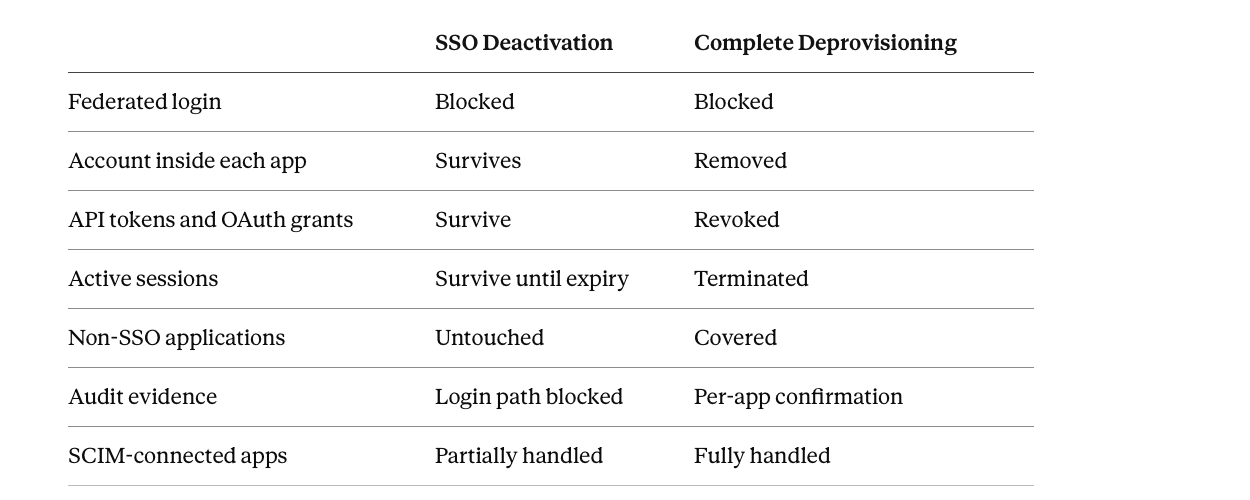
The account inside each application. Every application connected to your SSO has its own user database. When SSO provisions a user into Salesforce, Jira, or Slack, it creates a record in that application's own system. Disabling the SSO account doesn't delete or deactivate those records. The application's own account remains, with its role, permissions, and data access intact. Many applications retain a direct login path alongside SSO, and that account can be accessed through a password reset flow that doesn't require SSO at all. Even where direct bypass isn't possible, the account record persists: still billable as a seat, still appearing in user exports, still representing access that was never formally removed.
API tokens and OAuth grants. API tokens and OAuth grants issued from a user account don't authenticate through SSO. They authenticate directly against the application's API using the credential issued when the integration was set up. Disabling the SSO account has no effect on them. A developer whose GitHub token powers an internal deployment pipeline, a sales rep whose Salesforce credentials feed a third-party reporting tool, an analyst whose OAuth grant gives a BI platform access to company data: all of these connections stay live after SSO deactivation. The integrations keep running. Nobody's watching.
Active sessions. If a user had an active session in an application before their SSO account was deactivated, that session often continues until it expires or is explicitly terminated. Session lifetimes vary by application from hours to days to indefinite for tokens that don't expire by default. An employee who logged into cloud storage on the morning of their last day may retain active access for hours after their SSO account is disabled. For sensitive applications, those hours matter.
Applications that were never behind SSO. The most significant category isn't in the connected application list at all. It's the applications that were never connected to SSO: shadow IT adopted with a corporate card, departmental tools that chose the non-enterprise pricing tier to avoid the SSO tax, SaaS products that don't support SAML, and AI tools teams started using last quarter. For all of them, SSO deactivation has zero effect because SSO never governed them in the first place. In most organizations, this category represents the majority of the SaaS stack by application count. Depending on SSO adoption rate, disabling SSO may address 20-40% of an employee's actual access footprint. The rest is untouched.
Shared and embedded credentials. When teams share application logins to avoid per-seat costs, or when a user's credentials are embedded in scripts or configuration files, deprovisioning the SSO account doesn't revoke those shared credentials. The team keeps using the shared login. The embedded credentials keep authenticating. The access persists under a credential that no longer maps to a named individual.
Why the Kill Switch Belief Persists
The SSO kill switch belief persists because it's partially true and partially verifiable. When you disable an SSO account, you can see the deactivation in the audit log. Users report being blocked. For the applications they test through the normal SSO flow, access is denied. The evidence of what SSO deactivation accomplished is visible and immediate.
What you can't see from the SSO console: the account that still exists inside each application, the API token that's still authenticating, the session that's still active, the app that was never in the SSO perimeter. The evidence of what it didn't accomplish is invisible until it surfaces in an audit finding or an incident.
There's also an operational reality worth naming honestly. The SSO kill switch belief makes offboarding feel manageable. If one action is sufficient, offboarding is fast, clean, and completable. If complete deprovisioning requires per-application action across every discovered app, it's time-consuming, complex, and never fully done at manual scale. The appealing simplicity of "disable SSO, done" is partly a coping mechanism for a problem that available tooling hasn't historically made easy.
SSO Deactivation vs Complete Deprovisioning
What Complete Deprovisioning Actually Requires
Real deprovisioning treats SSO deactivation as the starting point, not the finish line.
Application-level deactivation is the first step beyond SSO. The user's account inside each connected application needs to be disabled or deleted, not just blocked at the login path. For applications with SCIM support, this can be automated. For applications without SCIM, direct API calls or application-admin actions are required, which means someone has to know the app exists, log into its admin panel, and take the action manually.
API token and OAuth grant revocation requires application-level visibility that SSO data doesn't provide. Every token and grant issued from the departing user's account needs to be identified and individually revoked. Most SSO platforms have no record of these because they were issued directly to the application, not through the federated session.
Session termination needs to happen at the application level, either through the application's session management interface or through explicit token revocation. The assumption that blocking the federated login also kills active sessions is wrong for most applications.
Non-SSO application coverage is where the gap is largest. Every application the user accessed outside the SSO perimeter needs to be identified first, then processed separately. This requires discovery that goes beyond what SSO can see: finance and expense data, endpoint signals, browser extension data, and direct application integrations.
Evidence production is the compliance dimension. The SSO deactivation log answers when the login path was blocked. It doesn't confirm that access inside each application was removed. That requires a per-application deprovisioning record with timestamps and completion status, which is what auditors for SOC 2, ISO 27001, and HIPAA are actually asking for when they request offboarding evidence.
The SCIM Gap
SCIM narrows the gap for connected applications. When SCIM deprovisioning is properly configured, disabling the user in SSO can trigger account deactivation inside SCIM-connected applications. For those applications, the combination of SSO deactivation and SCIM deprovisioning closes most of the account-level gap.
But SCIM coverage across a typical SaaS stack is partial. SCIM requires the application to support it (many don't), the integration to be configured (it often isn't, especially for newer or less-critical tools), and the deprovisioning to be tested (it frequently isn't until it fails at a real offboarding). And even where SCIM works correctly, it handles account existence, not the API tokens, OAuth grants, and active sessions associated with that account.
The gap that remains after SSO deactivation and SCIM deprovisioning is the non-SCIM application coverage, the shadow IT layer, and the token and session revocation that no federated protocol addresses.
How Zluri Closes the Gap
Zluri is an identity security platform for autonomous enterprises. Its offboarding model treats SSO deactivation as input, not as conclusion.
The starting point is discovery, not a checklist. When an employee's departure is triggered (from HRMS, from SSO, or manually), Zluri auto-populates the deprovisioning workflow from the employee's actual discovered access footprint: every application they touched, regardless of whether it was connected to SSO. Discovery runs through eight parallel pathways (direct API integrations, finance and expense system data, endpoint agents, MDMs, CASBs, browser plugins, HRMS feeds, and SSO data) so non-SSO applications surface alongside the federated ones. An IT admin doesn't need to know which apps the employee used. Zluri already does.
Deprovisioning follows a specific sequence inside each application. The order matters because each step depends on the previous one.
- Revoke device authentication. Zluri kills active application sessions across every device the user was logged into simultaneously, not just the primary device.
- Transfer data before the account disappears. Documents move to the designated owner, open tickets get reassigned, Slack messages are archived, calendar access is handed over. The data is secured before anything is deleted.
- Remove the license. Zluri removes the user from the application itself and reclaims the seat.
- Remove the SSO connection. Only after the above three steps are confirmed does SSO access get cut.
No data is lost. No access lingers at any layer.
The session problem is handled explicitly. One of the most common gaps in SSO-based offboarding is the session that was active before the SSO account was deactivated. If an employee signed into HubSpot on a 30-day session on Day 1 and was offboarded on Day 10, that session stays valid for another 20 days even after their SSO access is removed. For apps with no session expiry, access persists indefinitely. Zluri's direct application integrations reach inside the application to terminate those sessions explicitly rather than waiting for them to expire.
Monitoring doesn't stop at workflow completion. After the deprovisioning sequence runs, Zluri continues monitoring whether the user can still access any application. If a session persists, a token wasn't fully revoked, or a non-SSO application wasn't covered by the initial workflow, Zluri surfaces an alert that the user can still reach that application. The offboarding isn't marked complete until the monitoring confirms it.
The core difference from SSO-only offboarding: SSO connects with applications at the authentication surface. Zluri connects directly with applications at the API level, which means it reaches inside the application to remove accounts, revoke tokens, transfer data, and confirm completion, rather than assuming that blocking the login path was sufficient.
Each action generates a Run Log entry confirming Completed, Failed, or Pending per application. Failed actions surface immediately for retry or manual escalation rather than silently leaving access in place. The result is offboarding evidence that answers what auditors actually ask: not "when was their SSO disabled" but "confirm their access in each application was removed, when, and by what action."
Frequently Asked Questions
If SSO is not a kill switch, why do so many organizations treat it as one?
Because SSO deactivation is the most visible and verifiable part of offboarding. The audit log shows the deactivation timestamp. Users report being blocked. For the applications they test through the normal SSO flow, access is denied. What's invisible is the account inside each application, the API tokens, the active sessions, and the apps that were never behind SSO. The evidence of what worked is immediate. The evidence of what didn't is distributed across dozens of applications nobody checked.
Which applications are most at risk of retaining access after SSO deactivation?
Three categories carry the most risk. Applications with direct login paths alongside SSO, where users can authenticate with a password even if SSO is configured because the application never enforced SSO-only authentication. Applications connected to the user's account via API tokens or OAuth grants, since these don't pass through the SSO session. And applications outside the SSO perimeter entirely: shadow IT, non-SCIM tools, and any app adopted outside the IT-managed stack.
Does SCIM solve the SSO kill switch problem?
Partially. SCIM deprovisioning, when properly configured, can trigger account deactivation inside connected applications when the SSO account is disabled. What SCIM doesn't address: API tokens and OAuth grants issued from the account, active sessions, non-SCIM applications (the majority of most stacks), and applications outside the SSO perimeter entirely.
How do I know which applications a departing employee actually had access to?
If you're relying on SSO data alone, you know which applications they authenticated to through SSO. You don't know which applications they used outside SSO, which API tokens they issued, or which OAuth grants they authorized. Complete offboarding requires discovery beyond the SSO audit log: direct application integrations, finance and expense data (which surfaces SaaS subscriptions regardless of SSO status), and endpoint signals.
What evidence does a complete offboarding process need to produce?
For compliance purposes the question is: can you confirm, for each application the employee had access to, that access was removed, when, and how? A single SSO deactivation timestamp answers that for the login path only. A per-application deprovisioning record with timestamps and confirmation status answers it completely. The difference matters in SOC 2, ISO 27001, and HIPAA audits where reviewers ask for deprovisioning evidence and SSO logs alone aren't sufficient.
What is the typical gap between SSO deactivation and complete access removal?
It depends on the organization's deprovisioning process, tool coverage, and manual workload. In organizations relying on SSO deactivation as the primary offboarding action, access in non-SCIM and non-SSO applications often persists indefinitely until an access review surfaces it. Research consistently finds former employees with active accounts in a dozen or more applications months after departure. The gap isn't a rare edge case. It's the expected outcome of treating SSO deactivation as deprovisioning complete.