


Some of the applications your teams rely on every day don't expose an API at all. Others lock it behind an enterprise tier you're not paying for. Zluri's AI-powered integrations bring these apps under the same discovery, lifecycle, and governance workflows as everything else, by working through the application's own interface.
Every governance program hits the same wall eventually: the app that can't be connected.
It's rarely an obscure tool. It's often something a whole department uses daily. But the vendor doesn't offer an API, or offers one only on a plan tier several times your current spend, and so the app sits outside your identity platform entirely. This is the same pattern as the SSO tax: a vendor pricing decision quietly deciding which of your apps get governed and which don't.
The cost of that gap is concrete:
- No visibility into who's using the app. User lists live only inside the vendor's admin console.
- Manual access management. Every grant and revocation means someone logging in and clicking through screens.
- Offboarding that depends on memory. If no one remembers the app during a departure, the account stays active.
- Audits done by hand. Access reviews for these apps mean screenshots and spreadsheets.
Zluri's AI-powered integrations exist to close exactly this gap.
What AI-Powered Integrations Actually Do
Strip away the terminology and the idea is simple: Zluri performs the same actions an administrator would perform in the app's web interface, automatically and reliably.
Two things make that work:
- A defined, repeatable set of steps. For each supported action (pulling the user list, provisioning an account, removing access, changing a role), Zluri runs a controlled sequence against the application's interface. The same action runs the same way every time, which is what makes it dependable enough for governance work.
- AI that adapts when the interface changes. SaaS vendors redesign their UIs constantly, and that's historically what killed interface-based automation. Here, AI interprets the interface dynamically, so when a button moves or a layout shifts, the automation adapts instead of breaking.
That combination is the difference between a brittle script and something you can build offboarding workflows on.
Where This Helps
AI-powered integrations are the right tool in three situations:
- The app has no API. Plenty of SaaS products, especially newer or niche ones, simply don't expose one.
- The API exists but is paywalled. API access sits on an enterprise tier, and upgrading the whole contract just to enable governance doesn't make financial sense.
- The API doesn't cover what you need. Some vendors expose an API for reading data but not for managing users, or support some lifecycle actions and not others.
In all three cases, the outcome is the same: an app your governance platform previously couldn't touch becomes a managed application.
How It Compares to API Integrations
The two approaches differ mainly in what they require from the vendor. API integrations need the vendor to expose an API and need credentials for it; AI-powered integrations need only a browser-accessible admin interface and administrator credentials. API integrations cover API-enabled apps, while AI-powered integrations extend coverage to effectively any browser-based SaaS application.
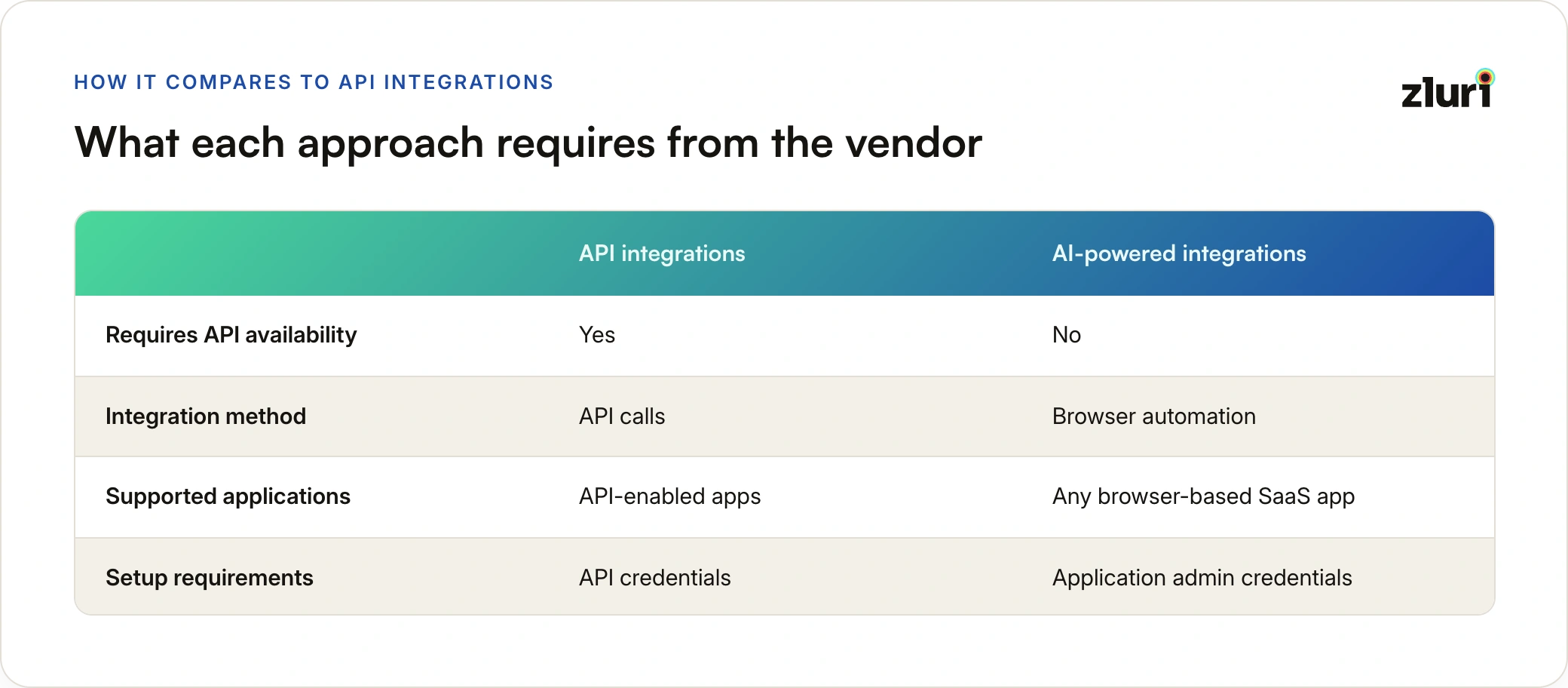
Once connected, the distinction stops mattering. An app connected through AI-powered integration shows up in the same workflows, automations, and access governance features as an API-connected one.
Security and Guardrails
Handing any system your admin credentials is a decision worth scrutinizing, so it's worth being specific about how this is protected.
Credentials provided during setup are stored in a protected credential vault: encrypted at rest, securely managed, and accessible only to authorized automation processes. They're never exposed to people or used outside the defined automation.
Beyond credential storage, two safeguards govern what the automation is allowed to do:
- Validation checks before every action. Zluri verifies the state of the application before executing changes, rather than acting blind.
- Guardrails against unintended operations. The automation can only perform the administrative actions it was configured for. Flexibility in reading the interface doesn't translate into freedom to act outside policy.
The AI adapts to what the screen looks like. It doesn't decide what to do. Actions stay within the administrative privileges and policies you defined.
Setting It Up
Setup follows the same flow as any other Zluri integration:
- Find the application in the Zluri Integrations Catalog.
- Select the capabilities you need: user discovery, provisioning, deprovisioning, role and permission management.
- Provide administrator credentials with the permissions required for those actions. These go straight into the credential vault.
- Authorize the connection. Zluri validates the credentials, checks account permissions, and confirms it can reach the application interface.
- Done. The integration goes active, and the app appears in Zluri like any other connected application.
From there, Zluri runs controlled automation sessions against the app's interface, and the results sync back to the platform, where your existing workflows take over.
One Less Reason for a Governance Gap
The no-API app used to be a permanent exception: a line in the audit report explaining why one system gets reviewed by hand. AI-powered integrations remove the exception. Combined with the Universal Identity Connector on the on-prem side, the practical answer to "can Zluri govern this app" is now yes, regardless of what the vendor exposes.
Frequently Asked Questions
Does this require installing anything on employee devices?
No. AI-powered integrations run on Zluri's side, against the application's own web interface, using administrator credentials. Nothing is installed on any employee's laptop or browser.
Which apps can be connected this way?
Any browser-based SaaS application with an administrator interface. That includes apps with no API, apps whose API is restricted to higher pricing tiers, and apps whose API doesn't support the actions you need.
What happens when the vendor redesigns their interface?
This is where the AI component matters. Instead of relying on fixed screen positions, the automation interprets interface elements dynamically and adapts when layouts change.
Are the credentials safe?
Credentials are stored in a protected vault, encrypted at rest, and accessible only to authorized automation processes. Validation checks and guardrails ensure automation stays within the permissions and policies you configured.
Do these apps get the same governance features as API-connected apps?
Yes. Once connected, the application participates in the same discovery, lifecycle workflows, automations, and access governance features as any API-based integration.


.svg)











