


At 70 people and growing, you're in the gap that every mid-market tooling list ignores. Full HRIS platforms are priced for enterprises and do far more than you need. Infrastructure tools like Terraform and Ansible can handle the provisioning logic but require you to build and maintain every workflow yourself. HR onboarding tools handle paperwork and culture content but don't touch GitHub organizations, AWS accounts, or Slack workspaces. Manual provisioning works until it doesn't — and for technical hires where day-one access matters, "doesn't" happens faster than you'd expect.
What Teams at This Size Are Actually Using
The thread surfaced the realistic range of what 50–200 person companies have actually built or bought, and the pattern is consistent with what most IT teams in this range experience.
PowerShell Universal or custom PowerShell scripts came up repeatedly. One commenter described building a custom tool on PowerShell Universal; several others mentioned scripts as their baseline. At this size, a well-maintained PowerShell script that creates an AD account, assigns groups, and triggers downstream provisioning is functional — the limitation is the same as in every provisioning script thread: third-party app access is the hard part. Creating an AD account is one API call. Provisioning GitHub org membership, AWS account access, and Slack workspace invitations are three more, each with their own authentication patterns and permission models.
Power Automate with MS Forms was described by one commenter as their working setup: form submission with user details, department, role, and special folders; a Teams approval card for IT to review; and Power Automate creating the account from the form variables. Clean and functional for Microsoft-stack environments, with the same ceiling as custom scripts when non-Microsoft applications need provisioning.
n8n came up as a genuinely interesting option for teams comfortable with APIs. Two commenters described using it, with one noting it can automate "about anything" if you're comfortable with the API layer. The honest caveat from the team actively building with it: the easy parts (form → user creation → group assignment → notifications) took a couple of months to get working well. Third-party app access is where it gets complicated — and the SCIM paywall issue that one commenter flagged is real: many vendors put SCIM provisioning behind enterprise tiers, which means n8n workflows end up calling custom API endpoints rather than standard provisioning flows.
Okta or Entra ID with dynamic groups comes up as the medium-company recommendation from the IAM practitioner in the thread — the combination that handles identity and SSO-connected app provisioning without the overhead of an enterprise IGA deployment. For teams that can get applications behind SSO, group membership in Okta or Entra ID drives provisioning automatically. The gap is applications outside SSO coverage and the access request workflow for anything beyond the standard entitlement set.
Jumpcloud gets mentioned as an option in the 50–200 range that handles directory, SSO, and some MDM without Okta's complexity and cost. For primarily non-Microsoft environments, it's worth evaluating alongside Okta and Entra.
The commenter who described their situation most honestly: their HRIS and identity management platform handle user account creation, password setup, email provisioning, and M365 licensing. The last piece — application access beyond the standard set — requires a manual ticket from the manager. The project to automate further would cost more time than the manual process currently takes. At 20 people with diverse roles, that calculation is accurate. At 70 people growing rapidly, it shifts.
The Three Gaps That Manual Processes Leave Open

For technical hiring specifically, three gaps show up consistently as the team scales.
Per-application provisioning for developer tools. GitHub org invitation, repository access with the right permission level, AWS account assignment, Slack workspace provisioning, and Google Workspace group membership are each their own operation. Doing them manually for every new developer hire takes 15–30 minutes at minimum, assumes IT knows which GitHub repos and AWS accounts are relevant to the new hire's role, and produces no audit trail of what was provisioned and when. As the engineering team grows, the combination of time cost and access inconsistency compounds.
Role-specific access without a role definition problem. One commenter in the thread identified the real challenge: teams have diverse roles, and "some sort of universal onboarding isn't going to help." This is accurate as a description of the problem but not as a reason automation can't help. The answer isn't universal onboarding — it's role-based onboarding, where conditional logic determines which applications get provisioned based on department, role, and sometimes team. IF Role = "Software Engineer" AND Department = "Platform" → provision specific GitHub organizations, AWS accounts with specific IAM role assignments, and the internal tooling relevant to that team. The conditional logic requires upfront definition work, but once defined, it runs automatically for every subsequent hire in that role.
The third-party access gap at offboarding. Manual provisioning creates an invisible access map — IT provisioned the standard set, and managers requested exceptions via tickets over time. When someone leaves, neither IT nor the manager has a reliable record of everything that person actually had access to. GitHub organization membership, AWS accounts, and SaaS tools provisioned via informal requests don't get cleaned up reliably through a manual offboarding process. That's where orphaned accounts accumulate.
How Purpose-Built IGA Handles Developer Tool Provisioning
The alternative to custom scripts and Power Automate flows is a provisioning platform with pre-built integrations for the specific applications technical hires need — one that connects the HRIS event to GitHub, AWS, Slack, and Google Workspace without requiring a custom workflow for each.
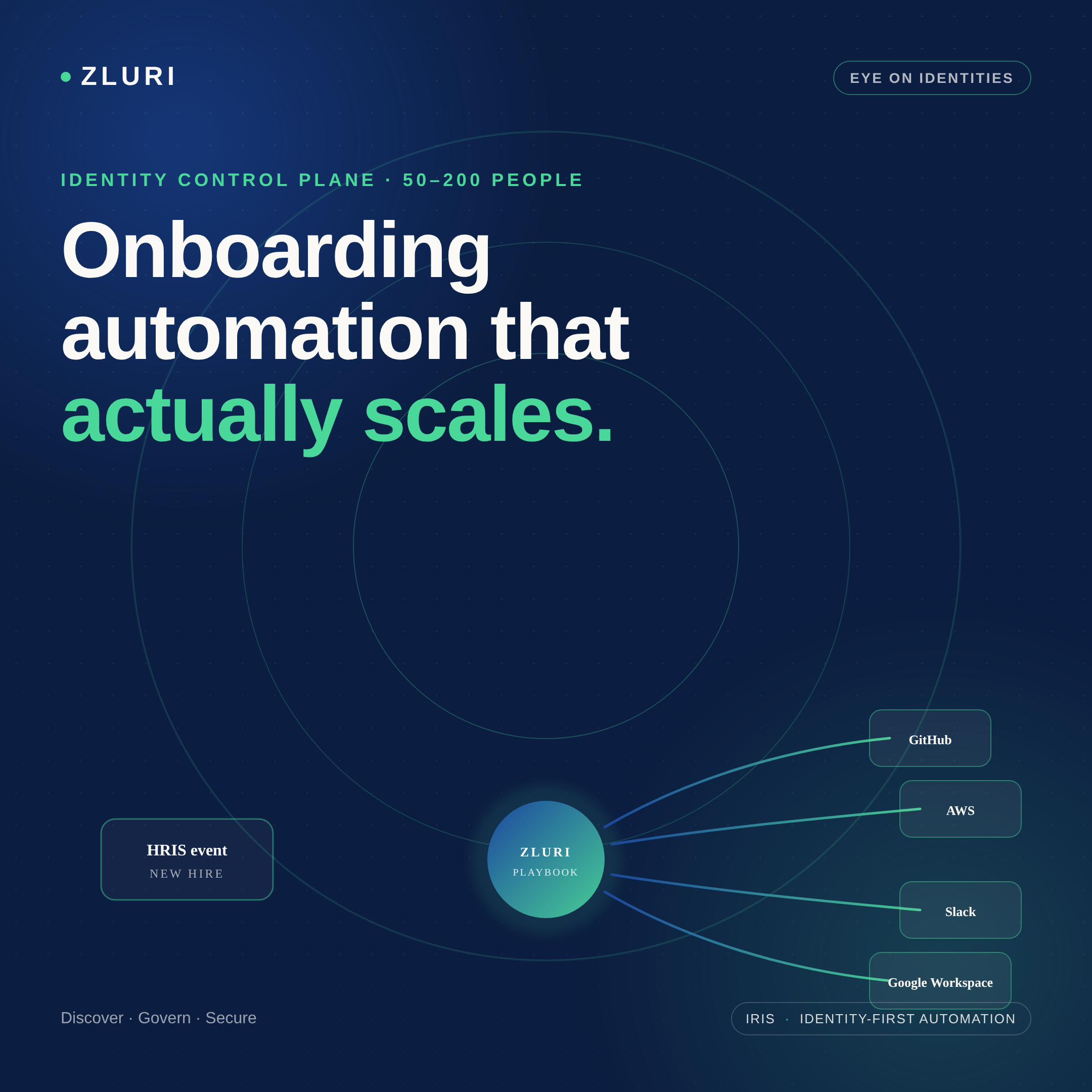
Zluri has direct API integrations with over 300 applications, including the developer tools described in the original post. When a new engineer is added to the HRIS, Zero Touch Onboarding detects the event and triggers a role-specific playbook. For a software engineer role, that playbook automatically sends the GitHub organization invite and assigns the user to the relevant repositories with the correct permission level (Triage, Write, Maintain, depending on the role configuration). Slack provisioning adds the user to role-relevant channels automatically. Google Workspace group assignment and license tier happen in the same workflow. AWS access provisioning runs through the same sequence.
The conditional logic that handles role diversity — IF Role = "Backend Engineer" versus IF Role = "Data Engineer" — is configured once in the automation rules layer and applies to every subsequent hire in that role without rebuilding the workflow. Diverse teams with different access requirements aren't a reason automation can't work; they're the reason conditional logic exists.
For applications without direct API support — internal databases, custom tools, legacy systems — the playbook generates an automated manual task routed to the appropriate owner. The task is tracked, the completion is logged, and the full provisioning record (automated and manual steps combined) is available in the audit trail. At offboarding, the same discovery and playbook architecture ensures the full access scope — including applications IT didn't explicitly provision — gets addressed rather than leaving orphaned accounts behind.

When to Build vs. When to Buy
The commenter who provided the most calibrated advice in the thread said it directly: the automation versus manual trade-off depends on the number of hires, role diversity, and how integrated your systems already are. For teams doing one or two technical hires a month with varied roles, the build cost of full automation may genuinely exceed the manual cost — at least until the hiring velocity increases.
The calculation shifts when any of three things are true: hiring velocity increases enough that manual provisioning is consistently taking IT time that should go elsewhere; role diversity is manageable enough that conditional logic can cover the major cases; or offboarding coverage becomes a security or compliance concern that manual processes can't reliably address.
At 70 people growing, the right starting point is usually not full IGA deployment — it's identifying the highest-friction provisioning steps (typically the developer tools described in the original post) and automating those first, whether through n8n, Power Automate, Okta dynamic groups, or a purpose-built integration platform. The architecture scales from there as hiring velocity and role standardization increase.
Frequently Asked Questions
What is the best employee onboarding automation tool for a 50–200 person company?
It depends on your existing stack and technical appetite. Power Automate with MS Forms works well for Microsoft-centric environments with moderate complexity. n8n offers broad automation capability for teams comfortable with APIs. Okta or Entra ID with dynamic groups handles SSO-connected app provisioning without full IGA overhead. Purpose-built IGA platforms like Zluri cover developer tools (GitHub, AWS, Slack, Google Workspace) with pre-built integrations and conditional role logic without custom scripting.
How do you automate GitHub, AWS, and Slack provisioning for new developer hires?
Each platform has an API that supports automated provisioning. Options include custom scripts (PowerShell or Python), workflow automation tools (Power Automate, n8n), or IGA platforms with pre-built integrations for developer tools. IGA platforms handle all three within a single onboarding playbook triggered by an HRIS event, with role-based conditional logic determining repository access levels, AWS account assignments, and Slack channel membership.
Is Terraform or Ansible a good choice for employee access provisioning?
Infrastructure-as-code tools can handle provisioning logic but require you to build every workflow yourself — they don't come with pre-built integrations for SaaS applications like GitHub, Slack, or Google Workspace. They're well-suited for cloud infrastructure provisioning but less practical for SaaS access management, where the tooling needs to handle approvals, audit trails, and access reviews in addition to the provisioning action.
How do you handle onboarding automation when every employee has a slightly different role?
Role-based conditional logic — IF Department = X AND Role = Y, THEN provision these specific applications with these specific permission levels — is the standard approach. It requires upfront definition work to map roles to access profiles, but once configured it runs automatically for every hire in each role. Universal onboarding handles the standard set; conditional logic handles the role-specific additions.
What's the SCIM paywall problem and how do you work around it?
Many SaaS vendors put SCIM provisioning (the standard that enables automated user lifecycle management) behind enterprise pricing tiers. This means smaller companies either pay for enterprise plans to get SCIM, build custom API integrations for each application, or use a provisioning platform that abstracts the integration layer. IGA platforms maintain these integrations centrally, so the per-application API complexity doesn't fall on the IT team.
See How Zluri Handles Developer Tool Provisioning for Growing Technical Teams
Most engineering teams at the 50–200 person stage discover the provisioning gap when a new hire's access request takes longer than their hardware setup. See how Zluri's role-based onboarding playbooks handle GitHub, AWS, Slack, and Google Workspace provisioning — and what the configuration looks like for a team with diverse technical roles.



.svg)













