


SaaS user management is really two problems stacked on top of each other. First: who actually is this person, according to which source, when sources disagree? Second: what SaaS applications does that person actually use, discovered through which system, holding what license, and is the relationship still legitimate? Get the first one wrong and everything built on top of it is unreliable. Get the second one wrong and license spend, security exposure, and shadow IT visibility stop reflecting reality.
Every organization pulls user data from multiple places: an HRMS, an SSO provider, maybe a second SSO for a subsidiary, direct app integrations. Those sources don't always agree. A name spelled differently, a status that's active in one system and inactive in another, a department that changed in HR but hasn't propagated anywhere else.
That's only half the picture. Even with an accurate user record, there's a separate question underneath it: for every person, which SaaS applications are they actually using, discovered through which system, holding what license, and is that specific relationship still legitimate. Multiply one person's answer to that question by every application they touch, then by every person in the organization, and you get the real shape of SaaS sprawl, a problem that isn't really about identities at all. It's about the accuracy of the connective tissue between identities and applications.
This piece covers both halves: how Zluri builds one trustworthy user record from multiple disagreeing sources, and how it discovers, prioritizes, and monitors every relationship that record has with the applications it actually touches.
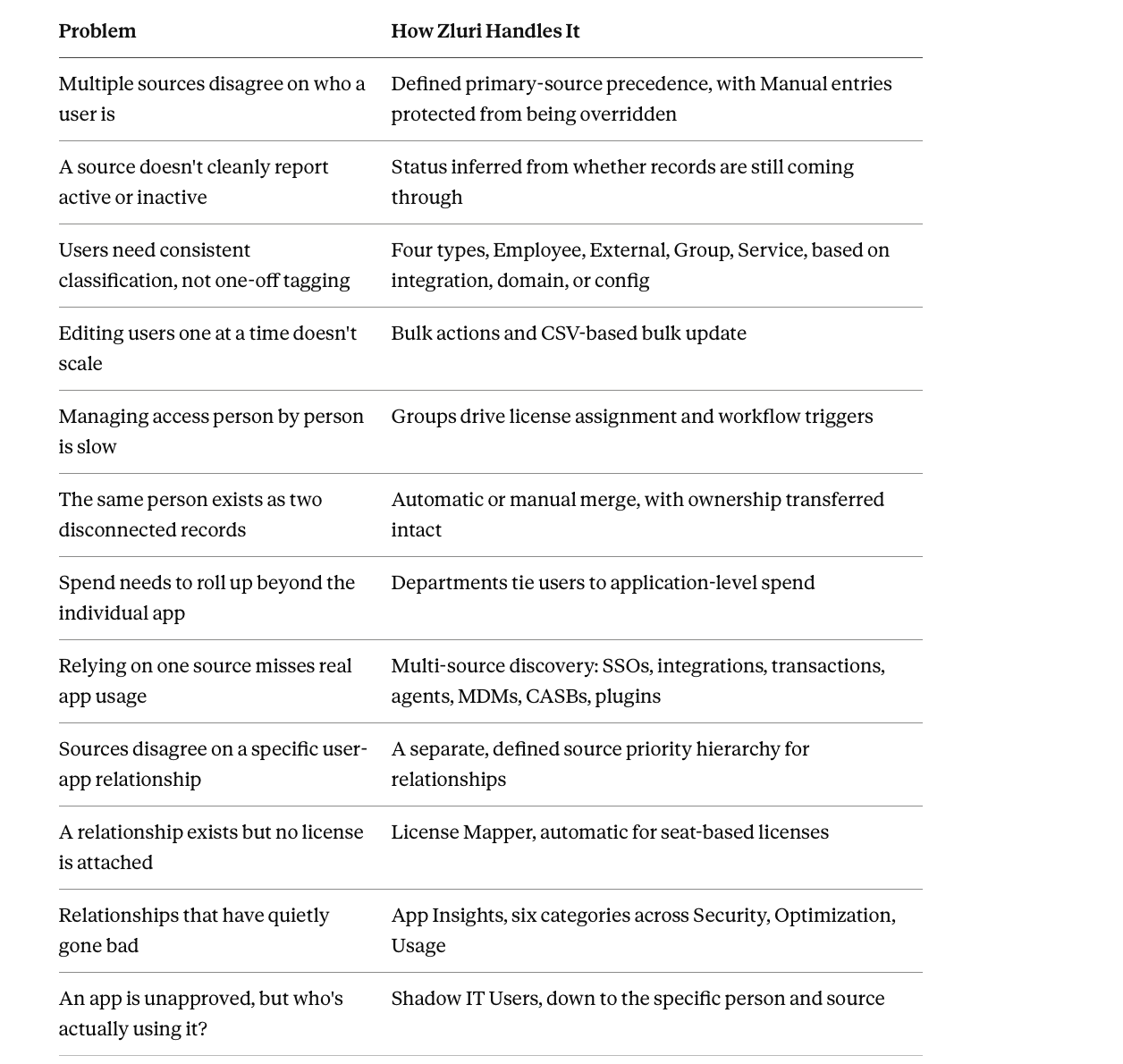
At a glance, before the detail:
Part One: Getting the User Record Right
One User Record, Built From Multiple Sources With a Defined Precedence
Manual corrections don't get silently overwritten. Every user's data gets assembled from whichever sources detect them, and where sources disagree, precedence determines what wins. Manually added or manually updated users default to Manual as their primary source, and that designation sticks, a later integration sync can't silently override a manual correction.
Beyond that, precedence generally favors the first source a user was actually discovered from, though multiple primary sources can be configured with an explicit priority order where an organization runs more than one SSO or HRMS. A user appearing in both a primary Google Workspace and a secondary Okta, for instance, resolves to whichever source is actually configured as higher priority, with users only in the secondary source resolving to that source instead.
Status Derived From the Source That Actually Governs It
Status follows the same precedence logic identity data does. A user's active or inactive status is driven by whatever their primary source reports. Where that source doesn't directly expose a status field, Zluri infers it: active if records are still coming through and the available status field says active, inactive if the source stops reporting the user or explicitly flags them inactive.
Categorization That Reflects How the Organization Actually Works
Classification adapts to the source, not a single rigid rule. Users get classified into four types, Employee, External, Group, and Service, based on the connected integration, email domain, or a specific configuration. Employee versus External distinctions can key off specific patterns in an email address, a contractor or vendor account often carries a distinguishing marker that a domain or pattern-based rule catches automatically as new accounts appear, rather than requiring a manually-maintained list to be updated every time.
Manual overrides hold under specific conditions. A user manually classified as Employee stays that way unless their primary source is genuinely Manual, otherwise the next sync can revert a manual correction that wasn't actually meant to be permanent.
The Individual User Profile as a Real Operational View
A profile traces cost and usage back to specific apps, not just a total. Opening a specific user surfaces actively used apps for the current month with month-over-month change, average monthly spend and its trend, monthly cost based on actual contract terms, total apps used, average usage sourced from SSO data, and status, designation, and department alongside onboarding date. App-wise spend and app-wise usage break the aggregate numbers down further.
Bulk Operations for Anything That Shouldn't Require One-by-One Handling
Multi-user actions and CSV-based edits replace opening records individually. Selecting multiple users from the list surfaces bulk actions: sending a prompt for browser or desktop agent installation, running an onboarding or offboarding playbook against the whole selection, or bulk editing shared attributes like status, department, or user type across everyone selected at once. For larger-scale data corrections, bulk update via CSV applies across many users' records simultaneously. The same mechanism works for updating Departments as well as Users, though it only updates existing records, it doesn't create new ones.
Groups as a Force Multiplier for License and Access Decisions
Groups let one action apply to many people at once. Groups sourced from connected identity providers give a way to act on many users based on shared role or department rather than individually. License assignment can run at the group level, automating consistent access for every current and future member. Group membership changes can also serve as workflow triggers, feeding into onboarding or offboarding automation based on someone joining or leaving a group, not just a formal HR event.
One caveat: group-level spend and cost figures can overlap where a user belongs to multiple groups, so they shouldn't be used to calculate total organizational spend. Application-level cost figures remain the accurate source for that number.
Merging Duplicate User Records Instead of Living With Fragmented Data
Merges consolidate data and transfer ownership, without deleting history. Where a user's primary email shows up as an alias of another user record, commonly from the same person being detected through more than one SSO with slightly different account details, Zluri merges them automatically, or a merge can be triggered manually. The target user's core metadata stays intact, the source user's applications, activity, and identifying attributes merge in with their original source tracked, and the source user's own emails become aliases on the merged record rather than disappearing. Ownership assignments, application, contract, and vendor ownership, transfer to the target user too.
Merges aren't reversible. The original source data isn't retained afterward, which is worth knowing before merging two records that might not actually be the same person.
Departments as the Organizational Layer Tying Users to Spend
Department assignment is what lets spend roll up beyond the individual app. Departments load from SSO, HRMS, or manual entry, and every user's department assignment is what lets application-level spend roll up into department-level figures. Budgets can be tracked against actual attributed spend directly, and where no manual budget is set, the department's actual spend serves as the effective baseline instead.
Part Two: Getting Every User-to-App Relationship Right
An accurate user record still leaves a separate question open: what applications does this person actually touch, and can that specific relationship be trusted.
Discovering What a User Actually Touches
No single source gets trusted alone. Every user-to-app relationship gets discovered through several channels working together: SSOs (Azure, Google Workspace, Okta, OneLogin, JumpCloud), direct application integrations, manual entry, transaction data, agents, MDMs, CASBs, and plugins. This matters specifically because relying on SSO discovery alone misses exactly the relationships an organization most needs visibility into: the app someone signed up for with a personal card and expensed later, the tool a team adopted without ever routing it through single sign-on.
Browser agents track presence, not content. Installed across Chrome, Edge, Firefox, and Brave, an agent identifies SaaS web apps by analyzing the URLs and titles of open tabs and aggregates a user's activity daily into a percentile score benchmarked against the rest of the org. Browser agents track that a tab was open and when, not browsing history, cookies, or page content. Because agents only see tab-level presence rather than authenticated, API-level activity, they sit deliberately at the bottom of the source-priority stack.
Resolving What Happens When Sources Disagree
A separate, defined hierarchy governs relationships, distinct from the user-record precedence above. Zluri resolves conflicting relationship data through a source priority hierarchy, highest to lowest:
- Manual entry or Workflow (whichever is marked primary)
- Direct integration
- SSO
- Indirect integration (if both a general admin console and the specific app itself are connected, the direct integration wins)
- Browser or desktop agents
Where two sources sit in the same tier, whichever was detected first becomes primary. Each tier derives status differently: SSO-sourced status infers active or inactive from whether the record keeps appearing, indirect integrations follow the same logic one level removed, and browser or desktop agents, when they're the only source for a given app, mark the relationship inactive after 30-plus days without detected use.
This hierarchy is fully visible and adjustable per application through the Sources column and a primary source override available from that app's three-dot menu.
This same mechanism explains the two most common "why is this number wrong" questions. An account showing Active despite no login in over a month is almost always an SSO-sourced relationship, since many SSOs report status off a single login event rather than continuous usage, fixed by connecting a direct integration where one exists. A user count that looks undercounted traces back to the identical root cause, SSO or agent-based discovery undercounting relative to what a direct integration would report.
Licenses, Attached to the Actual Relationship
Seat-based licenses map automatically. Quantity-based ones can't map to a person at all. Zluri's License Mapper auto-maps most seat-based licenses to their associated users directly from integration data, with anything an integration can't supply left for manual assignment, individually or in bulk via CSV. Quantity-based licenses, priced against a usage metric rather than a per-seat count, can't be assigned to an individual user at all, by definition.
Catching Relationships That Have Gone Bad
App Insights flags specific user-to-app relationships that have quietly become a problem, across six categories:
Security:
- Orphaned Access flags an active app account tied to a user who's actually inactive, the clearest possible signature of incomplete offboarding.
- Dormant Accounts flags no login activity for 30-plus days.
- Service Account Exposure flags shared or service accounts holding app access with no clear individual owner.
- Shadow IT Users flags people accessing an app through a source that was never formally approved.
Optimization:
- Unused Licenses flags licensed users inactive for 30-plus days.
- Undeprovisioned Licenses flags licenses still assigned to users who've actually departed.
- Suspended Users with License flags a suspended account still quietly consuming a paid seat.
- Users with Multiple Accounts flags duplicate or alias identities inside the same application.
Usage:
- New Users Detected surfaces anyone who's become active on an app in the last 30 days.
Shadow IT: The Relationship Nobody Approved
Knowing an app is unmanaged is different from knowing who's actually using it. An application's authorization status (Managed, Unmanaged, Restricted, Needs Review) separates approved apps from everything else, but the Shadow IT Users insight goes a layer deeper, identifying specifically which people are accessing an unapproved app through an unapproved source. Knowing "this app is Unmanaged" is a governance fact. Knowing "these fourteen specific people are using it, through these specific sources" is what actually lets someone act.
Why Both Halves Matter Separately
An account record can be perfectly accurate, correct status, correct type, correct department, while the picture of what SaaS apps that account actually touches is stale, duplicated, or missing entirely, because that picture depends on a completely different set of mechanics: which of several possible sources gets trusted, how recently each source last reported, and whether a license was ever actually mapped to the relationship at all.
Getting the account right is necessary but not sufficient. Getting the user-to-app relationship right is what actually determines whether license spend, security exposure, and shadow IT visibility reflect reality.
Book a demo to see one accurate user record, and every application relationship behind it, resolved from every connected source.
Frequently Asked Questions
Why does Zluri sometimes show a different active-user count than expected?
A few common causes: external users like contractors or vendors get counted even though they're not traditional employees, the same person tracked across multiple SSOs or systems can create ambiguity about which count is "correct," and group email addresses used for team distribution sometimes get counted as individual users. Checking the actual source breakdown for a specific user is usually what resolves the discrepancy.
Is the source priority for a user's identity the same as the source priority for their app relationships?
No, they're separate hierarchies. User-record precedence governs which source defines who a person is, their name, status, department. Relationship precedence separately governs which source defines whether a specific person-to-app connection is trustworthy, whether that's Manual, a direct integration, SSO, an indirect integration, or a browser agent.
Is merging two user records something that can be undone if it turns out they were actually different people?
No, merges aren't reversible, the original source-level data for the merged-away record isn't retained. This is worth real caution before merging, particularly for automatic merges triggered by alias detection.
Can every type of software license be assigned directly to an individual user?
No. Seat-based licenses can be mapped to individual users, either automatically or manually. Quantity-based licenses, priced against a usage metric like messages or emails sent rather than per seat, can't be assigned to a specific person by definition.
What's the actual difference between an app being flagged "Unmanaged" and a user being flagged under "Shadow IT Users"?
Unmanaged is a property of the application itself, it hasn't been approved or classified by IT. Shadow IT Users is more specific: it identifies which individual people are accessing that application through a source that was never sanctioned, which is the detail that actually enables a decision, formalizing the app as Managed or restricting it outright.
How is a Service account different from an External user in Zluri's classification?
External specifically means a real person who isn't a traditional employee, a contractor, vendor, or freelancer. Service accounts represent non-human, functional accounts, classified manually through bulk edit or automatically where a backend configuration handles Service/Group classification based on raw account data.


.svg)











