



Waiting on access usually means waiting on one specific person. Assign more than one approver to a request, and it resolves the moment any one of them acts, not once everyone's weighed in. That's what actually fast-tracks an access request, and it's a deliberate design, not a shortcut.
The most common reason an access request drags on has nothing to do with the app or the approval logic. It's that the one person who can approve it is out of office, in back-to-back meetings, or just slow to check their notifications.
Assigning a single approver to a request means the request waits on that person specifically. Assign more than one, whether that's a handful of named people or an entire group, and the request no longer depends on any single person's calendar.
Worth separating this from a related but different pattern: requests that need several different people to approve in sequence, a manager first, then a department head, then the security team, each looking at something different before the request is fully cleared. That's not what this piece is about. What's covered here is a single approval step with more than one possible approver, where speed comes from any one of them being able to act, not from requiring everyone to sign off. The sequential, everyone-must-approve pattern shows up later in this piece as a different tool for a different situation.
Why Multiple Approvers Speeds Things Up
Two ways this shows up in practice:
- Named approvers: whichever one acts first, approve or reject, is what gets recorded. The request doesn't wait for the others to weigh in.
- A group: every member gets notified at once, and the first approval or rejection from anyone in that group resolves the request.
Either way, the request clears as soon as one qualified person acts, approver A or approver B or approver C, not approver A and approver B and approver C all having to sign off first. That's the entire mechanism behind the speed: more approvers means more chances someone's actually available right now.
What Actually Makes This Fast
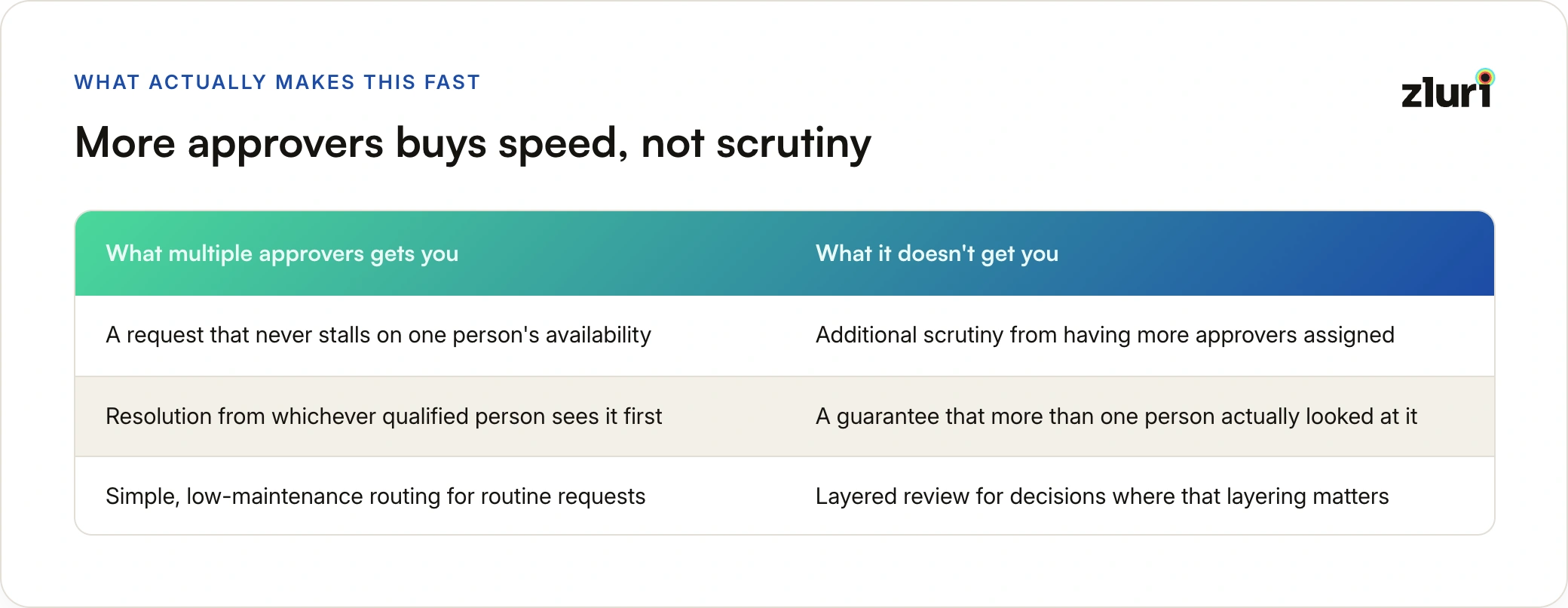
For routine, low or medium-risk requests, this trade-off is exactly right. If any member of a group like Finance Approvers is equally qualified to sign off on a standard finance-tool request, there's no benefit to waiting for a specific one of them, or requiring more than one to independently confirm the same low-stakes decision. Speed is the point, and multiple approvers is what delivers it.
When Fast Isn't What You Actually Want
The same setup that fast-tracks a routine request is the wrong tool for one that needs real scrutiny, sensitive roles, admin-level access, business-critical apps.
Adding more names to the approver list doesn't slow this down or add rigor, it's still just as fast. A step with five approvers assigned resolves the instant any one of them acts, exactly as quickly as a step with one approver. If the goal for a high-risk request is layered judgment rather than speed, more names on the same step won't get you there.
More approvers on one step buys you speed. Additional approval steps, each one the request has to clear in sequence, buys you scrutiny. A genuinely high-risk request needs the second thing, and stacking more names into the first one only makes it resolve just as fast as before, not more carefully.
Real layered review comes from a sequential approval chain instead. Each step is its own configured level, and a request has to clear one before it moves to the next: an App Owner confirms the request is legitimate at one step, then a Security approver independently confirms the access itself is appropriate at the next. Each individual step can still use the same fast, multi-approver logic internally, any qualified Security approver can clear that step, but the request now has to pass through both steps in order, not just get one person's sign-off from a combined pool.
Designing the Two Together
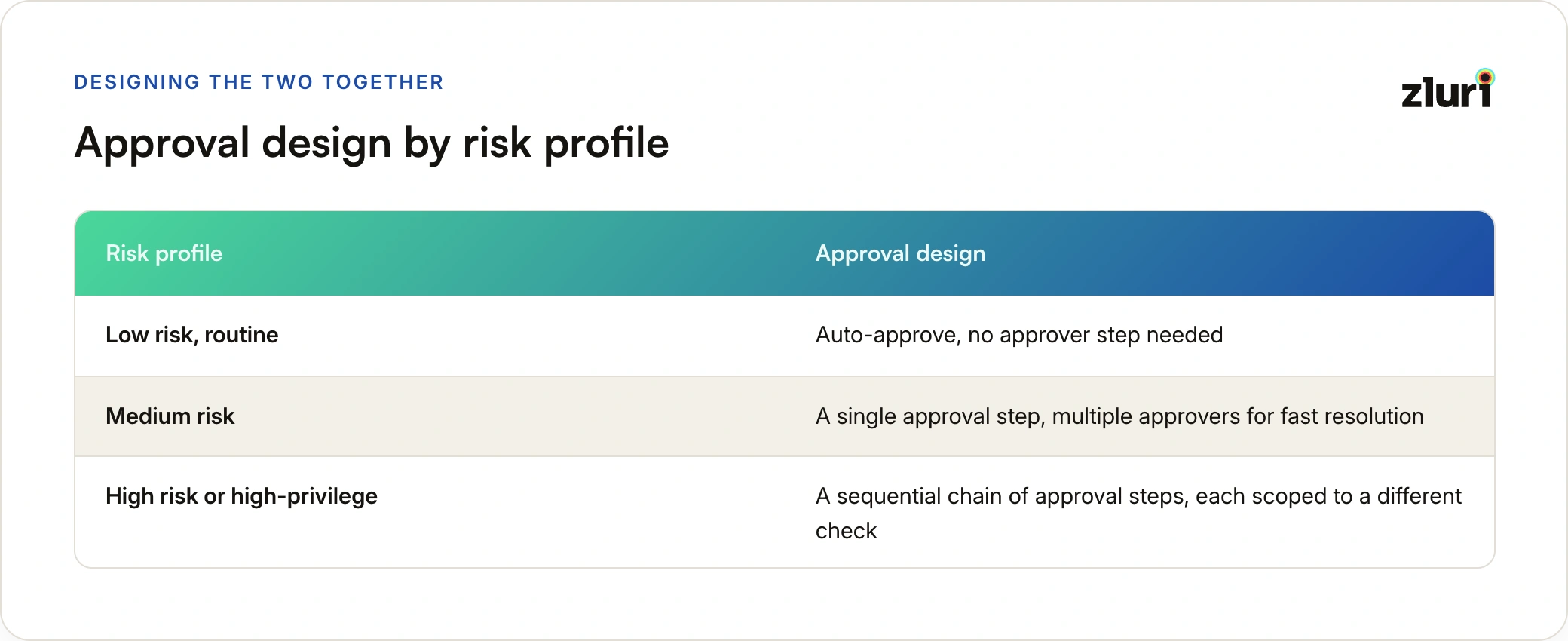
A dynamic role like App Owner or Reporting Manager works well inside either design, since it resolves to the right person automatically instead of relying on a hardcoded name that breaks when someone changes roles. The distinction that matters is how many steps the request has to clear, not how many names sit inside any one of them.
How This Works in Zluri
Both patterns are configured in the same place, inside an Automation Rule's approval step:
- Choose Initiate Approval Process, then click Add Approver.
- Assign Specific Users, a Zluri Role like App Owner or Reporting Manager, or a User Group, any of which resolves as soon as any one of them acts.
- To add a step rather than more names, repeat the Add Approver configuration for a second step, which the request has to clear separately before moving on.
The same rule structure works whether it's an application-specific rule or a general one, so a high-risk app can carry its own sequential approval chain without changing how routine apps are handled elsewhere.
Frequently Asked Questions
Why did my access request get approved so quickly?
If more than one person is assigned as an approver, whether a handful of named people or a group, the request resolves as soon as any one of them acts. It's not waiting on all of them, just whoever gets to it first.
Does assigning a group make a request more secure than assigning one person?
It makes it more resilient to one person being unavailable, since any qualified group member can act, which is what makes it fast. It doesn't add scrutiny beyond what a single approver would apply, because the request still resolves on one action, not a collective decision.
If I want a request to move faster, should I just add more approvers?
Yes, for routine and medium-risk requests, more approvers on the same step means more chances someone's available to act right away.
How do I actually get layered review for a high-risk request instead of just a fast one?
Use a sequential chain of approval steps, not more approvers on a single step. Each step has to clear before the request moves to the next, which is what produces genuine layered review instead of one fast decision from whoever responds first.



.svg)











