.png)




Most companies have an onboarding checklist and an offboarding checklist. Everything in between is a ticket and a prayer.
Your company manages two events in an employee's lifecycle: the day they start and the day they leave.
The 30+ access changes that happen between those bookends (promotions, transfers, projects, team changes) run on tickets and memory. "Hey, can someone give Sarah access to the Sales Slack channel?" becomes a three-day ticket when it should have happened automatically the moment HR changed her department to Sales.
This is user lifecycle management at most companies: provision on Day 1, ignore for years, deprovision on exit. The middle, where employees get promoted, transfer departments, join cross-functional projects, take parental leave, change managers, has no systematic process. Every change becomes an exception requiring manual intervention.
Over a typical 5-year tenure, an employee experiences 32+ access-impacting events. Most organizations systematically manage 2 of them (onboarding and offboarding). The remaining 30 events, representing 94% of the lifecycle, are handled reactively through tickets, Slack messages, and employee complaints. That's not lifecycle management. That's hoping nothing important gets forgotten.
The User Journey (Nobody Tracks)
Ask IT how many access changes happen during an employee's tenure, and they'll say "two: when they join and when they leave." Audit their actual access over time, and you'll find a completely different story.
The Typical 5-Year Employee Journey
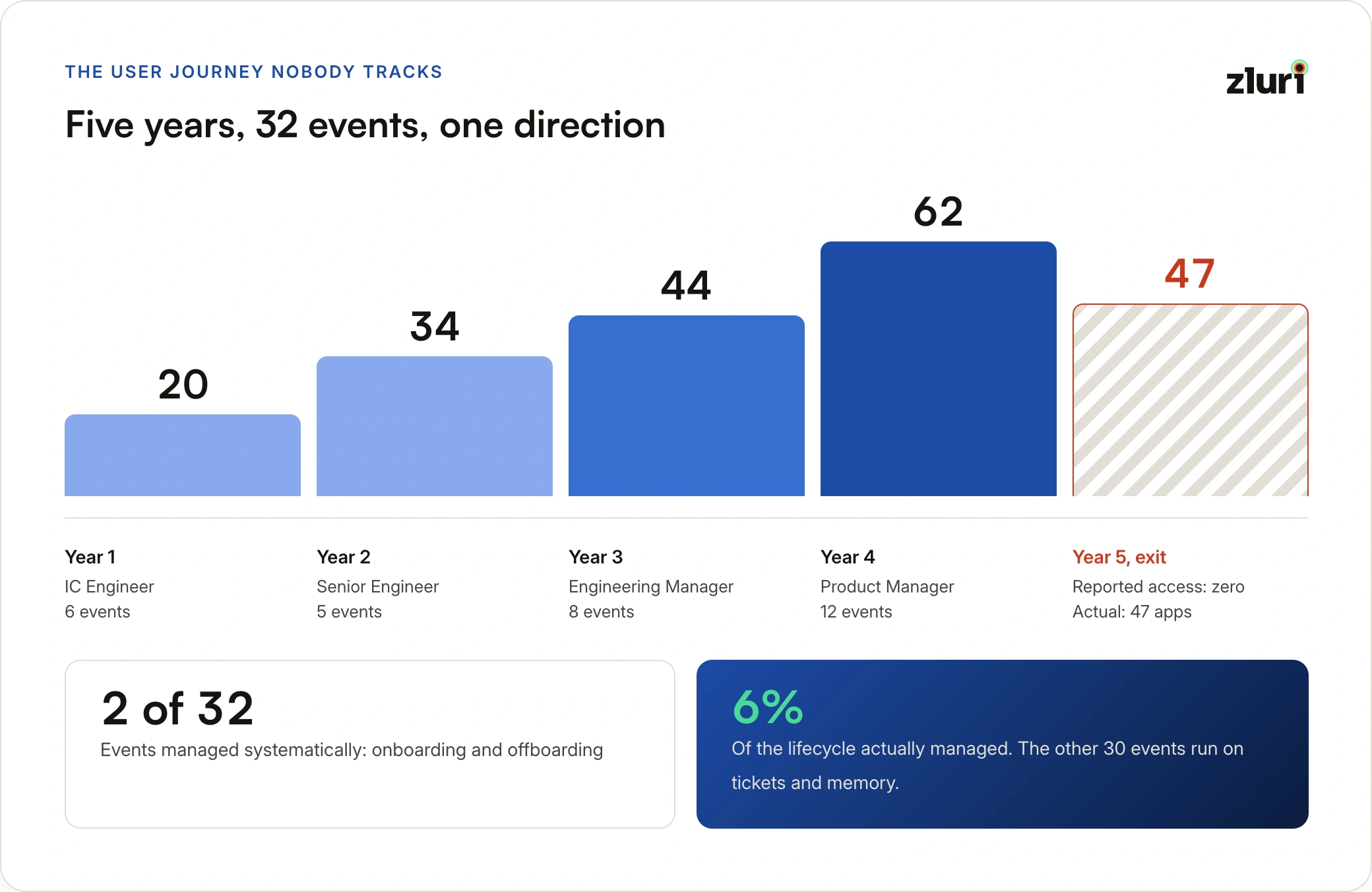
Year 1: IC Engineer — 6 events
Month 1, onboarding: The new hire starts. IT provisions around 20 apps: GitHub, Jira, Slack, cloud tools, and more. Access count: 20.
Month 4, first project: Assigned to a platform migration project. Three more tools added for infrastructure work. Access count: 23.
Month 8, team change: Moves from the Frontend team to the Platform team. Five Platform repositories added, three Frontend repositories removed (maybe, if IT remembers to remove them). Access count: 25.
Year 2: Promoted to Senior Engineer — 5 events
Month 13, promotion: Two additional apps granted (elevated monitoring access, incident management). GitHub permissions upgraded. Access count: 27.
Month 16, new project: Infrastructure redesign project kicks off. Four more tools added. Access count: 31.
Month 20, cross-team collaboration: Temporary support for the Mobile team. Three mobile-specific tools added, marked as temporary, but they become permanent because no one follows up. Access count: 34.
Year 3: Promoted to Engineering Manager — 8 events
Month 25, major role change: Moves from Senior Engineer to Engineering Manager. Five manager tools added: HR system access, budget system, performance management, recruiting. The five IC-specific tools (direct production access) should be removed. They aren't. Access count: 39.
Month 28, team growth: Team expands from 5 to 12 people. Two more collaboration tools added. Access count: 41.
Month 30, budget responsibility: Takes over team budget. Finance and procurement system access added. Access count: 42.
Month 33, on-call coverage: Two weeks of emergency on-call. Elevated incident access and emergency admin tools granted. Supposed to be temporary. Never revoked. Access count: 44.
Year 4: Department Transfer to Product — 12 events
Month 37, department transfer: Moves from Engineering Manager to Product Manager. Ten Product apps added (analytics, user research, roadmapping tools). Fifteen Engineering apps should be removed. Three actually get removed. Access count: 51.
Month 40–45: Three more project cycles. A new product launch, a partner integration, and a cross-functional Sales collaboration each add 3–4 more tools. Access count: 62.
Year 5: Exit — 1 event
Month 60, offboarding: Employee resigns. IT disables the SSO account. Reported access: zero. Actual access still available: 47 apps, because SSO being off doesn't mean OAuth sessions, API keys, and shared passwords were also revoked.
The full count: 32+ lifecycle events. IT managed 2 of them systematically. The other 30 ran on tickets and Slack messages.
What Organizations Actually Manage
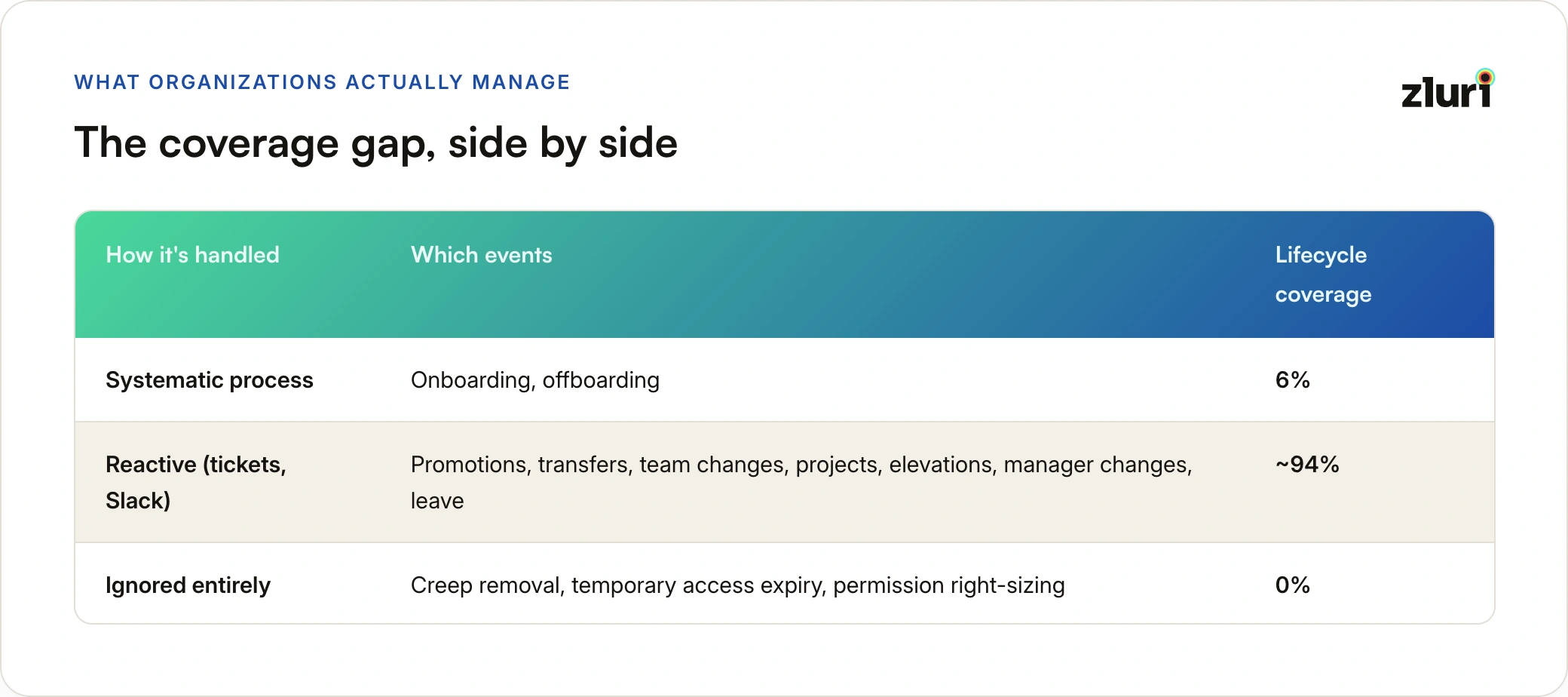
Two events get a real process: onboarding (IT has a checklist) and offboarding (IT has a checklist).
Everything in between is reactive. Promotions, transfers, team changes, project assignments, temporary access elevations, manager changes, and leave events all land as tickets or informal requests, if they land at all.
And one category is almost entirely ignored: cleanup. Access that should be removed when a project ends, temporary access that was supposed to expire, permission levels that no longer match the person's actual role. These never get systematically reviewed. The result is privilege creep: access that accumulates silently over years.
The math: 2 managed events out of 32 total = 6% of the lifecycle actually managed.
The Six User States (That Require Different Access)
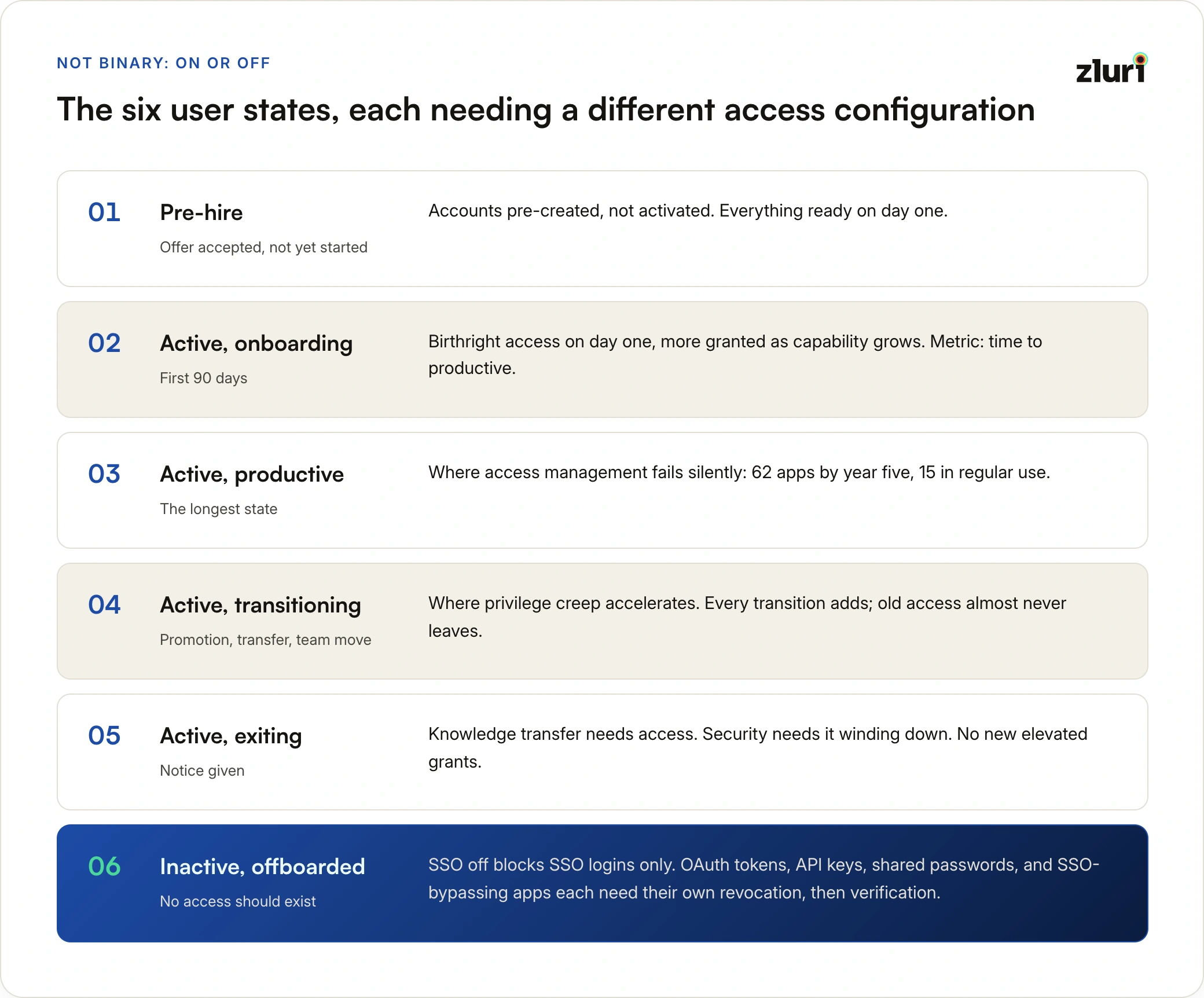
Most organizations treat access as binary: employed means access on, departed means access off. The reality is more nuanced. Users move through six distinct states across their tenure, and each state requires a different access configuration.
State 1: Pre-Hire
What it is: Offer accepted, start date set, person hasn't walked in yet.
What should happen: HR enters the new hire into the HR system. IT receives an automatic notification. Accounts get pre-created (but not yet activated). Equipment is ordered. The manager is briefed. On Day 1, everything is ready.
What actually happens: HR posts in Slack two days before the start date: "Welcome Sarah, she starts Monday!" IT sees it, scrambles over the weekend. Monday morning: the new hire sits and waits two or three days for basic access.
The difference between a prepared and unprepared start isn't just about first impressions. It's about whether someone can be productive in week one or week three.
State 2: Active — Onboarding
What it is: First 90 days. The person is learning the role, the tools, the systems.
Access pattern: Week 1 covers core tools (email, Slack, shared drives). Weeks 2–4 bring role-specific tools. Month 2 adds team-specific resources. By month 3, the person should have everything they need for full productivity.
What should happen: Day 1 access covers everything they definitely need (birthright access). Additional access gets granted as they progress, matching their growing capability and responsibility.
What actually happens: Day 1 access is partial. The new hire spends two to three weeks submitting access requests. Eventually stops asking and works around the gaps. Never gets some access they actually needed.
The success metric: Time to productive. Under a week is good. Four weeks or more means the onboarding process is broken.
State 3: Active — Productive (Steady State)
What it is: The longest state. The person is established, doing the job, and their access should be stable.
What should happen: Access stays appropriate for the role. Unused access gets flagged and removed on a regular cycle. Temporary access expires automatically. Permissions match actual usage, not historical accumulation.
What actually happens: Access accumulates continuously. Nothing gets removed unless an employee complains it's confusing. There's no systematic review. Five years in, someone has 62 apps and uses 15 of them regularly.
The access creep pattern is consistent across organizations:
Year 1: 20 apps (all appropriate). Year 2: 28 apps (+8 new, nothing removed). Year 3: 38 apps. Year 4: 51 apps. Year 5: 62 apps.
This is the state where most employees spend most of their career, and where access management fails silently. The risk accumulates invisibly until an audit or an incident makes it visible.
State 4: Active — Transitioning
What it is: A major change is happening: a promotion, a department transfer, a team move. Access needs significant reconfiguration.
Promotion (IC to Manager):
- Add: Manager tools (HR system, budget system, performance management)
- Remove: IC direct access (production deployment, database admin)
- Adjust: Approval workflows. The person is now an approver, not a requester
Department transfer (Engineering to Product):
- Add: Product tools (analytics, user research, roadmapping)
- Remove: Engineering tools (CI/CD pipelines, infrastructure monitoring, ops tools)
- Keep: Shared tools (email, Slack, docs) but update channels and groups
Team change:
- Add: New team's repositories, projects, and collaboration spaces
- Remove: Old team's resources
- Keep: Shared engineering tools, adjust permission scope
What should happen: The HR system detects the change. An automated process calculates what access to add, remove, and adjust. Changes happen within hours. The manager reviews and confirms. The employee starts their new role with appropriate access, not their old access plus their new access stacked together.
What actually happens: HR updates the system. IT doesn't receive a notification (no integration). The employee submits access requests as they discover what they can't access. Old access is never removed. Six months later, a manager asks: "Why does Sarah still have Engineering admin access? She's been in Product for half a year."
This state is where privilege creep accelerates. Every transition adds new access. Old access almost never leaves.
State 5: Active — Exiting
What it is: Notice given. The person is wrapping up, transferring knowledge, and preparing to leave.
The tension: Knowledge transfer requires that the person retain some access during their notice period. Security requires that access start winding down. Most organizations handle this awkwardly, either cutting access too early and breaking knowledge transfer, or leaving full access until the last day and scrambling.
What should happen: From the day notice is given, no new elevated access is granted. Existing access stays in place for the notice period to enable handoffs. In the final days, access narrows to what's needed for final handover. On the last day, a full and verified deprovisioning runs: not just the SSO account, but everything.
What actually happens: IT scrambles on the last day. Some things get missed. The knowledge transfer was incomplete because IT cut access a day early, or there's a security gap because something was overlooked.
State 6: Inactive — Offboarded
What it is: Former employee. No access should exist anywhere.
The offboarding illusion: Most IT teams disable the SSO account and consider the job done. But SSO being off only blocks SSO-based logins. It doesn't touch OAuth tokens, API keys, shared account passwords, or applications that bypass SSO entirely.
A realistic post-offboarding audit typically finds: dozens of OAuth sessions still valid, multiple API keys still active, shared passwords unchanged across several systems, and a handful of applications still fully accessible.
Six months later, an audit flags the former employee as still having admin access to production systems. "But we disabled their account" is accurate, and insufficient.
Complete offboarding requires: SSO access revoked, all active application sessions terminated, OAuth tokens invalidated, API keys deleted, shared credentials rotated, all device storage wiped, and access removal verified by actually testing whether the former employee's credentials still work. The last step is the one almost no one does.
The 32+ Lifecycle Events (That Trigger Access Changes)
Not all lifecycle events carry the same weight. Some happen to everyone; some are role-specific; some are rare. But collectively, they add up to 30 or more unmanaged events per employee across a typical tenure.
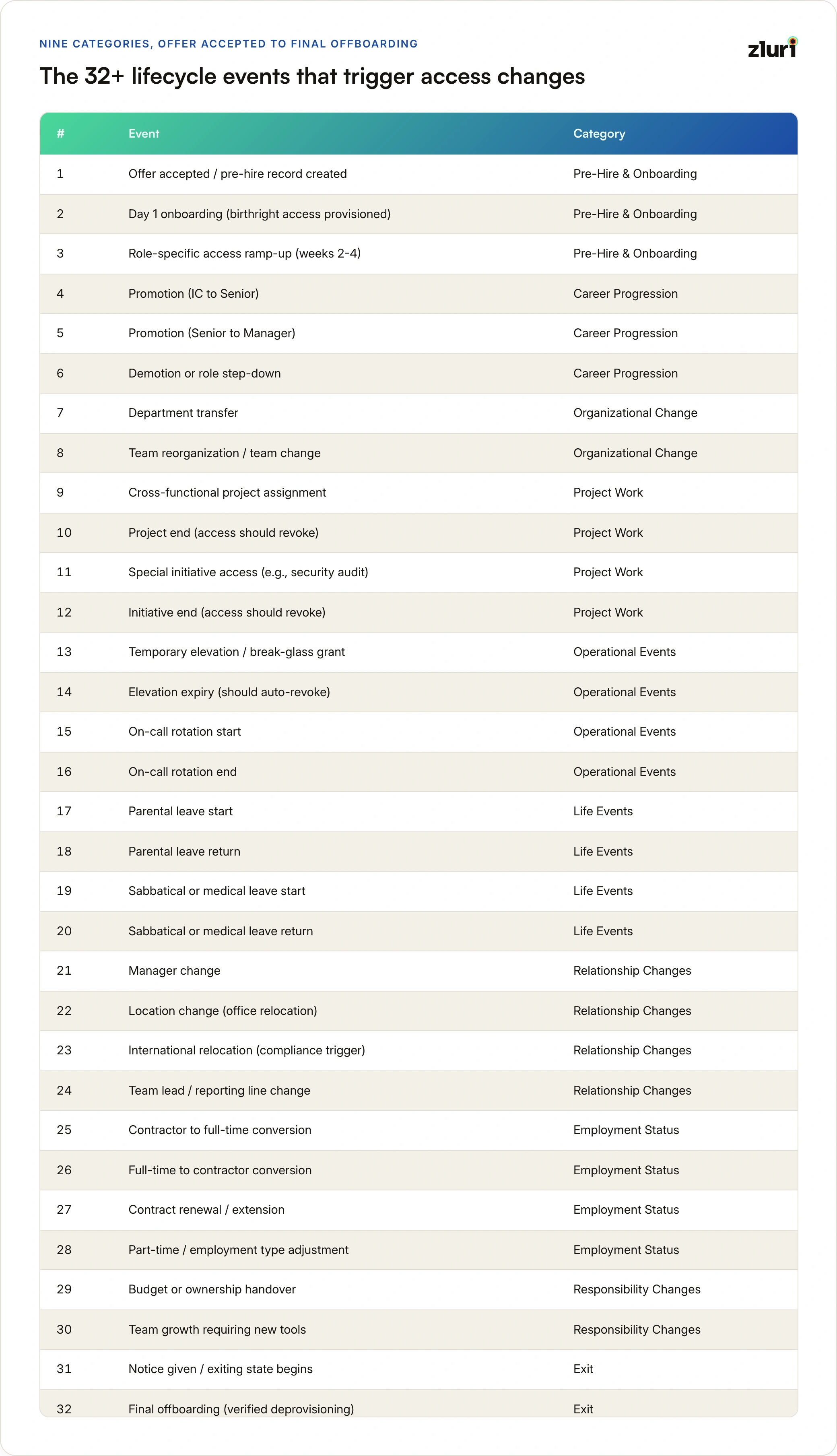
The 32 event types span nine categories, from the moment an offer is accepted to the final verified offboarding. Some, like temporary elevations and project assignments, recur multiple times a year; others, like a department transfer or a leave of absence, happen once or twice across an entire tenure. The full list, grouped by category:
Career Progression Events (2–3 per tenure)
Promotions happen roughly every 18 to 24 months. Each promotion adds elevated permissions but almost never removes the lower-tier access that's no longer appropriate. An IC engineer promoted to engineering manager should lose direct production access: managers review and approve, they don't execute deployments. In practice, they keep both sets of access.
Organizational Change Events (1–2 per tenure)
Department transfers are high-impact. A move from Engineering to Product should involve removing 15 or more Engineering-specific apps and adding 10 or more Product apps, a net reduction in total access. What actually happens: the 10 Product apps get added, 2 or 3 Engineering apps get removed, and the employee ends up with more total access than before the transfer.
Team reorganizations create orphaned access. When a team restructures, the old team's folders, repositories, and shared resources often remain accessible indefinitely.
Project Work Events (10–20 per tenure)
Cross-functional project assignments are the single largest source of access creep. A 90-day project requires temporary access to another team's tools. The access is granted. The project ends. No one removes the access. Two years later, the employee still has Salesforce access from a Sales Engineering collaboration they did in 2022.
Special initiatives follow the same pattern. A security audit requires vulnerability scanning tools for 30 days. The audit ends. The penetration testing tools remain on the employee's access profile for 18 months.
Operational Events (10–30 per tenure)
Temporary elevations are common in technical roles. A production incident requires elevated database access for four hours. The access is granted. The incident closes. The elevated access stays, because no one scheduled a revocation, and no automatic expiry was set. Eight months later, an auditor flags the standing database admin access on an account that has no business reason for it.
On-call rotations work the same way. A one-week on-call shift requires elevated monitoring and deployment access. The rotation ends. The access doesn't.
Life Events (1–2 per tenure)
Parental leave, sabbatical, and medical leave each create a state that most systems handle poorly. The right configuration: work tools suspended (the person isn't working), benefits tools kept active (the person still needs to manage healthcare and payroll), email at read-only access (to catch important notifications). Return date scheduled for automatic access restoration.
What actually happens: either the access stays fully active for three months (security gap) or it gets fully suspended and the employee has no way to check benefits or important messages during leave (operational failure). And the return is manual. IT has to remember to restore access when the person comes back.
Relationship Changes (2–4 per tenure)
Manager changes are invisible to most access systems. When a manager leaves or moves, approval workflows break. The next access request the employee submits gets routed to an account that no longer exists or is no longer the correct approver. The request sits unresolved.
Location changes, particularly international relocations, create compliance risk. An employee who moves from a US office to a European office may have data access that was appropriate under US data residency rules but creates a compliance issue under GDPR.
Total Event Count
.webp)
Across a 5-year tenure, the range is 32 to 133 access-impacting events depending on role, seniority, and how much cross-functional work the person does. The average, for a typical employee who moves through a few promotions and team changes, is 6 to 7 events per year.
For a company of 100 employees, that's 650 to 700 access-impacting events per year. Managed manually, that's 650 to 700 tickets. Managed through automation, it's 650 to 700 automatic executions: no tickets, no delays, no forgotten steps.
What User Lifecycle Automation Actually Requires
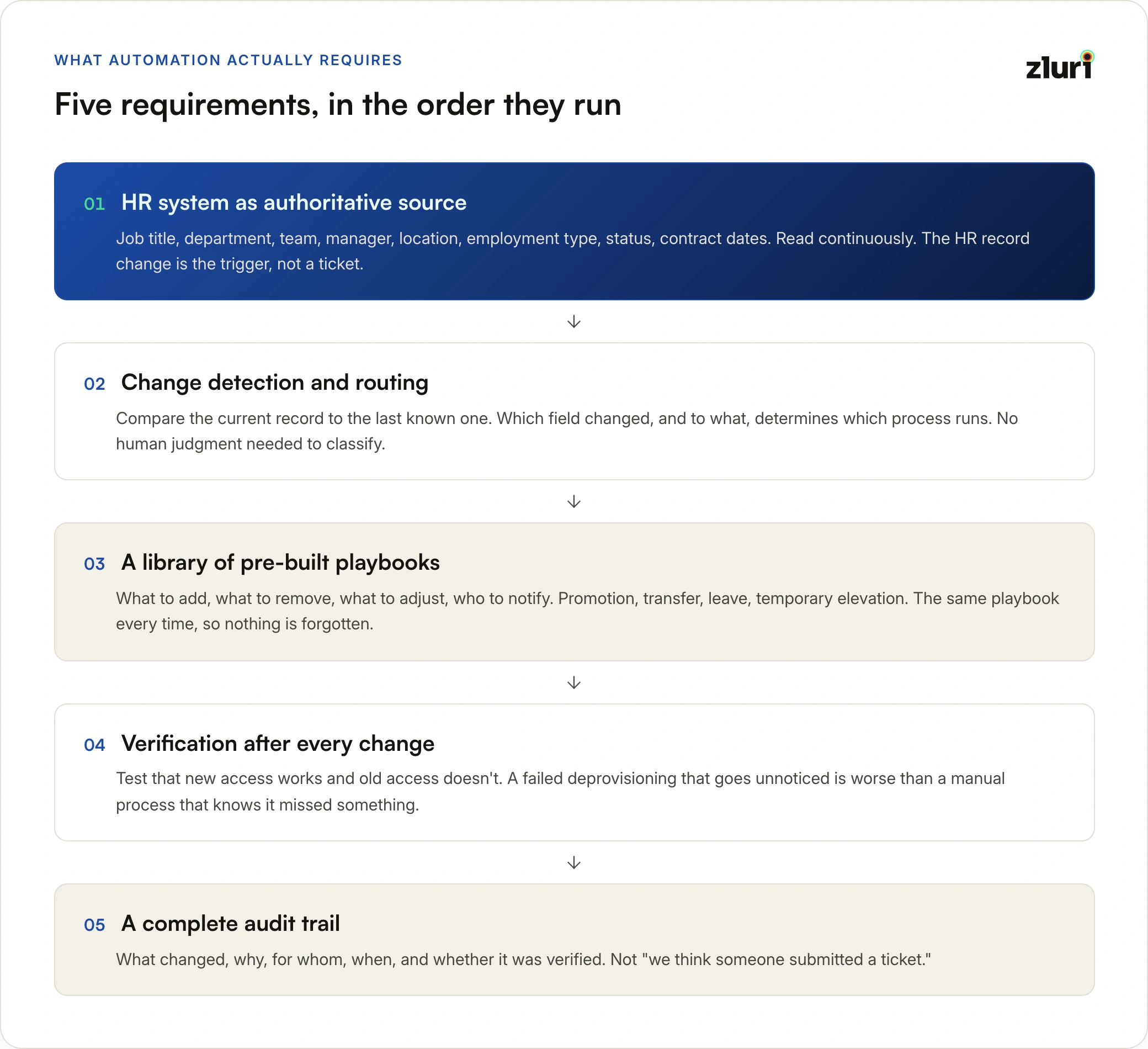
You can't manage 32+ events per employee manually at scale. The only viable approach is automation that triggers directly from HR system changes. Here's what that requires in plain terms.
Requirement 1: The HR System as the Authoritative Source
The HR system is where the ground truth lives. When HR promotes an employee, the HR record changes. When HR records a department transfer, the HR record changes. When HR marks someone as on leave or terminated, the HR record changes.
The core fields that drive access decisions are: employee ID, name, email, job title, department, team, reporting manager, location, employment type (full-time, contractor, intern), employment status (active, on leave, terminated), and contract dates.
The access management system needs to read these fields continuously: ideally in near real-time for critical events like terminations, and at minimum daily for everything else. When any of these fields change, the system needs to respond.
This is the foundational principle: HR data entry is the trigger for access changes. Not a ticket. Not a Slack message. Not an IT request. A change in the HR record.
Requirement 2: Detecting What Changed and Routing to the Right Response
When the HR system syncs, the access management system compares the current record to the last known record. The comparison identifies exactly what changed: Is this a promotion (level increased)? A demotion? A department transfer? A team change? A status change to terminated? A status change to leave?
Each type of change routes to a different response. A promotion triggers the promotion playbook. A department change triggers the transfer playbook. A termination triggers the offboarding playbook, immediately and at highest priority.
The logic doesn't require human judgment for the classification. The system looks at which field changed and what it changed to. That's enough to determine which process to run.
Requirement 3: A Library of Pre-Built Response Playbooks
Each type of lifecycle event has a defined playbook: a pre-built, tested sequence of access changes specific to that scenario. The playbook covers what to add, what to remove, what to adjust, and who to notify.
Promotion playbook: Identify the person's current access. Identify what the new role requires. Calculate the difference. Add what's missing. Remove what's no longer appropriate (particularly IC direct access when someone becomes a manager). Adjust permission levels where the role boundary changes. Notify the employee and new manager.
Department transfer playbook: Identify apps that are exclusive to the old department. Identify apps required by the new department. Identify shared apps that need reconfiguration (updating Slack channels, project group memberships, shared drives). Remove old department exclusives. Add new department apps. Adjust the shared tools. Transfer ownership of any resources the person owned (project boards, documentation). Notify both the old and new manager.
Leave of absence playbook: Suspend work applications. Keep benefits and HR portal access active. Set email to read-only. Schedule automatic access restoration for the confirmed return date. Notify the manager and HR.
Temporary elevation playbook: Validate the justification (incident ticket, approved request). Grant the elevated access. Set a hard expiry: two hours, four hours, eight hours, depending on the situation. Log everything done with the elevated access during the window. Auto-revoke when the timer expires or the incident is resolved. Produce a complete audit record.
Playbooks are repeatable and comprehensive. The same playbook runs for every promotion, every transfer, every on-call rotation. Nothing is forgotten because the playbook defines the complete set of steps.
Requirement 4: Verification After Every Change
Automation doesn't mean trusting that it worked. After every playbook runs, the system should verify that the changes actually took effect.
Was the new access granted? Test it: confirm the employee can log in to the newly provisioned tool. Was the old access removed? Test it: confirm the employee's credentials no longer work in the tool that should have been deprovisioned. Do the current permissions match the policy for this role? Compare them.
If any verification step fails, alert someone. A failed deprovisioning that goes unnoticed is worse than a manual process that at least knows it missed something.
Requirement 5: A Complete Audit Trail for Every Change
Every access change (addition, removal, adjustment) needs a timestamped record that answers: what changed, why it changed (which lifecycle event triggered it), who it changed for, when it changed, and whether the change was verified.
When an auditor asks "Why did Sarah's access change in March?" the answer shouldn't be "we think someone submitted a ticket." It should be a precise record: promotion detected from HR system on March 5th, promotion playbook executed, these apps added, these apps removed, verification passed, all logged.
This audit trail is what separates a compliant access management process from one that can't be proved.
The Metrics That Matter
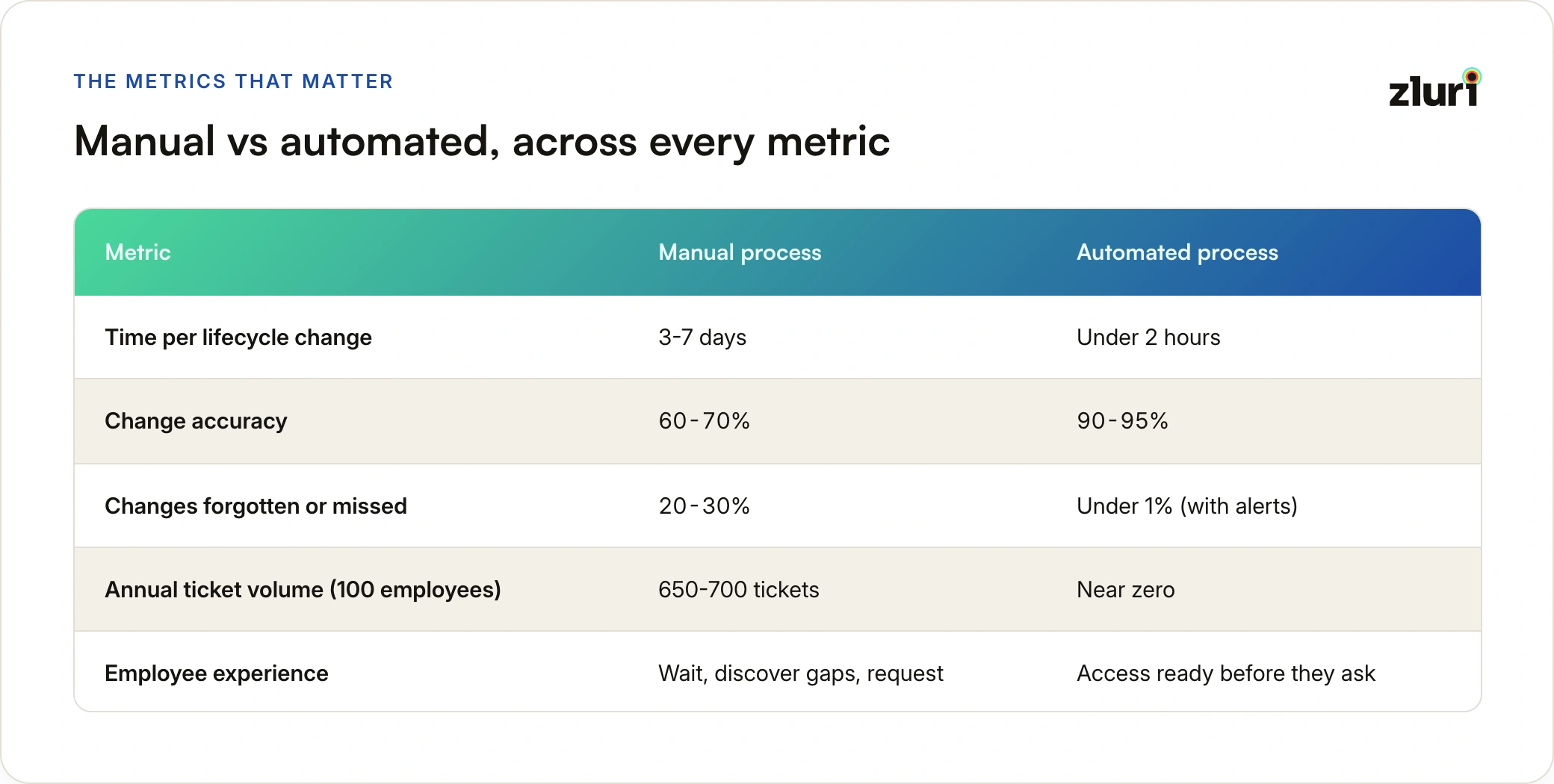
How many lifecycle events happen per year?
Low-change roles (stable position, few projects): 2–3 events per year. Typical employees: 5–7 events per year. High-change roles (leadership, cross-functional, lots of projects): 10–15 events per year. Average across most organizations: 6–7 events per employee per year.
For a 100-person company: roughly 650 access-impacting events per year that need to be handled.
How long does each event take to process?
Manual process: IT learns about the change (1–2 days). A ticket gets created (1 day). A manager approves (1–2 days). IT provisions (1–2 days). Total: 3–7 days per change.
Automated process: HR system change detected (real-time or within 24 hours). Policy evaluated and playbook selected (seconds). Access changes executed via system integrations (15–60 minutes). Verification runs (5–10 minutes). Total: under 2 hours.
Time reduction: over 95%.
How accurate is each approach?
Manual: Around 20–30% of lifecycle changes result in something being forgotten, usually removing old access or adjusting permission levels. Overall accuracy: 60–70%.
Automated: Policy-driven execution with verification catches most errors. Accuracy: 90–95%.
What's the failure rate?
Manual: 20–30% of lifecycle changes that should happen don't happen. Access that should be removed stays. Temporary access becomes permanent. The risk accumulates silently.
Automated: Less than 1% failure rate, and failures generate alerts rather than disappearing into the background.
What does this mean for employee experience?
Manual: Employees wait days for access when their role changes. They discover missing access by running into blocked workflows. They submit tickets and wait. Access management is a friction point.
Automated: Access updates automatically when the lifecycle change happens. An employee promoted on Friday has the right access on Monday morning without submitting a single ticket. The goal is zero access-related tickets: not because IT is faster, but because there's nothing to request.
How Zluri Handles User Lifecycle
.webp)
The HR System as Lifecycle Trigger
Every lifecycle process in Zluri starts with an HR system change, not an IT ticket.
HR enters a promotion. Zluri detects it. Access is adjusted automatically. HR records a department transfer. Zluri detects it. Access is updated: old department apps removed, new department apps provisioned. HR marks someone as terminated. Zluri detects it immediately. Full offboarding executes.
IT doesn't need to create a ticket, monitor a Slack channel, or run a manual process. The HR system change is the trigger. Everything that follows is automatic.
20+ Pre-Built Lifecycle Playbooks
Zluri ships a playbook library covering the full range of lifecycle events: promotion, demotion, department transfer, team change, project assignment (time-bound), temporary elevation (break-glass), on-call rotation, leave of absence (with automatic return-date restoration), contract extension, manager change, location change, employment type change, contractor to full-time conversion, full-time to contractor, part-time adjustment, and rehire.
Each playbook is tested, comprehensive, and repeatable. Nothing falls through the gaps because every scenario has a defined response.
Access That Stays Accurate Over Time
Traditional lifecycle management: access was correct on Day 1 and has been drifting ever since. Five years in, nobody knows what the person actually needs versus what they've accumulated.
Zluri's model: access is always current. Role changed, access changed. Project ended, temporary access revoked. Team moved, resources updated to reflect the new team. There's no drift over time because every HR change that touches access triggers a corresponding access update.
Usage-Based Right-Sizing
Beyond policy-driven automation, Zluri monitors actual usage. If an employee was granted Figma access during a design collaboration six months ago and hasn't logged in since, Zluri flags it. If someone has admin permissions on 50 GitHub repositories but only commits to 5, Zluri recommends reducing the scope.
The quarterly access review becomes a list of five specific, actionable recommendations, not a spreadsheet of 62 apps and a question of "does Sarah really need all of these?"
Stop Managing 6% of the Lifecycle
Over a 5-year tenure, a typical employee experiences more than 30 access-impacting lifecycle events. Most organizations manage 2 of them: the day someone joins and the day someone leaves.
The remaining 30 events run on tickets, Slack messages, and memory. Every promotion, transfer, project assignment, temporary elevation, team change, manager change, and leave event creates an access change that should happen automatically but instead becomes a manual exception. Multiply by hundreds of employees and the result is thousands of unmanaged access events per year, and the privilege creep, compliance gaps, and security risk that come with them.
Managing the full lifecycle requires four things working together: the HR system as the authoritative trigger, automated event detection that routes each change to the right response, a library of pre-built playbooks that cover every scenario comprehensively, and verification that confirms changes actually took effect.
The result isn't just operational efficiency, though a 95% reduction in processing time is significant. The deeper outcome is an access environment that accurately reflects reality: who people are, what they do, and what they actually need. Not who they were three job changes ago and what they accumulated along the way.
Zluri enables this through continuous HR integration, a 20+ playbook library, automated execution, usage-based right-sizing, and a complete audit trail for every change. The difference between managing 2 lifecycle events and 32 lifecycle events is the difference between hoping nothing important gets forgotten and having provable evidence that the entire lifecycle is under control.
Frequently Asked Questions
What is user lifecycle management?
User lifecycle management is the practice of keeping an employee's system access accurate at every stage of their employment, not just when they join and when they leave. It covers every access change in between: promotions, department transfers, team changes, project assignments, temporary elevations, and leave of absence. The goal is that the access someone has today reflects who they are and what they do today.
How many access changes does a typical employee go through?
Over a 5-year tenure, the range is 32 to 133 access-impacting events depending on role and seniority. Project assignments (10–20) and temporary elevations (10–30) account for the bulk, followed by promotions, team changes, manager changes, transfers, and life events. Averaged out, most organizations see 6–7 events per employee per year: roughly 650 events annually for a 100-person company.
Why does access creep happen?
Because access is easy to add and rarely gets removed. Every project, role change, or collaboration adds tools to someone's profile, but when the project ends or the role changes, there's no automatic trigger to remove what's no longer needed. A new hire who starts with 20 appropriately scoped apps typically ends up with 60+ five years later, using only 15 of them regularly.
Is disabling an SSO account enough to offboard an employee?
No. SSO deactivation only blocks SSO-based logins. OAuth tokens, API keys, shared credentials, and applications with their own passwords all remain active until they're revoked, deleted, or rotated individually. Complete offboarding addresses each pathway separately and then verifies removal by testing whether the former employee's credentials still work.
How does HR-driven lifecycle automation work?
The HR system holds the authoritative record for job title, department, team, manager, location, employment type, and status. An automated system reads these fields continuously and compares each sync to the last known state. When a field changes, the system identifies the event type (promotion, transfer, termination, leave) and runs the matching playbook: adding, removing, and adjusting access without a ticket ever being created.
What metrics show whether lifecycle management is working?
Five numbers tell the story: lifecycle event coverage (baseline is 6%, target is 95%+), time to process a change (manual averages 3–7 days, automated runs under 2 hours), change accuracy (manual 60–70%, automated 90–95%), orphaned access rate (any number above zero means cleanup isn't working), and access-related ticket volume, which should trend toward zero.