.png)



Most governance processes quietly assume one app means one system. When an application actually runs as two or three separate tenants, every one of those processes starts certifying, provisioning, and revoking against a partial picture. This article explains how multi-instance environments happen, exactly where they break governance, and how Zluri treats each instance as its own governable object.
Most IT teams assume one app means one integration, one user list, one bill. Then an acquisition closes, or a second Slack workspace shows up, and "Slack" is suddenly two different systems wearing the same logo.
Multiple instances of the same application are one of the most common and least discussed sources of access risk in a SaaS stack. Every governance process you run, from onboarding to access reviews, quietly assumes an app is a single thing. When it isn't, users slip through the gaps between instances.
In this article, we cover what multi-instance environments look like, why they create governance problems that single-instance tooling can't see, and how Zluri treats each instance as a first-class object across discovery, workflows, and automation.
What "Multiple Instances" Actually Means
An instance is a distinct, independently administered deployment of an application, with its own tenant, its own user directory, and its own admin credentials. Two instances of the same app share a vendor and nothing else.
Common ways organizations end up with multiple instances:
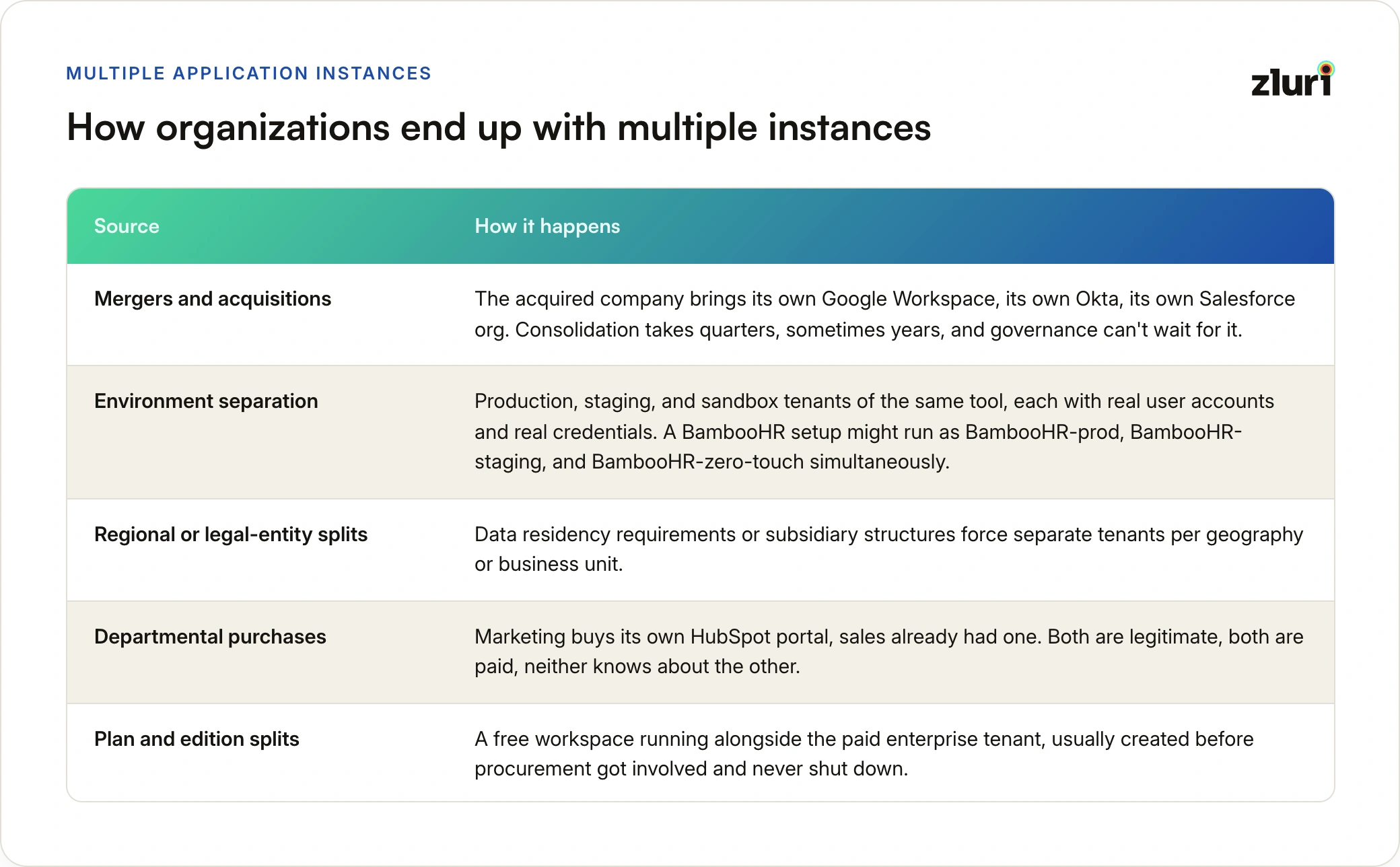
- Mergers and acquisitions. The acquired company brings its own Google Workspace, its own Okta, its own Salesforce org. Consolidation takes quarters, sometimes years, and governance can't wait for it.
- Environment separation. Production, staging, and sandbox tenants of the same tool, each with real user accounts and real credentials. A BambooHR setup might run as BambooHR-prod, BambooHR-staging, and BambooHR-zero-touch simultaneously.
- Regional or legal-entity splits. Data residency requirements or subsidiary structures force separate tenants per geography or business unit.
- Departmental purchases. Marketing buys its own HubSpot portal, sales already had one. Both are legitimate, both are paid, neither knows about the other.
- Plan and edition splits. A free workspace running alongside the paid enterprise tenant, usually created before procurement got involved and never shut down.
An instance is not a duplicate of the app. It is a separate system with its own users, its own permissions, and its own blast radius when something goes wrong.
Why Multiple Instances Break Single-Instance Governance
The problem is not that multiple instances exist. Most of the reasons above are defensible. The problem is that every downstream process treats "the app" as one object when it is actually several.
Five failure modes show up again and again. Fragmented visibility means user counts and access lists are wrong because they cover one tenant out of several. Offboarding gaps happen when deprovisioning runs against one instance and leaves accounts live in the others. Duplicate spend comes from paying for overlapping seats across tenants that were never compared. Inconsistent policy means one instance enforces SSO and least privilege while its sibling runs on password logins and default-admin roles. And audit exposure follows from all four, because an access review scoped to the wrong instance certifies access that was never actually checked.
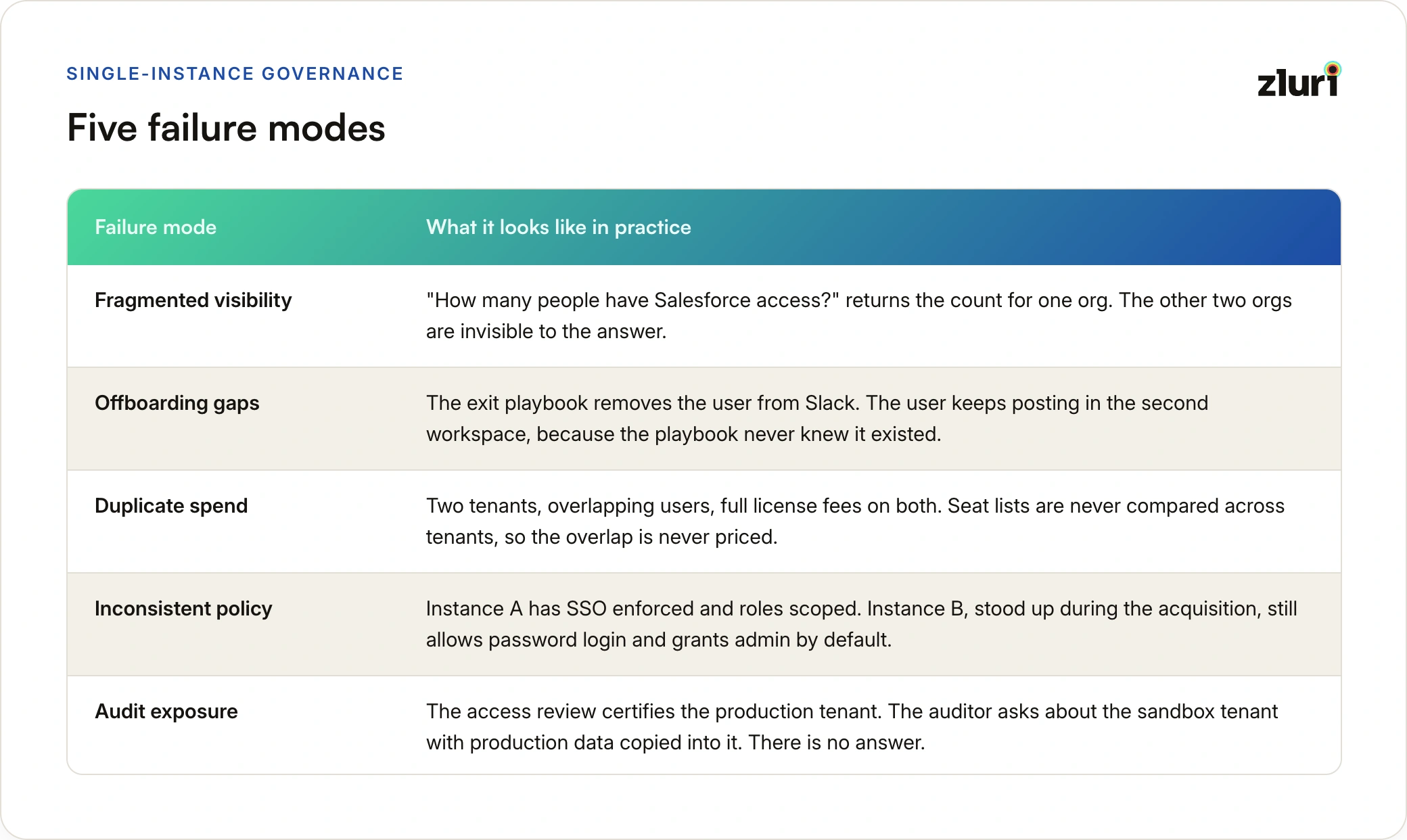
The offboarding gap deserves special emphasis because it is the one that turns into an incident. A departing employee whose access was revoked in one instance but not the other is, from the org's point of view, fully offboarded. From the employee's point of view, they still have a working login. This is the same class of exposure that makes joiners, movers, and leavers the highest-stakes moments in the identity lifecycle: the process believes it finished, and nothing in the process can tell it otherwise.
The audit version of this problem is just as sharp. When access reviews are scoped by app name rather than by instance, a reviewer can certify "Salesforce" in good faith while an entire second org goes unexamined. The certification is complete on paper and partial in fact.
How Zluri Handles Multiple Instances
Zluri's approach is to make instances visible and addressable at every layer where access decisions happen, rather than flattening them into a single app record.
Each Instance Is a Separate Integration
When an application has multiple deployments, each one connects to Zluri as its own integration instance with its own credentials. A Slack environment with two workspaces shows up as Slack_0 and Slack_1. An HR stack shows up as BambooHR-zero-touch, BambooHR-prod, and BambooHR-staging, each independently connected and independently synced.
This matters because it means user lists, access data, and activity are pulled per instance, not per vendor. The question "who has access?" gets answered for each tenant separately, which is the only version of the answer that is actually true.
Instance Selection Is Built Into Workflows
When you add an integrated application to an onboarding or offboarding workflow, Zluri asks which instance you mean. The app block carries an instance selector, and switching it changes which tenant the configured actions run against.
Where instance selection shows up in practice:
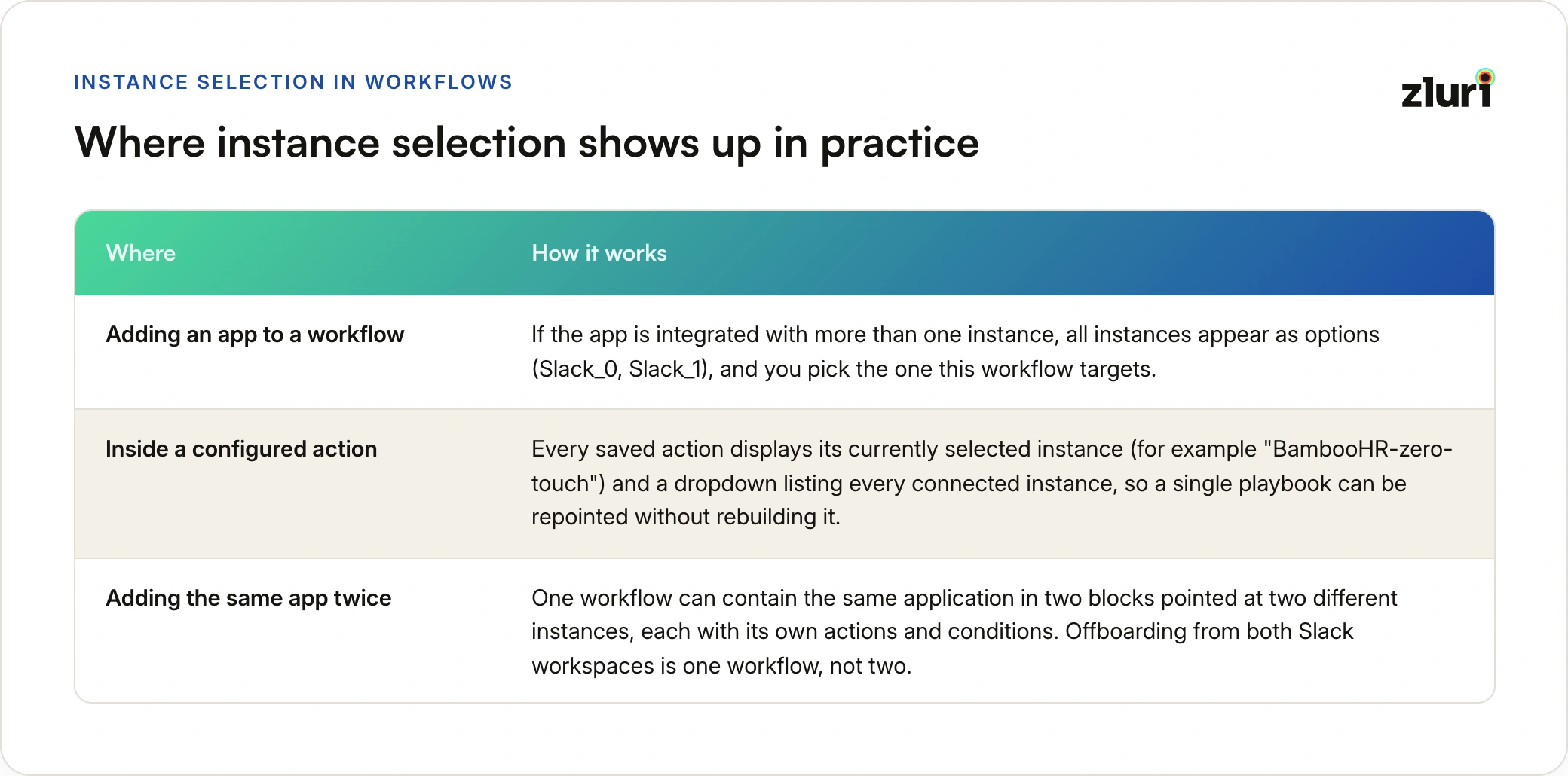
- Adding an app to a workflow. If the app is integrated with more than one instance, all instances appear as options (Slack_0, Slack_1), and you pick the one this workflow targets.
- Inside a configured action. Every saved action displays its currently selected instance (for example "BambooHR-zero-touch") and a dropdown listing every connected instance, so a single playbook can be repointed without rebuilding it.
- Adding the same app twice. One workflow can contain the same application in two blocks pointed at two different instances, each with its own actions and conditions. Offboarding from both Slack workspaces is one workflow, not two.
The instance selector is the difference between "we ran the offboarding playbook" and "we ran the offboarding playbook against every tenant this user actually had an account in."
Automation Respects Instance Boundaries
Zluri's automation rules and Zero Touch Onboarding execute against the specific instance they were configured for. If an organization has multiple HRMS instances connected, each one gets its own configuration, because a hire-date sync from BambooHR-prod says nothing about what exists in BambooHR-staging.
The same boundary applies to Custom Actions: an action created for an app instance authenticates using that instance's connected credentials. Automation built against one tenant cannot accidentally write into another.
Governance Covers Every Instance, Not Just the Primary One
Because each instance carries its own user list, access reviews and audit evidence can be scoped per instance. A certification can review the production Okta tenant and the legacy acquired tenant as separate entities, with separate reviewers if the two are owned by different teams. Deprovisioning evidence in run logs is tied to the specific instance where access was removed, which is what an auditor actually needs to see.
A Practical Sequence for Getting Multi-Instance Environments Under Control
The order matters here. Governing instances you haven't discovered yet is not possible, and automating against instances you haven't governed just automates the inconsistency.
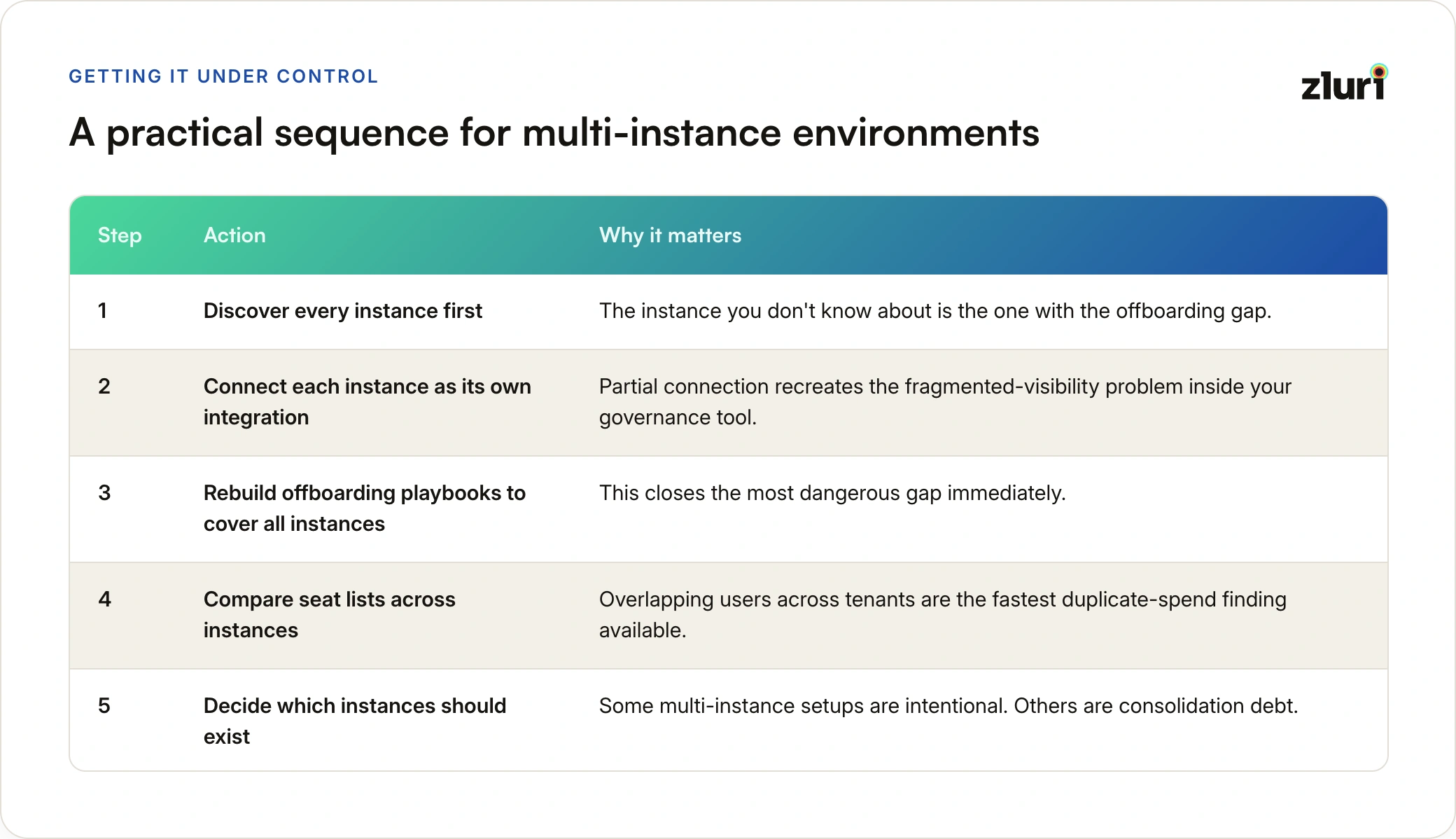
- Discover every instance first. Let Zluri's discovery engine surface all tenants, including the free workspace and the undocumented sandbox. The instance you don't know about is the one with the offboarding gap, and it usually lives in the same blind spot as the rest of your shadow IT.
- Connect each instance as its own integration. Resist the urge to connect only the "main" tenant. Partial connection recreates the fragmented-visibility problem inside your governance tool.
- Rebuild offboarding playbooks to cover all instances. Add the app once per instance in exit workflows, or verify the instance selector on every action. This closes the most dangerous gap immediately.
- Compare seat lists across instances. Overlapping users across tenants are the fastest duplicate-spend finding available, and the data is already synced.
- Decide which instances should exist. Some multi-instance setups are intentional and should be governed as such. Others are consolidation debt. Zluri gives you the access data to make that call per instance instead of by vendor name.
Where This Leaves You
Multiple instances are not a misconfiguration to be ashamed of. They are the normal result of acquisitions, environment hygiene, and how software actually gets bought. The failure is not having them. The failure is running governance that pretends they are one thing.
Zluri's model, where every instance is discovered, connected, selectable in workflows, and separately auditable, means the org chart of your tenants matches the org chart of your controls. Onboarding provisions into the right tenant, offboarding revokes from all of them, and "who has access?" finally has an answer that covers everything the vendor's logo is attached to.
Frequently Asked Questions
Are multiple instances of the same app a problem in themselves? No. Environment separation, data residency, and post-acquisition coexistence are all legitimate reasons to run separate tenants. The problem is governance tooling and processes that treat several tenants as one system, because that gap is where offboarding misses, duplicate spend, and audit exposure live.
How do organizations usually discover they have multiple instances? Usually the hard way: an offboarded employee is found still active in a second workspace, an auditor asks about a tenant that was never scoped into the review, or finance notices two invoices from the same vendor. Systematic discovery across SSO, finance systems, and direct integrations surfaces these tenants before an incident does.
Does Zluri treat each instance as a separate app? Each instance connects as its own integration with its own credentials and its own synced user list, but they remain tied to the same application. That combination is the point: per-instance accuracy for access data and actions, without losing the vendor-level view for spend and consolidation decisions.
Can one workflow act on multiple instances of the same app? Yes. A single workflow can contain the same application in multiple blocks, each pointed at a different instance with its own actions and conditions. Offboarding a user from every Slack workspace they belong to runs as one workflow, not one per tenant.
Should we consolidate our instances or govern them separately? Govern first, then decide. Some instances exist for durable reasons (regions, environments, legal entities) and should stay. Others are consolidation debt from an acquisition or a departmental purchase. Per-instance user and access data is what lets you make that call on evidence instead of by vendor name.