.png)




In this guide, we cover what a user access review actually is, the ways to run one, the full workflow from scoping to audit evidence, what every compliance framework demands, why manual reviews break down, and what changes when you build reviews on complete visibility instead of what your IdP happens to see.
Your former sales manager left four months ago. She still has admin access to Salesforce, full read/write to your customer database, and owner permissions on 12 Slack channels containing deal negotiations. Your quarterly access review is in two weeks.
Sounds like a problem? It is.
Here's what happens when you run that review:
.webp)
This exact pattern plays out at company after company. Weeks of effort, dozens of people involved, and critical violations still slip through. The reviews happened. The violations persisted.
This isn't about compliance checkboxes. It's about whether your access reviews actually make you more secure or just create the illusion of control. If you've ever wondered why access reviews feel like punishment rather than protection, we break down what's actually broken and how to fix it in the sections ahead.
What is a user access review?
Before we explain what access reviews should be, let's acknowledge what they are at most companies: a quarterly event where IT emails managers asking, "Are these people still on your team?" and waits for responses that may or may not arrive before the deadline.
When managers do respond, they're looking at a spreadsheet with no context. Is this access new (granted last week) or old (been there for years)? They don't know. So they approve everything to avoid blocking someone's work.
A user access review (also called access certification or entitlement review) is the process of periodically validating that users have appropriate access to applications and data based on their current role, responsibilities, and employment status.
Where access reviews sit in IGA. Access reviews are a core function of identity governance and administration. IGA has two halves: governance, which decides and verifies what access should exist, and administration, which grants and revokes it. Reviews are one of the two central controls on the governance side, alongside segregation of duties: reviews verify that each individual's access is still appropriate, while SoD verifies that no individual's combined access creates a conflict. In Zluri, this structure is mirrored in the product itself: the Access Reviews module sits inside the IGA product alongside the Access Management, Access Requests, and SoD modules.
What a review actually accomplishes. Provisioning grants least privilege on day one; drift erodes it from day two. Every role change, project assignment, and temporary grant adds access that rarely gets removed on its own. Access reviews are the mechanism that restores the principle of least privilege after that drift: each revocation pulls a user back to only what their current role requires. And every entitlement removed is one less credential an attacker can use, which is why reviews are also one of the most direct ways to shrink your identity attack surface. Fewer standing permissions per account also means a compromised account can reach less, containing the blast radius of any single breach.
If you're still building the internal case for why this deserves budget and attention, we've laid out why automated user access reviews are important as its own argument, so you don't have to make it from scratch.
What you're actually reviewing
User-to-app relationships. Who has access to which applications? What level of permissions do they have? Is this access still necessary?
Role-based entitlements. Does their access match their current job function? Have they accumulated permissions from previous roles (privilege creep)? Are there excessive admin rights?
Reviews are also where toxic combinations surface: one person holding access rights that together violate segregation of duties, like the ability to both create and approve payments. Tracking the right metrics for reviewing user access rightsturns this from gut feel into measurable coverage.
Group memberships. Many organizations grant access through SSO groups, not individual app assignments. When someone joins "Engineering-FullStack," they automatically get access to 15-20 apps. Reviewing at the group level asks one question, "should this person be in this group?", instead of certifying thousands of individual relationships.
What's not an access review
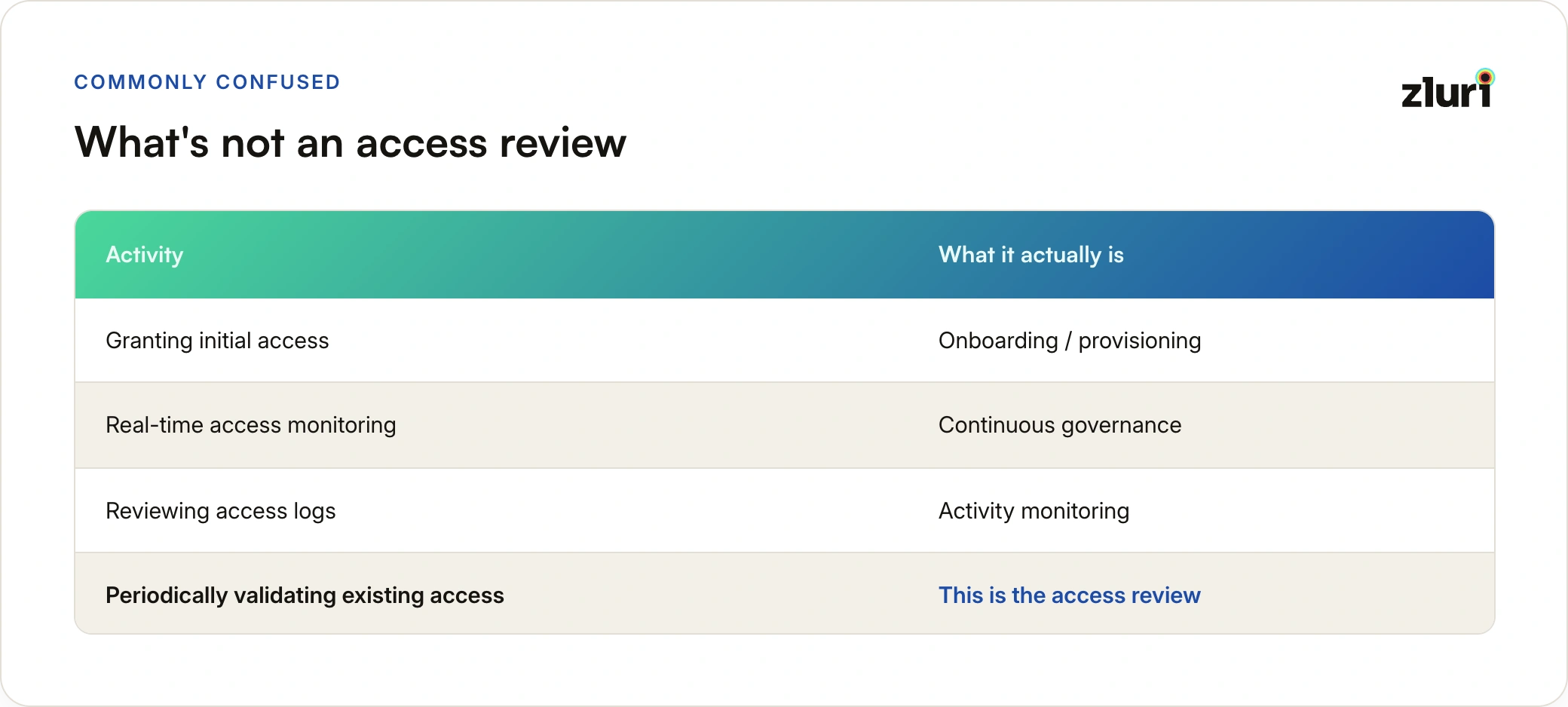
The review sits inside a larger family of preventive, detective, and corrective controls: the review itself is the detective control, the revocation it triggers is corrective, and the workflow fixes it should inspire are preventive.
The cadence compliance frameworks expect
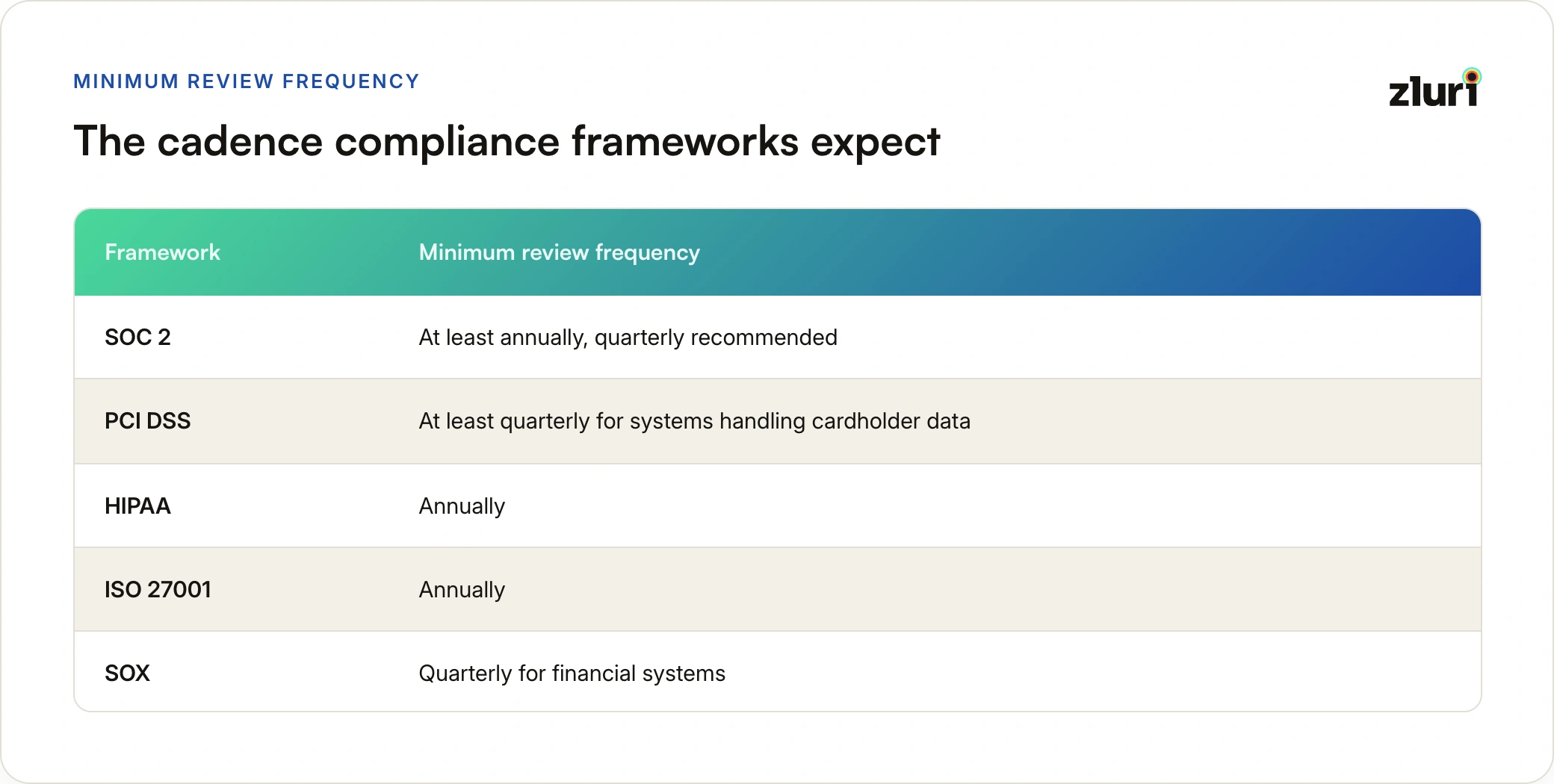
Most organizations land on quarterly or semi-annual reviews, with quarterly certification for anything in SOX or PCI DSS scope.
But calendar frequency is only half the decision. Getting periodic user access reviews right means setting risk-based frequency rather than applying one cadence to everything. And a single certification is never the end of it: access recertification exists because the access you approved in Q1 drifts by Q3.
Types of user access review
Access reviews aren't one-size-fits-all. Organizations typically use a combination of approaches based on their size, maturity, and risk profile.
1. User-based reviews
The most granular approach: review individual users across all their applications. This method catches everything. Every user, every app, every permission level. But it's also the most time-intensive.
A manager reviewing 50 users across 10 apps faces 500 individual decisions. Scale this to 2,000 users across 100 apps and you're looking at 200,000 data points to certify.
Best for: small teams (under 100 people), executives, and high-risk applications where you need complete granularity. For a full breakdown of when this approach fits and how to scope it, see our guide to user-based access reviews.
2. Group-based reviews
The modern approach to access certification. Instead of reviewing individual user-to-app assignments, you review SSO groups and their entitlements. When someone joins "Engineering-FullStack," they automatically get access to 15-20 apps; certifying at the group level is dramatically faster and aligns with how access is actually granted.
This is also how role-based reviews get done in practice at most companies. In principle, a role-based review certifies by job function: all engineers, all sales reps, all finance. In reality, those roles live as SSO groups, so reviewing the group IS reviewing the role. When someone's access doesn't match their function, or they've retained permissions from a previous role, the group membership review is where it shows up.
Best for: organizations with strong SSO adoption and well-defined group taxonomies. The tradeoff: if your groups are messy or inconsistently applied, group-based reviews inherit the mess.
Our group-based access reviews guide covers how to set the structure up so the reviews hold, and the story behind why we built group-based reviews into Zluri explains what changed for organizations that adopted them.
3. Application-based reviews
This flips the question entirely. Instead of asking "what does this user have access to?", you ask "who has access to this critical application?" You might review everyone with access to your financial systems, customer database, or admin tools.
Best for: compliance-driven reviews where specific applications (SOX, HIPAA scope) need quarterly certification. The limitation: you may miss cross-app privilege creep, where someone accumulated excessive access across multiple less-critical systems. See the application-based access reviews guide for a deeper walkthrough.
How the three compare
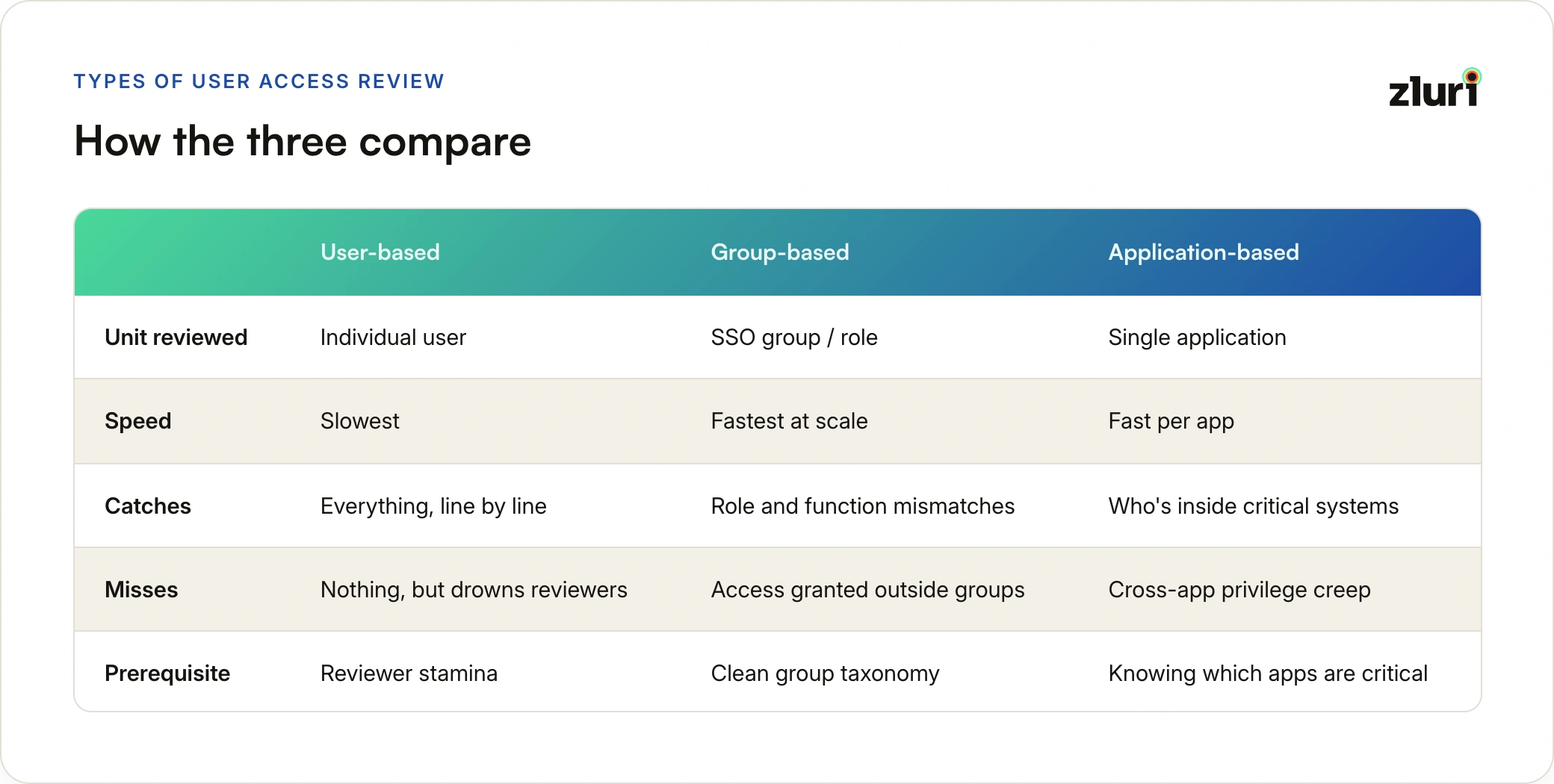
Most organizations combine them: application-based reviews for SOX and HIPAA-scoped apps that need quarterly certification, group-based reviews for everything granted through SSO groups, and user-based reviews as a supplement for executives or unusually sensitive applications.
When one approval isn't enough: multi-level reviews
For high-risk access, a single reviewer's sign-off may not satisfy your auditors or your own risk appetite. Multi-level access reviews apply the four-eyes principle: a second reviewer confirms the first reviewer's decisions before they take effect.
The design question is making the second level add scrutiny rather than rubber-stamping, which is exactly what Zluri's approach to multi-level reviews is built around. For the original product context, how multi-level reviews simplify auditscovers the launch rationale.
The review workflow, step by step
Whatever review type you choose, the workflow underneath follows the same arc. Each stage has its own guide in our library:
- Scope the review. Decide what's in scope before anyone certifies anything. Defining audit scope for access is its own discipline: miss half your identities here (service accounts, contractors, external collaborators) and everything downstream certifies an incomplete picture.
- Prepare the structure. A user access review template gives reviewers a consistent format with the seven components every certification record needs. The complete user access review checklist sequences the pre-review work so nothing gets discovered mid-cycle.
- Execute the review. The five-step user access review process covers the arc; the step-by-step review procedure gets into execution detail. For teams past the basics, the advanced guide to carrying out a user access review covers the judgment calls templates can't script.
- Delegate the queue. Reviews stall when the wrong people hold the certification queue. Access review delegationlays out four models for distributing review work so campaigns complete in weeks, not months.
- Report the results. The user access review report formats findings for executives, IT leadership, and auditors separately, because a board summary and an audit evidence package are not the same document.
- Survive the audit. Know what auditors actually test in a user access review audit before they arrive: the gap between "flagged for removal" and "actually removed" is the first thing they probe.
Compliance frameworks: what each one demands
The cadence table earlier tells you how often each framework expects reviews. The harder part is what each one expects the review to contain.
SOC 2 treats access reviews as evidence that your logical access controls operate over time, not just exist on paper. Our guide to user access reviews for SOC 2 covers the manual-versus-automated evidence question.
SOX is the most demanding framework, because reviews of financial systems feed directly into ITGC testing. SOX access reviews walks through building twelve months of audit-ready evidence, which matters double if an IPO is on the horizon. Reviews are also the SOX control most worth automating first, and SOX automation makes that case in detail.
ISO 27001 accepts annual reviews, but auditors increasingly expect risk-based frequency. The ISO 27001 user access review guide covers moving from convenience-based to risk-based cycles.
PCI DSS requires quarterly validation for anything touching cardholder data. PCI DSS user access reviews covers what assessors look for.
Every framework expects a documented policy. The user access review policy guide covers what to document for PCI DSS, HIPAA, ISO 27001, SOC 2, and SOX in one place, so a single policy satisfies all of them instead of five documents drifting apart.
Special review scopes that deserve their own treatment
Privileged access. Admin rights, production access, and financial system permissions are a small slice of your total access landscape but carry most of the risk. A privileged user access review treats that slice differently: higher frequency, tighter scrutiny, multi-level approval, and continuous monitoring between cycles rather than a purely periodic check.
Departures. Offboarding workflows fail silently: nobody files a ticket when deprovisioning doesn't happen. That makes reviews the only feedback mechanism that catches incomplete offboarding, so former employees don't accumulate months of live access before the next quarterly cycle notices.
Why manual user access reviews fail
Most organizations know access reviews are important. The question is: why do IT teams spend weeks and involve dozens of people every quarter on something that still leaves critical violations unaddressed?
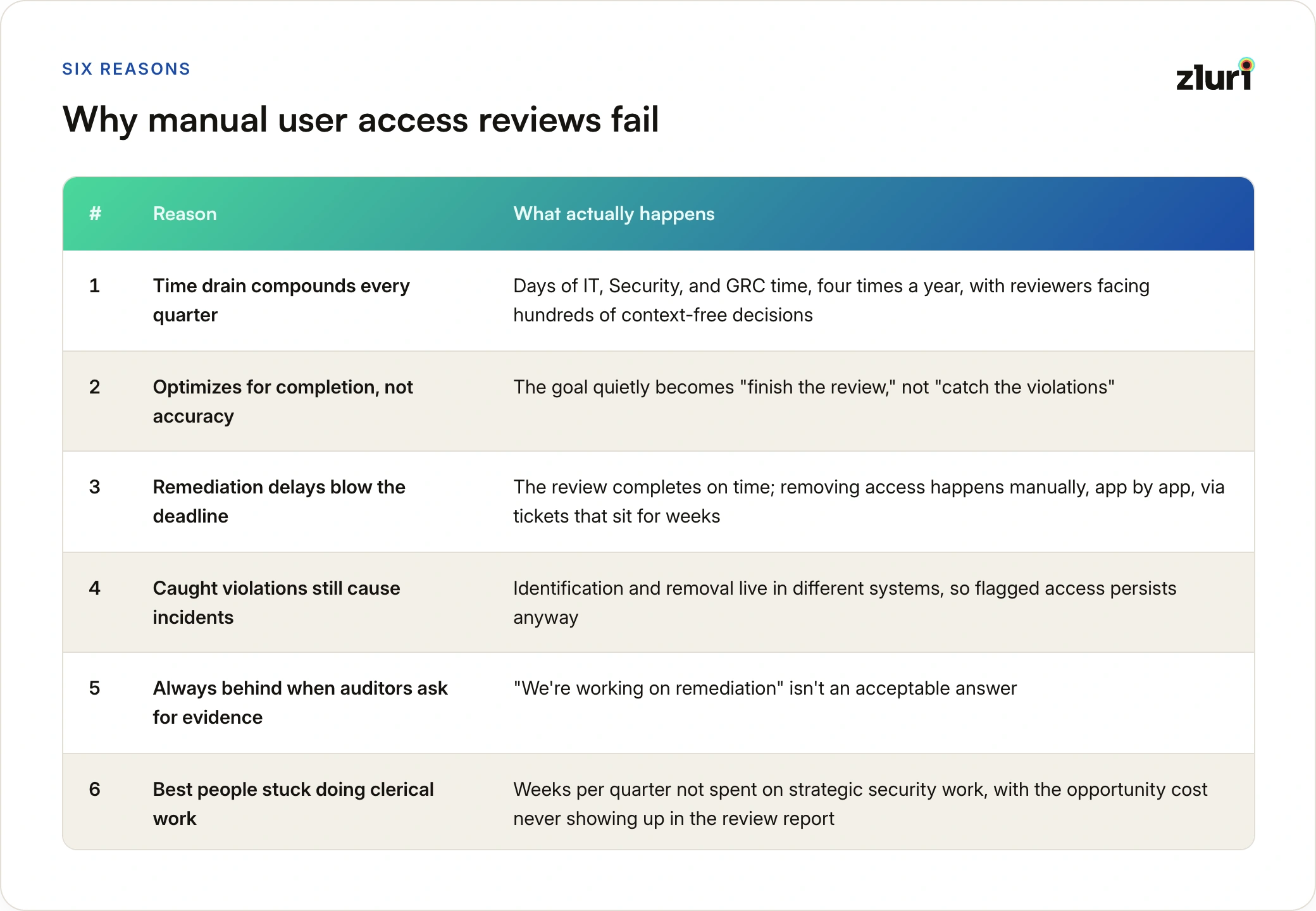
Reason 1: The time drain compounds every quarter
Manual access reviews are resource black holes. A typical quarterly cycle pulls in people across IT, Security, and GRC for days at a time, four times a year. Reviewers face hundreds or thousands of decisions with no context about whether access is new or old, used or dormant. So "Approve All" becomes the default. Not because managers don't care, but because they're drowning in data they can't evaluate.
Reason 2: Manual reviews optimize for completion, not accuracy
Compare organizations running manual processes against those with automation and the gap is consistent: manual reviews are significantly less effective at actually catching and correcting inappropriate access. The goal quietly becomes "finish the review," not "catch the violations."
Reason 3: Remediation delays blow the deadline
Our survey of 215 security and IT leaders found that 41% of organizations running fully manual reviews regularly miss access review deadlines, against 18% of fully automated ones. The culprit is usually remediation: the review completes on time, but removing access happens manually, app by app, via tickets that sit in each owner's queue for weeks.
Reason 4: The violations reviews catch still cause incidents
Many security incidents trace back to the exact issues reviews are supposed to catch: over-permissive access that existed for months, ex-employees who retained access, vendors with persistent elevated permissions. These violations were identified in reviews. They persisted anyway, because identification and removal lived in different systems.
Reason 5: You're always behind when auditors ask for evidence
Auditors want proof reviews happened on schedule, evidence violations were remediated, and audit trails showing who approved or revoked what, and when. "We're working on remediation" isn't acceptable.
Reason 6: Your best people are stuck doing clerical work
Weeks per quarter on access reviews is time not spent on strategic security initiatives or actual threat response. The opportunity cost never shows up in the review report, but it's the biggest line item.
These six reasons show up so consistently that we've catalogued the fixes IT teams have actually made work, tying back to the punishment-versus-protection gap raised earlier.
The root cause: reviews are built on incomplete visibility
Most access review failures trace back to a single architectural flaw. The industry, both traditional IGA vendors and those calling themselves "modern," takes a governance-first approach: they assume you already know what exists in your environment, then help you manage it. That assumption is wrong, and it's why we argue visibility-first beats governance-first: before you can govern what you know, you have to know what to govern.
What complete access visibility requires
If you're going to govern access, you need to know three things with complete accuracy:
- Who exists: every identity in your environment, including employees, contractors, ex-employees, service accounts, and external users
- What exists: every application, including SSO apps, shadow IT, personal subscriptions, and legacy tools
- Who has access to what: the complete map of relationships between identities and applications
Most access review solutions, traditional and modern, rely on IdP/SSO-based visibility for all three. Identities come from the IdP or directory. Applications are only the ones integrated with SSO. Access mapping covers only relationships visible through the identity provider.
That gives you partial truth. Comprehensive discovery typically surfaces close to double the applications an organization's IdP shows, and each of those invisible apps carries its own identities and access relationships: contractor accounts created directly in apps, personal ChatGPT subscriptions, department Airtable purchases, direct app logins, shared credentials, API keys, and OAuth grants that never touch SSO.
You can't govern what you don't know exists. Access reviews built on IdP or SSO visibility aren't reviewing your complete access landscape. They're reviewing the portion visible to your identity provider.
Even "modern" and "autonomous" vendors depend on the same input
Vendors positioning themselves as modern or autonomous ultimately depend on IdP/SSO integration too. The assumption underneath their model: if it's not in your IdP, it shouldn't exist. But that's not how companies work. Departments buy tools. Developers spin up services. Employees use personal accounts for work. None of that touches your IdP, and all of it creates access risk.
The industry treats IdP and SSO coverage as the goal. Complete visibility should be the goal, with IdP/SSO integration as one input among many.
What access reviews should look like
Here's what changes when you start with complete visibility.
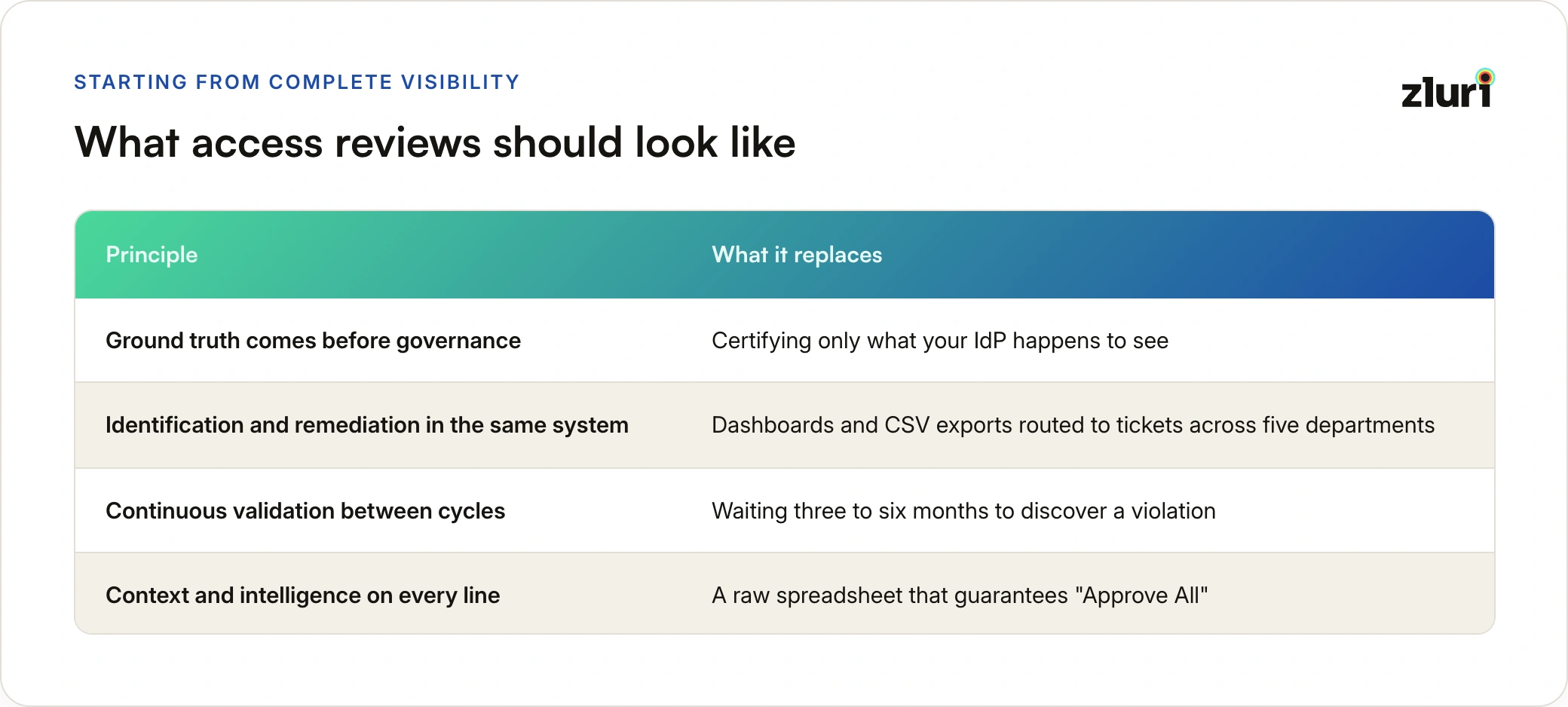
Ground truth comes before governance
Access reviews should be built on complete discovery of who exists, what exists, and who has access to what, not just what's visible to your IdP. That requires multiple discovery methods working together: finance system data shows purchases IT never approved, browser signals reveal which SaaS tools employees actually use, CASB logs capture cloud traffic. Each method reveals what the others miss.
Identification and remediation should happen in the same system
Most review platforms identify violations, then stop. You get dashboards, then CSV exports and tickets routed to each app's owner: IT for centrally managed apps, the sales head for Salesforce, the finance owner for NetSuite. Weeks after reviews "complete," a substantial portion of identified violations still exist, waiting in queues across five departments.
Access reviews should run on closed-loop remediation instead: identify violations and remediate them directly from the platform where the review happened, with the revocation verified and evidenced in the same system. For apps with APIs, one-click remediation. For apps without APIs, guided workflows that still capture audit trails.
Continuous validation catches violations as they emerge
Quarterly access reviews are backward-looking by design. You're certifying access that's been in place for three to six months. Between certifications, the system should flag anomalies as they appear:
- Dormant accounts suddenly active
- External users gaining admin privileges
- New applications bypassing SSO
- Contractors accessing systems months after projects end
This doesn't replace quarterly reviews. It makes them more effective, because certification becomes confirmation of a landscape you're already watching.
Context and intelligence prevent "approve all" behavior
Showing managers a spreadsheet of 500 access decisions without context guarantees "Approve All." Reviews should carry intelligence with every line: this access was granted 18 months ago and never used; this user has admin access to 12 financial systems when the role requires two; this SOX-scoped app has eight users with excessive permissions.
This shift, from raw data to context-rich decisions, is the single biggest lever in the user access review best practices that let teams review dramatically faster without sacrificing accuracy.
Choosing your approach: automation paths and tools
Once the principles are clear, the practical question is how to get there from a manual process.
Know your automation options before picking one. There isn't a single way to automate reviews; there are several, each with different tradeoffs in effort and coverage. Our guide to the five ways to automate user access reviews maps the approaches so you can choose deliberately.
Learn from teams that made the jump. How fast-growing tech firms automate access reviews covers the sequencing that worked in practice: which reviews to automate first, and what breaks when you try to automate everything at once.
Evaluate tools against your actual failure modes. If your reviews fail on visibility, a tool that only certifies IdP data won't fix anything. The top user access review software comparison evaluates the leading platforms, and the six mistakes teams make when selecting an access review solution covers the evaluation traps: buying for the demo, ignoring remediation, and scoping the pilot to apps that were never the problem.
How this works in Zluri
The principles above require specific architectural choices. Here's how Zluri implements them.
Discovery establishes ground truth first. Zluri combines eight discovery methods, spanning SSO/IdPs, direct integrations, HRMS, finance systems, browser extensions, MDMs, CASBs, and directories, so reviews certify what actually exists rather than what the IdP reports. Discovery runs continuously: new apps, users, and group memberships become visible within 24 hours.
Remediation is closed-loop, not exported. Identify a violation, click "Revoke Access," done. For apps with API integrations, remediation is automatic; for apps without APIs, guided workflows capture the audit trail in the same system. The same engine powers remediation playbooks: departures trigger access removal everywhere, role changes adjust entitlements, high-risk violations escalate immediately.
Intelligence rides on every review line. Usage data (never logged in, dormant 90+ days), risk scoring (excessive admin privileges, sensitive-data apps), and compliance mapping (SOX-critical apps with over-provisioned access) turn each certification decision from a guess into a judgment.
Audit logs are retained indefinitely. When auditors ask for evidence from 18 months ago, the complete trail is there: who reviewed, what was decided, when remediation occurred. No retention paywall, unlike solutions such as Okta that charge for retention beyond 90 days.
And we run this on ourselves. How we do user access reviews at Zluri, using Zluri, covers our own internal review cycle: what we certify, at what cadence, and what our own auditors see.
The payoff pattern is consistent: fewer people per cycle, faster completion, and a steep drop in person-days consumed per quarter. And unlike traditional IGA implementations that take six to twelve months, reviews built on complete discovery launch within weeks: discovery starts finding apps on day one, and the first campaign runs by week two or three.
Getting started with your first user access review
Week 1: Enable discovery. Turn on discovery across all available methods and let it run for seven days. Most organizations find dozens of apps they didn't know existed.
Week 2: Define scope. Don't review everything at once. Start with high-risk apps (finance, customer data, admin tools), compliance-critical apps (SOX, PCI DSS, HIPAA, SOC 2, ISO 27001 scope), and apps with external user access.
Week 3: Launch the first campaign. Use group-based reviews where possible. Configure who reviews (manager, app owner, or IT), approval workflows (single-level for most, multi-level for critical systems), and remediation playbooks.
Week 4: Review and remediate. Reviewers certify access directly in the platform. Violations are remediated immediately via closed-loop workflows, and reports are generated automatically for audit evidence.
Ongoing: Quarterly cadence. Set up recurring campaigns. Automation handles reminders, tracks completion, and ensures you never miss a deadline.
After the first cycle: don't stop at completion. The first completed review is a milestone, not the finish line. What to do after implementing access reviews covers the strategy layer: turning findings into workflow fixes, tightening scope where risk concentrates, and expanding coverage where the first cycle exposed gaps.
Ready to configure this in Zluri? The full walkthrough of setting up application-, group-, and user-based certifications, reviewer assignment, and remediation playbooks is here: How Access Reviews Work in Zluri.
The future is continuous access governance
The future isn't quarterly access reviews built on IdP visibility. It's continuous access governance built on ground truth: access validated in real time, entitlements that adjust automatically when someone changes roles, immediate review when an app is flagged as risky, and compliance audits that become "pull this report" instead of "spend two weeks gathering evidence."
Access reviews are one wing of a larger identity governance and administration program, and they shouldn't be the wing that drains your resources. Done right, they're lightweight, continuous, and actually make your organization more secure.
The question isn't whether to automate. It's whether you'll build on ground truth or keep certifying partial visibility.
See who has access to what in your environment and prioritize access risks. Book a demo to understand your complete access landscape across all applications.
Frequently Asked Questions
How often should user access reviews be conducted?
Quarterly is the common target, driven by SOX and PCI DSS requirements for in-scope systems. SOC 2, HIPAA, and ISO 27001 accept annual reviews at minimum, but most auditors view quarterly certification of high-risk applications as the standard of care. Risk-based frequency, reviewing critical apps quarterly and lower-risk apps annually, is an accepted and increasingly common model.
Who should perform an access review?
The reviewer needs enough context to judge whether access is appropriate. Direct managers review their team's access, application owners review who holds access to their app, and IT or security validates technical entitlements like admin rights and service accounts. High-risk systems often warrant multi-level review, where a second approver confirms the first reviewer's decisions.
What's the difference between an access review and an access audit?
The review is the internal control: your organization validating its own access decisions on a schedule. The audit is the external check: an auditor testing whether those reviews happened, whether decisions were documented, and whether revocations were actually carried out. A clean review process is what makes the audit uneventful.
What should an access review deliverable include?
At minimum: the scope reviewed (which apps, users, or groups), each certification decision with reviewer identity and timestamp, evidence that revocations were executed, and exceptions with justification. Auditors specifically test the gap between "flagged for removal" and "actually removed."
Can access reviews be fully automated?
The mechanics can be: gathering access data, routing review tasks, sending reminders, executing revocations, and generating evidence. The judgment cannot. A human still decides whether a given person should hold a given entitlement. Automation's job is to make that decision fast and well-informed, then execute it immediately.