


Big-bang IGA projects run out of patience before they run out of scope. Twelve to eighteen months with nothing to show isn't a timeline leadership defends twice. This guide runs on three constraints: monthly visible wins, a sequence that never stalls, and one converged platform, since discovery, reviews, and lifecycle aren't separable, and splitting them across tools is the expensive way to do it.
Most big-bang IGA projects fail at the timeline, not the technology. Twelve to eighteen months is the default runway teams reach for when they try to govern everything at once, and no board or leadership team is going to wait a year before calling a security or compliance initiative a success. (We've cataloged the common failure patterns elsewhere; this piece is the fix.)
This guide runs on three constraints:
- Monthly wins, not a year of silence. Phase-by-phase execution is mandatory, not optional, if you want the project to survive contact with a budget review. Each phase needs to produce something visible on its own, a completed review cycle, a shrunk ticket queue, a closed audit finding, so the program keeps earning the right to continue instead of asking for twelve more months of trust upfront.
- A sequence that can't get stuck. A phased plan that stalls indefinitely on one phase because nobody scoped an exit condition is worse than no plan at all, it just fails slower and more expensively. Every phase here has a defined start, a defined output, and a defined handoff to the next one, so "we're on phase three" always means something specific.
- One converged platform, not three point tools. These six phases are interdependent, not modular: discovery feeds access reviews, reviews feed the entitlement map segregation of duties depends on, and lifecycle automation and self-service both need the same identity data discovery already found. Running each as a separate tool means rebuilding that handoff manually and paying for it twice, once in licenses, once in integration work. A converged platform, where these phases share one data model, is usually the cheaper option once that integration work is counted.
Before we get into sequencing, let's be clear about what we're trying to achieve. The goal of identity governance and administration is to ensure the right people have the right level of access to the right tools at the right time. Everything else is implementation detail, including the order you tackle it in.
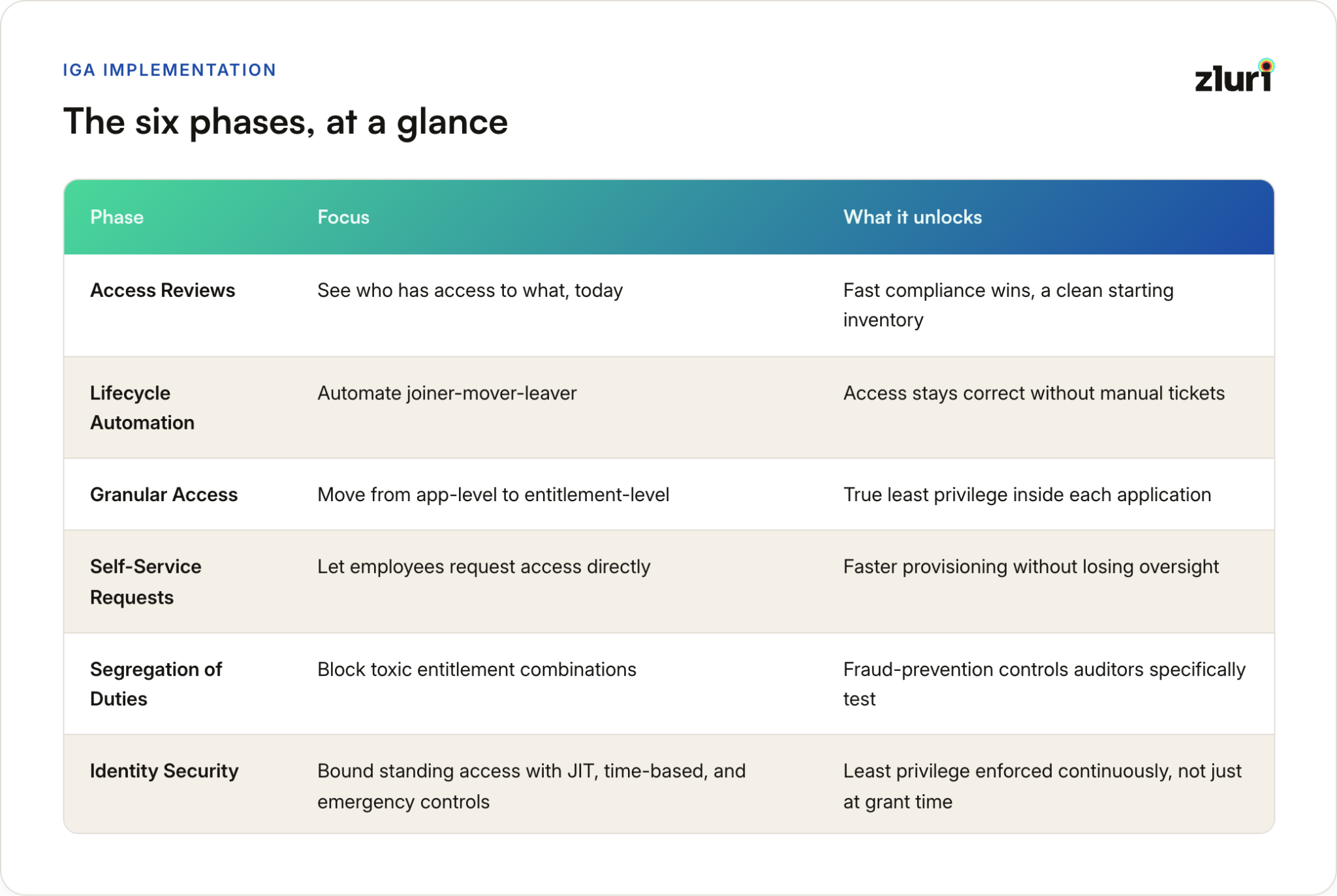
The Six Phases, at a Glance
These are the building blocks. Every sequence in this piece uses the same six phases, they just run them in a different order depending on what's forcing the project.
Five Ways to Sequence Them
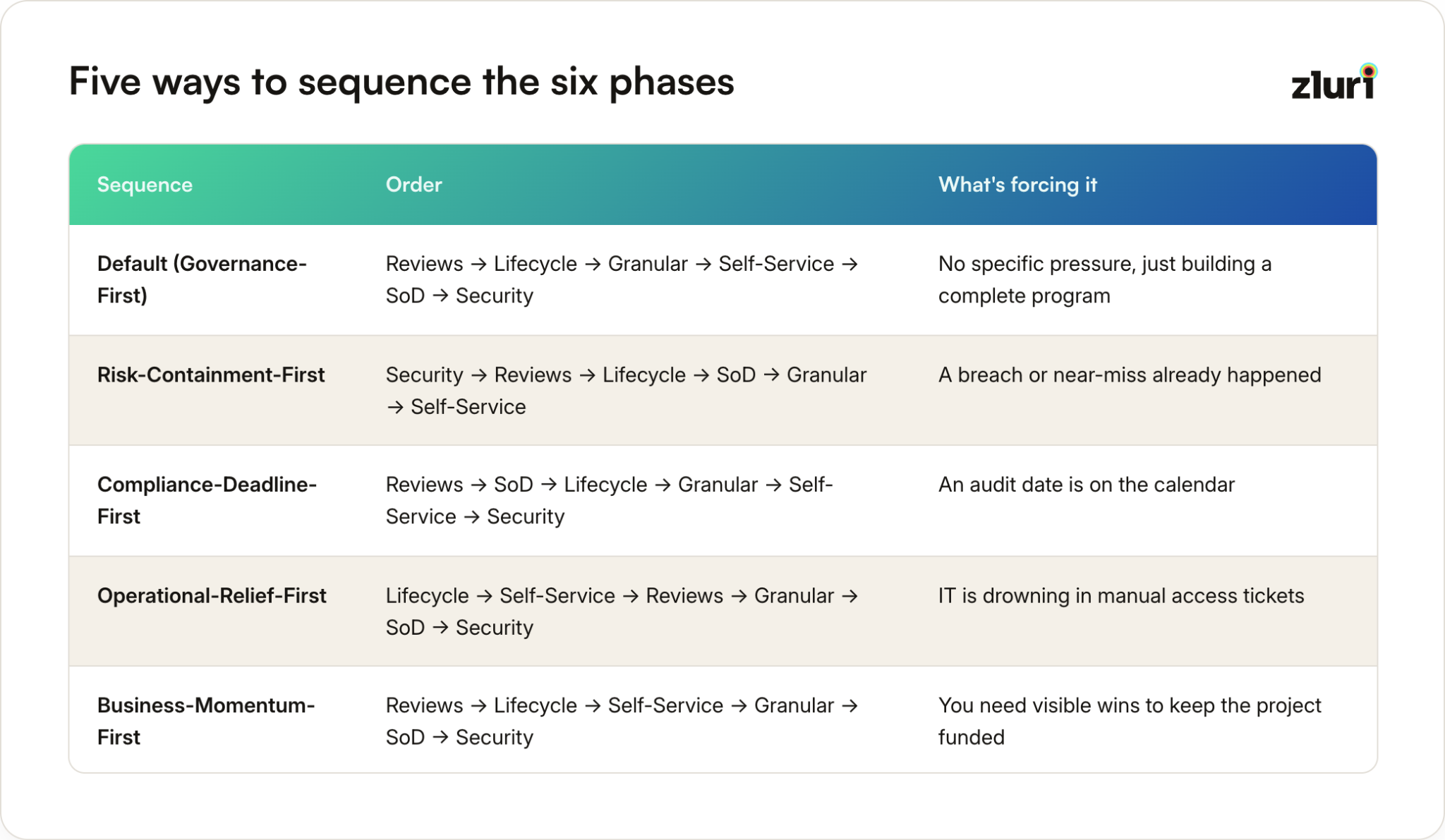
The Default order is what the detailed phase walkthrough below follows, front-load visibility, automate the operational baseline, close governance gaps, then open self-service and layer in security last. It's the right choice when nothing specific is forcing your timeline. The other four exist because something usually is.
Risk-Containment-First
If you're implementing after an incident, a breach, a former employee caught with active access, an auditor flagging exposure you didn't know about, the instinct to reach for reviews first is wrong. Reviews are a governance process. What you need immediately is containment.
Start with the parts of identity security that stop active bleeding: MFA on anything high-risk, tighter monitoring, time-bound access on privileged systems. Reviews come second, now used to find what else the incident touched. Self-service goes dead last, an organization recovering from an incident shouldn't be optimizing for convenience yet.
Best fit for: Post-incident implementations, or any organization where a security review just found something nobody wants to explain twice.
Compliance-Deadline-First
When an audit date is fixed, SOX, SOC 2, a customer's security questionnaire due next quarter, the question changes from "what's most valuable" to "what does the auditor actually test." Reviews and SoD get pulled together and pushed first, even though SoD ideally wants the entitlement-level data Granular Access produces. That's a real tradeoff: a rougher first pass at SoD by the deadline, refined once Granular Access catches up.
Best fit for: Organizations with a specific compliance deadline driving budget and attention, where good-enough evidence by the date beats correct sequencing with no deadline.
Operational-Relief-First
Sometimes the forcing function is that IT is buried, manual provisioning taking days, an offboarding process that depends on someone remembering. That's an operational crisis, and governance depth won't fix it. Automation will. Lifecycle automation and self-service go first because they directly kill the ticket volume causing the pain. Reviews, Granular Access, SoD, and Security still happen, once the team has bandwidth to do them properly.
Best fit for: Fast-growing organizations where headcount outpaced IT's processes, and the pain is operational exhaustion, not a specific compliance or security trigger.
Business-Momentum-First
This is the sequence for when the real risk isn't a breach or an audit, it's losing executive sponsorship before the harder phases get funded. Reviews still lead, cheapest visibility win regardless of situation. Self-service gets pulled forward, ahead of Granular Access and SoD, because it's the one phase employees personally notice. Finance sees reclaimed licenses from reviews, employees see faster access from self-service, both are stories a champion can tell a skeptical stakeholder. Granular Access and SoD, invisible to everyone except IT and auditors, wait until you've earned the room to do unglamorous work.
Best fit for: Organizations where the biggest risk is stalling out from lost internal support, not a security gap or missed deadline.
How to Pick Yours
Ask what's actually true right now, not what you'd prefer to be true:
- Did something already go wrong? Risk-Containment-First.
- Is there a fixed date an auditor is holding you to? Compliance-Deadline-First.
- Is IT's ticket queue the loudest complaint in the building? Operational-Relief-First.
- Is the biggest risk losing support before the project finishes? Business-Momentum-First.
- None of the above? The Default order below.
If more than one pressure is real at once, sequence for the shortest fuse. A compliance deadline six weeks out beats a general sense that IT is overworked. An active incident beats everything else on this list combined.
Whichever sequence you pick, every phase still needs to be executed properly. That's what the rest of this guide covers, in the Default order, jump to whichever phase your sequence calls for first.
Phase 1: Start With User Access Reviews
If you're wondering where to begin, start here in every sequence except Risk-Containment-First and Operational-Relief-First. Not because access reviews solve everything, they don't, but because they give you momentum and prove value quickly.
Access reviews are already happening at most organizations because compliance frameworks demand them. SOX, HIPAA, GDPR, they all require some version of "prove that you know who has access to what." So you're not introducing something completely new. You're just doing it better and more systematically.
Here's why this works as a starting point:
- Compliance wins fast. Auditors want to see that you're actively monitoring who has access to sensitive systems. Access reviews give you that proof.
- The process is straightforward. Managers review lists of who has what access, then approve or revoke.
- You build momentum. When you show senior leadership that you've eliminated orphaned accounts and tightened controls on financial systems, suddenly your IGA project has executive support, the kind buy-in that's much harder to win before you have a result to point to.
The practical steps are simple. Start with high-value applications, your HRMS, CRM, financial systems, identity providers. These hold your most sensitive data, so they're where you need visibility first.
Then identify clear owners for each application. Someone needs to know who should have access and who shouldn't. Run the review process with those owners, documenting what changes you make and why.
You'll start to see patterns, maybe the sales team always over-provisions Salesforce access, or the engineering team has way too many people with admin rights.
Track everything. How many accounts did you revoke? How many licenses did you reclaim? What compliance gaps did you close? These metrics matter because they prove ROI and keep your project funded.
The side benefit that finance teams love: you'll probably find a bunch of licenses you can reclaim. Someone left six months ago but still has an active Salesforce seat? That's $1,800 a year you just saved.
But, and this is critical, don't stop here. Access reviews are a great starting point, but they're not the end goal. They have serious limitations that you need to understand.
Why Access Reviews Alone Won't Cut It
Access reviews are point-in-time snapshots. You run them quarterly or annually, which means there's a massive gap between reviews where access can drift.
Someone gets promoted? They keep their old access and get new access. Someone leaves? Their accounts sit there until the next review cycle. Someone changes departments? Nobody remembers to update their permissions.
Most organizations run access reviews only on their "in-scope" applications, the ones that auditors care about. That's fine for compliance, but it leaves huge security blind spots. Your cloud infrastructure, your SaaS tools, your development environments, none of those are getting reviewed, and they're probably where your biggest risks live.
Here's the other problem: access reviews are inherently restrictive. They're designed to find and remove excess access. That's good for security, but it creates a cultural problem. Managers start under-provisioning access because they're worried about the next audit. New hires don't get everything they need because "we'll add it if they really need it." Productivity suffers.
The real issue is that access reviews don't help you ensure that people have the right access when they need it. They only help you clean up after the fact. That's not governance, that's cleanup.
So what's the logical next step? Automate the processes that create access drift in the first place.
Phase 2: Automate Lifecycle Management
This is where IGA starts to feel like actual governance instead of periodic housekeeping. If you're running Operational-Relief-First, this is your starting phase, not Phase 1.
User lifecycle management means automating what happens when someone joins your company, changes roles, or leaves. These are your joiner-mover-leaver processes, and if you're doing them manually, you're wasting massive amounts of time while creating security gaps.
- Think about what happens today when someone joins. IT gets a ticket, manually provisions their accounts one by one, probably forgets something, then has to circle back when the new hire complains they can't access Slack.
- When someone leaves, their manager maybe remembers to tell IT, who hopefully gets around to deprovisioning their accounts before the next audit.
- When someone changes departments, their access just accumulates because nobody wants to be responsible for breaking something.
Automation fixes all of this, and it fixes it continuously, not just at quarterly review checkpoints.
The way this works in practice: your HR system becomes your source of truth.
When HR creates a new employee record, that triggers automatic provisioning in your identity provider.
The new hire gets their baseline access immediately, email, collaboration tools, the standard stuff everyone needs. They also get department-specific access based on their role. Engineering gets GitHub, sales gets Salesforce, finance gets your ERP.
When someone changes roles, the system detects that change and automatically adjusts their access. When someone leaves, their accounts get deprovisioned immediately, not in three months when someone finally gets around to it.
This typically handles 50% or more of your provisioning work with zero manual intervention. More importantly, it shrinks the window of risk. Instead of waiting weeks or months to remove access from departed employees, it happens the same day.
The practical setup involves connecting your HR system to your identity provider with real-time or scheduled syncing. You define your "birthright access," what everyone gets by default. You map department and role attributes to application access. You set up triggers for new hires, transfers, and exits. Then you monitor and refine as your organization changes.
The end result is that your next access review is dramatically easier because access is already mostly correct. You're not spending hours cleaning up orphaned accounts or figuring out why someone has access to three different departments' tools.
Phase 3: Granular Access Management
So far we've been working at the application level, does this person have access to Salesforce or not? But that's too coarse-grained for real least privilege.
Inside Salesforce, what can they actually see? Can they view all opportunities or just their own? Can they delete records or just read them? Same thing with Slack, are they in the company-wide channels or also the executive planning channel? Your CRM, can they see financial data or just contact information?
This is where you move from application-level access to entitlement-level access. It's more complex, but it's where real security happens.
The challenge is that every application structures permissions differently. Salesforce uses profiles and permission sets. Slack uses channels and user groups. GitHub uses repository permissions and team memberships. Your ERP probably has some byzantine role hierarchy that three people in the entire company understand.
You need to map all of this out. For each critical application, document how permissions work and who owns what resources. The sales VP should own Salesforce access. The engineering director should own GitHub repositories. The finance controller should own ERP modules.
Then you extend your automation to include these granular permissions. When someone joins as a sales rep, they don't just get Salesforce, they get the specific profile and permission sets that sales reps need, access to their territory's accounts, and membership in the appropriate Slack channels. High-risk permissions require additional approval workflows.
This is also where role-based access control, and other access control types, start to matter. You're no longer thinking about departments, you're thinking about job functions. Account executives need different Salesforce access than sales engineers. Backend engineers need different GitHub permissions than frontend engineers.
This entitlement-level map is also the prerequisite for segregation of duties later in Phase 5, you can't find conflicting entitlements until you can see entitlements this granularly. Phase 4 covers self-service access requests first.
Phase 4: Enable Self-Service Access Requests
Here's where you shift from controlling access to enabling business velocity, without sacrificing security. If you're running Business-Momentum-First or Operational-Relief-First, you may have already pulled this phase forward.
Right now, when someone needs access to a new tool, they probably submit a ticket, wait for IT to see it, wait for approvals, wait for provisioning. This takes days or weeks. People work around it by sharing credentials (terrible) or just not using the tools they need (also terrible).
Self-service fixes this. Build a portal where employees can request access to applications, roles, or specific resources. They select what they need, provide justification, and submit.
The request routes automatically to the appropriate approvers, their manager, the application owner, maybe a security review for high-risk access. Once approved, the access is provisioned automatically through your existing workflows.
This isn't a free-for-all access. You're still enforcing policy and approval chains. High-risk requests require thorough justification and multiple approvals. But you're eliminating the manual ticket shuffle and reducing wait times from weeks to hours.
Track everything. Who's requesting what? Are there patterns you should automate? Are certain requests consistently denied? Are there bottlenecks in the approval process? Use this data to continuously improve.
The result is faster onboarding, better productivity, and happier employees, all while maintaining security and compliance controls. Your IT team stops being a bottleneck and starts being an enabler.
Phase 5: Segregation of Duties
Once entitlements are mapped, a different question becomes answerable: which of these shouldn't sit on the same person? Someone who can both create and approve a purchase order can commit fraud without a second signature. Someone who can push code and approve their own deployment can ship anything, reviewed by no one. Neither of those is a hypothetical, they're the standard textbook examples auditors specifically test for.
This is segregation of duties, and it belongs here, not earlier, because you can't enforce a rule about conflicting entitlements until Phase 3 has actually given you entitlement-level visibility. Trying to define SoD rules against application-level access ("has Salesforce" vs "has NetSuite") misses most real conflicts, which live inside what someone can do in a single application, not just whether they're in it.
Start by identifying your toxic combinations. Every department has its own version:
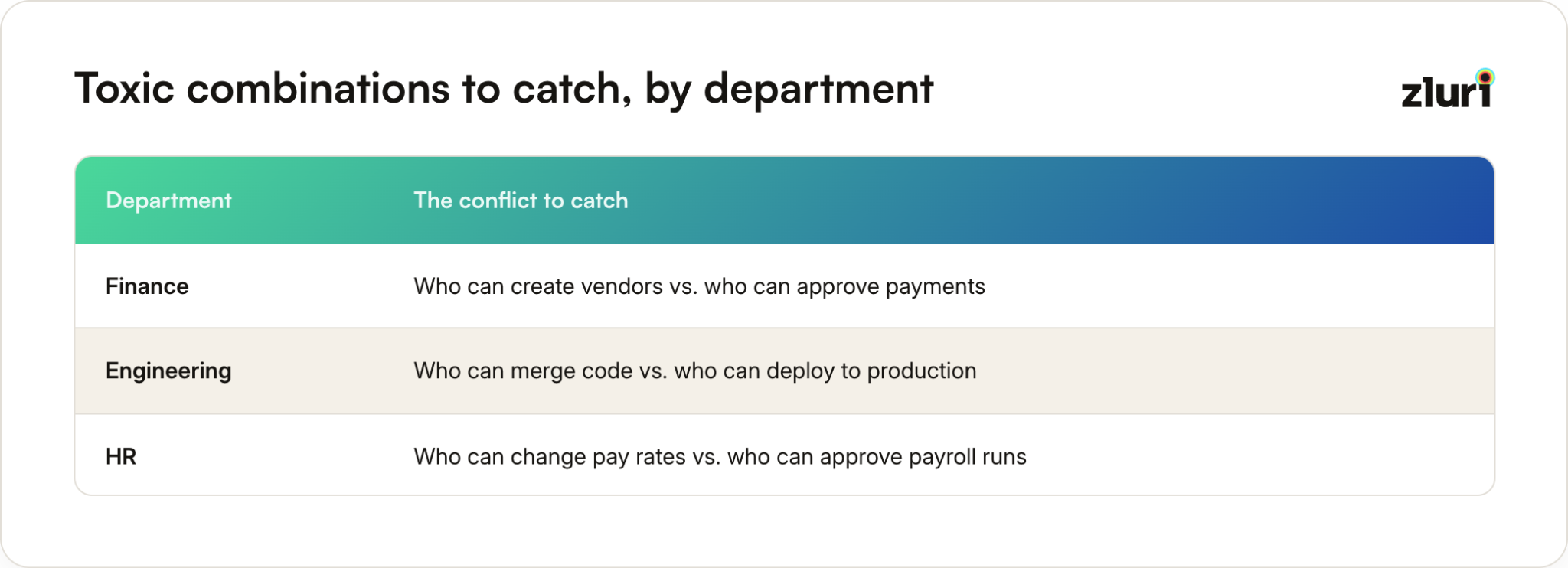
The practical steps, in order:
- Document these as explicit rules, not tribal knowledge. A rule like "no single user should hold both Accounts Payable: Create Vendor and Accounts Payable: Approve Payment" is auditable. "We trust Dave not to do anything weird" is not.
- Run a conflict scan against your current access. This usually turns up more violations than expected, not because anyone did anything wrong, but because access accumulates over time and nobody's been checking combinations, only individual grants. Someone who moved from AP to AR eighteen months ago and never lost their old entitlements is a walking SoD violation nobody noticed.
- Build prevention, not just detection. A scan that runs quarterly tells you about violations after they've existed for months. The stronger version blocks the second conflicting entitlement at grant time, so the toxic combination never gets created in the first place.
That's a meaningfully different guarantee to give an auditor: not "we check for this," but "this cannot happen."
The result is a control that auditors specifically look for, and one that's nearly impossible to retrofit convincingly after the fact. Doing it here, right after granular access management, is the cheapest point in the whole implementation to get it right.
Phase 6: Strengthen Identity Security
At this point you've got solid governance in place. Users get provisioned correctly, deprovisioned quickly, have granular access aligned to their roles, and toxic entitlement combinations are blocked before they happen. But most of what you've built so far still grants standing access, permissions that sit there indefinitely once approved. This phase is about bounding that access at the point it's least needed: continuously, not just at grant time. If you're running Risk-Containment-First, you already did the urgent version of this first, this is where you make it systematic.
Start with a risk-based view of where standing access is riskiest. Not all applications are equally sensitive, classify everything, then decide where standing access gets replaced first:
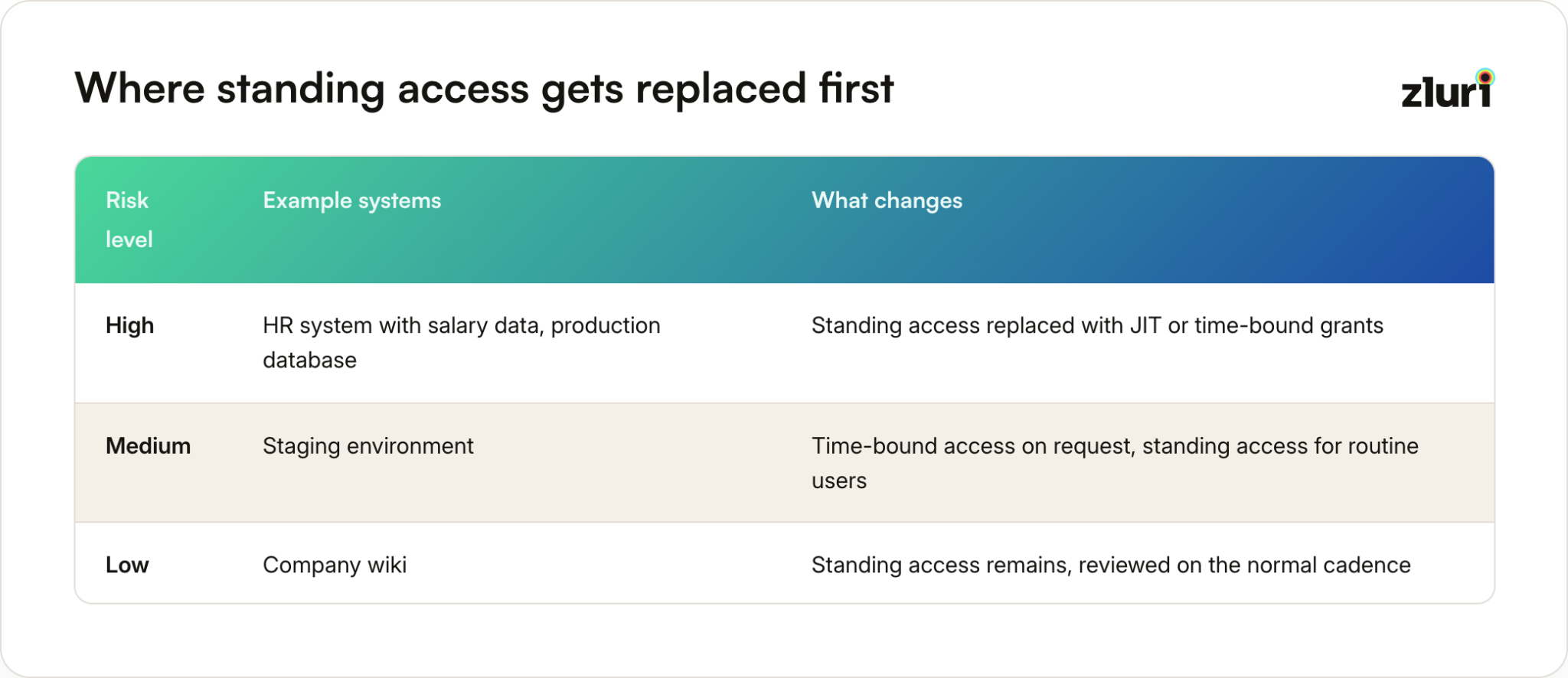
JIT (just-in-time) access replaces standing grants with access that's requested, approved, and automatically expires. Nobody holds admin rights to a system they touch twice a year, they request it when they need it and lose it when they're done. This is the single highest-leverage change in this phase, because it shrinks the population of people who could misuse an entitlement at any given moment, not just the population who currently are.
Time-based access controls are the mechanism underneath JIT: access that's automatically bounded to a window instead of relying on someone remembering to revoke it later. For privileged users, database admins, infrastructure engineers, security team members, this means a request gets approved for exactly as long as needed (maybe four hours for a production database task), then it's gone without anyone having to act.
Emergency access, sometimes called break-glass access, is the deliberate exception to all of this. When an incident requires immediate elevated access and the normal request-approve cycle is too slow, emergency access grants it instantly, logs everything, and forces a review after the fact rather than before. The discipline is making sure "emergency" stays rare and every use gets audited, not that it never happens.
Privileged access ties all three together as a category: the accounts and entitlements where getting this wrong causes the most damage. Admin consoles, production databases, financial systems, infrastructure credentials. These are exactly the entitlements JIT, time-bound, and emergency access should apply to first, standing privileged access is the highest-risk thing left once the rest of your IGA program is running well.
Don't forget shadow IT. You've bounded access to your known applications, but your teams are probably using SaaS tools you don't even know about. Deploy discovery tools to find these, then decide whether to onboard them into your IGA framework or block them. Either way, you need visibility before you can bound anything.
The result isn't a security perimeter, that's a different discipline entirely. It's an access model where almost nothing sits around unused and ungoverned long enough to become the thing an audit or an incident finds.
What Never Moves, and Why
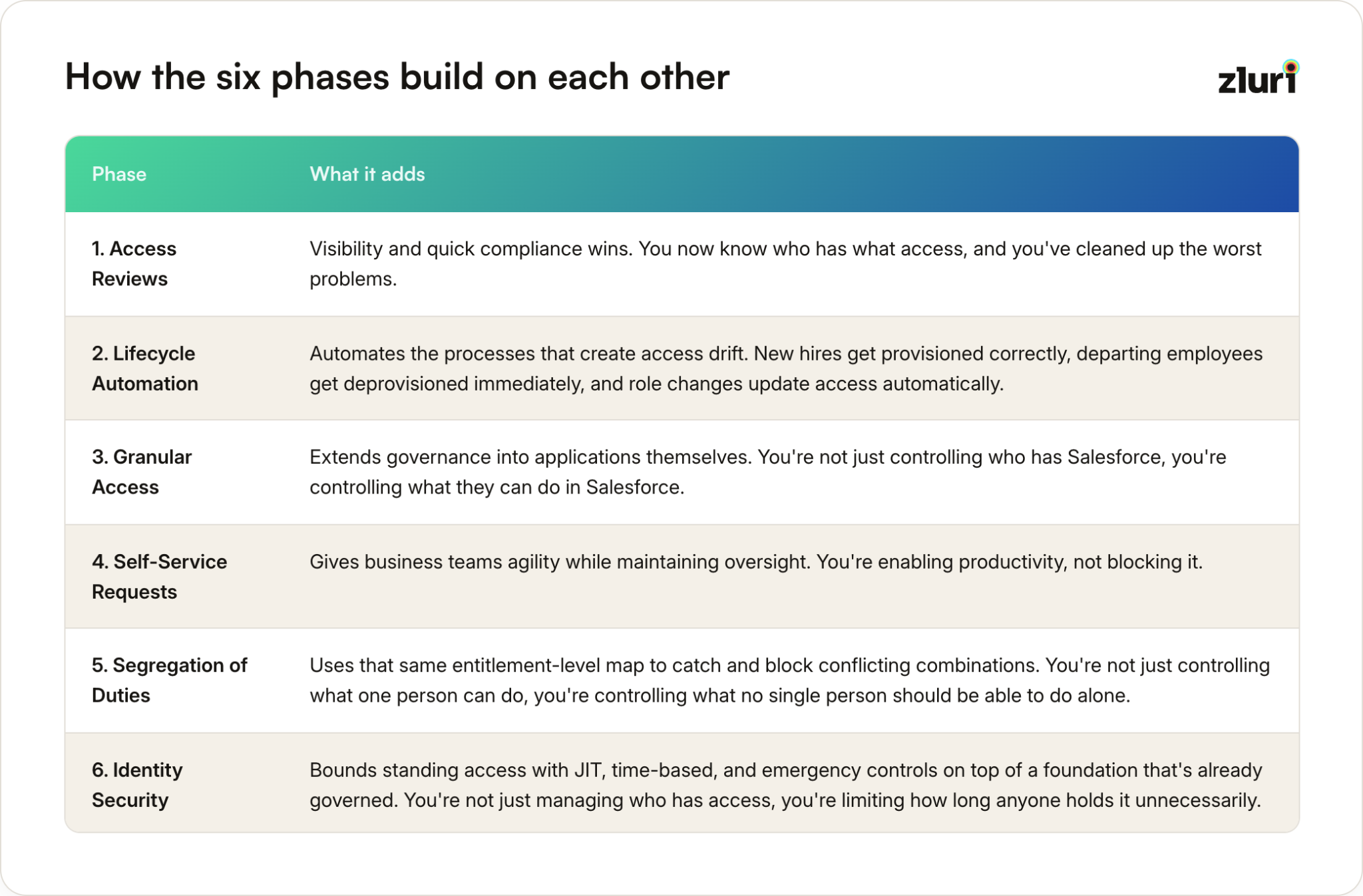
Across all five sequences, only three phases actually change position: Security, SoD, and Self-Service. Two phases barely move at all.
Access Reviews stays first or near-first in four of the five sequences. It's the cheapest phase to start, requires no new automation, and produces evidence almost immediately. There's rarely a good reason to delay it, whatever else is driving the project.
Granular Access Management rarely moves far from the middle, because too much depends on it. Segregation of duties needs the entitlement-level map it produces to catch real conflicts instead of surface-level ones. Push Granular Access too late and every phase after it is working with incomplete data.
How the Six Phases Build on Each Other
Five Implementation Principles That Determine Success
- Phase your rollout. Don't try to implement everything everywhere at once. Start with a pilot group or a single department, learn what works, fix what doesn't, then expand. IGA implementations fail when organizations try to boil the ocean on day one, we've traced why in a root cause analysis if you want the underlying pattern.
- Your IGA is only as good as your identity data. If your HR system has stale information, wrong departments, or missing role data, everything downstream breaks. Invest in data cleanup early. It's boring work, but it's foundational.
- Define clear ownership. Who owns each application? Who approves access requests? Who's responsible for reviewing entitlements? Without clear ownership, your governance framework becomes a bureaucratic mess where nobody takes responsibility for anything. Getting this right up front is most of what stakeholder alignment actually involves.
- Track metrics that matter. Don't just count the number of access reviews you completed. Track time saved, orphaned accounts removed, policy violations detected, and time-to-provision for new hires, here's a fuller framework for measuring your program. These metrics prove ROI and help you continuously improve.
- Stay agile. Your identity landscape changes constantly, new applications, acquisitions, organizational changes, new compliance requirements. Your IGA program needs to adapt. This isn't a "set it and forget it" project.
IGA as Business Enabler, Not Just Security Control
IGA isn't about implementing tools or checking compliance boxes. It's about building a framework that enables your business to move fast while staying secure.
Good IGA means your sales team can provision a new rep and have them productive on day one. It means your finance team knows exactly who can access sensitive financial data. It means your security team can prove to auditors that you have appropriate controls in place. It means when someone leaves, they lose access immediately instead of lingering in your systems for months.
Most importantly, good IGA means your organization can adopt new technologies, enter new markets, and respond to opportunities without security becoming a bottleneck.
Start with the sequence that matches what's actually forcing your project, build momentum, automate the boring stuff, then layer in sophistication over time. That's how you build IGA that actually works.
Frequently Asked Questions
Which phase should we start with if we're already behind on compliance?
Follow Compliance-Deadline-First: Access Reviews, then Segregation of Duties, pulled forward together even though SoD normally wants the entitlement data Granular Access produces. It's the fastest path to evidence an auditor will accept.
Can we run phases in parallel, or switch sequences partway through?
Running the core six in parallel generally doesn't work, each phase produces the input the next one needs. Parallelizing scope within a phase (multiple departments at once) is fine. Switching sequences partway through is different and happens often, a compliance-deadline-first rollout can turn into risk-containment-first overnight if a review turns up something serious. Treat your chosen sequence as a starting hypothesis, not a locked plan.
How long does the full implementation take, and does the sequence change that?
Plan for months, not weeks, per phase, with the total program running 10 to 20 months depending on organization size and how much manual process you're replacing. All five sequences cover the same six phases in roughly that same range, sequencing changes which risks get addressed first, not how fast the total program moves. The mistake isn't taking this long, it's trying to compress it and ending up with a half-implemented system at every phase instead of a finished one at each.
Where does SoD fit if we already have RBAC in place?
Segregation of duties still belongs in Phase 5, after granular access management and self-service requests, even with roles already defined. Existing roles don't guarantee the underlying entitlements are conflict-free, someone can hold two roles that are each individually fine but toxic in combination. Re-check for conflicts once you have entitlement-level visibility, not just role-level visibility.
Is one of the five sequences objectively the best?
No. Each optimizes for a different kind of risk: security risk, audit risk, operational risk, project-survival risk, or (for the Default) no specific risk at all, just building a complete program. The right one is whichever risk is closest to materializing in your organization right now.
What if our situation doesn't match any of the four pressure-driven sequences?
Then you're a Default case, and that's fine, most organizations implementing IGA proactively rather than reactively are. Follow the phase order above as written. If a specific pressure emerges later, you can always pull a phase forward.


.svg)













