


One Person Reviewing 50,000 Access is Why Reviews Fail
Your Q1 access review just launched. You're the IT person reviewing access across 100 applications for 500 employees. That's potentially 50,000 access combinations to evaluate.
You start:
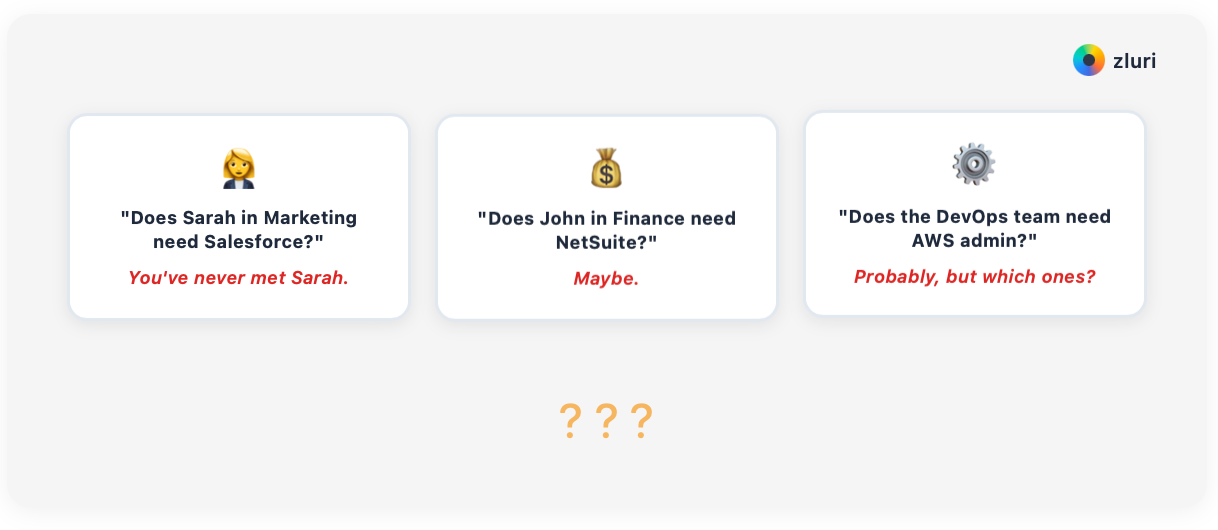
- "Does Sarah in Marketing need Salesforce?" You've never met Sarah.
- "Does John in Finance need NetSuite?" Maybe.
- "Does the DevOps team need AWS admin?" Probably, but which ones?
Three hours in, you've reviewed 400 items. You have 49,600 left. At 30 seconds per item, you're looking at 83 hours of work—two full work weeks every quarter.
This is why access reviews fail. One person tries to make all the decisions.
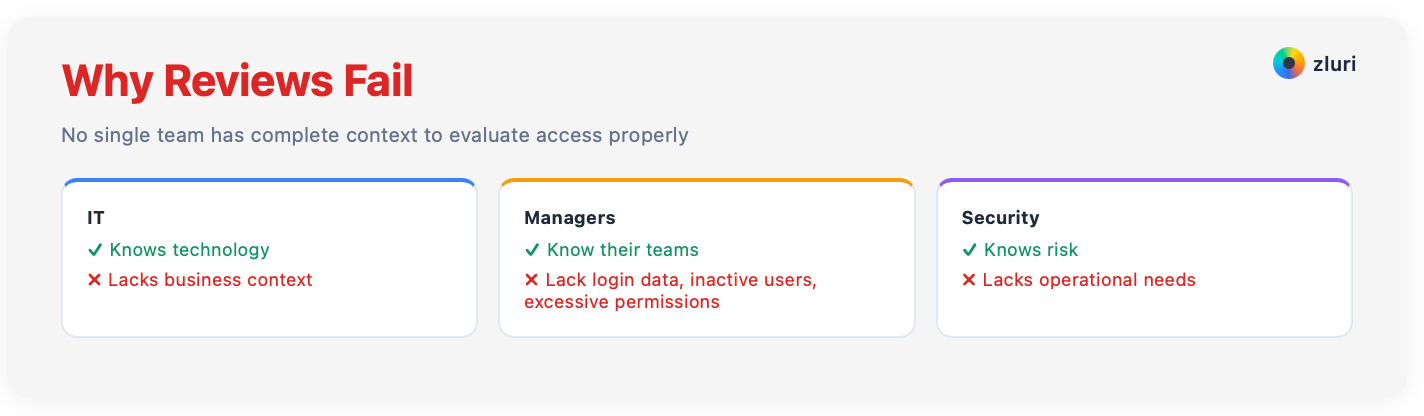
IT knows technology but not business context. Managers know their teams but lack contextual insights—who logged in recently, who's been inactive for 2 months, which permissions are excessive. Security knows risk but not operational needs. No single team has complete context.
The solution isn't centralizing reviews—it's distributing them to people who actually know what they're evaluating. In this guide, we show you how to do that.
Four Models for Delegating Access Reviews
Different organizations need different approaches. Here are four models with guidance on when to use each.
Model 1: Manager-Based Reviews
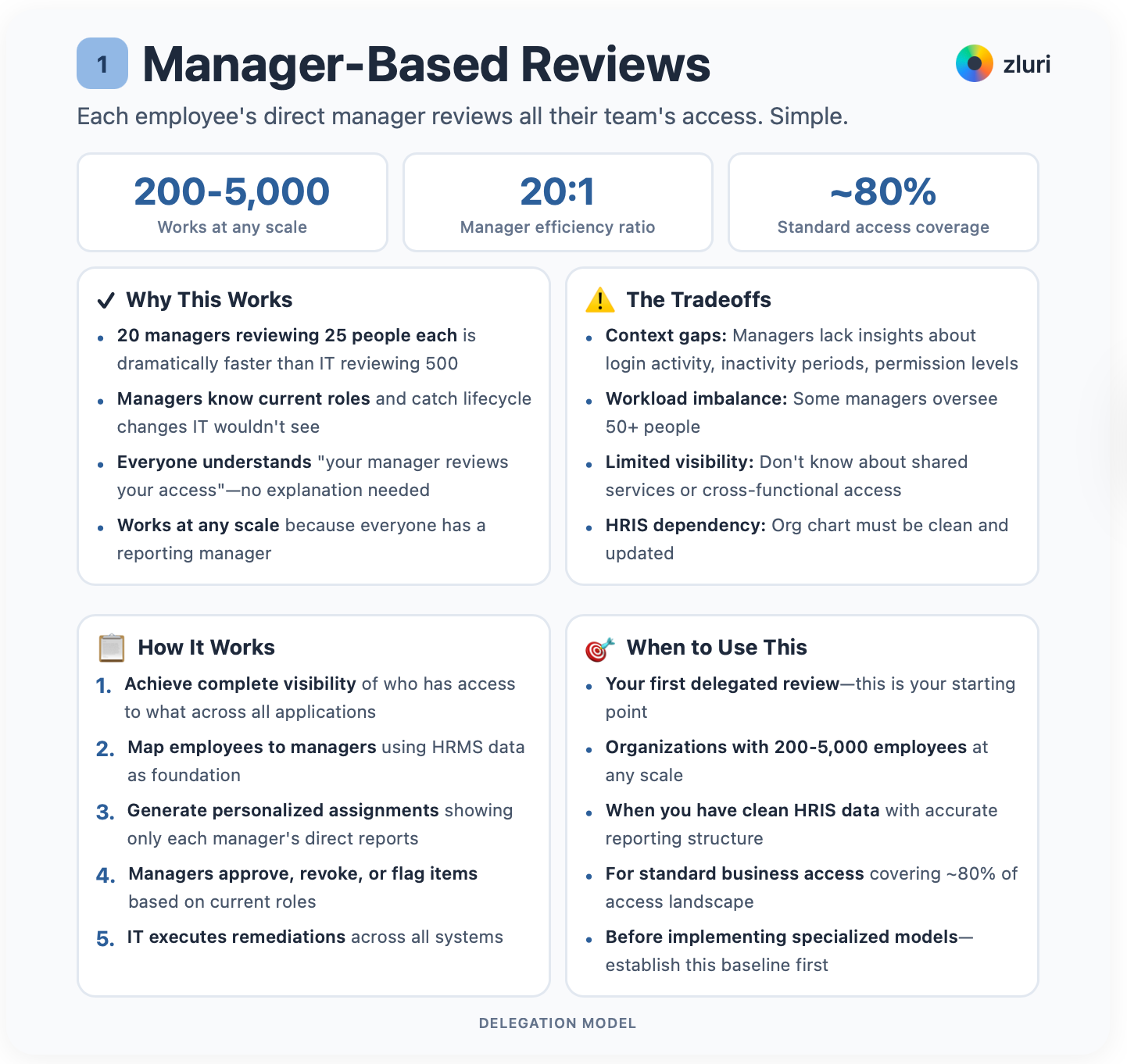
Each employee's direct manager reviews all their team's access. Simple.
Your marketing manager reviews Marketing. Your engineering manager reviews Engineering.
But in larger departments with sub-teams, it goes deeper. Your content marketing manager reviews their team. Your product marketing manager reviews theirs. Your performance marketing manager reviews theirs. Each manager reviews their direct reports, whether they oversee an entire department or a specialized sub-team within it.
In this model, reviews are distributed across all managers organization-wide. But first, you need complete access visibility—who has access to what. Next, you need to map employees to managers using HRMS data. This is the foundation. You can't delegate what you can't see.
Doing this manually is impossible at scale. Most access review platforms rely on just IDP/SSO integration to identify users and their access, which only captures 30-40% of your actual application landscape. Apps purchased with credit cards? Tools adopted by individual teams? Legacy systems without SSO integration? All invisible. That's the other 60-70%.
For complete visibility of all apps and their users, you need multiple discovery methods. Zluri's discovery engine uses 9 discovery methods to achieve 99%+ visibility. That's what creates the complete picture needed for effective delegation.
Once you have visibility, generate personalized assignments showing only each manager's direct reports. Managers approve, revoke, or flag items. IT executes the remediations.
This is your starting point. Everyone has a reporting manager, so this works at any scale. 200 employees or 2,000. It's the right choice for your first delegated review. Don't overcomplicate things.
Why does this work? 20 managers reviewing 25 people each is dramatically faster than IT reviewing 500. Managers know their employees' current roles. They catch lifecycle changes that IT wouldn't see. Role changes. Departures. Transfers. Everyone understands "your manager reviews your access." No explanation needed.
The tradeoffs: Managers lack contextual insights about login activity, inactivity periods, and permission levels. Some managers oversee 50+ people, creating workload imbalance. They don't know about shared services or cross-functional access.
And critically, your reporting structure must be clean and updated in your employee directory or HRIS. Stale data means reviews get routed to the wrong people or sit in limbo for managers who left months ago. If your org chart isn't accurate, fix that first.
But start here anyway. Manager-based is the easiest to implement. Once you've completed 2-3 cycles, add the other models for specialized systems.
Your marketing manager reviews HubSpot access for 12 team members, Canva for 8, Salesforce for 5 sales-marketing hybrids, and Google Analytics for 3 analysts. Your software engineering manager reviews AWS for 15 infrastructure engineers, PagerDuty for 12 on-call engineers, GitHub admin for 3 senior engineers.
Each manager handles their domain. Nobody drowns in spreadsheets.
Model 2: Application Owner Reviews
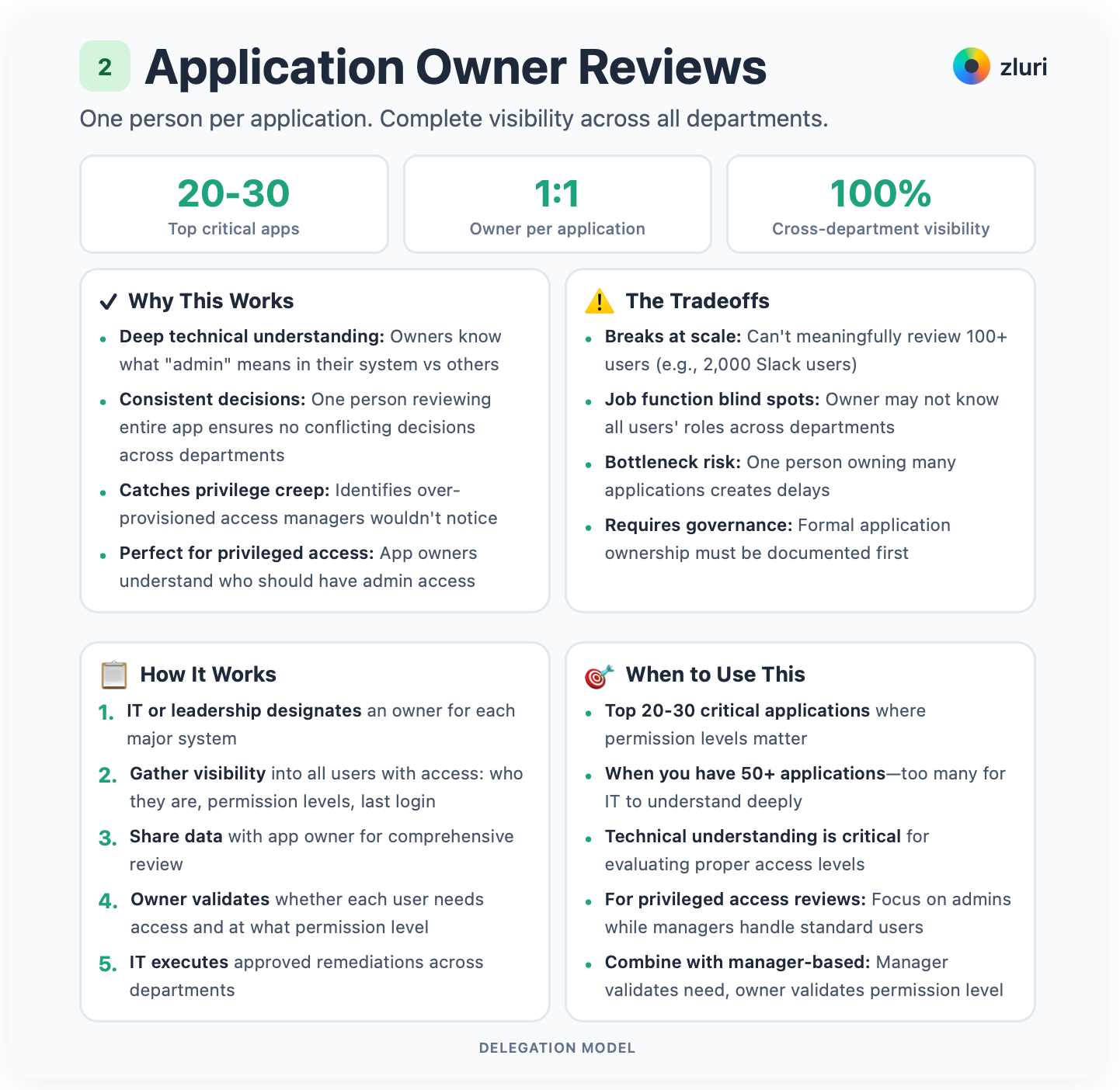
For each application, designate an owner. The person responsible for that system. That owner reviews all users with access, regardless of department.
Your Salesforce owner reviews all Salesforce users across Marketing, Sales, and Support. Your AWS owner reviews all AWS users across Engineering, DevOps, and Data.
One person per application. Complete visibility.
This works especially well for privileged users' reviews. App owners understand who should have admin access and who shouldn't.
But it breaks at scale. For apps with 100+ users, one person can't meaningfully review everyone. Take Slack used company-wide. You can't have one person review 2,000 employees. That's impossible.
In contrast, the app owner can review all the admins. Combine this with manager-based reviews for standard users.
You need this when applications get complex. When you have 50+ applications, too many for IT to understand each one deeply. When technical understanding becomes critical for evaluating proper access levels.
IT or leadership designates an owner for each major system. You need visibility into all users with access to each application. Who they are. What permission levels they have. When they last logged in. Share this data for the app owner to review. The owner validates whether each user needs access and at what permission level.
Application owners understand their system intimately. They know what "admin" means in Salesforce versus GitHub versus AWS. One person reviewing the entire application ensures consistency. No more conflicting decisions across departments.
They identify over-provisioned access. They catch privilege creep that managers wouldn't notice. A user only needs read-only but has editor permissions? The owner sees it.
The catch is you need formal application ownership governance first. Who owns each app? It has to be documented.
The owner may not know all users' job functions across departments. That's a blind spot. One person owning many applications creates a bottleneck. Owners may be too lenient or too restrictive without proper training.
Use this for your top 20-30 most critical applications where permission levels matter. Salesforce, AWS, GitHub, NetSuite. For widely-used apps, focus the owner's review on privileged access only and let managers handle standard users.
Combine it with manager-based reviews. The manager validates that the person still needs the tool. Application owner validates the permission level is appropriate. Two checks.
Your Salesforce owner reviews 87 users across Sales, Marketing, Support, and Operations. She identifies 12 who should be downgraded from editor to read-only. Five who haven't logged in for 90+ days. Eight who transferred departments but kept access. Three who legitimately need full access.
Your GitHub owner reviews 45 developers and validates that only 3 should have admin (team leads), 35 should have write access (active developers), 7 should have read-only (transferred to non-engineering roles), and 2 contractors whose contracts ended should be removed immediately.
Model 3: Security-Led Reviews for High-Risk Access
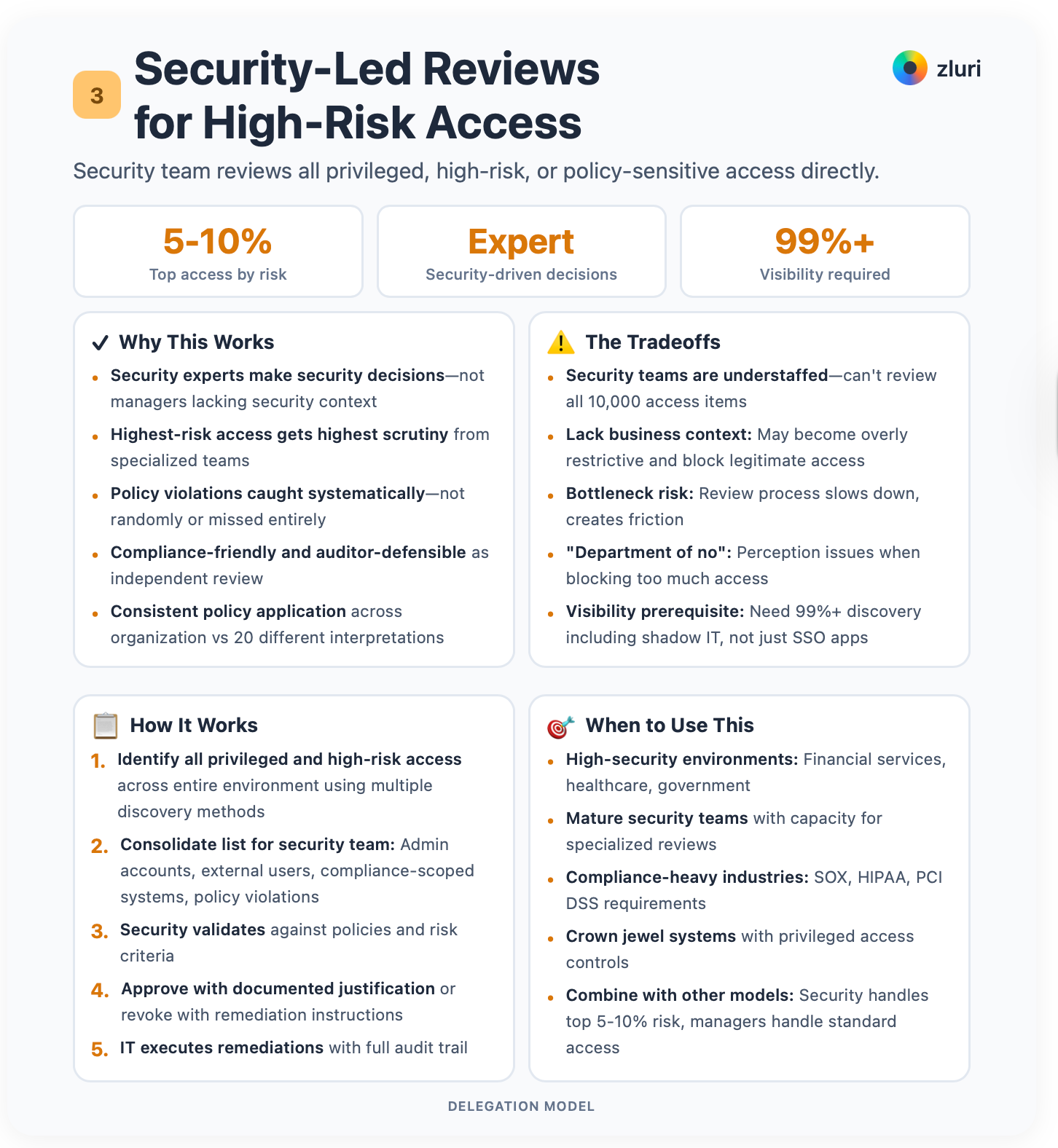
Your security team reviews all privileged, high-risk, or policy-sensitive access directly.
Privileged accounts. External users. They validate access against policies, risk frameworks, and compliance requirements. This is where expertise matters most.
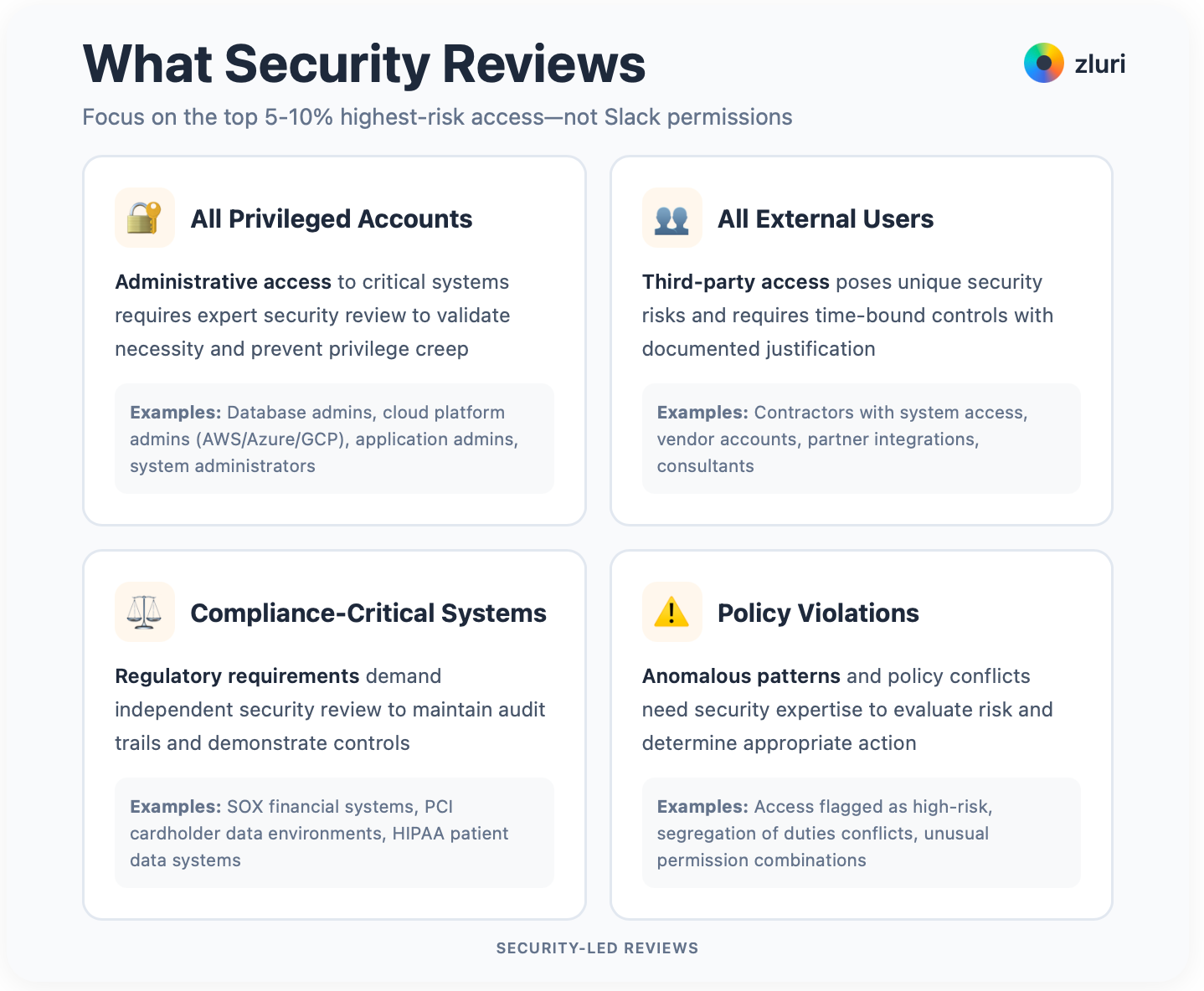
Who needs this? High-security environments. Financial services, healthcare, government. Organizations with mature security teams that have capacity for reviews. Companies dealing with privileged access to crown jewel systems. Compliance-heavy industries requiring SOX, HIPAA, or PCI DSS controls.
The prerequisite of this model is you need to identify all privileged and high-risk access across your entire environment. Who has administrative accounts? Which contractors have system access? Which users can access compliance-scoped systems? What access patterns violate policies?
Identifying privileged access is impossible without first knowing what SaaS apps are used inside your organization. Critical privileged access often exists in legacy systems, infrastructure tools, and shadow IT that aren't behind SSO. As discussed in Model 1, platforms relying solely on IDP/SSO integration miss 60-70% of your access landscape.
For complete visibility, you need multiple discovery methods to find all privileged accounts across all systems. Not just the ones integrated with your identity provider.
Once you have this visibility, share a consolidated list to the security team. All administrative accounts across all systems. All external users. Contractors, partners, vendors. All users with access to compliance-scoped systems. All access flagged as policy violations or high risk.
Security validates against policies and risk criteria. They approve with documented justification or revoke with remediation instructions.
Security experts make security decisions. Not managers lacking security context. Highest-risk access receives the highest scrutiny. Policy violations get caught systematically, not randomly.
It's compliance-friendly. Defensible to auditors as independent review. Security policies get applied consistently across the organization instead of being interpreted differently by 20 managers.
However, security teams are understaffed. They can't review all 10,000 access items. Nobody can. Security may lack business context and become overly restrictive, blocking legitimate access and creating friction. The review process can become a bottleneck. People start calling you "the department of no."
Use this for your top 5-10% of access by risk. All privileged accounts. Database admins, cloud platform admins, application admins. All external users. Contractors, vendors, partners. All access to compliance-critical systems. SOX financial systems, PCI cardholder data, HIPAA patient data. Access patterns flagged as policy violations.
Combine this with manager-based or application owner reviews for standard access. Security focuses on what matters most. Not Slack permissions.
Security reviews 47 users with production database admin access, validating only required users have admin access and downgrading 12 developers to read-only.
They review 23 contractors with access to customer data, validate contracts are active, and revoke 5 expired contractors immediately. They review 8 users flagged by AI for suspicious activity. Bulk exports. Unusual login times. Things that make you look twice.
Model 4: Hybrid Routing by Access Type
Combine all three models based on access type.
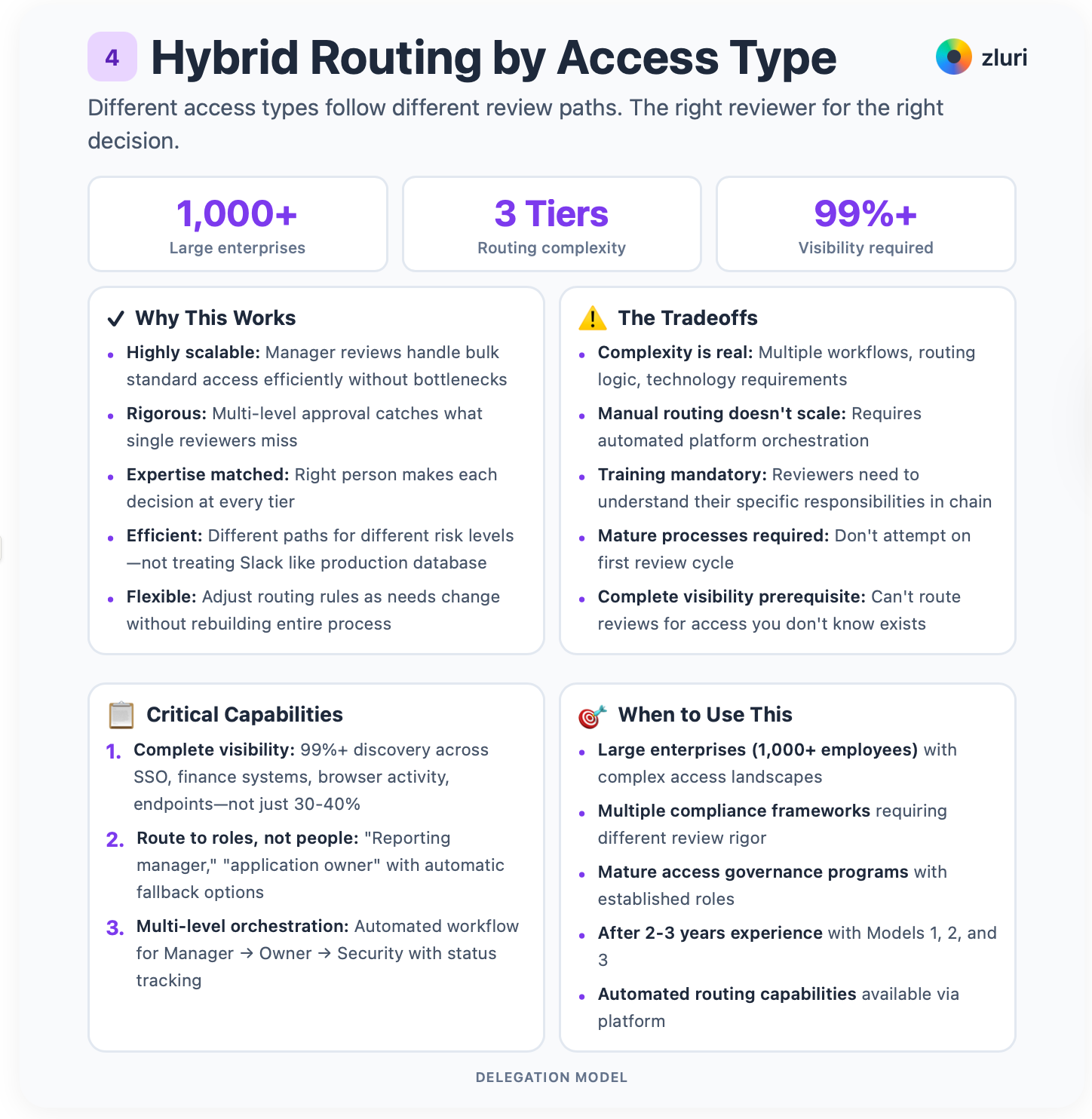
Standard business access flows to managers. Privileged access requires multi-level approval. Manager validates business need, application owner validates technical appropriateness, Security approves risk. External users and compliance-scoped systems route directly to Security.
Different access types follow different review paths. The right reviewer for the right decision.
This is for large enterprises (1,000+ employees) with complex access landscapes. Multiple compliance frameworks. Mature access governance programs with established roles and automated routing capabilities. Don't attempt this on your first review. You need experience with each of the 3 types of reviews discussed earlier.
Standard user access (80% of your access) goes to managers. Low-risk, distributed broadly, AI flags unusual patterns.
Privileged access (15% of access) gets multi-level review. Manager validates business justification, then application owner validates technical necessity, then Security approves risk. Each level adds scrutiny.
External users (5% of access) go straight to Security. Contractors, vendors, partners all require Security approval with time-bound access, MFA enforcement, and documented compensating controls.
The hybrid approach is highly scalable. Manager reviews handle bulk standard access efficiently without bottlenecks.
It's rigorous. Multi-level approval catches what single reviewers miss. Expertise is matched. The right person makes each decision.
It's efficient. Different paths for different risk levels means you're not treating Slack access like production database access.
It's flexible. You can adjust routing rules as needs change without rebuilding the entire process.
Here's what makes hybrid routing actually work: complete visibility and intelligent automation.
You can't delegate what you can't see. As discussed in Model 1, most IGA platforms rely on IDP/SSO integration for discovery, capturing only 30-40% of your actual application landscape. The other 60-70% remains invisible. You can't route reviews for access you don't know exists.
Since hybrid routing requires an access review platform, three critical capabilities matter:
First, complete visibility is what separates good reviews from great reviews. You need to identify all applications, all users, all access levels, and all permission types across your entire environment.
Most access review solutions assume you already have complete access visibility. They don't. This leaves massive blind spots. Make sure your solution gives you complete access visibility.
At Zluri, we start with access visibility. Our discovery engine uses 9 discovery methods to achieve 99%+ visibility. SSO integration, finance system data, browser activity, endpoint agents, and more. Without comprehensive discovery, you're delegating partial reviews and missing critical access.
Second, don't hardcode people. Routing "Salesforce admin reviews to Mark Jones" breaks when Mark leaves or changes roles. Route to roles instead. "Reporting manager," "application owner," "security engineer" with automatic fallback options. When the primary reviewer is unavailable, your system must escalate to the designated backup without manual intervention. This prevents reviews from stalling because one person is on vacation.
Third, multi-level approvals need orchestration. Privileged access requiring Manager → Owner → Security review means three sequential steps. If you're managing this manually with spreadsheets and email chains, it takes weeks. Platforms like Zluri automate the workflow. When the manager approves, it automatically routes to the application owner, then to Security, tracking status and sending reminders at each stage.
The complexity is real. Multiple workflows. Routing logic. Technology requirements. Manual routing doesn't scale at this level. Training is mandatory because reviewers need to understand their specific responsibilities in the chain. You need mature processes. Don't attempt this on your first review cycle. Start simple, add complexity as you prove the models work.
This is your end state, where mature organizations land after 2-3 years.
Start with manager-based delegation. Add application owner reviews for the top 20% of applications. Add security reviews for top 5% highest-risk access. Then implement automated routing to manage complexity.
Evolution, not revolution.
Tier 1 (Standard Access, routed to managers): All SaaS application access for non-admin users. Collaboration tools like Slack, Zoom, Google Workspace. Department-specific business tools. Twenty managers each review 20-30 people. Fast.
Tier 2 (Privileged Access, multi-level): Application admin access gets Manager + Application Owner + Security review. Infrastructure access gets Manager + Infrastructure Lead + Security review. Financial system access gets Manager + Finance Controller + Security review. 120 privileged users get 3-level scrutiny. Slow, but appropriately so.
Tier 3 (High Risk, Security direct): All contractor/vendor/partner access. 45 external users. All access to SOX-scoped systems. All policy violations flagged by AI. Security reviews approximately 200 high-risk items. No shortcuts.
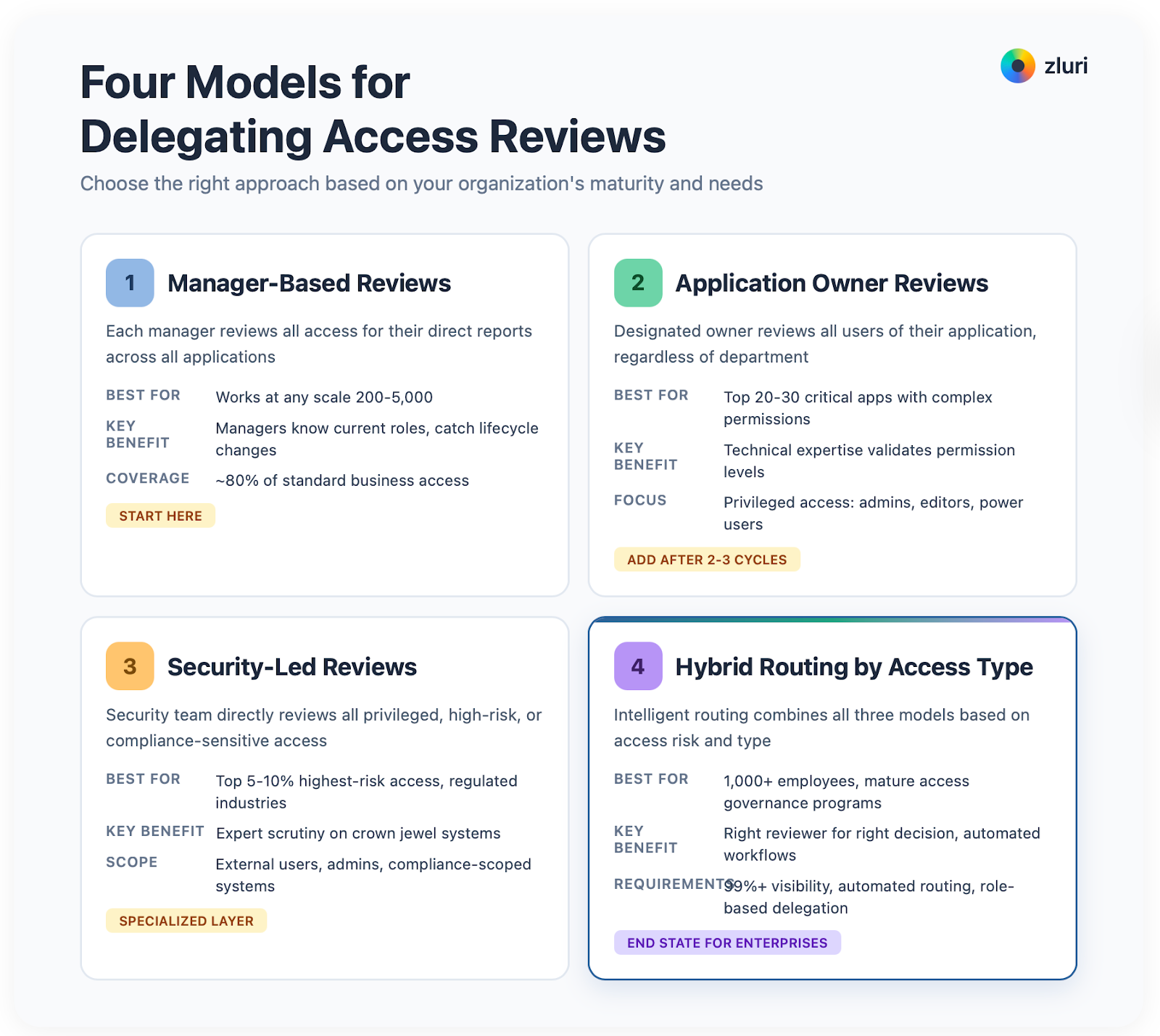
To summarise, all the four models are:
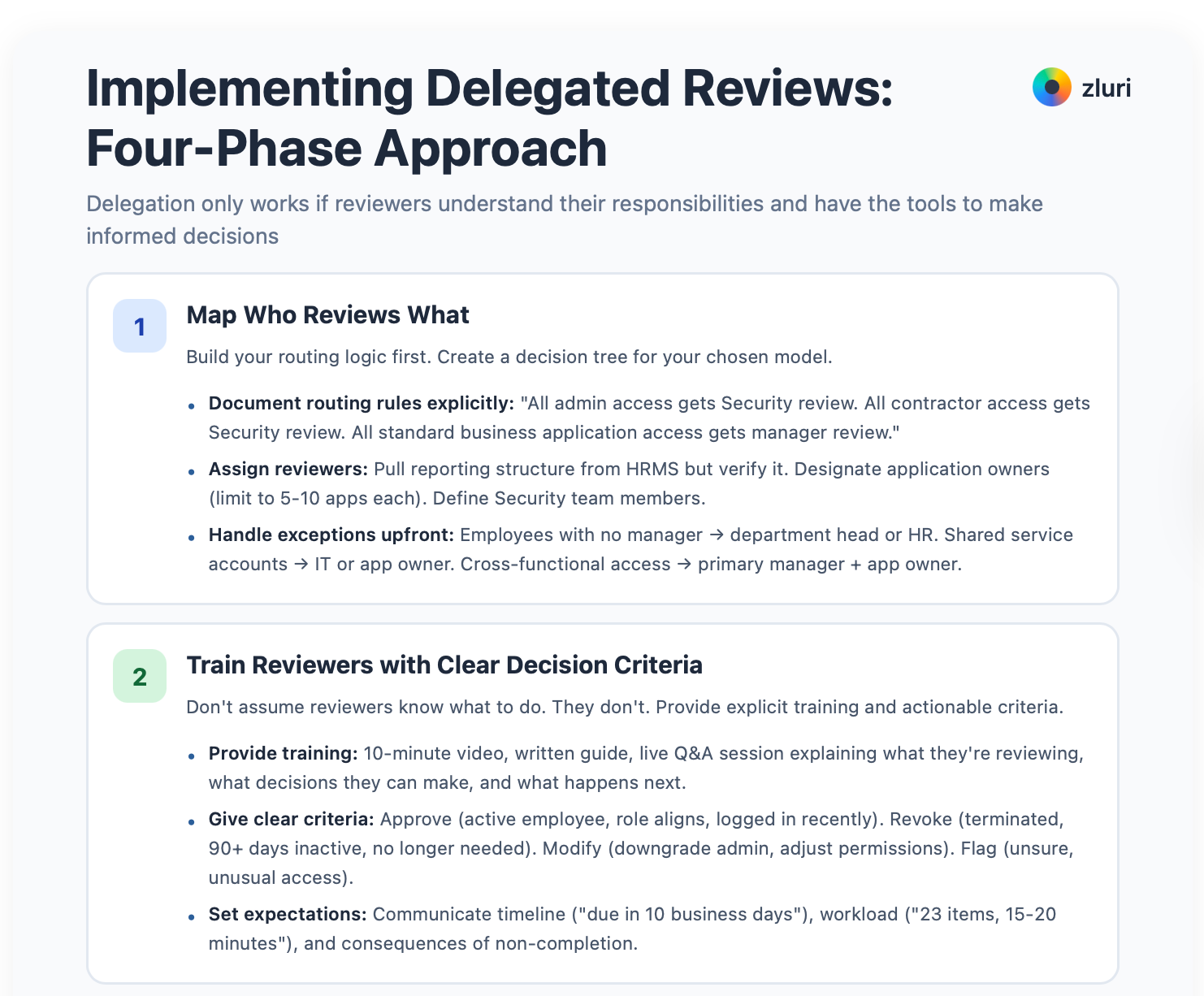
Implementing Delegated Reviews: Four-Phase Approach
Delegation only works if reviewers understand their responsibilities and have the tools to make informed decisions.
You can implement these phases manually. Spreadsheets, email chains, tracking documents. It works, but it's cumbersome at scale. Or you can use user access review software like Zluri to automate routing, notifications, tracking, and remediation. The logic remains the same whether you do it manually, use Zluri, or use any other user access review tool. The phases don't change. Only the execution efficiency changes.
Here's how to implement delegation successfully.
Phase 1: Map Who Reviews What
Build your routing logic first. Create a decision tree for your chosen model.
For manager-based, all standard access routes to managers. For hybrid, external users route to Security, privileged access routes to Manager + Owner + Security, standard access routes to Manager only. More complex, but necessary at scale.
Document your routing rules explicitly. Write them down in your policy. "All admin access gets Security review. All contractor access gets Security review. All standard business application access gets manager review. All access to top 20 critical applications also gets application owner review." No ambiguity about who reviews what.
Now assign your reviewers. For manager-based reviews, pull reporting structure from HRMS. But verify it. HRMS data is often stale. Managers listed may not be actual managers anymore. Handle employees with no manager listed, managers on leave, or contractors without a clear manager. Don't let edge cases derail your launch.
For application owner reviews, designate an owner for each major application. Document ownership in a centralized registry that everyone can access. Limit each owner to 5-10 applications to prevent overload. One person owning 30 applications becomes a bottleneck.
For Security reviews, identify which team members will conduct reviews and define the escalation path if a reviewer is unavailable. Security is often small. Plan for coverage gaps.
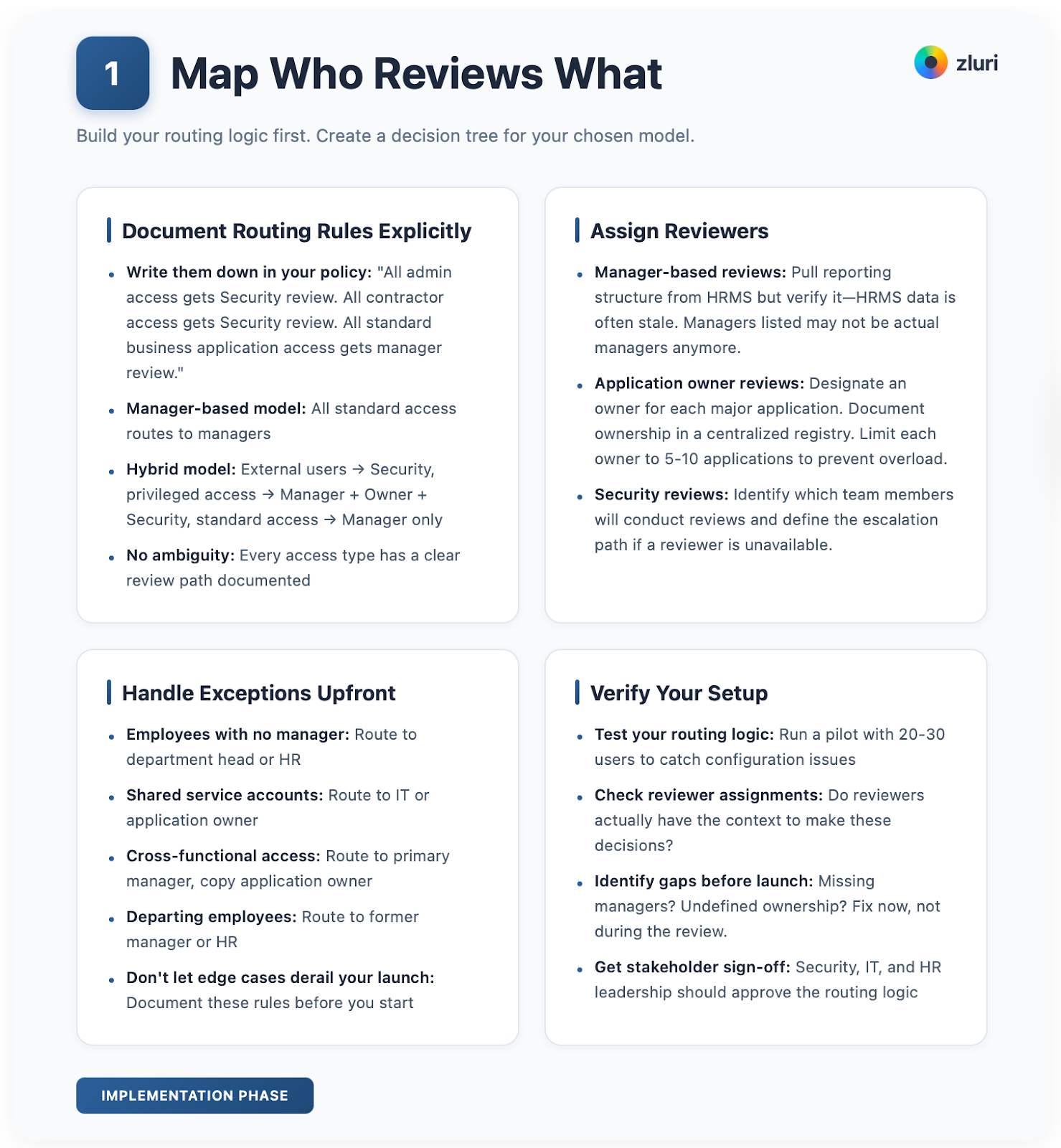
Handle exceptions upfront, not during the review. Employees with no clear manager route to department head or HR. Shared service accounts route to IT or application owner. Cross-functional access routes to primary manager, copy application owner. Departing employees route to former manager or HR. Document these rules before launch.
Phase 2: Train Reviewers with Clear Decision Criteria
Don't assume reviewers know what to do. They don't.
Provide explicit training. Explain what they're reviewing (access to applications), what they're evaluating (does this person still need this access), what decisions they can make (approve, revoke, modify, escalate), how to use the review tool, and what happens next (IT executes your decisions). Ten-minute video. Written guide. Live Q&A session. Make it crystal clear.
Give them decision criteria they can actually use:
Approve if the user is an active employee, access aligns with current role, user has logged in recently (within 90 days), and business justification is clear.
Modify if the user needs access but at a different level. Downgrade admin to standard user. Change license type from pro to basic for cost savings. Adjust permissions to match current role requirements.
Revoke if user is terminated or on long-term leave, user hasn't logged in for 90+ days, access no longer needed for current role, or user has duplicate tools serving same function.
Flag for escalation if you're unsure if the user still needs access, access seems unusual for role, user is contractor and contract status unclear, or user has admin access without obvious justification.
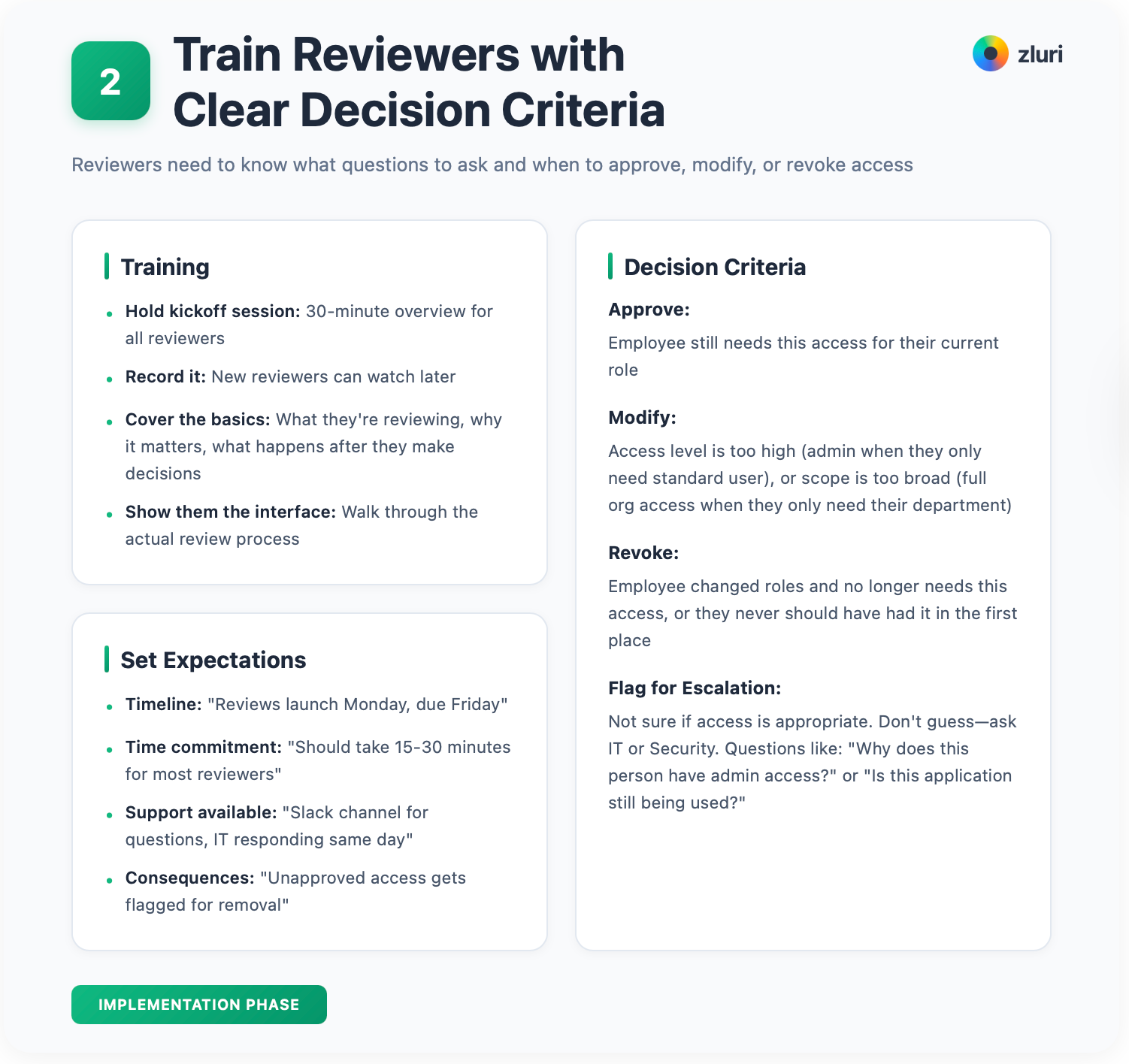
Set clear expectations. Communicate timelines: "Your review is due in 10 business days." Communicate consequences: "If you don't complete your review by the deadline, we'll escalate to your manager." Communicate workload: "You have 23 access items to review. This should take 15-20 minutes." People need to know what's expected and how long it'll take.
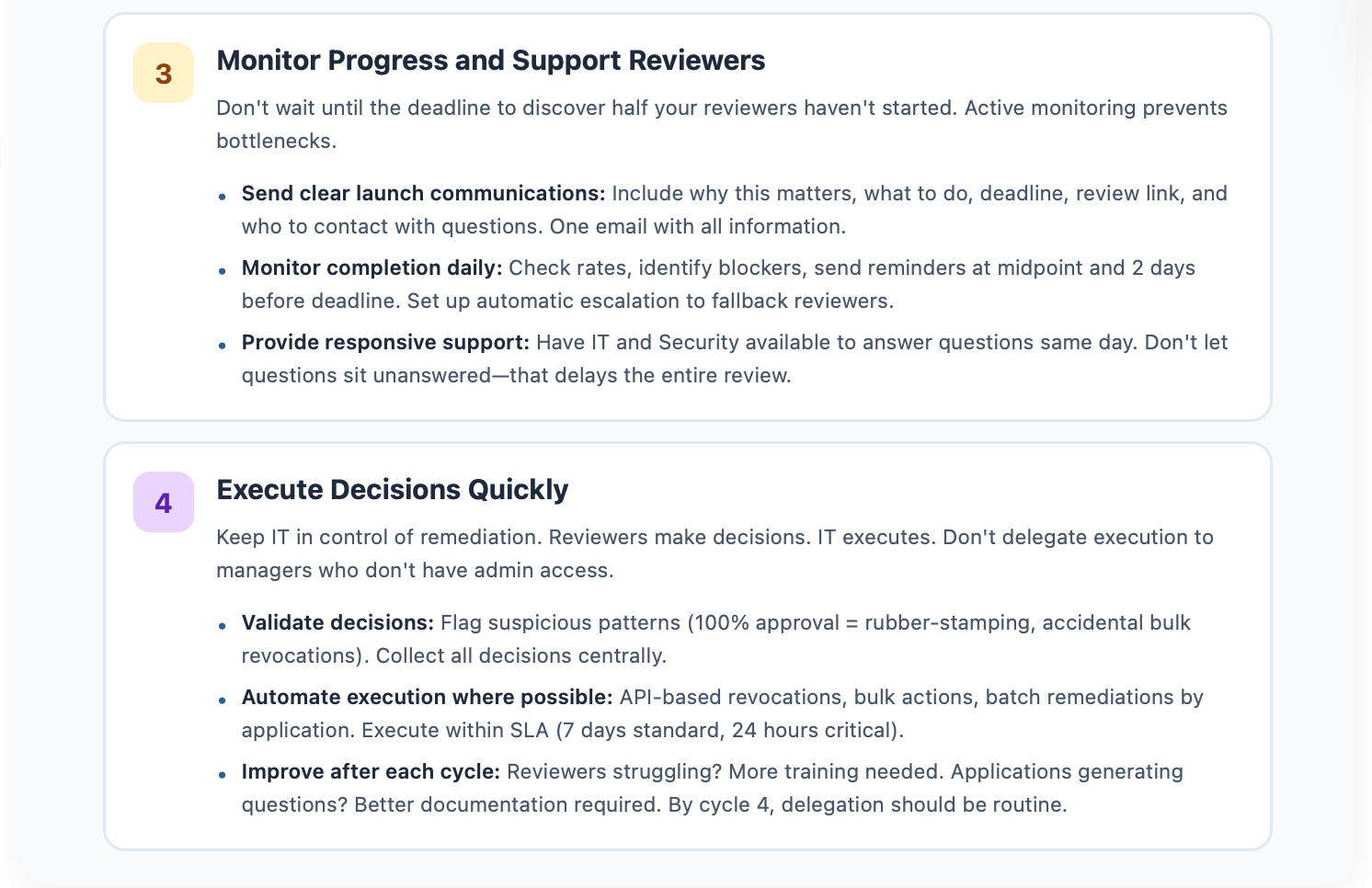
Phase 3: Monitor Progress and Support Reviewers
Send clear launch communications. "You've been assigned to review access for your team as part of Q1 access reviews. This is required for compliance and security. Please click the link below to complete your review by [date]."
Include why this matters, what they need to do, the deadline, the link to their review, and who to contact with questions. One email. All the information.
Monitor completion daily. Check rates. Identify blockers. Reviewers who haven't started. Reviewers stuck on specific decisions. Technical issues preventing completion. Send reminders at midpoint and 2 days before the deadline. Don't wait until the deadline to discover half your reviewers haven't started.
Set up automatic escalation, if possible. If the primary reviewer doesn't respond by the first reminder, notify the fallback reviewer. If fallback is assigned, tell them upfront. Don't surprise them three days before the deadline. People hate last-minute surprises.
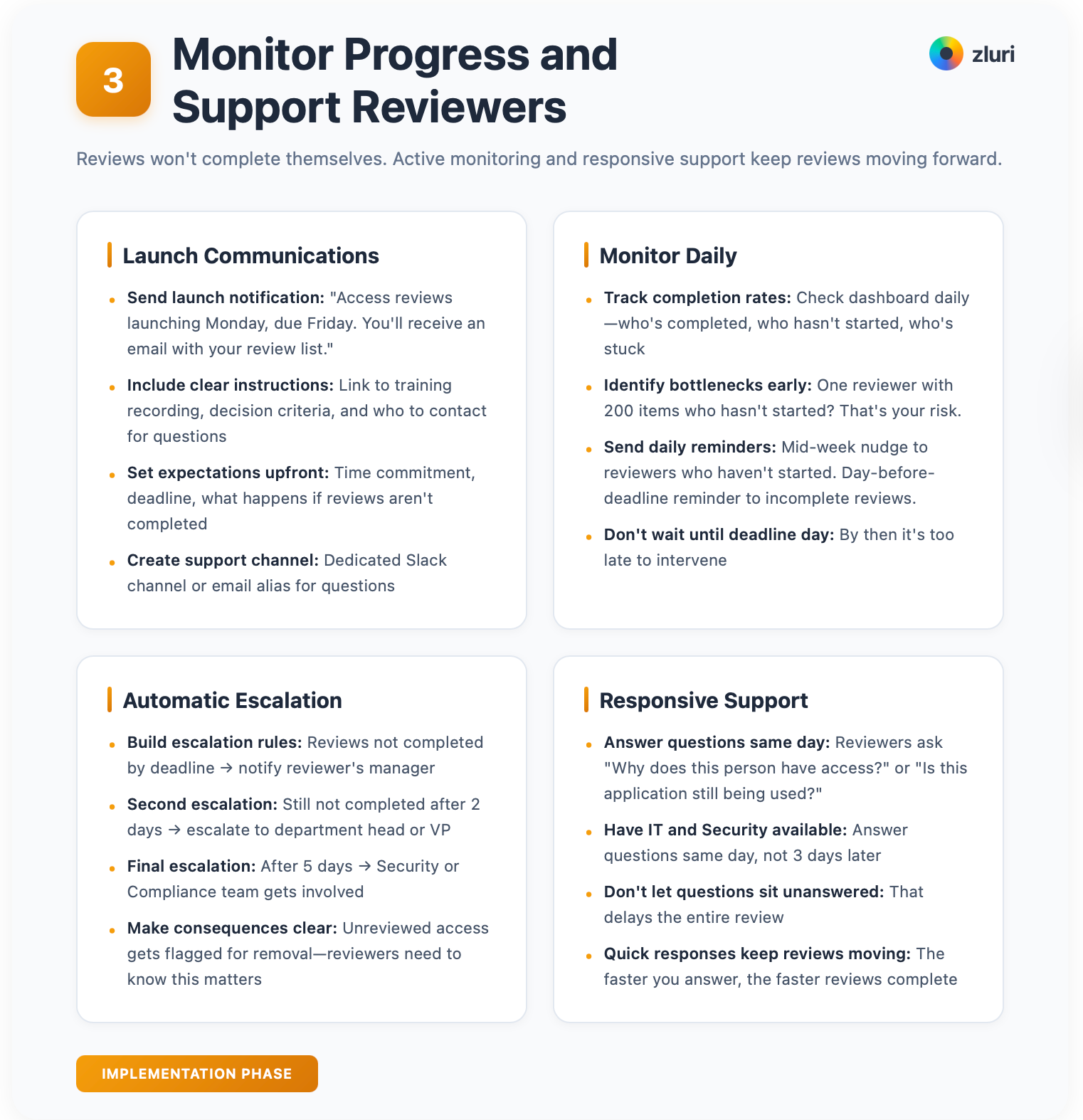
Provide responsive support. Reviewers will have questions. "What does admin access mean?" "This person left 3 months ago, why do they still have access?" "I'm not sure if this contractor still needs access." Have IT and Security available to answer questions quickly. Same day, not three days later. Don't let questions sit unanswered. That delays the entire review.
Phase 4: Execute Decisions Quickly
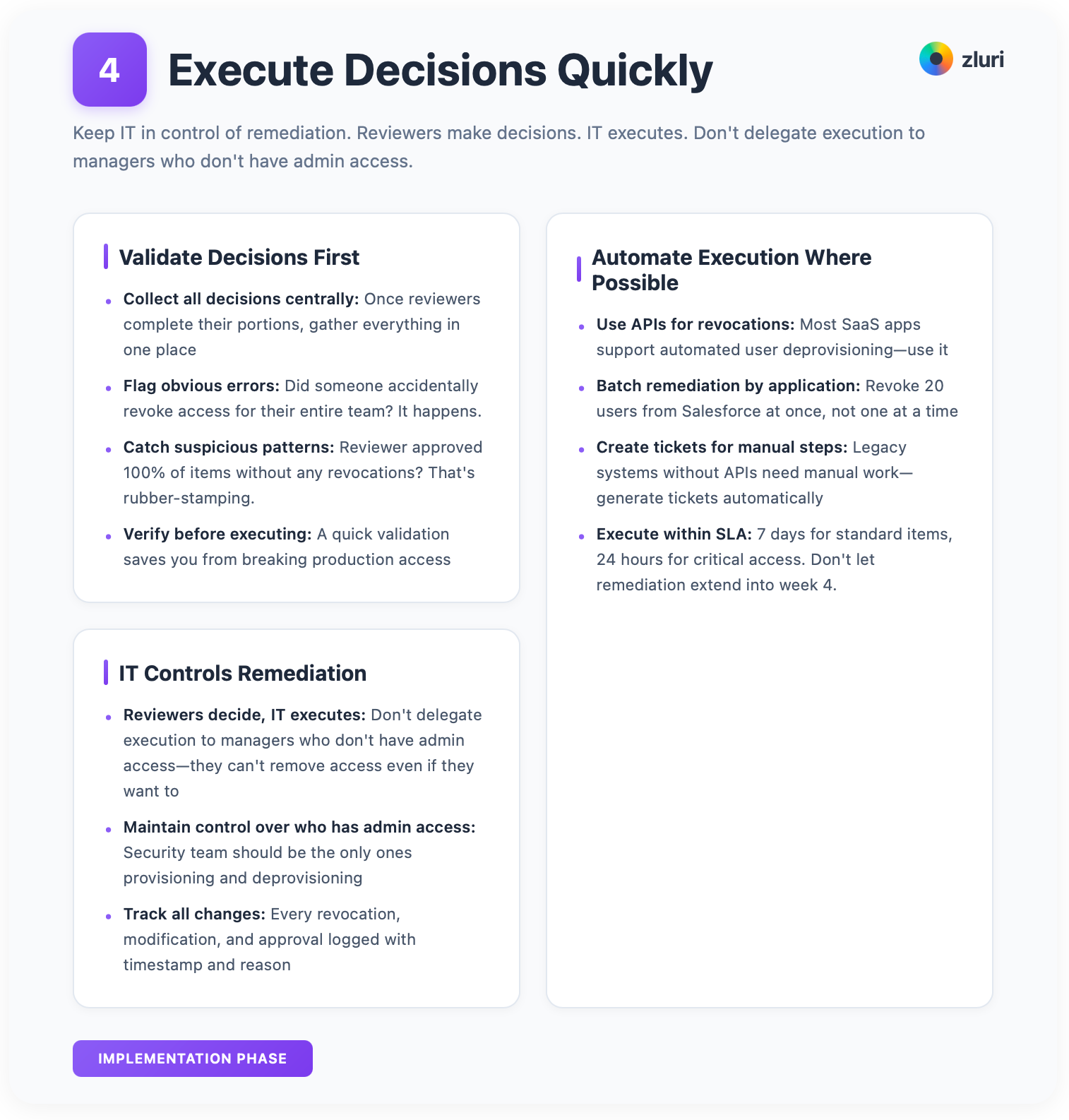
Once reviewers complete their portions, collect all decisions centrally. Validate for obvious errors. Did someone accidentally revoke access for their entire team? It happens. Flag suspicious patterns. Reviewer approved 100% of items without any revocations? That's rubber-stamping.
Keep IT in control of remediation. Reviewers make decisions. IT executes. Don't delegate execution to managers who don't have admin access. They can't remove access even if they want to.
Execution should be automatic where possible. API-based revocations, bulk actions, ticketing for manual steps. Batch remediations by application for efficiency. Execute within SLA. 7 days for standard, 24 hours for critical. Don't let remediation extend into week 4.
Improve after each cycle. Reviewers consistently struggling? More training needed. Applications generating questions? Better documentation required. Long reviews? Improved tools or guidance.
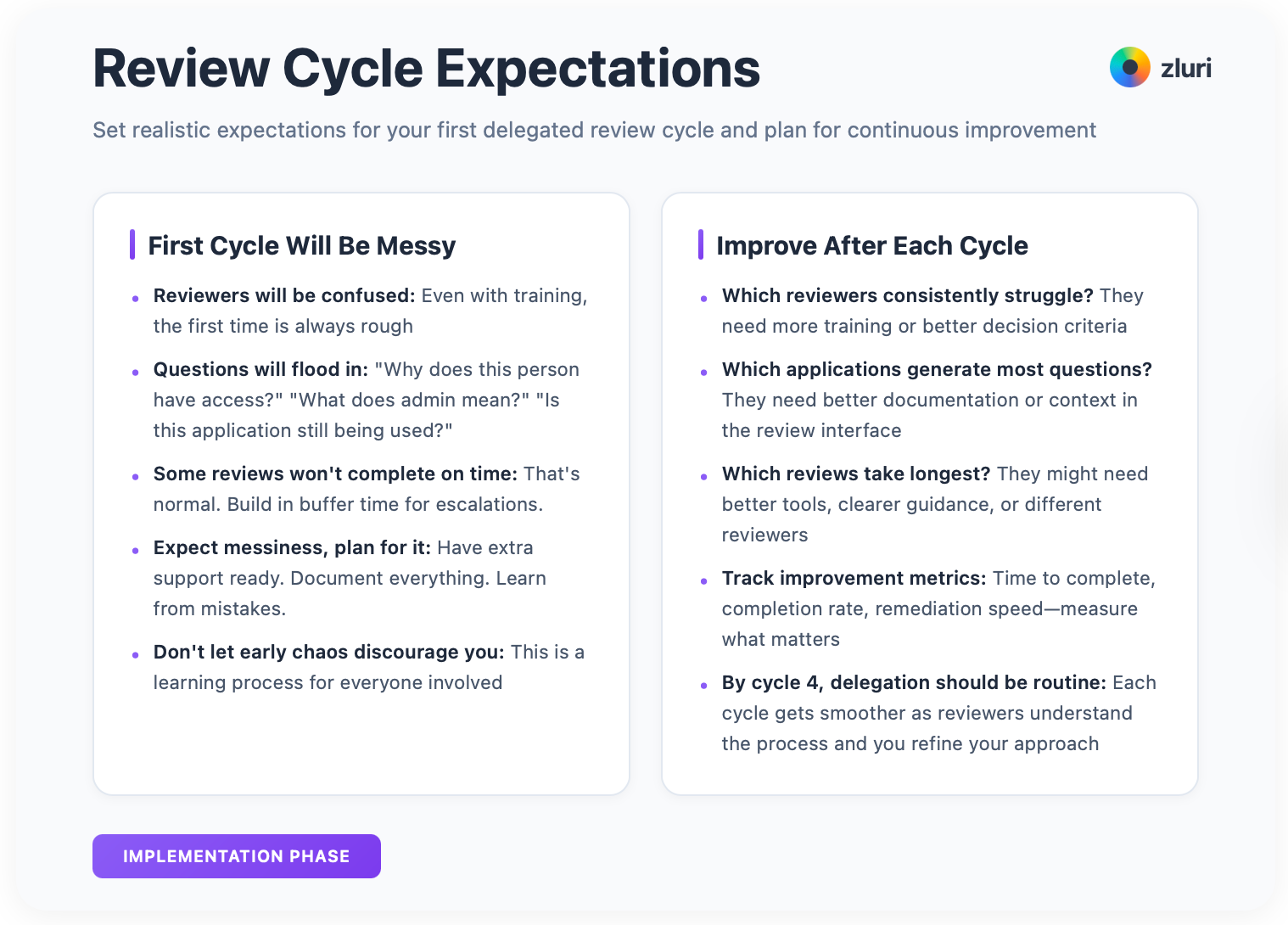
The first delegated review cycle will be messy. Reviewers will be confused. Questions will flood in. Some reviews won't complete on time. That's normal. By the fourth cycle, delegation should be routine.
Five Common User Access Review Delegation Mistakes (And How to Fix Them)
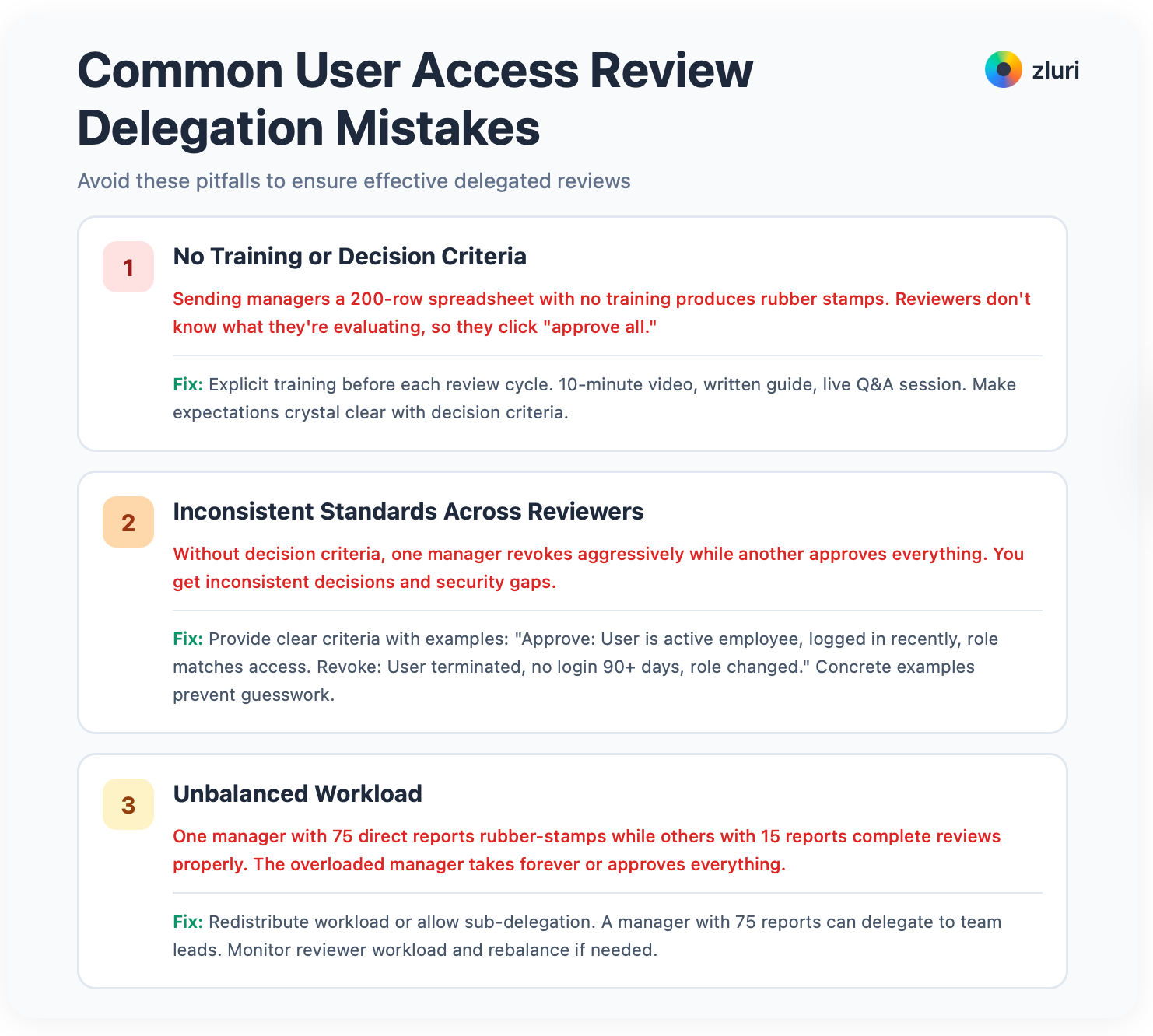
1. No Training or Decision Criteria
Sending managers a 200-row spreadsheet with no training produces rubber stamps. Reviewers don't know what they're evaluating, so they click "approve all." Fix this with explicit training before each review cycle. 10-minute video, written guide, live Q&A session. Make expectations crystal clear with the decision criteria from Phase 2.
2. Inconsistent Standards Across Reviewers
Without decision criteria, one manager revokes aggressively while another approves everything. You get inconsistent decisions and security gaps. Provide clear criteria with examples: "Approve: User is active employee, logged in recently, role matches access. Revoke: User terminated, no login 90+ days, role changed." Concrete examples prevent guesswork.
3. Unbalanced Workload
One manager with 75 direct reports rubber-stamps while others with 15 reports complete reviews properly. The overloaded manager takes forever or approves everything. Redistribute workload or allow sub-delegation. A manager with 75 reports can delegate to team leads. Monitor reviewer workload and rebalance if needed. Don't let one person's overload break the entire process.
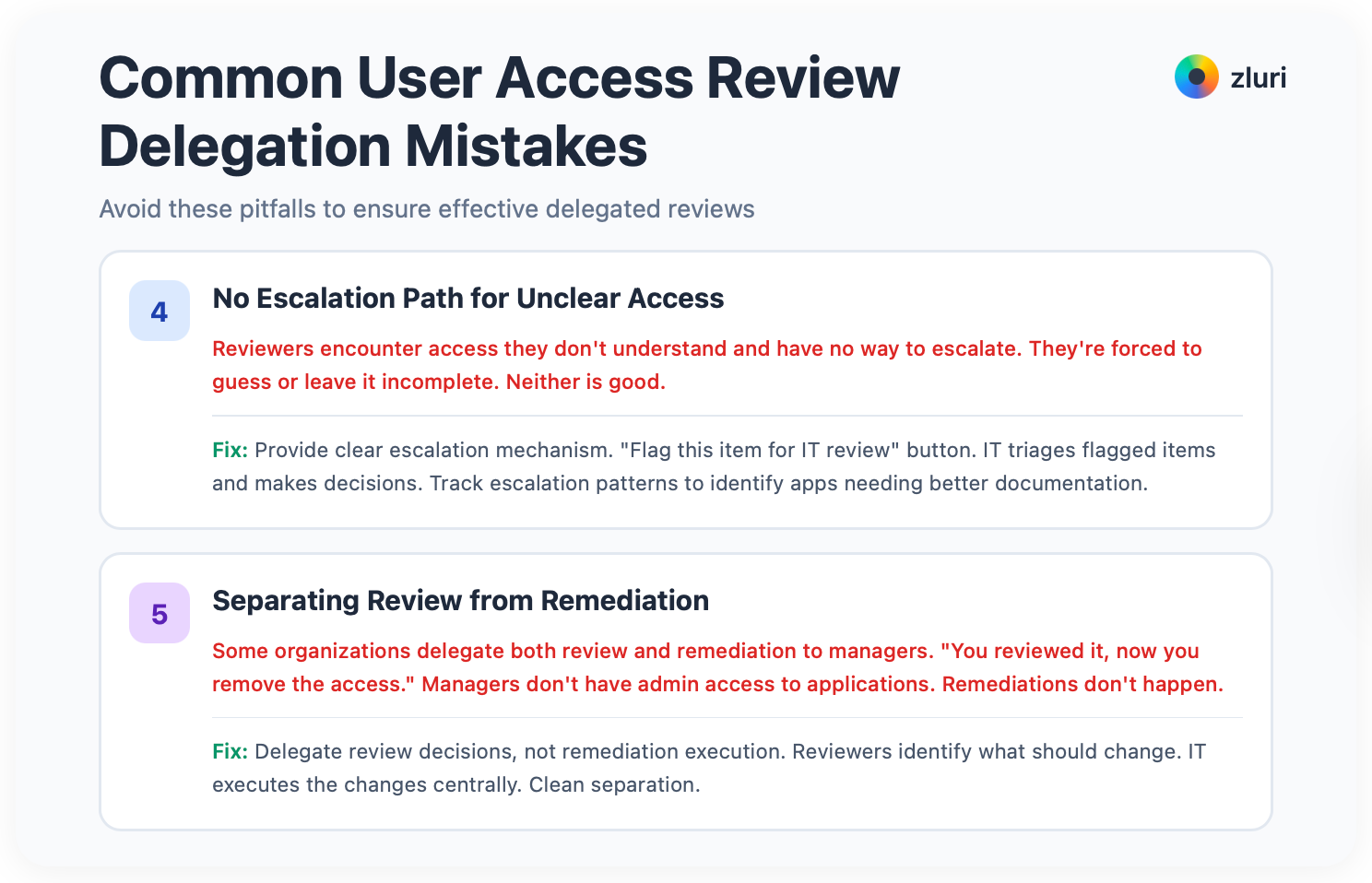
4. No Escalation Path for Unclear Access
Reviewers encounter access they don't understand and have no way to escalate. They're forced to guess or leave it incomplete. Neither is good. Provide a clear escalation mechanism. "Flag this item for IT review" button. IT triages flagged items and makes decisions. Track escalation patterns. If many reviewers escalate the same application, that app needs better documentation or clearer ownership.
5. Separating Review from Remediation
Some organizations delegate both review and remediation to managers. "You reviewed it, now you remove the access." Managers don't have admin access to applications. They don't know how to revoke. Remediations don't happen. Delegate review decisions, not remediation execution. Reviewers identify what should change. IT executes the changes centrally. Clean separation.
Measuring Delegation Success
Track these metrics to prove delegation is working and improving over time.
For completion, monitor overall completion rate (target: >90%), completion rate by reviewer type, time to complete (target: <15 days), and number of reminders required per reviewer. These tell you if people are actually doing the reviews.
For quality, watch approval rate by reviewer. Flag 100% approvers or 100% revokers because both indicate problems. Track violations discovered per reviewer, escalations per reviewer, and post-review access requests. These tell you if reviewers are making good decisions or just clicking through.
For efficiency, measure IT person-hours invested (should decrease), reviewer hours invested (distributed, not concentrated), time from decision to remediation, and number of unclear items flagged. These tell you if delegation is actually saving time or just moving the burden around.
Create and compare to your centralized baseline. If before delegation, it requires 149 man-hours, 18 days to complete, 85% completion rate, minimal violations discovered, then after delegation, it should reduce to 50 man-hours on orchestration, 12 days to complete, 92% completion rate, three times more violations discovered because reviewers have actual context. That's an improvement.
Delegation Scales Access Reviews as Your Organization Grows
At 100 employees, maybe one or two people can review all access. At 1,000 employees, delegation isn't optional. It's how reviews complete without overwhelming IT.
The progression is clear. Start with manager-based reviews for all standard access. Managers know their teams and can make 80% of access decisions. Add application owner reviews for your top 20-30 critical systems where technical permission levels matter. Add Security-led reviews for privileged accounts, external users, and compliance-critical systems. Implement hybrid routing that automatically sends different access types down different review paths based on risk.
Reviews complete in weeks instead of months. Decisions are made by people with actual context. Violations are discovered that IT would miss. IT time is freed for strategic work. Access reviews scale as your organization grows.
The question isn't whether to delegate. It's how to delegate effectively.
Get Started
See automated review delegation routing in action → Book a Demo


.svg)











