Access Management

What is Birthright Access? Traditional vs. Modern Approaches

Madan Panathula
Talent Partner, Adobe
June 2, 2026
8 MIn read

Ready to secure your identity surface?

About the author

Madan is a senior talent development partner at Adobe. He brings with him expertise from both the world of software and the world of talent. He is a guest writer for Zluri.

Most IT teams think they have birthright access because they use SSO to provision accounts. What they actually have is automated account creation — and an invisible backlog of permission requests waiting to happen.

You hire a software engineer. They need access to 15 applications to do their job.

Traditional approach:

  • HR or manager submits one ticket: "New engineer John Doe starting January 15"
  • IT responds: "What access does he need?"
  • Manager: "Give him what other engineers have"
  • IT: "Which repos? What permissions? Which AWS accounts?"
  • Manager: "Ask Sarah, she's on the team"
  • Email chain with Sarah listing apps from memory
  • IT: "We don't have access to Datadog, who owns that?"
  • More email chains tracking down app owners
  • Week later: Still waiting on 3 apps, engineer starts without them
  • Week 2: Engineer submits 5 follow-up tickets for apps nobody mentioned

It takes 5-10 days. The engineer sits idle or works around missing access. Lots of email chains. Inconsistent results.

Modern approach: The 8-12 apps that are standardizable (used by 70-80%+ of engineers) are provisioned automatically on Day 1. Zero tickets. Zero email chains. Zero wait time for the standardized baseline.

The remaining 3-7 apps that vary by individual, team, or project? Those are requested normally.

That's the difference between manual provisioning and modern birthright access.

Critical distinction: Birthright ≠ Everything needed to work. Birthright = What can be standardized and automated because the majority of roles use it.

The reality check: Vendors make birthright sound simple. It's not. Defining what's standardizable requires usage analysis, role modeling, and constant refinement. But automating even 20-30% of access (40-60% with AI) is still a massive improvement over coordinating everything manually.

This article covers what birthright access is, how traditional and modern approaches differ, the real challenges of implementation, and how AI is expanding what's possible.

What is Birthright Access?

Birthright access is the access you grant automatically based on who someone is (role, department, function) because it's standardizable across that group.

Simple definition:

IF [you have these attributes] AND [majority of people with these attributes use this]

THEN [you automatically get this access]

No request. No approval. No ticket. Automatic.

The criteria for birthright:

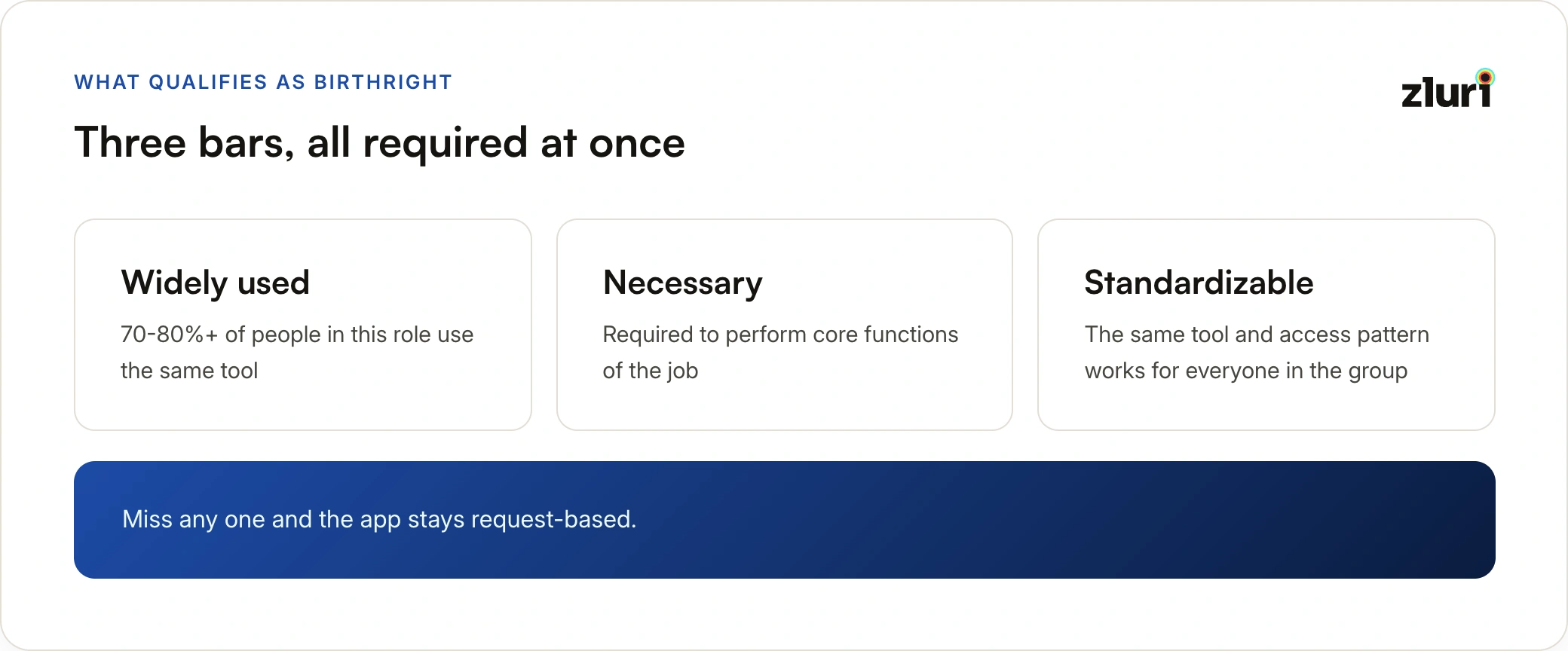
  1. Widely used: 70-80%+ of people in this role use THE SAME tool
  2. Necessary: Required to perform core functions
  3. Standardizable: Same tool/access pattern for everyone in the group

All three criteria required.

Critical: Birthright = Necessary but NOT Sufficient

Birthright is access you need to work, but not everything you need to work. It's the foundation, not the complete toolkit.

Why necessary apps might NOT be birthright:

Individual tool preferences for the same function:

  • API testing is necessary for Backend Engineers
  • But Engineer A uses Postman, Engineer B uses Insomnia, Engineer C uses curl
  • → Function is standardized (API testing), tool choice is not
  • → None becomes birthright, each requests their preferred tool

Common examples:

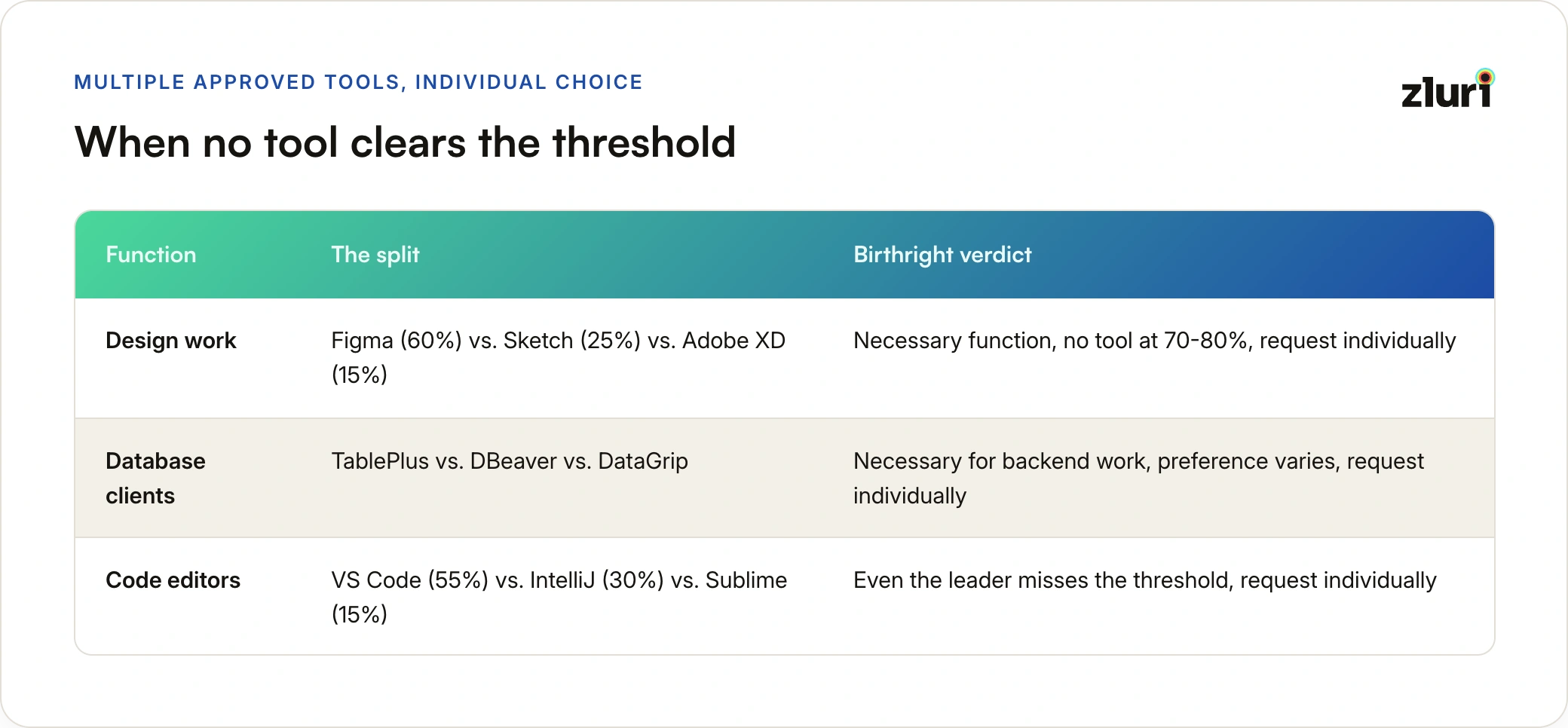
  • Design work: Figma (60%) vs Sketch (25%) vs Adobe XD (15%)
    • Necessary function, but no single tool used by 70-80%
    • → Not birthright, request individual preference
  • Database clients: TablePlus vs DBeaver vs DataGrip
    • Necessary for backend work, but preference varies
    • → Not birthright, request based on preference
  • Terminal emulators: iTerm2 vs Warp vs Hyper
    • Necessary for developers, but highly personal choice
    • → Not birthright, request preferred tool

An app can be essential to your job but NOT in birthright if:

  • Only a subset uses that specific tool (even if function is universal)
  • Access patterns aren't standardizable (e.g., repo access varies by team assignment)
  • It's project-specific or temporary (e.g., staging access for specific project)

The attributes that determine birthright:

  • Employment status: Active employee
  • Department: Engineering, Sales, Marketing, etc.
  • Function/Role: Software Engineer, Content Writer, Sales Development Rep

Example:

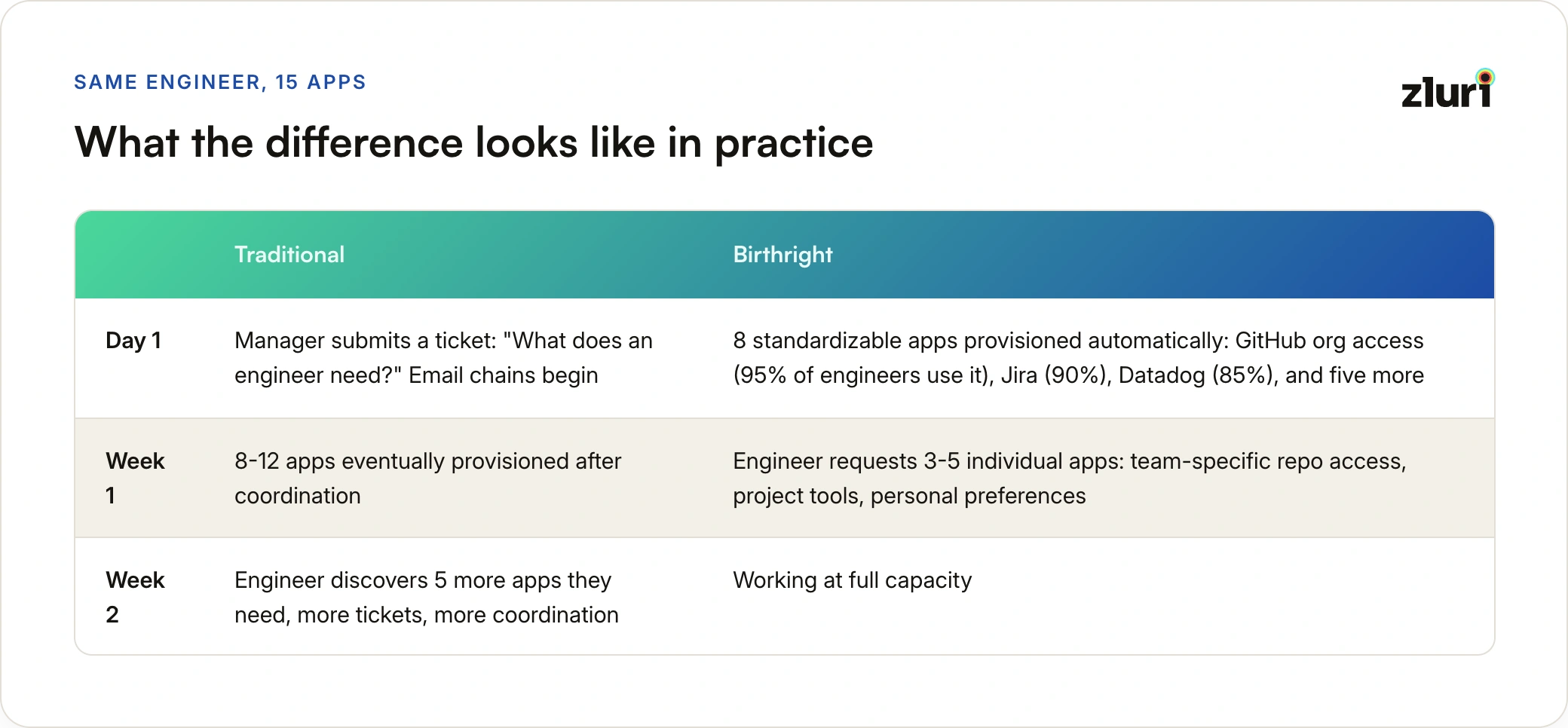
Traditional:

New engineer starts (needs 15 apps total for their job)

→ Manager submits a ticket: "What does an engineer need?"

→ Email chains trying to figure it out

→ Eventually provisions 8-12 apps

→ Week later: Engineer discovers they need 5 more

→ More tickets, more coordination

Birthright:

New engineer starts (needs 15 apps total for their job)

→ Automatically gets 8 standardizable apps:

  ✓ GitHub org access (95% of engineers use)

  ✓ AWS dev account (92% of engineers use)

  ✓ Jira (90% of engineers use)

  ✓ Datadog (85% of engineers use)

  ... 4 more standardized apps

→ Day 1, zero coordination for these 8

→ Requests 3-5 individual apps based on team/project:

  - Specific repo access (varies by team)

  - Project-specific tools

  - Individual tool preferences

→ Normal access request process for these

The value: Automating 8 out of 15 apps (53%) eliminates 80% of coordination overhead because you're not coordinating the predictable portion anymore.

The access is predefined, documented, consistent, and automatic—for the portion that can be standardized.

Why Focus on Only 20-30% of Access?

If birthright only covers 20-30% of total access needs, why not tackle the 70-80% of access requests instead?

This is the trap ambitious teams fall into. Here's the strategic reality:

The 70-80% Cannot Be Standardized

That 70-80% exists precisely because it can't be automated:

  • Team-specific (Frontend vs Backend repo access)
  • Project-specific (temporary project tools)
  • Individual preferences (Postman vs Insomnia vs curl)
  • Career progression (promoted to Senior, need elevated access)

Even with perfect workflow automation:

  • Still requires human judgment
  • Still needs approvals
  • Still takes case-by-case processing
  • Complexity doesn't disappear—it moves to workflow definition

The 20-30% Is the Strategic Sweet Spot

Why birthright first:

1. Implementation success = building momentum

  • Birthright: 90-day implementation
  • Access request automation: 6-12 month cross-functional project
  • Quick wins build trust, trust enables next phase

2. Disproportionate time savings

  • 20-30% of apps generate 80% of coordination overhead
  • Why? Same questions every hire: "What does an engineer need?"
  • Same email chains: IT → Manager → Team → App owners
  • Eliminate standardized coordination, free IT for cases needing judgment

3. Easy to implement

  • Birthright: "All engineers get these 8 apps" → Automate
  • Access requests: Unique context per request → Still needs human decision

4. Foundation for everything else

  • Can't optimize access requests without birthright baseline
  • Can't review access efficiently without knowing birthright vs additions
  • Can't enforce least privilege without documented baseline

Real Implementation Math

Attempting 100% on Day 1 (fails):

Months 1-6: Cross-functional requirements (every team's unique needs)

Months 7-12: Build complex workflow automation

Month 13+: Endless edge case handling

Result: Complex system, minimal time savings, stakeholder fatigue

Starting with birthright (succeeds):

Months 1-3: Implement birthright (standardized 20-30%)

Result: 300 hours/year saved, stakeholder trust earned

Months 4-6: Optimize access requests (now clearer scope)

Result: Efficient handling of individual needs

The Honest Assessment

Why vendors don't emphasize this:

  • Selling "20-30% coverage" sounds weak
  • But attempting 100% is where implementations fail
  • Birthright is achievable, builds momentum, earns trust

Why it's the right approach:

  • Considerable impact (eliminates coordination chaos)
  • Quick implementation (90 days vs 12+ months)
  • Builds foundation for tackling the 70-80% later

Focus on the standardizable portion first. Win stakeholder trust. Then tackle the complex individual access needs with the political capital you've earned.

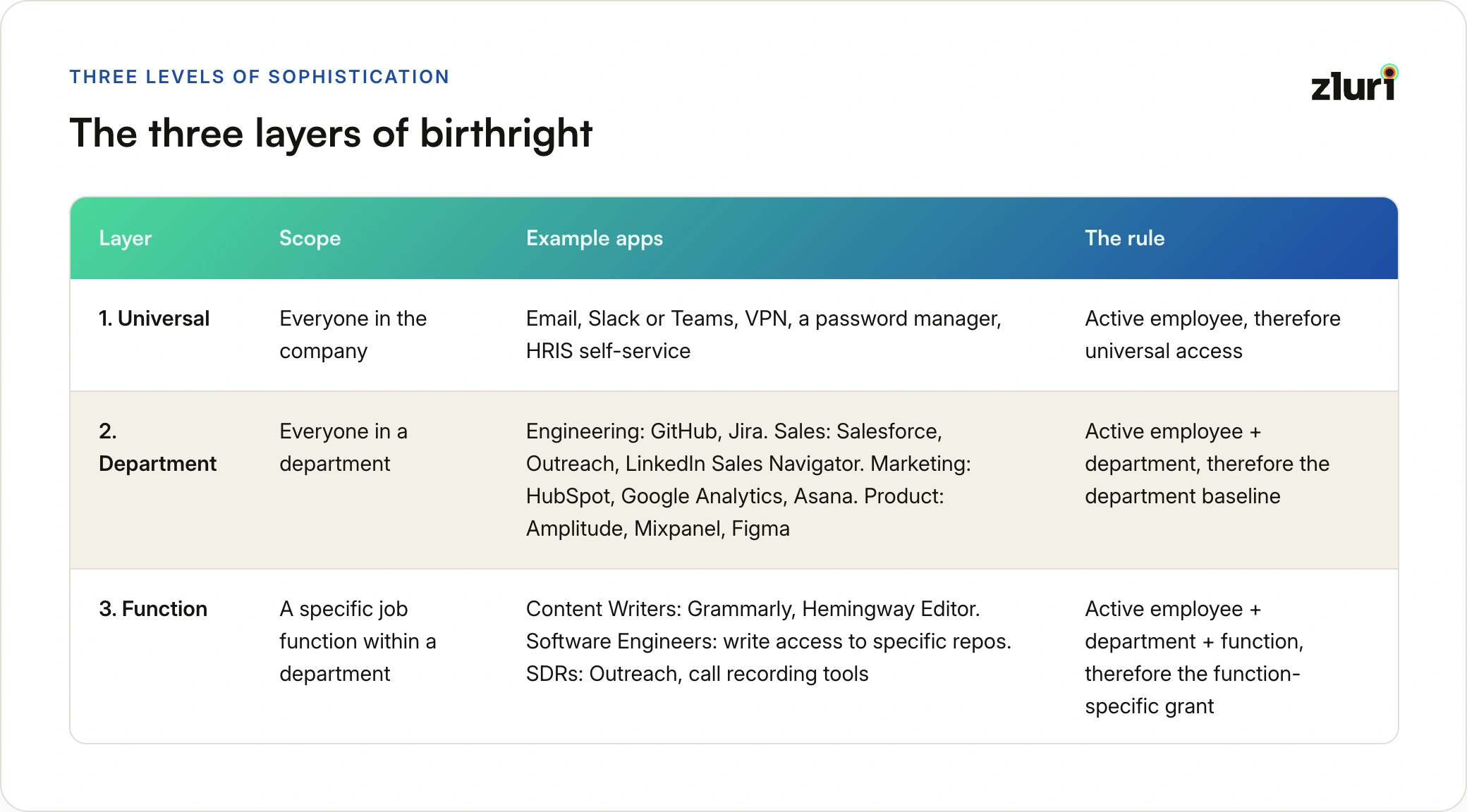
The Three Layers of Birthright

Birthright can be implemented at three levels of sophistication:

Layer 1: Universal (Organization-Wide)

Everyone in the company gets these tools automatically.

Examples:

  • Email
  • Slack or Microsoft Teams
  • VPN
  • Password manager (1Password, LastPass)
  • HRIS self-service

Rule: IF employment_status = "Active" THEN grant universal access

Layer 2: Department-Specific

Everyone in a department gets these tools automatically.

Examples:

  • Engineering → GitHub, Jira, development tools
  • Sales → Salesforce, Outreach, LinkedIn Sales Navigator
  • Marketing → HubSpot, Google Analytics, Asana
  • Product → Amplitude, Mixpanel, Figma

Rule: IF employment_status = "Active" AND department = "Engineering" THEN grant Engineering access

Layer 3: Function-Specific

People in specific job functions get specialized tools automatically.

Examples:

  • Content Writers (not all Marketing) → Grammarly, Hemingway Editor
  • Software Engineers (not all Engineering) → Write access to specific repos
  • Sales Development Reps (not all Sales) → Outreach, call recording tools

Rule: IF employment_status = "Active" AND department = "Marketing" AND function = "Content Writer" THEN grant Grammarly

Important: These layers aren't mandatory. You can start with Layer 1 and add sophistication over time.
Traditional Approach to Birthright Access

What Traditional Tools Could Do

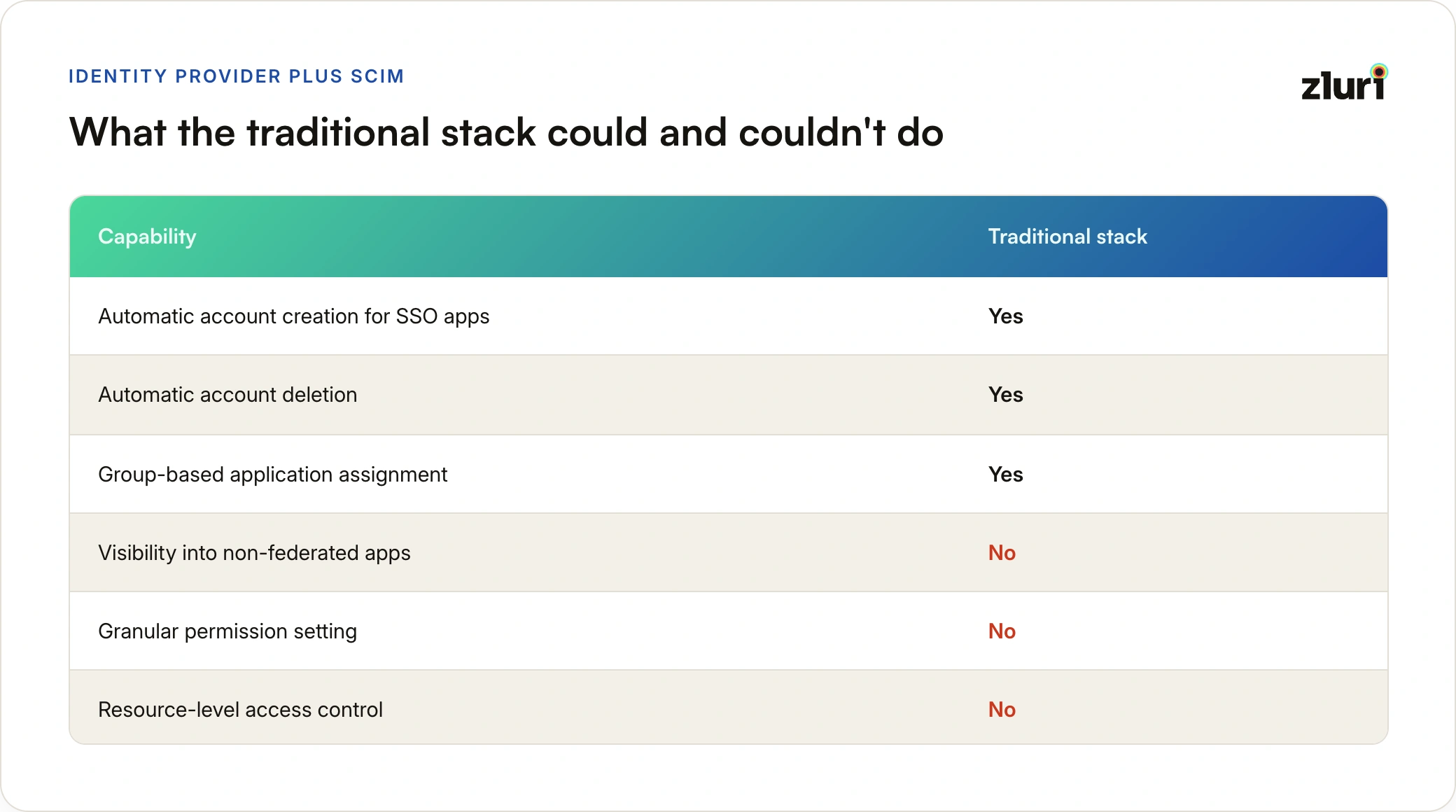
Traditional birthright was limited to organization-wide access (Layer 1 only).

The traditional stack:

Capabilities:

  • ✓ Automatic account creation for SSO apps
  • ✓ Automatic account deletion
  • ✓ Group-based application assignment
  • ✗ No visibility into non-federated apps
  • ✗ No granular permission setting
  • ✗ No resource-level access control

Why Traditional Was Limited to Layer 1

Visibility Problem:

Traditional tools only had visibility into federated applications—apps connected to your SSO.

IT's view of the world (via SSO):

- GitHub ✓

- AWS ✓

- Salesforce ✓

- Jira ✓

Reality (what departments actually use):

- GitHub ✓

- AWS ✓

- Salesforce ✓

- Jira ✓

- Figma ✗ (not in SSO)

- Postman ✗ (not in SSO)

- Datadog ✗ (not in SSO)

- Amplitude ✗ (not in SSO)

- Mixpanel ✗ (not in SSO)

- ... +20 more non-federated apps

The consequence:

IT could only define birthright for apps they knew about. Department-specific and function-specific birthright required knowing what each department actually used—information traditional tools didn't provide.

Provisioning Problem:

Traditional SCIM worked at the account level only.

What traditional SCIM could do:

New engineer hired

→ Create GitHub account ✓

→ Create AWS account ✓

→ Create Jira account ✓

What traditional SCIM couldn't do:

→ Grant Write access to platform-* repos ✗

→ Assign PowerUser role in AWS dev account ✗

→ Add to specific Jira projects ✗

→ Set permission levels within applications ✗

The result:

Accounts were created automatically, but permissions had to be set manually. IT still received tickets:

Day 1: Engineer account created via SSO

Day 2: Engineer submits ticket: "Need Write access to platform repos"

Day 3: Engineer submits ticket: "Need AWS dev environment access"

Day 4: Engineer submits ticket: "Need to join project X in Jira"

You automated account creation, not access provisioning.

Traditional Birthright in Practice

What organizations actually implemented:

Layer 1 only (universal access):

  • Email: ✓ Automatic
  • Chat (Slack/Teams): ✓ Automatic
  • VPN: ✓ Automatic
  • Password manager: ✓ Automatic

Layer 2 and 3 (department/function):

  • Manual provisioning via tickets
  • "Ask the manager what they need"
  • "Copy access from similar employee"
  • Inconsistent, slow, ticket-driven

Why stop at Layer 1?

Not by choice. Traditional tools couldn't support Layers 2 and 3 because they lacked:

  1. Visibility into what each department/function actually used
  2. Ability to set granular permissions automatically

Modern Approach to Birthright Access

What Changed

Two technological advances made modern birthright possible:

1. Complete Access Visibility

Modern platforms discover all applications in use—federated and non-federated.

How discovery works:

  • SSO integration: See federated apps
  • HRIS integration: See provisioned apps
  • Finance integration: See purchased apps (via expense data)
  • Browser extensions: See what people actually access
  • API usage: See applications making authentication calls

The result:

Complete view of the world:

- GitHub ✓ (federated, in SSO)

- AWS ✓ (federated, in SSO)

- Salesforce ✓ (federated, in SSO)

- Jira ✓ (federated, in SSO)

- Figma ✓ (discovered via browser extension)

- Postman ✓ (discovered via browser extension)

- Datadog ✓ (discovered via API usage)

- Amplitude ✓ (discovered via expense data)

- Mixpanel ✓ (discovered via expense data)

- ... +20 more non-federated apps ✓

With complete visibility, you can answer:

  • What apps does Engineering use? (All of them, not just SSO apps)
  • What apps do Content Writers specifically use? (Function-level insight)
  • Who has access to Grammarly? (Even though it's not in SSO)

2. Granular Provisioning Actions

Modern platforms perform deep actions across connected applications, beyond SCIM.

Account-level (traditional SCIM):

  • Create account ✓
  • Delete account ✓

Permission-level (modern platforms):

  • Create account ✓
  • Set permission levels (Read/Write/Admin) ✓
  • Grant access to specific resources (repos, projects, folders) ✓
  • Assign roles within applications (PowerUser, Contributor, Admin) ✓
  • Add to groups/teams ✓
  • Set application-specific configurations ✓

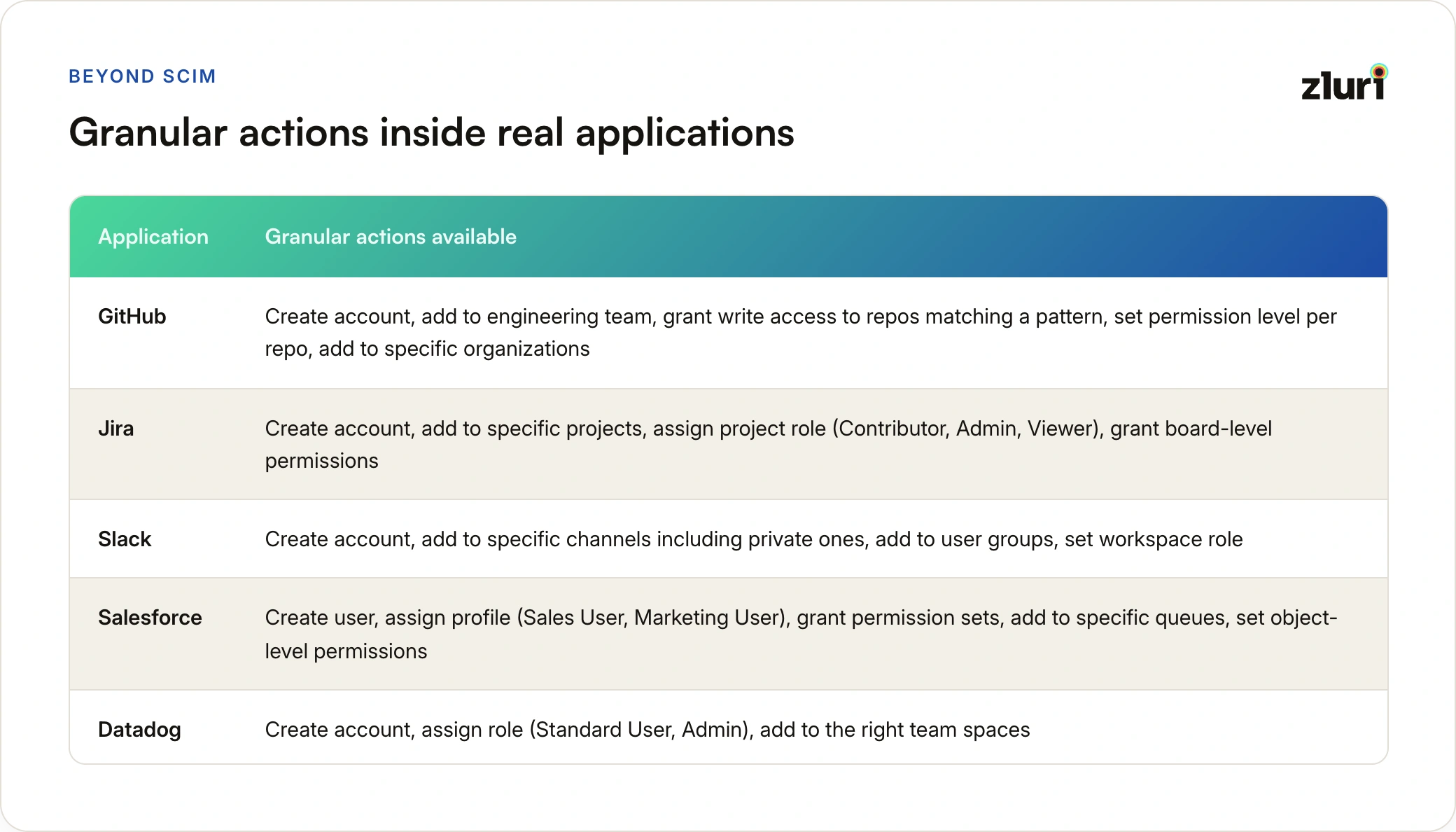
Examples of granular actions:

GitHub:

  • Create account ✓
  • Add to engineering team ✓
  • Grant Write access to repos matching pattern: platform-* ✓
  • Set permission level per repo (Read/Write/Admin) ✓
  • Add as member to specific organizations ✓

AWS:

  • Create IAM user ✓
  • Assign PowerUser role ✓
  • Grant access to dev account (not staging/prod) ✓
  • Attach permission policies ✓
  • Add to IAM groups ✓

Jira:

  • Create account ✓
  • Add to specific projects ✓
  • Assign project role (Contributor, Admin, Viewer) ✓
  • Grant board-level permissions ✓
  • Set issue-type permissions ✓

Slack:

  • Create account ✓
  • Add to specific channels (public and private) ✓
  • Set channel permissions ✓
  • Add to user groups ✓
  • Grant workspace role (Member, Guest, Admin) ✓

Salesforce:

  • Create user ✓
  • Assign profile (Sales User, Marketing User) ✓
  • Grant permission sets ✓
  • Add to specific queues ✓
  • Set object-level permissions ✓

Modern Birthright in Practice

With complete visibility and granular provisioning, organizations can implement all three layers:

Layer 1 - Universal (everyone):

New hire: employment_status = "Active"

→ Automatically provision:

  ✓ Email

  ✓ Slack (Standard member)

  ✓ VPN (Standard access)

  ✓ 1Password

  ✓ Zoom

Layer 2 - Department (Engineering):

New hire: department = "Engineering"

→ Automatically provision:

  ✓ GitHub (organization access)

  ✓ Jira (access to engineering projects)

  ✓ Confluence (User)

  ✓ Sentry (Member)

  ✓ Datadog (discovered via visibility, now in birthright)

Layer 3 - Function (Software Engineer):

New hire: function = "Software Engineer"

→ Automatically provision granular permissions:

  ✓ GitHub: Write to platform-* repos

  ✓ AWS: PowerUser role in dev account

  ✓ Datadog: Standard User

  ✓ PagerDuty: Responder

Result: Complete access on Day 1. Zero tickets. Zero manual work.

The Key Differences
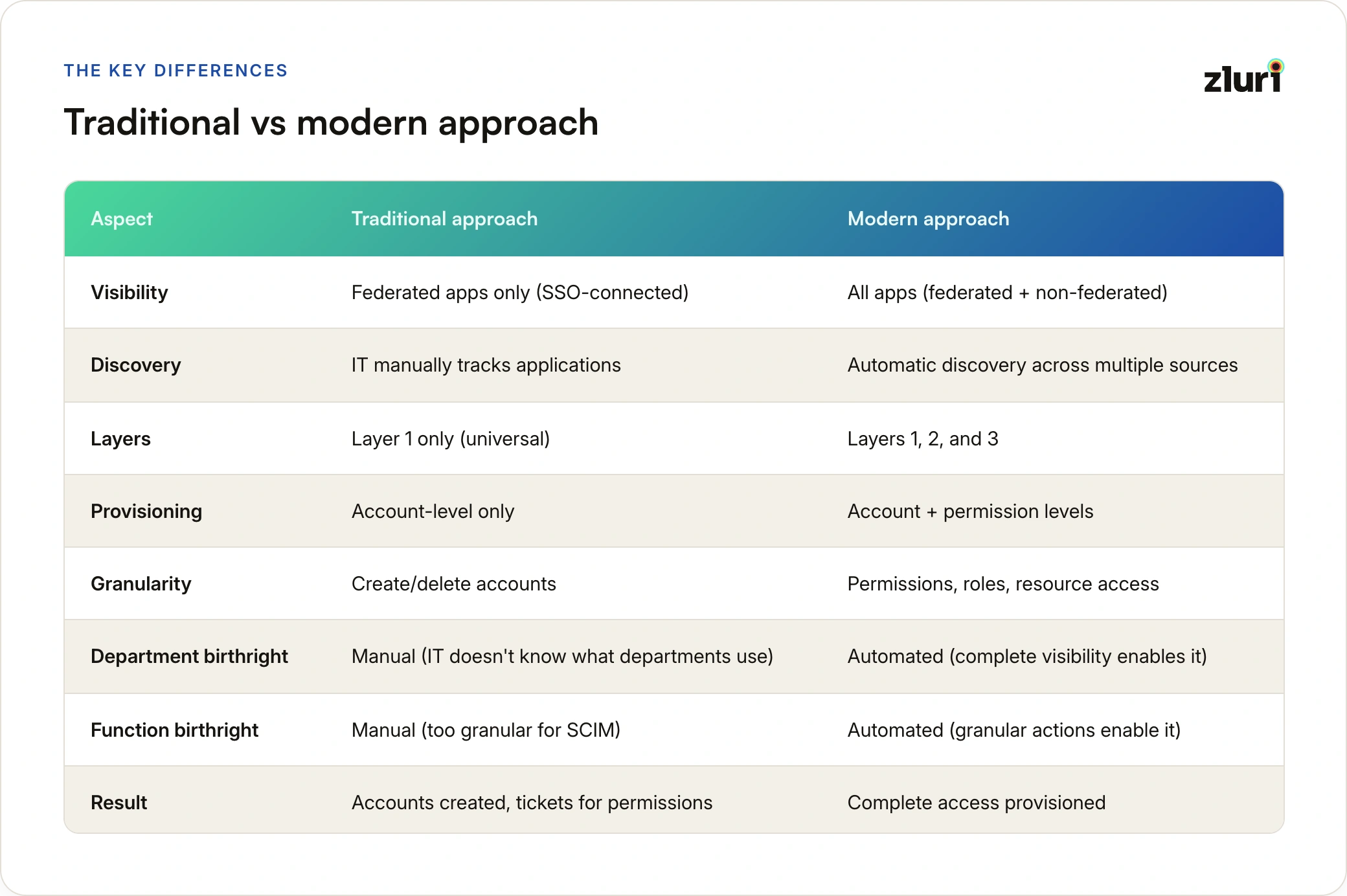
Traditional vs Modern: Real Examplesx

Example 1: New Software Engineer

Traditional approach:

Day 1:

- SSO creates accounts: GitHub, AWS, Jira, Slack ✓

- Engineer can log in but has no permissions

- Engineer submits tickets for access

Week 1:

- Ticket #1: Need Write access to platform repos

- Ticket #2: Need AWS dev environment access

- Ticket #3: Need to join Platform team in Jira

- Ticket #4: Need Datadog access (IT says "What's Datadog?")

- Ticket #5: Need PagerDuty for on-call rotation

Week 2:

- Engineer still waiting on tickets #4 and #5

- Discovers they also need Postman, Figma, Sentry

- Submits 3 more tickets

Modern approach:

Day 1:

- Complete visibility shows what Software Engineers actually use

- Automated granular provisioning:

  ✓ GitHub: Account created + Write to platform-* repos

  ✓ AWS: Account created + PowerUser role in dev account

  ✓ Jira: Account created + Added to Platform team

  ✓ Datadog: Account created + Standard User

  ✓ PagerDuty: Account created + Responder role

  ✓ Postman: Account created

  ✓ Figma: Account created + Added to Engineering team

  ✓ Sentry: Account created + Member role

Engineer starts work immediately. Zero tickets.

Example 2: New Content Writer (Marketing)

Traditional approach:

Marketing uses 12 tools, but only 3 are in SSO.

Day 1:

- SSO creates accounts: Email, Slack, Google Workspace ✓

- Writer has no access to actual writing tools

Week 1:

- Discovers they need: Grammarly, Hemingway, WordPress, Airtable, Canva

- None of these are in SSO

- IT says: "Contact the app owners directly"

- Writer spends week chasing down access

Week 2:

- Still doesn't have Grammarly (not in SSO, no one owns it)

- Manager has to purchase new license and manually add them

Modern approach:

Complete visibility discovers all 12 Marketing apps (SSO + non-SSO).

Function-level analysis shows Content Writers specifically use 8 of them.

Day 1:

- Universal access: Email, Slack, Google Workspace ✓

- Department access: HubSpot, Asana, Google Analytics ✓

- Function access (Content Writer specifically):

  ✓ Grammarly (discovered via browser extension)

  ✓ Hemingway Editor

  ✓ WordPress (Editor role)

  ✓ Airtable (Content calendar access)

  ✓ Canva (Brand kit access)

Writer starts creating content immediately. Zero tickets.

Example 3: Role Change - Engineer to Engineering Manager

Traditional approach:

Engineer promoted to Engineering Manager

Manual process:

1. Manager submits ticket: "Promote Engineer X to Manager"

2. IT asks: "What access do managers need?"

3. Manager says: "Give them what other managers have"

4. IT manually compares access of 3 current managers

5. Discovers inconsistencies (managers have different access)

6. IT grants conservative access, tells new manager to request more if needed

7. New manager discovers gaps over next 2 weeks, submits 5 more tickets

Modern approach:

Engineer promoted to Engineering Manager

Automated birthright update:

1. Role change triggered in HRIS

2. System compares:

  - Current birthright: Software Engineer

  - New birthright: Engineering Manager

3. Automatic actions:

  ✓ Keep: All engineer access (managers need same tools)

  ✓ Add: 1:1 management tools

  ✓ Add: Admin access to Jira for team management

  ✓ Add: BambooHR for team member data

  ✓ Add: Budget/expense tools

  ✓ Elevate: GitHub permissions to Admin for team repos

Complete transition on promotion date. Zero manual work.

Why Traditional Platforms Are Partial Solutions

Most user access management platforms claim to support birthright access. What they actually support is partial birthright.

What they automate:

  • Account creation for federated apps (apps in your SSO)
  • Group-based application assignment
  • Account deactivation on termination

What they can't do:

1. Department/function birthright (missing visibility)

  • Can only provision apps IT knows about
  • No discovery of non-federated apps
  • Can't answer: "What does Marketing actually use?"
  • Result: Birthright limited to universal/org-wide layer

2. Permission-level birthright (SCIM limitation)

  • Can create accounts but can't set permissions
  • Can't grant Write to specific repos
  • Can't assign PowerUser role in AWS
  • Can't add to specific Jira projects
  • Result: Accounts created, tickets still needed for access

The marketing vs reality gap:

What they say: "We automate user provisioning"

What they mean: "We create accounts in your SSO apps"

What you still need to do manually:

  • Discover what non-SSO apps departments use
  • Set permissions within applications
  • Handle department-specific access requests
  • Process function-specific access requests
  • Update access when roles change

They automate within what you know. They don't help you know everything.

What Enables Complete Birthright

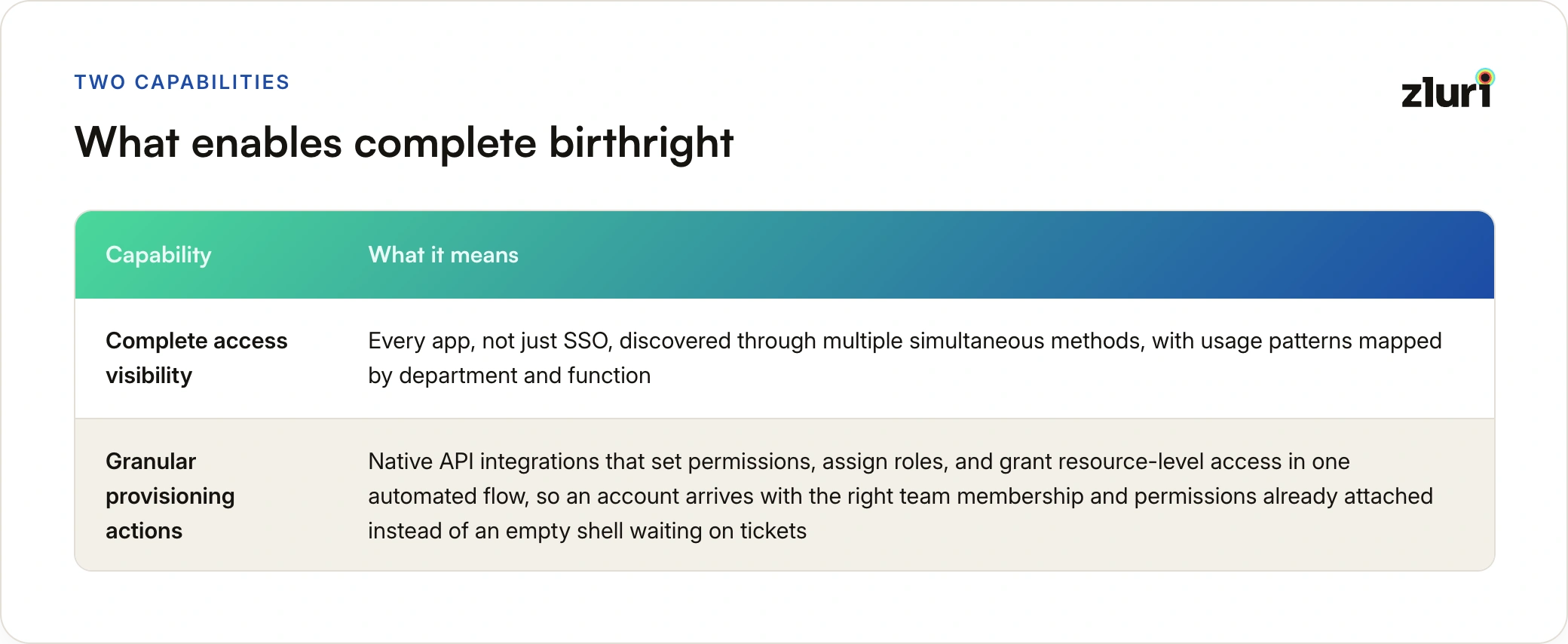
Complete birthright—across all three layers, with granular permissions—requires two capabilities:

1. Complete Access Visibility

Not just SSO apps. Not just federated apps. All apps.

How platforms like Zluri achieve this:

Multiple discovery methods:

  • SSO integration: Federated apps
  • HRIS integration: Provisioned apps
  • Finance integration: Purchased apps (via expense tracking)
  • Browser extensions: Direct-login apps users actually access
  • API monitoring: Applications making authentication calls
  • Agent-based discovery: Desktop applications

The result:

  • Discover 100% of applications in use (average: 3x more than IT knew about)
  • See who has access to each application
  • Identify usage patterns by department and function
  • Map application relationships and dependencies

Real discovery example:

Before visibility platform:

IT knew about: 23 applications (all federated in Okta)

After visibility platform:

Discovered: 87 applications total

- 23 federated (already knew)

- 31 SaaS apps with direct login (didn't know)

- 22 free/freemium tools (didn't know)

- 11 shadow IT tools (didn't know)

With this visibility, you can confidently define birthright at all three layers because you actually know what people use.

2. Granular Provisioning Actions

Not just create/delete accounts. Set permissions, assign roles, grant resource access.

How platforms like Zluri achieve this:

Deep application integrations:

  • Native APIs (beyond SCIM)
  • Custom connectors for popular apps
  • Resource-level permission management
  • Role and group assignment
  • Application-specific configurations

What this enables:

Traditional SCIM:

Create GitHub account

→ Account exists, but no repo access

→ Manual ticket needed

Granular provisioning:

Create GitHub account

+ Add to engineering team

+ Grant Write to platform-* repos

+ Set Read access to docs-* repos

+ Add as member to main organization

→ Complete access on Day 1, zero tickets

Example provisioning workflows:

New Software Engineer:

Trigger: role = "Software Engineer" AND department = "Engineering"

Actions:

 GitHub:

   - create_account

   - add_to_team: "engineering"

   - grant_permission:

       repos: "platform-*"

       level: "write"

   - grant_permission:

       repos: "docs-*"

       level: "read"

 AWS:

   - create_iam_user

   - assign_role: "PowerUser"

   - grant_account_access: "dev"

   - add_to_group: "engineers"

 Jira:

   - create_account

   - add_to_project: "Platform"

   - assign_role: "Contributor"

   - grant_board_access: "Engineering Board"

This level of automation wasn't possible with traditional SCIM.

Implementation Path

Traditional Approach (What Organizations Settled For)

Phase 1: Universal access only

  • Automate account creation for SSO apps
  • Manual provisioning for everything else
  • Result: Some automation, still lots of tickets

Phase 2: Department access attempted

  • IT tries to define department birthright
  • Limited to SSO apps they know about
  • Misses most department-specific tools
  • Result: Incomplete birthright, still lots of tickets

Phase 3: Give up on function-specific

  • Too granular for SCIM
  • Too many manual tickets
  • Result: Function access stays fully manual

Reality check:

Most organizations got stuck at Phase 1. Universal access automated, everything else manual.

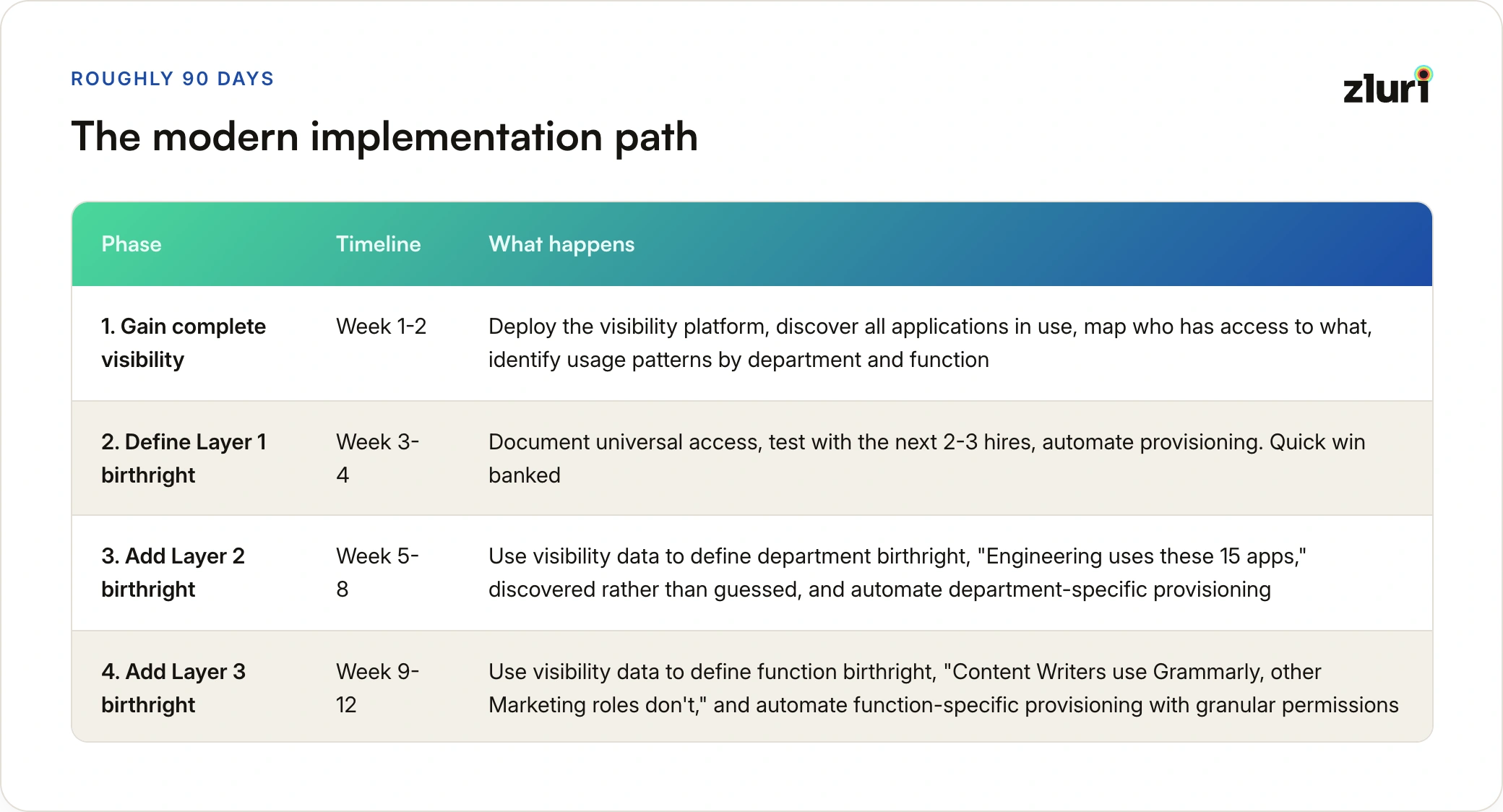
Modern Approach (What's Possible Now)

Phase 1: Gain complete visibility (Week 1-2)

  • Deploy access visibility platform
  • Discover all applications in use
  • Map who has access to what
  • Identify usage patterns by department/function

Phase 2: Define Layer 1 birthright (Week 3-4)

  • Document universal access (what everyone gets)
  • Test with next 2-3 hires
  • Automate provisioning
  • Quick win: Universal access automated

Phase 3: Add Layer 2 birthright (Week 5-8)

  • Use visibility data to define department birthright
  • "Engineering uses these 15 apps" (discovered, not guessed)
  • "Sales uses these 12 apps" (discovered, not guessed)
  • Automate department-specific provisioning

Phase 4: Add Layer 3 birthright (Week 9-12)

  • Use visibility data to define function birthright
  • "Content Writers use Grammarly, other Marketing roles don't"
  • "Software Engineers need repo access, Engineering Managers need admin access"
  • Automate function-specific provisioning with granular permissions

Timeline: 90 days from discovery to complete three-layer birthright.

The Business Impact

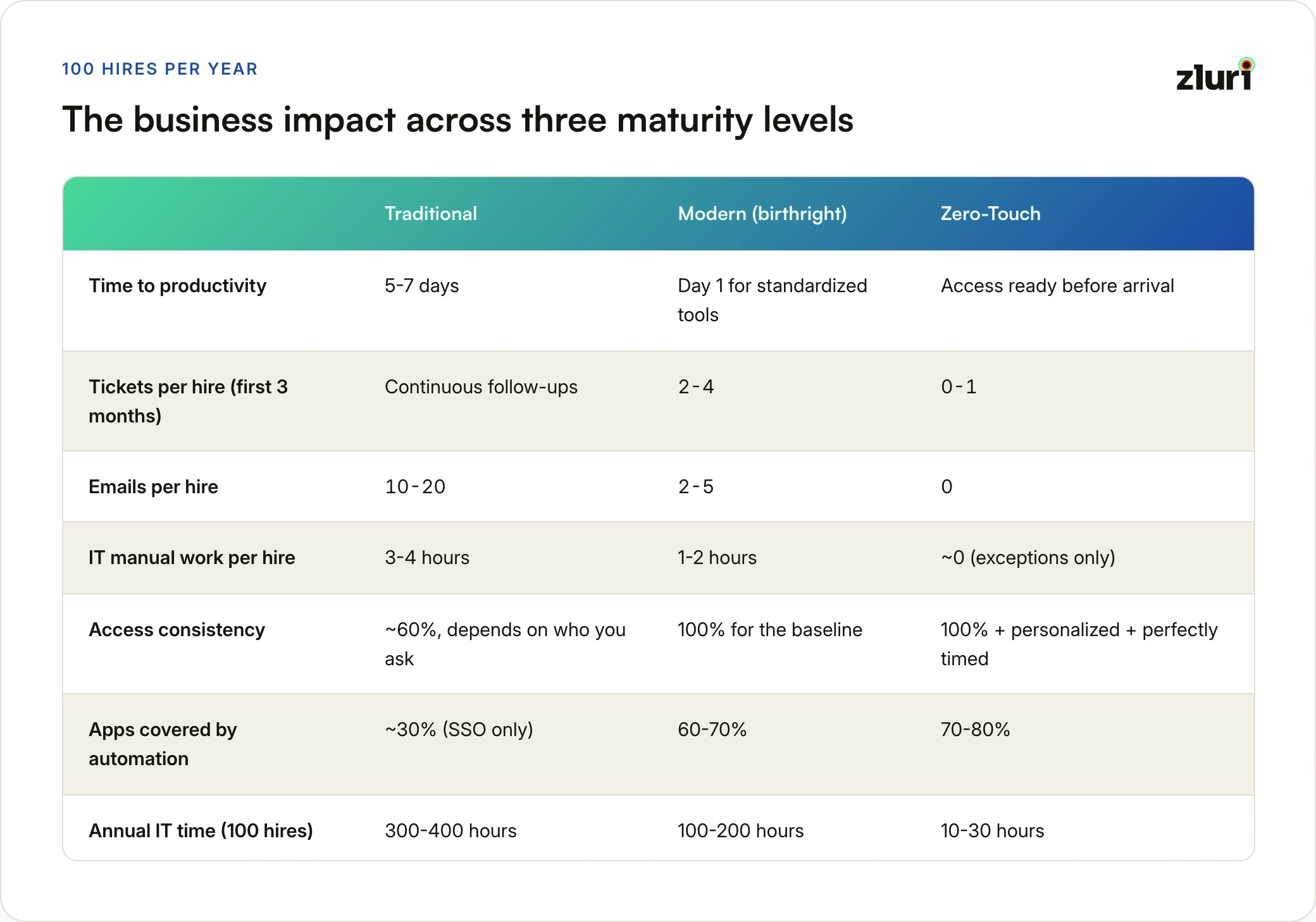
Traditional Approach: Partial Automation

Metrics:

  • Time to productivity: 5-7 days (waiting for back-and-forth to resolve)
  • IT ticket volume: 1-2 tickets per new hire (initial request + follow-ups for missed apps)
  • Email overhead: 10-20 emails per hire (IT ↔ Manager ↔ Team ↔ App owners)
  • Manual work per hire: 3-4 hours (email chains, tracking down answers, coordinating)
  • Access consistency: 60% (depends on who you ask - Sarah vs Tom vs last hire)
  • Apps covered by automation: 30% (SSO apps only)

Annual cost for 100 hires:

  • IT time: 300-400 hours (mostly spent on email chains and coordination)
  • Lost productivity: 500-700 employee days (waiting for access, working around gaps)
  • Coordination overhead: $30,000-40,000
  • Security risk: High (inconsistent access, no documented baseline, access based on memory)

Modern Approach: Birthright Foundation + Access Requests

Realistic metrics (not vendor promises):

  • Time to productivity: Day 1 for standardized tools, ongoing for individual needs
  • IT ticket volume: 2-4 access request tickets per hire over first 3 months (team/project-specific tools)
  • Email overhead: 2-5 emails per hire (clarifying individual needs, not coordinating standardized access)
  • Manual work per hire: 1-2 hours (handling individual access requests, not basic provisioning)
  • Access consistency: 100% for birthright baseline, managed process for individual requests
  • Apps covered by automation: 60-70% (standardizable apps in birthright, rest requested individually)

Annual cost for 100 hires:

  • IT time: 100-200 hours (handling individual access requests only, zero time coordinating standardized access)
  • Lost productivity: 50-100 days (waiting for specialized tools, not standardized baseline)
  • Access request processing: $10,000-15,000
  • Security risk: Medium-Low (documented baseline, tracked individual requests)

ROI calculation:

IT time saved: 100-200 hours per year (mostly email coordination eliminated) Productivity regained: 400-600 employee days per year Cost savings: $15,000-25,000 per year Reduction in overhead: 60-80% fewer coordination emails, 30-40% fewer follow-up tickets

Important: These numbers assume:

  • You've implemented Layers 1 and 2 (universal + department)
  • You've done role modeling and usage analysis
  • You have clean HRIS data
  • You maintain birthright definitions quarterly

Without these, your results will be closer to traditional approach.

AI-Driven Approach: Intelligent Birthright + Proactive Provisioning

Advanced metrics (with AI insights):

  • Time to productivity: Day 1 for core tools + proactive suggestions for likely needs
  • IT ticket volume: 1-2 tickets per hire over first 3 months (edge cases, edge cases only)
  • Email overhead: 0-2 emails per hire (only for unusual cases flagged by AI)
  • Manual work per hire: 0.5-1 hour (reviewing AI recommendations, handling edge cases)
  • Access consistency: 100% for birthright + personalized for individual patterns
  • Apps covered by automation: 70-80% (birthright + AI-predicted needs)

Annual cost for 100 hires:

  • IT time: 50-100 hours (reviewing AI recommendations, handling edge cases only)
  • Lost productivity: 20-40 days (only edge cases, not coordination delays)
  • Exception processing overhead: $5,000-8,000
  • Security risk: Low (documented baseline + AI anomaly detection)

ROI calculation:

IT time saved: 200-300 hours per year (vs traditional) Productivity regained: 460-680 employee days per year (vs traditional) Cost savings: $22,000-32,000 per year (vs traditional) Reduction in coordination overhead: 80-90% fewer emails, 50-70% fewer tickets (vs traditional)

What AI adds:

  • Automatic role pattern detection (saves 4-8 weeks of manual analysis per department)
  • Proactive provisioning recommendations (reduces tickets by catching needs before requests)
  • Continuous optimization (birthright stays current without manual reviews)
  • Personalized birthright (Backend engineer gets different recommendations than Frontend)
  • Anomaly detection (flags unusual patterns for review automatically)

The progression:

Traditional: 1-2 tickets + 10-20 emails per hire, manual coordination chaos

→ Manual Modern: 2-4 tickets + 2-5 emails per hire, birthright reduces coordination

→ AI-Driven: 1-2 tickets + 0-2 emails per hire, AI predicts needs proactively

Important: These numbers assume:

  • Access visibility platform with AI capabilities (like Zluri)
  • Sufficient historical data (6+ months of usage patterns)
  • Clean role taxonomy in HRIS
  • IT team that reviews and acts on AI recommendations

The AI doesn't replace IT—it makes IT dramatically more efficient by handling pattern recognition, threshold decisions, and continuous monitoring automatically.

Zero-Touch Approach: HRIS-Triggered Automation

Next-level metrics (with zero-touch + AI):

  • Time to productivity: Day 1 access ready before arrival + Week 1-2 proactive suggestions
  • IT ticket volume: 0-1 tickets per hire over first 3 months (only rare edge cases)
  • Email overhead: 0 emails for standard hires (manager gets preview notification, no response needed)
  • Manual work per hire: 0 minutes (zero IT intervention for standard hires)
  • Access consistency: 100% + personalized + perfectly timed
  • Apps covered by automation: 70-80% (birthright + AI-predicted)
  • IT trigger required: No (HRIS joining date triggers everything)

Annual cost for 100 hires:

  • IT time: 10-30 hours (only for rare exceptions, zero standard provisioning)
  • Lost productivity: 0-20 days (only specialized exceptions, zero coordination delays)
  • Exception processing overhead: $2,000-4,000
  • Security risk: Very low (automated baseline + AI monitoring + no manual delays)

ROI calculation:

IT time saved: 290-390 hours per year (vs traditional) Productivity regained: 480-700 employee days per year (vs traditional) Cost savings: $28,000-36,000 per year (vs traditional) Reduction in overhead: 95%+ fewer emails, 80-90% fewer tickets (vs traditional)

What zero-touch adds on top of AI:

  • Eliminates IT trigger step (saves 5-10 min per hire)
  • Eliminates all coordination emails (manager gets notification, no response needed)
  • Scheduled provisioning based on joining date (access ready on Day 1, not after IT action)
  • Preboarding workflow (manager preview day before joining)
  • Perfect timing (provisioning happens at midnight before Day 1, not "whenever IT gets to it")
  • Scales infinitely (1,000 hires/month = same 0 minutes as 10 hires/month)

The complete evolution:

Traditional: 1-2 tickets + 10-20 email chains, 3-4 hours coordination per hire, 5-7 days

→ Manual Modern: 2-4 tickets + 2-5 emails, 1-2 hours coordination per hire, Day 1 core access

→ AI-Driven: 1-2 tickets + 0-2 emails, 0.5-1 hour review per hire, Day 1 + proactive

→ Zero-Touch: 0-1 tickets + 0 emails, 0 minutes IT time per hire, Day 1 perfect + proactive

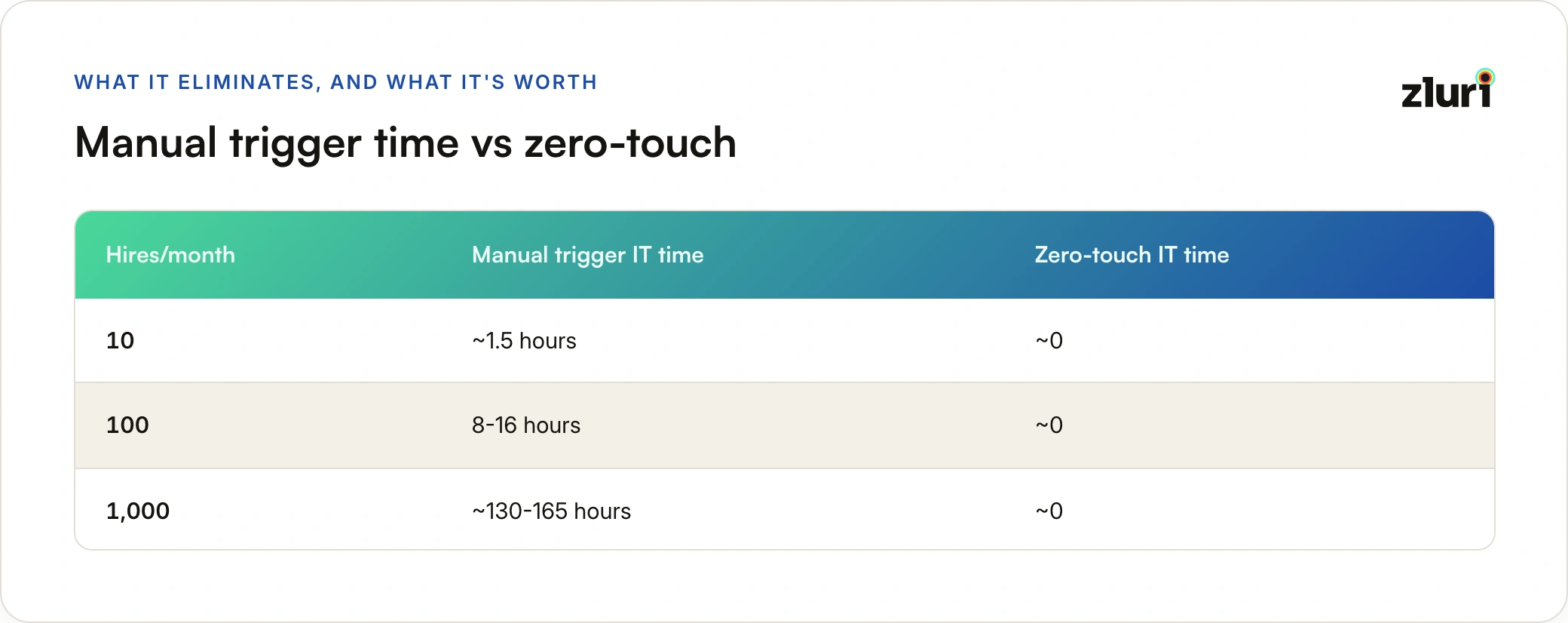
Time savings comparison (100 hires/month):

Important: These numbers assume:

  • HRIS integration with webhook support (like BambooHR, Workday, Rippling)
  • Access visibility platform with zero-touch capabilities (like Zluri)
  • Clean joining_date data in HRIS
  • AI-driven birthright already configured
  • Manager approval workflow (optional, can be auto-approved)

Zero-touch is the final evolution: IT defines birthright once, AI optimizes it continuously, HRIS triggers it automatically. IT only intervenes for edge cases.

Important: These numbers assume:

  • HRIS integration with webhook support (like BambooHR, Workday, Rippling)
  • Access visibility platform with zero-touch capabilities (like Zluri)
  • Clean joining_date data in HRIS
  • AI-driven birthright already configured
  • Manager approval workflow (optional, can be auto-approved)

Zero-touch is the final evolution: IT defines birthright once, AI optimizes it continuously, HRIS triggers it automatically. IT only intervenes for edge cases.

Beyond Manual Role Modeling: AI-Driven Insights

The challenges above are real when you're doing manual role modeling. But what if you didn't have to manually analyze usage patterns, set arbitrary thresholds, and guess what new hires need?

Modern platforms are moving beyond manual role modeling to AI-driven insights that solve these exact problems.

The Problem with Manual Role Modeling (Recap)

Manual approach:

  1. Export usage data from visibility platform
  2. Analyze in spreadsheets: "Who uses what?"
  3. Set threshold: "80% of engineers use Datadog"
  4. Make judgment calls on edge cases
  5. Validate with stakeholders (takes weeks)
  6. Document birthright definitions
  7. Update quarterly as usage changes

Time required: 4-8 weeks per department Accuracy: Depends on analyst interpretation Maintenance: Manual, reactive

The AI-Driven Alternative

Instead of manual analysis, AI can automatically:

1. Identify Role-Based Patterns

Traditional question: "What % of Software Engineers use Datadog?"

AI question: "What access patterns distinguish Software Engineers from other roles?"

What AI discovers:

Software Engineers pattern:

- 95% use GitHub (obvious)

- 87% use AWS dev account within first week (should be birthright)

- 78% use Datadog within first month (borderline)

- 45% eventually use Terraform (not birthright, too specialized)

- 23% use Postman regularly (not birthright, project-specific)

Recommendation: Include AWS and GitHub in birthright,

suggest Datadog for "likely needed" list,

exclude Terraform and Postman from birthright

How this is better:

  • No arbitrary 80% threshold
  • Considers timing (first week vs first month vs eventually)
  • Distinguishes "core" from "eventual" from "specialized"

2. Predict What New Hires Will Need

Traditional approach: Give everyone the same birthright

AI approach: Personalize birthright based on similar users

Example: New Backend Engineer joining

AI analysis of similar users (Backend Engineers hired in last 12 months):

Core tools (provision immediately):

✓ GitHub (100% need, average time to first use: Day 1)

✓ AWS dev (98% need, average time to first use: Day 2)

✓ Jira (95% need, average time to first use: Day 1)

✓ Datadog (92% need, average time to first use: Week 1)

Likely needed soon (suggest proactively):

⚡ Sentry (78% need, average time to first use: Week 2)

⚡ Terraform (65% need, average time to first use: Month 1)

⚡ Kubernetes tools (58% need, average time to first use: Month 2)

Rarely needed (wait for request):

⏸ Postman (34% need, highly variable timing)

⏸ Redis tools (28% need, project-dependent)

The recommendation to IT:

  • Auto-provision: Core tools (high confidence, immediate need)
  • Proactive notification: "This new hire will likely need Sentry in 2 weeks based on similar users"
  • Skip: Low-usage tools unless requested

3. Identify Department Variations

Traditional approach: "Marketing uses these 10 apps"

AI approach: "Marketing has 3 distinct sub-patterns"

What AI discovers:

Marketing department breakdown:

Pattern 1: Content Writers (35% of Marketing)

- HubSpot: 95% usage

- Grammarly: 92% usage

- WordPress: 88% usage

- Canva: 76% usage

Pattern 2: Demand Gen (30% of Marketing)

- HubSpot: 100% usage

- LinkedIn Sales Nav: 94% usage

- Outreach: 87% usage

- Grammarly: 31% usage

Pattern 3: Social Media (20% of Marketing)

- Hootsuite: 98% usage

- Canva: 95% usage

- HubSpot: 67% usage

- Grammarly: 18% usage

Recommendation:

- All Marketing: HubSpot (high usage across all patterns)

- Content Writers only: Grammarly, WordPress

- Demand Gen only: LinkedIn Sales Nav, Outreach

- Social Media only: Hootsuite

This solves the "60% of Marketing uses Grammarly" problem. AI sees it's actually 92% of Content Writers, not a department-wide tool.

4. Detect Usage Timing Patterns

Traditional approach: "They use it" or "They don't use it"

AI approach: "They use it, and here's when they typically start"

What AI discovers:

AWS usage pattern for new Software Engineers:

Week 1: Dev account (98% of engineers need this)

Month 1: Staging account (87% of engineers need this)

Month 3: Prod read-only (76% of engineers need this)

Month 6: Prod write access (34% of engineers need this)

Recommendation for birthright:

- Day 1: Auto-provision dev account

- Week 3: Notify manager "Engineer ready for staging access based on typical timeline"

- Month 2: Suggest prod read-only "Most engineers at this stage need production visibility"

- Prod write: Wait for explicit request (only 1/3 need it)

How platforms like Zluri use this:

  • Provision dev immediately (high confidence)
  • Proactive notifications for likely next steps
  • Prevent over-provisioning (don't give prod to everyone)

5. Identify Outliers and Anomalies

Traditional approach: Everyone gets same birthright

AI approach: Flag unusual patterns for review

What AI catches:

New Software Engineer onboarded:

Expected pattern: GitHub, AWS dev, Jira, Datadog

Actual pattern: GitHub, AWS dev, Jira, Salesforce, Zendesk

⚠️ Anomaly detected:

- Salesforce: 2% of Software Engineers use this (unusual)

- Zendesk: 4% of Software Engineers use this (unusual)

AI insight: This person may be in customer-facing engineering role

Recommendation: Verify with manager, might need different birthright template

This prevents blind provisioning and catches special cases automatically.

6. Continuous Birthright Optimization

Traditional approach: Define birthright, update quarterly if you remember

AI approach: Continuous analysis and recommendations

What AI monitors:

Monthly birthright analysis:

Engineering birthright drift detected:

Addition recommendation:

✓ Figma usage among engineers increased from 45% → 78% in last 6 months

 Recommendation: Add Figma to Engineering birthright

Removal recommendation:

⚠️ Confluence usage among engineers decreased from 82% → 54% in last 6 months

 Recommendation: Consider removing from birthright or investigate why usage dropped

New tool recommendation:

📊 Discovered: Linear (project management) used by 67% of engineers hired in last 3 months

 Recommendation: Add to birthright for new Engineering hires

The benefit:

  • Birthright stays current automatically
  • No manual quarterly review needed
  • Catch tool adoption trends early

Real Implementation: AI-Driven Birthright

How it works in practice:

Traditional manual workflow:

New Software Engineer hired

→ IT provisions standard Engineer birthright (defined 6 months ago)

→ Engineer discovers they need 8 additional tools

→ Submits 8 access requests over first month

→ IT processes 8 tickets

AI-driven workflow:

New Software Engineer hired

→ AI analyzes: Similar role, Backend team, joining Platform squad

AI recommendations:

✓ Core birthright (auto-provision):

 - GitHub + Write to platform-* repos

 - AWS dev account

 - Jira + Platform project

 - Datadog

⚡ Likely needed (proactive notification to manager):

 - Sentry (87% of similar users need within 2 weeks)

 - Terraform (72% of Platform engineers need within 1 month)

 - Kubernetes tools (68% of Backend engineers need)

📧 Notification sent to manager:

"Based on similar hires, this engineer will likely need Sentry within 2 weeks

and Terraform within 1 month. Approve now or wait for request?"

Result:

- Core access: Automatic (Day 1)

- Likely needed: Proactive (manager pre-approves, no waiting)

- Specialized: Request-based (if needed)

Ticket reduction: From 8 tickets to 1-2 tickets

The AI Advantage Summary

What This Solves

Remember the challenges from the previous section? AI directly addresses them:

Challenge 1: Complex role modeling → AI finds sub-patterns within departments automatically

Challenge 2: The 80% threshold problem → AI uses confidence scores + timing instead of arbitrary thresholds

Challenge 3: Most access happens after onboarding → AI predicts likely future needs and prompts proactive provisioning

Challenge 4: Role modeling takes weeks → AI analyzes patterns in minutes, provides immediate recommendations

Challenge 5: Clean data required → AI works with messy data, identifies patterns despite inconsistencies

Challenge 6: Exceptions become the rule → AI reduces exceptions by personalizing birthright based on actual patterns

The result:

Birthright coverage increases from 20-30% of apps to 40-60% of apps because AI:

  • Includes tools you'd miss with manual analysis
  • Suggests proactive provisioning before requests come in
  • Optimizes timing (provision now vs suggest later)
  • Continuously improves as it learns from more data

This is the difference between "implementing birthright" and "implementing AI-driven birthright."

The Next Level: Zero-Touch Provisioning

AI-driven birthright solves the "what to provision" problem. But there's still one manual step: triggering the provisioning.

Most organizations still require IT to manually initiate the birthright provisioning process when someone joins. Zero-touch provisioning eliminates even that step.

How Traditional Automated Birthright Works

Current "automated" approach:

1. HR adds new hire to HRIS (joining date: January 15)

2. HR notifies IT: "New Software Engineer starting January 15"

3. IT logs into provisioning platform

4. IT manually triggers: "Provision birthright for John Doe"

5. System automatically provisions birthright access

6. Done

The manual step: IT still needs to initiate provisioning, even though the provisioning itself is automated.

Why this happens:

  • IT wants control over when provisioning occurs
  • No direct integration between HRIS and provisioning platform
  • IT reviews the hire before provisioning (verify role, department, etc.)

The problem:

  • IT becomes a bottleneck (even for 5 minutes per hire)
  • Provisioning can be delayed if IT is busy
  • Someone has to remember to do it
  • Doesn't scale well (100 hires/month = 500 minutes of IT time just clicking "provision")

How Zero-Touch Provisioning Works

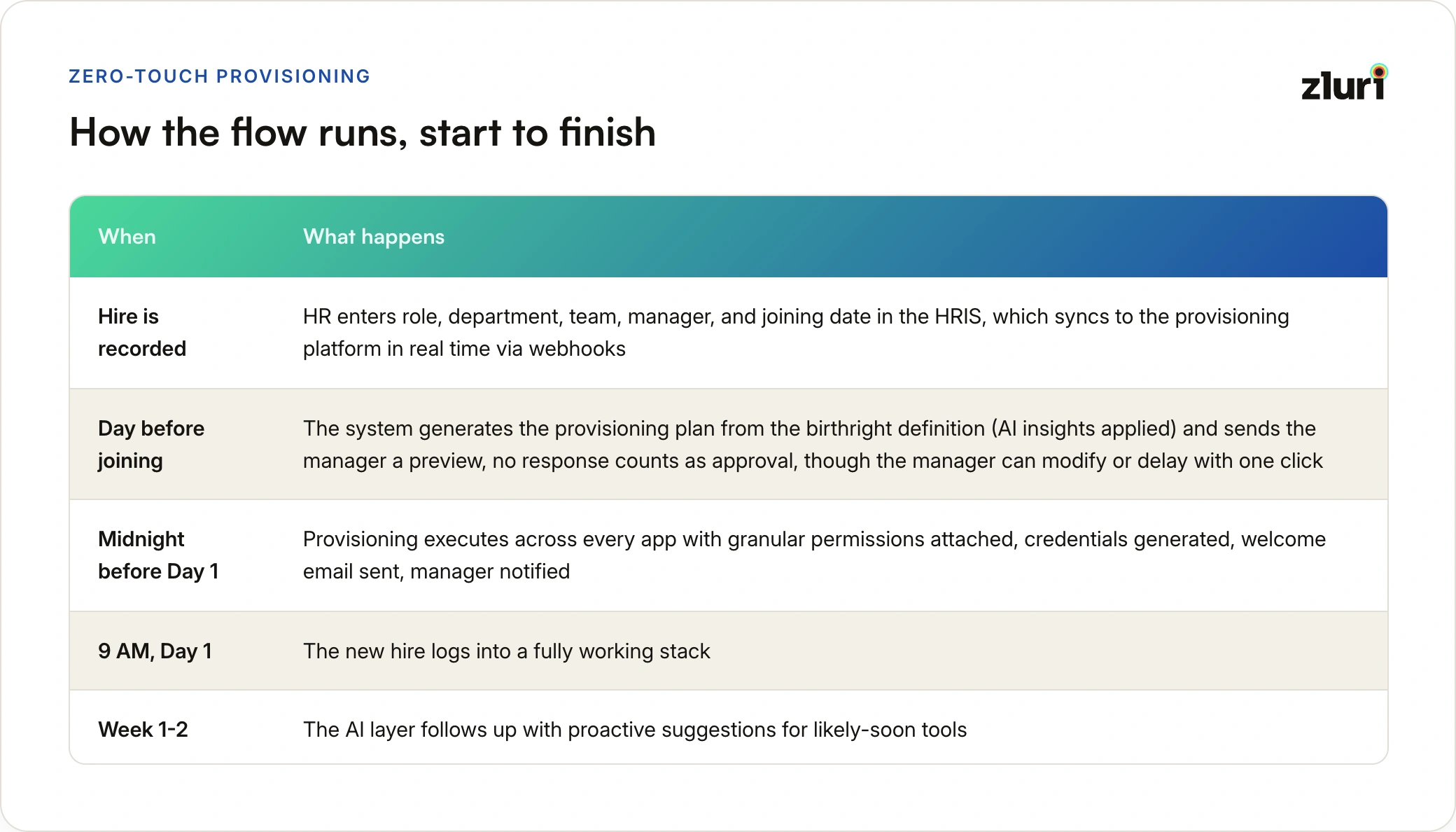
Zero-touch approach:

1. HR adds new hire to HRIS (joining date: January 15)

  ├─ Name: John Doe

  ├─ Role: Software Engineer

  ├─ Department: Engineering

  ├─ Team: Backend Platform

  ├─ Joining date: January 15, 2025

  └─ Manager: Jane Smith

2. HRIS → Provisioning platform (automatic sync)

  ├─ New employee detected

  ├─ Attributes synced: Role, Department, Team, Joining date

  └─ Trigger created: Provision on January 15, 2025

3. January 14 (preboarding, automatic):

  ├─ AI analyzes role pattern (Software Engineer, Backend, Platform team)

  ├─ Generates provisioning plan

  ├─ Sends preview to manager: "John will receive these 12 apps tomorrow"

  └─ Manager approves with one click (optional)

4. January 15, 12:00 AM (joining date, automatic):

  ├─ System automatically provisions birthright:

     ✓ Email account created

     ✓ Slack account + Engineering channels

     ✓ GitHub + Write to platform-* repos

     ✓ AWS dev account + PowerUser role

     ✓ Jira + Platform project

     ✓ Datadog, PagerDuty, Sentry

  ├─ Welcome email sent with credentials

  └─ Manager notified: "John's access is ready"

5. January 15, 9:00 AM (first day):

  └─ John logs in, everything works, zero waiting

IT involvement: Zero (unless exception occurs)

The difference: IT doesn't trigger anything. HRIS joining date automatically triggers provisioning.

The HRIS Integration

What makes zero-touch possible:

1. Bidirectional HRIS sync

Traditional integration:

  • HRIS → Provisioning: One-way sync
  • Updates attributes (name, role, department)
  • But doesn't trigger provisioning automatically

Zero-touch integration:

  • HRIS → Provisioning: Real-time sync with webhooks
  • New hire detected → Automatic trigger created
  • Joining date → Automatic provisioning scheduled
  • Role change → Automatic birthright update triggered

2. Joining date as trigger

The critical field: joining_date in HRIS

Employee record in HRIS:

 name: John Doe

 employee_id: EMP-1234

 role: Software Engineer

 department: Engineering

 team: Backend Platform

 manager: Jane Smith

 joining_date: 2025-01-15  ← This triggers everything

 status: Pre-hire

What the platform does:

On new employee detected:

1. Parse joining_date from HRIS

2. Calculate preboarding date (joining_date - 1 day)

3. Schedule provisioning job:

  - Preboarding: Generate plan, notify manager

  - Joining date 12:00 AM: Execute provisioning

4. Monitor HRIS for changes:

  - If joining_date changes → Reschedule

  - If role/department changes → Update birthright plan

  - If status changes to "canceled" → Cancel provisioning

3. Preboarding automation

Day before joining (automatic):

  • Generate personalized provisioning plan based on AI insights
  • Send to manager for review: "John will receive these apps tomorrow"
  • Manager can:
    • Approve (default, happens automatically if no response)
    • Modify (add/remove specific apps)
    • Delay (postpone provisioning)

This gives managers visibility without requiring action.

4. Execution on joining date

Joining date, 12:00 AM (automatic):

  • Execute birthright provisioning
  • Perform granular actions across all apps
  • Generate credentials where needed
  • Send welcome email with access details
  • Notify manager: "Access ready"

New hire arrives at 9 AM:

  • Email works ✓
  • Slack works ✓
  • Development tools ready ✓
  • Zero waiting, zero tickets

What Zero-Touch Eliminates

IT tasks eliminated:

Before zero-touch (per hire):

1. Receive notification from HR (check email)

2. Verify hire details (check HRIS)

3. Log into provisioning platform

4. Find employee record

5. Verify birthright definition is correct

6. Click "Provision"

7. Monitor provisioning status

8. Confirm completion

9. Notify hiring manager

Time: 5-10 minutes per hire

Mental overhead: Context switching, remembering to do it

With zero-touch (per hire):

1. Nothing (HRIS triggers everything automatically)

Time: 0 minutes

Mental overhead: Zero (IT only intervenes for exceptions)

At scale:

100 hires/month:

  • Before: 500-1,000 minutes (8-16 hours) of IT time
  • After: 0 minutes (unless exception)

Exceptions that still require IT:

  • Hire with unusual role (doesn't match birthright patterns)
  • Urgent provisioning (joining date changed, need access earlier)
  • Failed provisioning (technical error, app API down)
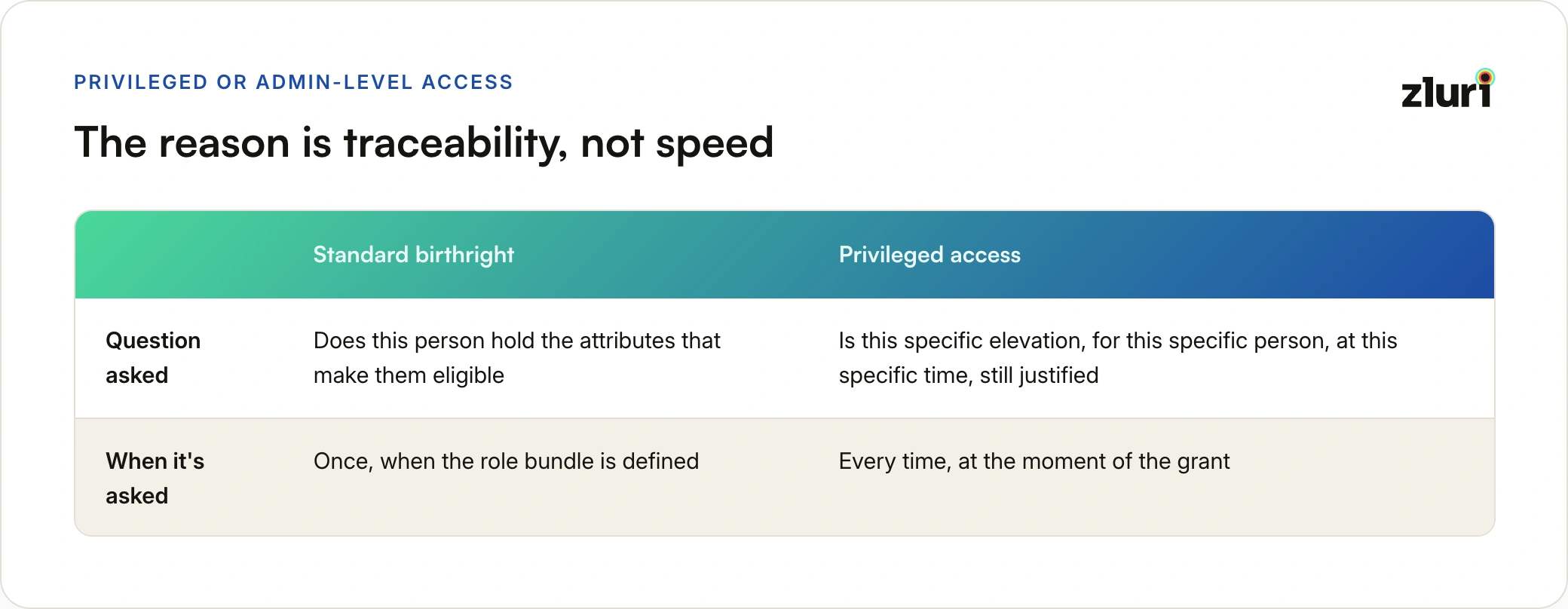
  • Special requests (elevated permissions beyond birthright)

These are rare (5-10% of hires) vs 100% manual intervention before.

The Complete Zero-Touch Workflow

Real example: Backend Engineer hire

Timeline:

December 20, 2024 (Offer accepted):

├─ HR adds to HRIS:

│  ├─ Name: Sarah Chen

│  ├─ Role: Software Engineer

│  ├─ Department: Engineering

│  ├─ Team: Backend Platform

│  ├─ Joining date: January 15, 2025

│  └─ Manager: Alex Kumar

└─ HRIS → Zluri sync (automatic):

  └─ New hire detected, provisioning scheduled for January 15

January 14, 2025 (Preboarding day, automatic):

├─ AI analyzes similar users:

│  └─ "Backend Platform Engineers typically need: GitHub, AWS, Jira, Datadog, etc."

├─ Generates provisioning plan:

│  ✓ Universal: Email, Slack, VPN, 1Password

│  ✓ Department: GitHub org, Jira, Confluence, Sentry

│  ✓ Function: GitHub Write to backend-*, AWS PowerUser dev account, Datadog

│  ⚡ Likely needed (Week 2): Terraform, Kubernetes tools

├─ Sends preview to manager (Alex):

│  📧 "Sarah Chen starts tomorrow. Here's what she'll receive:"

│  [Preview list of 12 apps + permissions]

│  [Approve] [Modify] [Delay]

└─ Alex clicks "Approve" (or auto-approves after 4 hours)

January 15, 2025, 12:00 AM (Joining date, automatic):

├─ Provisioning executes:

│  ✓ Email: sarah.chen@company.com created

│  ✓ Slack: Account created + #engineering #backend channels

│  ✓ GitHub: Account + Write to backend-* + engineering team

│  ✓ AWS: IAM user + PowerUser role in dev account

│  ✓ Jira: Account + Backend Platform project + Contributor role

│  ✓ Datadog: Account + Standard User

│  ✓ PagerDuty: Account + Responder + Platform schedule

│  ✓ Confluence: Account + Engineering space

│  ✓ Sentry: Account + Member role

│  ✓ VPN: Account + Standard access

│  ✓ 1Password: Account + Engineering vault

│  ✓ Figma: Account + Engineering team

├─ Welcome email sent (6:00 AM):

│  📧 "Welcome Sarah! Your accounts are ready."

│  [Login instructions] [Password reset links] [IT contact]

├─ Manager notified (6:00 AM):

│  📧 "Sarah's access provisioned successfully."

│  [Summary of 12 apps] [Review access]

└─ Slack notification in #new-hires:

  💬 "Welcome @sarah.chen! You've been added to #engineering."

January 15, 2025, 9:00 AM (First day):

├─ Sarah logs in:

│  ✓ Email works immediately

│  ✓ Slack shows engineering channels

│  ✓ Can clone repos and start coding

│  ✓ Can access Jira tickets

│  ✓ Can view Datadog dashboards

└─ IT involvement: Zero

  (Unless Sarah has questions, which go to standard support)

January 22, 2025 (Week 2, AI proactive notification):

└─ Manager receives:

  📧 "Sarah may need Terraform and K8s tools soon based on similar engineers."

  [Approve now] [Wait for request]

Total IT time: 0 minutes (fully automated)

The Business Impact of Zero-Touch

Time savings:

100 hires/month:

  • Manual provisioning: 500-1,000 minutes (8-16 hours)
  • Automated with manual trigger: 500-1,000 minutes (IT still clicks "provision")
  • Zero-touch: 0 minutes (fully automated)

Error reduction:

Manual: 5-10% error rate (forgot to provision, wrong role, delayed) Zero-touch: <1% error rate (only technical failures)

Consistency:

Manual: Varies (depends on who does it, when they remember) Zero-touch: Perfect (same process every time, triggered by joining date)

Scaling:

Manual: Doesn't scale (1,000 hires/month = 133 hours IT time) Zero-touch: Scales perfectly (1,000 hires/month = 0 hours IT time)

The math at scale:

Common Questions

"Can't we just use our IdP/SSO for this?"

What your IdP can do:

  • Automate account creation for federated apps ✓
  • Group-based application assignment ✓
  • Account deactivation ✓

What your IdP can't do:

  • Discover non-federated apps ✗
  • See who has access to non-SSO apps ✗
  • Set granular permissions within apps ✗
  • Automate department/function-specific access ✗

Your IdP is part of the solution, not the complete solution.

"Isn't this just role-based access control (RBAC)?"

Similar concept, different scope.

RBAC: Defines roles and permissions within a single application

  • Example: "Admin role can delete users, Editor role cannot"
  • Scope: One application

Birthright access: Defines which applications and permissions someone gets across all applications

  • Example: "Software Engineers get these 15 apps with these specific permissions"
  • Scope: Entire application landscape

Birthright access often uses RBAC concepts (roles, permissions) but applies them at the organizational level.

"We have 200+ applications. Do we need birthright for all of them?"

No. Start with the applications that:

  1. Everyone uses (universal layer)
  2. Entire departments use (department layer)
  3. Specific functions use regularly (function layer)

This typically covers 80% of access needs with 20% of applications.

The remaining applications:

  • Request-based access (low usage)
  • Exception-based access (special circumstances)
  • Self-service access (low risk)

"What about the rest of the access employees need?"

Birthright = Necessary but NOT Sufficient

Birthright covers 20-30% of access—the portion that's both necessary AND standardizable. The remaining 70-80% is gained through access requests.

Critical understanding: Birthright provides access you need to work, but not everything you need to work. You can't be productive with only birthright access.

Why access requests are still needed:

Individual tool preferences (15-20% of eventual access):

  • Function is necessary, tool choice varies
  • API testing: Postman (30%) vs Insomnia (25%) vs curl (20%) vs nothing (25%)
    • Function required for backend work, but no single tool reaches 70% threshold
    • → Each engineer requests their preferred tool
  • Design work: Figma (60%) vs Sketch (25%) vs Adobe XD (15%)
    • All do same job, no clear 70%+ winner
    • → Not birthright, request based on preference
  • Database clients: TablePlus vs DBeaver vs DataGrip
    • Necessary for DB work, highly personal choice
    • → Cannot standardize, must accommodate preferences
  • Code editors: VS Code (55%) vs IntelliJ (30%) vs Sublime (15%)
    • Even VS Code at 55% doesn't meet 70% threshold for birthright
    • → Personal preference prevents standardization

Team-specific access (20-30% of eventual access):

  • Backend vs Frontend repos
  • Regional tools
  • Team-specific platforms
  • Cannot be standardized (varies by team assignment)

Project-based access (30-40% of eventual access):

  • Joining specific projects
  • Temporary cross-functional work
  • Time-limited initiatives
  • Cannot be standardized (varies by assignment and time)

Career progression (10-15% of eventual access):

  • Promotions to senior/lead roles
  • Moving into management
  • Changing departments
  • Cannot be standardized (individual career path)

The honest math:

Day 1 (birthright - automated): 8-12 apps

 ↳ Necessary foundation (email, core tools)

 ↳ Can start onboarding, but not productive yet

Week 1 (access requests): +3-5 apps

 ↳ Individual preferences (API client, DB tool, editor)

 ↳ Team-specific tools

 ↳ Now sufficient to be productive

Month 1-3: +5-10 apps (project assignments)

Month 3-12: +8-15 apps (specialized tools, career growth)

Total after 1 year: 30-40 apps

Key insight: Birthright alone is necessary but not sufficient. You need birthright PLUS individual preferences PLUS team tools PLUS project access to actually work.

Access requests should follow a documented approval process and be tracked separately from birthright. The goal isn't to eliminate access requests (impossible - individual preferences and context prevent standardization), but to automate what's standardizable so access requests can focus on individual needs.

The Reality: It's Not as Simple as Vendors Make It Sound
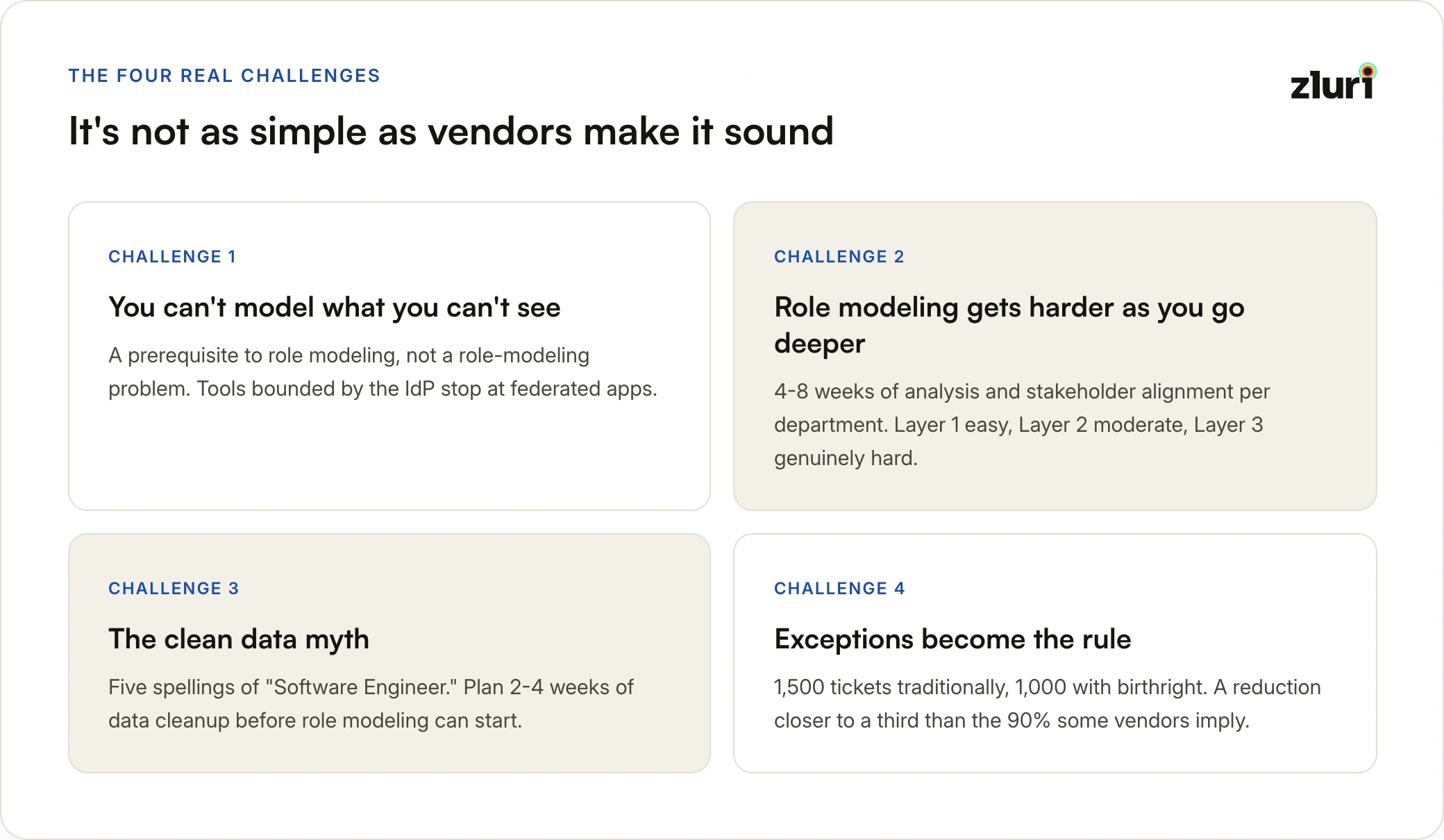
Many vendors position birthright access as straightforward: "Just define what each role needs and automate it."

The reality is messier. Department and function-level birthright is tricky to implement well.

Challenge 1: Role Modeling Is Complex

The vendor pitch:

  • "Everyone in Marketing gets HubSpot, Asana, and Google Analytics"
  • "All Software Engineers get GitHub, AWS, and Datadog"

The reality:

Tools are rarely used cleanly by "everyone in a department" or "everyone in a function."

Marketing department example:

HubSpot usage:

- Marketing Ops: 100% (use daily)

- Content Writers: 40% (some use it, some don't)

- Demand Gen: 90% (use regularly)

- Product Marketing: 30% (rarely use)

- Social Media: 10% (almost never)

Question: Is HubSpot "department birthright"?

Engineering function example:

Datadog usage within Software Engineers:

- Backend Engineers: 95% (monitoring production)

- Frontend Engineers: 60% (some monitor, some don't)

- Mobile Engineers: 30% (different monitoring tools)

- QA Engineers: 80% (use for debugging)

Question: Is Datadog "function birthright"?

There's no clean answer. You need to model usage patterns and make judgment calls.

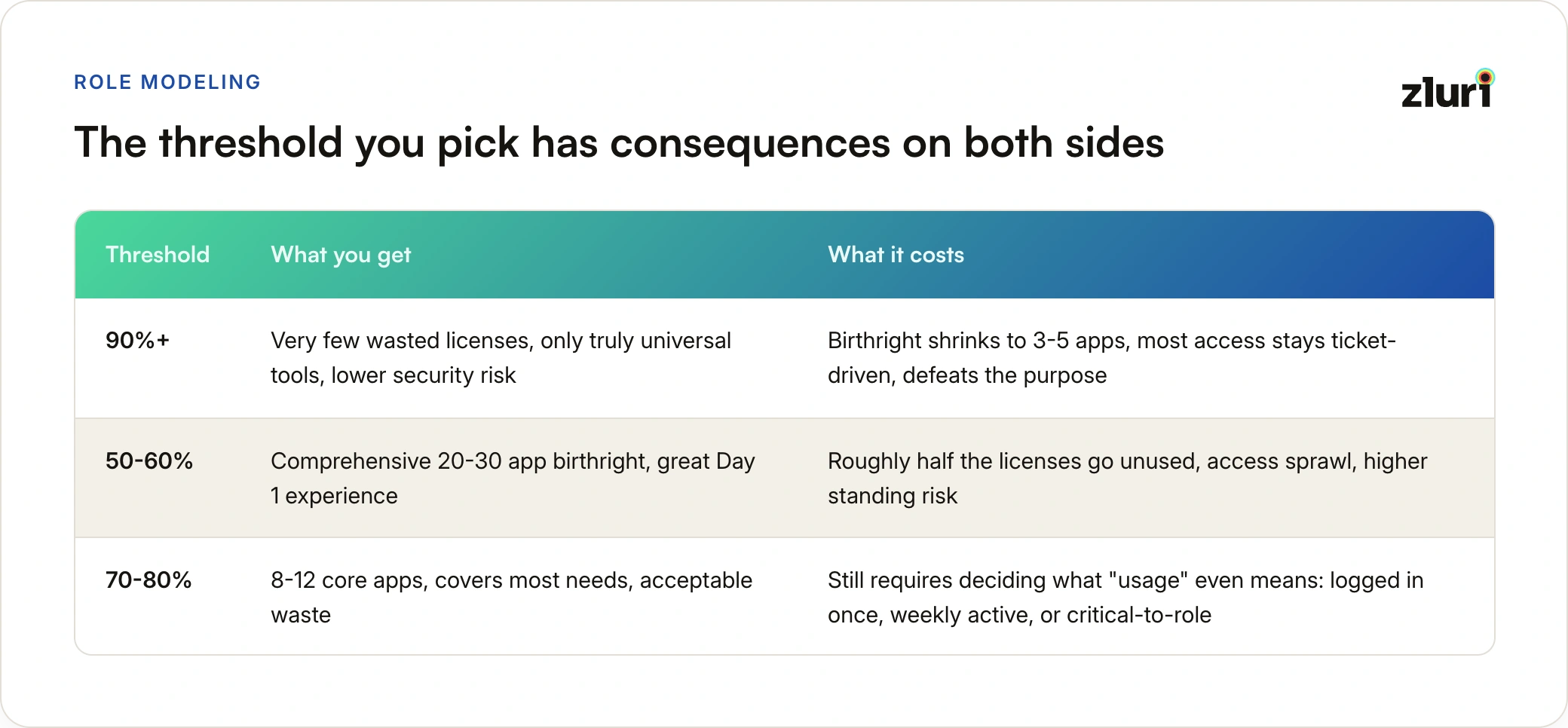
Challenge 2: The 80% Rule (and Its Trade-offs)

To decide what goes in birthright, organizations typically use a usage threshold: "If 80% of people in this role use this tool, it's birthright."

Setting the threshold too high (90%+):

Pros:

  • Very few over-provisioned licenses
  • Only truly universal tools in birthright
  • Lower security risk (fewer unnecessary permissions)

Cons:

  • Birthright becomes too narrow (only 5-10 apps)
  • Still lots of access requests after onboarding
  • Defeats the purpose (still processing lots of tickets)

Example:

90% threshold for Marketing:

Birthright: Email, Slack, Google Workspace

Result: 3 apps in birthright, 15-20 request tickets still needed

Setting the threshold too low (50-60%):

Pros:

  • Comprehensive birthright (20-30 apps)
  • Fewer access requests after onboarding
  • Better Day 1 experience

Cons:

  • Lots of wasted licenses (people provisioned but don't use)
  • Higher security risk (unnecessary access)
  • Access sprawl (people have access "just in case")

Example:

50% threshold for Marketing:

Birthright: 25 apps

Result: Average person uses 12 of them, 13 licenses wasted per person

The 80% sweet spot:

Most organizations settle on 70-80% usage threshold.

80% threshold for Marketing:

Birthright: 8-12 core apps

Result: Covers most needs, some requests still needed, acceptable waste

But even this requires careful analysis:

  • Who defines "usage"? Logged in once? Used weekly? Critical to job?
  • How do you measure usage for non-SSO apps?
  • What about seasonal usage? (Someone uses a tool quarterly but it's critical)

Challenge 3: Most Access Happens After Onboarding

The vendor pitch:

  • "Define birthright, provision everything on Day 1, done"

The reality:

Birthright typically covers only 20-30% of the applications an employee will eventually need.

Actual access accumulation over tenure:

Day 1 (birthright):

- 8-12 applications

- 20-30% of total eventual access

Month 3:

- +5-10 applications (joined specific projects)

- Now at 40-50% of eventual access

Month 6:

- +8-12 applications (cross-functional work)

- Now at 60-70% of eventual access

Year 1:

- +10-15 applications (specialized tools, temporary projects)

- Now at 80-90% of eventual access

Why access grows over time:

Project-based access:

  • Join Project X → Need access to Project X tools
  • Not birthright (project-specific, temporary)

Team-specific access:

  • Start on Backend team → Need Backend repos
  • Transfer to Frontend team → Need Frontend repos
  • Not clean birthright (changes with team assignment)

Cross-functional access:

  • Work with Sales on customer issue → Need Salesforce read access
  • Not birthright (temporary collaboration)

Career progression:

  • Promoted to Senior → Need elevated permissions
  • Move to leadership → Need management tools
  • Access evolves with role

Specialized tools:

  • Need Postman for API testing (some engineers, not all)
  • Need Terraform for infrastructure work (platform team only)
  • Not universal enough for birthright

The honest assessment:

Birthright gets people productive on Day 1 with core tools. But 70-80% of access is gained during tenure through:

  • Request-based access (for specific needs)
  • Project-based access (temporary)
  • Exception-based access (elevated permissions)
  • Role change provisioning (promotions, transfers)

This doesn't mean birthright fails. It means birthright is the foundation, not the complete solution.

Challenge 4: The Role Modeling Process Is Hard

To define birthright at department and function levels, you need to:

Step 1: Discover all applications in use

  • Access visibility platforms help here
  • But: Usage data needs interpretation

Step 2: Map applications to departments/functions

  • "80% of Content Writers use Grammarly" → Function birthright
  • "60% of Content Writers use Grammarly" → Not clear, need judgment
  • "40% of Marketing uses Grammarly" → Not department birthright

Step 3: Validate with stakeholders

  • IT: "We think Content Writers need these 8 apps"
  • Content team lead: "Actually, we don't use 3 of those anymore"
  • Finance: "We're not paying for 2 of those"
  • Reality check required

Step 4: Handle disagreements

  • Marketing manager: "Everyone needs Grammarly"
  • Usage data: "Only 45% actually use it"
  • Finance: "Grammarly costs $30/user/month, don't over-provision"
  • Compromise needed

Step 5: Deal with edge cases

  • New role that doesn't fit existing patterns
  • Contractor vs full-time (same function, different access)
  • Intern vs full employee (same department, different access)
  • Remote vs office (some tools differ)

Step 6: Keep it updated

  • Departments change tools
  • Usage patterns shift
  • New functions emerge
  • Birthright definitions need maintenance

The reality: Role modeling takes 4-8 weeks of analysis and stakeholder alignment for a single department.

Challenge 5: The Clean Data Myth

What you need for good birthright:

  • Clean HRIS data (accurate roles, departments, functions)
  • Accurate usage data (who actually uses what)
  • Up-to-date application inventory
  • Clear role taxonomy (consistent job titles)

What you actually have:

HRIS data issues:

Job titles:

- "Software Engineer"

- "Software Engineer II"

- "Software Engineer - Backend"

- "Sr. Software Engineer"

- "Engineer, Software"

Question: Are these the same function? Different functions? Who decides?

Usage data issues:

Grammarly usage:

- User A: Last login 6 months ago (counted as "user"?)

- User B: Logs in daily but only uses spell check (power user?)

- User C: Never logged in but license assigned (counted how?)

Application inventory issues:

Discovered applications:

- "Slack" (official)

- "Slack (Personal)" (someone's personal workspace)

- "Slack Staging" (test environment)

Question: Are these separate apps? Same app? Count usage separately?

You need data cleanup before you can model roles effectively. This adds 2-4 weeks to the project.

Challenge 6: Exceptions Become the Rule

Even with perfect birthright definition, you'll still have lots of exceptions:

Exception categories that can't be avoided:

1. Team-specific access (30-40% of requests)

  • Backend team needs different repos than Frontend team
  • Can't be birthright (too granular, changes frequently)

2. Project-based access (20-30% of requests)

  • Temporary access for specific projects
  • Not birthright by definition (temporary, varies)

3. Cross-functional access (15-20% of requests)

  • Engineer needs Sales data for customer issue
  • Support needs Engineering tools for escalation
  • Not birthright (ad-hoc, varies by situation)

4. Elevated permissions (10-15% of requests)

  • Need Admin instead of User
  • Need Write instead of Read
  • Not birthright (requires justification)

The math:

100 new hires per year

Traditional approach: 1,500 access tickets per year

With birthright:

- Day 1: 0 tickets (birthright automated)

- Month 1-3: 400 tickets (projects, teams, exceptions)

- Month 3-12: 600 tickets (cross-functional, elevated permissions)

Total: 1,000 tickets per year

Reduction: 33% (not 90% like vendors claim)

Birthright helps, but it doesn't eliminate access management. It reduces it.

What This Means for Implementation

Realistic expectations:

Layer 1 (Universal):

  • ✓ Relatively easy (everyone gets same tools)
  • ✓ Clean to implement (no role modeling needed)
  • ✓ High ROI (covers all employees)

Layer 2 (Department):

  • ~ Moderate difficulty (some role modeling required)
  • ~ Usage patterns often messy (60-80% threshold decisions)
  • ~ Medium ROI (reduces some tickets)

Layer 3 (Function):

  • ✗ High difficulty (extensive role modeling required)
  • ✗ Usage patterns very messy (lots of edge cases)
  • ✗ Lower ROI (still lots of exceptions)

Recommended approach:

Phase 1: Universal birthright (Month 1-2)

  • Define: What everyone needs
  • Automate: Email, chat, VPN, password manager
  • ROI: Immediate, high impact

Phase 2: Department birthright for 2-3 departments (Month 3-6)

  • Start with: Departments with clear tool usage (Engineering, Sales)
  • Define: 70-80% usage threshold
  • Validate: With department leads
  • Automate: 8-12 core department apps

Phase 3: Function birthright for specific roles (Month 6-12)

  • Start with: High-volume roles (Software Engineer, SDR)
  • Define: Based on actual usage data
  • Accept: Will still have lots of exceptions
  • Automate: Core function tools only

Phase 4: Continuous refinement (Ongoing)

  • Monitor: Usage patterns (quarterly)
  • Update: Birthright definitions (as tools change)
  • Measure: Exception rate (should be 60-70% of requests)

Success metrics:

Not "zero tickets" (unrealistic). Instead:

  • 30-40% reduction in access tickets
  • Day 1 productivity for 80% of needs
  • Consistent access for same roles
  • Clear exception process for edge cases

The vendors won't tell you this, but birthright access is an improvement, not a silver bullet.

The Future of Birthright Access

Where we were (traditional):

  • IT knows about 30% of apps
  • Can automate 20% of access
  • Manual provisioning for everything else
  • Birthright limited to org-wide basics

Where we are (modern):

  • Complete visibility into 100% of apps
  • Can automate 80% of access
  • Granular provisioning across applications
  • Birthright at universal, department, and function levels

Where we're going (next evolution):

  • AI-driven birthright recommendations
  • Automatic birthright updates based on usage patterns
  • Predictive provisioning (provision before they need it)
  • Self-healing access (automatic remediation of drift)

The technology finally exists to make birthright access practical at scale. The question isn't whether to implement it, but how quickly you can deploy it.

The Bottom Line: Is Birthright Worth It?

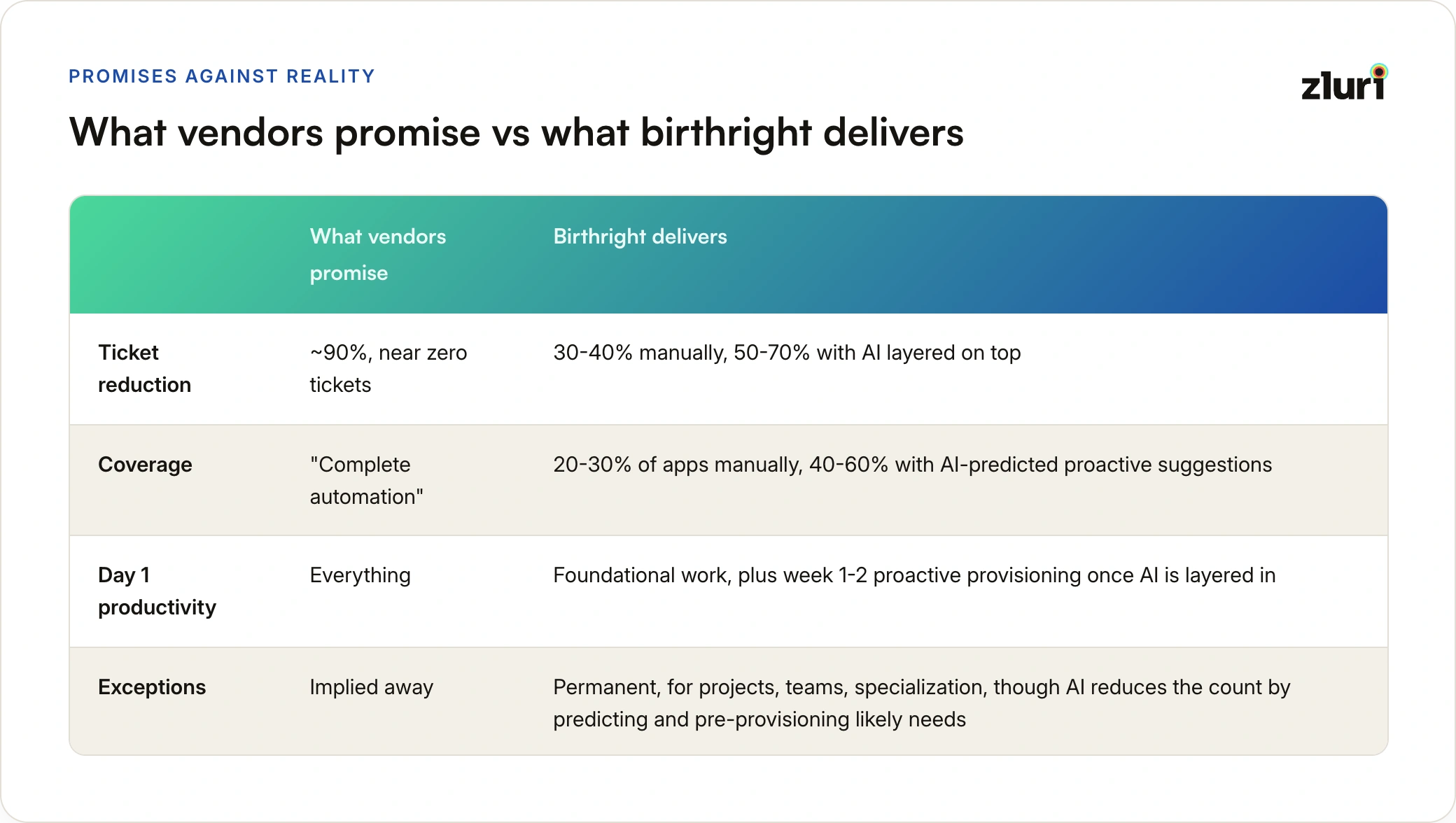
What vendors promise:

  • Zero access tickets
  • Complete automation
  • 90% reduction in IT work
  • Day 1 productivity for everything

What you actually get (manual birthright):

  • 30-40% reduction in access tickets
  • Birthright for core tools (20-30% of apps)
  • Exceptions still needed for projects, teams, specialization
  • Day 1 productivity for foundational work

What you can get (AI-driven birthright):

  • 50-70% reduction in access tickets
  • Birthright + proactive suggestions (40-60% of apps)
  • Fewer exceptions (AI predicts and provisions likely needs)
  • Day 1 productivity + Week 1-2 proactive provisioning

Is this still worth it? Absolutely.

Why birthright matters even with these limitations:

1. Consistency

  • Everyone in the same role gets identical core access
  • No more "Sarah has different access than other engineers"
  • Documented baseline for audits and reviews

2. Speed where it counts

  • New hires productive Day 1 with core tools
  • No waiting for email, chat, development environment
  • Specialized tools can be requested as needed (better than starting from zero)
  • With AI: Proactive suggestions for likely tools before they're needed

3. Foundation for exceptions

  • Birthright covers predictable 20-30%
  • IT can focus on meaningful exceptions (projects, elevated permissions)
  • Better than processing generic "new hire needs GitHub" tickets
  • With AI: Covers 40-60% through predictions, even fewer generic tickets

4. Compliance and security

  • Documented birthright = audit trail
  • Exceptions tracked separately = better oversight
  • Least privilege by default for core access
  • With AI: Anomaly detection flags unusual patterns automatically

The honest recommendation:

For manual birthright implementation:

Start with Layer 1 (universal):

  • High ROI, low complexity
  • 2-4 weeks to implement
  • Immediate impact

Add Layer 2 (department) for 2-3 key departments:

  • Medium ROI, medium complexity
  • 8-12 weeks to implement
  • Requires manual role modeling and usage analysis

Consider Layer 3 (function) for high-volume roles only:

  • Lower ROI, high complexity
  • 12-16 weeks to implement
  • Worth it for roles you hire frequently (engineers, SDRs)

For AI-driven birthright implementation:

Start with complete visibility platform:

  • Discover all apps (federated + non-federated)
  • Build historical usage data
  • Enable AI pattern detection

Let AI handle role modeling:

  • Automatic pattern detection across departments
  • Dynamic threshold setting (no arbitrary 80% rule)
  • Continuous monitoring and optimization
  • 4-8 weeks saved per department vs manual analysis

Add AI-driven provisioning:

  • Core birthright (auto-provision immediately)
  • Likely needed (proactive notifications to managers)
  • Anomaly detection (flag unusual patterns)
  • Personalized by team, timing, similar users

Accept that:

  • Most access will still be request-based (40-60% with AI vs 70-80% manual)
  • Role modeling takes time with manual approach, minutes with AI
  • Clean data helps but AI works with messy data
  • Exceptions are normal, not failure—AI just reduces them significantly

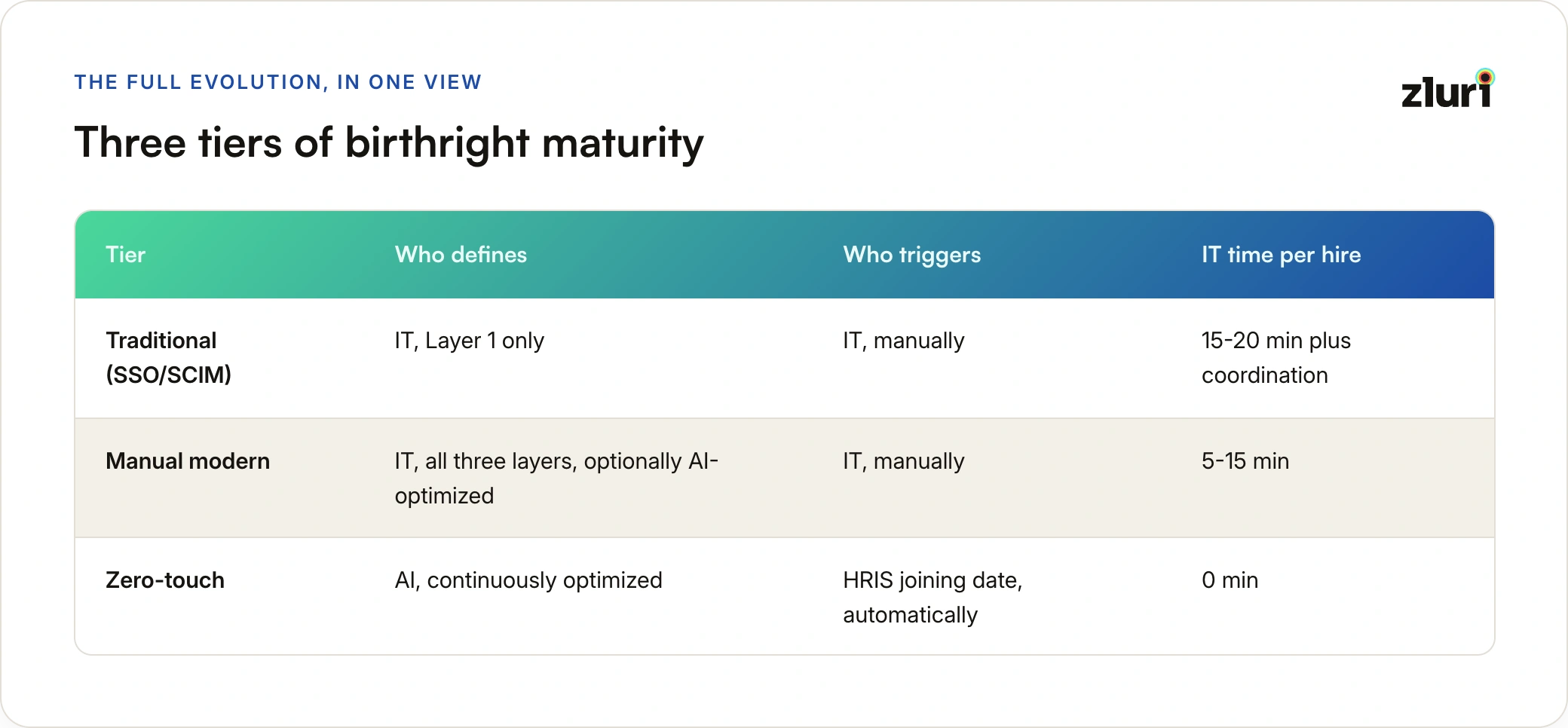
The technology evolution:

Tier 1: Traditional birthright (SSO/SCIM)

  • Layer 1 only (universal)
  • Account-level automation
  • Manual everything else
  • IT triggers each provisioning manually

Tier 2: Manual modern birthright (visibility + granular provisioning)

  • Layers 1-3 possible
  • Permission-level automation
  • 4-8 weeks role modeling per department
  • IT still triggers each provisioning manually

Tier 3: AI-driven birthright (visibility + AI + granular provisioning)

  • Layers 1-3 automated
  • Permission-level + predictive provisioning
  • Minutes for role modeling, continuous optimization
  • IT still triggers each provisioning manually

Tier 4: Zero-touch birthright (visibility + AI + granular provisioning + HRIS integration)

  • Layers 1-3 automated + personalized
  • Permission-level + predictive + scheduled provisioning
  • HRIS joining date triggers everything automatically
  • IT intervention: Zero (only for edge cases)

The progression:

Traditional: IT defines + IT triggers + IT monitors = 15-20 min per hire

Manual Modern: IT defines + IT triggers + automatic provisioning = 10-15 min per hire

AI-Driven: AI defines + IT triggers + automatic provisioning = 5-10 min per hire

Zero-Touch: AI defines + HRIS triggers + automatic provisioning = 0 min per hire

Birthright access isn't a silver bullet. But it's evolving from "foundation that reduces noise" to "intelligent system that predicts, personalizes, and provisions proactively" to "completely autonomous system that requires zero IT intervention."

That's a massive win—and it's available now, not in vendor roadmaps.

Frequently Asked Questions

What is birthright access?

Birthright access is the automatic provisioning of predefined apps and permissions based on who someone is — their role, department, and function — without any request, ticket, or approval needed. It's access that's standardizable because the majority of people in that role use the same tools. An engineer gets GitHub and AWS dev access on Day 1. A content writer gets Grammarly and WordPress. Not because they asked, but because everyone in that role needs it.

Is birthright access the same as giving employees everything they need on Day 1?

No — and this is the most common misconception. Birthright is necessary but not sufficient. It covers the 20-30% of apps that can be standardized across a role. The remaining 70-80% — team-specific repos, project tools, individual preferences — still comes through access requests during tenure. Think of birthright as getting someone a desk, a laptop, and building access. They'll still need specific meeting rooms and equipment based on their actual work.

Can't we just copy what another employee has — "give them what Sarah has"?

This is how most organizations do it today, and it's where inconsistency lives. Sarah's access reflects two years of projects, role changes, and ad hoc approvals. Copying it means the new hire inherits access Sarah probably shouldn't have anymore either. Birthright isn't "give them what Sarah has" — it's "here's the documented standard baseline for this role, applied the same way every single time."

Doesn't our IdP or SSO already handle this?

Your IdP automates account creation for apps connected to SSO — but that's about 30% of the apps your teams actually use. The other 70% are non-federated tools discovered through browser extensions, expense data, and direct logins. Even for the apps your IdP does manage, it creates accounts but can't set permissions. An engineer's GitHub account gets created, but the repos they need access to, the team they should be on, the permission level — all of that still requires manual work.

What's the difference between birthright access and RBAC?

RBAC defines permissions within a single application — "Admins can delete users, Editors cannot." Birthright access operates at the organizational level — "Software Engineers get access to these 12 applications with these specific permission levels within each." Birthright often uses RBAC logic inside individual apps to set the right permission levels, but it governs which apps someone gets in the first place, not just what they can do inside one.

Why can't we just put every app in birthright and be done with it?

Because most apps don't meet the criteria — 70-80%+ of a role using the same tool. Consider API testing: it's a necessary function for backend engineers, but 30% use Postman, 25% use Insomnia, 20% use curl. No single tool reaches the threshold, so none becomes birthright. Forcing Postman on everyone wastes licenses and frustrates developers who prefer something else. Birthright works precisely because it only covers what's genuinely standardizable.

We have 200+ applications. Do we need birthright for all of them?

No — typically 20% of your application stack covers 80% of standardizable access. Start with the three layers: universal (tools everyone uses), department-level (tools a whole team uses), and function-level (tools specific roles use consistently). The remaining 160+ apps stay request-based, which is correct — their usage is too variable or individual to standardize.

What does "birthright only covers 20-30% of access" mean in practice?

It means an employee's access evolves significantly after Day 1. They start with 8-12 birthright apps, then pick up 5-10 more in the first quarter through project assignments and team tools, and gradually accumulate another 10-15 over their first year through career progression and specialized needs. This isn't a failure of birthright — it's the nature of work. Birthright handles the predictable portion automatically so access requests can focus on the genuinely individual needs.

What is zero-touch provisioning, and how is it different from birthright access?

Birthright access is the policy — what gets provisioned automatically. Zero-touch provisioning is the mechanism — birthright triggered directly from the HRIS joining date, requiring no IT action whatsoever. In most organizations, IT still manually initiates provisioning even when birthright is defined. Zero-touch removes that last manual step: HR adds a joining date to the HRIS, that syncs to the provisioning platform, and the system schedules and executes provisioning at midnight before Day 1. IT only intervenes for edge cases.

How does AI improve birthright access?

Manually defining birthright requires weeks of spreadsheet analysis per department — checking who uses what, setting arbitrary thresholds, validating with stakeholders. AI does this in minutes. It detects role-based usage patterns, identifies sub-patterns within departments (Content Writers use Grammarly at 92%, Demand Gen at 31% — two very different birthright definitions), predicts what new hires will likely need based on similar users, and flags when birthright definitions drift as tool adoption changes. The result: birthright coverage increases from 20-30% to 40-60% because AI catches patterns manual analysis misses.

What about role changes — promotions, team transfers?

Role changes are where traditional provisioning breaks down most visibly. Someone promoted to Engineering Manager typically ends up with manager tools added on top of their existing engineer access — a manual, error-prone process that creates privilege creep. Modern birthright handles this automatically: when a role changes in the HRIS, the system calculates the difference between old and new birthright definitions, removes what no longer applies, and adds what the new role requires. The result is a clean, accurate access state rather than an accumulation.

Does birthright access help with SOC 2 or other compliance audits?

Yes — significantly. Auditors look for documented evidence of who should have access to what and how that's enforced. Birthright access creates a defined baseline per role: every engineer gets exactly these apps at these permission levels. Deviations from that baseline are tracked separately as access requests with justification. This turns an access review from "why does this person have 47 apps" into "here's their birthright, here's what they requested and why" — a much cleaner audit trail.

What about contractors and temporary workers?

Contractors typically get a restricted version of birthright — universal access (email, Slack, VPN) and function-specific tools they need for the engagement, but with automatic expiration tied to the contract end date. The key difference from full-time birthright is time-limiting: access is provisioned the same way but set to auto-revoke when the contract closes, without requiring IT to remember to act.

Why start with birthright if it only solves 20-30% of the access problem?

Because the 20-30% birthright covers generates 80% of the coordination overhead. The same questions — "What does an engineer need? Who owns Datadog? Which repos?" — repeat with every single hire, eating 3-4 hours of IT time in email chains every time. Birthright eliminates that coordination entirely for standardizable access. And unlike automating the 70-80% (which requires complex request workflows that still need human judgment), birthright is implementable in 90 days by IT alone. It builds momentum, earns stakeholder trust, and funds the next phase.

What comes after birthright access?

Birthright is step one in a full identity lifecycle. Once the onboarding baseline is defined and automated, the next phases are access request automation (efficient handling of the 70-80% of individual needs), access reviews (certifying that birthright definitions and accumulated access remain appropriate), and deprovisioning automation (revoking all access — birthright and requested — when someone leaves or changes roles). Each phase builds on the previous one. You can't run access reviews efficiently without a birthright baseline to compare against.

Ready to secure your identity surface?