.png)


Your IT director spent six months implementing SCIM across your core applications.
Day one of production, the help desk gets flooded: new sales reps can't access their Slack channels, engineers aren't in the right Jira projects, managers don't have the shared drives they need.
SCIM created all the accounts perfectly. It just didn't provide employees any actual access required to do their job.
This is the story of every mid-market company we've onboarded at Zluri over the past three years. They arrive having checked all the boxes—integrated with their IdP, connected their major apps, and automated basic provisioning. They've also paid the SSO tax, manually configured attribute mappings, and debugged vendor-specific implementations.
One year in, they're exhausted. SCIM solved one problem and revealed five others.
The problems don't announce themselves during the sales demo. They surface gradually—in pricing negotiations, the first week of production use, when edge cases appear. Each company discovers them at different moments, but the pattern is always identical.
This isn't a failure of SCIM. It's a failure of expectations.
SCIM was designed to automate account creation across cloud applications. It does that well. But creating accounts isn't the same as provisioning access. And for mid-market companies (those with 500 to 5,000 employees) managing 100+ apps without dedicated identity teams—that distinction determines whether your provisioning strategy actually works.
Table of Contents
- What Is SCIM Provisioning and Why It Exists
- The Economics Problem: Why SCIM Coverage Stops at 15-25%
- The Five Gaps SCIM Can't Close
- What Complete Provisioning Actually Requires
- How to Use SCIM Strategically (Not Exclusively)
What Is SCIM Provisioning and Why It Exists
SCIM (System for Cross-domain Identity Management) automatically creates, updates, and removes user accounts across your applications. When someone joins your company, SCIM creates their accounts. When they leave, it removes them. When their role changes, it updates their access—all without IT touching each app manually.
Technically, SCIM uses REST APIs to exchange user identity data between your identity provider (Google Workspace, Okta, Azure AD) and your SaaS applications. It defines a standard way to represent users and groups, so vendors don't need proprietary integrations.
Before SCIM, IT teams had two options, both bad:
Option 1: Build custom integrations. Use proprietary APIs for each app. Expensive, time-consuming, impossible to scale when you're adding apps monthly.
Option 2: Manual provisioning. Log into each app, create accounts one by one, update permissions when people change roles, remember to delete accounts when people leave. Error-prone, slow, a security nightmare when you forget to deprovision someone.
Earlier standardization attempts—DSML, SPML—failed because they were too complex. Administrators wouldn't use them.
SCIM succeeded because it was simpler. It gave IT teams one standard way to sync user accounts across hundreds of apps without writing custom code or spending hours in admin panels.
That was genuine progress. SCIM solved real problems around basic account lifecycle management. It reduced manual work, prevented zombie accounts, gave IT teams a scalable way to handle onboarding and offboarding.
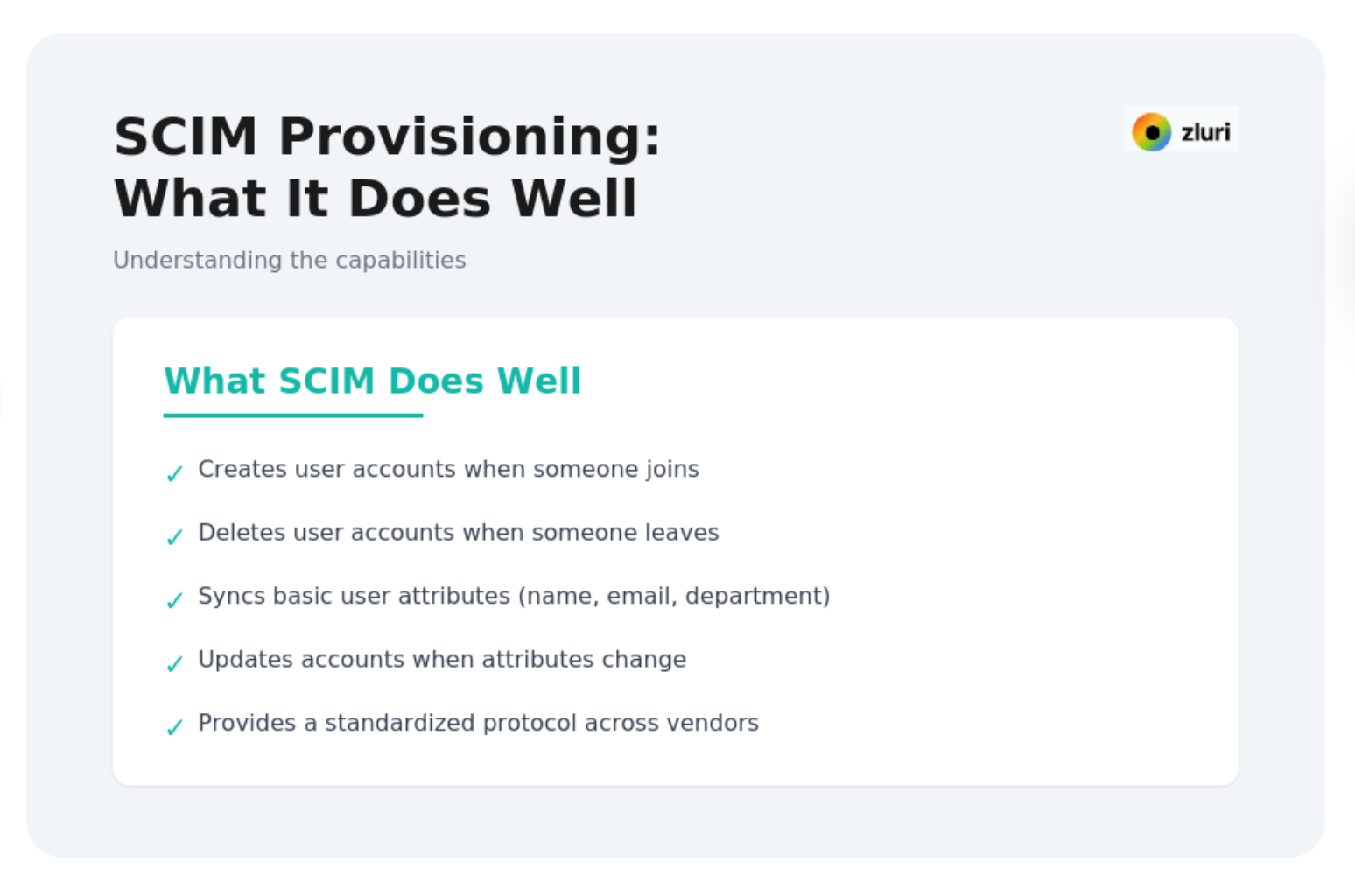
But SCIM was designed for a specific problem: creating and deleting accounts. Everything else is where the gaps appear.
The Economics Problem (Why SCIM Coverage Stops at 15-25%)
The first wake-up call comes during procurement, not implementation.
SCIM technically works with hundreds of apps. Economically, it works with far fewer. The reason is vendor bundling—an overlooked cost structure that fundamentally limits SCIM adoption.
Most SaaS vendors bundle SCIM with SSO in their enterprise pricing tiers. That means upgrading to plans that cost 2-4x the base price just to enable provisioning.
Real pricing from popular SaaS apps:
- Slack: $7.25/user/month → $15/user/month for SSO+SCIM
- Notion: $12/user/month → $24/user/month for SSO+SCIM
- Airtable: $20/user/month → $45/user/month for SSO+SCIM
For a 1,000-person company, the math works like this:
Apps you'll pay SSO tax for (20 apps): $54,000/month
These are your critical, company-wide platforms—Slack, Salesforce, Google Workspace, Zoom, Jira, Confluence, Figma, Notion, Linear.
Apps you won't pay SSO tax for (80 apps): Would cost $100,000+/month
Loom, Calendly, Miro, Apollo, Typeform, Asana, and dozens of department-specific tools.
What you end up with: SCIM coverage for 15-25% of your apps, manual provisioning still required for 75-85% of your apps, and total additional cost of $648,000 annually just for those 20 apps.
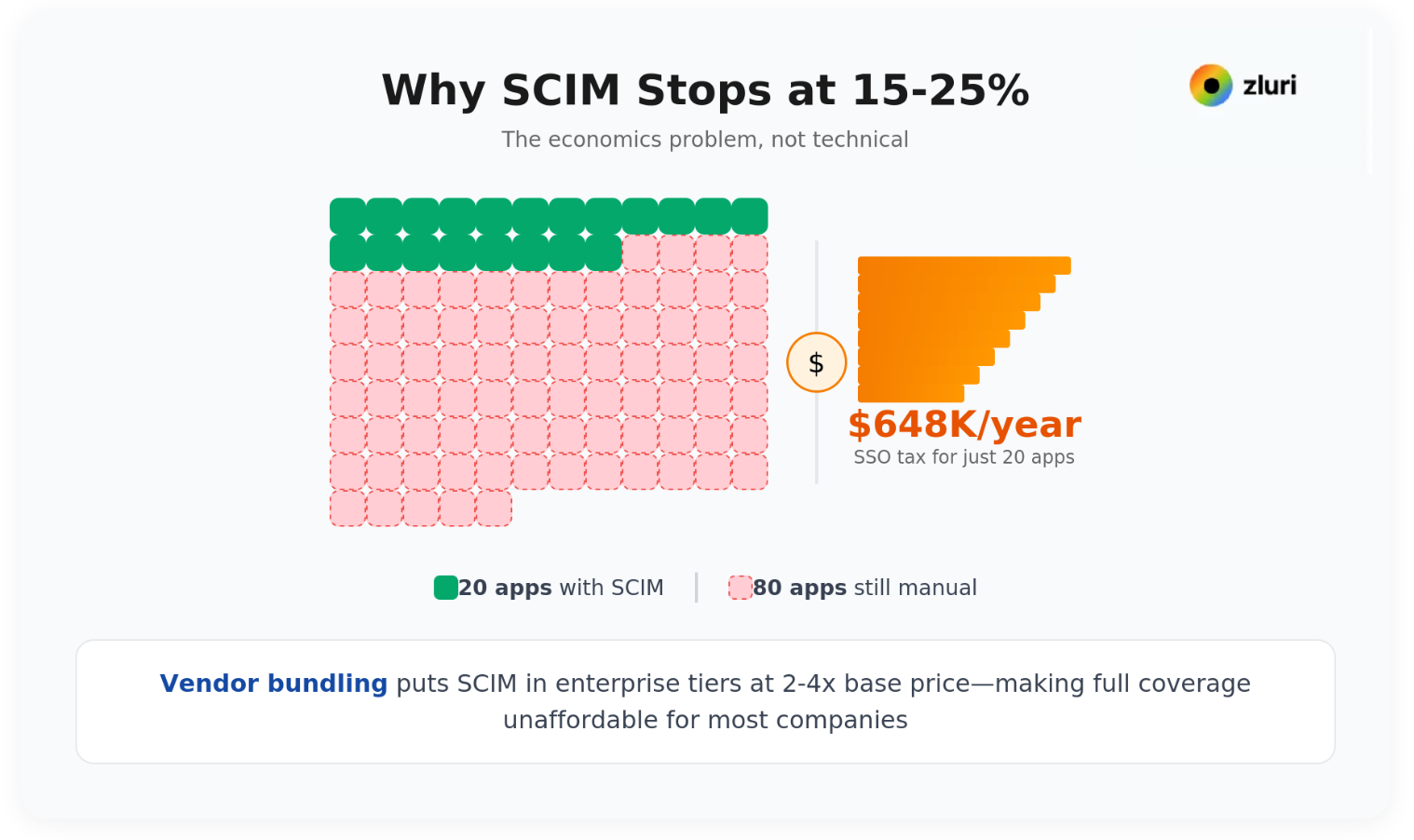
The SSO tax doesn't just make SCIM expensive—it makes it incomplete. You have fragmented automation: 20 apps provisioned via SCIM, 80 apps provisioned manually, and a false sense of security because "we have SCIM enabled."
SaaS vendors price SCIM this way because they've invested significant engineering resources building these implementations—senior developers, complex integrations, ongoing maintenance. They recoup costs by placing SCIM in enterprise tiers.
This creates a structural divide. Enterprises can afford SCIM for 100+ apps. Mid-market companies can't. The provisioning gap grows with every new app your teams adopt.
The coverage gap isn't technical. It's economical.
The Five Gaps SCIM Can't Close
Gap 1: SCIM Creates Accounts, Not Access
When Sarah joins as a Senior Sales Rep in your Boston office, here's what needs to happen in Slack:
✓ SCIM handles:
Creates @sarah.johnson account
✗ SCIM doesn't handle:
- Add to #sales-team (department-based)
- Add to #northeast-region (location-based)
- Add to #senior-reps (seniority-based)
- Add to #enterprise-accounts (role-specific)
- Add to #sales-leadership (reports 3 people)
- Add to #all-hands (company-wide)
- Add to 9 other channels she needs day one
SCIM did 10% of the provisioning work. Someone still manually does the other 90%.
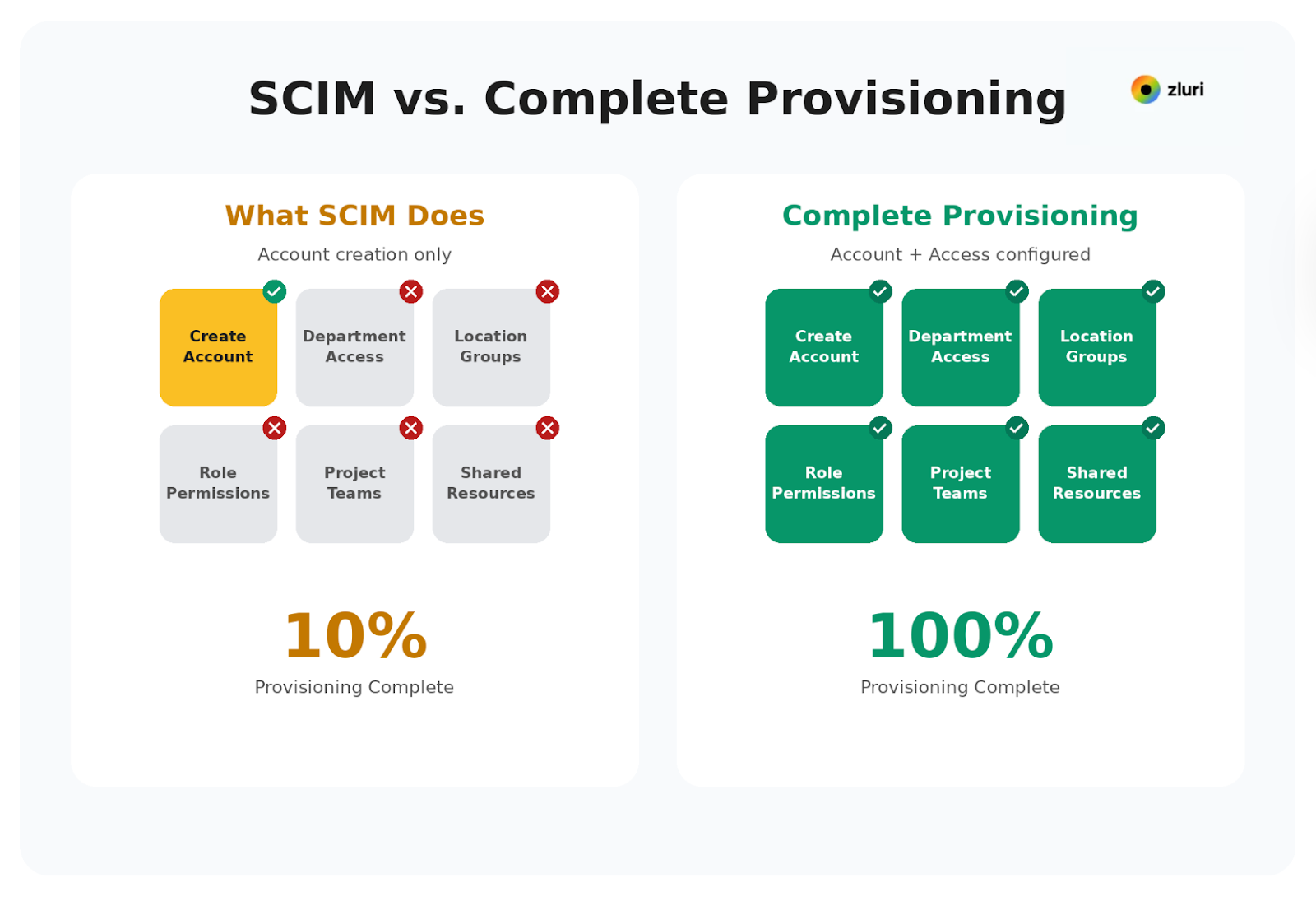
This is what we mean when we say: SCIM creates accounts. Real provisioning provisions access.
Across our customer base, we see this pattern repeat in every application:
Jira: SCIM creates the user account. IT still manually adds them to the right projects, assigns the correct permission schemes, and sets up board access based on their team and role.
Salesforce: SCIM creates the user account. IT still manually assigns permission sets, adds them to queues, configures territory access, and sets up report folder sharing based on their sales region.
Google Workspace: SCIM creates the user account. IT still manually adds them to shared drives, distribution lists, and Calendar resources based on their department and location.
Notion: SCIM creates the user account. IT still manually adds them to team spaces, sets page permissions, and configures guest access based on cross-functional project involvement.
Confluence: SCIM creates the user account. IT still manually adds them to spaces, sets page restrictions, and configures group permissions based on their role and department.
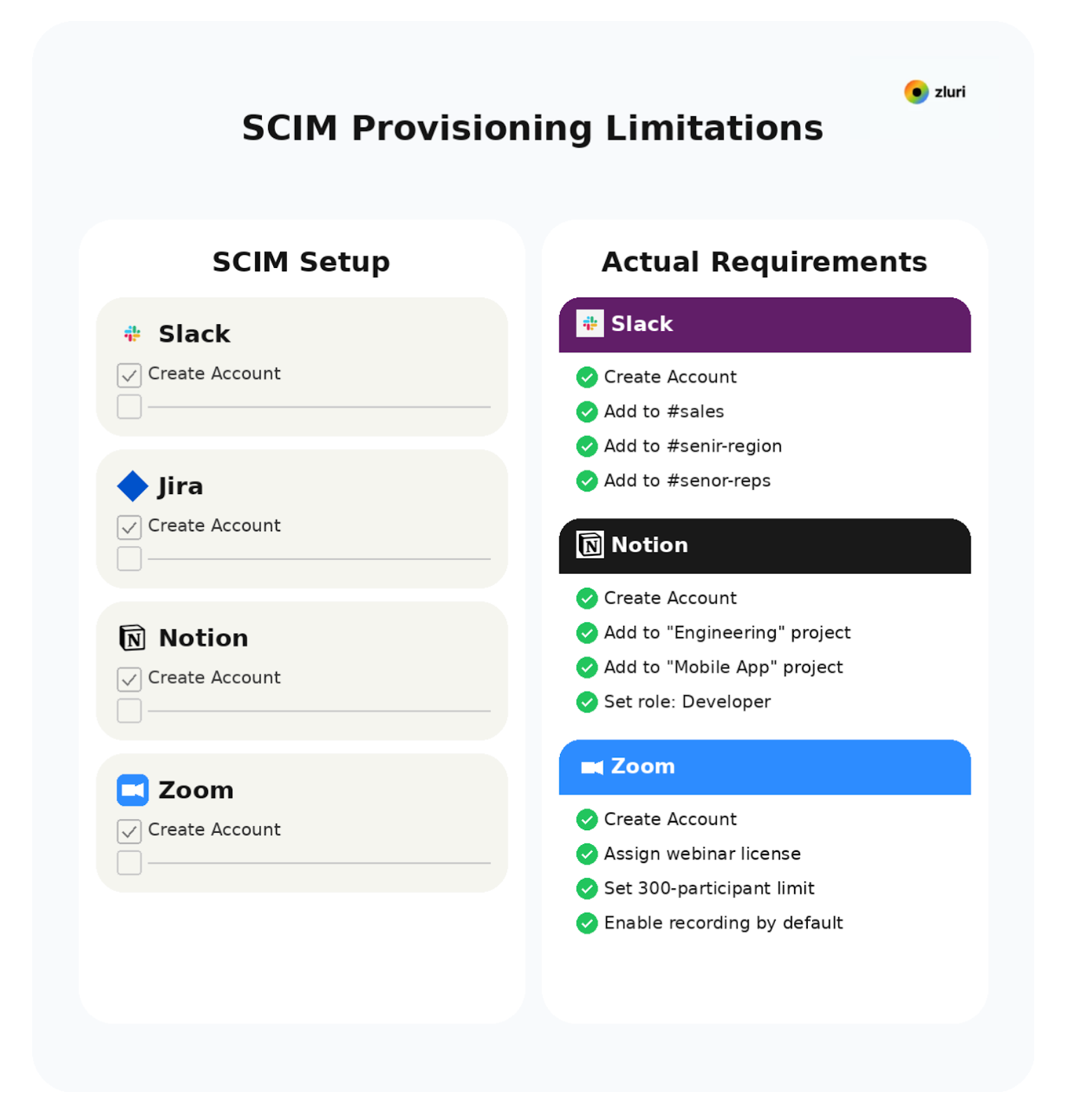
See the pattern? SCIM handles line one. Pre-built integrations with deeper API access handle the rest.
We've watched companies spend $180,000 implementing SCIM to successfully create user accounts, then spend another 35-40 IT hours per month manually adding people to the right groups, channels, teams, and projects.
That's not automation. That's expensive data entry with a nice dashboard.
Gap 2: The Visibility Problem (You Can't Provision What You Don't Know Exists)
SCIM provisions your federated apps smoothly. Then reality arrives. Someone from Marketing asks IT to provision access to that tool they've been using for six months—the one IT didn't know existed.
During a recent access review, a 1,200-person company we work with discovered:
- 47 apps IT didn't know existed
- $186,000 in duplicate SaaS spend
- 23 former employees still with active accounts in ungoverned tools
- Customer data stored in 8 unmanaged applications
SCIM provisioned zero of these apps. Because SCIM can't provision what you don't know exists.
Across the mid-market companies we've onboarded, IT teams are typically unaware of 60-70% of their actual application stack.
They're shadow IT—tools your teams pay for with corporate cards, completely outside your identity provider:
- Design team using Figma
- Marketing using Canva Pro
- Sales using Apollo.io
- Customer success using Typeform
- Engineering using Postman
This creates two critical problems.
The first is a security risk—these ungoverned apps contain sensitive data like customer information, financial records, and strategic plans, but access isn't centrally managed. When someone leaves, their accounts remain active because they're not in your deprovisioning workflows.
The second problem is incomplete automation—even if you've successfully implemented SCIM for your federated apps, you're still manually managing the majority of your stack. The provisioning problem isn't solved. It's just invisible.
SCIM assumes a perfect world where every app flows through your identity provider. The real world is one where employees adopt tools faster than IT can approve them.
You need visibility first. Discover what apps exist across your organization—both federated and unfederated—then extend managed access to all of them.
Gap 3: The Technical Complexity Problem (Who Actually Implements This?)
The initial setup for your first app feels manageable with your senior engineer's help. Then you try to scale. You need to replicate this across 20 apps, and that engineer has moved on to other priorities.
SCIM is marketed as streamlined automation. It's not streamlined to implement.
Setting up SCIM requires:
- Understanding API endpoints and OAuth flows
- Configuring attribute mappings between your IdP and each app
- Debugging SCIM payloads when integrations break
- Managing vendor-specific implementations (Okta's SCIM ≠ Azure AD's SCIM)
- Reading technical documentation for each integration
- Working with SaaS vendor support when configurations fail
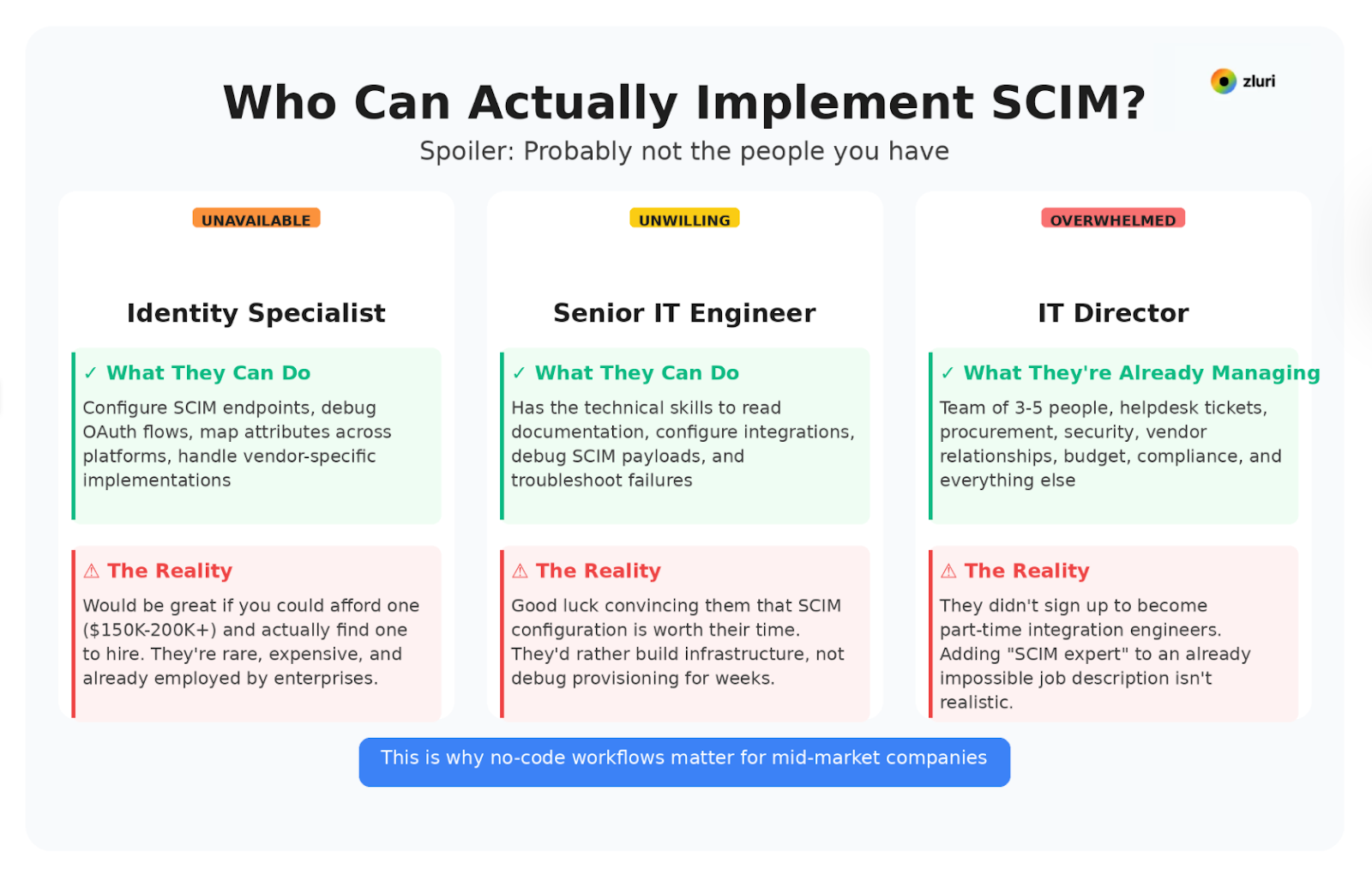
Who implements SCIM at your company?
Identity specialists would be ideal. Most mid-market companies don't have one—and can't hire one even if they wanted to. The talent doesn't exist at scale.
Senior engineers could do it. Good luck convincing them that SCIM configuration is the highest-value use of their time.
Your IT Director manages 3-5 people who also handle helpdesk, procurement, and security. They're already underwater and didn't sign up to become part-time integration engineers.
SCIM assumes you have an identity engineer on staff. The mid-market reality is that you don't—and won't.
When we talked to our customers, the companies that successfully scaled SCIM either:
- Hired expensive consultants for 3-6 month implementations ($80K-$150K), or
- Had a senior engineer spend 20% of their time maintaining integrations indefinitely
Neither approach scales when you're adding 2-3 new apps per month.
Gap 4: The Lifecycle Problem (Beyond Joiner-Leaver)
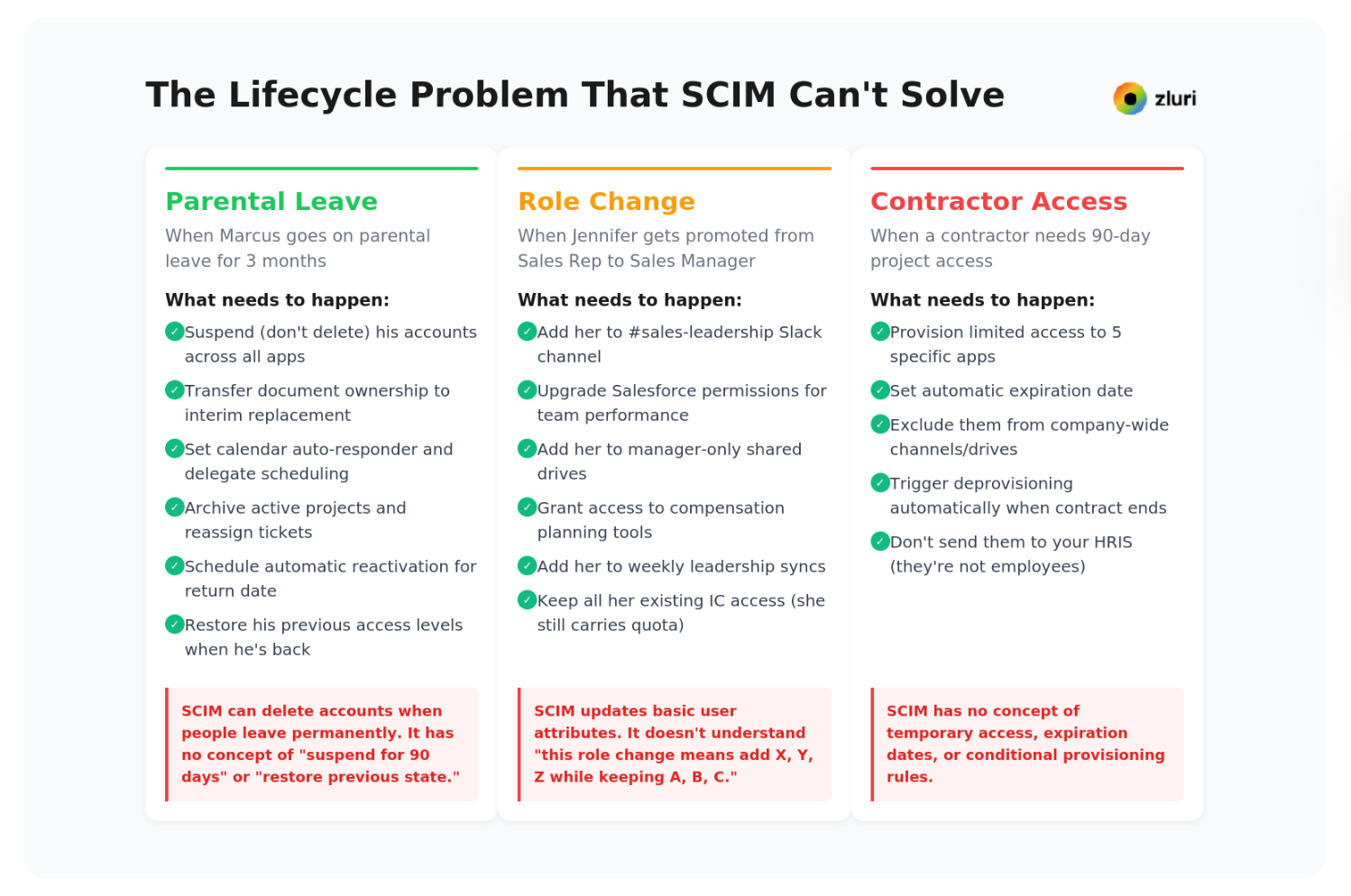
Standard onboarding and offboarding work well. Until they don't. The edge cases start appearing: someone goes on parental leave, a contractor needs 90-day access, an employee transfers departments mid-quarter.
SCIM was designed for a simple model: create accounts when people join, delete accounts when they leave.
The employee lifecycle is more complex:
When Marcus goes on parental leave for 3 months, here's what needs to happen:
- Suspend (don't delete) his accounts across all apps
- Transfer document ownership to his interim replacement
- Set calendar auto-responder and delegate meeting scheduling
- Archive active projects and reassign tickets
- Schedule automatic reactivation for his return date
- Restore his previous access levels when he's back
SCIM can delete accounts when people leave permanently. It has no concept of "suspend for 90 days" or "restore previous state."
When Jennifer gets promoted from Sales Rep to Sales Manager:
- Add her to #sales-leadership Slack channel
- Upgrade her Salesforce permissions to view team performance
- Add her to manager-only shared drives
- Grant her access to compensation planning tools
- Add her to weekly leadership syncs
- Keep all her existing IC access (she still carries quota)
SCIM updates basic user attributes. It doesn't understand "this role change means add X, Y, Z while keeping A, B, C."
When a contractor needs 90-day project access:
- Provision limited access to 5 specific apps
- Set automatic expiration date
- Exclude them from company-wide channels/drives
- Trigger deprovisioning automatically when contract ends
- Don't send them to your HRIS (they're not employees)
SCIM provisions through your HRIS or IdP. Contractors often exist outside these systems entirely.
Across our customer base, these mid-lifecycle scenarios represent 30-40% of all provisioning requests. SCIM can barely handle 10% of these scenarios.
Gap 5: Offboarding Isn't Just Account Deletion
When an employee leaves, SCIM deletes their account. Real offboarding requires orchestrating 15-20 distinct actions across your stack—and most of them are app-specific.
When David leaves the company, here's what actually needs to happen:
Google Workspace:
- Transfer ownership of his documents to his manager
- Download his email archive for compliance (7-year retention)
- Reassign his calendar and reschedule his recurring meetings
- Transfer ownership of shared drives he created
- Remove him from distribution lists
- Then delete the account
Slack:
- Archive his DMs (compliance requirement)
- Transfer ownership of channels he created
- Reassign open threads he was mentioned in
- Download his message history if required by legal
- Then deactivate the account
Jira:
- Reassign his open tickets to his manager
- Transfer project ownership
- Update boards where he was the owner
- Archive his work for project continuity
- Then deactivate the account
Salesforce:
- Reassign his open opportunities to other reps
- Transfer account ownership to his replacement
- Update forecasts that included his pipeline
- Archive his notes and activity history
- Then deactivate the account
Device Management (Jamf/Intune):
- Trigger remote device wipe
- Revoke certificates
- Remove from device groups
- Track device return
SCIM deletes the account. It doesn't transfer ownership, reassign work, archive data, or coordinate device retrieval. These actions are app-specific, context-dependent, and often require deep integration with each application's unique features.
SCIM's standardized approach can't handle them because there's no standard for "transfer this person's work to their manager in a way that makes sense for this specific application."
We've seen IT teams spend hours during offboarding manually working through these tasks across 20-30 apps per departing employee. SCIM deletes the account in 30 seconds. The other 3-4 hours of work still happens manually.
What Complete Provisioning Actually Requires
Comprehensive user access management needs five capabilities that go beyond what SCIM provides:
1. Visibility-First (Discover Before You Provision)
Before automating anything, you need to know:
- What apps exist (federated and Shadow IT)
- Who has access to what
- What permissions each user currently has
- Where access is ungoverned or excessive
This discovery phase isn't optional. Automating provisioning without visibility is just automating chaos faster.
Effective provisioning starts with visibility. Discovery tools scan your environment to map your complete SaaS stack—approved apps and Shadow IT—before provisioning decisions get made. You can't manage access to apps you don't know exist.
2. Deeper API Integrations (Beyond Account Creation)
SCIM creates accounts. Pre-built integration provision access.
These integrations go beyond SCIM's capabilities:
- Attribute-based group assignments (department, location, seniority, role)
- App-specific entitlements and permissions
- Granular resource access (channels, projects, shared drives, permission sets)
- Context-aware provisioning policies
Modern platforms provide thousands of automated actions across hundreds of apps. Not just the account creation SCIM handles, but the complete access configuration users actually need on day one.
3. Workflows Built for IT Teams, Not Identity Engineers
Provisioning should be configurable by IT managers, not just developers.
Visual workflow builders let you create provisioning policies like:
- "When a sales rep joins the Boston office, create accounts in these 12 apps and add them to these 47 groups/channels/projects"
- "When an engineer is promoted to senior, update their permissions in Jira, AWS, and Notion"
- "When someone moves from Marketing to Sales, revoke marketing access and provision sales tools within 24 hours"
No coding required. No API knowledge needed. IT admins/managers/directors can build and maintain these workflows without engineering support.
In our experience, companies that require developer involvement for every provisioning change end up with IT backlogs measured in weeks. IT leaders that empower their team with visual workflow builders provision access in hours.
4. Unified Access Management Across All Apps
Don't fragment your provisioning strategy:
- SCIM for 20 apps
- Manual processes for 80 apps
- Shadow IT completely unmanaged
Use a platform that handles federated and unfederated apps through the same workflows. Consistent provisioning policies across your entire stack—whether apps support SCIM or not, whether they're approved or Shadow IT.
The most effective approach integrates with existing SCIM implementations for core apps, then extends automated provisioning to the other 75-85% of the stack that SCIM couldn't reach economically or technically.
5. Complete Lifecycle Management
Provisioning isn't just onboarding and offboarding:
Joiner workflows: Automated day-one access based on role, department, location, and seniority
Mover workflows: Role changes, promotions, department transfers, leave of absence, contractor renewals
Leaver workflows: Granular offboarding with data transfer, device management, ownership reassignment, and compliance archiving
Temporary access: Contractors, seasonal workers, project-based permissions with automatic expiration
Access reviews: Periodic certification of who has access to what, required for SOC 2, ISO 27001, and cyber insurance
All of this flows through the same system with the same visibility and control.
How to Use SCIM Strategically (Not Exclusively)
SCIM is valuable. For your top 15-20 company-wide applications, SCIM provides standardized, reliable account lifecycle management.
Apps worth the SSO tax (implement SCIM):
- Company-wide platforms: Slack, Google Workspace, Salesforce
- High-security tools: Your SSO provider, password manager
- Core collaboration: Zoom, Jira, Confluence
- Primary productivity: Notion, Figma, Linear
If you can afford the SSO tax for these critical apps, SCIM is worth implementing.
Apps not worth the SSO tax (use API-based provisioning):
- Department-specific tools (the other 75-85% of your stack)
- Apps without SCIM support
- Shadow IT you're bringing under management
- Tools with prohibitive enterprise pricing just for provisioning
The companies that succeed with provisioning don't choose between SCIM and alternatives. They use SCIM where it makes economic and technical sense, then complement it with a platform that fills the gaps.
Here's what that looks like in practice:
Your top 20 apps provision via SCIM through your IdP. Your other 80+ apps provision through deeper API integrations. Both flow through the same workflows, use the same attribute-based policies, and appear in the same access reviews.
Zluri maximizes the ROI of your existing SCIM investment by completing what SCIM started. SCIM creates the accounts—Zluri provides the actual access. For apps where you've already paid the SSO tax, you get fine-grained provisioning that adds users to the right channels, projects, groups, and permission sets based on their role and department. Your SCIM investment finally delivers complete automation, not just account creation.
IT teams see one unified view. Employees get complete access on day one. Security teams can govern the entire stack, not just the 15-25% that's SCIM-federated.
This is the approach we've built at Zluri:
- Visibility-first discovery to identify your complete SaaS stack
- Pre-built integrations for granular provisioning beyond account creation
- Visual workflows that IT teams can build without engineering support
- Unified management across federated and unfederated apps
- Complete lifecycle coverage for joiners, movers, leavers, and temporary access
Because provisioning isn't just about creating accounts. It's about giving people the right access, in the right apps, at the right time—and removing it the moment they don't need it anymore.
See how Zluri provisions complete access—not just accounts—across your entire SaaS stack, including the 75-85% of apps SCIM can't reach economically. Book a demo.
Frequently Asked Questions
What is SCIM provisioning?
SCIM provisioning is an automated process that creates, updates, and deletes user accounts across cloud applications using the SCIM (System for Cross-domain Identity Management) standard. It syncs user identity data between your identity provider and SaaS applications.
How does SCIM work?
SCIM uses REST APIs to exchange user information between an identity provider (like Google Workspace, Okta, or Azure AD) and service providers (SaaS applications). When you create, update, or delete a user in your IdP, SCIM automatically syncs those changes to connected applications.
What is the difference between SCIM and SAML?
SCIM handles user provisioning (creating and managing accounts), while SAML handles authentication (verifying user identity for single sign-on). They serve different purposes but often work together in enterprise identity management.
What is the difference between SCIM and SSO?
SSO (Single Sign-On) allows users to authenticate once and access multiple applications. SCIM automates the creation and management of user accounts across those applications. SSO handles login; SCIM handles account lifecycle.
Does SCIM require SSO?
Technically no—SCIM is a standalone protocol. However, most SaaS vendors bundle SCIM with SSO in their enterprise pricing tiers, creating an "SSO tax" that makes SCIM access expensive for mid-market companies.
How much does SCIM cost compared to alternatives?
SCIM itself is free (it's an open protocol), but vendors charge 2-4x base pricing for enterprise tiers that include SCIM. For a 1,000-person company, implementing SCIM across 20 apps typically costs $600K-$800K annually in additional license fees—just to enable provisioning.
Why is SCIM not enough for complete provisioning?
SCIM creates and deletes accounts but doesn't handle granular access provisioning—like adding users to specific groups, channels, or projects based on their role, department, or location. It also doesn't work for apps outside your identity provider (Shadow IT) and struggles with complex lifecycle changes beyond basic joiner-leaver scenarios.
Can I use SCIM and Zluri together?
Yes. Most of our customers use SCIM for their core 15-20 federated apps, then use Zluri to provision the other 80+ apps in their stack that either don't support SCIM or price it prohibitively. Both systems work together through unified workflows.
What apps does Zluri provision that SCIM can't?
Zluri provisions any app with an API—including Shadow IT apps, department-specific tools, and applications that don't support SCIM. We have pre-built integrations for 300+ apps with 2,500+ provisioning actions, covering both account creation and granular access configuration.
How does SCIM improve security?
SCIM reduces security risks by automating user deprovisioning when employees leave, preventing zombie accounts. It also ensures consistent account management across applications, reducing manual errors that could leave access ungoverned.
What are the main challenges with SCIM implementation?
The primary challenges include: high costs due to the SSO tax, limited coverage (SCIM typically reaches only 15-25% of your app stack), technical complexity requiring identity specialists, and inability to handle granular, app-specific provisioning needs beyond basic account creation.