



Role-Based Access Control promises simple identity management. Group users by job function, assign roles, manage access at scale.
The theory is elegant: instead of managing permissions individually, manage them through roles.
But implementation forces a choice between two paths. You can optimize for accuracy (roles grant only necessary access) or optimize for manageability (roles remain maintainable as the organization grows). You cannot optimize for both.
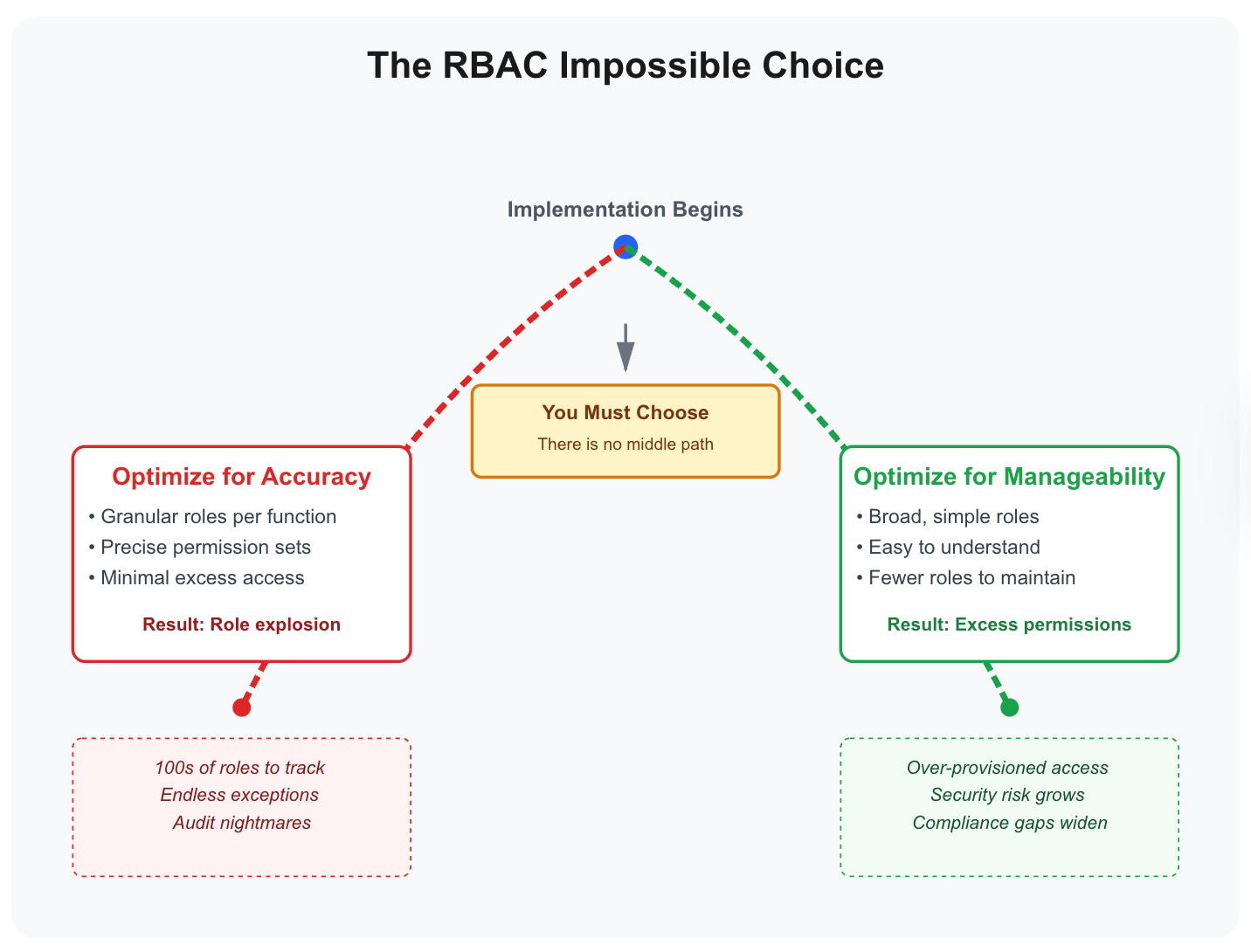
Every organization implementing RBAC walks one of these paths. Both lead to failure, just different types of failure. Understanding why reveals a fundamental design constraint: role-based abstractions break down under organizational complexity.
What's in this article:
- Path 1: The Accuracy Path - How creating precise roles leads to role explosion (50-75 roles at 1000 employees)
- Path 2: The Manageability Path - How keeping roles broad leads to over-permissioning or manual exception chaos
- Why the middle ground fails - The unstable position between two failure modes
- The SCIM reality - Why even perfect RBAC only governs 30-40% of actual applications
- The evolution path - How to start with RBAC and evolve to ABAC/PBAC without rebuilding
Path 1: The Accuracy Path (Role Explosion)
Start with a simple role: "Sales Rep." Define baseline access for sales work: Salesforce access, LinkedIn Sales Navigator, email sequences tool, meeting scheduler, CRM chrome extensions. Everyone with a sales function gets this role. Clean, simple, manageable.
Then someone in the enterprise sales team needs different tools. They need contract management software, legal document repository access, and enterprise pricing calculator. You have a decision to make.
The Accuracy Choice: Create "Enterprise Sales Rep"
Create a separate "Enterprise Sales Rep" role with its own complete access definition.
This new role includes everything needed for enterprise sales: core sales tools plus contract management, legal repository, and enterprise pricing tools.
Now you have two roles instead of one. Still manageable.
The Regional Variation
Next, an Enterprise Sales Rep in EMEA needs region-specific applications: EMEA Salesforce instance, European contract templates, region-specific pricing tools, GDPR-compliant data handling apps.
Another decision point.
The accuracy choice: Create "Enterprise Sales Rep - EMEA"
Three roles now. But the pattern is established. Each time someone needs access that doesn't fit existing roles, accuracy demands creating a new role.
The Multiplication Effect
The sales team alone starts generating variations across multiple dimensions.
By segment, you need different roles: Mid-Market Sales Reps need proposal automation, Enterprise Sales Reps need contracts and legal access, Strategic Accounts Reps need executive engagement tools. Each segment operates across three regions (Americas, EMEA, APAC), creating 9 segment-region combinations.
Then layer in four role types. Account Executives own deals, Solutions Engineers need technical demos and POC environments, Sales Development Reps focus on prospecting tools only, and Account Managers need renewal and expansion playbooks.
Add employment variants—full-time employees get full access while contractors get restricted customer data access—and the multiplication accelerates.
The math compounds quickly:
- 3 segments (Mid-Market, Enterprise, Strategic)
- 3 regions per segment = 9 combinations
- 4 role types (AE, SE, SDR, AM)
- 2 employment variants per type
Total: 3 × 3 × 4 × 2 = 72 separate roles just for Sales in a 1000-person company.
What This Looks Like in Practice
Each role requires:
1. Definition and documentation What access does this role grant? What are the boundaries? When should someone be assigned this role versus a similar role?
With 72 roles, managers face impossible decisions:
- "Is this new hire Enterprise Sales Rep - Americas or Strategic Accounts Rep - Americas?"
- "What's the difference between these roles?"
- "Why do we have both?"
2. Application mapping
Here's where theory meets reality:
SCIM Integration Reality:
- Only 20-40% of your applications support SCIM integration
- Why? SSO tax problem (vendors charge extra for SCIM, many SMB apps don't support it)
- SCIM only works for federated apps (centrally managed by IT)
- Shadow IT apps (60-70% of actual application usage) aren't even visible to IT teams
Integration effort:
- Each SCIM integration: 2-3 hours setup (Zluri's pre-built integrations take ~2 minutes)
- Each custom API integration (for granular control): 6-8 hours setup
- Requires developer time (not just IT admin)
- SCIM limitations: Only handles account creation and deletion
- No granular actions (can't provision "read-only Salesforce" vs "full Salesforce")
- For apps without SCIM: ITSM tickets for manual access requests
The math:
- 200 total applications in use (includes shadow IT)
- IT visibility: ~60-80 applications (30-40%)
- SCIM-capable apps: ~25 applications (20-40% of visible apps)
- Actually integrated: ~20 applications (IT resource constraints)
So your 72 sales roles can be auto-provisioned to only 20 applications. The other 40-60 visible applications require ITSM tickets and manual provisioning.
3. Assignment rules
Modern RBAC tools don't actually use complex criteria. It's mostly:
- Role → App mapping (this role gets access to these apps)
- Manual assignment by managers or IT
Some tools offer visual workflow builders:
- Easy to create (drag-and-drop interface)
- Difficult to manage (no standardization)
- Creates proliferation: Easier to build new workflow than modify existing one
- Each team builds their own variation: Sales has 5 onboarding workflows, Engineering has 7
4. Access review coverage
Each role needs quarterly review. But reviewers face:
- "Should Enterprise Sales Rep - EMEA still have contract management access?"
- Reviewer doesn't know which tools that role actually uses
- With 72 roles, reviews become overwhelming
- Approving everything is safest
5. Maintenance overhead
When a new application is added:
- Determine which of the 72 role objects should include it
- If SCIM-capable: 2-3 hours integration + testing
- If SCIM available but no granular controls: Manual provisioning still required
- If no SCIM: ITSM workflow or manual provisioning
- Requires developer time for any integration work
The Administrative Burden
(Note: The following sections contain calculations and detailed numbers. Feel free to skip these if you prefer to focus on the core arguments.)
Initial implementation requires 220+ hours (5+ weeks): 72 role objects creation, 20 SCIM integrations, developer time for setup, and ITSM workflow configuration for non-SCIM apps.
Ongoing maintenance for new apps requires 40+ hours per month: 1-2 SCIM-capable apps (integration, testing, documentation), plus 2-4 non-SCIM apps (ITSM workflow creation, testing, documentation).
This assumes existing apps remain static. No permission model updates, no new features requiring access changes, no application migrations. In practice, existing apps do change, adding unpredictable maintenance overhead on top of new app additions.
Available IT capacity for RBAC is typically 80 hours/month (4 people at 50% allocation). With new apps requiring 40+ hours/month, that's 50% of capacity. Looks manageable... if existing apps never change.
But the moment existing applications update their permission models or add new features, the system breaks. Most organizations experience 4-6 significant app changes per month, adding another 20-30 hours of unplanned work.
The Drift Problem
As maintenance burden grows, role definitions drift from reality:
Month 1: Roles are accurate and well-documented. Sales adopted a new prospecting tool. IT adds it to relevant sales roles within 48 hours.
Month 6: Roles mostly accurate but documentation lags. Enterprise Sales self-procured 3 tools (official provisioning too slow). Not in role definitions. Some Enterprise Sales reps have them, others don't.
Month 12: Roles are outdated. Sales reorganized (new "Strategic Accounts" segment), but role structure still reflects old segments. The SDR team uses 6 new tools (shadow IT), none in role definitions. SCIM integrations haven't been updated, new role objects aren't mapped to integrated apps.
Month 24: Roles are historical artifacts. New sales hires get provisioned based on outdated role structure, then spend Week 1 submitting 8-12 exception requests for tools everyone actually uses. Shadow IT is now 60-70% of sales tools. IT doesn't know these apps exist.
The accuracy path that started with "create precise roles" ends with 72 unmaintainable roles that aren't actually accurate anymore because the maintenance burden exceeded organizational capacity.
When Role Explosion Becomes Fatal
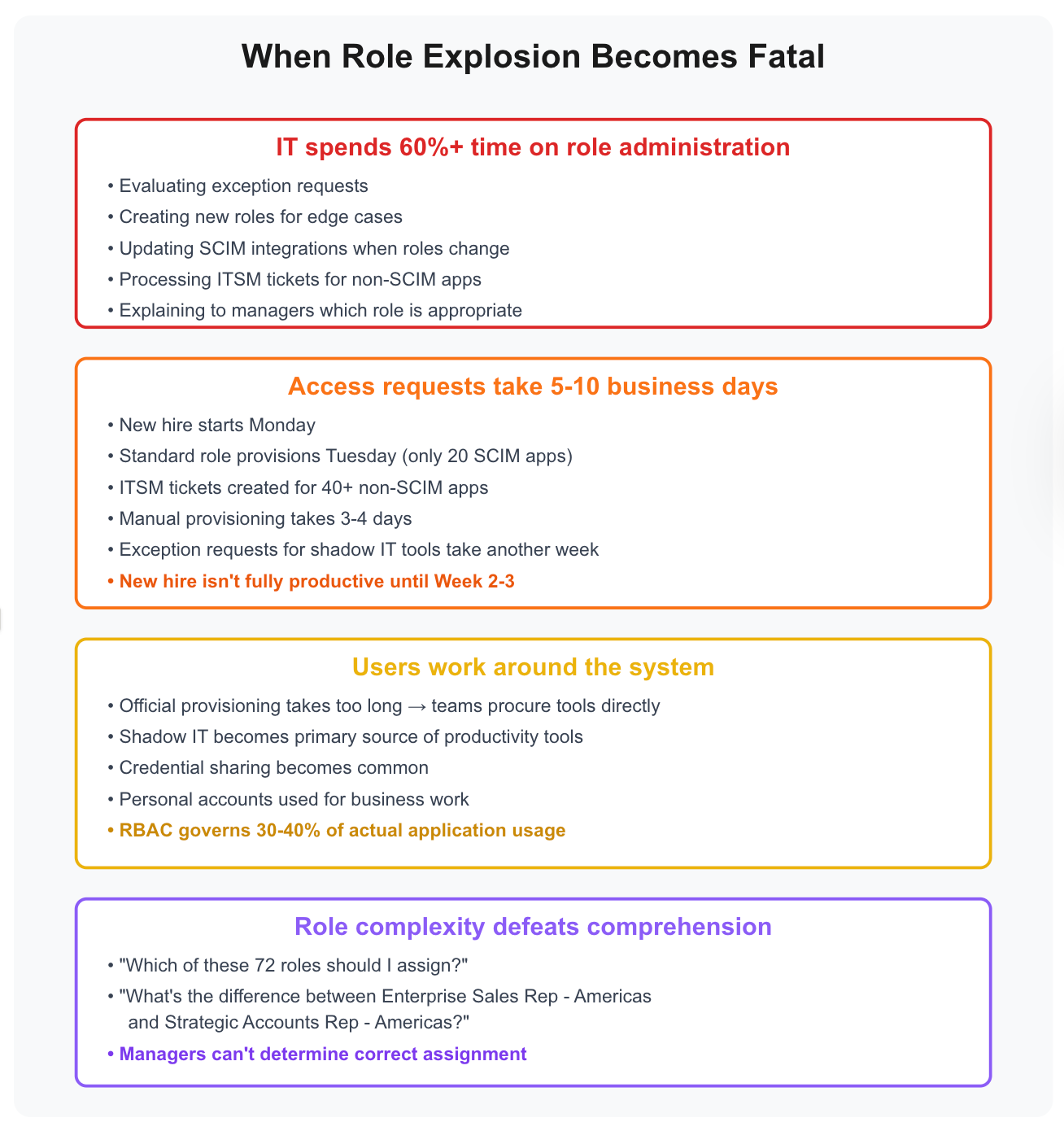
Organizations on the accuracy path typically hit the breaking point around 50-75 role objects (including sub-groups and nested hierarchies). In our experience, this happens around 1000 employees, though this varies significantly based on organizational complexity, industry, and application portfolio.
IT spends 60%+ of their time on role administration instead of strategic work. They're constantly evaluating exception requests, creating new roles for edge cases, updating SCIM integrations when roles change, processing ITSM tickets for non-SCIM apps, and explaining to managers which of the 72 roles is appropriate for a new hire.
Access requests take 5-10 business days. New hire starts Monday, gets standard role provisioned Tuesday (covering only 20 SCIM apps), ITSM tickets get created for 40+ non-SCIM apps requiring manual provisioning over 3-4 days, then exception requests for shadow IT tools take another week. The new hire isn't fully productive until Week 2-3.
The Paradox of the Accuracy Path
Organizations choose the accuracy path for precise access control. But:
- Each new role requires full app mapping (2-3 hours per SCIM app, 6-8 hours for custom APIs)
- SCIM only covers 20 applications (10% of total apps)
- Most apps require manual provisioning regardless of role granularity
- Shadow IT grows faster than RBAC coverage
- By Month 18-24: Role structure governs minority of actual access
The path toward accuracy ends in inaccuracy, not because roles were poorly designed, but because:
- SCIM only covers 30-40% of apps
- Shadow IT exceeds IT visibility
- Maintaining accurate role definitions exceeds organizational capacity
Note on Hierarchical RBAC
Many companies attempt to use hierarchical RBAC (sub-groups, role inheritance) to reduce the overhead of managing separate roles. The theory: create "Sales Rep" as a base, then "Enterprise Sales Rep" inherits from it, avoiding duplicate definitions.
In practice, hierarchical structures provide only marginal relief:
- Still need to map each sub-group to applications (inheritance doesn't eliminate app mapping work)
- Inheritance chains add complexity ("Which parent does this sub-group inherit from?")
- SCIM integrations still required for each role object (sub-groups are still distinct objects)
- Manual provisioning overhead remains identical
- Exception volume doesn't decrease (roles still don't match actual needs)
Hierarchical RBAC delays role explosion by a few months but doesn't prevent it. You still hit 50-75 role objects around 1000 employees, just with nested hierarchies instead of flat structures. The maintenance burden, SCIM limitations, and shadow IT problems remain unchanged.
Path 2: The Manageability Path (Over-Permissioning or Manual Exceptions)
The alternative is keeping roles broad and manageable. When edge cases appear, you avoid creating new roles by choosing one of two approaches:
Path 2A: Expand existing roles (grant broader access to everyone)
Path 2B: Use manual exceptions (handle edge cases via ITSM tickets)
Both keep your role count low. Both are "manageable" in theory. Both fail in practice, just differently.
Path 2A: Role Expansion (Over-Permissioning)
Start with the same "Sales Rep" role. Enterprise sales team needs contract management and legal document access.
The Expansion Choice
Add contract management and legal docs to general "Sales Rep" role.
Now all sales reps have contract access, whether they need it or not. Most are mid-market reps who'll never touch enterprise contracts. But expanding the role is easier than:
- Creating "Enterprise Sales Rep" role (triggers Path 1 multiplication)
- Mapping new role to 20 SCIM apps (2 hours each = 40 hours)
- Building ITSM workflows for 40 non-SCIM apps
This is the first compromise. Seems minor: a few extra apps.
The Accumulation Pattern
Expansions continue:
Someone needs financial forecasting: Add revenue analytics to "Sales Rep" role. Now all reps see company financials. Only managers and above need this. But creating "Sales Manager" role means app remapping, ITSM workflows.
Solutions Engineers need technical environments: Add POC environment access, demo infrastructure, technical documentation to "Sales Rep." Now SDRs (who only do prospecting) have access to production demo environments. They'll never use it.
What This Looks Like After 12 Months
The "Sales Rep" role has ballooned to include core sales tools (Salesforce, LinkedIn Sales Nav, email sequences), contract management and legal repository, revenue analytics and financial forecasting, POC environments and demo infrastructure, technical documentation and implementation guides, executive briefing materials, strategic account playbooks, competitive intelligence database, pricing optimization tools with cost data, and customer health scoring with churn data.
An SDR hired for prospecting (whose job is building top-of-funnel and booking meetings) gets access to executive strategic materials, company financial forecasting, contract templates and legal docs, POC production environments, and competitive pricing and cost data.
They don't need 70% of this access. But the "Sales Rep" role grants it because someone in sales needs each tool, and creating granular roles triggered the Path 1 multiplication problem.
Path 2B: Manual Exceptions (The ITSM Ticket Spiral)
Many organizations avoid over-permissioning by taking a different approach: Keep roles minimal, handle exceptions manually via ITSM tickets.
Start with the same "Sales Rep" role with baseline access. Enterprise sales team needs contract management.
The Manual Exception Choice
Don't expand the "Sales Rep" role (that would over-permission everyone).
Instead, enterprise sales reps submit ITSM tickets when they need contract management access.
IT reviews and manually grants access. Seems prudent: only grant what's needed, when it's needed.
This feels like the right balance:
- Roles stay narrow (no over-permissioning)
- Role count stays low (no explosion)
- Access remains controlled (manual approval for exceptions)
The Exception Volume Problem
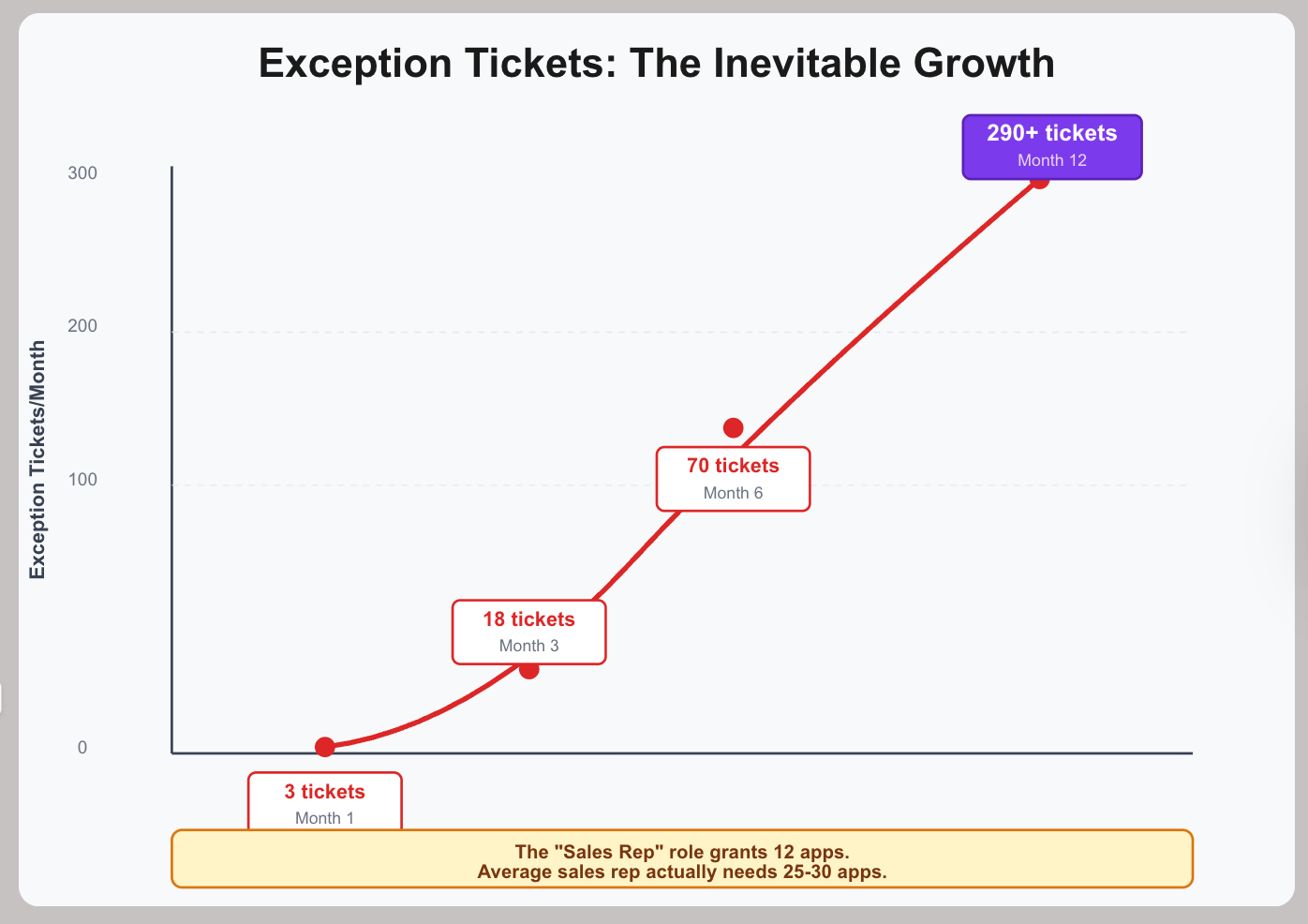
Month 1 works fine. Three enterprise sales reps need contract management, submit 3 ITSM tickets, and IT processes them in 1-2 days. Exception volume: 3 tickets.
By Month 3, more exceptions appear. Solutions Engineers need POC environments (5 tickets), strategic account reps need executive materials (4 tickets), sales managers need financial forecasting (6 tickets), and 3 new hires need contract management. Exception volume: 18 tickets/month.
By Month 6, exception requests accelerate. Every new enterprise sales hire requires 4-6 exception tickets, Solutions Engineers need 3-4 exceptions each, strategic accounts need 5-7 exceptions each, role changes (SDR → AE) generate 8-10 exception tickets, and new tool adoptions create 15-20 exceptions to grant access. Exception volume: 60-80 tickets/month.
By Month 12, exceptions become the norm. The standard "Sales Rep" role grants only 12 core apps, but the average sales rep actually needs 25-30 apps. Each new hire requires 13-18 exception tickets. With 15 new sales hires per month, that's 225 tickets just for new hires, plus another 40 tickets for existing reps requesting new tools, plus 25 tickets for role changes. Exception volume: 290+ tickets/month.
The Math of Manual Exceptions
At 290 exceptions/month, the math becomes impossible.
Each ticket actually requires 35 minutes total (user submits: 5 min, manager approves: 10 min, IT processes manually: 15 min, testing: 5 min). That's 169 hours per month needed (290 × 35 minutes). Available IT capacity: 80 hours/month with 4 people at 50% allocation. Status: 211% over capacity"
What This Looks Like in Practice
Access provisioning takes 7-15 business days. New hire starts Monday, receives baseline "Sales Rep" access covering just 12 apps on Tuesday, then submits 15 exception tickets for the tools they actually need. Tickets sit in queues because IT is overwhelmed. Approvals trickle in over 2 weeks. The new hire isn't fully productive until Week 3-4.
Exception backlog grows:
- IT can process ~80 hours = ~137 tickets/month
- Receiving 290 tickets/month
- Backlog grows by 153 tickets/month
- After 6 months: 900+ ticket backlog
- Average resolution time: 2-3 weeks
When official access takes 3 weeks, users work around the system. Managers share credentials, teams procure shadow IT tools, personal accounts get used for business work, and onboarding buddies grant access via shared accounts. RBAC becomes irrelevant—real access happens outside the system.
Exception requests exceed standard provisioning. The standard role grants just 12 apps, but each person needs 13-18 exception grants. When 60%+ of access comes via exceptions rather than roles, the "role-based" system has become exception-based.
IT becomes a ticket processing center, spending 70-80% of time on exception tickets with no time for automation, integration, or improvement. Every new tool requires manual provisioning setup, and SCIM integrations don't reduce workload because exceptions bypass them anyway.
When Manual Exceptions Become Fatal
Breaking point indicators:
Exception volume exceeds standard provisioning: When 60%+ of access is granted via exceptions, you no longer have role-based access control. You have ticket-based access control: manual, slow, error-prone.
IT capacity consumed by exception processing: When 70-80% of IT time goes to processing tickets, no capacity remains for:
- Automating common exceptions (they'd become role features)
- Improving onboarding flows
- Integrating new applications
- Security reviews and access governance
Shadow IT becomes the primary source: When official access takes 2-3 weeks, teams procure tools directly. IT loses visibility. Governance becomes impossible.
Audit findings:
- "Why are these credentials shared among 5 people?"
- "Why don't new hires have access logs for their first 3 weeks?"
- "Why are there 600+ unresolved access tickets?"
- "Why are employees using personal accounts for business data?"
The Paradox of Path 2B
Organizations choose manual exceptions to maintain control:
- No over-permissioning (security benefit)
- No role explosion (manageability benefit)
- Manual approval (governance benefit)
But the manual work required to maintain this control exceeds organizational capacity:
- Exception volume grows exponentially
- IT becomes bottleneck
- Users circumvent system
- Shadow IT exceeds IT visibility
- Credential sharing becomes norm
The path toward control ends in loss of control, not immediately, but when exception volume exceeds IT capacity to process.
The Security Implications (Applies to Both Path 2A and 2B)
Both manageability paths create security risks—just different types.
Path 2A (Over-Permissioning) Risk: Blast Radius
Over-permissioning isn't just inefficient—it's a security risk.
Blast radius of compromised accounts:
When an SDR's credentials get compromised through phishing, the attacker doesn't just get access to Salesforce.
- They get financial forecasting showing revenue, margins, and projections.
- They get the contract repository with customer terms, pricing, and SOWs.
- They can access POC infrastructure that potentially contains customer test data.
- They download competitive intelligence including IP and market strategy.
A compromised prospecting role becomes a critical security incident because the broad "Sales Rep" role grants enterprise-level access no SDR should have.
Insider threat magnification:
A disgruntled SDR about to leave for a competitor can export the entire Salesforce database, download competitive intelligence, copy pricing and cost data, take strategic account playbooks, and access financial forecasting.
The "Sales Rep" role was never intended to grant this much access to entry-level prospecting reps, but manageability choices accumulated into dangerous access levels.
Path 2B (Manual Exceptions) Risk: Visibility Loss
Manual exception processes create different security risks. When official access takes 2-3 weeks, new hires borrow credentials from colleagues, managers share admin accounts, and teams create shared "service" accounts with no individual accountability for actions.
Security impact:
- Can't trace who accessed what
- Shared credentials rarely get rotated
- When someone leaves, shared access remains active
- Audit logs show the account holder, not actual user
Shadow IT exceeds governance: When ITSM tickets take weeks to process:
- Teams procure tools directly (no IT approval)
- 60-70% of applications unknown to IT
- No SCIM integration, no access reviews, no visibility
- Customer data in ungoverned systems
Security impact:
- Can't enforce security policies on unknown apps
- Data breaches in shadow IT go undetected
- No central deprovisioning when employees leave
- Compliance violations in systems IT doesn't know exist
Exception backlog hides security issues: With 900+ ticket backlog:
- Security-related access reviews delayed weeks/months
- Terminations lost in queue (ex-employees keep access)
- Suspicious access requests buried in volume
- No time to investigate anomalies
Compliance violations:
Both Path 2A and Path 2B violate compliance requirements—just differently.
Path 2A creates violations through over-permissioning. SOX requires separation of duties, but the broad "Sales Rep" role grants both revenue forecasting and direct CRM data modification access to the same people.
PCI-DSS requires least privilege for payment card data, but if any sales rep processes payments, all reps get payment processing access—violating the principle of limiting to only those who need it.
GDPR's data minimization requirement mandates that customer PII should be limited to those who need it for their function, but broad roles give all reps access to all customer data.
Path 2B creates violations through process chaos. SOC 2 access controls require documented, repeatable access provisioning, but manual exception tickets create undocumented, inconsistent processes—and a 900+ ticket backlog demonstrates access control failure.
GDPR requires knowing who has access to personal data, but shared credentials and shadow IT mean IT doesn't know and can't produce accurate access reports for regulators.
SOX IT general controls require timely deprovisioning when employees leave, but termination requests get buried in the 900+ ticket backlog, leaving ex-employees with access for weeks or months.
The Access Review Problem (Affects Both Paths)
Quarterly reviews become meaningless under both manageability approaches.
Path 2A (Over-Permissioning) Review Problem:
The review question: "Should this person have these access rights?"
When an SDR has access to 45 systems but only uses 12:
- Reviewer doesn't know which 12 are actually needed
- Can't determine if other 33 are "just in case"
- Removing access might break unknown workflows
- Approving everything is safest (avoids tickets and complaints)
Path 2B (Manual Exceptions) Review Problem:
The review question: "Should this person have these access rights?"
When access was granted via 15 different ITSM tickets over 6 months:
- Reviewer sees list of applications
- Can't trace back to original ticket justifications (buried in 900+ ticket backlog)
- Don't know which were "temporary" vs permanent
- Can't determine if access is still needed
- Can't revoke without creating new ITSM ticket (adds to backlog)
- Approving everything is only practical option
The false confidence: "We completed quarterly access reviews" sounds like governance.
But reviews provide compliance checkmarks rather than actual control:
- Path 2A: Approving over-permissioned roles without evaluating necessity
- Path 2B: Approving exception-granted access without ticket context
- Both: Can't measure shadow IT access (60-70% of actual tools)
When the Manageability Path Becomes Fatal
Breaking points vary by which path you chose:
Path 2A (Over-Permissioning) Breaking Points:
Audit failures: External auditors cite least privilege violations and separation of duties failures.
"Why does this SDR have access to financial forecasting and strategic account materials?"
Answer: "Creating separate roles triggers management overhead" doesn't satisfy SOX, PCI-DSS, or GDPR requirements.
"Remediate within 90 days or face certification loss" forces emergency role redesign—which triggers Path 1 problems.
Security incidents: Compromised SDR account exfiltrates customer database, financial data, and competitive intelligence.
Investigation reveals account had access to 45 systems but only needed 12.
Post-incident remediation requires rebuilding role framework from scratch.
Path 2B (Manual Exceptions) Breaking Points:
IT capacity collapse: Exception volume exceeds processing capacity by 200%+.
With 169 hours/month required but only 80 hours available:
- Backlog grows to 900+ tickets
- Average resolution time: 2-3 weeks
- New hires can't work for 3-4 weeks
- Teams abandon official process entirely
Shadow IT becomes majority: When official access takes 3 weeks:
- 60-70% of tools procured outside IT
- Governance covers <30-40% of actual applications
- Can't produce accurate access reports for audits
- Don't know where company data lives
Audit findings: "Show us access provisioning documentation for the past quarter."
Response: 900+ ITSM tickets with inconsistent approvals, no standardized process, 3-week average resolution.
Auditor finding: "Access control processes are ad-hoc and inadequate."
Both Paths Lead to Same Outcome:
Data breach disclosure requirements (Path 2A) or governance failure (Path 2B) forces emergency remediation.
Either triggers Path 1 role explosion when you're forced to create granular roles.
The SCIM Reality That Changes Everything
Even perfect role design fails due to integration limitations:
Coverage Problem:
- 200 applications in actual use
- IT visibility: 60-80 apps (30-40%)
- SCIM-capable: 25 apps (20-40% of visible)
- Actually integrated: 20 apps (resource constraints)
Your RBAC system governs 10% of actual application usage.
Granularity Problem: Even with SCIM:
- Only handles account creation/deletion
- No permission-level control (can't do "read-only Salesforce")
- Custom API integrations required for granular access
- 6-8 hours per app for custom integration (vs 2-3 hours for standard SCIM)
- Most organizations can't afford this for >5-10 apps
The automation mirage: RBAC promises "automated provisioning." Reality:
- 20 apps: Automated (SCIM)
- 40-60 apps: Manual provisioning (IT visibility but no SCIM)
- 120-140 apps: Unknown to IT (shadow IT)
Automation covers a minority of access grants.
Start with RBAC, Then Evolve
The dilemma doesn't mean avoiding RBAC. It means start with it—then evolve beyond it as complexity grows.
RBAC is right starting point for most organizations:
- Simple and understandable
- Manageable at small-to-mid scale
- Makes sense to managers, IT, auditors
- "Sales reps get sales tools, engineers get engineering tools" is intuitive
Start with 15-25 function-based roles:
- Keep them broad enough to avoid immediate explosion
- Automate baseline provisioning for SCIM-capable apps
- Manual provisioning for critical non-SCIM apps
- Accept that shadow IT exists (60-70% of tools)
Pair with access reviews from day one: Same platform should handle both RBAC provisioning and access review workflows.
Reviews provide feedback mechanism:
- Unused access signals over-permissioning (roles too broad)
- Repeated exceptions signal missing access (roles too narrow)
- Shadow IT discovery signals visibility gaps
- Review friction signals role confusion (too many similar roles, unclear boundaries)
This feedback tells you when you're drifting toward Path 1 (explosion) or Path 2 (over-permissioning).
Add visibility if you haven't started there: Discovery shows:
- What applications actually exist (including shadow IT)
- Who has access
- Actual usage patterns
When we run discovery for mid-market companies: 60-70% of applications unknown to IT.
Shadow IT isn't an edge case. Marketing procures tools, sales buys software, engineering adopts services—none through central IT.
Building role structures without visibility means governing only 30-40% of the environment.
The Evolution Path
As organizations grow, pure RBAC becomes unmaintainable. The solution isn't abandoning roles—it's evolving beyond them:
Stage 1: Start with RBAC (500-2,000 employees) - Function-based roles work well. 15-25 roles, clear provisioning, manageable exceptions.
Stage 2: Add Attributes (2,000-5,000 employees) - Instead of creating "Enterprise Sales Rep - EMEA," "Enterprise Sales Rep - Americas," use one "Enterprise Sales Rep" role modified by location attributes. Reduces role proliferation while maintaining granularity.
Stage 3: Transition to ABAC (1,000+ employees) - Attribute-based policies evaluate multiple factors: department, segment, location, clearance level. More flexible than rigid roles.
Stage 4: Evolve to PBAC (Enterprise scale) - Dynamic policies based on context: user attributes, resource sensitivity, time of day, device security, behavior patterns.
The Platform Matters
Most identity platforms force you to rebuild everything when you outgrow RBAC. Choose infrastructure that supports evolution without reimplementation.
Zluri's approach: Start with RBAC, pair with access reviews for continuous feedback, add discovery to govern shadow IT (60-70% of apps), then layer in attributes and policies as complexity demands—all on the same platform.
You start with roles because they're simple. You pair them with reviews because you need feedback. You add visibility because you need to govern the full scope (including 60-70% shadow IT). You evolve to attributes and policies when complexity demands it. All on the same platform, without rebuilding.
Even perfect RBAC covers only 30-40% of apps. Shadow IT is the majority. Success isn't eliminating manual work—it's efficiently managing what you can't automate while evolving your model as organizational complexity grows.
The Key Takeaway
The dilemma isn't "RBAC vs. something else." It's understanding that:
- RBAC is the right starting point
- It will eventually need to evolve (mathematical certainty, not if but when)
- Choose infrastructure that supports evolution


.svg)













