



Quarterly access reviews repeat every 90 days whether your team is ready or not. This playbook covers what actually changes each quarter, the 3-week workflow that keeps cycles on schedule, and the infrastructure that separates a 149-person-day review from a 55-person-day one.
It's the third week of January. You're launching Q1 access reviews. Again.
In April, you'll do Q2. In July, Q3. In October, Q4.
Every 90 days, the cycle repeats: review 200+ applications, involve 20+ reviewers across IT and business teams, identify violations, remediate access, generate audit evidence, and complete it all in 2-3 weeks before the process extends into the next quarter.
If you're reading this, you've likely already decided that quarterly is your cadence.
If you're still deciding whether quarterly is right for your organization, read our guide to periodic access review frequencies first; it covers why quarterly works for most organizations and when you might need monthly for critical access or annual for low-risk systems.
Before we move ahead, let's summarise why quarterly is the gold standard cadence for access reviews.
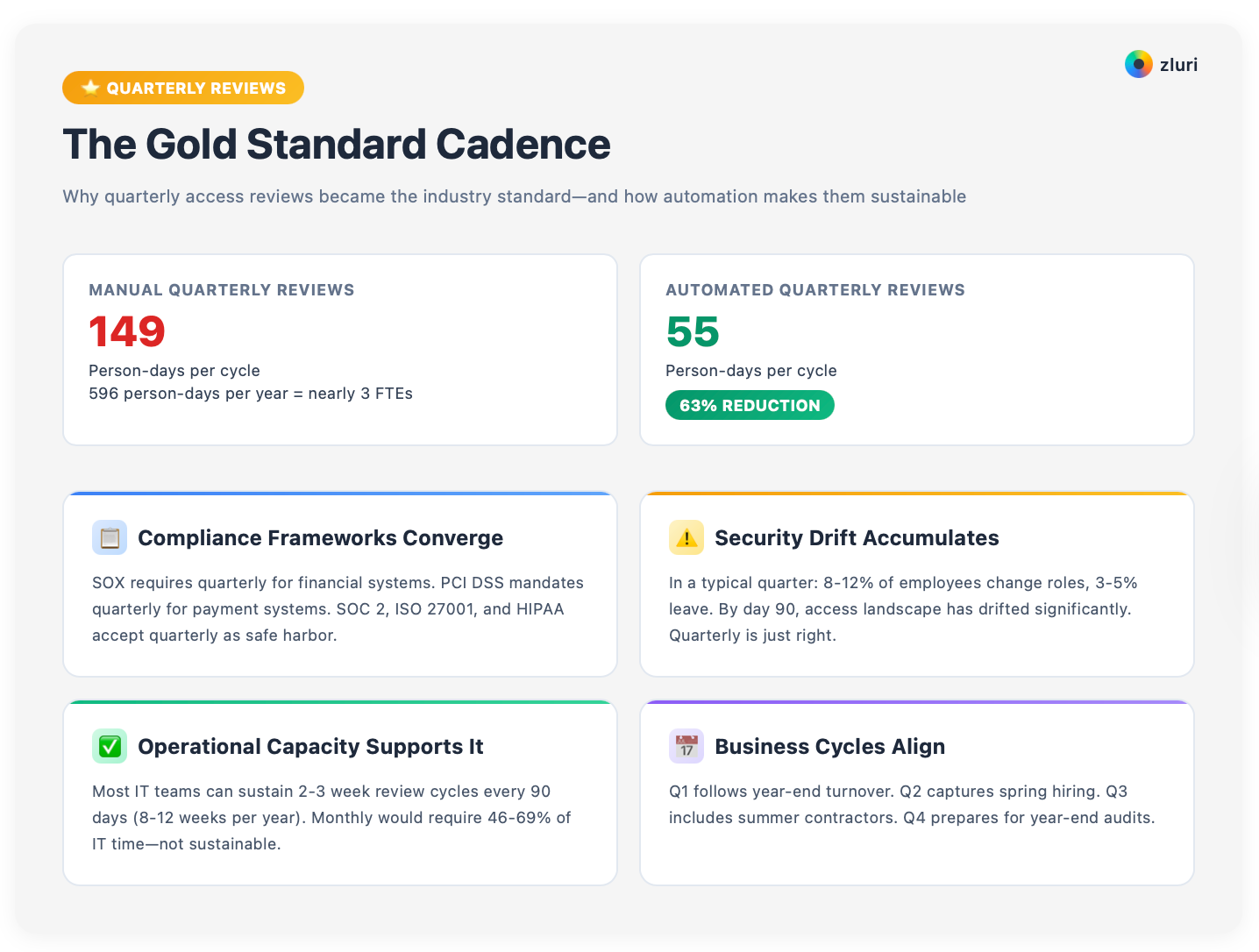
This article is your tactical playbook for executing quarterly reviews efficiently. We'll show you:
- how each quarter has different patterns requiring different focus,
- how to run the 3-week workflow that keeps reviews on track, and
- how to avoid the pitfalls that turn quarterly reviews into compliance checklists.
Let's make your quarterly reviews sustainable. (And if you're building the review program itself rather than the cadence, our complete guide to user access reviews covers the full picture; this playbook assumes that foundation.)
Quarter-by-Quarter: What Changes Each Cycle
Most organizations run the same review campaign every quarter. Same scope. Same questions. Same approach. They treat Q1 in January the same as Q3 in August.
Mistake.
Each quarter has different patterns. Mature organizations tailor their quarterly reviews to these patterns rather than running identical reviews four times per year.
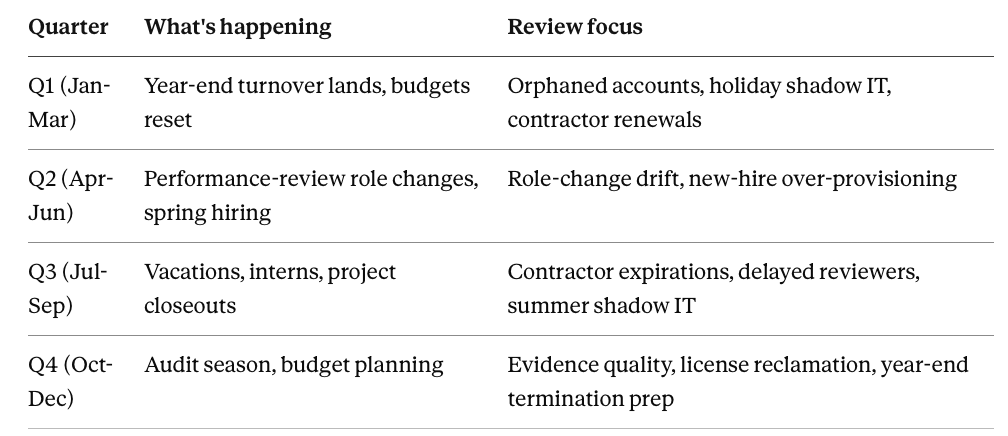
Q1 Reviews (January-March): Post-Holiday Cleanup

What's different in Q1:
Q1 reviews follow year-end employee turnover. Employees who gave notice in November/December officially left in December/January, but access often lags. Holiday breaks meant some offboarding got delayed or incomplete.
You're catching 2-3 months of accumulated turnover in one review.
Budget resets also impact Q1. Finance approved new tools for the year, IT provisioned access, but not all tools are being used yet. You're reviewing access that was just granted within the past 30 days, too early to determine if it's being utilized.
Q1 priorities:
Orphaned accounts. Focus heavily on terminated employees. Export your HRMS termination list from October-January and cross-reference against all applications. You'll likely find 20-40 accounts that should have been deprovisioned during offboarding but weren't.
Holiday shadow IT. Marketing launched campaigns with new tools during Q4 without IT approval. Finance closed the year with temporary data analysis tools. Discover and inventory these tools before they become permanent blind spots.
Annual access grant cleanup. A new fiscal year often means new role assignments. Someone promoted to manager in January now has inherited access from their old role plus new manager-level access. Permission accumulation.
Contractor renewals. Many contractor agreements renew annually. Q1 is when you validate whether contractors who had access all last year still need it this year, or if their projects are complete and access should be revoked.
Q1 execution tips:
Partner with HR to get a complete Q4 termination list early in January. Many offboarding gaps happen during December holidays when IT is short-staffed. Use Q1 reviews to catch what wasn't completed.
Work with Finance to identify which new tools were purchased in Q4; these need immediate discovery and access review before they become permanent shadow IT.
Q2 Reviews (April-June): Role Changes and Growth

What's different in Q2:
Q2 captures the impacts of performance review season (typically February-April). Promotions. Demotions. Lateral moves. Team transfers.
All happen in Q1-Q2. Access needs to adjust accordingly, but often doesn't. Employees keep old role access while gaining new role access: permission creep at scale.
Spring hiring also peaks in Q2. Companies backfill Q1 departures and staff up for summer projects. You're reviewing a wave of new users who've been granted access over the past 60-90 days.
Q2 priorities:
Role change access drift. Pull your HRMS data for anyone whose title, department, or manager changed in Q1. These people likely have misaligned access: engineers who moved to sales still have engineering tool access, managers who moved to individual contributor roles still have manager-level permissions.
New hire over-provisioning. Review all users onboarded in Q1. Are they actually using all the tools they were granted? Many organizations use "standard bundles" that provision 15-20 tools to new hires, but employees only actively use 8-10. Q2 is when you can identify which tools went unused and revoke unnecessary access.
Project-based access. Many companies launch annual projects in Q1 (new product development, system migrations, special initiatives). Access was granted broadly to cross-functional teams. By Q2, validate whether project access is still needed or if some team members have finished their contributions and should lose access.
Seasonal contractors. Q2 is when summer interns and seasonal contractors get onboarded. Set time-bound access with expiration dates now, so Q3 reviews don't have to manually discover that interns still have access in September.
Q2 execution tips:
Create an automated alert for role changes in your HRMS. When someone's job title or department changes, automatically flag their access for review within 30 days. This catches permission creep before it builds up for 90 days.
Work with managers to validate that role changes trigger access adjustments; many managers don't think about access when someone on their team transfers to a new role.
Q3 Reviews (July-September): Contractor and Vacation Management
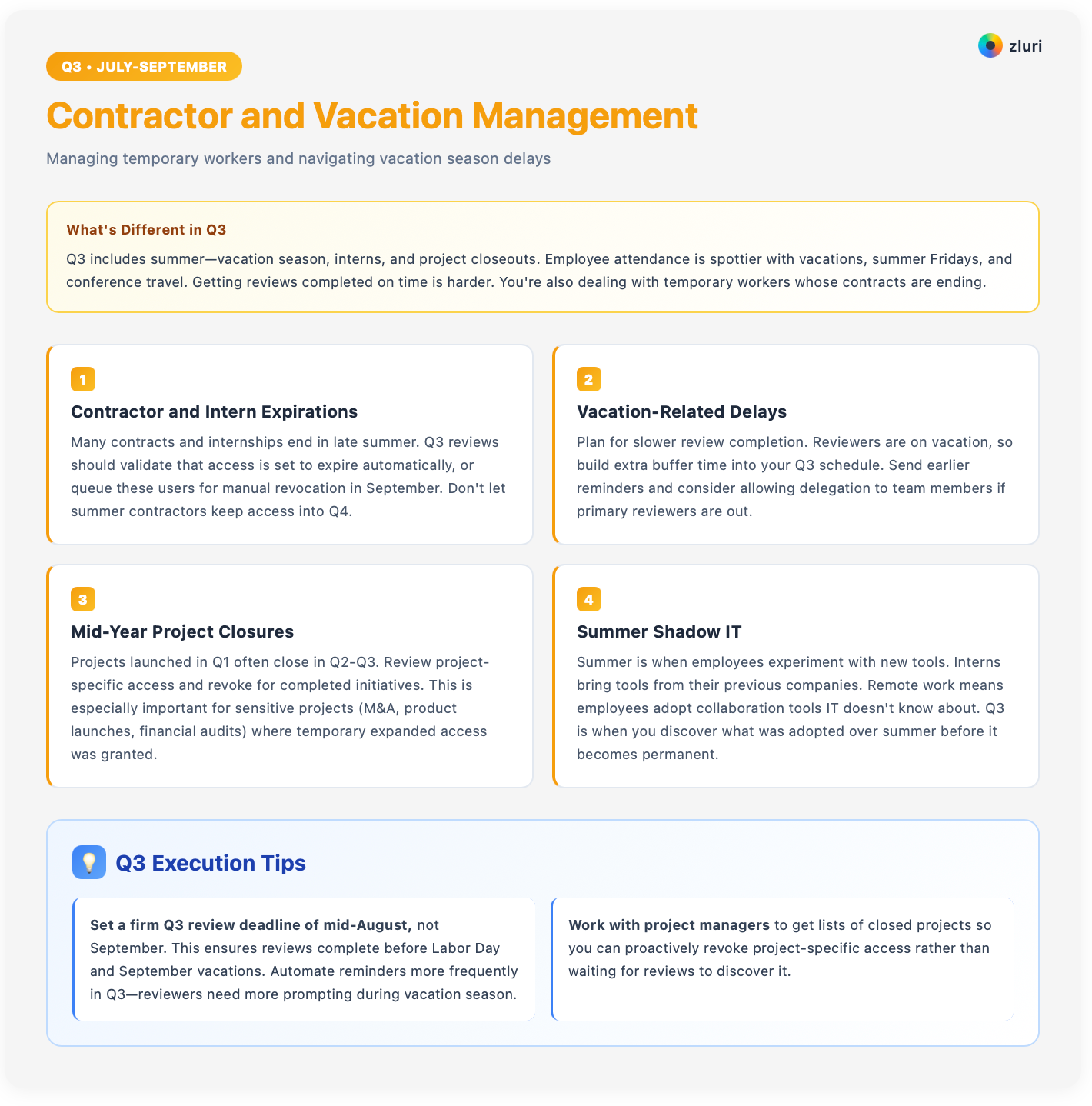
What's different in Q3:
Q3 includes summer: vacation season, interns, and project closeouts. Employee attendance is spottier. Vacations. Summer Fridays. Conference travel.
Getting reviews completed on time is harder. You're also dealing with temporary workers whose contracts are ending.
Q3 priorities:
Contractor and intern expirations. Many contracts and internships end in late summer. Q3 reviews should validate that access is set to expire automatically, or queue these users for manual revocation in September. Don't let summer contractors keep access into Q4.
Vacation-related delays. Plan for slower review completion. Reviewers are on vacation, so build extra buffer time into your Q3 schedule. Send earlier reminders and consider allowing delegation to team members if primary reviewers are out.
Mid-year project closures. Projects launched in Q1 often close in Q2-Q3. Review project-specific access and revoke for completed initiatives. This is especially important for sensitive projects (M&A, product launches, financial audits) where temporary expanded access was granted.
Summer shadow IT. Summer is when employees experiment with new tools. Interns bring tools from their previous companies. Remote work means employees adopt collaboration tools IT doesn't know about. Q3 is when you discover what was adopted over summer before it becomes permanent.
Q3 execution tips:
Set a firm Q3 review deadline of mid-August, not September. This ensures reviews complete before Labor Day and September vacations. Automate reminders more frequently in Q3; reviewers need more prompting during vacation season.
Work with project managers to get lists of closed projects so you can proactively revoke project-specific access rather than waiting for reviews to discover it.
Q4 Reviews (October-December): Audit Prep and Year-End Planning

What's different in Q4:
Q4 is the audit season for many organizations. SOC 2 audits typically happen in Q4-Q1. SOX audits align with fiscal year-end. ISO 27001 audits often happen in Q4.
Your Q4 access review needs to generate evidence that satisfies auditors; what they actually test, framework by framework, is worth reading before this cycle. Extra documentation rigor.
Q4 also includes year-end budget planning. You're identifying unused licenses to cut for next fiscal year. You're preparing for the annual employee turnover that happens in December-January.
Q4 priorities:
Audit evidence quality. Ensure Q4 reviews generate complete audit trails. Reviewer attestations must be explicit ("I reviewed and approved access"). Remediation evidence must include before/after proof. Documentation must be organized and easily retrievable for auditors who will request it in 30-60 days.
License reclamation for budgeting. Q4 is when Finance wants to know "which software can we cut for next year?" Use Q4 reviews to identify dormant accounts (no login in 90+ days) and unused licenses. Calculate savings from license reclamation to justify your access governance program budget.
Year-end termination prep. Historically, many employees resign in Q4 to maximize bonuses before leaving in January. Review high-risk access more closely in Q4; you don't want departing employees to have broad access during their final weeks.
Compliance scope validation. Q4 is when you validate that your compliance-scoped systems (SOX, PCI DSS) are correctly classified. If your environment changed during the year, new systems added, old systems retired, update your scope before Q1 audits begin.
Q4 execution tips:
Q4 reviews should be your most thorough of the year. This is the cycle auditors will examine most closely. Don't rush Q4 reviews in November/December when IT is busy with holiday coverage.
Consider launching Q4 reviews in mid-October to complete by mid-November, leaving December for evidence preparation. Work with Finance to quantify the dollar value of license reclamation; this shows ROI and justifies budget for better tools.
The 3-Week Quarterly Review Workflow
Here's a detailed week-by-week breakdown of how to execute quarterly reviews efficiently.
Week 1: Planning and Launch

If doing it for the first time, run discovery and define your scope
Run comprehensive discovery to identify all applications and users in scope for review. Verify that all applications are correctly categorized by risk tier (critical, standard, low-risk). Confirm which applications fall under compliance scope (SOX, PCI DSS, SOC 2).
Export current user lists for each application. Identify new applications added since last quarter. Flag applications that should be reviewed but don't have clear owners assigned yet.
Assign reviewers to applications
Assign reviewers for each application and access type. Typically, managers review their direct reports' access, application owners review admin/privileged access, Security reviews high-risk cross-functional access, IT orchestrates but doesn't make all decisions.
Validate that assigned reviewers are still appropriate. If someone changed roles since last quarter, reassign their review responsibilities. Confirm reviewer email addresses and notification preferences.
Prepare materials for each reviewer
Generate review dashboards or spreadsheets for each reviewer. Include: user name and current role, applications they can access, permission levels (admin, editor, viewer), last login date for each application, recommended actions based on automated intelligence (flag dormant accounts, flag admins, flag users who changed roles).
For automated platforms, verify that review campaigns are configured correctly. For manual processes, create and test spreadsheet templates.
Launch the review campaign
Send launch communications to all reviewers.
Subject line: "Action Required: Q[X] Access Review Due [Date]."
Email should explain: why this matters (compliance, security), what they need to do (review list, approve or revoke), deadline (7-10 business days), where to find their review assignments (link or attachment), who to contact with questions.
Launch the review campaign. For automated systems like Zluri, this means clicking "launch" (the click-by-click version of this entire 3-week workflow is in our user access review procedure). For manual systems, this means emailing spreadsheets and creating a tracking document.
Week 1 tips: Don't assume reviewers remember the process from last quarter; include clear instructions in every launch email, and a short video walkthrough if possible. Friction in Week 1 leads to delays and approvals without thorough evaluation later, so run the launch itself against the pre-launch section of our user access review checklist. Stale manager hierarchies and missed notification bounces are the two Week-1 failures that surface as Week-3 chaos.
Week 2: Review Execution and Support
Monitor progress daily
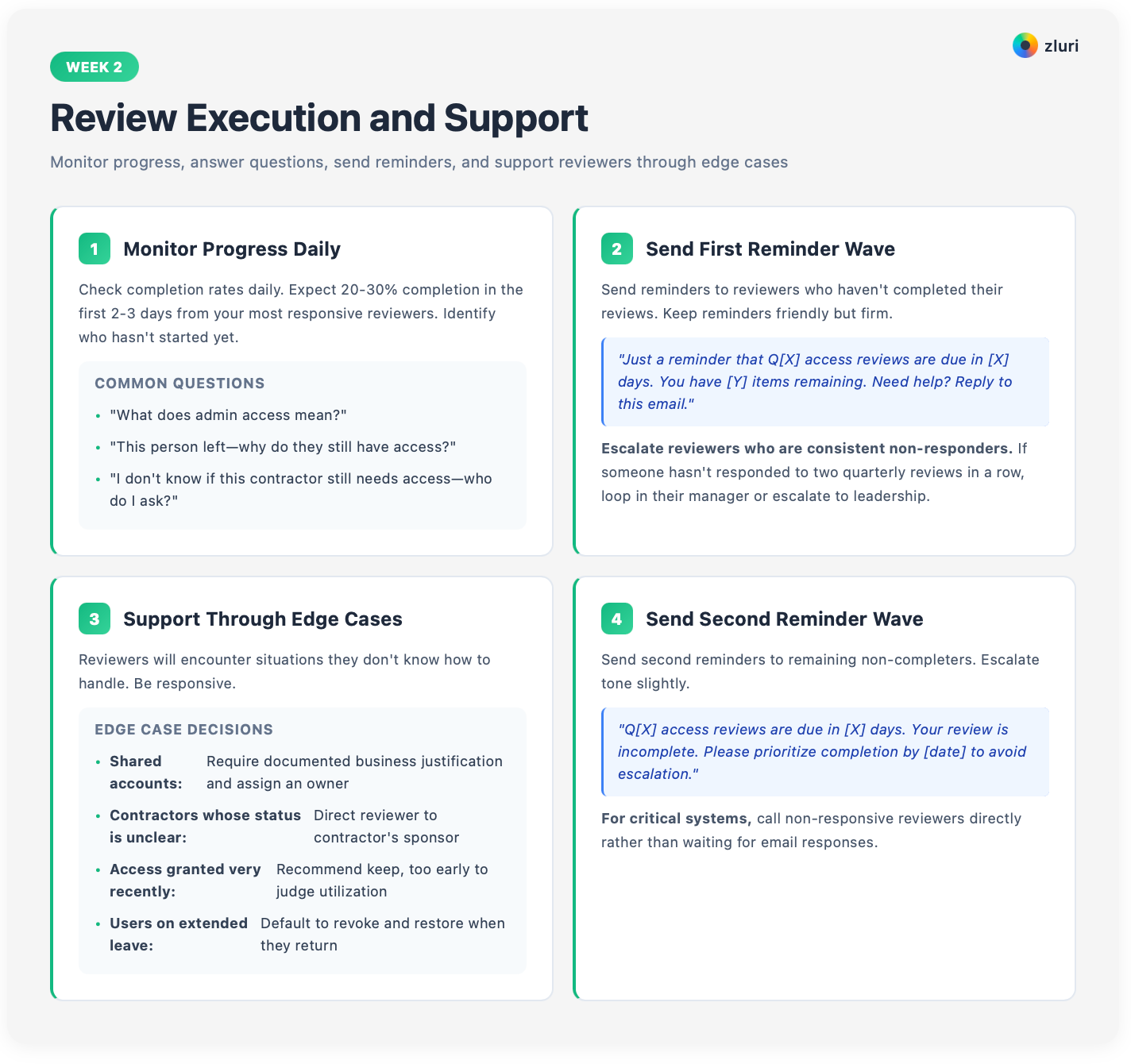
Check completion rates daily. Expect 20-30% completion in the first 2-3 days from your most responsive reviewers. Identify who hasn't started yet.
Answer questions that come in. Common questions:
- "What does admin access mean?"
- "This person left, why do they still have access?"
- "I don't know if this contractor still needs access, who do I ask?"
Send your first reminder wave
Send reminders to reviewers who haven't completed their reviews. Keep reminders friendly but firm:
"Just a reminder that Q[X] access reviews are due in [X] days. You have [Y] items remaining. Need help? Reply to this email."
Escalate reviewers who are consistent non-responders. If someone hasn't responded to two quarterly reviews in a row, loop in their manager or escalate to leadership.
Support reviewers through edge cases
Reviewers will encounter situations they don't know how to handle. Be responsive.
- Shared accounts: require documented business justification and assign an owner.
- Contractors whose status is unclear: direct reviewer to the contractor's sponsor.
- Access granted very recently: recommend keep; too early to judge utilization.
- Users on extended leave: default to revoke and restore when they return.
Document decisions for edge cases so you can apply them consistently in future quarters.
Send your second reminder wave
Send second reminders to remaining non-completers. Escalate tone slightly:
"Q[X] access reviews are due in [X] days. Your review is incomplete. Please prioritize completion by [date] to avoid escalation."
For critical systems, call non-responsive reviewers directly rather than waiting for email responses.
Week 2 tips:
Track average time-to-complete for each reviewer. Some reviewers complete it in 10 minutes. Others take 3 days. The slower ones need more hands-on support; offer to walk them through it on a call.
Work with their managers if they're consistently slow. Make review completion a performance expectation, not an optional task.
Week 3: Remediation and Documentation

Close out all reviews
Force-close reviews at deadline. Mark any non-completed items as "needs investigation" rather than auto-approving. You'll handle these separately.
Compile all review decisions. Create a master list of access items approved (no change needed), access items revoked (needs removal), exceptions or unclear items (need additional review).
Review the exception list with Security or Compliance before finalizing. For high-risk items (privileged access, production systems), get explicit approval from Security before revoking.
Execute all remediations
Execute all approved remediations. For platforms with closed-loop remediation, batch-approve the remediation queue and let the system execute via API. For manual processes, assign remediation tasks to IT team members with clear deadlines.
Log every remediation action: timestamp, who executed it, before/after proof (screenshots, user export comparisons). This becomes your audit evidence.
Notify affected users that access was removed (optional, depends on sensitivity). Notify IT helpdesk that they may receive access restoration requests from users whose access was legitimately revoked.
Compile documentation and reports
Generate completion reports that include total applications reviewed, total users reviewed, total access items approved, total access items revoked, completion rate by reviewer, time to complete, remediation completion status.
Compile audit evidence: reviewer assignments, individual decisions for each user-access pair, reviewer attestations or sign-offs, remediation logs with timestamps and executors, before/after proof of changes.
Store all evidence in your designated secure repository. Ensure evidence is organized by quarter for easy retrieval during audits.
Communicate results to stakeholders
Send a summary report to the leadership and compliance team (the three formats worth using for this, by audience, are in our guide to user access review reports). Include: high-level metrics (X% of access reviewed, Y violations found and remediated), key findings (most common violations, departments with highest violation rates), time invested (person-hours), license reclamation (dollars saved from unused licenses), next review date.
Celebrate success with your team. Quarterly reviews are significant work; acknowledge the effort.
Week 3 tips:
Don't let remediation extend into week 4+. Set internal SLA: all standard remediations complete within 48 hours of review closure, all critical remediations within 24 hours.
If you consistently miss remediation SLAs, it's a signal you need automation. Work with Compliance to ensure evidence format matches what auditors expect; don't compile evidence in a format auditors can't use, requiring you to redo it later.
Making Quarterly Reviews Sustainable
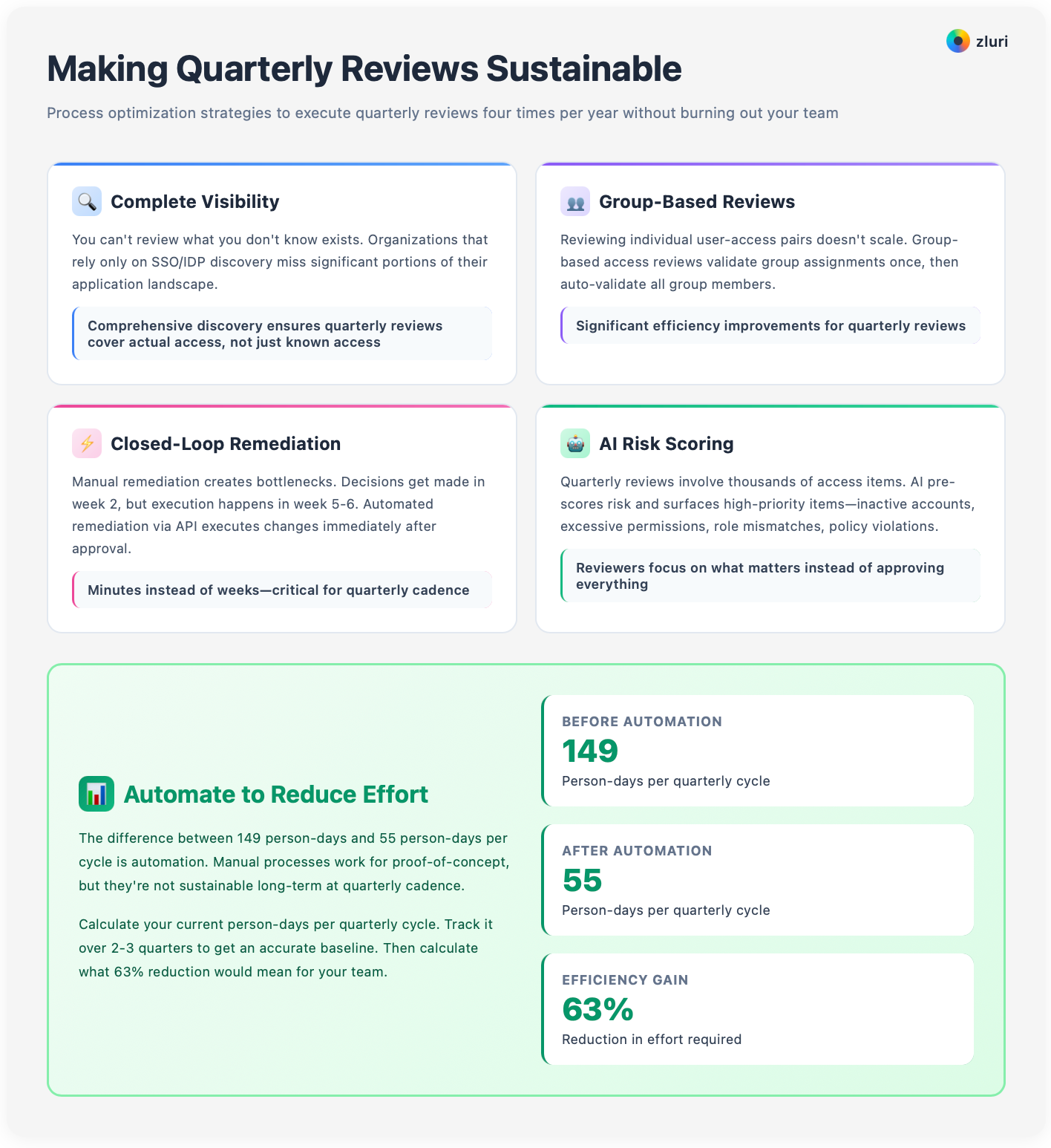
Executing quarterly reviews four times per year is only sustainable with the right infrastructure.
You need complete visibility through comprehensive discovery (not just SSO-integrated apps), group-based reviews that validate access at scale, closed-loop remediation that executes changes via API within hours instead of weeks, and AI risk scoring that surfaces the 20% of access items requiring human attention. These four, plus three more, are covered in depth in our user access review best practices guide.
The difference between 149 person-days and 55 person-days per cycle is automation. In our survey of 215 security and IT leaders, a full access review averages 149 person-days for completely manual teams, 90 for partially automated ones, and 55 for fully automated ones, a 63% reduction from manual to fully automated.
Organizations doing quarterly reviews manually should automate after 2-3 cycles; manual processes work for proof-of-concept, but they're not sustainable long-term at quarterly cadence.
Calculate your current person-days per quarterly cycle, track it over 2-3 quarters to establish a baseline, then use that 63% reduction potential to justify investment in automation platforms.
For detailed guidance on these sustainability factors, see our complete guide to periodic access review frequencies, which covers the infrastructure requirements for maintaining any review cadence efficiently.
Common Quarterly Review Pitfalls
Even experienced teams encounter these issues. Here's the quick-reference version, with the details below.

Pitfall 1: Starting too late in the quarter
Launching Q1 reviews in March means they complete in April (Q2). You're always behind. You're reviewing last quarter's access patterns instead of this quarter's. Remediation bleeds into the next review cycle.
Solution: Launch reviews in the first 2 weeks of each quarter: January for Q1, April for Q2, July for Q3, October for Q4. This ensures completion within the quarter.
Pitfall 2: Identical reviews every quarter
Each quarter has different patterns (post-holiday cleanup in Q1, contractor expirations in Q3). Most organizations ignore these patterns and run the same review every time. Same questions. Same scope. Same approach.
Solution: Tailor your focus accordingly. Flag specific high-risk items based on quarterly business cycles instead of running identical reviews.
Pitfall 3: Letting remediation accumulate
Completing reviews in week 3 but not executing remediation until week 6-8 defeats the purpose. The access violations you discovered in January still exist in February. Auditors notice. Security teams notice.
Solution: Set hard remediation SLAs: 7 days for standard, 24 hours for critical. If you can't meet these requirements, you need automation.
Pitfall 4: Approvals without evaluation
High approval rates (>95%) suggest reviewers aren't actually evaluating access. They're clicking "approve all."
Think about the last time you reviewed access. Did you genuinely evaluate each item? Or did you skim the list and approve everything because you had 10 other priorities that day?
Solution: Provide clear decision criteria and examples. Flag suspicious approvals (inactive users kept, no-login accounts approved). Require justification for admin access approvals. Spot-check reviewer decisions and provide feedback.
Pitfall 5: Review fatigue
Quarterly cadence is sustainable only if reviews are efficient. If reviewers spend 2+ hours per review, they'll start ignoring them. Response rates drop. Completion times stretch. Reviews become the thing everyone dreads.
Solution: Reduce reviewer workload by surfacing only their access items, highlighting high-risk items that need attention, providing one-click approve/revoke actions, and distributing reviews appropriately.
Make continuous improvement: After each quarterly review, hold a 30-minute retrospective with your team, Security, and a few reviewers. What worked? What didn't? What should change next quarter?
Make incremental improvements; don't wait for major overhauls.
Measuring Quarterly Review Success
Track these metrics to demonstrate quarterly reviews are effective and improving.
Efficiency metrics:
- Person-hours per cycle (target: <20 hours IT effort)
- Days to complete (target: <20 days from launch to evidence stored)
- Reviewer completion rate (target: >90% on-time)
- Remediation execution time (target: <7 days from review close)
Security metrics:
- Violations discovered per cycle (should trend down quarter-over-quarter)
- Orphaned accounts found (ex-employees with lingering access)
- Dormant accounts flagged (no login 90+ days)
- Over-privileged access downgraded (admin → standard)
Business metrics:
- Licenses reclaimed per cycle (unused access removed)
- Dollar savings from license reclamation
- Audit findings related to access (should decrease)
- Time invested vs risk reduced (ROI)
Trend analysis:
Track metrics quarter-over-quarter. Are you getting faster (efficiency improving)? Are you finding fewer violations (upstream processes improving)? Is remediation getting quicker (automation working)?
Use trends to justify continued investment in optimization.
The Quarterly Rhythm That Actually Works
Quarterly access reviews balance compliance requirements, security effectiveness, and operational sustainability.
They're frequent enough to catch violations before they accumulate excessively.
Infrequent enough that IT and reviewers can execute them well without fatigue.
Strategic enough to deliver real security value instead of a box-checking exercise.
Get Started
See how automation reduces quarterly effort by 63% → Book a Demo
Frequently Asked Questions
How long does a quarterly access review take?
The 3-week workflow in this guide is the standard timeline: planning and launch, review execution, remediation and documentation. Automated platforms can compress this significantly; manual processes routinely use the full 3 weeks and sometimes bleed into a fourth.
What's different about each quarter's review?
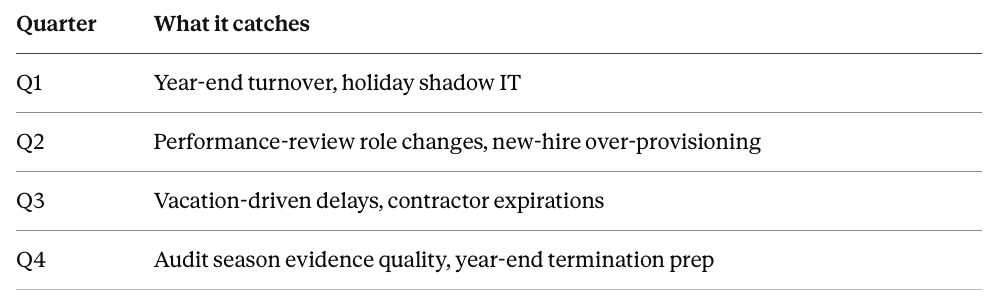
Running the same generic review every quarter misses all four patterns.
What's the biggest reason quarterly reviews fail?
Two schedule problems, not decision-quality ones: starting too late in the quarter, and letting remediation accumulate past the review window. Both point to the same fix: launch in the first two weeks of the quarter and enforce a hard remediation SLA.
How much does automation actually save on a quarterly cycle?
A full review cycle averages 149 person-days for completely manual teams and 55 for fully automated ones (see the survey data above), a reduction of roughly 63%. Time, error rate, and headcount all drop by similar margins once automation is in place.
Is quarterly the right cadence for every system?
No. Quarterly is the standard for SOX and PCI-scoped systems and a reasonable default elsewhere, but risk-tiered cadences (monthly for critical access, annual for low-risk) are often more efficient. Our guide to periodic access review frequencies, linked above, covers how to set cadence by risk instead of a single calendar rule.


.svg)











