


Zoom's pricing has one property that makes it uniquely optimizable: it charges for hosts, but most of what happens on Zoom is attending. Every paid license assigned to someone who joins meetings without ever hosting them is money spent on a capability that person never uses. Finding those people is the whole game, and most companies have never looked.
Zoom optimization is a different problem from optimizing a suite like Google Workspace, and treating them the same is why generic license advice underdelivers here. Workspace waste hides in tier mismatches across users who all genuinely use the product. Zoom waste hides in a starker asymmetry: the product distinguishes hosts from attendees, only hosts need paid licenses, and attending requires nothing at all.
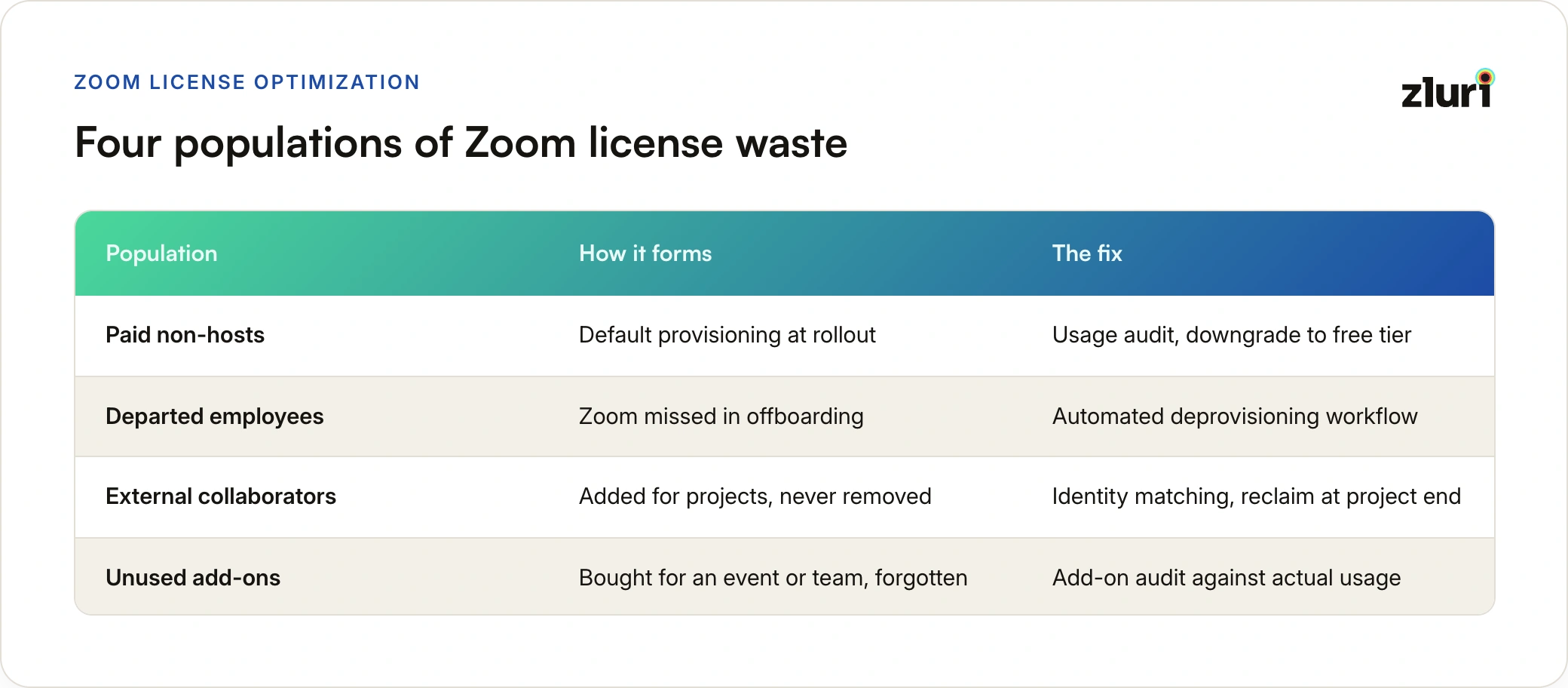
That asymmetry is the entire playbook. In most organizations, meeting-hosting follows a steep power law: a minority of employees (managers, sales, customer-facing teams, executives, anyone who runs recurring meetings) host constantly, and a long tail of employees host rarely or never. They join stand-ups someone else scheduled, attend all-hands someone else runs, and take customer calls on the account executive's link. If those long-tail employees hold paid licenses, and in most companies they do because licenses were provisioned to everyone by default, each one is pure downgrade material.
So this playbook runs in host-behavior order: find the non-hosts first (the big lever), then the departed and external license holders (the pure waste), then the add-on layer (the forgotten spend), and then carry the corrected picture into renewal.
The one-question audit that starts everything: for each paid Zoom license, when did this person last host a meeting? Not attend, host. Every license where the answer is "months ago" or "never" is a candidate for the free tier, at zero loss of capability to that person.
Lever 1: Downgrade the Attendees Who Hold Host Licenses
This is the largest single lever, and it exists because of how Zoom enters companies. Zoom typically gets rolled out to everyone at once, and provisioning-by-default puts a paid license in every hand. Nobody audits against actual hosting behavior afterward, because the admin console shows license assignment readily and hosting behavior much less readily.
The mechanics of the fix: pull per-user meeting data and separate three populations. Frequent hosts keep their licenses, no discussion. Occasional hosts (a meeting hosted once a quarter) get a judgment call: many can be moved to the free tier and borrow a licensed colleague's room, or use a shared departmental license, when the rare need arises; meeting-length limits on the free tier matter for hosting, not attending. Never-hosts move to the free tier outright, and functionally nothing changes for them: they join every meeting exactly as before.
Zluri's direct Zoom integration is what makes this audit a report instead of a project: per-user engagement and hosting-frequency data across the whole license pool, so the three populations separate themselves. The downgrade itself can run as a license workflow rather than a ticket queue.
One cultural note worth handling deliberately: taking away a "license" sounds like taking away a tool, and people react to that. Frame the change as what it is (nothing about attending changes, hosting remains available through the team when needed), and route it through managers for the occasional-host population. The savings are not worth a week of confused complaints that better communication would have prevented.
Lever 2: Reclaim Departed and External License Holders
The pure-waste layer: licenses assigned to people who should not hold any license at all. Two populations live here.
Departed employees are the familiar one. Zoom regularly escapes offboarding checklists because it feels peripheral compared to email and core systems, so ex-employee licenses quietly persist and bill. The fix is the same as for every app: license reclamation as an automated step in the deprovisioning workflow, triggered by the HRMS event, not by memory.
External users are the subtler one. Contractors, vendors, freelancers, and agency collaborators get added to the Zoom account for a project and never removed after it ends. Each one holds a paid seat, invisible in any employee-based reconciliation because they were never employees. Catching them requires matching license holders against the actual workforce: Zluri maps Zoom users against identity data from your directory and HRMS, which surfaces exactly this population (license holders with no corresponding active employee), along with when they last used the product. Project over, contract ended, license back in the pool.
Lever 3: Audit the Add-On Layer
Zoom spend is not just seat licenses, and the add-on layer is where forgotten purchases live. Webinar capacity, large-meeting expansions, conference-room licenses, cloud recording storage, and phone add-ons each get bought for a concrete reason (a launch event, a big all-hands, a specific team's workflow) and then persist long after the reason has passed. A webinar license purchased for one product launch two years ago may still be billing today.
The audit question for each add-on mirrors the host question: when was this capability last actually used? Webinar licenses with no webinars in two quarters, room licenses for rooms that were consolidated in the last office move, recording storage far above consumption. Because add-ons are line items on the same contract, they tend to renew as a block with the seats, and nobody re-justifies them individually. Do it once a year, deliberately, and the add-on layer usually gives up savings out of proportion to the effort.
Lever 4: Renew on the Corrected Numbers
The three levers above only convert into money if they run before the renewal locks the numbers in. Seat commitments and add-on selections fix at signature; the vendor has no reason to revisit them mid-term. So sequence matters: renewal alerts far enough out (Zluri's renewal calendar fires at 30, 15, and 7 days for contracts, with custom alerts for high-value ones), the host audit and add-on audit inside that window, and the negotiation conducted on the corrected seat count and add-on list.
The negotiation posture this produces is quietly strong. You are not asking for a discount on the old number; you are presenting a new number backed by usage evidence, with the credible alternative of simply downgrading the non-hosts yourself on the current contract. Vendors price differently against customers who demonstrably know their own usage.
The broader mechanics of running renewals this way across the stack are covered in our SaaS license management guide, with the fuller Zluri-specific mechanics in how Zluri helps with software license management; Zoom is simply one of the cleanest applications of it, because the host/attendee asymmetry makes the evidence so unambiguous.
The Shape of the Result
Run all four levers and the Zoom line item changes shape: a smaller pool of paid licenses concentrated on actual hosts, zero seats held by departed or external users, an add-on list that matches current reality, and a renewal negotiated from evidence. Nothing about how the company meets changes at all, which is the entire point: the optimization removes spend on unused capability, not capability itself. The same discipline applies across the stack; we've written companion playbooks for Google Workspace and Salesforce licenses, each with its own characteristic leaks.
Frequently Asked Questions
Who actually needs a paid Zoom license?
Only people who host meetings beyond the free tier's limits: recurring meeting owners, customer-facing roles, and anyone running sessions longer than the free-tier cap. Attending any meeting, of any length, requires no paid license.
Will downgrading employees to the free Zoom tier disrupt their work?
Not for attendees. Joining meetings is identical on the free tier. The only change affects hosting: free-tier group meetings have a time limit. Occasional hosts can use a shared departmental license or a colleague's room for rare hosting needs.
How do I find external users holding Zoom licenses?
By matching license holders against identity data from your directory and HRMS. License holders with no corresponding active employee record are contractors, vendors, or collaborators added for past projects, and their licenses can be reclaimed.
How often should Zoom add-on licenses be reviewed?
At minimum annually, before renewal. Webinar, large-meeting, room, and storage add-ons are typically purchased for specific past needs and renew as a block with seats unless each is individually re-justified against recent usage.
When should the Zoom license audit run?
Continuously for departed-user reclamation (as part of offboarding automation), and as a full host-behavior and add-on audit inside the renewal window, so the corrected numbers are in hand before seat commitments lock in.


.svg)











