


Salesforce seats are among the most expensive per-user licenses in the average company's stack, and Salesforce contracts have a one-way property: you can add licenses any day of the year, but you can't reduce them until renewal. Put those two facts together and Salesforce license management stops being routine SaaS hygiene. Every mistake bills at the highest rate in your stack, for the longest possible time.
Most license optimization advice treats every app the same: find unused seats, reclaim them, renew on the corrected number. That advice works on Salesforce too, but it misses what makes Salesforce distinctive, and the distinctive parts are where the real money sits.
Three properties set Salesforce apart:
- Cost. The per-seat price is high enough that a single mismatched license wastes more than a dozen mismatched seats of a cheaper tool.
- Complexity. The license model has multiple license types, editions, and a deep add-on catalog, which creates a failure mode cheaper tools don't have: paying for the wrong kind of access, not just too much of it.
- Contract asymmetry. Additions happen anytime, reductions only at renewal, so the cost of a lazy audit is locked in for a full term.
This playbook works those three properties in order: understand the license types (because the biggest lever lives in the gaps between them), audit users against the type they actually need, reclaim the pure waste, and land all of it inside the renewal window where it can actually change the invoice.
The distinctive Salesforce question is not "who isn't using it?" That question works everywhere. The Salesforce-specific question is "who is using a fraction of it while holding the license priced for all of it?" Type mismatch, not non-usage, is where the biggest savings hide.
Know the License Types, Because the Gaps Between Them Are the Lever
Salesforce access is not one product; it is a ladder of license types at very different price points, and users placed on the wrong rung overpay silently. The map, simplified to the decision-relevant tiers:
Full CRM licenses (Sales Cloud, Service Cloud) are the expensive ones, built for people who live in opportunities, pipelines, and cases: account executives, sales managers, service agents. If the person's job is the CRM, this is their license, and it earns its cost.
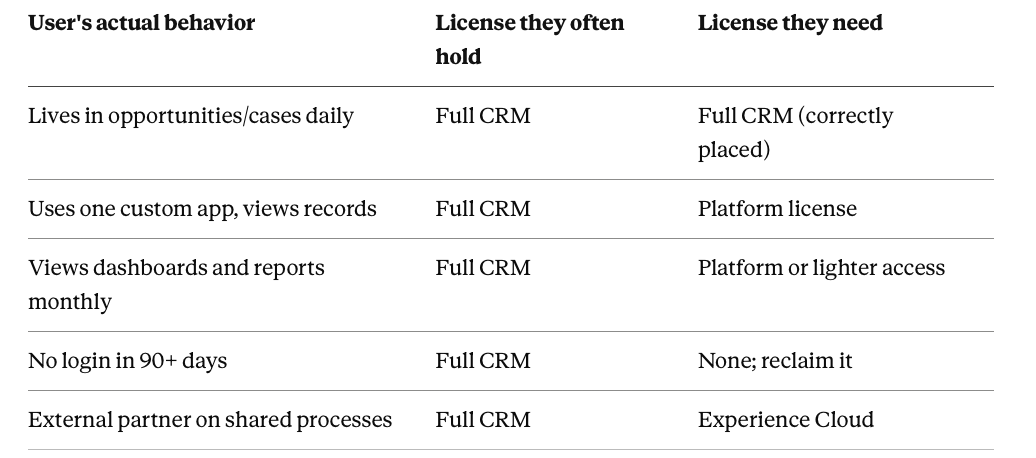
Platform licenses are the underused middle. They grant access to custom objects, custom apps, and core records at a substantially lower price than full CRM, but without the sales and service objects. The classic mismatch: operations, finance, engineering, or fulfillment staff who touch Salesforce only through a custom app or to view account records, sitting on full CRM licenses because that's what everyone got at rollout. Every one of those users is a downgrade candidate at a per-seat delta that dwarfs most other optimization work in your stack.
Experience Cloud and lightweight access covers external partners and customers, and occasional internal read-mostly needs, at a different pricing model again.
Feature and add-on licenses (analytics, AI features, sandboxes, integration capacity, industry clouds) stack on top per-user or per-org, each purchased for a reason and each capable of outliving that reason.
The audit implication is direct: for every full-CRM license holder, the question is whether their actual object usage justifies full CRM, or whether a platform license covers everything they really touch. Answering it requires object-level and feature-level usage data per user, which the effort is worth precisely because the per-seat delta is so large.
Audit Users Against the Type They Need, Not Just Against Usage
Standard usage audits catch non-users; the Salesforce audit has to catch mis-typed users, and that requires deeper data. Login frequency alone will not do it: the operations analyst logging in daily to use one custom app looks identical to the account executive in a login report, while their license needs differ by the full price gap between platform and full CRM.
What separates them is which parts of Salesforce they touch. Zluri's Salesforce integration provides this depth: per-user visibility into engagement frequency and feature-level usage, so the audit can sort the license pool into correctly-placed full-CRM users, platform-downgrade candidates, and non-users, instead of lumping the first two together.
Discovery across the wider stack (Zluri's engine works through eight methods, from SSO and direct integrations to finance systems) also catches the adjacent waste pattern: teams buying separate point tools for things the Salesforce add-ons you already pay for could do, and vice versa.
Run the sort, and three work queues fall out. Correctly-placed users need nothing. Downgrade candidates get validated with their managers (the custom app they use must be confirmed available under the platform license) and re-typed. Non-users go to reclamation.
Reclaim the Pure Waste: Departed Users and Frozen Seats
The familiar layer, with Salesforce-specific mechanics worth knowing. Departed employees' seats are the standard case: deactivating the user in Salesforce frees the license for reassignment, but only if offboarding actually includes that step. Because Salesforce sits outside the core identity stack in many companies, it escapes offboarding checklists at a surprising rate, and at Salesforce prices, each escaped seat is an expensive omission.
The durable fix is the same one that works everywhere: deprovisioning as an automated workflow triggered by the HRMS event, with Salesforce deactivation and license reclamation as explicit steps, so the seat returns to the pool the day the person leaves.
Reclaimed licenses then become the buffer that prevents new purchases: a new hire draws from the recovered pool instead of triggering an add-on order. Given the contract asymmetry (additions anytime, reductions only at renewal), this internal recycling is the only cost control available mid-term, which makes the reclamation workflow more valuable on Salesforce than on almost any other contract you hold.
Add-on licenses get the same annual scrutiny as seats: sandboxes spun up for finished projects, analytics licenses assigned to users who never open a dashboard, integration capacity sized for a volume that never materialized. Each is a line item that renews by default unless someone re-justifies it.
Land Everything Inside the Renewal Window
Mid-term, all of the above manages costs at the margin; at renewal, it resets the baseline, and Salesforce renewals reward preparation unusually well. The asymmetry that hurts you mid-term (no reductions until renewal) makes the renewal the single moment your audit findings can shrink the contract. Miss it, and the mis-typed licenses and excess seats bill for another full term.
Sequence accordingly. Renewal visibility far in advance (Zluri's renewal calendar alerts at 30, 15, and 7 days for contracts, with custom alerts worth setting much earlier for a contract this size), the license-type audit and reclamation sweep completed inside that runway, and the negotiation conducted on the corrected numbers: fewer full-CRM seats, a defensible platform-license mix, an add-on list matching current reality.
As with every major renewal, the posture matters as much as the numbers: presenting usage evidence signals a customer who will not absorb list-price drift, and the credible alternative of re-typing licenses at renewal is to leverage the vendor prices against. The stack-wide version of this discipline is covered in our SaaS license management guide, with the Zluri-specific mechanics in how Zluri helps with software license management; Salesforce is the contract where practicing it returns the most per hour invested, simply because the seats cost the most.
The Compounding Effect
One property of Salesforce license management makes the effort compound: the license-type map, once built from real usage data, becomes provisioning policy. New hires get the license their role actually needs instead of defaulting to full CRM, which means the mismatch layer stops regrowing.
Combined with automated reclamation on departures and an annual add-on review, the expensive audit becomes a one-time correction followed by cheap maintenance, on the contract where corrections are worth the most. We've written companion playbooks for Google Workspace and Zoom licenses; each app leaks differently, but the operating loop (discover, measure, re-type, reclaim, renew on evidence) is the same one.
Frequently Asked Questions
What is the difference between a full Salesforce license and a platform license?
Full CRM licenses (Sales Cloud, Service Cloud) include the standard sales and service objects like opportunities and cases, priced accordingly. Platform licenses provide access to custom apps, custom objects, and core records at a substantially lower cost, and fit users who don't work in sales or service objects.
Can I reduce Salesforce licenses mid-contract?
No. Salesforce contracts allow adding licenses anytime but reducing them only at renewal. This makes internal recycling of reclaimed licenses the only mid-term cost control, and makes completing the license audit before renewal essential.
How do I identify users who should be downgraded from full CRM to platform licenses?
Through feature-level usage data, not login frequency. Users who log in regularly but only touch custom apps or view records are downgrade candidates; login reports alone cannot distinguish them from users who genuinely work in sales and service objects.
What happens to a Salesforce license when an employee leaves?
Deactivating the user frees their license for reassignment to someone else. The license continues to be paid for under the contract either way, so the value of reclamation is avoiding new license purchases and reducing the committed count at the next renewal.
When should a Salesforce license audit be done?
Reclamation should run continuously through automated offboarding. The full license-type audit should be completed inside the renewal runway, since renewal is the only point where findings can reduce the contracted seat count and add-on list.


.svg)











