.png)


The scariest moment in any SoD rollout is the first detection run. Did the policy catch the right people? Did it over-fire on half the company? Zluri answers both questions before the policy ever goes live, through two simulation modes that never write to the live violation store.
An SoD policy is only as good as its rule sets, and rule sets are easy to get subtly wrong.
A criteria-based rule meant to match "privileged permissions in the finance app" might quietly match every permission in the finance app. A scope meant to cover the finance department might pull in contractors no one intended to evaluate.
In Zluri's SoD policy engine, these mistakes would surface as violations, and violations create work: notifications fire, records get logged, and in Enforce mode, Playbooks start revoking access.
Simulation is the pressure valve. The Simulate option lights up in the policy wizard the moment both rule sets are saved, so you can run detection as a dry run, see exactly what would have fired, and fix the policy before any of it becomes real. Nothing written during simulation touches the live violation store, which makes it fully safe to run against production scope.
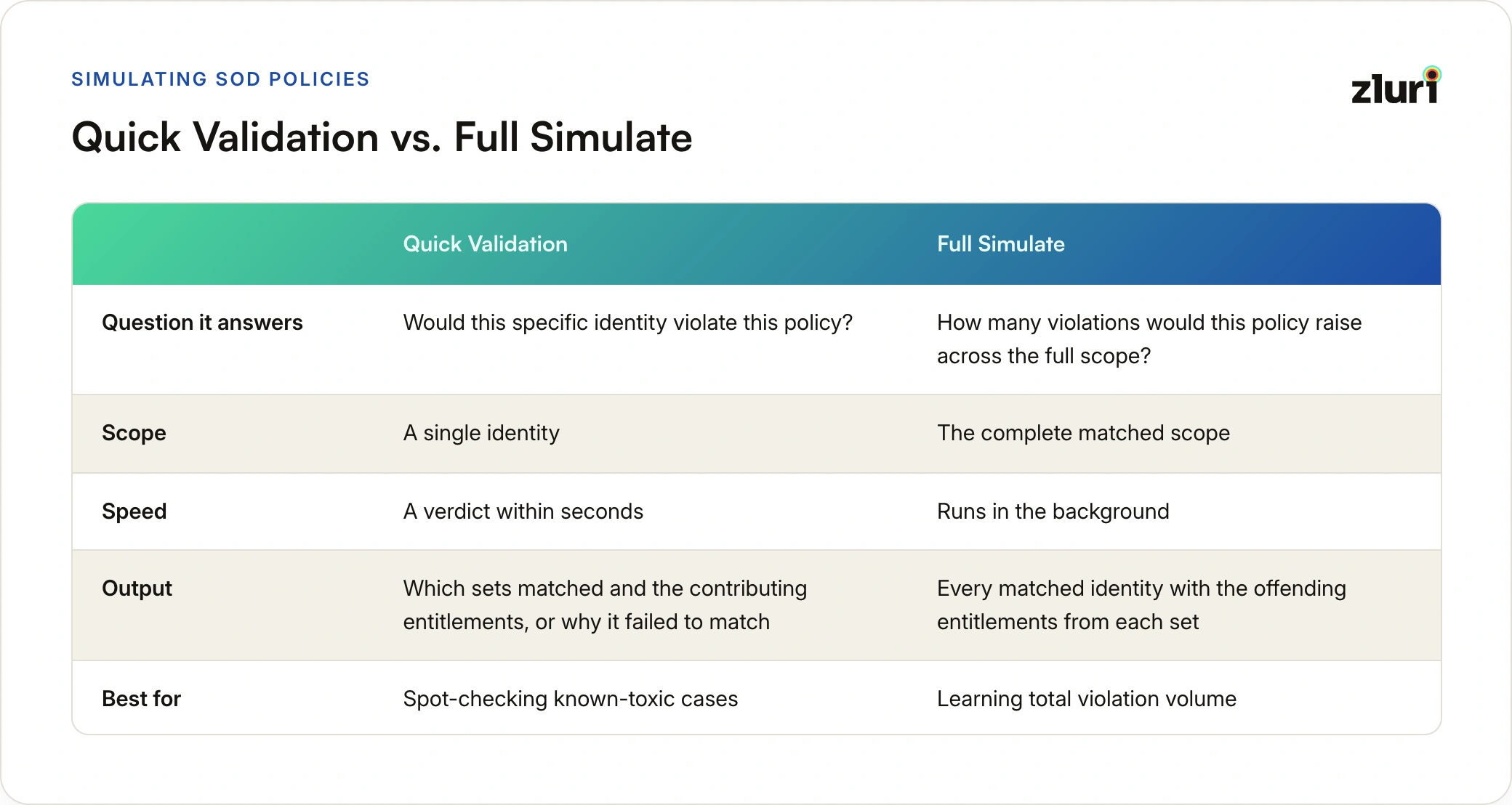
Quick Validation: One Identity, Seconds to a Verdict
Quick Validation answers a narrow question fast: would this specific identity violate this policy?
You select a single identity, and Zluri evaluates it against both rule sets and returns a verdict within seconds. The verdict is complete either way. If the identity violated, you see which sets matched and the contributing entitlements from each side. If it didn't, Zluri tells you why it failed to match, which is often more useful, because "why didn't this fire" is exactly the question you're asking when a known-toxic test case comes back clean.
The natural use is spot-checking your known cases before committing to a full run. Most teams building an SoD policy already have one or two identities in mind, the person whose access combination prompted the policy in the first place. Quick Validation confirms the policy catches them before you spend a background run on the whole org.
Full Simulate: The Entire Scope, In the Background
Full Simulate runs detection across the complete matched scope, exactly as a real policy run would, just without writing anything live. It runs in the background, and on completion, View Results shows every matched identity with the offending entitlements from each set.
Two mechanics are worth knowing here:
- The on-screen table caps at 500 rows. For any simulation that matches more than that, Export CSV is the only way to see the complete result set.
- Results are temporary. Zluri shows the timestamp of the most recent simulation, and running Simulate Again replaces the previous results entirely. Nothing is versioned or retained, so if a simulation's output matters for later comparison, export it before running the next one.
Full Simulate is where you learn total violation volume, and volume is the number that decides your rollout. A policy that surfaces 12 violations is ready for a very different conversation than one that surfaces 4,000, and finding that out in a dry run costs nothing.
A practical sequence that works: run Quick Validation against two or three known-toxic identities to confirm the rules fire correctly, then run Full Simulate to learn total volume, then export the CSV and sanity-check a sample of matches you didn't expect. Unexpected matches are usually a scope problem, not a rules problem.
Simulation vs Monitor Mode: Not the Same Thing
It's tempting to treat Monitor mode as the testing phase and skip simulation, but the two solve different problems. Simulation runs before publish, never writes to the live violation store, notifies no one, and keeps nothing after the next run replaces it. Monitor mode requires a published policy, creates real Open violations that persist as records, and notifies the policy owner when violations are found. One validates detection logic; the other observes real violations over time.
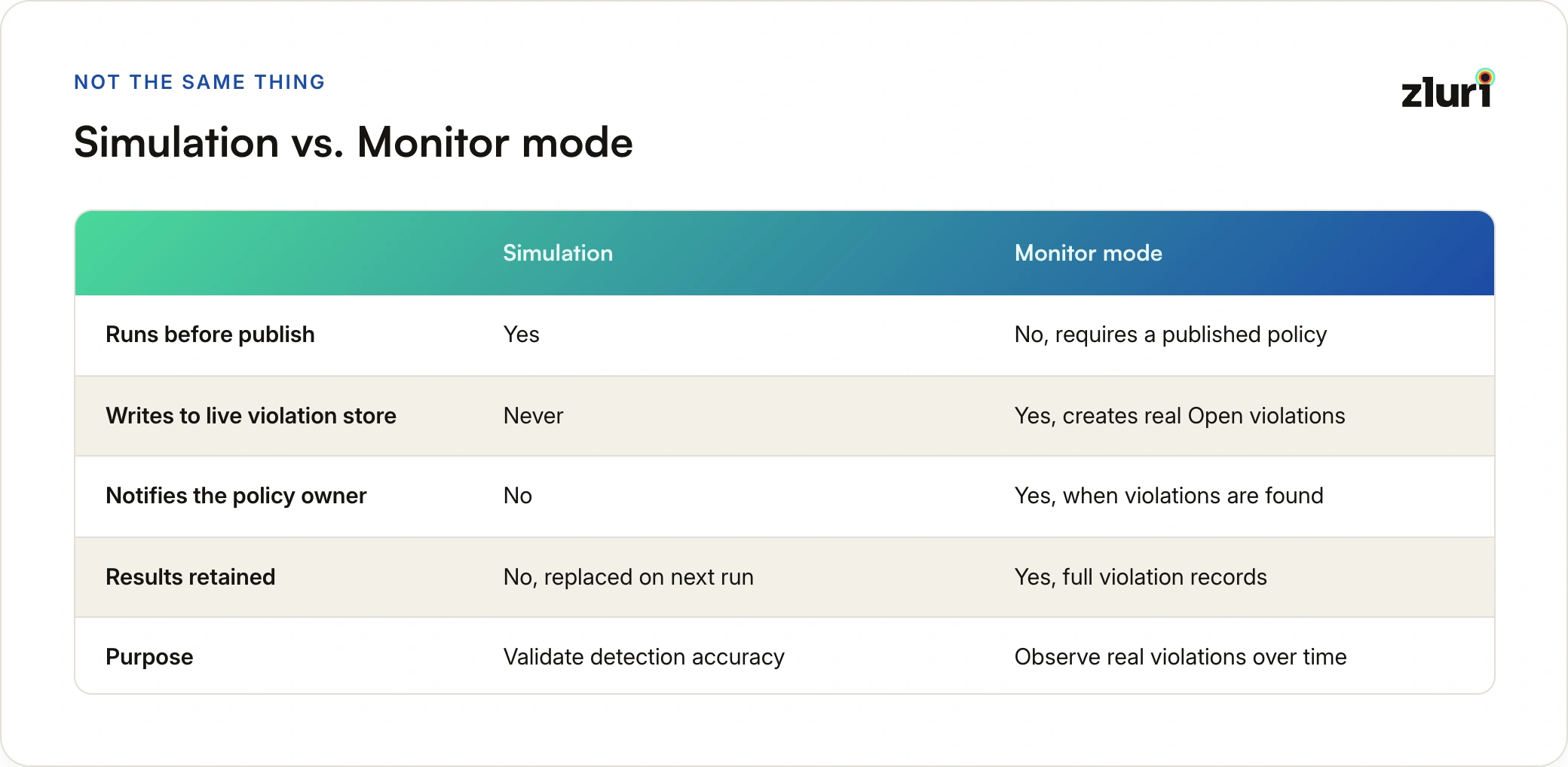
Simulation validates the policy's logic before anything becomes a record. Monitor mode then observes real violations accumulating over real runs, without remediating. The clean rollout uses both in order: simulate until the results look right, publish in Monitor mode to build confidence over a few scheduled runs, then promote to Enforce. What happens to violations once they exist, in either mode, is a lifecycle of its own, covered in the violation lifecycle in Zluri.
Skipping straight from an untested draft to Enforce mode is technically possible. It's also how a mis-scoped criteria rule turns into a Playbook revoking access from people who did nothing wrong. The engine gives you two free chances to catch that first. Take both.
Frequently Asked Questions
Does simulation create any violation records?
No. Neither Quick Validation nor Full Simulate writes to the live violation store. Simulation results live only in the simulation view until the next simulation replaces them.
Can I simulate a policy that's already published?
Simulation is available in the policy wizard once Scope and Rules are configured, which includes drafts created from published policies. The standard path for testing a change to a live policy is creating a draft, editing it, simulating, and publishing over the original.
How do I see more than 500 simulation results?
The on-screen table shows the first 500 rows. Export CSV downloads the complete matched set, however large.
Are previous simulation results saved anywhere?
No. Running a new simulation replaces the previous results entirely, and nothing is versioned. Export the CSV before re-simulating if you need to keep or compare results.
Why did my known-toxic identity come back clean in Quick Validation?
The verdict includes the reason for a non-match. The usual culprits:
- The identity falls outside the configured scope
- An exclusion pulls one of their entitlements back out of a rule set
- A criteria rule matches a narrower pattern than intended