.png)




Detection is the easy half of segregation of duties. The hard half is what happens next: who acts, what gets revoked, how exceptions are handled, and how any of it gets proven to an auditor later. Zluri gives every SoD violation a defined lifecycle, and understanding it is the difference between a control that works and a dashboard that just fills up.
An SoD violation is born the moment a policy run finds an identity holding both sides of a toxic combination.
What happens to it next is the part that decides whether your control actually works: eight possible statuses, two enforcement shapes, time-bound exemptions, and a supersession mechanic that keeps the violation list current run after run.
In this guide, we walk through every state and transition, from first detection to audit-ready closure.
Where Violations Live
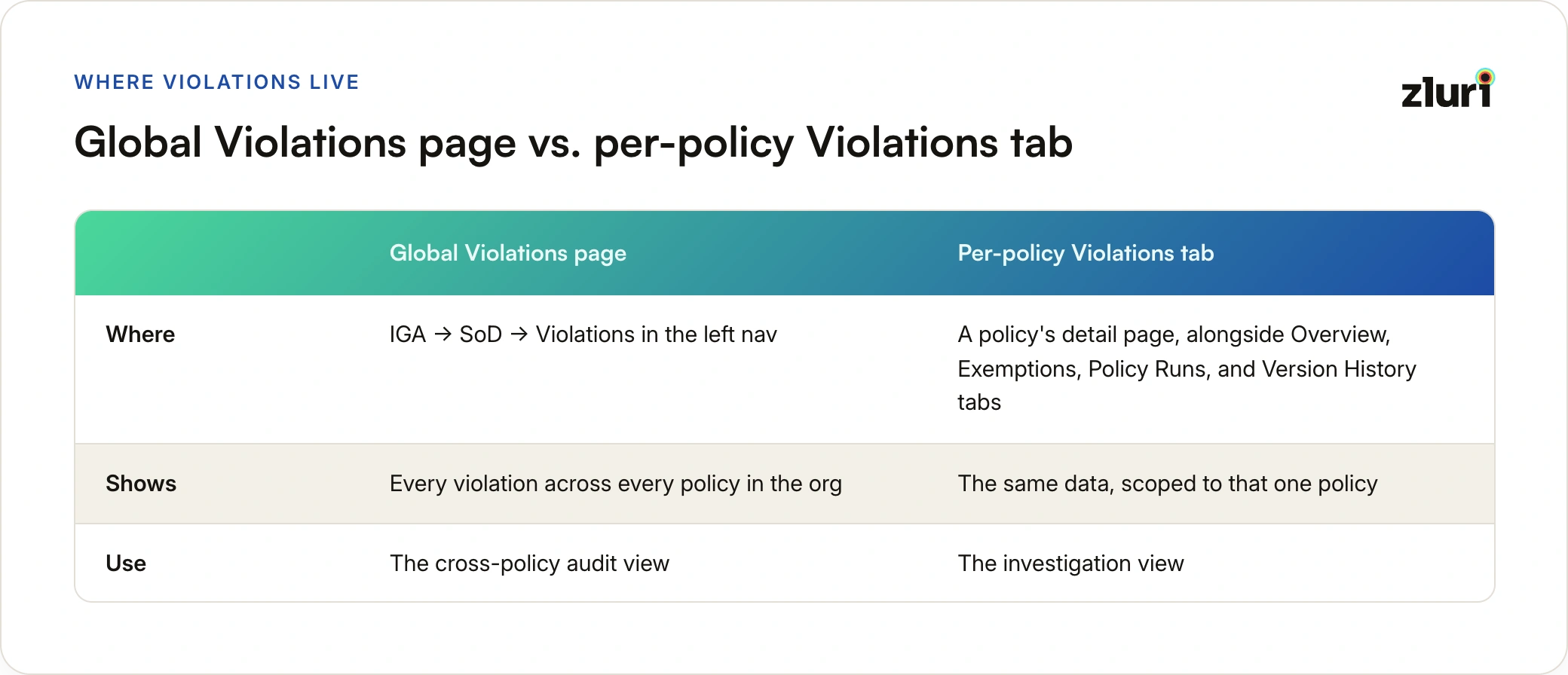
Every identity that matches a toxic combination defined in a segregation of duties policy gets logged as a violation when the policy runs, and you can work with violations in two places. The global Violations page (IGA → SoD → Violations in the left nav) shows every violation across every policy in the org, which is the cross-policy audit view. The per-policy Violations tab on a policy's detail page scopes the same data to that one policy, which is the investigation view, sitting alongside Overview, Exemptions, Policy Runs, and Version History tabs.
Each row carries the violation ID, run ID, policy name, identity name, severity, detection time, and policy owner, with quick filters for Open Violations and High Severity Violations. Opening a row lands you in a detail drawer built to answer the first question anyone asks: why was this flagged?
The drawer's Summary tab packs in everything needed to judge the violation on the spot:
- Set A and Set B matching entitlements side by side, each with its account, application, and entitlement identifiers
- Four header badges: severity, Recurring (when the same conflict has been detected across multiple runs), status, and enforcement mode
- Context details: the occurrence count over the last 30 days and which event triggered the run that caught it
- Action buttons for Mark as remediated and Exempt, right in the header
- A Monitor-mode banner when applicable, stating plainly that no remediation Playbooks will run automatically and the violation must be resolved manually
A Related tab surfaces prior violations for the same identity and policy, plus any linked exemptions, so context from previous rounds never has to be reconstructed from memory.
The Eight Statuses
A violation can sit in one of eight states, and only two of them (Open and Remediation In Progress) are active. The rest are terminal: three remediation outcomes (full, partial, or failed), an Exempted state that holds until expiry, a Superseded state for records replaced by a newer run, and a Failed state reserved for system errors rather than Playbook failures.
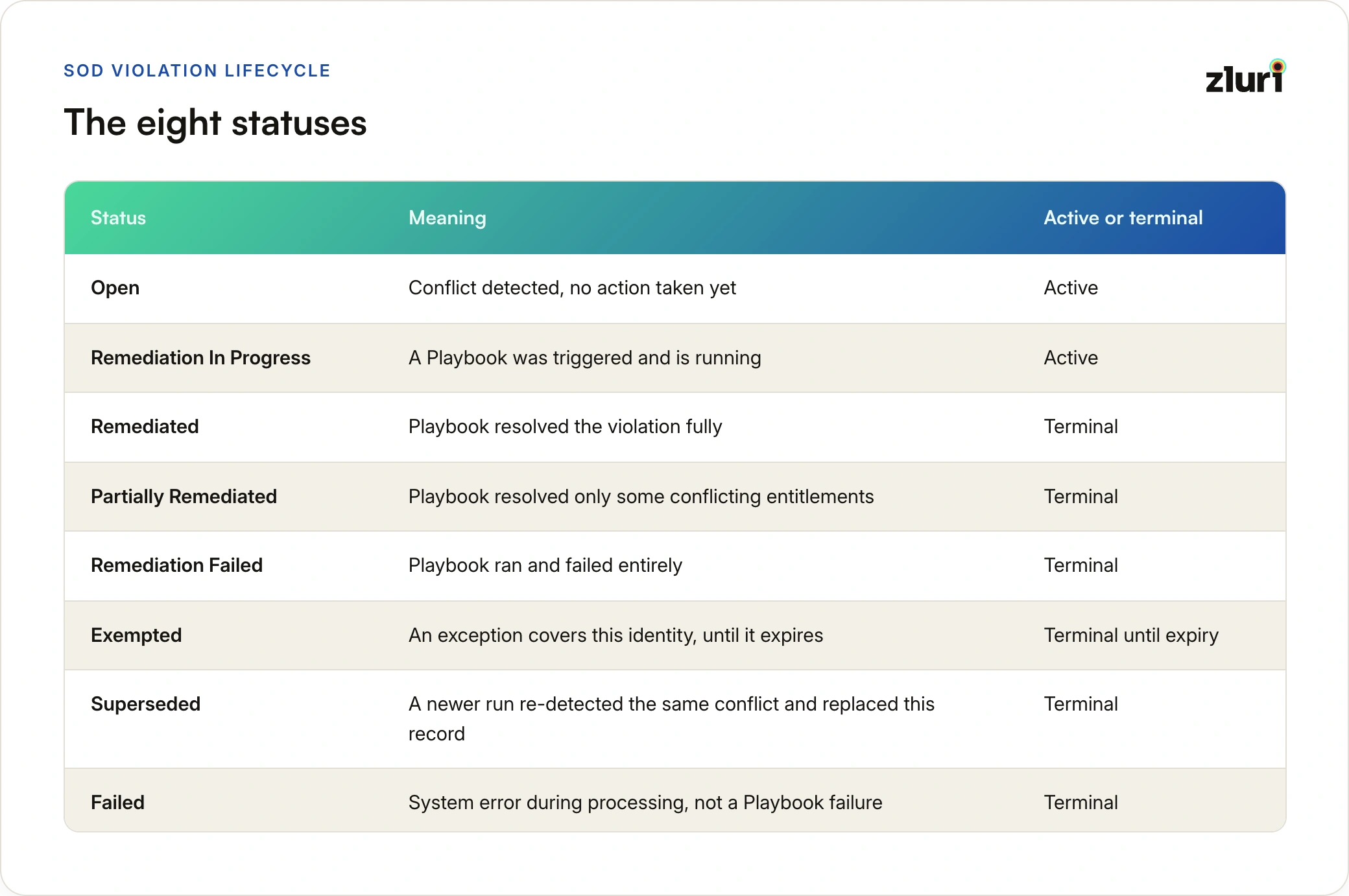
Only Open and Remediation In Progress are active states. Everything else is terminal, meaning no further automatic action happens once a violation lands there. Partially Remediated deserves attention in practice: it means some conflicting access survived the Playbook, and closing it out fully requires manual follow-through.
How a Violation Is Born
When a policy run evaluates its scope, every in-scope identity that breaks the rule produces exactly one violation, and its starting status depends on one check: does a pre-configured exemption already cover this identity? If yes, the violation is created directly as Exempted. If no, it opens as Open.
What happens next depends entirely on the policy's mode. In Monitor mode, nothing happens next automatically. Violations stay Open indefinitely until someone acts manually or the policy gets promoted, which is precisely the point of Monitor mode: observe first, act later. Manual resolution isn't guesswork either, because every Monitor policy ships with required written remediation steps (a mandatory field at configuration time) telling the reviewer exactly how to resolve a violation by hand. In Enforce mode with Playbooks configured, the engine waits until all violations for that run are detected, then moves each into Remediation In Progress and executes.
The Two Enforcement Shapes
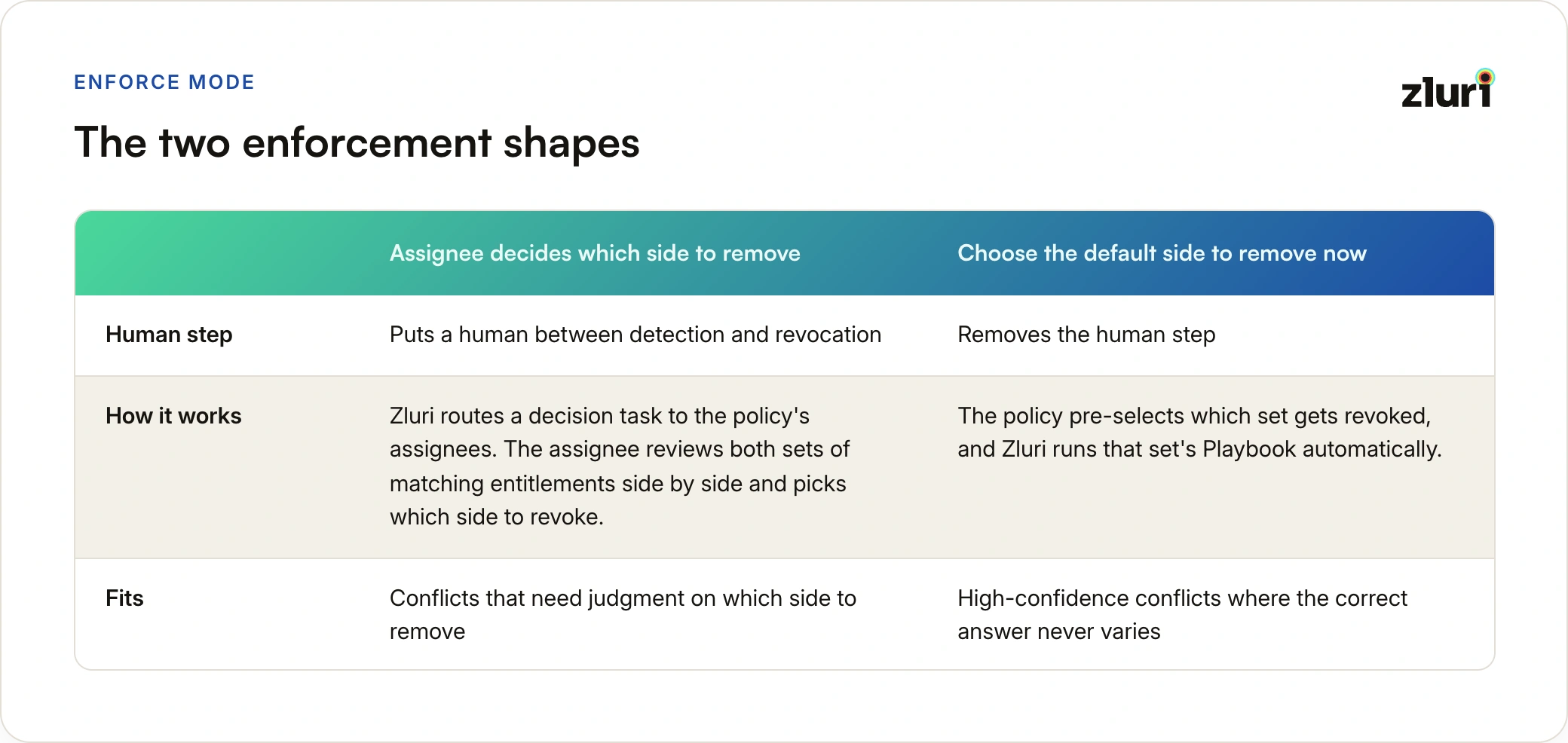
Assignee decides which side to remove puts a human between detection and revocation. Zluri routes a decision task to the assignees set on the policy itself, configured in the wizard's first step (up to five per policy). The assignee opens the violation, reviews both sets of matching entitlements side by side, and picks which side to revoke. Zluri then runs that set's dedicated Playbook and moves the violation to Remediated.
Choose the default side to remove now removes the human step. The policy pre-selects which set gets revoked, and Zluri runs that set's Playbook automatically, updating the status on completion. This shape fits high-confidence conflicts where the correct answer never varies, the kind where routing a decision task would just add latency to a foregone conclusion.
The per-set Playbook design is what makes both shapes work. Each side of the conflict has its own defined revocation actions, so "revoke Set A" and "revoke Set B" are both fully specified in advance, whichever one ends up being chosen.
Worth internalizing: promoting a policy from Monitor to Enforce triggers an automatic back-test of existing Open violations against the new enforcement configuration. You don't wait for the next scheduled run to find out what enforcement would act on. The engine tells you immediately.
Exemptions: Every Exception Has an Expiry
Sometimes conflicting access is legitimate. A controller covering two roles during a departure, a small team where full separation isn't staffable yet. Zluri handles this through SoD exemptions, with guardrails that keep exceptions from becoming permanent policy erosion.
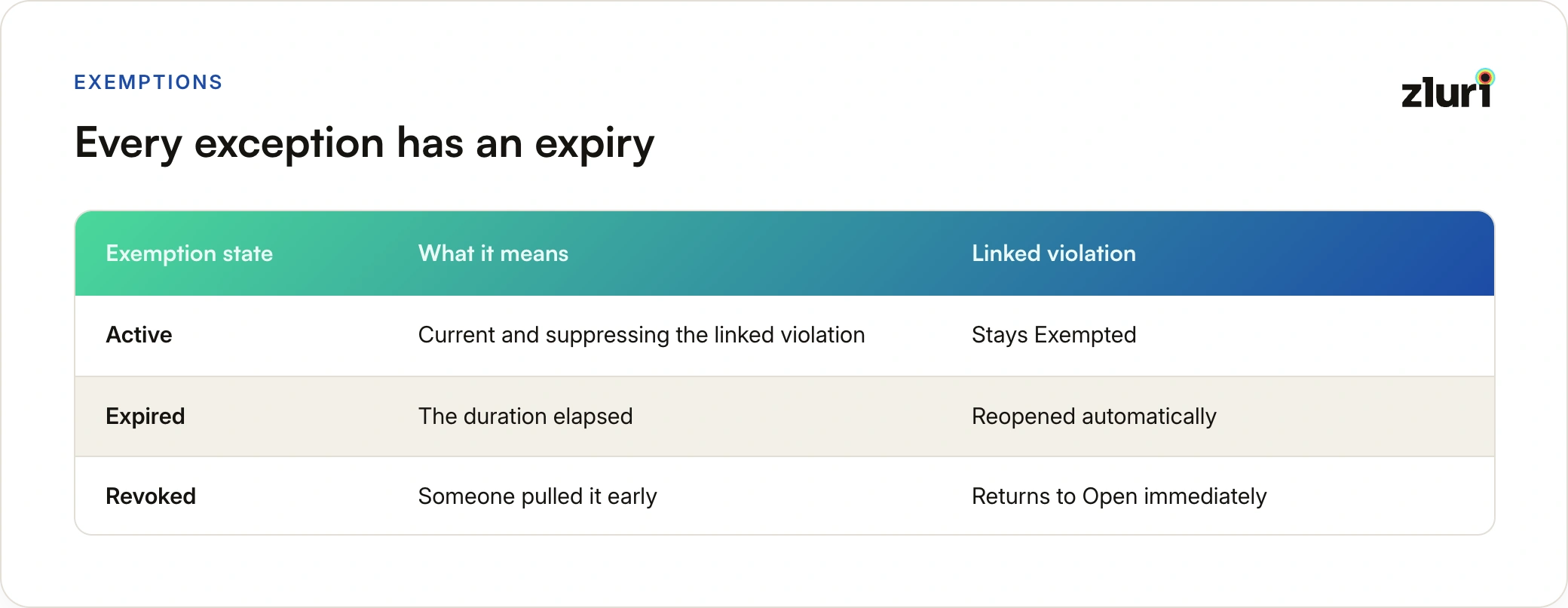
Exemptions must be enabled per policy, with a maximum duration set in days. Granting one requires opening the violation, entering a duration within the policy's cap (the panel shows the maximum inline), and providing a required reason. The violation moves to Exempted, and when the duration expires, it reopens automatically. No one has to remember to re-review it; the engine does that by design.
Every exemption itself moves through three states of its own. Active means it's current and suppressing the linked violation. Expired means the duration elapsed and Zluri reopened the violation automatically. Revoked means someone pulled it early, and the linked violation returned to Open immediately. Both terminal paths end the same way (a reopened violation); the only difference is who pulled the trigger.
Exemptions get their own global page too (IGA → SoD → Exemptions), listing every exemption across every policy with its status, reason, grantor, and expiry date, alongside the per-policy Exemptions tab. Only Owner, Admin, and IT Admin roles can grant exemptions, regardless of who's assigned to the violation itself.
Why the Violation List Never Goes Stale
Here's a mechanic that quietly does a lot of work: when the same policy runs again and re-detects the same conflict for the same identity, the existing Open violation flips to Superseded and a fresh Open violation is created. The list always reflects the latest run's findings for identities still in conflict, rather than accumulating duplicate records run over run.
The old records aren't lost. They're preserved as Superseded, visible in the Related tab of the current violation, which is how the Recurring tag and the 30-day occurrence count get their data. You get a current list and a full history at the same time.
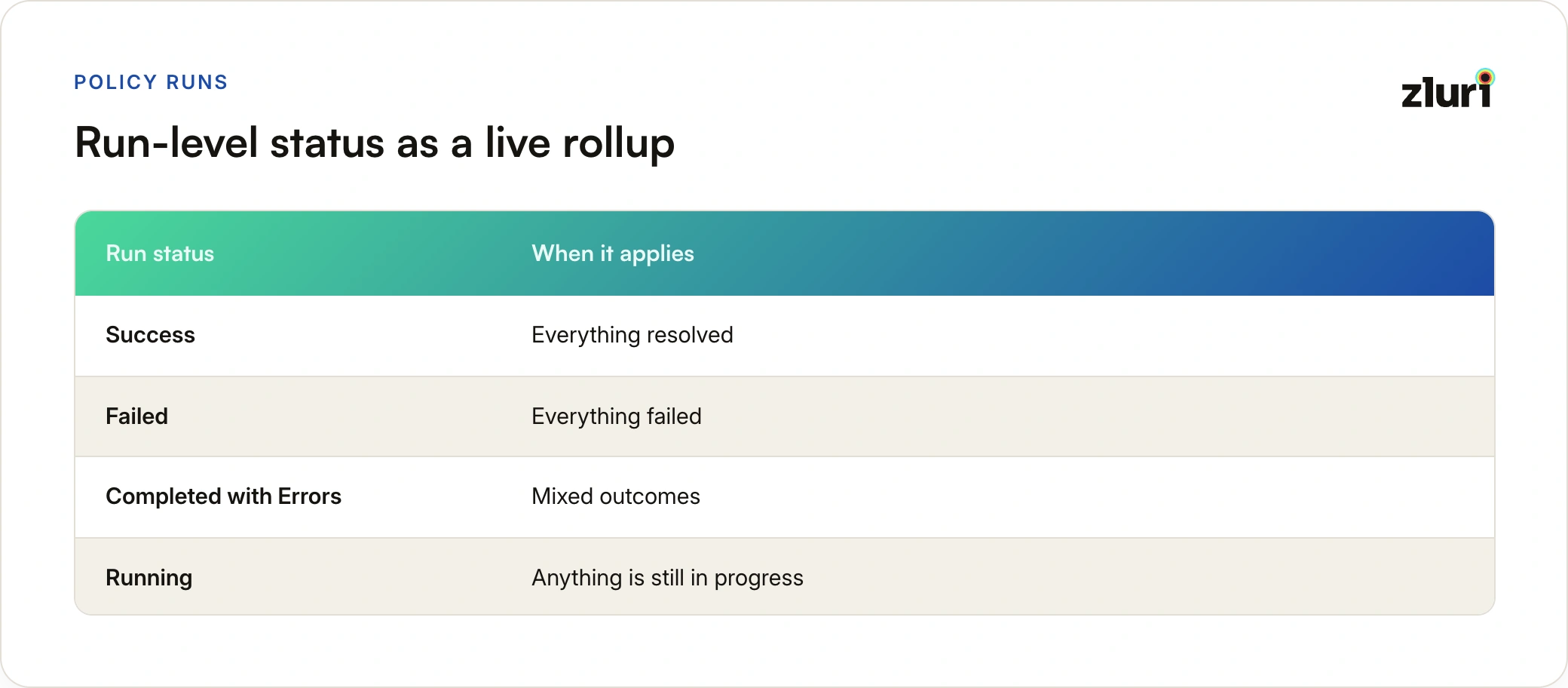
Run-level status works as a live rollup on top of all this. Each policy run's execution record recalculates every time an individual violation's status changes: Success when everything resolved, Failed when everything failed, Completed with Errors for mixed outcomes, Running while anything is still in progress. It's a living summary, not a snapshot taken once at run completion. Runs are listed both on a global Policy Run page (every detection run across every policy) and per policy, with each record showing run type (scheduled or manual), start and completion times, violations found, and who triggered a manual run. Opening a run reveals an Evaluation Flow diagram tracing the full funnel: trigger, identities evaluated, compliant versus violators, and how the violators split across suppressed, pending, remediated, failed, and exempted.
Closing the Loop for Audits
Segregation of duties only counts as an internal control if you can prove it operated, and the proof is the audit trail. Every state change described above lands in it: detections, Playbook executions, exemption grants, manual status changes. Export CSV from the violations list packages violation records, remediation actions taken, and exemption details into audit evidence, and the Internal Auditor role can pull all of it read-only, without any ability to modify the controls being evaluated.
Manual paths exist throughout for the cases automation can't cover:
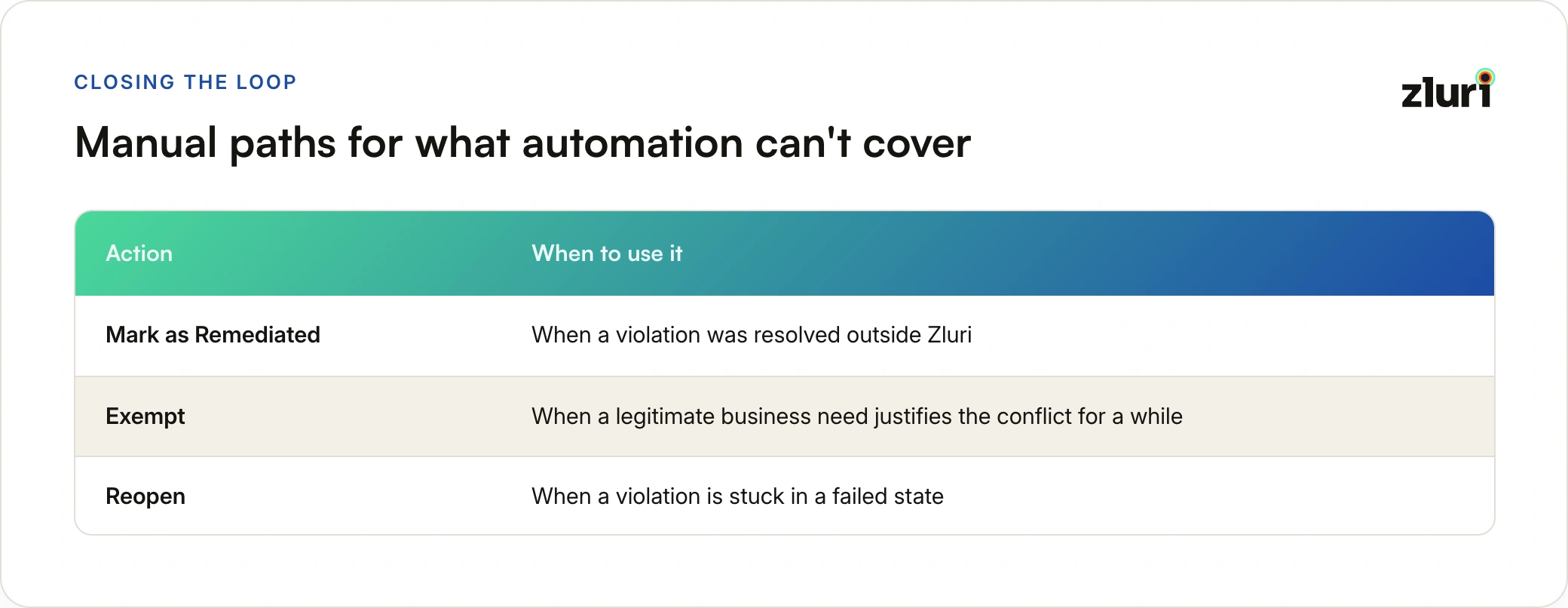
- Mark as Remediated when a violation was resolved outside Zluri
- Exempt when a legitimate business need justifies the conflict for a while
- Reopen when a violation is stuck in a failed state
The lifecycle is opinionated, but it isn't a cage.
How violations get detected in the first place, from rule sets to scoping to publish, is covered in our walkthrough of the SoD policy engine. And if you're still pre-publish, the safest first step is a dry run: our SoD policy simulation guide walks through both modes.
Frequently Asked Questions
What's the difference between Remediation Failed and Failed?
Remediation Failed means the Playbook executed and failed to revoke the conflicting access. Failed means a system error occurred while processing the violation itself, before or outside any Playbook execution. They're tracked separately because they need different responses: one is a remediation problem, the other is a processing problem.
Do violations in Monitor mode ever get remediated automatically?
No. Monitor mode never triggers remediation under any circumstances. Violations stay Open until acted on manually or until the policy is promoted to Enforce, at which point existing Open violations are automatically back-tested against the new enforcement configuration.
What happens when an exemption expires?
The violation reopens automatically and the exemption record flips to Expired. The same thing happens immediately if an exemption is revoked early, with the record marked Revoked instead. There is no indefinite exemption in Zluri's SoD engine; every exception carries a duration from the moment it's granted.
Why do I see Superseded violations for an identity that's still in conflict?
Superseded records are prior detections replaced by the latest run. The identity's current conflict lives in a fresh Open violation, and the Superseded history feeds the Recurring tag and occurrence count so you can see how long the conflict has persisted.
Can one identity with conflicting access across multiple accounts create multiple violations?
No. Violations are identity-centric. One identity with conflicting entitlements spread across several accounts produces exactly one violation, with every offending account surfaced as context inside it.