.png)




Most SoD tooling was built for a single ERP. Zluri's SoD engine detects conflicting access across your entire SaaS stack, raises violations against identities rather than accounts, and can remediate automatically through Playbooks. Here is how the whole engine works, end to end.
Segregation of duties fails in SaaS environments for a simple reason: the conflict rarely lives in one place.
An identity might hold "create purchase order" through a NetSuite role and "approve purchase order" through an Okta group that grants downstream access. Each grant looks harmless in isolation. Together, they let one person both initiate and sign off on the same transaction. That's the modern face of IT segregation of duties: the conflict assembles itself across systems instead of sitting inside one.
Catching this pattern is the entire job of SoD software, and Zluri's engine does it from inside the IGA product (under IGA → SoD) as its own policy engine, separate from access reviews and access requests.
It evaluates three types of entitlements: roles, permissions, and group memberships. Anything that grants an identity the ability to act on a resource counts. In this guide, we walk through the whole engine: the two-set rule model, the five-step wizard, both enforcement modes, and what happens after publish.
Set A and Set B: The Two-List Model
Every SoD policy in Zluri is built on exactly two rule sets. Set A holds one side of the conflict, Set B holds the other. A violation fires when a single identity holds at least one entitlement from each set at the same time.
Two details matter here. First, the match condition is "at least one from each side," not a full-set match. If Set A contains ten entitlements and Set B contains five, an identity holding one from each is already in violation. Second, the two-set model is a hard limit by design: you can't add a third set or remove one, so a three-way conflict needs to be expressed as multiple policies.
Each rule set has an Inclusion section (entitlements that count toward a match) and an optional Exclusion section (entitlements that override inclusion and pull specific items back out of the match). Seeing "No exclusions configured" in a rule set summary just means the default state, not a misconfiguration.
Creating a Policy: The Five-Step Wizard
Create Policy from the Policy Library opens a wizard with five steps: Basics & Triggers, Scope, Rules, Remediation, and Review & Publish.
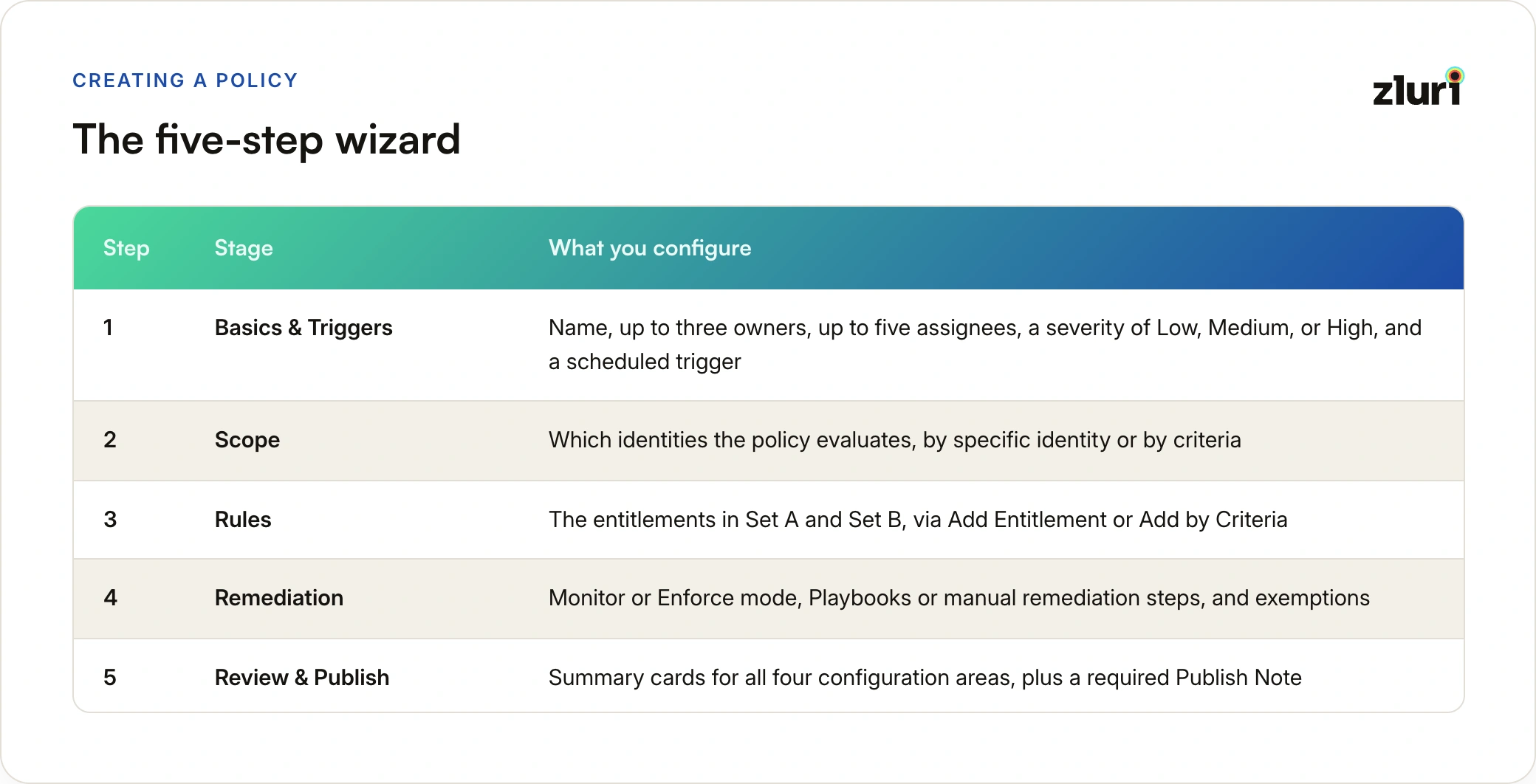
Step 1: Basics & Triggers
This step carries more than the name. You name the policy (names must be unique in the org), optionally add a description, and then set the people and the stakes: up to three owners responsible for the policy, defaulting to whoever is authoring and each holding an Owner, Admin, or IT Admin role; up to five assignees, who receive violation tasks when the policy detects a conflict; and a severity of Low, Medium, or High, applied to every violation this policy raises.
Then you add a trigger. Detection runs on a recurring schedule, configured either as an interval (runs every N units, on a chosen day, at a chosen time, in a chosen timezone, with a preview banner updating live as you edit) or as a cron expression, with Zluri validating syntax inline.
Next activates only once everything on this step is in place:
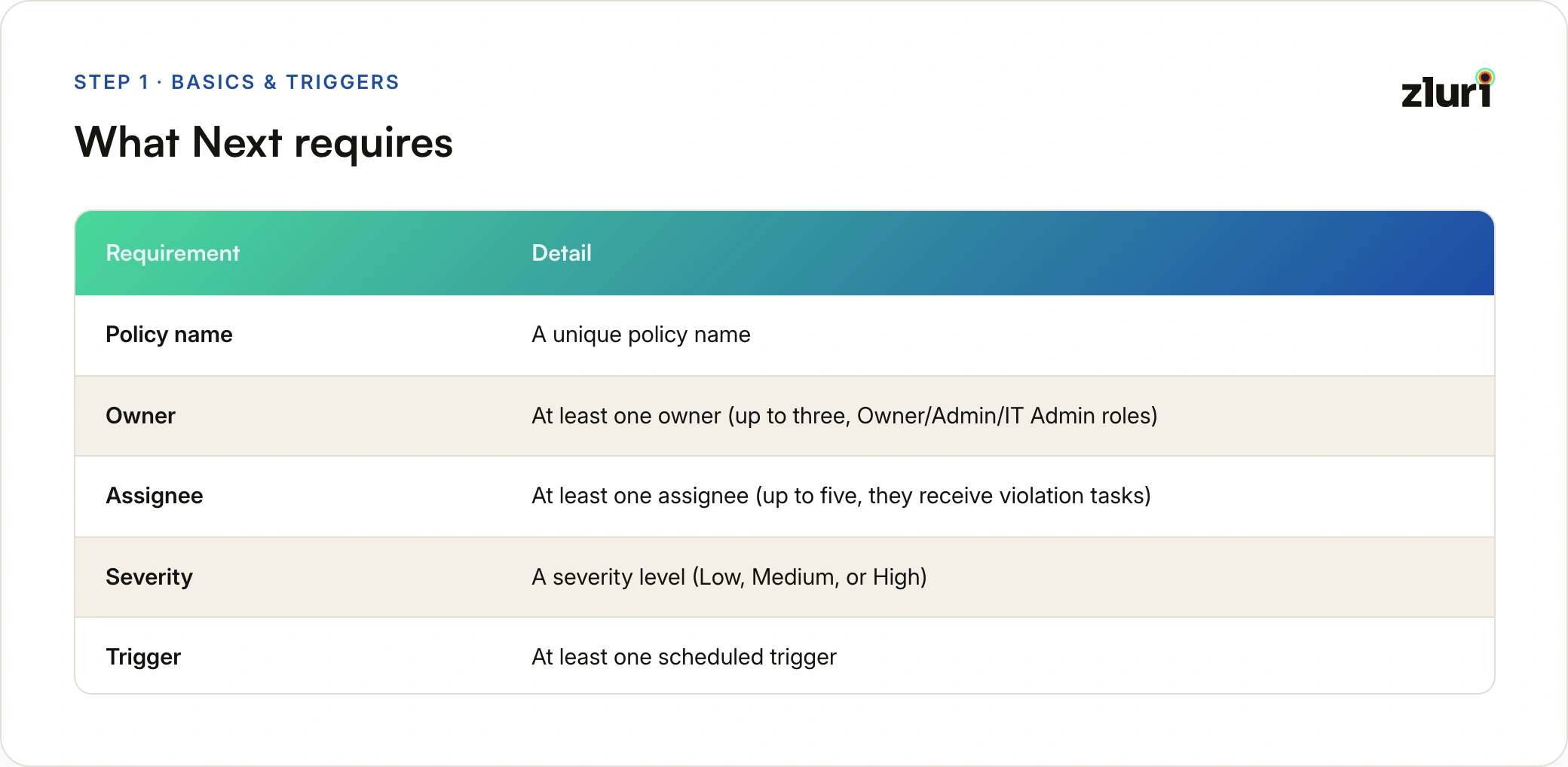
- A unique policy name
- At least one owner (up to three, Owner/Admin/IT Admin roles)
- At least one assignee (up to five, they receive violation tasks)
- A severity level (Low, Medium, or High)
- At least one scheduled trigger
Deciding who handles violations, and how serious they are, happens before a single rule gets written, and that ordering is deliberate: it forces the accountability question first.
Step 2: Scope Identities
Scope defines which identities the policy evaluates at all. Narrower scope means fewer false positives and faster runs, so this step deserves real thought rather than a default "everyone."
You build scope with two input methods that can coexist: adding specific identities by search, and adding by criteria. Criteria conditions can filter on identity source (Okta, Azure AD, BambooHR), identity type (employee, external, service account, group account), app category, tags, and HRMS-sourced attributes like department and location, joined with And/Or logic. Exclusions work the same way and subtract from the match. A Matched Identities panel shows you exactly who currently falls in scope, and Zluri surfaces a non-blocking warning if that count crosses 50,000.
Step 3: Configure Rule Sets
This is where the toxic combination gets defined. Teams usually arrive here with a documented policy in hand (a separation of duties policy example shows the typical shape), and this step translates it into enforceable rule sets. For each set, you add entitlements through one of two methods, and both can live in the same rule set, joined with OR logic.
Add Entitlement is a searchable picker for when you know the exact roles, permissions, or group memberships that form one side of the conflict, often lifted straight from an existing SoD matrix. You can filter by entitlement type, application, or privilege level, and a + control lets you attach an AND condition between two specific entitlements, meaning both must be true for that block to match.
Add by Criteria builds pattern-based rules that auto-adapt as entitlements change in the source app. "All privileged permissions in Workday" keeps matching new privileged permissions as they appear, without anyone editing the policy. Criteria can target role attributes, permission attributes, group attributes, and a long list of application attributes including category, owner, and authorization status.
If Set A and Set B end up matching identical entitlement sets, Zluri warns you that the sets overlap and violations may over-fire. The warning doesn't block publishing, but it's worth heeding.
Before moving on, the Preview on the Rules summary page shows every identity that currently matches the toxic combination, and you can drill into any row to see exactly which entitlements from each set caused the match.
Step 4: Configure Remediation
Here you pick the policy's mode, and this choice shapes everything downstream. Both modes detect, log, and notify, but Monitor (Detect and Notify) stops there and requires written manual remediation steps instead of Playbooks, while Enforce (Detect and Act) wires each set to its own remediation Playbook and acts, either through a human decision or automatically. The fields in this step change based on which mode you select.
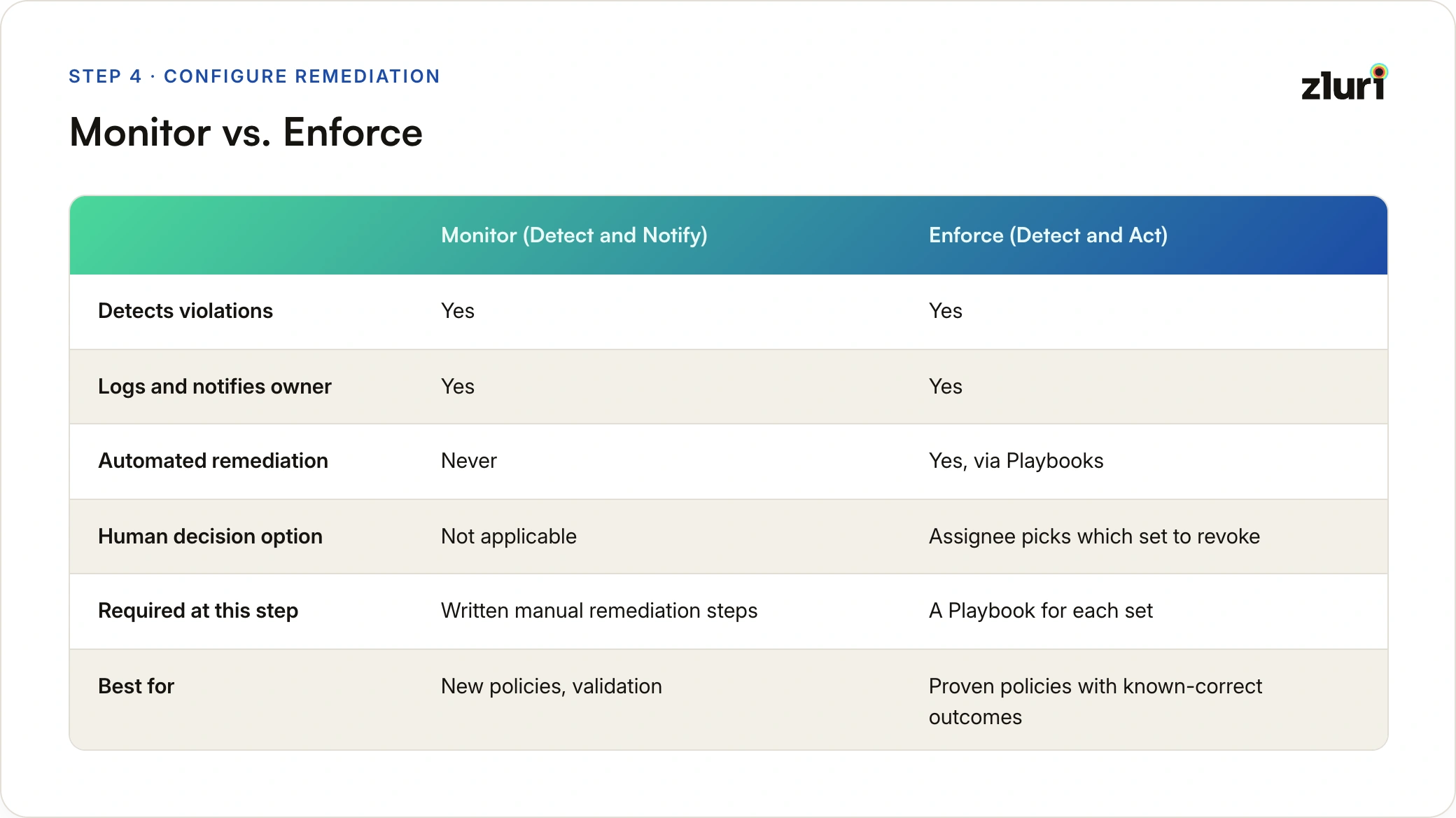
Monitor mode detects, logs, keeps violations open for review, and notifies the policy owner when violations are found. Nothing automated runs. It does demand one thing, though: a required rich-text Remediation steps field (up to 500 characters) describing the manual steps a reviewer should follow to resolve a violation. You can't publish a Monitor policy without writing down how violations get handled by hand, which is a quietly good forcing function.
Enforce mode adds action, in one of two shapes: Assignee decides which side to remove, where Zluri routes a decision task with full context to the assignees configured back in Step 1, and the chosen assignee picks which set to revoke, or Choose the default side to remove now, where Zluri auto-revokes a pre-selected set with no human step. Either way, each set gets its own dedicated remediation Playbook defining the revocation actions.
Exemptions also get enabled here, and the Allow exemptions? toggle is available in both modes. It's off by default, and turning it on requires setting a maximum duration in days. Zluri has no concept of an indefinite exemption: every exception expires, and the violation automatically reopens when it does.
Step 5: Review & Publish
The final step shows summary cards for all four configuration areas, with a pencil icon on each to jump back without losing anything else. Publishing requires a Publish Note (up to 512 characters), which feeds directly into version history and the audit log, and then a confirmation dialog ("Publishing will activate this policy and begin evaluation"), a deliberate second step rather than a single click. On confirm, the policy flips from Draft to Published, the first detection scan gets queued per the trigger schedule, and Zluri writes an audit entry with author, timestamp, version, and note.
Before publishing, it's worth running the policy through simulation to check detection accuracy without touching the live violation store. That workflow is deep enough that we've covered it separately in our guide to simulating SoD policies.
What Makes Detection Identity-Centric
Violations in Zluri are raised against identities, not accounts. If one person holds conflicting entitlements spread across three different accounts, the engine produces exactly one violation, with all offending accounts surfaced as supporting context inside it.
This matters more than it sounds. Account-centric detection, which is how spreadsheet-based SoD reviews effectively work, evaluates each account in isolation, so a conflict split across two accounts belonging to the same human is invisible. Identity-centric detection collapses everything a person can do into one evaluation, which is the level at which SoD risk actually exists.
The same logic extends across applications. A single policy can span multiple apps, and a consolidated violation fires when Set A is held in one app and Set B in another. The NetSuite-plus-Okta scenario from earlier is a first-class detection case, not an edge case.
Editing, Promoting, and Retiring Policies
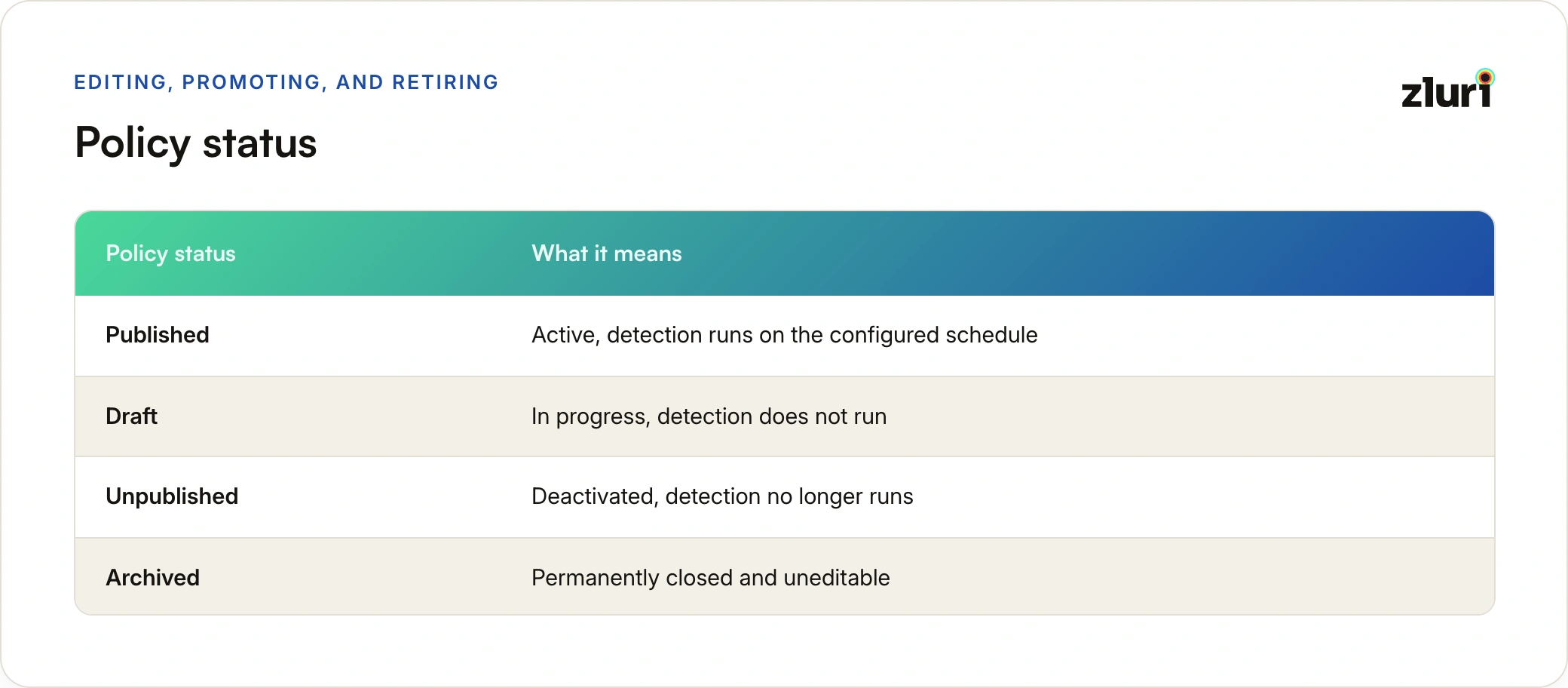
A policy lives in one of four states. Published means it's active and running detection on schedule, Draft means it's in progress and detection never runs, Unpublished means it was active but has been deactivated, and Archived means it's permanently closed and no longer editable.
Published policies are never edited in place. The Create Draft action spins up an editable draft from the current published version, and the live policy keeps running untouched until the draft gets published over it. This is also how you promote a policy from Monitor to Enforce:

- Open the published policy and select Create Draft
- In the draft's Remediation step, switch the mode from Monitor to Enforce
- Configure the violation handling shape and the Playbook for each set
- Enter a Publish Note and publish
Zluri then automatically back-tests existing open violations against the new enforcement configuration, so you immediately see what the new setup would act on without waiting for the next scheduled run.
Retiring a policy has guardrails. Unpublish is blocked while the policy has active violations, active exemptions, or ongoing runs, with a tooltip explaining what needs resolving first. There's no force-unpublish, which means a policy can't quietly disappear while it still has open findings attached to it.
Every publish also creates a full configuration snapshot in Version History, not just a diff. Any historical version can be inspected in full and resurrected as a new draft, which turns out to be genuinely useful when an auditor asks what a policy looked like eight months ago.
Who Can Do What
Access splits four ways: Owner, Admin, and IT Admin roles get full authoring and publishing rights plus exemption authority, App Owners can act on violations routed to them but can't touch policies, Internal Auditors get read-only visibility with CSV evidence export, and every other role sees nothing at all.
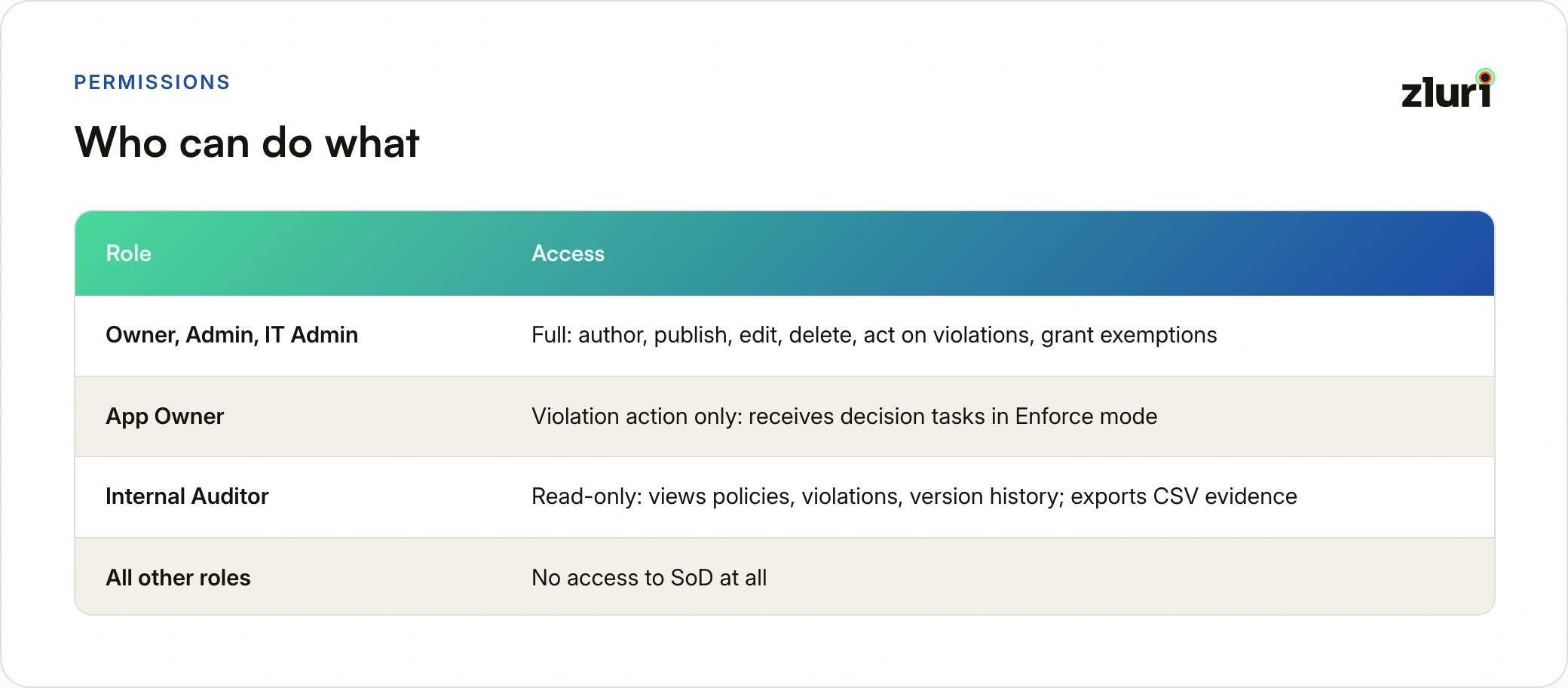
The Internal Auditor role deserves a mention because it maps cleanly to how audits actually run: auditors get evidence access without any ability to change the controls they're evaluating.
Once a policy is live and violations start flowing in, the work shifts from authoring to handling. We've broken down every status, the full detection-to-remediation flow, and how exemptions behave in the SoD violation lifecycle breakdown.
Frequently Asked Questions
Can a single SoD policy detect conflicts across two different applications?
Yes. Cross-application detection is native to the engine. If Set A matches an entitlement in one app and Set B matches an entitlement in another, the identity holding both gets a single consolidated violation covering both apps.
What's the difference between adding entitlements directly and adding by criteria?
Direct addition pins the rule to specific, named entitlements you select from a picker. Criteria-based rules define a pattern (for example, all privileged roles in a given app) and automatically keep matching as entitlements change in the source application. Both methods can coexist in one rule set.
Does Monitor mode ever remediate anything?
No, never. Monitor mode detects, logs, and notifies the policy owner, and violations stay open until someone acts manually or the policy is promoted to Enforce. There's no partial-automation state in between. That's also why Monitor policies require a written remediation-steps field at configuration: manual resolution is the only resolution in this mode, so the engine makes you document how it happens.
Can I build a policy with three conflicting sets?
Not in a single policy. Every policy has exactly two rule sets, Set A and Set B, and that limit is baked in. Three-way conflicts need to be modeled as multiple two-set policies.
Who can grant exemptions on violations?
Only Owner, Admin, and IT Admin roles, and only on policies where the Allow Exemptions toggle has been turned on with a configured maximum duration. Every exemption is time-bound and the violation reopens automatically on expiry.