
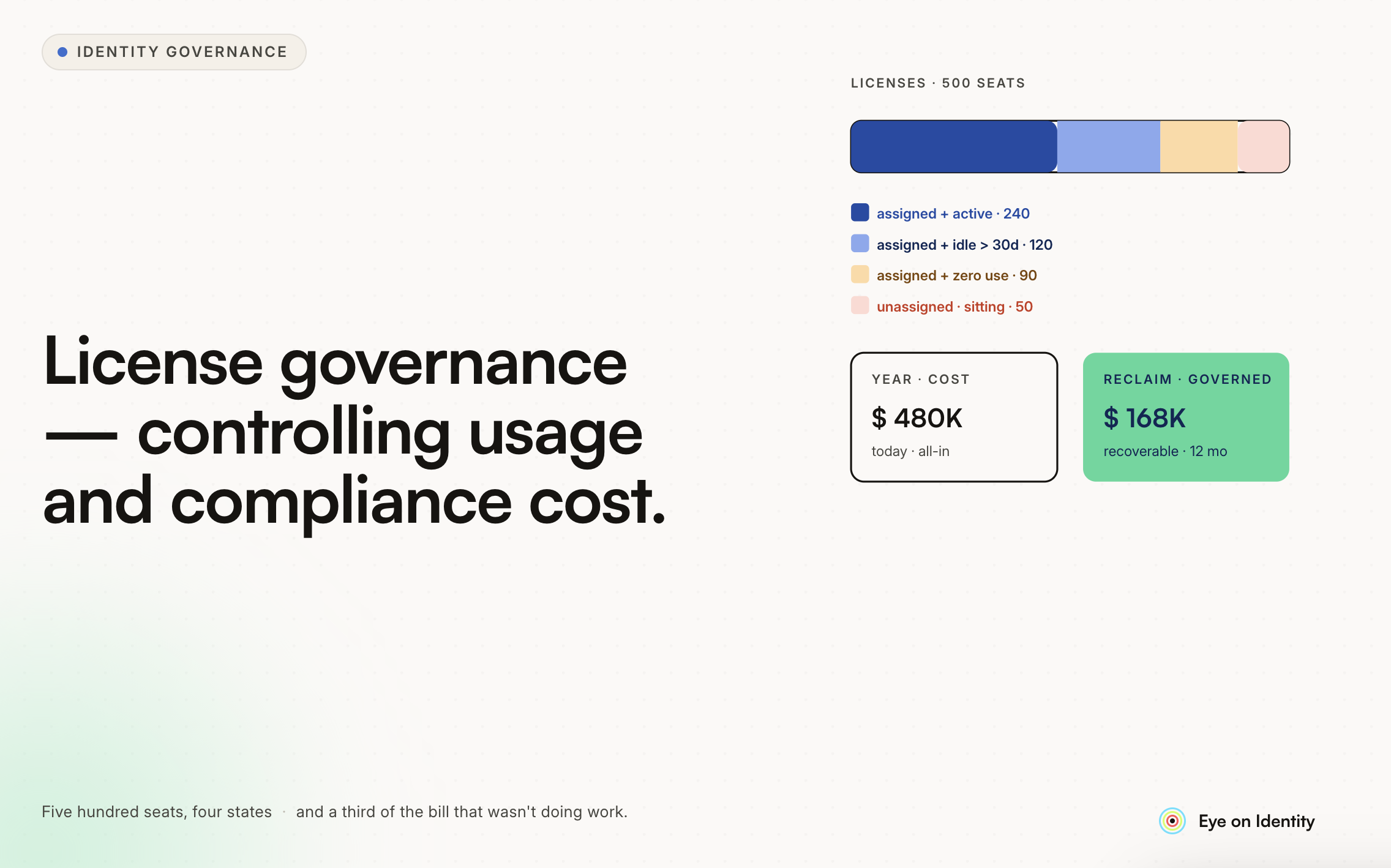


License cost governance for tiered-pricing applications — where the difference between a Fulfiller and a Business Stakeholder license is hundreds or thousands of dollars per year — is exactly the kind of problem that looks manageable in a small environment and becomes a significant budget issue as headcount grows. The two most common failure modes are over-provisioning at the request stage (giving everyone a Fulfiller license because it's easier than evaluating who actually needs it) and retention creep at the removal stage (people keeping expensive licenses they no longer use because nobody reviewed them).
Here's how to build a governance model that addresses both.
The Request Stage: Structuring How Licenses Are Granted
The most effective intervention for license cost governance is at the point of request — before the license is granted, when the opportunity to ask the right questions still exists.
Intent-Based Request Forms
A request form that asks questions about how the user intends to use the application produces better license decisions than a simple "I need access" form. For the Fulfiller vs. Business Stakeholder distinction, the relevant questions are:
- Will you need to create or update tickets, incidents, or change requests? (Fulfiller territory)
- Will you need to work directly on task assignments and modify records? (Fulfiller territory)
- Do you primarily need to view reports, monitor dashboards, or review approval requests? (Business Stakeholder territory)
- What's the business case for the access level you're requesting?
These questions route the requester toward the appropriate tier and provide the justification that approvers need to make an informed decision. A user who checks "view reports only" but selects a Fulfiller license is a conversation starter. A user who explicitly documents that they need to create change tickets has self-justified the Fulfiller request.
Constrained Role Selection
Free-text fields for license type introduce errors and inconsistencies. A constrained dropdown that presents the exact license tiers that exist — "Fulfiller," "Business Stakeholder," or similar — and maps each option to a defined price point ensures that requests align with your actual pricing structure and enables automated routing based on the selection.
When the license tier selected matches a pre-defined tier, the provisioning action can be automated: selecting "Business Stakeholder" provisions the appropriate role without manual IT intervention. Selecting "Fulfiller" routes for cost approval before provisioning.
Tiered Approval Based on License Cost
Not all license requests warrant the same approval overhead. Business Stakeholder licenses, where the cost is low, might be auto-approved for requests that meet defined criteria (department is in scope, requester's manager has pre-approved their team for this tool). Fulfiller licenses, where the cost is high, route to a department head or finance owner for explicit cost approval.
This tiering concentrates approval attention on the decisions that carry the most budget impact while reducing friction for lower-cost access.
The Monitoring Stage: Staying Current on What's Actually in Use
Once licenses are granted, the monitoring function tracks whether the allocation is still appropriate and whether you're getting value from what you're paying for.
License Utilization Tracking
The key metric is utilization rate: of the licenses you've purchased, how many are assigned, and of those assigned, how many are actively being used? A gap between purchased and assigned licenses means you're paying for capacity you could reduce at renewal. A gap between assigned and actively used means you're paying for licenses that people have but don't use.
For ITSM licensing specifically, the utilization picture often looks like this: a significant portion of Fulfiller licenses assigned to users who primarily perform the subset of functions that Business Stakeholder licenses would cover. These are over-provisioned users — they have more access than they need, at a higher price than necessary.
Activity-Based Monitoring
Last login date and usage frequency are the most practically useful signals for identifying candidates for license optimization. A user with a Fulfiller license who logs in quarterly to check reports is a good candidate for downgrade to Business Stakeholder. A user who hasn't logged in at all in three months may not need the license at any tier.
Setting up regular monitoring reports that surface low-activity Fulfiller license holders — filtered to show users below defined activity thresholds — gives license managers a prioritized list for outreach without requiring manual analysis.
The Removal Stage: Inactivity-Based License Reclamation
The removal process that balances cost recovery against operational disruption requires confirming inactivity before acting, rather than automatically revoking based solely on last login.
The Confirmation Workflow
A user who hasn't logged in for three months may have a legitimate reason — they're on leave, working on a project that doesn't currently require the tool, or using the application in ways that don't generate login events your monitoring captures. Revoking without confirmation generates help desk tickets and user frustration.
The more robust approach: when a user crosses your inactivity threshold (90 days is a common choice), the system sends them a notification — Slack message or email — asking them to confirm whether they still need the license. The notification gives them a defined response window (typically one to two weeks) to confirm or voluntarily release the license.
If they confirm they still need it: the inactivity clock resets, they remain provisioned, and the decision is documented. If they confirm they don't need it: the license is released and they're downgraded or deprovisioned as appropriate. If they don't respond within the window: the license is released. Non-response is treated as confirmation of inactivity, which is a defensible policy to communicate to users upfront.
This workflow captures user intent before taking action, which dramatically reduces the friction and reversal requests compared to automatic silent revocation.
Exclusions
Certain user categories should be excluded from inactivity-based optimization: IT administrators whose access is necessary for the governance process itself, accounts used by automation or integrations that don't generate login activity in ways your monitoring captures, and users explicitly flagged by their managers as needing persistent access even when not actively using it.
Building exclusions into the monitoring process prevents the governance mechanism from accidentally disrupting the infrastructure it depends on.
The Role Change Stage: Catching License Creep at Transitions
License governance at the request and removal stages covers new access and unused access. The gap that's often missed is role changes: an employee who moves from a department that required Fulfiller access to a role where Business Stakeholder access would suffice retains the Fulfiller license because nobody reviewed it during the transition.
The fix is connecting your license governance process to your HRMS so that role and department changes trigger a review of existing access. When someone changes teams, the governance workflow evaluates whether their current license tier still aligns with their new responsibilities — and if not, initiates a downgrade process rather than waiting for the annual review cycle to catch it.
This is the most common source of license creep in organizations with active internal mobility, and it's the one that purely inactivity-based monitoring misses: a user who changes departments and remains active in the tool at their old tier doesn't trigger inactivity flags, but their license may no longer be appropriate.
What a Working License Governance Model Looks Like
Putting these stages together: a Fulfiller license request arrives through the structured form, is routed for cost approval, is provisioned when approved. Quarterly, a monitoring report identifies Fulfiller license holders below defined activity thresholds. Those users receive a confirmation workflow. Non-responders and voluntary release requests are processed, and the licenses are reallocated or reduced. Role change triggers from the HRMS initiate reviews of affected users' license tiers.
The audit trail from this process — documented requests with business justifications, approval decisions, confirmation workflow records, and release confirmations — is also the evidence your finance and procurement teams need when negotiating renewal pricing. Demonstrated utilization data, with documentation showing active governance rather than passive accumulation, strengthens the negotiating position.
The organizations that manage ITSM and similar tiered-pricing application costs most effectively have all four stages running: structured request intake, ongoing utilization monitoring, inactivity-based reclamation, and role change-triggered reviews. Any single stage in isolation leaves the other gaps open.



.svg)











