.png)




An orphaned account isn't just an ex-employee's login still sitting active. It's any access whose original justification has lapsed while the account itself persists: a departed employee, certainly, but also a service account whose project ended, a contractor's access that never had a formal exit trigger to begin with, or an account for a role that simply no longer exists. The common thread isn't who the account belonged to. It's that nothing marked it as done. (For the broader case behind this problem, see our guide to orphaned accounts as a concept.)
Orphaned accounts get discussed almost exclusively through one scenario: someone leaves the company, and their access lingers. That's the most common case. It's real, and it's not the whole category.
An account becomes orphaned any time the reason it existed goes away while the account itself doesn't. That happens through several distinct paths, not one. This piece covers the full range, and the layered mechanics that catch each one.
The Many Ways an Account Becomes Orphaned
Departure is the obvious case. It's worth naming the others directly, because each one requires a slightly different detection path.
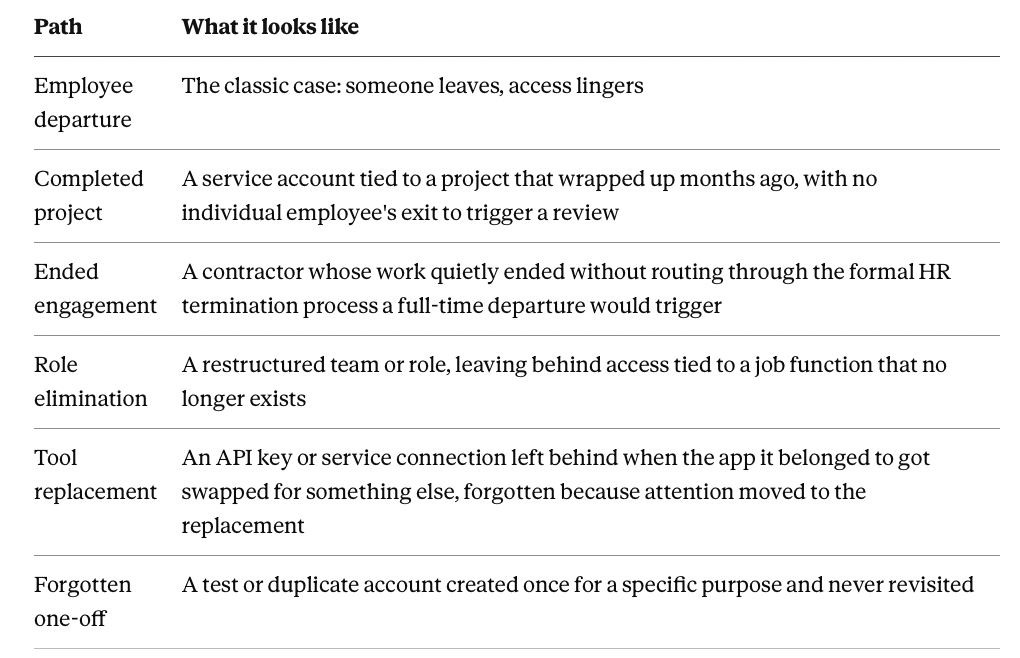
None of these look like the classic ex-employee scenario. None of them get caught by a detection method built only to watch for that one specific pattern.
Why Orphaned Accounts Go Undetected
Why SSO Deprovisioning Alone Leaves Orphans Behind
This is the single most common source of orphaned accounts in practice, and it's worth stating plainly. Removing someone from single sign-on stops new authentication through that one path. It does nothing to any local account an app holds through a direct integration, since that account sits entirely outside SSO's reach.
Treat SSO removal as equivalent to complete offboarding, and orphaned accounts accumulate in every application outside that federation boundary. Guaranteed, by construction. Not because anything failed along the way, but because the two were never actually the same action to begin with.
Finding What's Already Orphaned
Four detection methods cover the ground SSO-only offboarding misses, each built for a different way an account slips through.
Undeprovisioned: The Direct Optimization Signal
Optimization's Undeprovisioned category flags a specific, unambiguous pattern: a license or access grant still attached to a user who has actually left the organization. The person's departure is a known, recorded fact. The access simply never got revoked.
That makes it the easiest orphan category to detect with confidence. It's also one of the more visible ones once surfaced, since it's tied to a real cost figure someone can point to.
Dormant Account Detection: Catching Orphans Even When the Trigger Was Missed
Not every orphan traces back to a departure event that got recorded correctly somewhere. Sometimes nothing was ever recorded at all.
Dormant account detection solves for that by flagging zero activity over a meaningful window, catching orphaned access independent of whether any offboarding trigger fired. An account can be technically active in every system of record and still be genuinely orphaned if nobody has touched it in months. Usage-based detection is what catches that reality, regardless of what the HR record shows.
Service Accounts: The Orphans Nobody Thinks to Check
Non-human identities are disproportionately likely to end up orphaned. The reason is simple: there's no individual departure event to prompt anyone to check on them.
Service Account Exposure flags exactly this pattern, service or shared accounts holding real application access with no clear individual owner accountable for confirming they're still needed. This category is structurally invisible to any detection method built around watching for a person leaving, because no person was ever the trigger to begin with.
Contractors and External Users: Orphaned Without a Standard Trigger
Third-party access frequently ends without ever routing through a formal termination process. A contractor's engagement wraps up. An external partner's project ends. Neither reliably generates the kind of system-of-record signal a full-time employee's HR-recorded departure would.
Group-removal-based triggers close this specific gap. Rather than assuming the standard employee offboarding path will catch a contractor or vendor, this treats the loss of a project-specific group membership as its own valid signal that the access underneath it should be revisited.
Making Orphans Rare Going Forward
Prevention: Closing the Gap at the Source
Catching orphaned accounts after the fact is necessary. Reducing how many ever get created matters more.
Automated offboarding, triggered reliably off a real event, an HR-recorded termination date, a group membership change for a contractor, closes the gap at the source. It doesn't depend on a later detection pass noticing what should have happened automatically. Zero Touch Provisioning's offboarding counterpart does this on the leaver side. The mover-stage logic that revokes prior-role access alongside granting new access does the same thing on the role-change side. Both reduce the raw volume of orphans a detection layer would otherwise need to catch downstream.
There's a structural layer underneath both of those triggers. An application with an assigned IT, finance, or department owner is far more likely to actually be included in offboarding checklists, scheduled reviews, and renewal audits in the first place. Application ownership is what keeps an app inside those governed processes, rather than an ownerless app quietly falling outside all of them and letting whatever's orphaned inside it go unnoticed by default.
The Periodic Catch-Net: Access Reviews
Prevention won't catch everything. An unrecorded departure, a service account nobody remembered to review, these still slip through, and they need a periodic mechanism to surface them.
Access Reviews scoped to include dormant accounts and unclear ownership give this a recurring cadence. Nobody has to happen to notice a stale account during unrelated work for it to get caught. That's what keeps orphaned access from accumulating silently between whatever prevention measures are already in place.
Frequently Asked Questions
Is an orphaned account always tied to someone who left the company?
No, that's the most common case but not the only one. Service accounts tied to completed projects, contractor access that never triggered formal offboarding, and accounts for eliminated roles are all genuinely orphaned even though no individual employee departure caused it.
Why isn't removing someone from SSO enough to fully offboard them?
Because SSO removal only stops authentication through that federated path. Any application connected through a direct integration rather than SSO keeps its own local account entirely untouched, which is exactly why an application connected outside the SSO boundary can remain fully active for someone who's already been removed from single sign-on.
Why are service accounts more likely to end up orphaned than employee accounts?
Because there's no individual departure event to prompt anyone to check on them. An employee leaving triggers an HR record and, ideally, an offboarding process. A service account tied to a completed project has no equivalent trigger, which is exactly why it needs its own dedicated detection, Service Account Exposure, rather than relying on departure-based logic that was never built to catch it.
Can an account be considered orphaned even if it's still technically marked active in every system?
Yes. Dormant account detection is built specifically for this case, flagging zero activity over a meaningful window regardless of what any system of record currently shows, since the underlying departure or role change that should have triggered offboarding may simply never have been recorded correctly.