.png)

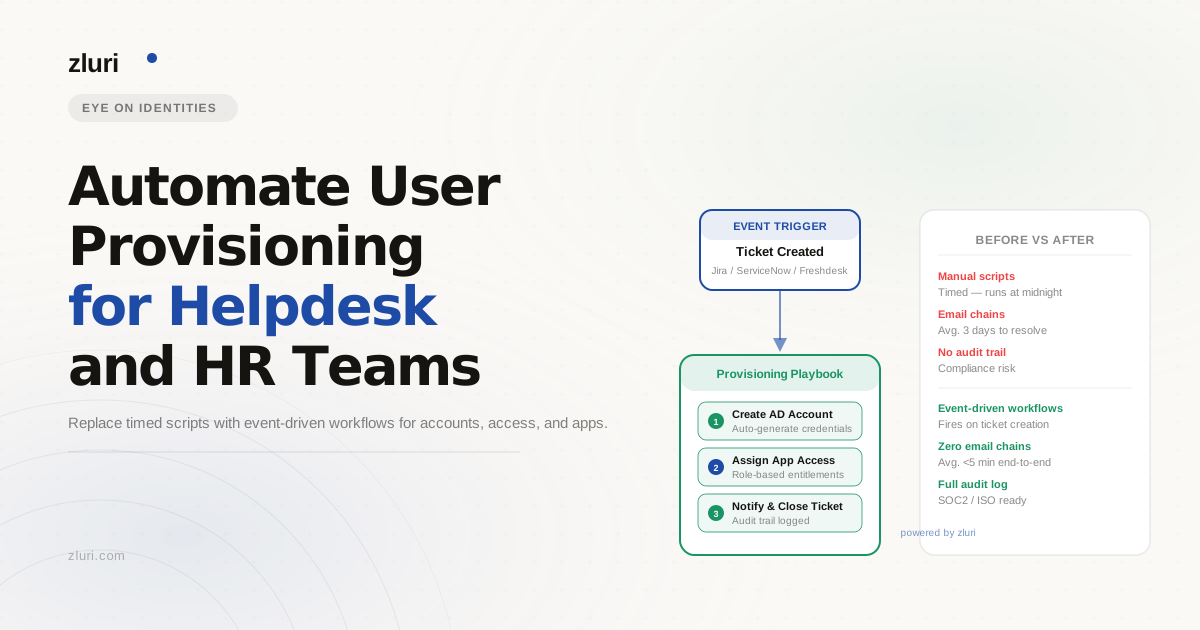


Your scheduled script runs every 15 minutes. HR enters new hires into the system the week payroll runs. The helpdesk gets a ticket the morning someone starts. By the time the new employee sits down, IT is still catching up. Automating user provisioning for helpdesk and HR teams isn't just about writing a better script — it's about removing the dependency on timed intervals and manual handoffs entirely, so the process runs the moment HR makes a move, not 15 minutes later.
Why Scheduled Scripts Can't Keep Up with the Joiner Process
The 15-minute polling loop is one of the most common user provisioning setups in hybrid AD environments, and it works — until it doesn't. The script checks an attribute, runs Enable-RemoteMailbox, triggers an ADSync, and the user lands in the right license group. Clean, functional, and entirely dependent on every upstream step happening on time.
The problem isn't the script. The problem is everything before it. If HR enters the new hire the morning they start rather than a week out, the 15-minute window is irrelevant — the account creation, mailbox provisioning, and license assignment are all running behind schedule regardless of how fast the script executes. The r/sysadmin thread this question came from captures the situation exactly: one commenter mentioned finally getting new hire information the afternoon before they start and describing that as progress.
Scheduled scripts also have no awareness of role or context. Checking the Title attribute to determine whether a mailbox should be a Room or Shared mailbox works when the attribute is populated correctly and consistently. When it isn't — when a title is missing, misspelled, or entered after the script already ran — the logic breaks silently and someone on the helpdesk ends up fixing it manually.
The bigger structural issue is that a polling script is an IT-owned process patching over a gap that exists because HR, IT, and the provisioning system aren't connected to the same event. When someone is hired in Workday or BambooHR, that event should trigger provisioning directly — not sit until a script happens to check.
What Teams Have Tried (And Where Each Approach Breaks Down)
The r/sysadmin thread on this topic shows the full range of workarounds IT teams land on, and they follow a recognizable pattern:
PowerShell scripts with manual input are the most common starting point. Several commenters described scripts that prompt for first name, last name, and username, then create the AD account, set the email address, assign a generic password, and drop the user into a new user OU. One commenter added group assignment for up to three security groups. These scripts work well for a single technician running one-off provisioning — they're fast, they're consistent, and they get the job done. The ceiling is low: they require someone to run them, they don't connect to HR data, and they have no logic for role-based access beyond what the script runner manually selects.
ERP or HRMS database polling is the next step up — a nightly pull from the HR system to create AD accounts automatically. One commenter described exactly this setup. It removes the manual input requirement, but it introduces a new dependency: the nightly sync. If a new hire is added to the HR system on a Monday afternoon, their account creation waits until Tuesday morning. If the sync fails silently, nobody knows until the employee shows up with no access.
Manager-submitted request forms show up as a process fix — requiring department heads to submit a ticket one week before a start date. This solves the last-minute problem in theory. In practice, it depends on manager compliance, and it still routes through the helpdesk rather than automating the downstream provisioning steps.
SSO platforms with HRIS integration (Okta, OneLogin) get mentioned as a more mature approach. Integrating with Workday to trigger account creation when a new hire is entered in the HRMS is a real improvement — provisioning starts from the HR event rather than waiting for a script or a ticket. The limitation is that this still tends to handle the identity layer well and leave app-level provisioning, mailbox setup, and group-based licensing as separate concerns.
Microsoft Identity Manager comes up for organizations already deep in the Microsoft stack. It's legitimate for complex hybrid environments, but it's an implementation project measured in months, not a configuration task.
How to Use Your HRIS as the Source of Truth for Seamless Provisioning
The shift that makes user provisioning genuinely seamless — for helpdesk, HR, and the new employee — is treating the HRIS as the event source rather than AD or a script. When HR marks someone as hired in Workday, BambooHR, or a similar system, that action should directly trigger the provisioning sequence. No polling interval, no manual ticket, no script runner.
Zluri connects to HR systems and to Entra ID to establish that event-driven architecture. The moment a new hire is added to the connected HRMS, Zluri detects the status change and triggers a zero-touch onboarding playbook automatically. For environments using webhooks, that sync is instant — provisioning begins the moment HR completes the record, not at the next scheduled interval.
For hybrid AD environments specifically, Zluri includes an on-premises Active Directory agent. This LDAP-based agent connects to your internal network to fetch and sync users, groups, and OUs in real time. Workflows can interact with on-prem AD, sync the identity to Entra ID, and provision Microsoft 365 licenses and mailboxes across the cloud — all within the same automation sequence that started when HR entered the new hire.
The logic that your current script handles through attribute checks — Title determining mailbox type, department determining license group — moves into visual, no-code automation rules. IF Title equals a specific value, THEN execute the corresponding Exchange or AD action. IF Department equals Sales, THEN add to the Sales license group. These rules run at the point of hire detection, not on a 15-minute timer, and they're readable by anyone on the IT or HR team rather than requiring someone to open a script file.
How to Automate Employee Onboarding Without a Helpdesk Ticket
The helpdesk bottleneck in most provisioning setups isn't the account creation step — it's everything after. The account exists, but the new hire needs access to three applications that weren't in their initial group assignment, and each one requires a manual ticket routed to the right person.
Zluri's approach to this is role-based birthright access combined with a self-service app catalog. At the point of hire, a new employee is automatically provisioned with the standard application entitlements for their role, department, and location — determined by the attributes pulled from the HRMS. A new sales hire gets Salesforce access from day one. A new engineer gets the development toolchain. No helpdesk ticket needed for the standard set.
For applications outside the birthright assignment, employees can request access directly through Zluri's app catalog — or submit the request via Slack without leaving the tool they're already in. The request routes automatically to the designated approver (manager or app owner), and once approved, Zluri provisions the license and updates group memberships without the helpdesk touching it. The helpdesk's involvement drops from "every access request" to "exceptions that require human judgment."
For hybrid Exchange environments, the mailbox and license assignment that currently runs through your scheduled script gets handled within the same onboarding playbook — including the mailbox type logic based on title attribute, the group-based licensing assignment, and the ADSync trigger. The difference is that it runs once, at hire detection, rather than waiting for the next polling interval.
What This Looks Like at Offboarding (The Part Provisioning Scripts Miss Entirely)
Provisioning scripts handle the joiner case. They rarely handle anything else. When someone leaves, the offboarding process in most script-based environments relies on the same manual handoffs: HR notifies IT, IT runs a script or works through a checklist, and access gets revoked app by app.
Zluri runs the same event-driven logic at termination that it runs at hire. When HR marks an employee as terminated in the HRMS, an offboarding playbook triggers automatically — disabling the AD account, revoking application access, reclaiming licenses, and logging every action taken. For apps outside SSO coverage, the same tiered approach applies: API-based deprovisioning where available, SDK-based connections for custom endpoints, and automated task assignment with tracking for apps with no programmatic interface.
Every action is logged, which covers SOC 2 and GDPR audit requirements without a separate reporting process. When an auditor asks who had access to which tools and when, that answer is available immediately rather than requiring someone to reconstruct it from script logs and helpdesk tickets.
Frequently Asked Questions
How do you automate user provisioning for helpdesk teams?
The most effective approach is replacing timed polling scripts with event-driven workflows triggered by HRIS data. When HR marks someone as hired, provisioning starts automatically — account creation, mailbox setup, license assignment, and group membership — without a helpdesk ticket. Platforms like Zluri connect to HRIS systems and hybrid AD environments to run this sequence from a single trigger.
What is the best way to automate employee onboarding in a hybrid AD environment?
For hybrid environments, you need a provisioning layer that can interact with both on-prem AD and Entra ID within the same workflow. An on-prem AD agent that syncs to Entra ID in real time — combined with role-based automation rules for mailbox type, license groups, and application access — handles the full onboarding sequence without separate scripts for each step.
How do you replace scheduled provisioning scripts with real-time automation?
The key is connecting provisioning to HRIS events rather than a polling interval. HRIS webhook integration means provisioning starts the moment HR enters the new hire — not at the next 15-minute script run. Visual automation rules replace attribute-checking script logic, and the full sequence (AD account, mailbox, licenses, groups, app access) runs as a single workflow.
How do you reduce helpdesk tickets for application access requests?
Role-based birthright access covers standard entitlements at hire — new employees get the apps their role requires from day one without requesting them. For anything outside that set, a self-service catalog with automated approval routing handles requests without helpdesk involvement. The helpdesk focuses on exceptions rather than routine access provisioning.
See How Zluri Handles Your Specific Hybrid Provisioning Setup
Most hybrid AD environments have more manual steps in their provisioning process than IT realizes until they map it end-to-end — attributes that require a human check, scripts that fail silently, and applications that never made it into the automation logic. See how Zluri's event-driven provisioning works for hybrid Entra ID environments and find out which steps in your current process can be fully automated from day one.