.png)



You register an application in Entra ID, try to configure automatic provisioning, and get this message: "Out-of-the-box automatic provisioning is not currently supported. Ensure that the application supports the SCIM standard for provisioning." If you're new to Azure or to identity provisioning in general, this error is confusing — it doesn't tell you whether your app can ever support SCIM, whether there's a way around it, or what to do next. The answers to all four of the questions the error implicitly raises are addressable, and none of them require the app to support SCIM.
What the SCIM Not Supported Error Actually Means
SCIM — System for Cross-domain Identity Management — is the open standard that Entra ID uses for out-of-the-box automatic provisioning. When an application's vendor has implemented SCIM endpoints, Entra ID can manage the full user lifecycle for that application: creating accounts, updating attributes, disabling users, and deleting records, all automatically. When the vendor hasn't implemented SCIM, Entra ID has no standard interface to provision users into that application, and you get the error.
The key thing to understand is that SCIM support isn't something you configure on the Entra ID side — it has to be built into the application itself by the software vendor. The error isn't telling you that your Entra ID configuration is wrong. It's telling you that the application doesn't expose the endpoints Entra ID needs to provision users automatically through the standard flow.
This is common. A significant portion of the SaaS applications in any organization's stack don't support SCIM. Some are legacy tools built before the standard was widely adopted. Some are niche applications whose vendors haven't prioritized it. Some are internal tools or custom-built applications with no SCIM implementation at all. The "SSO tax" phenomenon — where vendors charge enterprise pricing to unlock SCIM and SAML support — means plenty of tools that could support SCIM don't, because the vendor has decided to keep it behind a paywall.
How to Check Whether Your Application Supports SCIM
There's no reliable way to check SCIM support from the Entra ID side if the application isn't already in Microsoft's app gallery. The definitive answer comes from the vendor.
The most direct path is contacting the application developer or vendor and asking specifically whether they have implemented SCIM 2.0 endpoints and whether those endpoints support the CRUD operations (Create, Read, Update, Delete) required for full lifecycle management. Vendors who support SCIM usually document it — look for "SCIM provisioning," "SCIM 2.0," or "automatic provisioning" in their documentation, help center, or integration guides.
If the application is listed in Microsoft's Entra ID application gallery, provisioning support is indicated in the gallery listing. Applications with SCIM support show a provisioning configuration option that works through the standard flow. If the application isn't in the gallery, or if it's a custom-registered application you've built yourself, SCIM support depends entirely on whether the developers have implemented it.
For applications your own development team owns or manages, SCIM support can be added — the vendor in that case is your own team. The application needs to implement SCIM 2.0 schemas for structuring user and group data, and expose endpoints that support the create, read, update, and delete operations. Microsoft's Entra documentation covers the implementation requirements in detail if the developer route is viable.
How to Deprovision Non-SCIM Apps in Entra ID: The Workarounds That Actually Work
The SCIM error isn't a dead end — it's the point where you choose which alternative approach fits the application. The options depend on what the application does expose: a standard API, a limited or non-standard API, or nothing programmable at all.
Direct API calls for applications with standard APIs. If the application has a REST API — even without SCIM — you can provision users by calling that API directly. IGA platforms like Zluri support configuring HTTP Request actions that make direct API calls to the application as part of an onboarding or offboarding playbook. You define the API endpoint, the authentication method, the request body (typically with dynamic user attribute variables pulled from the HR system or directory), and the action executes automatically when the workflow runs. This handles the majority of modern SaaS applications that have APIs but haven't implemented SCIM.
Custom actions for applications with non-standard APIs. Some applications have APIs that work differently from the standard REST pattern — unusual authentication flows, non-standard request formats, or specific sequences of API calls required to complete a provisioning action. Custom actions let you build reusable, parameterized API sequences that handle these requirements, then call them from provisioning workflows the same way you'd call a standard HTTP request. The upfront configuration is more involved, but the result is the same: automated provisioning for an application that doesn't support SCIM.
Automated manual tasks for applications with no API. When an application has no API surface at all — no SCIM, no REST API, no integration capability — the provisioning step requires a human. The choice is between an informal process (someone remembers to do it) and a tracked, routed, documented task that's part of the automated workflow. Zluri generates manual tasks automatically as part of the onboarding or offboarding playbook: when the workflow reaches the non-API application, a task is created and routed to the designated owner (the DBA, the app admin, whoever manages that system), delivered via email, Slack, or an ITSM ticket in Jira or ServiceNow. The task owner completes the manual step and marks it done. The action is logged in the audit trail alongside the automated steps, so the full provisioning record is complete even for applications that couldn't be automated.
What to Ask the Application Developer About SCIM Implementation
If SCIM support is the right long-term answer for the application — either because it's a vendor product that should support it or because it's an internal application your team can update — there are specific things the developer needs to implement.
SCIM 2.0 compliance requires implementing the standard schemas for representing user and group objects, exposing HTTP endpoints that respond to the operations Entra ID will send (POST to create, GET to read, PUT or PATCH to update, DELETE to remove), and handling the specific request formats defined in the SCIM specification. The Entra ID SCIM documentation provides the implementation requirements and testing guidance for developers building SCIM support into an application.
For vendor products, the practical question is timeline and pricing. Some vendors have SCIM on their roadmap but haven't shipped it. Others have shipped it but gate it behind enterprise tiers. Knowing which situation you're in determines whether to wait for native SCIM support, work around it with API-based provisioning in the interim, or make the SCIM gap a factor in the vendor evaluation for renewal.
How IGA Platforms Close the SCIM Gap Across the Full Application Stack
The SCIM error on a single application is a specific technical problem. The broader pattern — an application stack where some tools support SCIM, some have APIs but not SCIM, and some have neither — is an identity governance problem. Managing the provisioning lifecycle across that mix manually means the parts that can't be automated create gaps in offboarding coverage, audit trails, and access review completeness.
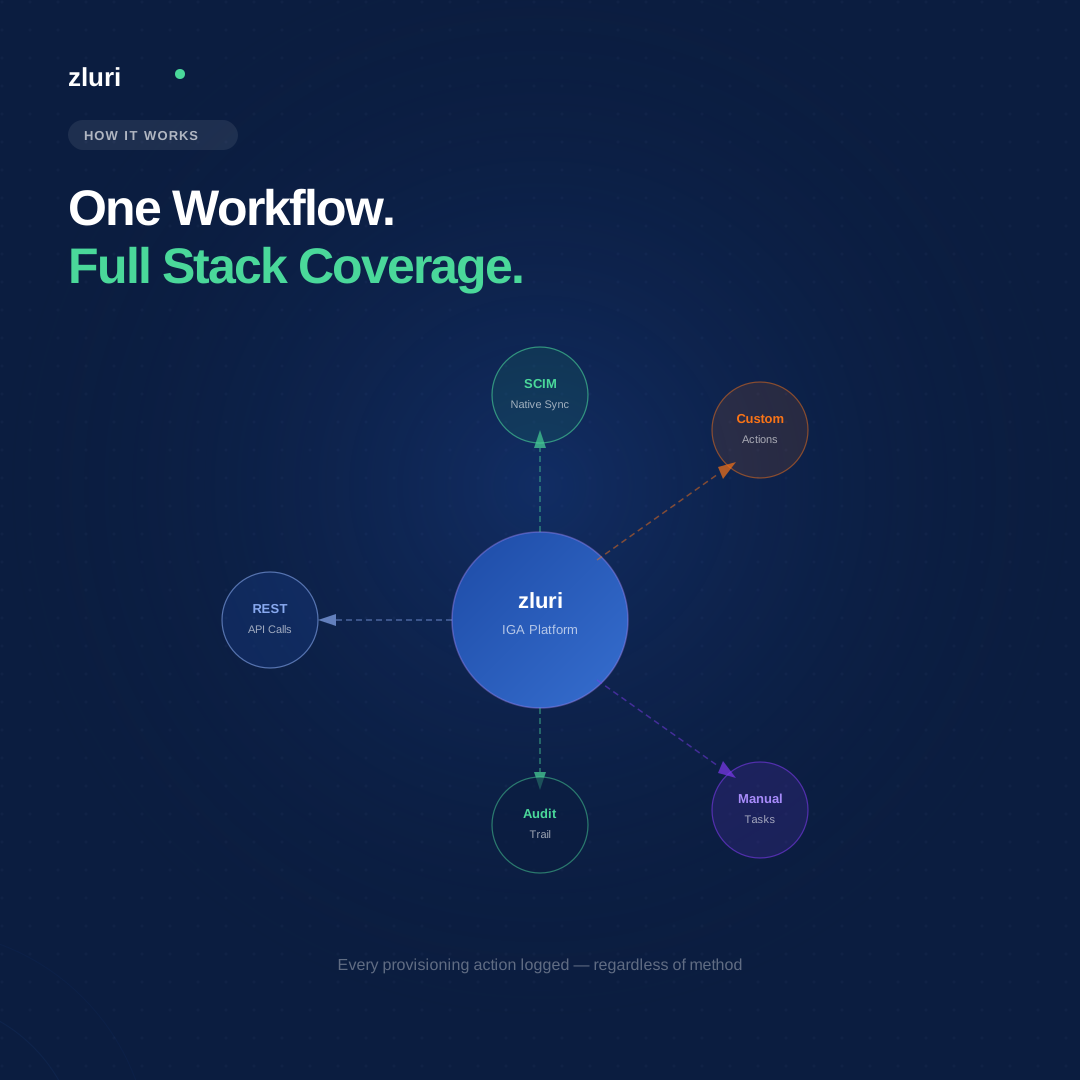
Zluri's approach is to handle all three categories within the same provisioning workflow. Applications with SCIM support provision through the standard integration. Applications with APIs but without SCIM provision through direct HTTP requests or custom actions. Applications with no API surface generate tracked manual tasks. The workflow doesn't stop at the SCIM-supported applications and leave the rest as manual exceptions — the entire stack is covered, and every action is logged regardless of the provisioning method used.
This matters most at offboarding, where the combination of "no SCIM" and "nobody knows all the systems this person had access to" creates the access blindspot that periodic reviews are supposed to catch. A provisioning platform that covers non-SCIM applications through API calls and tracked manual tasks closes that blindspot structurally rather than relying on the review cycle to find what was missed.
Frequently Asked Questions
How do I check if my application supports SCIM on Entra ID?
Check the vendor's documentation for "SCIM 2.0" or "automatic provisioning" support. If the application is in Microsoft's Entra app gallery, the provisioning capability is indicated in the listing. For applications not in the gallery, contact the vendor directly and ask whether they've implemented SCIM endpoints that support create, read, update, and delete operations.
Can I set up automatic provisioning in Entra ID without SCIM?
Yes, if the application has a standard API. IGA platforms like Zluri can provision users via direct API calls to the application, bypassing the SCIM requirement. For applications with no API at all, automated manual task routing handles the provisioning step as a tracked, documented workflow item rather than an informal manual process.
What does the "out-of-the-box automatic provisioning is not supported" error mean in Entra ID?
It means the application hasn't implemented SCIM endpoints, which is what Entra ID requires for its native automatic provisioning flow. The error is on the application side, not the Entra ID configuration. SCIM support must be built into the application by the vendor or development team.
What does an application developer need to implement to support SCIM provisioning?
SCIM 2.0 compliance requires implementing the standard schemas for user and group objects, exposing HTTP endpoints for the CRUD operations Entra ID sends, and handling the request formats defined in the SCIM specification. Microsoft's Entra ID SCIM documentation provides the specific implementation requirements and testing guidance.
What is the SSO tax and how does it relate to SCIM support?
The SSO tax refers to vendors charging enterprise-tier pricing to unlock SCIM and SAML support — features that many IT teams need for basic identity governance but that are gated behind significantly more expensive plans. When a vendor supports SCIM in principle but only at enterprise pricing, the practical effect is the same as no SCIM support for organizations that can't justify the upgrade cost.
See How Zluri Handles Provisioning for Apps That Don't Support SCIM
Most Entra ID environments have a mix of SCIM-supported applications and everything else. See how Zluri covers the full stack — API-based provisioning for non-SCIM apps, automated manual task routing for legacy systems, and a single audit trail across all provisioning methods.