.png)

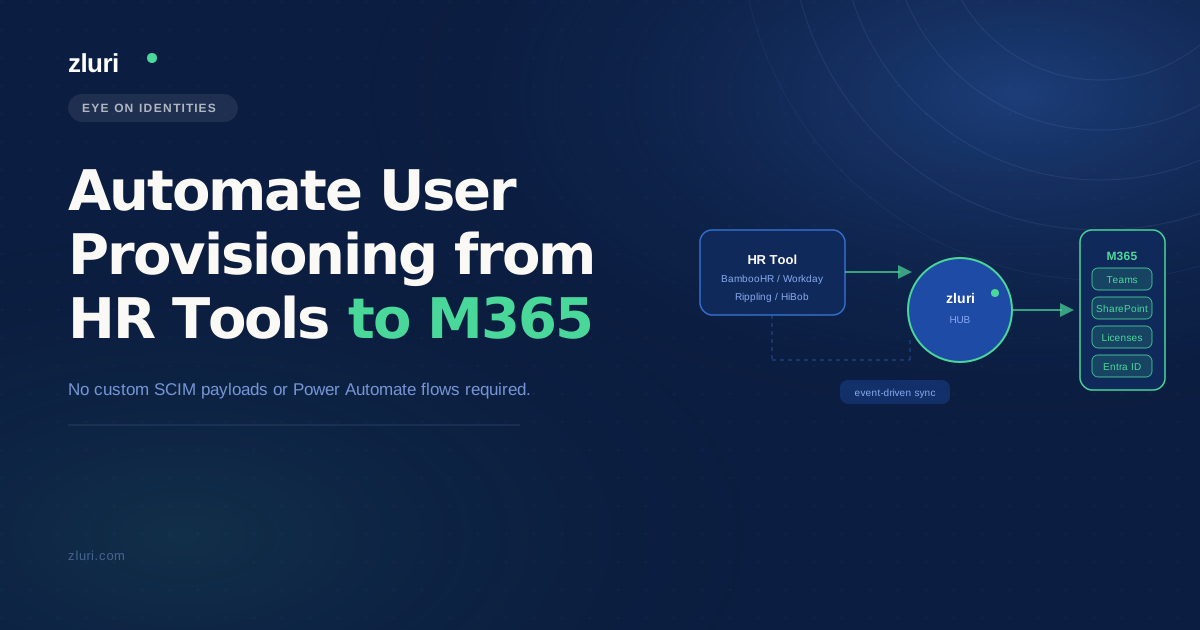


Microsoft's API-driven inbound provisioning is a genuine step forward for teams already deep in the Graph API and comfortable building SCIM bulk payloads. But for most IT teams, the goal isn't just automating provisioning into M365 — it's automating provisioning from HR tools into M365 and every other application in the stack, without writing and maintaining custom code for each one. That's where the Graph API approach runs out of runway, and where the architecture question becomes less about which API to call and more about what sits between your HRMS and your full application catalog.
Why Microsoft's API-Driven Provisioning Solves Half the Problem
The new Graph API inbound provisioning feature is worth understanding clearly before deciding whether it's the right tool for your environment. The core value proposition, as explained in the original thread by someone who clearly knows the spec, is that it offloads the processing logic from your API client to Microsoft's provisioning service. With standard Graph API, your client has to determine the right operation — whether to create, update, enable, disable, or delete the user — by making GET calls, comparing what's in Entra ID against what's in your HR source, and then deciding what to do. The new bulkUpload API lets the client simply send HR data as a SCIM payload and let the provisioning job handle the comparison and CRUD operations.
That's a real improvement for teams building custom provisioning integrations. It removes a layer of logic from your code and hands responsibility for attribute mapping and scoping rules to the IT team configuring the provisioning job rather than the developer writing the API client.
The practical limitations are also worth naming. The approach is job-based rather than synchronous — you submit the payload, a job runs in the background, and you check the job status rather than getting a real-time response. For environments with tight provisioning SLAs or complex conditional logic, that async model adds steps. And as one commenter in the thread pointed out, unless you're working in a hybrid or on-prem environment (where the provisioning agent adds genuine value), standard Graph API achieves the same result with a more direct response model.
The deeper limitation is scope. API-driven provisioning into Entra ID handles the Microsoft layer well. It doesn't provision Slack. It doesn't add the user to Jira. It doesn't assign a Salesforce license or set up the project management tool the team uses. M365 is the entry point, not the full picture — and for most organizations, the M365 account is maybe 20% of what a new hire needs to be productive on day one.
What Teams Are Actually Building (And Where It Gets Complicated)
The thread surfaced a few real-world approaches worth understanding, because they illustrate where the DIY provisioning path tends to stall.
Custom Graph API scripts with manual ticket intake is a common setup for teams that don't trust HR data enough to automate directly. One commenter described their process plainly: HR submits a ticket, IT runs a Graph API script. The manual gate exists because HR enters names incorrectly often enough that automation would propagate bad data into AD — the commenter specifically mentioned a 10% error rate on new hire names. This isn't a fringe case; bad attribute data from HR is one of the most consistently cited blockers for provisioning automation. You can build a technically excellent pipeline and have it undermined entirely by a misspelled display name or a missing department field.
PHP or custom app integrations against crappy HR APIs come up for organizations whose system of record has limited or restricted API access. One commenter was building a PHP proof-of-concept to provision from PowerSchool — a student information system with an API they couldn't fully access. Getting partial data out of a poorly documented API, formatting it as a SCIM payload, and keeping that integration maintained as the HR system updates is a significant ongoing investment for an IT team that has other things to do.
Power Automate flows tied to CSV exports is where Microsoft's own documentation points for teams that want a no-code path. It works, but it introduces a file-based step in an otherwise automated chain — someone needs to export the CSV, or a scheduled task needs to do it, and the whole flow breaks if the export format changes.
The pattern across all of these is the same: each approach solves the M365 provisioning problem for one specific HR source, and every other application in the stack remains a separate project.
How to Use Your HRIS as the Source of Truth for M365 and Beyond
The architecture that eliminates the custom build requirement connects the HRMS directly to a provisioning platform that handles both the M365 layer and the broader SaaS stack within the same workflow.
Zluri integrates natively with Workday, BambooHR, Personio, HiBob, and other HRMS platforms to establish them as the authoritative source for user identity. The moment a new hire is added or an employment status changes in the HR system, Zluri detects that event and triggers an onboarding playbook — no polling interval, no manual export, no custom SCIM payload required. The playbook provisions the Entra ID account and M365 licenses as the first step, then continues into the rest of the application stack.
One specific gap that often goes unaddressed in custom builds: HR systems frequently only capture a new hire's personal email at the point of record creation, because the corporate email address doesn't exist yet. Zluri handles this by using the personal email to generate the corporate work email within Azure AD, then writing that address back to the HR system and its own directory. Every subsequent provisioning step uses the correct corporate identity rather than the personal email that was in the HR record at hire time.
For organizations using Entra ID's Dynamic Groups to manage Microsoft-specific access, Zluri's automation rules extend that same logic beyond the Microsoft stack. Birthright access — the standard set of application entitlements for a given role, department, or location — gets provisioned automatically when the onboarding playbook runs. The M365 license tiers and Azure AD group memberships are handled alongside Slack workspace access, Jira project assignments, Salesforce licenses, and any other application in the stack. A single hire event in the HRMS drives provisioning across all of them, not just the Microsoft layer.
Handling Non-Standard HR Systems and Data Quality Issues
Two of the most common blockers for provisioning automation are HR systems without clean native integrations and bad attribute data that creates downstream problems in AD and M365. Both are worth addressing directly.
For organizations using HR systems outside Zluri's native integration library, or internal databases that don't expose a standard API, provisioning can be driven through bulk CSV uploads. Admins map the CSV columns to user attributes directly, and uploading the file triggers the same onboarding workflow that a native HRMS integration would initiate. For organizations with custom internal tools or proprietary HR systems, Zluri's integration SDK lets you push identity data from those systems via API — the same event-driven provisioning, without requiring a pre-built connector.
The data quality problem is harder, because it's fundamentally a process issue rather than a technical one. The teams in the thread who maintain a manual gate before provisioning — requiring HR to submit a ticket so IT can verify the name is spelled correctly — are solving a real problem, not being obstinate. Automating directly from HR data that's wrong 10% of the time means 10% of your provisioned accounts have errors. Field validation rules — filters that catch missing required attributes or flag values that don't match expected formats before the provisioning workflow runs — are how that manual gate gets replaced with an automated check rather than a human one.
Frequently Asked Questions
How do you automate user provisioning from HR tools to Microsoft 365?
The two main approaches are Microsoft's native API-driven inbound provisioning (which accepts SCIM bulk payloads via Graph API and handles the create/update/disable logic within the provisioning job) and IGA platforms like Zluri that connect directly to HRMS systems and trigger provisioning workflows without requiring custom SCIM payload construction. The native approach works well for Microsoft-centric environments; a platform approach extends the same automation to the full SaaS stack.
What is the difference between Graph API provisioning and using an IGA platform?
Graph API provisioning requires your client to build and send SCIM payloads, then check job status asynchronously. An IGA platform handles the HR-to-identity connection, the payload logic, and the downstream app provisioning within a single workflow — without custom code per application. The tradeoff is build control versus breadth of coverage.
Can you provision users from a CSV file into Entra ID and M365?
Yes — both Microsoft's API-driven provisioning (via Power Automate flows) and platforms like Zluri support CSV-based inbound provisioning. Zluri's approach maps CSV columns to user attributes directly and triggers the full onboarding workflow on upload, including M365 licensing and any other application provisioning in the playbook.
How do you handle bad HR data in automated provisioning workflows?
Field validation rules that run before the provisioning workflow executes are the standard approach — checking that required attributes are present, that name fields match expected formats, and flagging records that don't pass validation rather than propagating errors into AD. This replaces the manual IT review step that many teams maintain because of HR data quality issues.
See How Zluri Connects Your HRMS to M365 and Your Full App Stack
Most organizations that have built custom Graph API provisioning flows find that M365 is handled and everything else is still a manual process. See how Zluri's zero-touch onboarding handles the full provisioning sequence — from HRMS event to M365 account to every other application in your stack — without a separate custom integration for each one.