.png)




A group-based access review doesn't ask who has access to what app. It asks who belongs in this group, and whether that membership still makes sense.
Groups (in Okta, Azure AD, Google Workspace, JumpCloud, wherever your directory lives) are often where access sprawl actually hides:
- Someone gets added to an admin group for a two-week project and stays there for two years
- A department-wide group accumulates members long after half of them changed roles
Group-based access reviews exist to catch exactly that, membership drift that app-level reviews don't always surface. Here's how the review type works, when to reach for it, and what setup looks like end to end.
What a Group-Based Review Actually Does
A group-based review scopes the certification to group membership rather than application access. You select a group (or groups by criteria), pull in the current members, and reviewers decide whether each person should stay in the group, get modified, or be removed.
What reviewers see is different too:
- The Entities column shows group source (Okta, Azure AD, and so on) and member count
- Filters focus on group-related attributes, not app roles or licenses
- The decision isn't "should this access level change," it's "should this person still be in this group at all"
Group membership often is the access grant. A user added to a "Salesforce-Admins" Okta group doesn't need a separate application review to have admin rights, the group membership is the mechanism. Reviewing the app without reviewing the group that grants access to it leaves a blind spot. This gap predates any particular vendor's tooling, group hygiene has always been standard practice for privileged and administrative access, independent of which platform executes it.
Groups aren't limited to app access, either. Permissions attach to groups across several kinds of resources:
- Shared drive folders
- SharePoint sites
- Distribution channels
- Anywhere else permissions get assigned to a group rather than an individual
That's also why group-based reviews are effectively mandatory for any organization running Role-Based Access Control (RBAC). If permissions are assigned by putting people into roles or groups rather than granting access one person at a time, the group is the access control mechanism. Reviewing groups in an RBAC environment isn't a supplementary check, it's reviewing the actual thing that grants access.
When Group-Based Is the Right Call
Directory group hygiene. Active Directory and Okta groups accumulate members over years. A recurring group-based review is the standard way to catch and correct that drift before it becomes a security or audit finding.
Privileged group reviews. Admin groups for business-critical SaaS tools, billing-admin groups, anything conferring elevated privilege through membership rather than individual app roles, these deserve focused, often more frequent review cycles independent of your broader application certifications, and are often where multi-level review (requiring more than one reviewer's sign-off) is worth configuring.
Post-reorg or team-change cleanup. When a team restructures, group membership is frequently the last thing updated. A group-based review scoped to the affected groups catches stragglers who retained access through old group memberships.
Compliance frameworks that specifically call out group-level access controls, particularly around privileged access management, where auditors want to see that group membership itself is periodically validated, not just app-level roles.
Organizations running Role-Based Access Control. If your access model assigns permissions by role or group rather than individually, reviewing groups is how you review the model itself. Skipping group-based reviews in an RBAC environment means never actually validating the mechanism doing most of the access-granting.
If the real question is "what does this specific person still have access to across every group and app they touch," that's a user-based review, not a group-based one. And if you're validating access to a specific app regardless of how that access was granted, an application-based review is the better fit.
Where Group-Based Reviews Fall Short
Groups are where access sprawl hides, but reviewing them isn't automatically comprehensive either.
Nested groups can obscure who's actually in scope. A user can inherit access through a group-of-groups structure, and depending on how membership resolves, a review scoped to the outer group doesn't always surface everyone who's effectively a member through nesting.
Not every group in the directory grants access. Distribution lists, notification groups, and purely organizational groupings get mixed into review scope if nobody's drawn a line between "access-granting" and "communication-only" groups. That noise wastes reviewer attention and makes it harder to focus on the memberships that actually matter.
Reviewers often don't know why a group exists. Without a documented purpose, "should this person still be in this group" becomes a guess, and guesses tend to default to approve. A Department Head reviewing a group they inherited three reorgs ago is rarely in a position to confidently revoke anyone.
Membership alone doesn't show what a person can actually do. Knowing someone is in the "Salesforce-Admins" group confirms they're in the group, not the specific permissions that membership confers inside the connected system. Understanding the actual blast radius of a group usually requires application-level context too.
Making Group-Based Reviews Actually Work
Document what each group grants before it enters a review cycle. A one-line description saved against the group ("grants production database read access") turns a guess into an informed decision, and it costs almost nothing to maintain.
Put privileged and administrative groups on a tighter cadence than general-purpose ones. Admin groups for business-critical SaaS systems warrant monthly or quarterly review; broad organizational groups can often run annually without meaningfully increasing risk.
Watch for groups that quietly became the org's largest attack surface. Broad groups that started small and absorbed members over years, without anyone re-scoping them, are consistently where audits find the most stale, unnecessary access.
Separate access-granting groups from communication groups in your review scope entirely. Reviewing a group that's really just a mailing list wastes a reviewer's time and dilutes their attention on the groups where a bad decision actually matters.
Where Group-Based Reviews Fit in a Broader Program
Group-based reviews tend to be the tightest-cadence piece of a mature access governance program, reserved for the places where membership itself is the highest-leverage security decision: admin access to business-critical SaaS systems, billing-admin groups, anywhere a single membership change grants broad standing access. Application-based reviews handle the steady-state baseline across your app portfolio; group-based reviews cover the smaller set of places where one unnoticed membership does outsized damage.
Group-Based vs. Application-Based vs. User-Based
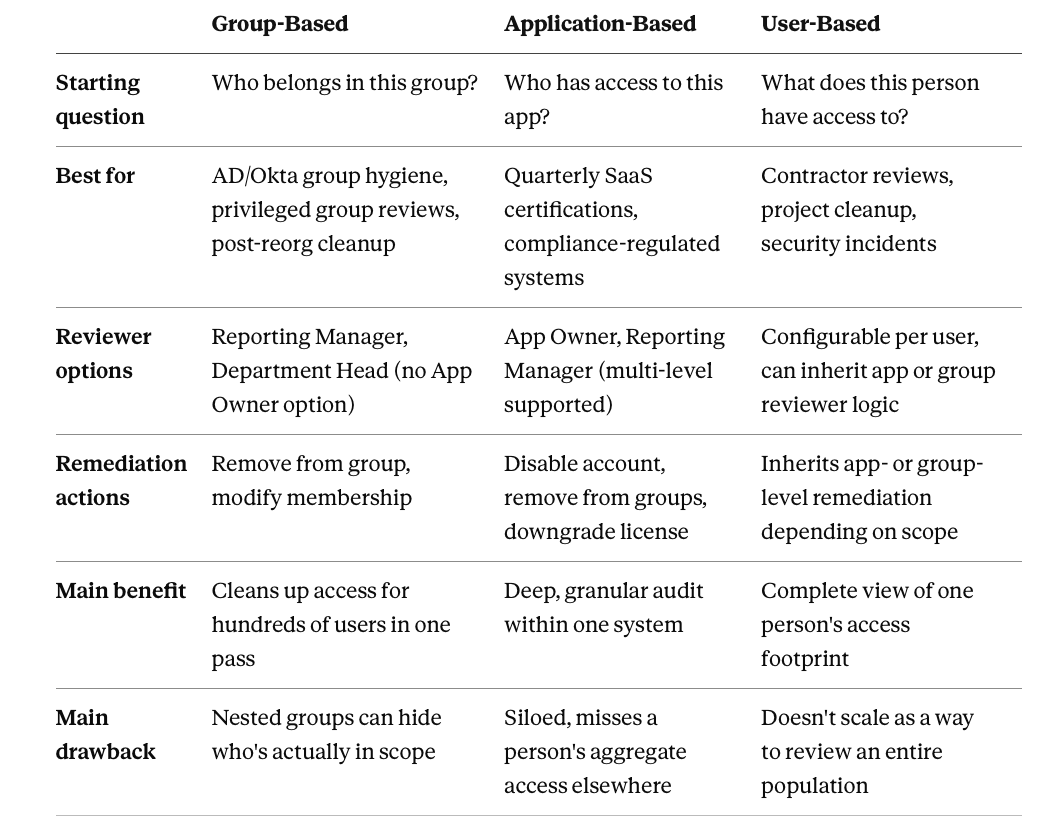
Read the companion deep dives on application-based access reviews and user-based access reviews for the other two entity types, or see how setup works in Zluri for the full step-by-step walkthrough across all three.
Frequently Asked Questions
Can group-based reviews cover groups from multiple identity sources at once?
Yes. A single certification can include groups from Okta, Azure AD, Google Workspace, or JumpCloud together, criteria-based scoping can filter by group type or category regardless of source.
Why is there no App Owner option for group reviewer assignment?
Groups aren't tied to a single application in the same way app access is, they're organizational or directory constructs. Reviewer roles for groups are Reporting Manager and Department Head instead, reflecting who actually has context on whether someone belongs in a given group.
What's the difference between "Remove User from Group" and "Modify Group Membership"?
Remove User from Group is a full removal, typically the outcome of a Revoke decision. Modify Group Membership covers partial changes, moving someone to a different group or downgrading their role within it, typically tied to a Modify decision.
Do group-based reviews support the same recurring schedules as application reviews?
Yes, monthly, quarterly, or custom recurrence up to 12 months, anchored to the first certification's start date the same way application-based recurrence works.
Can I review both a group and its parent application's access in one certification?
Not in a single group-based or application-based certification, each entity type scopes to its own resource. If you need to see both a person's group memberships and their direct app access together, that's what a user-based review is built for.
Should every group in the directory be part of a review cycle?
No. Groups that don't grant access, distribution lists, notification groups, purely organizational groupings, add noise without adding security value. Scope review cycles to the groups that actually confer access or privilege.
How is "stale" group membership usually defined?
There's no universal threshold, but a common approach flags members who haven't logged into the app the group grants access to within a defined window (30, 60, or 90 days), combined with members whose current role or department no longer matches the group's stated purpose.