.png)




Three entity types, one wizard. Here's exactly what setup looks like for application-based, group-based, and user-based access reviews in Zluri, step by step, including where they diverge.
If you've read the deep dives on application-based, group-based, or user-based access reviews, you already know when to reach for each one. This article is the mechanics companion: the actual certification wizard, reviewer resolution logic, and remediation engine that power all three, with the differences called out at each step.
The Same Wizard, Three Entity Types
Every certification in Zluri, regardless of entity type, moves through the same three-step wizard: Provide Details → Set Up Certification → Complete Setup. What changes between application-, group-, and user-based reviews is what gets scoped first, which reviewer roles are available, and how remediation gets applied. Everything else, the underlying logic for reviewer resolution, self-review handling, sign-off, and remediation, is identical across all three.
Step 1: Provide Details
This step is the same regardless of entity type:
- Certification Name
- Certification Owner, must hold Owner, Admin, or IT Admin privileges
- Optional Certification Description (rich text and links supported, useful for pointing reviewers to a knowledge base article or access matrix)
- Entity type, Applications, Groups, or Users
- If Users is selected, one extra sub-choice: does this review cover those users' Applications access or Groupsaccess
That last choice only shows up for user-based reviews, and it determines what gets scoped in the next step.
Step 2: Scoping (Where the Three Types Diverge)
This is the step where entity type actually changes the order of operations:
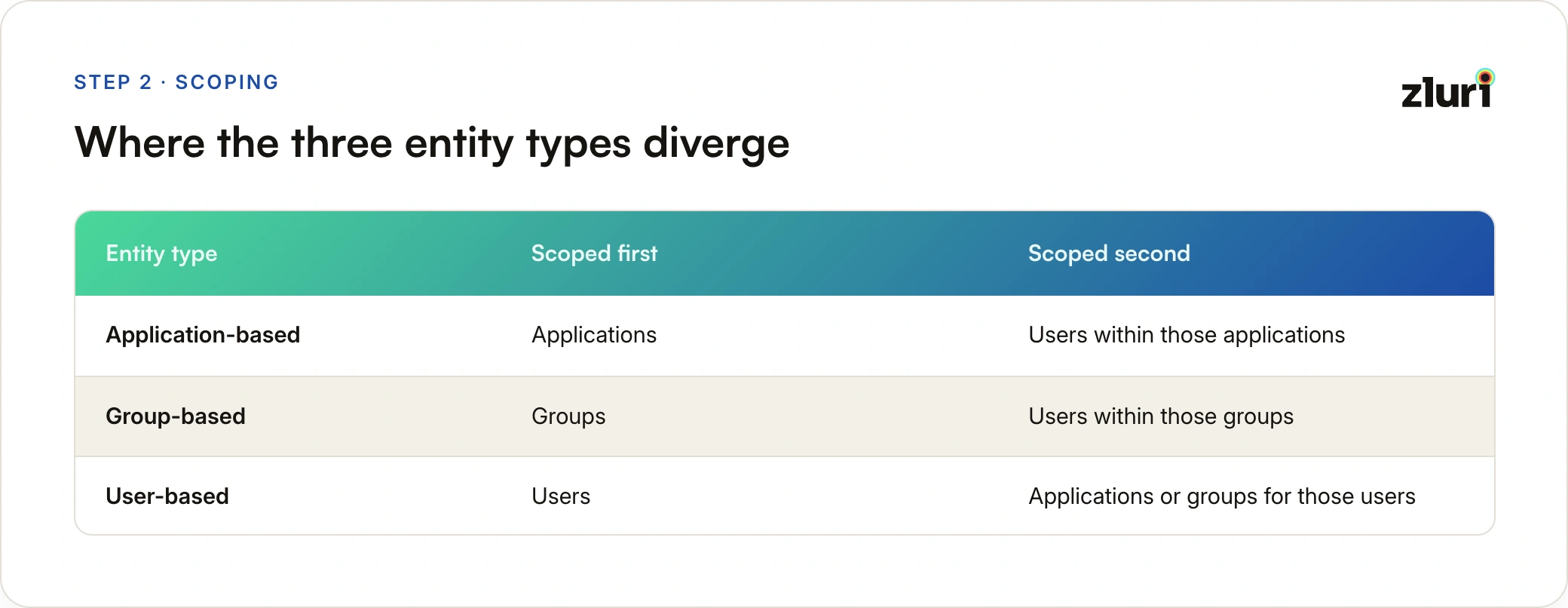
Scoping Applications (Application-Based Reviews)
- Add specific applications when you already know exactly which app (or apps) need reviewing.
- Add applications by criteria, filtered by type, category, restricted status, or archive status, useful for something like "every restricted app in the org" without hand-picking each one.
- Exclusions let you carve out specific apps or apps matching criteria, even if they'd otherwise match your inclusion rules.
A live preview shows the final application set after filters apply.
Scoping Groups (Group-Based Reviews)
- Add specific groups by name, when you know exactly which group (or groups) need reviewing.
- Add groups by criteria, filtered by group type or category, for broader sweeps like "every privileged group in the org."
- Exclusions carve specific groups out even if they'd otherwise match.
A preview shows the final group set before you move forward.
Scoping Users (User-Based Reviews, and the Second Step for the Other Two)
Whether you're defining the primary population for a user-based review, or narrowing down who gets reviewed within a chosen app or group, user scoping works the same way:
- Add specific users by name, best for small, targeted reviews, a five-person project team, a single flagged individual.
- Add users by criteria, rule-based population definitions like Account Type = External, Contractor = Yes, or Country starts with US. Multiple criteria combine with AND/OR logic, so you can build something like "all external employees, except those in the US" in one pass.
- Exclusion rules work independently of inclusion rules.
For user-based reviews specifically, a live preview panel updates in real time as criteria change, and you can switch between individual users in the preview to verify their specific application or group scope looks right, since a criteria-based population often has a different access footprint per person.
Scoping Applications or Groups for a User-Based Review
Once the user population is defined, you scope what gets reviewed for them:
- Add specific applications or groups by name.
- Add by criteria, filtering applications by type, last-used date, or archive status.
- Exclusions apply the same way as user scoping.
The preview shows each user's matching applications or groups individually, with status, assigned roles, and other configured details.
Step 3: Set Defaults
Defaults apply certification-wide unless overridden for a specific entity (see Step 4).
Default reviewers differ by entity type:
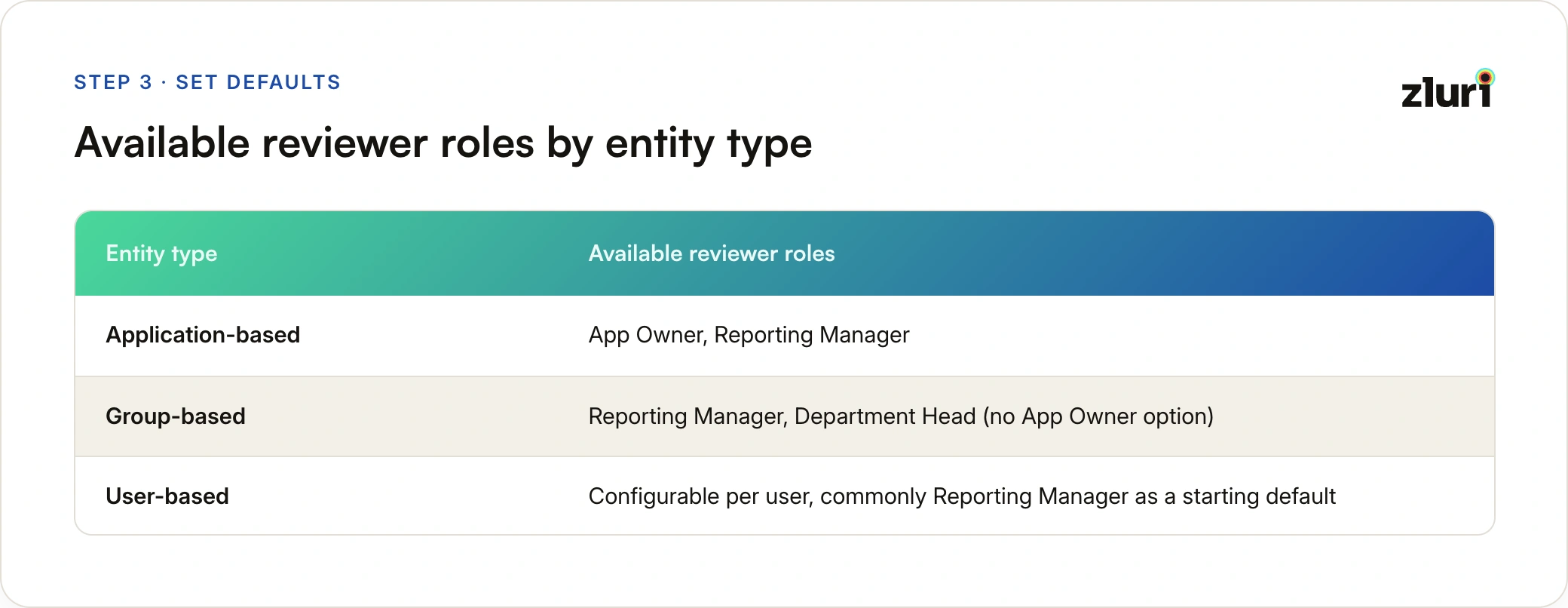
Data visibility lets you choose which columns reviewers see. For applications and groups, this includes app role, license type, last login, department, and employment status, reorderable to surface what matters most. Group reviews swap app-specific columns for group membership details.
Default remediations assign playbooks for what happens on a Revoke or Modify decision. Only global playbooks can be set as certification-level defaults, app- or group-specific playbooks require an override.
Step 4: Configure Overrides
Not every reviewer or remediation path needs to be uniform across an entire certification. Overrides let you customize reviewers, data visibility, or remediation actions for specific entities within the same certification, without splitting into separate certifications. This is the current, entity-level way to handle what used to require duplicating the same app or group with different configurations.
For user-based reviews specifically, overrides apply at the individual level, assign a different reviewer for one particular person, or narrow their application scope, without touching the configuration for anyone else in the same certification. Users without a specific override run on the certification's defaults; the overrides table marks each entity "Custom" or "Default."
Before finishing setup, running Check Invalid Configurations catches common issues: deleted or unpublished remediation playbooks, inactive or removed reviewers, and incomplete override configurations. All flagged issues need resolving before you can continue.
Step 5: Complete Setup and Launch
This step is identical across all three entity types:
- Start Now (launches immediately, appears under Ongoing) or Start Later (scheduled, appears under Upcoming, locked until the start date)
- Review End Date and Remediation End Date, Zluri sends automated reminders 48 hours before each deadline
- Self-review handling, Allow Self Review or Auto-Reassign (see below)
- Recurring certifications (optional), monthly, quarterly, or custom cadence up to 12 months
- Create Certification to launch, or Save Draft to pause and come back later
Reviewer Assignment: How Zluri Resolves Who Actually Reviews a Record
Every record in every certification, regardless of entity type, resolves down to one Current Reviewer, the only person who can actually take action on it. That resolution follows a fixed order:
- Primary Reviewer check. If the configured role or named person resolves to a valid, active reviewer for that record, they get it.
- Fallback Reviewer. If the Primary is unmapped or inactive, the record goes to a named Fallback Reviewer, always a specific person, never a role.
- Self-review handling. If the resolved reviewer would be reviewing their own access, Zluri either allows it (Allow Self Review) or reassigns it (Auto-Reassign) to a configured role or person, Reporting Manager, Department Head, Certification Owner, Fallback Reviewer, or a named individual.
- Final fallback. If nothing else resolves, the record defaults to the Certification Owner. No record is ever left without a reviewer.
One detail worth knowing before scheduling anything for later: reviewer resolution happens at launch time, not at configuration time. If a named Primary Reviewer leaves the company between setup and a scheduled "Start Later" date, the Fallback Reviewer automatically takes over the moment the certification actually goes live, no manual intervention needed.
Multi-Level Reviews for Higher-Stakes Access
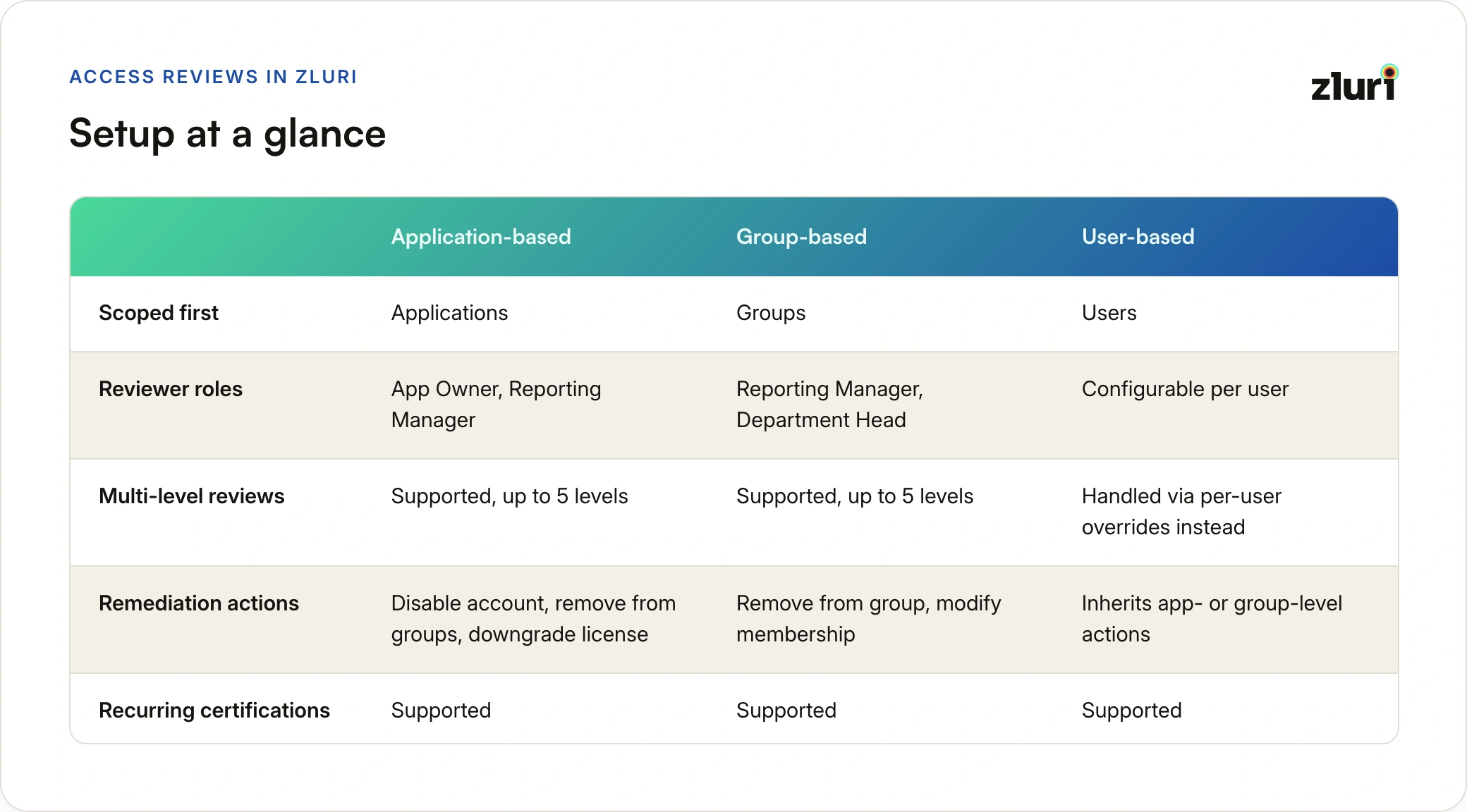
Application-based and group-based reviews support up to five sequential reviewer levels per entity. Each level needs a unique Primary Reviewer (Zluri blocks duplicate reviewers across levels to prevent redundant review paths), and each can have its own Fallback Reviewer, which can repeat across levels.
Records don't advance to the next level until the current level signs off, and once a level signs off, its decisions lock permanently. This is the structure for financial systems under SOX scope, apps holding customer PII under GDPR, or privileged groups where a single reviewer's approval isn't sufficient evidence for an auditor, Reporting Manager sign-off at level one, Department Head sign-off at level two, for example.
User-based reviews don't use this same multi-level structure. Instead, granular reviewer control happens through per-user overrides, assigning different reviewers to different people within the same population-based certification.
See the full breakdown of multi-level access reviews for the complete mechanics: why sequencing matters, how the shared Fallback Reviewer works, and when a multi-level chain is worth configuring versus overkill.
Remediation: Playbooks by Entity Type
Remediation runs through the same playbook engine across all three entity types, but the available actions differ:
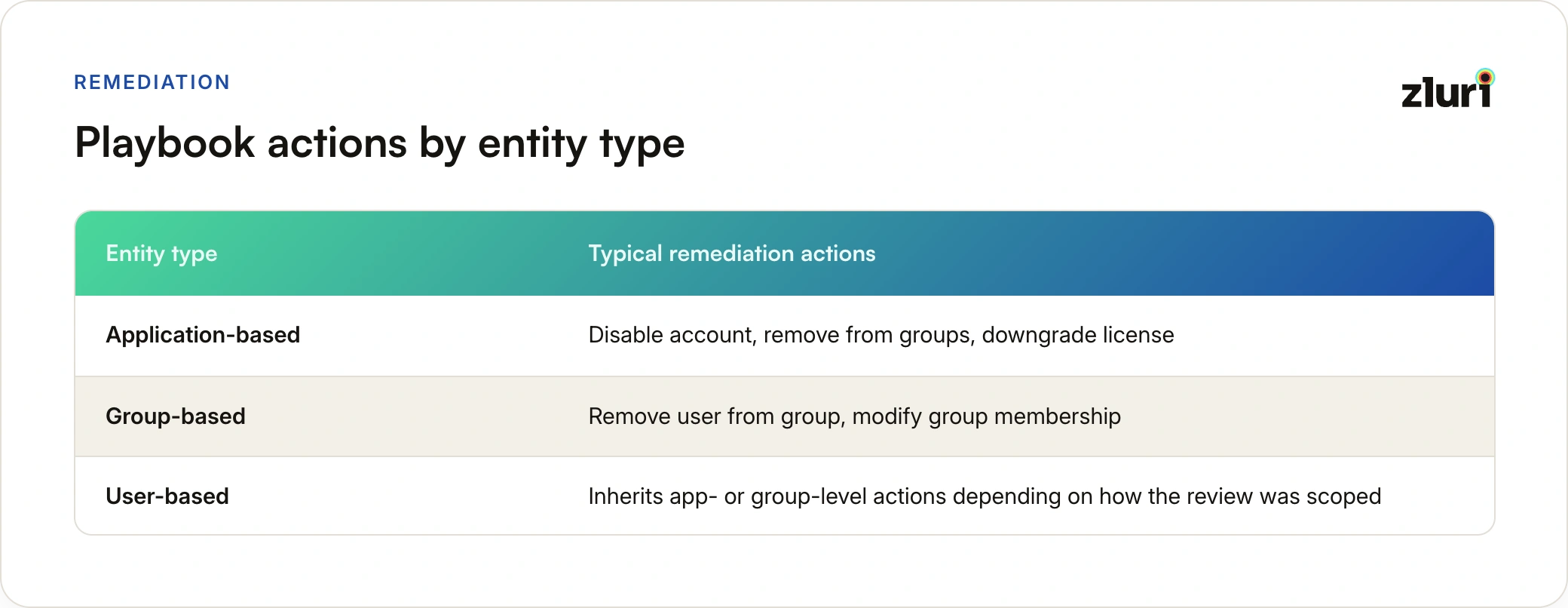
Application-level playbooks are created under each app's Automation settings, support automated actions (like disabling an account) alongside manual tasks (like creating a Jira ticket), and require the app to be integrated with the right permissions for automated actions to run.
Group-based playbooks are always created under the source application where the group actually lives, Okta, Google Workspace, Azure AD, JumpCloud, even though they're managed in the same interface as application-level playbooks. Typical actions are Remove User from Group or Modify Group Membership.
Global playbooks aren't tied to any specific app or group, they're reusable workflows (Jira tickets, notifications, standardized processes) that serve as certification-level defaults and as fallback actions when an app- or group-specific playbook isn't available.
If Zluri lacks the integration scope to run an action automatically, it flags the gap and offers three options: add the missing permission, ignore it and accept the action won't run, or convert it to a manual task assigned to the right owner.
Closing the Loop: From Sign-Off to Completion
Once every reviewer on every configured level has signed off, an entity (application, group, or user) is tagged Ready for Remediation. Once every entity in the certification carries that tag, the Certification Owner can trigger Conclude Review, which locks the setup and fires the linked remediation playbooks.
Zluri won't let a certification conclude with an invalid remediation playbook attached, unpublished, deleted, or misconfigured playbooks throw an error on the affected entity and block conclusion until fixed. This exists specifically so a review cycle never ends in decisions that never actually get executed.
Automated remediation runs immediately for entities with the right integration permissions. Manual remediation generates a task (Jira ticket, email, Slack message) when automation isn't available or permissions are missing. Both are logged in the certification's audit trail with per-record status: Pending, In Progress, Completed, or Failed, with retry options on failure.
The certification can be marked complete while some remediation actions are still processing in the background, completion and remediation execution are decoupled. On completion, Zluri generates a non-editable, timestamped PDF report, auto-emailed to the Certification Owner and available for download anytime, the audit evidence for SOC 2, ISO 27001, SOX, or whatever framework triggered the review in the first place.
Setup at a Glance
Frequently Asked Questions
Does reviewer resolution logic differ between entity types?
No. Every entity type uses the same Primary → Fallback → Self-review → Certification Owner resolution chain. The only thing that changes is which reviewer roles are available to configure as the Primary (App Owner and Reporting Manager for applications, Reporting Manager and Department Head for groups, fully configurable per person for users).
Can I use multi-level reviews for a user-based certification?
Not in the same structured, level-by-level way application- and group-based reviews support. User-based reviews achieve similar granularity through per-user overrides, assigning different reviewers to different people within the same certification.
What happens if I try to conclude a review with a broken playbook?
Zluri blocks it. Any unpublished, deleted, or misconfigured remediation playbook throws an error on the affected entity, and the Conclude Review action stays unavailable until you either republish the playbook or swap in a valid one.
Do all three entity types support the same recurring schedule options?
Yes, monthly, quarterly, or custom recurrence up to 12 months, anchored to the first certification's start date so the review-to-remediation interval stays consistent across every future instance.
What's the difference between a default reviewer and an override?
Defaults apply to every entity in the certification unless specified otherwise. Overrides customize the reviewer, data visibility, or remediation playbook for individual entities (an application, a group, or a user) within the same certification, without requiring a separate certification.