.png)




The person already has baseline access. What changes, for a defined and known period, is the level. Access goes up, then comes back down, on a schedule, for a planned reason. Here's how that pattern works in Zluri, end to end.
Temporary elevated access starts from a different place than most access patterns: the person already has baseline access, and what changes for a defined, known period is the level, not whether access exists at all.
An on-call engineer needs admin rights for their rotation week. An analyst needs write access instead of read-only during a specific audit. A team member needs broader permissions to finish a two-week project. In every case, access goes up, then comes back down, on a known schedule, for a planned reason.
Two adjacent patterns are worth ruling out immediately. This isn't break-glass access, which exists for genuine, unplanned emergencies and typically bypasses normal approval entirely. And it isn't the general case of just-in-time provisioning, which usually means granting a new identity access from zero. Temporary elevated access specifically means an existing identity's already-established access level gets deliberately raised, on a schedule known in advance, for a defined business reason, and then reverts.
Temporary elevated access is one of two specialized forms of the general JIT access pattern (duration-bound grants with automatic reversion), break-glass being the other. The two are distinguished by trigger and approval path: temporary elevated access is planned in advance and flows through the standard approval process; break-glass access is triggered by an unplanned emergency and is pre-authorized to bypass that process, with rigor concentrated in review after use instead.
What Makes This a Distinct Pattern
The defining shape of temporary elevation: baseline access exists, elevated access gets added on top for a known window, and only the elevated portion reverts afterward. The underlying baseline stays intact throughout.
This matters mechanically. It means the reversion step is fundamentally an Update action, modifying or removing a specific elevated permission, rather than a Delete action wiping out access entirely the way an offboarding or a full break-glass revocation would. Getting this distinction right in how a workflow is built is what prevents a reversion from accidentally removing baseline access the person still legitimately needs.
Requesting an Elevation Through the Normal Channel
Unlike break-glass access, which is pre-authorized to bypass standard approval specifically because there's no time to wait, a planned temporary elevation goes through the normal Access Request flow, just scoped precisely to what's actually changing.
Two fields do the scoping. The Application Role field specifies the elevated role or license tier being requested, not blanket application access the person already has. Access Duration specifies exactly how long that elevation should last: a defined on-call week, a two-week project window, a specific audit period.
This keeps a planned elevation inside the organization's standard approval and accountability process, which is appropriate, since there's no emergency forcing a bypass. And it makes the request specific enough that an approver is evaluating exactly what's being elevated and for how long, not a vague, open-ended access bump.
Staging Elevation and Reversion to Known Dates
Because temporary elevation is planned rather than reactive, its timing can anchor to real, known dates instead of firing the instant a request is approved.
Automation Rules' On-date, Before, and After scheduling options let an elevation activate on the first day of an on-call rotation or a project's start date, rather than the moment the request happened to be approved, which might be days earlier. The reversion side works identically in reverse: scheduled to fire exactly when the rotation ends or the project's window closes, rather than depending on someone remembering to manually downgrade the access once the reason for it has passed.
Reverting Cleanly: An Update, Not a Full Revoke
This is the mechanical detail most worth getting right when building a temporary elevation workflow.
The Deprovisioning Playbook tied to the elevation's Access Duration needs to target the elevated permission or role tier specifically, downgrading back to the person's actual baseline. Not a generic revocation that could strip access the person still needs for their normal, ongoing job function.
Built correctly as an Update action, modifying the specific role or license level rather than deleting the application relationship entirely, the reversion is precise: the elevated privilege disappears, and the baseline access underneath it doesn't.
Rotating Elevated Access Through Group Membership
On-call rotations are a recurring, cyclical version of this pattern, and group membership is a particularly clean mechanism for them.
Moving someone into an "on-call admin" group at the start of their rotation, with license and access assignment tied automatically to that membership, and moving them back out at the end, handled through the same group-join and group-leave automation used for group-based access control generally, gives a rotating elevation pattern a natural, recurring trigger.
The next person's rotation simply becomes their own group-join event. The current person's rotation ends with their group-leave event. No separate, one-off elevation workflow needs to be built and scheduled for every single rotation cycle.
Checking for New Combination Risk at the Moment of Elevation
This is the easy-to-overlook point that matters most for security: an elevation can create a Segregation of Duties conflict that didn't exist at the person's baseline level, even if their baseline access was entirely conflict-free.
Someone temporarily elevated to approve transactions, while still retaining their normal baseline ability to create them, now holds both halves of a conflict for the duration of that elevation. This means SoD evaluation needs to run against the elevated state, not just the person's standing, baseline roles. A review scoped only to permanent, standing access would miss the combination entirely, because it only exists during the temporary window.
Reviewing Elevated Windows With Full Rigor
Someone holding temporarily elevated access represents genuinely elevated risk for as long as that window is open. It deserves the same scrutiny standing privileged access gets, not a lighter standard just because it's scheduled to end.
Threat scoring applies to the elevated permission exactly as it would to a standing one. And Access Reviews can be scoped specifically to whoever currently holds any active temporary elevation, giving a direct, current answer to "who's operating above their normal baseline right now, and is that still appropriate," rather than waiting for the next general review cycle to happen to catch it.
How This Differs From Break-Glass Access
The two patterns share real structural similarities: both involve access above a baseline, both should be time-boxed, both should revert automatically, and both are specialized forms of the general JIT access pattern. The two are distinguished by trigger and approval path: temporary elevated access is planned in advance and flows through the standard approval process; break-glass access is triggered by an unplanned emergency and is pre-authorized to bypass that process, with rigor concentrated in review after use instead.
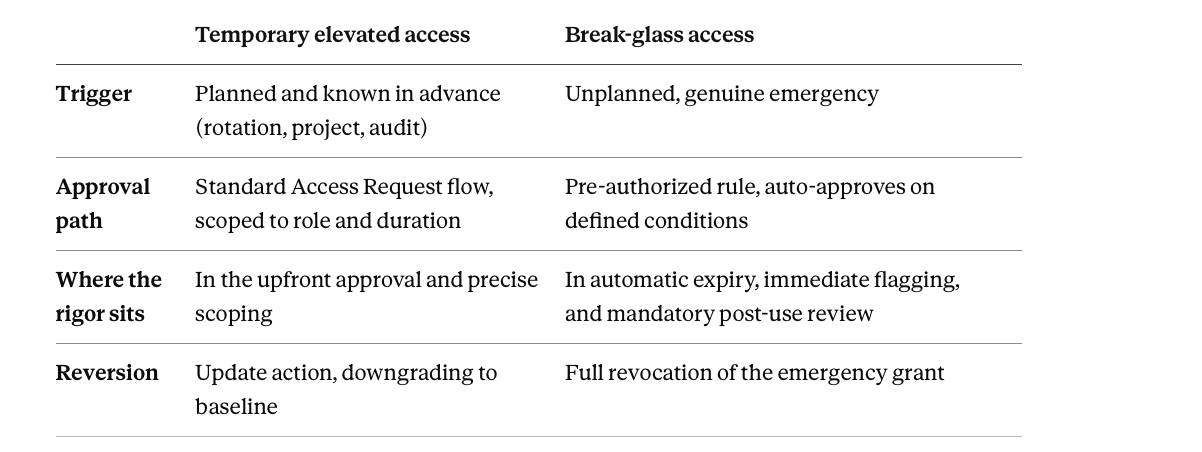
Applying the wrong pattern fails in both directions: treating a planned on-call rotation as if it needed break-glass-style pre-authorized bypass, or treating a genuine emergency as if it had time for standard approval routing. For the emergency pattern end to end, see break-glass access in Zluri.
Frequently Asked Questions
Does reverting temporary elevated access remove all of a person's access to that application?
No, and getting this right is important. Reversion should be built as an Update action targeting specifically the elevated role or permission tier, downgrading back to the person's actual baseline access. Not a full revocation, which would also remove the underlying access they still legitimately need for their normal job function.
Does a temporary elevation request go through the same approval process as a break-glass request?
Generally not, and that's by design. Break-glass access is typically pre-authorized to bypass normal approval because a genuine emergency doesn't allow time to wait. A planned temporary elevation, known about in advance, goes through the organization's standard Access Request approval flow, just scoped precisely to the specific role and duration being requested.
Can a temporary elevation create a security risk that wouldn't show up in a standard access review?
Yes: a Segregation of Duties conflict that only exists during the elevated window, combining a temporarily elevated permission with a baseline permission the person already held. This is exactly why SoD evaluation needs to run against the elevated state directly, not just against a person's standing, permanent roles.
Is an on-call rotation a good fit for group-based elevation specifically?
Yes, it's one of the cleanest use cases for it. Moving someone into an on-call group at the start of their rotation and out at the end, with access tied to that membership, gives a recurring elevation pattern a natural trigger for every rotation cycle. No new, separately scheduled elevation workflow needs to be built each time someone's turn comes up.