.png)




Most identity governance tools promise ROI eventually. The deployment takes two quarters, the role modeling takes another, and the savings show up in year two if the project survives that long. For a mid-market organization, 500 to 5,000 employees, with a lean IT team and no services budget, that timeline isn't just slow. It's disqualifying. Zluri's returns work differently: the clock starts the week you connect it. In this article, we break down where the ROI actually comes from, module by module, and why the timing matters more than the size of the number.
The Problem with IGA ROI Isn't the Size. It's the Timing.
Every identity governance vendor can show you an ROI model with an impressive multiple at the end. The number is rarely the issue. The issue is when that number arrives.
Traditional IGA economics are back-loaded by design:
- Deployment first. A 6-to-12-month implementation, usually with consultants attached, before the platform does anything useful.
- Role modeling next. Before automation works, someone has to model roles across the whole organization. That's its own multi-quarter project.
- Connectors throughout. Every application in scope needs a connector built and tuned before reviews or provisioning touch it.
So the real cost of a traditional IGA program isn't the license and the services line. It's the two to four quarters of full spend with zero return, while your team keeps doing everything manually in parallel.
Why This Hits Mid-Market Teams Hardest
An enterprise (with 50,000 employees) with a dedicated identity team of eight can absorb a year-long deployment. A 1,500-person company where identity is two people's part-time job cannot. Mid-market organizations face the same audit requirements, the same offboarding risk, and often more SaaS sprawl per employee than enterprises, but with none of the slack to run a services engagement alongside the day job. Many of the identity challenges that specifically emerge past the 500-employee markare exactly the ones a two-person team feels first, and has the least capacity to absorb.
That's why so many mid-market IGA projects die in the deployment window. Not because the tool was bad, but because the business lost patience before the savings showed up, and the two-person team burned out getting there.
Zluri's ROI Profile Is the Inverse: Front-Loaded
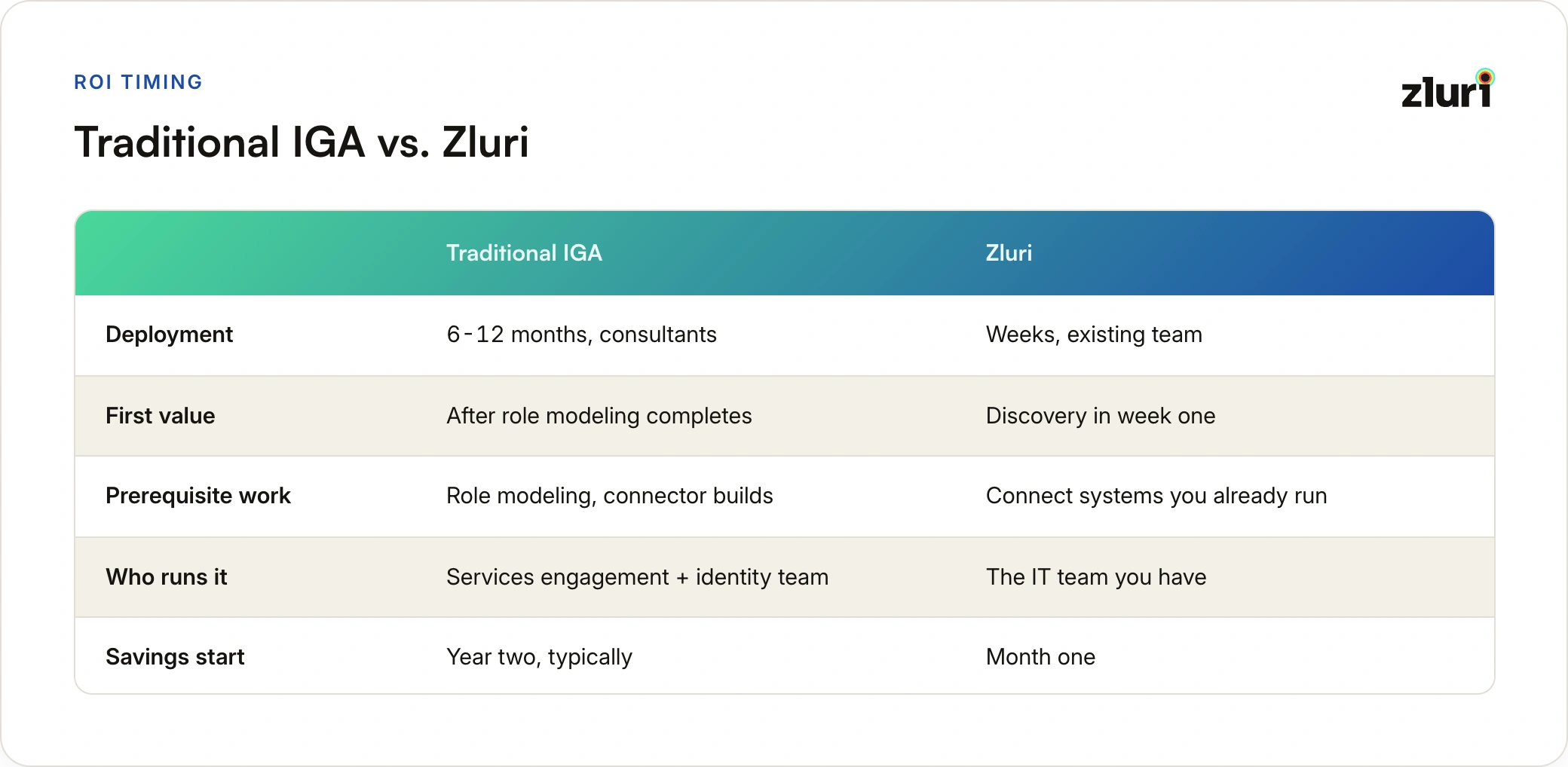
This is also the gap most buyers miss when evaluating IGA software in the first place: two platforms can promise similar end-state capability while requiring wildly different amounts of runway to get there.
The reason isn't magic. Zluri connects to infrastructure a mid-market company already has, its SSO, HRMS, finance systems, and the apps themselves, through 300+ integrations, instead of asking you to rebuild your identity layer first. Discovery runs in the first week. The first renewal alert fires within the first month. The first automated offboarding happens the day the workflow goes live.
The one-line version: Zluri's differentiation on ROI isn't a bigger multiple. It's that the savings start in month one instead of year two, on the team you already have, with no implementation line item on the quote.
Where the ROI Actually Comes From: The Four Sources
"Efficiency gains" is how most vendors describe ROI, and it explains nothing. Zluri's savings come from four specific, measurable sources of value, each working through a different mechanism. Understanding the mechanism is what makes the number believable.
To make this concrete, we'll use a sample run of Zluri's ROI calculator for a 1,000-employee organization, squarely in the mid-market band, with typical inputs: quarterly access reviews, around 30 access tickets a day, and roughly 28 onboardings and 24 offboardings a month. With those inputs, the calculator estimates about $401,000 in annual savings and 3,797 hours returned to the team, roughly a 13x return. Your numbers will differ, which is the point of the calculator. But the sample makes the structure of the savings visible.
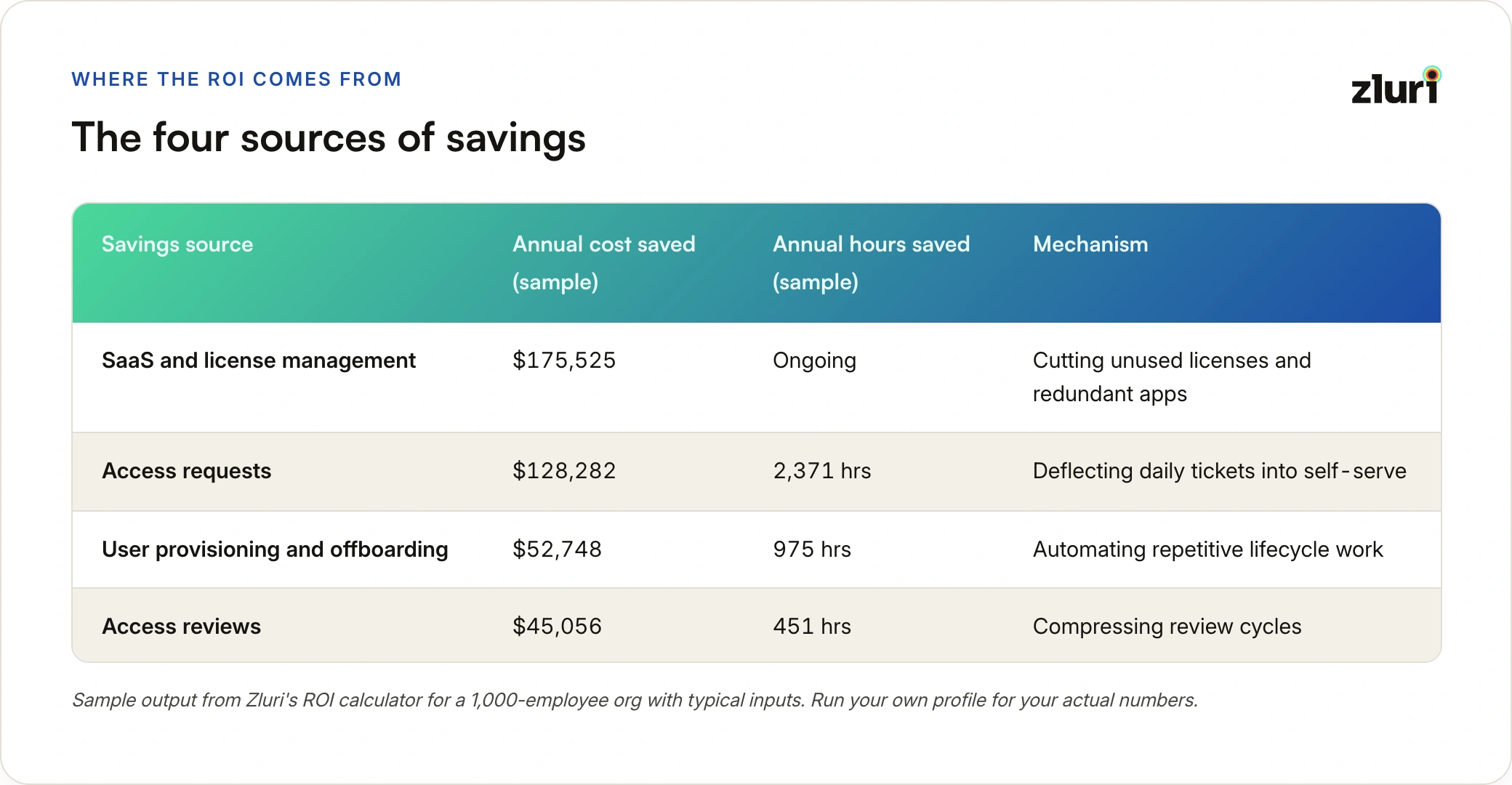
Sample output from Zluri's ROI calculator for a 1,000-employee org with typical inputs. Run your own profile for your actual numbers.
Notice something in that table before we go deeper. The biggest dollar bucket and the biggest time bucket are different rows. License savings produce the largest cash number, which is what pays for the platform. But access requests are where the hours go, which is what changes how your team operates day to day. Both matter, and they matter to different people in your building. Keep that split in mind; we'll come back to it.
Source 1: License Savings
The hard cash that funds everything else.
This is the fastest and most defensible source of ROI because it's not a productivity estimate. It's money you're currently spending that you can stop spending.
The Mechanism: Discovery Plus Usage
Zluri's discovery engine finds every application in the environment through eight discovery methods, your SSO and identity providers, direct API integrations, HRMS, finance and expense systems, MDM, CASBs, directories, and browser extensions, matched against a library of 240,000+ known applications. Then it layers actual usage on top: who has a license, and who has actually used it.
The gap between those two numbers is where the money is.
Where the Waste Hides
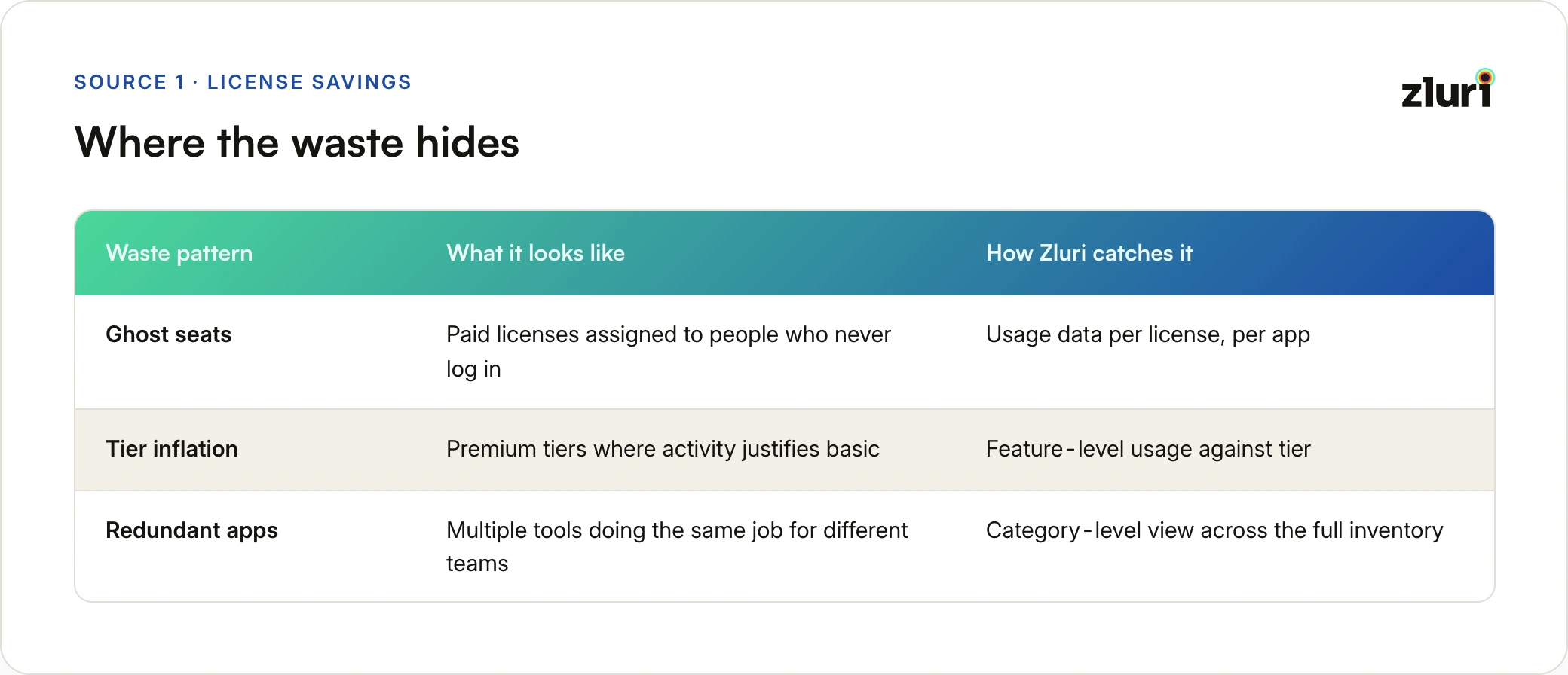
For a mid-market company, this waste is usually a symptom of SaaS sprawl outrunning the team that has to manage it, not carelessness. In the sample run, average savings work out to around $4,800 per app per year across the optimizable portion of the stack, and it comes from three familiar patterns:
Add renewal alerts at 30, 15, and 7 days out, and you stop the most expensive failure mode of all: auto-renewing a contract nobody reviewed. For a mid-market company, one caught auto-renewal on a major contract can cover a meaningful slice of the platform cost by itself.
Why It's Immediate
Discovery doesn't wait for process change. The moment Zluri connects to your SSO and finance systems, the unused-license report exists. Whether you act on it in week two or week six is up to you, but the visibility, and the first round of reclaimable spend, shows up before your first monthly check-in.
Source 2: Access Request Deflection
The biggest time bucket, and the one your team feels daily.
Thirty access tickets a day sounds manageable until you do the math on it:
- Zluri's customer success benchmarks put average ticket resolution at 57 minutes of IT time
- At 30 tickets a day, that's roughly 28 hours of IT work per day going into access grants
- For a mid-market team of five to ten IT staff, that's most of two full-time roles doing nothing but granting access, one ticket at a time, forever
The Mechanism: Move Requests Out of the Queue Entirely
Employees request access through a self-serve catalog. Approval routing happens automatically based on rules you define. The grant itself executes without an IT admin touching the target application. In the sample run, that's worth 2,371 hours a year, the single largest time recovery in the model.
The Honest Framing
This bucket is capacity, not cash. Nobody's payroll shrinks because tickets went away. What changes is what those hours get spent on. Mid-market IT teams drowning in access tickets don't do proactive work: no audit preparation, no policy cleanup, no automation projects. The teams that escape the queue do. That's a real return, it's just a different currency than the license line, and it matters most at exactly the team sizes where every hour is contested.
Source 3: Lifecycle Automation
Small tasks, brutal frequency.
Provisioning a new hire or offboarding a leaver is not individually expensive. What makes it expensive is that it never stops. At 28 onboardings and 24 offboardings a month, with birthright access spanning 35 or so applications per new hire, the volume of small repetitive actions compounds into weeks of work per year.
The Mechanism: Automate Both Directions
On the way in: HR-driven provisioning turns HRMS events directly into access grants, so new hires land in their birthright applications based on role, department, and location without a ticket, and without HR chasing IT the night before a start date. Zluri's zero-touch provisioning model is built around exactly this: HRMS entry to productive employee with no manual step in between.
On the way out: offboarding revokes access across every connected application in one workflow, the day the leaver's HRMS record changes.
Zluri's benchmarks put automated provisioning at around 5 minutes and deprovisioning at around 15, against manual processes that routinely stretch to hours per person across dozens of apps. The sample run values this at 975 hours and roughly $52,700 a year.
The Return That Never Shows Up in the Spreadsheet
There's a second return hiding in this bucket that the calculator prices conservatively: offboarding automation is also risk reduction. Every day an ex-employee's access lingers is exposure, and lingering access from departed users is one of the most consistently cited access-related breach factors. The time savings are the measurable part. The incident you didn't have is the part no spreadsheet captures.
Source 4: Access Review Compression
From person-weeks to person-days.
Access reviews are the clearest before-and-after in the whole model, because there's independent survey data on what manual reviews cost:
What the research shows: across US organizations running access reviews, a fully manual review cycle consumes around 149 person-days, while fully automated reviews complete the same cycle in about 55, a 63% reduction. The same access review statistics show that 41% of teams running manual reviews miss their deadlines outright. For a mid-market company facing SOC 2 or SOX-driven review requirements with a lean team, that's the difference between a process that finishes and one that gets crammed the week before the auditor arrives.
The Mechanism: Compress Every Stage of the Cycle
- Scoping: review campaigns run by application, group, or user, instead of one giant all-of-everything spreadsheet
- Reviewing: reviewers see usage context next to each access record, instead of guessing whether "jsmith, Salesforce, admin" is fine
- Remediating: revocations execute directly from the review, instead of turning into a second project of follow-up tickets
In the sample run, that's worth 451 hours and about $45,000 a year, and it converts a quarterly event teams dread into a process that actually finishes. If you're comparing different ways to automate access reviews before committing to one platform, this is the compression that matters most in the comparison.
What "Immediate" Looks Like on a Calendar
The four sources explain where the money comes from. The calendar explains why the timing claim holds up.
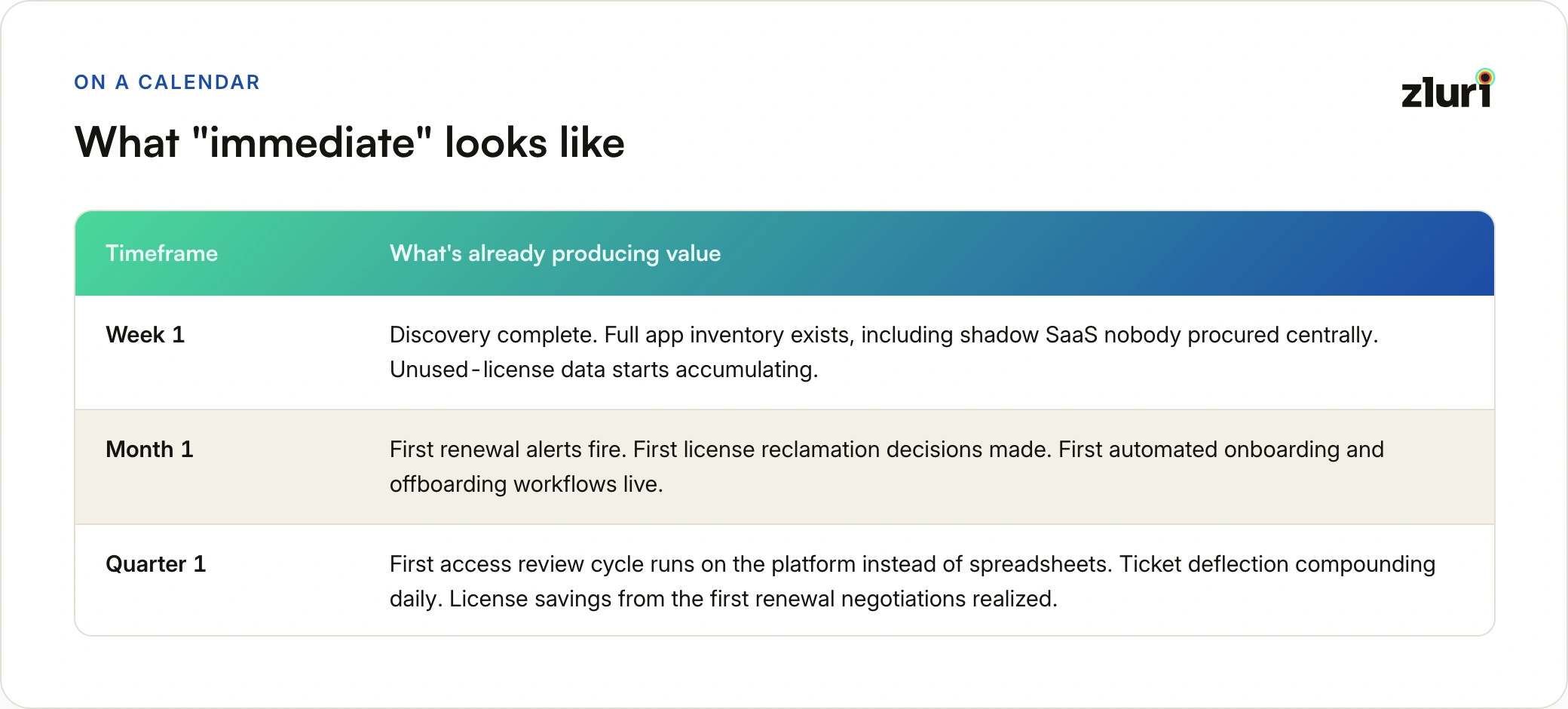
Compare that to the traditional sequence, where quarter one is requirements gathering, quarter two is deployment, and the first dollar of savings is a year-two line item. The difference isn't that Zluri's model assumes bigger savings. It's that the same categories of savings start compounding three or four quarters earlier, on infrastructure you connected rather than rebuilt, run by the team you already have rather than a services engagement.
That earlier start does something subtle to the politics of the project, too. A platform showing reclaimed license spend in month two doesn't need to defend its renewal. A platform still in deployment at month eight does, and in a mid-market budget cycle, that defense usually fails.
Run Your Own Numbers
Every figure in this article came from one sample profile: 1,000 employees, quarterly reviews, a specific ticket volume. Your organization's mix will differ:
- Heavy contractor churn? Lifecycle automation will dominate your model.
- Never audited your SaaS spend? License savings will dwarf everything else.
- Buried in tickets? The hours bucket becomes the headline.
The ROI calculator takes seven inputs you already know, headcount, review cadence, days spent per review, birthright app count, monthly onboardings and offboardings, and daily ticket volume, and shows you your own version of the tables above. It takes about two minutes, and it's a considerably better conversation starter with your finance team than any vendor's sample numbers, ours included.
Frequently Asked Questions
How quickly does Zluri start delivering ROI after deployment?
The first value arrives with discovery, typically within the first week of connecting your SSO, HRMS, and finance systems. License savings opportunities and shadow SaaS visibility exist before any process changes. Automated workflows and renewal alerts typically produce their first measurable savings within the first month.
Is Zluri's ROI model realistic for a mid-market company without a dedicated identity team?
That's the profile it's built for. Deployment runs in weeks on your existing IT team, with no services engagement, because the platform connects to systems you already operate rather than requiring role modeling or custom connector builds first. Organizations of 500 to 5,000 employees with an existing SSO footprint see the fastest time to value.
Where does most of the cost savings come from?
In most profiles, license and SaaS spend optimization is the largest dollar bucket, because it's direct cost elimination rather than productivity gain. Time savings are usually largest in access request handling, since daily ticket volume compounds faster than any other identity task.
Are the time savings real money?
They're real capacity. Hours recovered from tickets, provisioning, and reviews don't reduce payroll, but they change what your existing team can take on: audit readiness, security projects, and automation work that never happens when the team is buried in queues. Finance teams typically treat license savings as hard savings and time savings as capacity gains, and it's worth presenting them that way.
Does the ROI depend on replacing our existing identity stack?
No. Zluri connects to the identity infrastructure you already run, your SSO or IdP, HRMS, finance systems, and the applications themselves, rather than replacing it. That's also why the returns start early: there's no rip-and-replace phase to get through first.
How accurate is the ROI calculator for my organization?
The calculator uses your actual inputs, headcount, review cadence, ticket volume, and lifecycle volume, combined with benchmarks from Zluri customer success data. Treat the output as a directional estimate for building your business case, then validate the license-savings portion against your own SaaS spend data once discovery runs, since that's the component you can verify directly within weeks.