


Non-human identities now outnumber human users 40 to 1. Service accounts sit at the center of that gap: autonomous, persistent, over-privileged, and almost never reviewed.
Service accounts don't appear in your HR system. They are part of the broader category of non-human identities governed by NHI governance programs that most enterprises have yet to build.
They don't trigger onboarding workflows. They don't get offboarded when a project ends or a developer moves on. They just keep running, authenticating on demand, accessing production databases, executing integrations, and operating at machine speed without any humans in the loop.
That's by design. Service accounts exist precisely because some operations can't wait for a human to log in. They power the automations, pipelines, and integrations that keep enterprise systems running.
The problem is not what service accounts do. The problem is what happens to them afterward, and what most organizations don't know about them.
In a typical enterprise today, non-human identities outnumber human users by roughly 40 to 1. Service accounts make up a significant portion of that number. Research consistently finds that 97% of them carry excessive privileges. Most have no assigned owner. Many were created for a specific purpose that no longer exists. And unlike human accounts, they almost never go through a formal access review.
The average dwell time after a non-human identity credential is compromised is over 200 days — more than three times the equivalent figure for compromised human accounts. That gap exists because no one is watching.
This article explains what service accounts are, how they work, what makes them different from user accounts, and why the standard IGA program (built around human lifecycle events)leaves them entirely ungoverned.
What Is a Service Account?
A service account is a non-human privileged account used by an application, automated process, or system to authenticate and interact with other systems — without any human actively logging in.
Where a user account is tied to an individual person, a service account is tied to a workload. A scheduled database backup job runs under a service account. An ERP-to-data warehouse integration authenticates via a service account. A monitoring agent, a CI/CD pipeline, a SaaS-to-SaaS connector: all of them need credentials that aren't tied to any specific employee. Service accounts are those credentials.
They are endowed with specific permissions tailored to the task they perform, or at least, that's the intention. In practice, service accounts are frequently created with broad privileges at the start of a project to avoid debugging friction, and are rarely right-sized afterward.
Service accounts predate cloud computing. In Windows Server environments, they've existed for decades, running IIS, Exchange, SQL Server, and other infrastructure services under controlled credentials. In modern SaaS and cloud environments, they've expanded into a broader category: non-human identities. Service accounts are one type within that family.
Types of Service Accounts
Service accounts take different forms depending on the environment they operate in. Understanding the taxonomy matters because the governance challenges differ by type.
Windows Service Accounts
The original form. Windows service accounts run background services under a defined security context, determining what the service can access locally and across the network. The most common types are Domain User accounts (used for services requiring network access), Local Service accounts (minimal privileges, local machine only), Network Service accounts (local machine plus authenticated network access), and Local System accounts (the most privileged, with full local control and network access as the machine).
Mission-critical applications (Active Directory, Exchange, SQL Server, SharePoint)run under Windows service accounts. These are the accounts that PAM tools like CyberArk were originally built to protect.
Linux and Unix Service Accounts
In Linux and Unix environments, service accounts typically appear as system users without interactive login shells. Web servers, database processes, application daemons: all run under dedicated service identities with restricted permissions. The principle of least privilege is easier to enforce here architecturally, but ownership and lifecycle management remain gaps.
Cloud Service Accounts and Service Principals
Cloud platforms have their own equivalents. In Google Cloud Platform, a "service account" is the native term. In Azure, the equivalent is a "service principal" or "managed identity." In AWS, it's an "IAM role" or "IAM user" used programmatically.
These identities allow workloads — virtual machines, Lambda functions, containers, Kubernetes pods — to authenticate to cloud services without storing static credentials in code. They are designed to replace hardcoded passwords, but they still carry entitlements that can be excessive, and they still require governance.
SaaS-Layer Service Accounts
This is the category most identity programs miss entirely. Across the 100+ SaaS applications a typical enterprise runs, service accounts take the form of integration users, API-enabled accounts, automation users, and connected service identities. A Salesforce integration user with admin-level API access. A Snowflake keypair user running data pipeline queries. A Jira service user created for an external vendor integration.
These accounts don't live in Active Directory. They're not visible to cloud IAM tools. They exist inside SaaS applications, often with no owner, no creation audit trail, and no rotation history. They are the fastest-growing and least-governed segment of the service account population.
Application Service Accounts
Application-level service accounts are created specifically for software-to-software communication. A CRM integrating with a marketing automation platform. An ERP connecting to a payroll system. A ticketing system syncing with a monitoring platform. Each integration typically requires a dedicated account on one or both sides.
These accounts are created by developers or admins at the time of integration setup and then forgotten. When the integration is retired, the accounts often persist.
How Service Accounts Work
Every service account consists of three elements:
The consumer: the application, script, or workload acting as the identity. This is what's actually making the authentication request.
The secret: the credential that proves the consumer's identity. For traditional service accounts, this is a username and password. For cloud service accounts, it might be an API key, a cryptographic token, a certificate, or an OAuth token.
The entitlements: the permissions and access rights the service account holds. What it can read, write, modify, delete, and execute across the systems it's connected to.
This structure matters for understanding breach risk. When an attacker compromises a service account, they acquire all three elements simultaneously. They operate as the original consumer, with the consumer's credentials, and the consumer's full entitlements. There is no behavioral anomaly at the authentication layer because the authentication itself is valid.
In practice, service accounts authenticate by presenting their credentials to a target system, which validates the credentials against its directory or IAM layer and grants access according to the configured entitlements. This happens without human interaction, at machine speed, across thousands of API calls per day in active environments.
Service Accounts vs User Accounts: The Governance Gap
Understanding the difference between service accounts and user accounts isn't just definitional. It explains exactly why standard identity governance programs fail to cover machine identities.
Origin and lifecycle
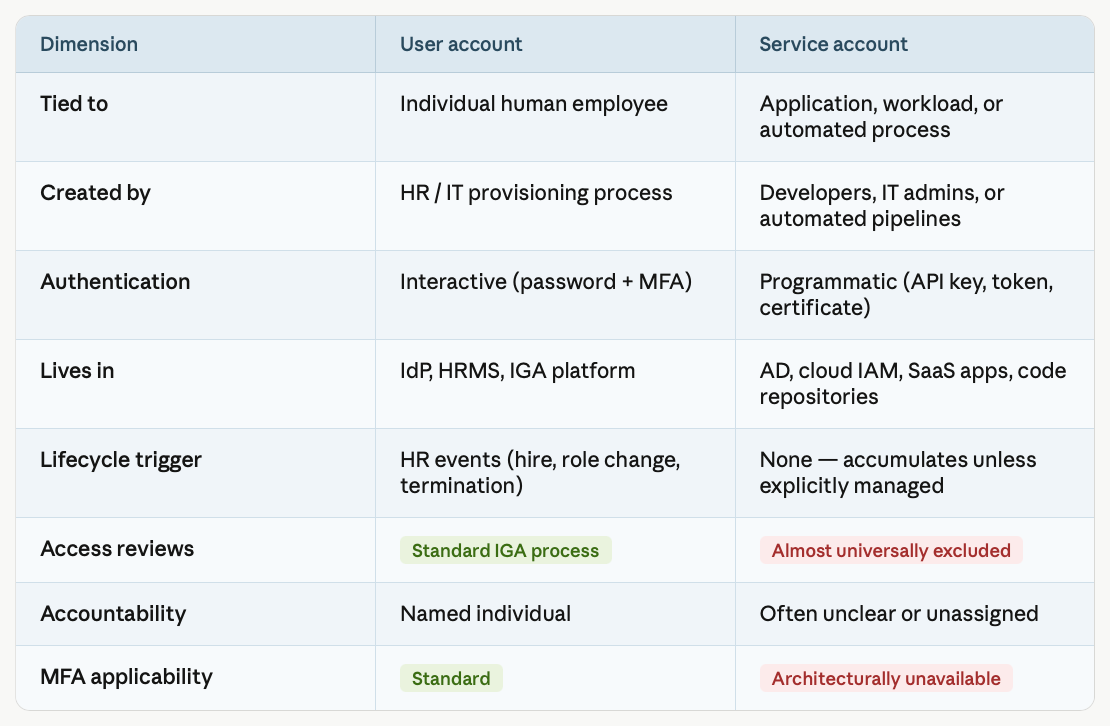
User accounts are born from HR events. A new employee starts; an account is provisioned. They change roles; access is modified. They leave; the account is deprovisioned. This joiner-mover-leaver (JML) model is the foundation of every IGA program.
Service accounts have no HR event. They're created by developers, IT admins, or automated pipelines, often without formal documentation, mandatory ownership assignment, or lifecycle controls. There is no equivalent of the "employee terminates" event to trigger deprovisioning. When the project ends or the developer moves teams, the account persists.
Authentication
User accounts authenticate interactively, usually with a username, password, and MFA. Service accounts authenticate programmatically, with API keys, tokens, certificates, or credentials stored in a vault or configuration file. MFA cannot be applied to a service account because there's no human to receive the second factor.
This means one of the primary security controls organizations rely on for human identity protection is architecturally unavailable for service accounts.
Visibility
User accounts appear in your IdP, your HRMS, and your IGA platform. They have a discoverable, centrally managed presence. Service accounts are scattered across Active Directory, cloud IAM systems, individual SaaS applications, code repositories, and configuration files. Many were never registered with IT at all.
Access reviews
Mature IGA programs run periodic access certification campaigns for user accounts. A reviewer confirms that each user's access is still appropriate given their current role. Service accounts are almost universally excluded from these reviews. This happens either because the IGA platform doesn't have visibility into them, because there's no defined owner to attest to them, or because the review workflow assumes a human identity model that doesn't apply to machines.
Accountability
When a human account takes an action, the audit trail identifies a person. When a service account takes an action, the audit trail identifies the account name, which may tell you the application but not who is ultimately responsible for it. Ownership of service accounts is routinely unclear, especially for accounts that have outlived their original creators.
This table summarizes the key distinctions:
Why Service Accounts Are the Fastest-Growing Identity Risk
The scale of the problem has changed faster than most security programs have adapted.
Non-human identities (of which service accounts are the most prevalent type)now outnumber human identities by 40 to 1 in the typical enterprise. Some organizations with advanced automation have ratios approaching 500 to 1. The NHI population grew 44% year-over-year between 2024 and 2025.
This growth is driven by three compounding forces.
SaaS proliferation. The average large enterprise now manages 130+ SaaS applications, each with its own identity model and access layer. Every integration between those applications generates service identities on both sides. At 100 apps with multiple integration points each, the service account population from SaaS alone easily exceeds the human headcount.
Automation adoption. CI/CD pipelines, RPA workflows, scheduled jobs, monitoring agents, and data pipelines all run under service credentials. Every new automation deployment adds accounts. None of them come with built-in governance.
AI agent deployment. Every AI agent a developer deploys this year creates at least one new credential. Those credentials authenticate to APIs, databases, and SaaS systems with entitlements their creators defined in a moment of convenience. They won't show up in your IdP. Most will never be reviewed.
Against this growth, the security controls available for service accounts are materially weaker than those for human accounts. No MFA. No behavioral baseline tied to a person. No HR event to trigger deprovisioning. No standard review process. The result is 97% of non-human identities carrying excessive privileges with no governance in place.
The Five Governance Gaps Service Accounts Create
Most organizations understand that service accounts are a risk. Far fewer have a systematic program to address it. The gaps cluster into five categories.
The discovery gap. Before you can govern a service account, you have to know it exists. Most organizations can't answer basic questions: how many service accounts do they have, where do they live, and what do they have access to? Service accounts are spread across Active Directory, cloud IAMs, individual SaaS applications, code repositories, and configuration files, with no single system of record. Accounts that IT doesn't know about can't be protected.
The ownership gap. Service accounts need a human accountable for them. In practice, most don't have one. The developer who created a service account three years ago has since changed teams or left the organization. The account still has production access. Nobody can tell you why it was created, whether it's still needed, or whether its permissions are appropriate. Orphaned accounts are the default state, not the exception.
The lifecycle gap. User accounts are provisioned, modified, and deprovisioned according to HR events. Service accounts have no equivalent lifecycle. They accumulate. Credentials are set once and rarely rotated. Accounts created for a proof-of-concept deployment persist indefinitely. There is no formal decommission process.
The access review gap. The standard IGA access review assumes a human identity: a named person whose manager or application owner can confirm their access is appropriate. Service accounts don't fit this model. They have no manager, they authenticate non-interactively, and the review requires understanding what the account's application actually does and needs. Most organizations exclude service accounts from access certification entirely, or handle them with a manual spreadsheet that's immediately out of date.
The secrets and credential gap. Service account credentials (API keys, tokens, certificates)are set once and forgotten. Rotation is manual, infrequent, or nonexistent. Credentials may exist in code repositories, configuration files, and developer workstations in addition to wherever they were originally registered. A compromised credential can grant access for years before detection.
Together, these gaps produce the exact situation Narvar faced before deploying Zluri: external and service accounts that remained active long after projects closed, with no automated process to identify or clean them up.
The Security Risk: What Happens When Service Accounts Go Ungoverned
The risk is not theoretical. Service accounts and machine credentials are now involved in the majority of significant breaches.
The pattern is consistent. The Snowflake breach that affected approximately 165 enterprise customers, including AT&T, Ticketmaster, and Santander. The breach started with long-lived automation credentials harvested from earlier infostealer infections. The accounts lacked MFA and were designed to persist indefinitely. There was no review process that would have caught them.
The Internet Archive breach affecting 31 million user accounts started with authentication tokens in a GitLab repository that had been accessible for nearly two years without rotation or review.
The BeyondTrust breach that reached the US Treasury started with a single compromised API key in a Remote Support SaaS platform.
In each case, the attacker didn't need to defeat MFA or exploit a zero-day. They needed a valid credential with persistent access and no active governance watching it. Service accounts provided exactly that.
The average dwell time for a compromised non-human identity is over 200 days. That's not because these breaches are harder to detect in principle. It's because most organizations have no monitoring, no review cadence, and no anomaly detection specific to service account behavior. The attacker operates within normal-looking authentication patterns for months before anyone notices.
What Service Account Governance Actually Requires
Credential security is necessary but not sufficient. Effective service account governance addresses the access layer underneath. Rotating passwords and vaulting secrets reduces one dimension of risk but doesn't address the access governance problem: which service accounts exist, what they're permitted to do, whether those permissions are still appropriate, and who is accountable for them.
Effective governance of service accounts — covered in depth in our guide to best practices for service accounts — requires four things working together. For a comparison of tools that implement these controls, see our guide to service account management tools.
Complete visibility. You need an accurate, continuously updated inventory of every service account across your environment: Active Directory, cloud IAM layers, and the SaaS application layer that most tools miss entirely. This inventory must include metadata: who owns the account, when it was last used, what systems it accesses, and what level of privilege it holds.
Ownership and accountability. Every service account needs a named human owner who can attest to its continued necessity and appropriate access. This requires not just assigning owners at creation but tracking ownership through personnel changes and enforcing attestation on a schedule.
Access reviews. Service accounts should go through the same periodic access certification process as human identities. A reviewer (the account's owner, or the owner of the application it supports) should confirm at a defined interval that the account still exists for a valid purpose, that its permissions align with what it actually needs, and that no excessive privileges have accumulated over time.
Lifecycle automation. Dormant accounts should be flagged and cleaned up automatically. Credentials should be rotated on a defined schedule. Decommission workflows should trigger when the associated application or project is retired. These processes can't be manual at scale. They need to be automated and enforced by policy.
How Zluri Governs Service Accounts
Zluri is an identity security platform built to govern every identity (human, service account, API token, certificate, and AI agent)across SaaS, cloud, and on-premises environments from a single control plane.
The foundation is visibility. Zluri's IVIP (Identity Visibility and Intelligence Platform) uses 8 discovery methods, covering IDPs and SSO, HRMS, MDMs, SaaS and cloud application integrations, CASBs, finance systems, directories, and optional desktop agents and browser extensions, to surface every identity in your environment, including service accounts that never appear in your IdP or HR system.
For each discovered service account, Zluri builds a 360-degree identity profile: the account type, its owner (inferred from HR and application metadata where not explicitly assigned), its privilege level, its last activity, the systems it accesses, its credential rotation age, and a risk score generated by IRIS, Zluri's Identity Risk Intelligence System.
IRIS operates as the intelligence layer beneath everything Zluri does. It ingests raw identity signals, normalizes and deduplicates records across sources, builds a relationship graph connecting NHIs to their permissions and the resources they reach, and surfaces risk-scored findings with prioritized recommended actions. When a service account has been dormant for 90 days and still holds admin-level access to a production system, IRIS surfaces it as a high-priority finding, without anyone having to run a manual query.
On top of this visibility layer, Zluri runs the same access review and governance workflows that its human identity program uses, extended to cover service accounts. Access certification campaigns can include non-human identities. Owners receive attestation requests. Dormant accounts are flagged. Revocation workflows execute automatically through Zluri Actions when a review fails attestation.
The SoD (Segregation of Duties) engine checks for toxic access combinations involving service accounts alongside human identities, identifying cases where a single account or a connected set of accounts can perform both sides of a sensitive operation without detection.
This is what governance parity looks like: service accounts reviewed at the same rigor as employees, within the same platform, generating the same audit evidence.
Narvar, a US-based technology company, faced exactly this challenge: external and service accounts in tools like Monday.com and Confluence remained active long after projects ended. After deploying Zluri, their policy engine auto-suspends inactive accounts after 90 days with a full audit trail. The result: 150+ hours saved annually in audits and $16K in operational savings.
The access reviews that used to consume significant IT effort now complete in a fraction of the time. Access that was previously invisible is now governed, evidenced, and reportable.
Frequently Asked Questions
What is a service account in simple terms?
A service account is an account that an application or automated process uses to log in to other systems — rather than a human user logging in manually. Think of it as the application's identity credential for making system-to-system requests.
How is a service account different from a regular user account?
User accounts are tied to individual human employees and managed through HR processes and identity governance tools. Service accounts are tied to applications and automated workloads. They authenticate programmatically, have no HR lifecycle events to govern them, cannot use MFA, and are often excluded from standard access review processes, which is what makes them a significant security gap.
Why are service accounts a security risk?
Service accounts carry persistent, often excessive privileges. They can't use MFA. They're rarely reviewed or rotated. They accumulate without decommission processes. When compromised, attackers can operate with full account entitlements for months before detection, because no one is monitoring service account behavior the way they monitor human user behavior.
What is the difference between a service account and an API key?
Both are types of non-human identity credentials, but they operate differently. A service account is a full identity object in a directory or system, with a name, privilege level, and lifecycle. An API key is a static credential (a string) used to authenticate API requests. Service accounts often use API keys or tokens as their authentication mechanism, but they're not the same thing. Both require governance.
How many service accounts does a typical enterprise have?
Far more than most IT teams realize. In the typical enterprise, non-human identities outnumber human users by 40 to 1. A 1,000-person organization might have 40,000 or more non-human credentials in operation: most undocumented, many unowned, and almost none subject to formal access reviews.
Can service accounts use multi-factor authentication?
Generally no. MFA requires a human to receive and approve a second-factor challenge. Because service accounts authenticate programmatically without human interaction, MFA can't be applied in the standard sense. This is why governance (access reviews, least privilege enforcement, rotation, and monitoring) is the primary security control for service accounts rather than authentication hardening.
What is service account governance?
Service account governance is the practice of applying the same visibility, lifecycle management, access review, and audit rigor to service accounts that mature identity programs apply to human user accounts. It covers discovery (knowing what accounts exist), ownership (assigning accountability), access reviews (periodically confirming access is appropriate), lifecycle management (creating with controls, decommissioning when no longer needed), and compliance reporting (generating audit evidence).
How does Zluri help govern service accounts?
Zluri discovers all service accounts across SaaS, cloud, and on-premises environments using 8 discovery methods, including the SaaS application layer that most identity tools miss. It builds a complete inventory with ownership, privilege levels, and risk scores. It extends its access review engine to cover service accounts alongside human identities, so the same certification workflow, attestation process, and auto-remediation logic applies. And it generates audit-ready reports covering both human and non-human identity access.
.webp)


.svg)











