.png)




Every access request resolves one of three ways: approved instantly, rejected instantly, or sent to a person. In a generic ITSM ticket, that outcome depends on whoever happens to pick up the queue. In a self-serve app catalog, it's decided by a rule, evaluated the same way every time.
Access requests can feel like they resolve unpredictably from the outside, one person gets instant access, another person requesting the same tool gets sent for review, a third gets an immediate no.
None of that is random. It's the output of a rule engine working through a defined sequence, checking a specific combination of factors, and landing on one of three actions. This is how that mechanism works in general, what actually goes into the decision, and further down, exactly how it's built in Zluri.
The Building Blocks: Trigger, Condition, Action
Every automation rule is built from the same three parts:
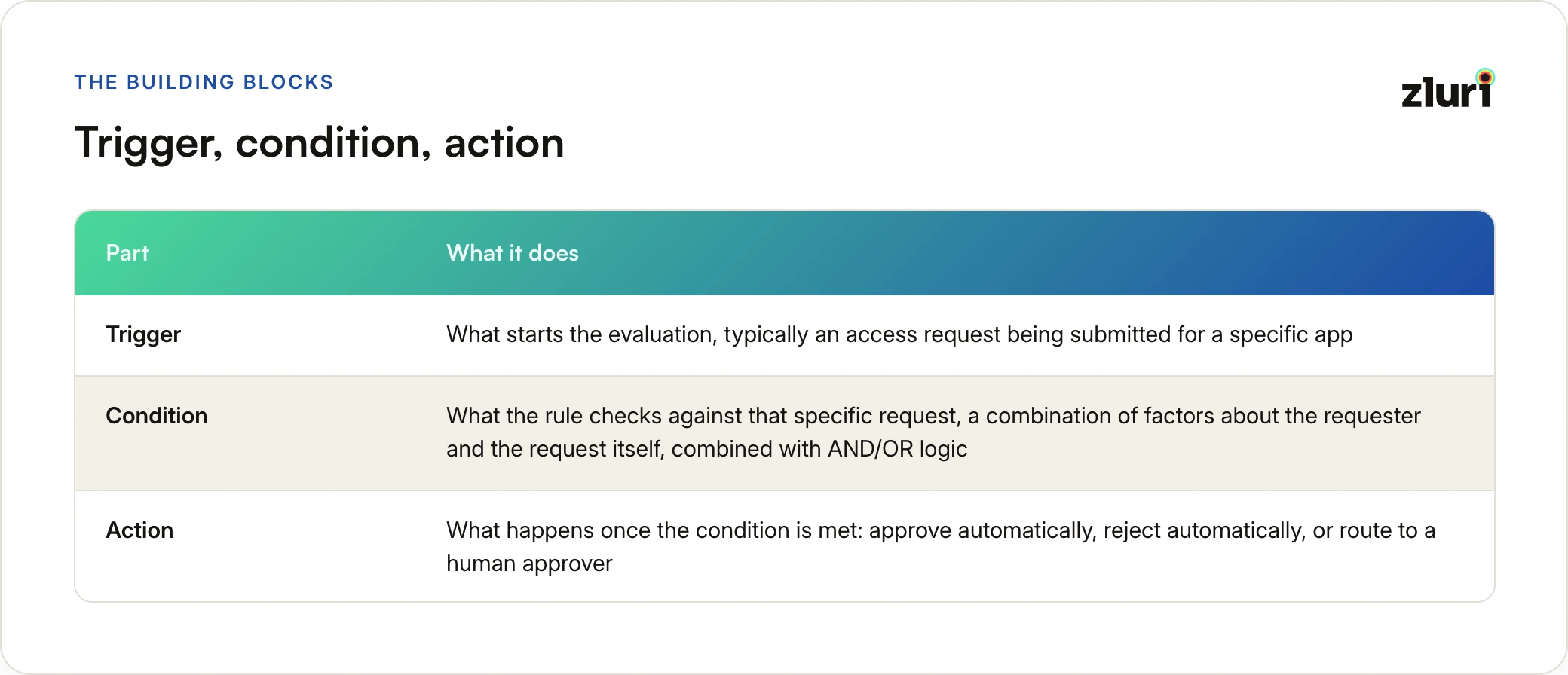
- Trigger: what starts the evaluation, typically an access request being submitted for a specific app
- Condition: what the rule checks against that specific request, a combination of factors about the requester and the request itself, combined with AND/OR logic
- Action: what happens once the condition is met: approve automatically, reject automatically, or route to a human approver
Nothing resolves until a request actually matches a rule's conditions. A request that doesn't match any configured rule simply doesn't get auto-processed, which is itself a meaningful outcome, it falls through to whatever default handling is in place rather than silently resolving.
Two Levels of Rules: Application-Specific and General
Rules exist at two levels, and the level matters as much as the conditions inside them:
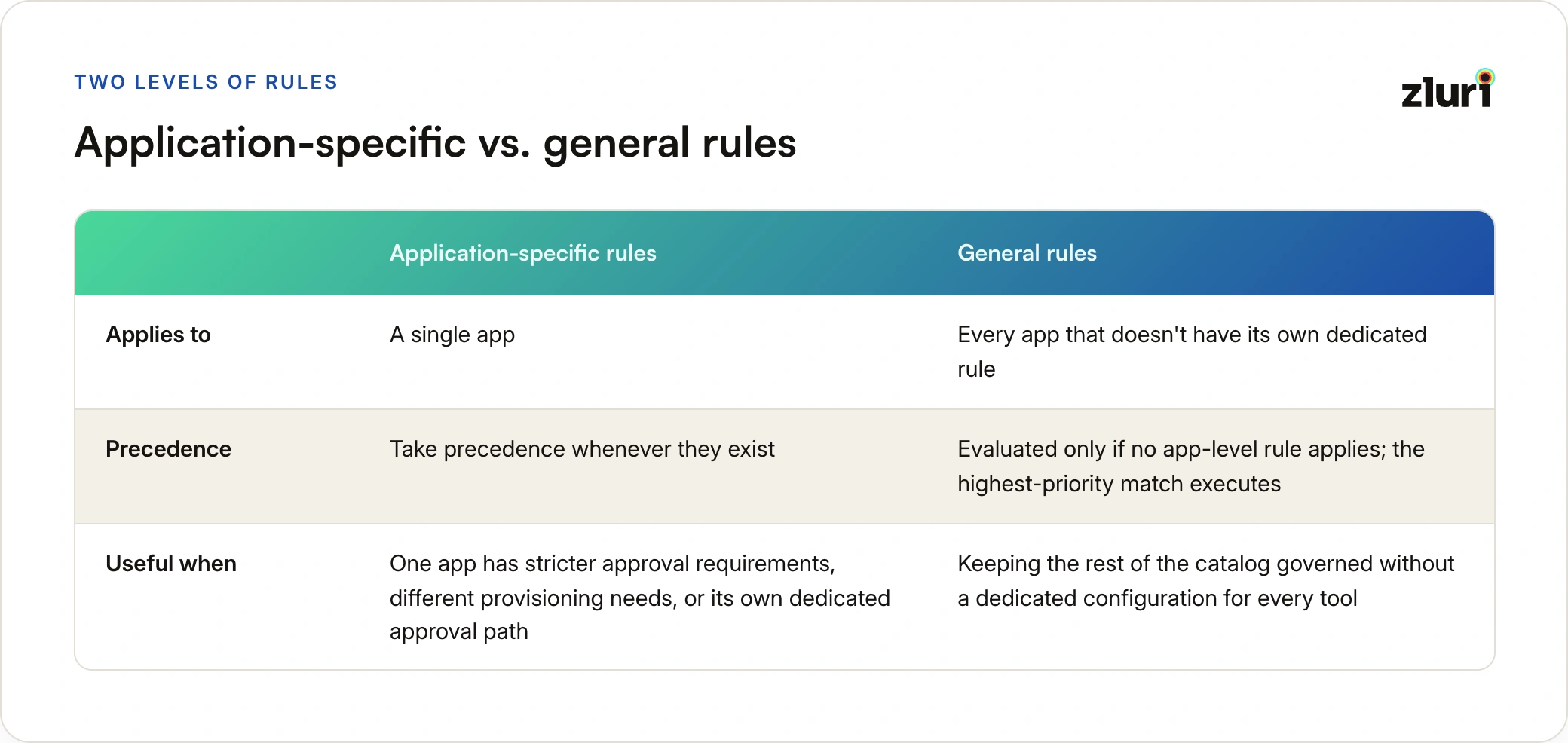
- Application-specific rules apply to a single app and take precedence whenever they exist, useful when one app has stricter approval requirements, different provisioning needs, or its own dedicated approval path that shouldn't be governed by a catalog-wide default
- General rules apply across every app that doesn't have its own dedicated rule, acting as the fallback that keeps the rest of the catalog governed without needing a dedicated configuration for every single tool
How the System Decides Which Rule Applies
When a request comes in, the evaluation follows a fixed sequence. The system checks for an application-specific rule first. If one exists and matches, it runs, full stop. If no app-level rule applies, general rules get evaluated instead, and if more than one general rule matches the request, the highest-priority rule, the one positioned topmost, is the one that executes. Only one rule ever runs per request. There's no stacking, no partial execution, no combining outcomes from multiple matching rules.
That last point is what keeps the system predictable. A request either matches the specific rule built for its app, or it falls to the general rule ranked highest among whatever else matches, and whichever one wins is the only one that acts.
The Three Ways a Rule Can Resolve a Request
Once a rule matches, its configured action determines what happens next, and each of the three options works differently.
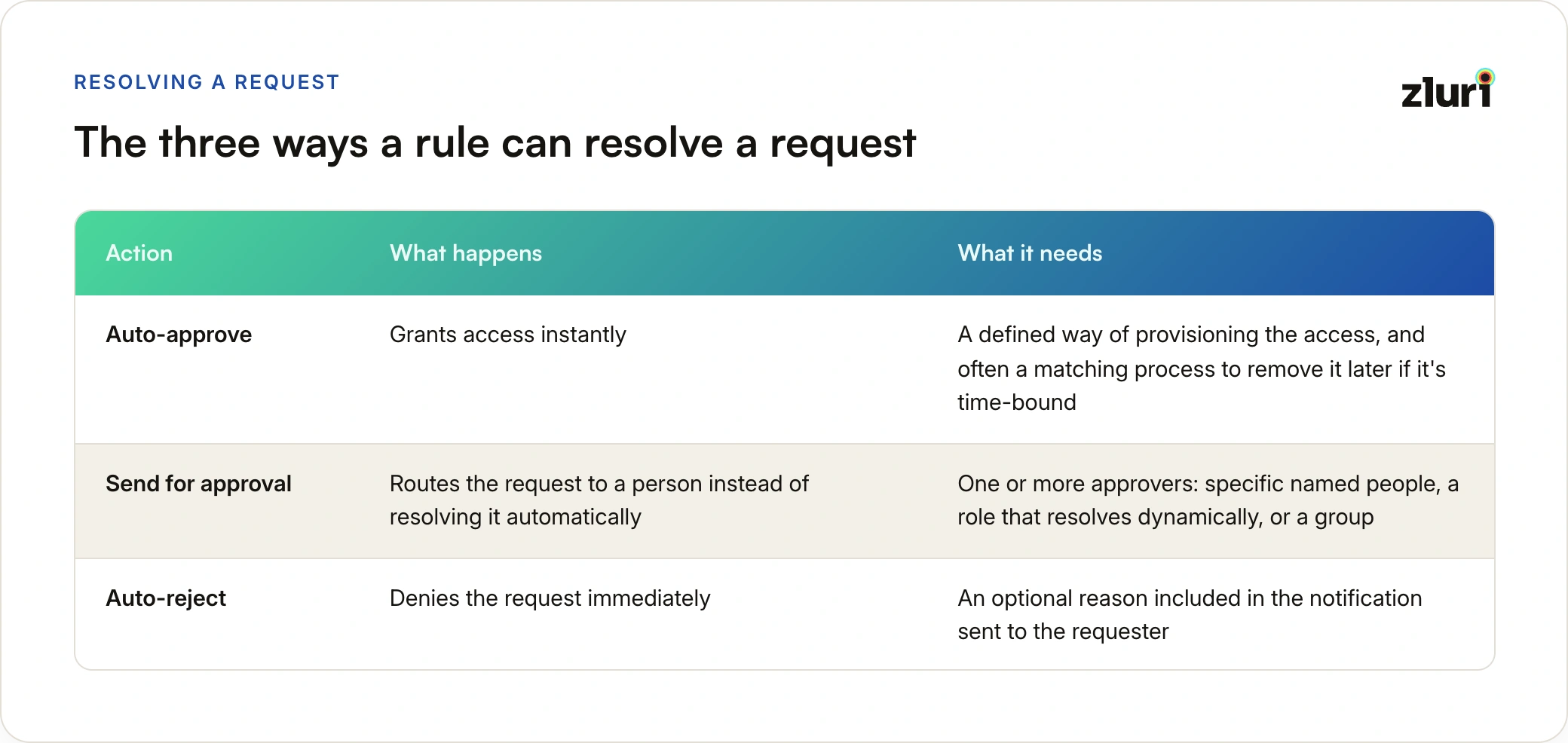
Auto-approve grants access instantly. For that to actually mean something, it has to be paired with a defined way of provisioning the access, whatever automated process the platform uses to turn an approval into working access, and often a matching process to remove that access later if it's meant to be time-bound.
Send for approval routes the request to a person instead of resolving it automatically. This is the right action for anything requiring judgment, sensitive roles, high-privilege access, apps that need a documented business justification. It means assigning one or more approvers, specific named people, a role that resolves dynamically depending on who's asking (like an app owner or manager), or a group, and once someone approves it, the system can trigger provisioning automatically or hand it off as a manual task.
Auto-reject denies the request immediately. Configuring it is the simplest of the three, generally just an optional reason that gets included in the notification sent to the requester, so the denial isn't a silent dead end.
The Factors That Go Into Every Condition
None of this resolves anything until a condition is actually built, and a condition isn't checking one thing about the app. It's evaluating a combination of factors about the requester and the request itself: department, which checks whether the request fits someone's normal scope of work, job title, which adds seniority or function-specific context beyond department alone, location, which picks up on patterns tied to where the request is coming from, requestor type, which distinguishes someone requesting for themselves from someone requesting on behalf of another person, app role, which separates a viewer-level request from an admin-level one on the same application, license type, which captures which tier of the app is involved, access duration, which flags whether the request is temporary or open-ended, compliance tags, which carry regulatory or policy flags attached to the app or access level, and risk score, a computed indicator of how sensitive the specific request is.
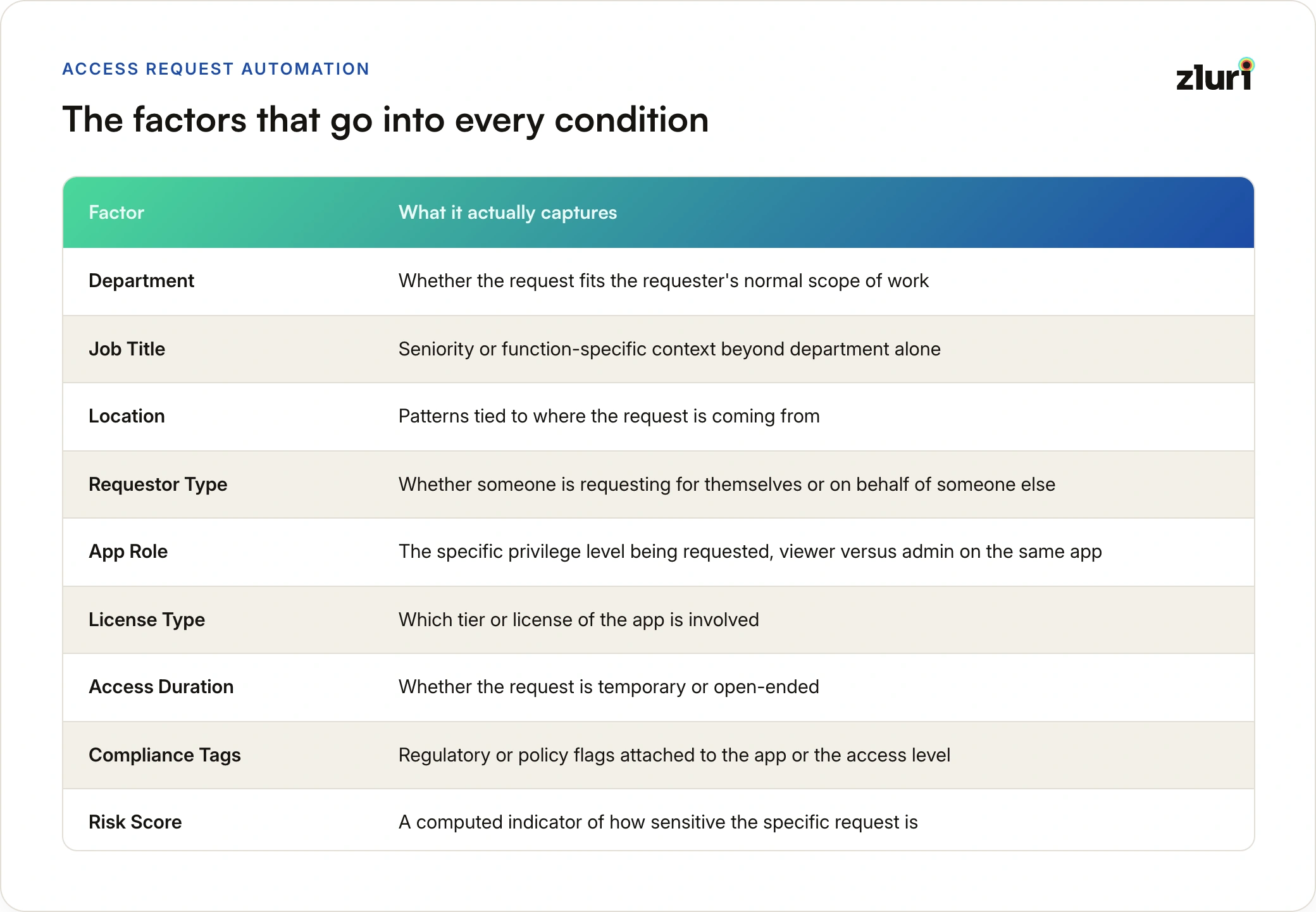
App role tends to be the factor with the most leverage in practice. A request for viewer access and a request for admin access on the exact same application are, for policy purposes, almost different requests entirely, and treating them as the same thing is how an auto-approve rule ends up granting more than it meant to.
That's also why access considered high-risk can still get auto-approved, and access considered low-risk can still get auto-rejected. An IT admin requesting elevated access during an active incident satisfies a role-and-context condition that a review step would otherwise exist to check. A request for a genuinely low-risk tool can still get auto-rejected if the requesting department or profile doesn't meet a defined condition, regardless of how harmless the app itself looks.
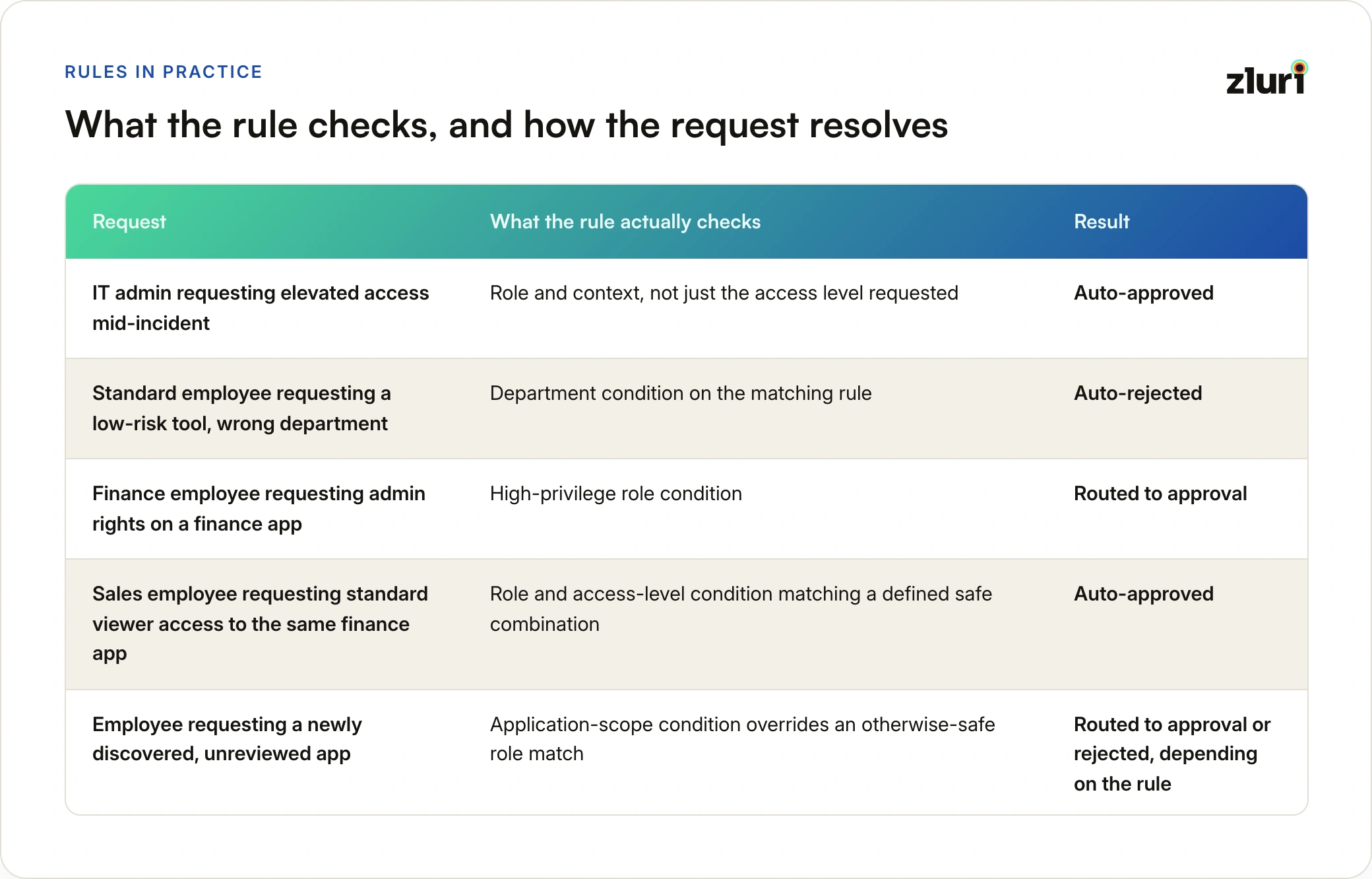
That pattern shows up across a range of requests. An IT admin requesting elevated access during an active incident gets auto-approved, since the rule is checking role and context rather than just the access level involved. A standard employee requesting a low-risk tool from the wrong department gets auto-rejected on a department condition. A finance employee requesting admin rights on a finance app gets routed to approval because of the high-privilege role condition. A sales employee requesting standard viewer access to that same finance app gets auto-approved, since the role and access-level combination matches a defined safe pattern. And an employee requesting a newly discovered, unreviewed app gets routed to approval or rejected outright, because the application-scope condition overrides what would otherwise look like a safe role match.
How Factors Combine: AND/OR Logic
None of these factors work in isolation, they're combined using AND/OR logic to build a condition specific enough to actually mean something. "Auto-approve if Department is Engineering" is a broad, blunt rule. "Auto-approve if Department is Engineering AND App Role is Viewer" is a precise one, it lets the same team get fast access to low-privilege requests while anything asking for more still gets a second look.
A single factor tells you something about the requester. A combination of factors tells you something about this specific request. Automatic decisions need the second kind, not the first.
OR logic works the same way in reverse, useful for combining multiple acceptable paths into one rule instead of building a separate rule for each, auto-approve if Department is Engineering OR Product, AND App Role is Viewer, covering two teams with one rule rather than duplicating the same logic twice. This is the same idea behind attribute-based access control, applied to access requests.
New vs Existing Applications: A Factor at the Rule Level
There's a factor that applies above the level of any individual request: whether a general rule is scoped to new applications only or existing applications only. A newly discovered app, one that hasn't gone through any prior review, is a fundamentally different case than a long-standing, already-managed app, even if every other condition looks identical. Scoping a rule to one or the other is how that distinction gets enforced without needing to write it into every individual condition.
Why More Factors Isn't Automatically Better
It's tempting to assume that adding every available factor to a rule makes it safer. It mostly just makes it narrower. A rule with too many required conditions ends up matching almost nothing, which means most requests fall through to a broader fallback rule or to manual review anyway, defeating the point of automating the easy cases in the first place. The right number of factors is whatever's needed to distinguish a genuinely safe combination from everything else, not the maximum number available.
Managing Rules Over Time
Rules aren't static once saved. A rule can typically be turned on or off without deleting it, disabled rules stay stored but stop being evaluated, without affecting any request that already resolved under them. Rules can also be reordered to change which general rule wins when more than one matches, and removed outright when no longer needed, which stops them from acting on future requests without touching anything they already processed.
How This Works in Zluri
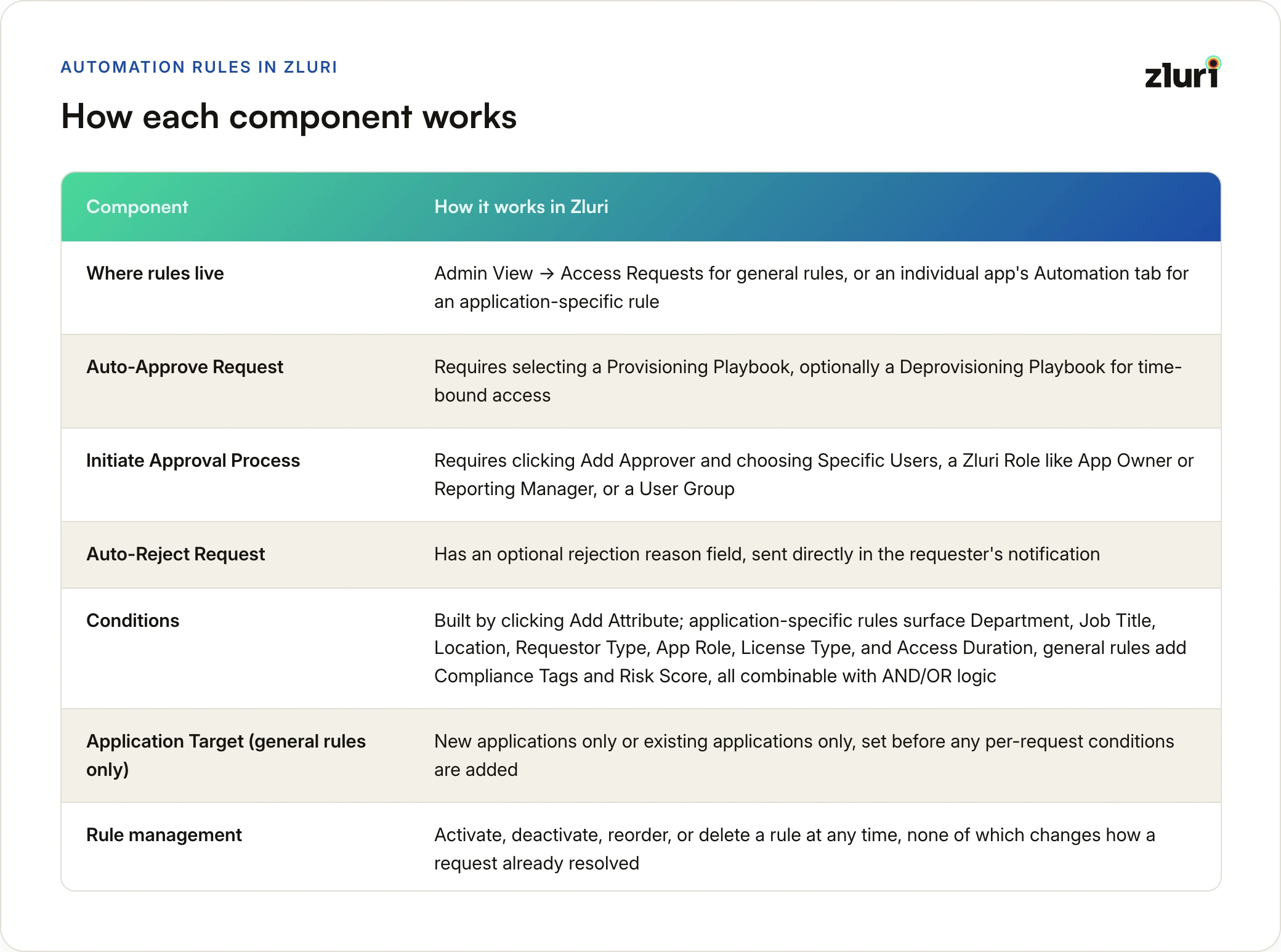
The same structure maps directly onto Zluri's Automation Rules, part of its access request management workflow and the wider Access Management module. General rules live under Admin View → Access Requests, while an application-specific rule sits under that app's own Automation tab. Auto-Approve Request requires selecting a Provisioning Playbook, with an optional Deprovisioning Playbook for time-bound access (for planned privileged access specifically, see temporary elevated access). Initiate Approval Process requires clicking Add Approver and choosing Specific Users, a Zluri Role like App Owner or Reporting Manager, or a User Group. Auto-Reject Request has an optional rejection reason field that's sent directly in the requester's notification. Conditions themselves are built by clicking Add Attribute, application-specific rules surface Department, Job Title, Location, Requestor Type, App Role, License Type, and Access Duration, while general rules add Compliance Tags and Risk Score, all combinable with AND/OR logic. General rules also carry an Application Target setting, new applications only or existing applications only, set before any per-request conditions are added. A rule itself can be activated, deactivated, reordered, or deleted at any time, none of which changes how a request already resolved.
Related reading across the access request cluster:
- Multiple approvers: what happens when a request is routed to more than one possible approver, and when high-risk requests need approval steps instead, in multiple approvers and OR logic
- Rejections: what a denial should look like once it's more than a dead end, in rejected requests as policy records
- The ticket baseline: what the manual alternative costs, in access requests via tickets, and what replacing it involves, in moving to a request flow
- The requester side: what the request experience looks like when it's built around the requester, in a better request experience
Frequently Asked Questions
If a request matches more than one rule, what actually happens?
Only one rule ever executes. Application-specific rules take priority over general rules entirely. If no app-specific rule applies and multiple general rules match, the one with the highest priority, positioned topmost, is the one that runs.
Can the same app be auto-approved for one person and sent for review for another?
Yes, because the rule isn't evaluating the app alone, it's evaluating the app together with the requester's conditions, department, role, access level requested, and more. Two requests for the same app can match entirely different rules, or different branches of the same rule's AND/OR logic.
Is there one factor that matters most in deciding auto-approval?
App role tends to carry the most weight in practice, since it separates a low-privilege request from a high-privilege one on the exact same application. But no single factor decides the outcome by itself, it's the combination that a rule's condition is actually checking.
Does adding more factors to a rule make it more secure?
Not necessarily. Too many required factors can make a rule match almost nothing, pushing most requests to a fallback rule or manual review instead of actually automating the cases that are genuinely safe. The goal is precision, choosing the factors that actually distinguish a safe request, not maximizing how many are included.
What has to be configured for a request to auto-approve?
A way to actually provision the access once it's approved, in Zluri that's a Provisioning Playbook, plus an optional matching process to remove access later if it's time-bound.
Does disabling a rule affect requests that already went through it?
No. Disabling or deleting a rule only stops it from being evaluated for future requests. Anything already processed under that rule stays exactly as it resolved.