.png)




Every approval workflow eventually routes a request to someone who can't properly judge it. What happens next, a blind approval, a stalled queue, or a clean hand-off, decides whether your access process is fast and trustworthy or just fast.
Routing rules are only as good as the org chart behind them, and org charts never match who actually owns an application's access.
So a request for a Salesforce profile lands on an engineering manager who has never touched Salesforce permissions. The right answer sits with the person who owns that profile, and the manager has no easy way to get the request to them.
In this piece, we cover:
- Why requests land on the wrong approver: and why it keeps happening even with good routing
- The three moves an approver needs: hand off, escalate for a second opinion, or cover for absence
- Guardrails: what keeps a flexible approval process accountable
- Use cases: four situations where this changes the outcome
- How this works in Zluri: the setup, the actions, and the limits
Why Requests Land on the Wrong Approver
Automatic routing assigns approvers using roles that are easy to resolve: the requester's reporting manager, the application owner, a department head. Those roles are a good first guess. They are not always the person best placed to decide.
The gap shows up in a few predictable ways:
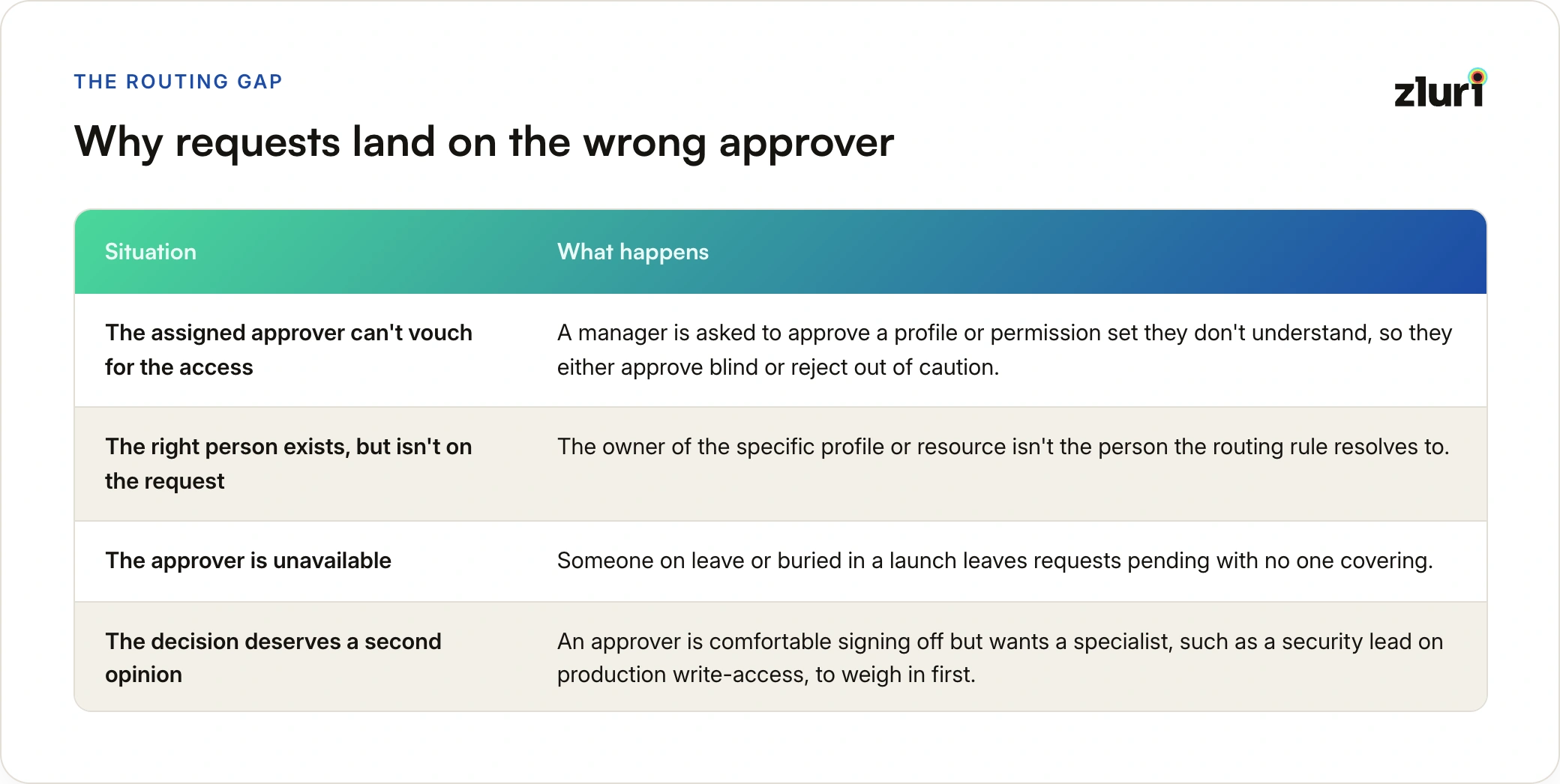
- The assigned approver can't vouch for the access: a manager is asked to approve a profile or permission set they don't understand, so they either approve blind or reject out of caution.
- The right person exists, but isn't on the request: the owner of the specific profile or resource isn't the person the routing rule resolves to.
- The approver is unavailable: someone on leave or buried in a launch leaves requests pending with no one covering.
- The decision deserves a second opinion: an approver is comfortable signing off but wants a specialist, such as a security lead on production write-access, to weigh in first.
Each of these is a normal part of running access at any size. The question is what the process lets an approver do when it happens.
What Most Processes Offer Today
In most organizations, the approver's options are limited to three poor ones:
- Approve anyway: sign off on access they can't fully vouch for, to avoid blocking the requester.
- Reject or ignore it: leave the request to age in their queue and hope someone notices.
- Ask IT to change the approver: file a ticket so an admin can swap the approver or rebuild the approval chain.
The third option looks like the responsible one, and it is the most expensive. A routine hand-off becomes a queue item for a different team, the request sits pending while the requester waits, and the context of why the approver changed lives in a ticket comment rather than on the request itself. This is the same pattern covered in access requests via tickets: each manual step adds delay and removes visibility.
When the only way to change an approver is to ask someone else, approvers stop changing approvers. They approve blind instead.
Three Moves an Approver Needs
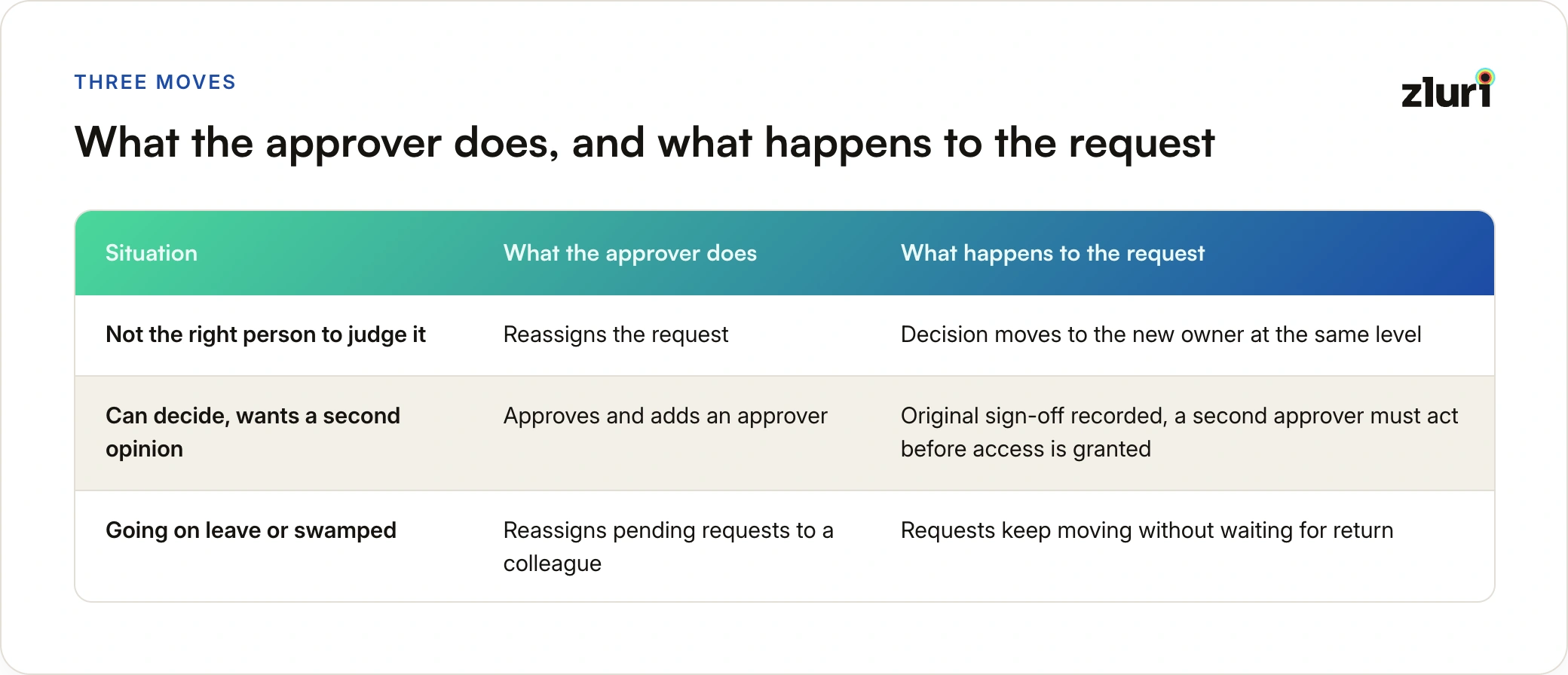
A well-designed approval flow gives the person whose turn it is a small set of actions, available from the request itself, with no admin involved:
- Reassign: pass the decision at their level to the person who should own it.
- Approve and add: approve their own stage, and bring a second approver in at the next level for an additional sign-off.
- Hand off while away: reassign pending requests to a colleague before leave begins, so provisioning isn't blocked on their return.
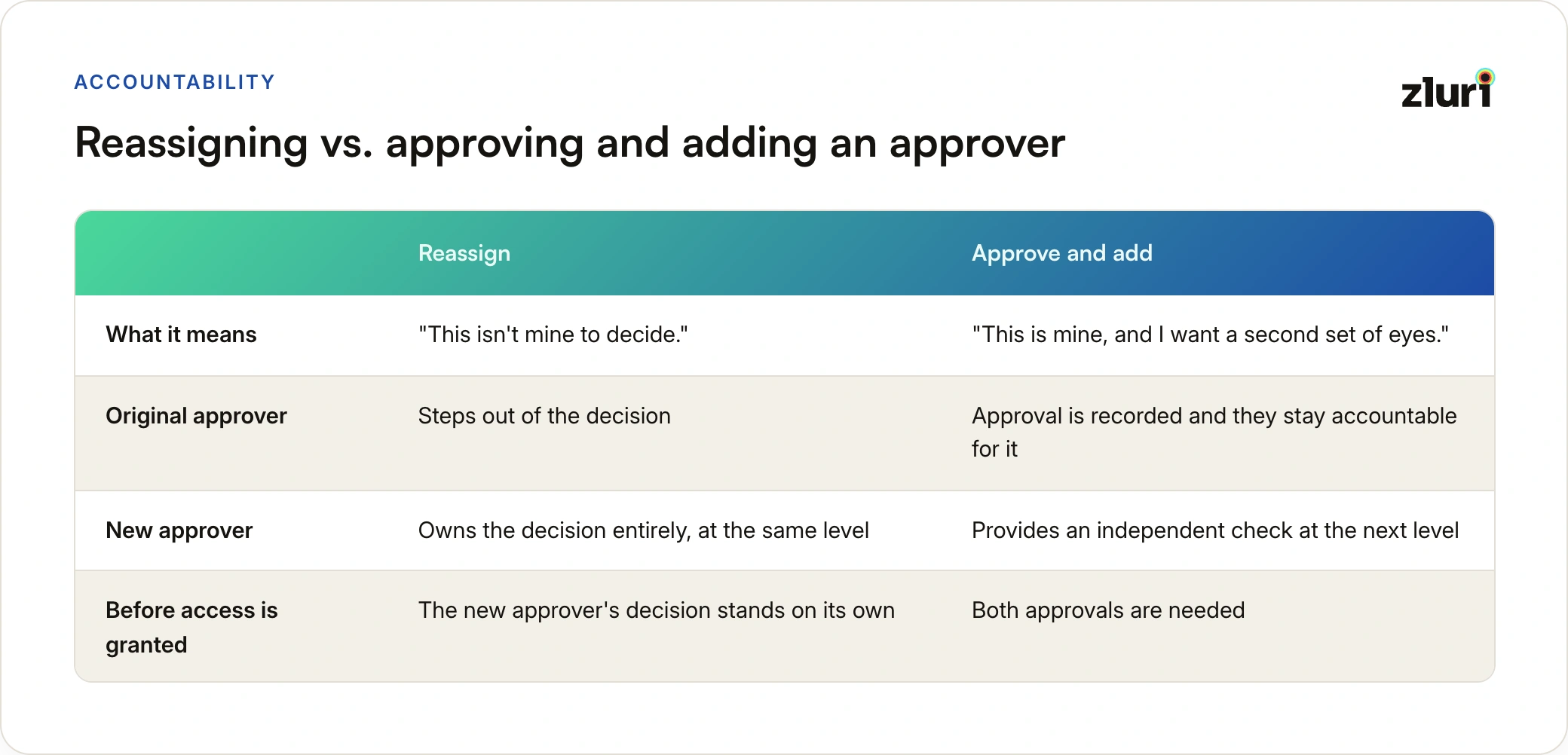
The first two are distinct decisions, and it helps to separate them clearly. Reassigning means the approver is saying "this isn't mine to decide." Approve and add means "this is mine to decide, I've decided, and I want someone else to confirm." Mixing them up is how an approval process ends up with sign-offs that don't mean anything.
A request that gets reassigned moves the decision to a new owner at the same level, so the original approver steps out of that decision. A request that gets approved with an added approver keeps the original approver's sign-off and adds a second approver at the next level, so the request needs both before access is granted. And a request handed off ahead of leave transfers pending approvals to a named colleague, so the requester isn't waiting on someone who is away.
Reassigning Is Not the Same as Adding a Second Approver
It is tempting to treat both actions as "bring someone else in." They carry different accountability.
A reassignment is an exit. The approver gives up the decision, and the new approver owns it entirely. If the new approver rejects, the request is rejected, and the original approver has no further stake.
An approve-and-add is a real approval. The approver has made their decision and is accountable for it. The added approver then provides an independent check on the same request, which means risky access collects two signatures instead of one. It is not a way to dodge a decision by routing it forward, because the approver has to approve to use it.
That distinction is also what keeps these actions from becoming a loophole. An approver who wants to avoid a decision has to explicitly reassign it, which leaves a visible record, rather than approving and quietly passing the problem along.
Reassign means "this isn't mine to decide." Approve and add means "this is mine, and I want a second set of eyes." Keep those two meanings apart and the audit trail stays honest.
The Guardrails That Keep Flexibility Accountable
Letting approvers change who decides is only safe with limits. A flexible process without guardrails turns into a way to shop for the friendliest approver. These are the controls worth building in, whichever tool you use:
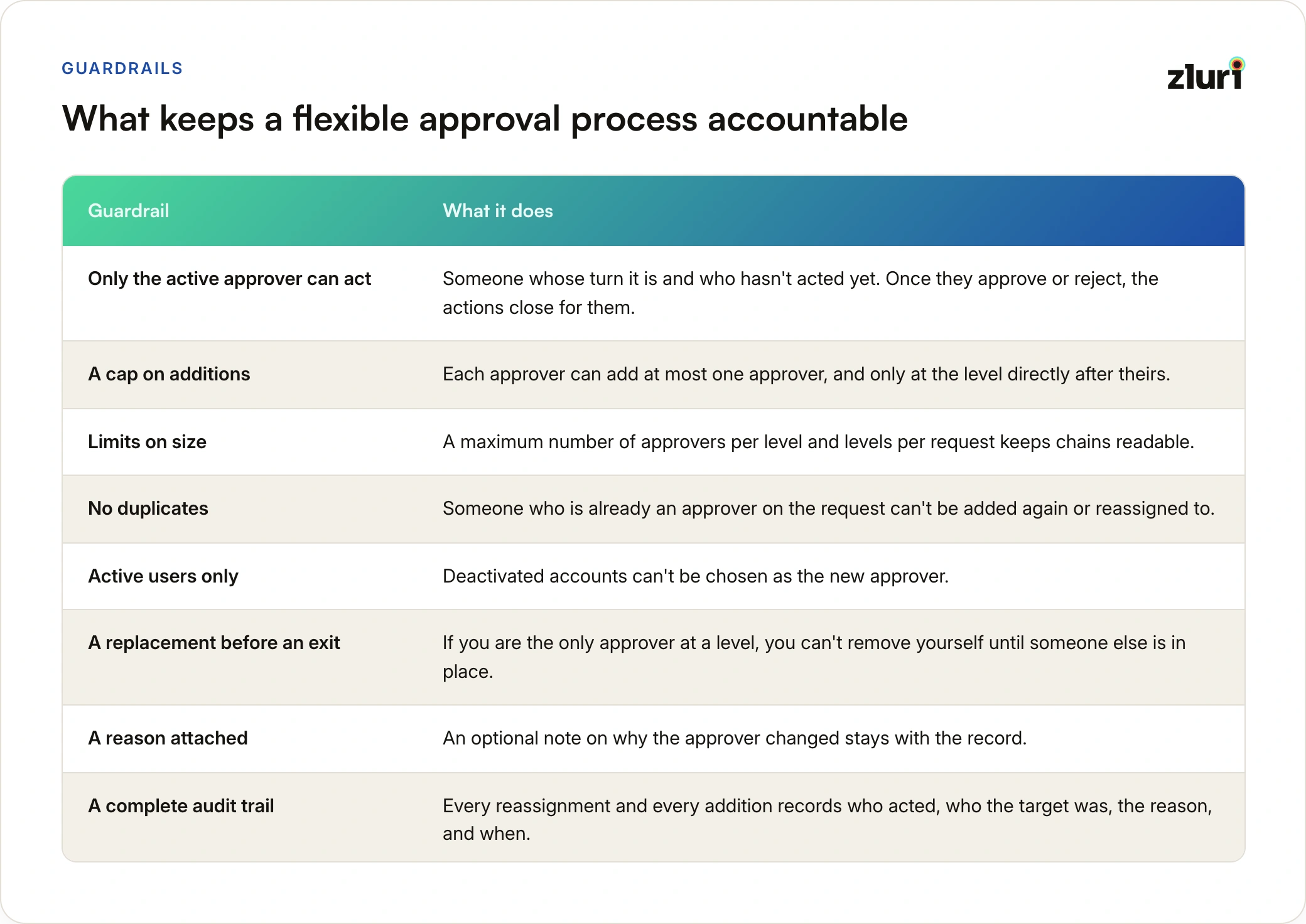
- Only the active approver can act: someone whose turn it is and who hasn't acted yet. Once they approve or reject, the actions close for them.
- A cap on additions: each approver can add at most one approver, and only at the level directly after theirs, so a request can't be extended indefinitely.
- Limits on size: a maximum number of approvers per level and levels per request keeps chains readable.
- No duplicates: someone who is already an approver on the request can't be added again or reassigned to.
- Active users only: deactivated accounts can't be chosen as the new approver.
- A replacement before an exit: if you are the only approver at a level, you can't remove yourself until someone else is in place.
- A reason attached: an optional note on why the approver changed stays with the record.
- A complete audit trail: every reassignment and every addition records who acted, who the target was, the reason, and when.
The last point matters most. Flexibility is only acceptable to auditors if the hand-offs are attributable. If a request was approved by someone other than the original approver, the record should say who, when, and why, without anyone reconstructing it from an inbox.
Four Situations Where This Changes the Outcome
The request landed on the wrong person. A request for a Salesforce profile routes to an engineering manager who doesn't own it. Instead of approving blind or filing a ticket, she reassigns her level to the profile's actual owner, who is notified and picks it up. The requester waits hours, not days.
The approver is on leave. Before going out of office, an approver reassigns the pending requests sitting with them to a colleague. Provisioning doesn't stall on their return date.
Risky access needs a second sign-off. An approver is comfortable approving production write-access but wants the security lead to co-sign. They approve their stage and add the security lead at the next level, so both must act before access is granted. No one restarts the request or rebuilds the chain.
A busy manager can't give it proper attention. A request is legitimately a manager's to decide, but they have no bandwidth mid-launch. Rather than sit on it or rubber-stamp it, they hand it to a colleague who can do it justice.
In every one of these, the alternative was either a delay, a blind approval, or a ticket. This is also the practical side of why access approvers make bad decisions: a decision-maker without the right context or the right authority has no good move, so giving them one is a fix in itself.
Where This Fits Next to Multiple Approvers
Reassignment and add-approver are about changing who decides on a live request. They sit alongside, and don't replace, the approver design you configure up front. Assigning several approvers to one step so that whoever acts first resolves it is covered in multiple approvers and OR logic. Rules that decide which requests need a person at all are covered in automatic approvals and rejections.
Think of it as three layers. Rules decide whether a person is needed. Approver design decides who is asked and how fast the step resolves. Reassignment and add-approver let the approver correct the routing when it turns out to be imperfect.
How This Works in Zluri
Zluri builds this into access request management as the Approver Reassignment capability, with two actions available to approvers from the request itself.
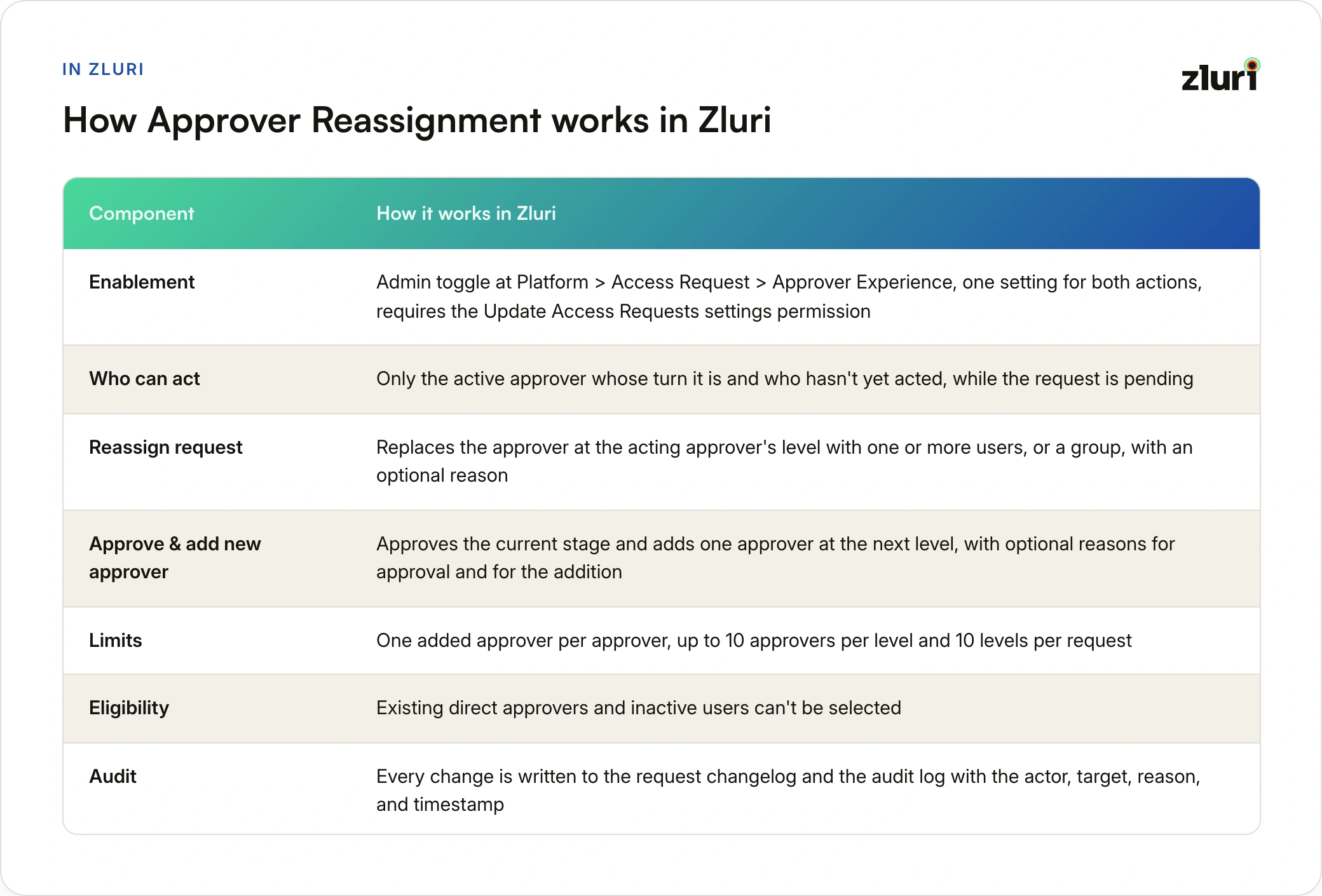
Turning it on. An admin enables it under Platform > Access Request > Approver Experience, using the "Approver Reassignment" toggle. One toggle governs both actions across the organization, and it requires the Update Access Requests settings permission. While it is off, the actions aren't shown to approvers and direct API calls to reassign or add an approver are rejected. Turning it off later doesn't change requests already in flight; it only stops new actions.
Where the actions live. On the request detail page, the active approver sees a three-dot menu beside Approve Request and Reject Request. It appears only while the request is pending, and only for the approver whose turn it is and who hasn't acted. The menu holds two items:
- Reassign request: opens a modal with the field "Manage approver at your level (level N)". The approver selects Add Approver, chooses either "Assign to one or more users" or "Assign to a group", and picks who owns the decision. An optional "Reason for modifying approver" is stored with the change.
- Approve & add new approver: approves the approver's own stage and inserts one new approver at the next level (the field reads "Add an approver at next level"). The approver can record a "Reason for approval" and a separate optional "Reason for adding approver". After confirming, the approver's stage is approved and they take no further action on the request.
The approver list in the sidebar stays read-only. Changes happen in the modal, and the sidebar updates only after they are confirmed.
A level can hold a single user, multiple users, or one group, but never two groups or a mix of individuals and a group. A group at a level is any-one-approves: any member can act, and the first action recorded approves the level. The request provisions only when every approver, original and added, has acted.
Safeguards are built in. Confirm stays disabled until something actually changes and until the level has at least one approver. If a peer acts, the request closes, or an admin turns the feature off while the modal is open, the confirmation is rejected and the approver is asked to refresh, so the first confirmed change wins. Removing yourself as the only approver at a level is blocked until a replacement is added.
Frequently Asked Questions
Why shouldn't an approver just ask IT to change the approver?
Because it turns a routine hand-off into a ticket for a different team. The request sits pending, the requester waits, and the reason for the change ends up in a ticket comment instead of on the request. Letting the active approver reassign directly keeps the decision moving and the record in one place.
Does letting approvers reassign requests weaken control?
Not if the actions are scoped and recorded. Only the active approver can act, the choices are limited, and every change is logged with an actor, a target, a reason, and a timestamp. Control comes from visibility and limits, not from forcing every change through an admin.
What's the difference between reassigning and approving and adding an approver?
Reassigning hands the decision at the approver's level to someone else, and the original approver steps out of it. Approving and adding records the approver's own approval and brings in a second approver at the next level, so the request needs both before access is granted.
Can an approver use "approve and add" to avoid making a decision?
No. It is a real approval of their own stage, followed by an additional approver after them. An approver who doesn't want to decide has to reassign the request, which is recorded separately.
What happens to requests already in progress if the feature is turned off?
Nothing changes for them. Turning it off stops new reassign and add actions, hides the menu, and rejects direct API attempts, but requests already in flight continue as they were.
Is there a limit on how many approvers a request can have?
In Zluri, a level can hold up to 10 approvers and a request can have up to 10 levels. At those limits, the add action is unavailable.