.png)




Group-based access control grants permissions through group membership instead of configuring access user by user. Most guides present it as its own model, sitting alongside RBAC on a menu. It isn't. GBAC is how role-based access control actually gets deployed in Azure AD, Okta, and every real identity provider. The theory says roles; the implementation says groups. And because groups are the implementation, group sprawl is where the theory quietly stops matching reality.
Ask an identity provider what a role is, and it doesn't have an answer. Azure AD has groups. Okta has groups. Google Workspace has groups. Nobody's console has a "role" object you attach permissions to directly. When an organization designs RBAC on a whiteboard, Sales Manager gets the sales stack, and then implements it, the role becomes a group, membership in the group becomes holding the role, and the whiteboard's tidy role model starts inheriting whatever the group model does well and does badly.
That's the fact this article starts from. GBAC isn't RBAC's competitor. It's RBAC's shipping container. Which means the failure modes worth understanding aren't "role explosion" in the abstract, they're what happens specifically to groups, in directories, over years, which is a more concrete and more common problem than most access control content admits.
What Group-Based Access Control Is
GBAC grants access by placing users into groups and attaching permissions to the group rather than the individual. A user in the Finance group gets whatever Finance has. A user removed from Finance loses it. The three components are simple by design.
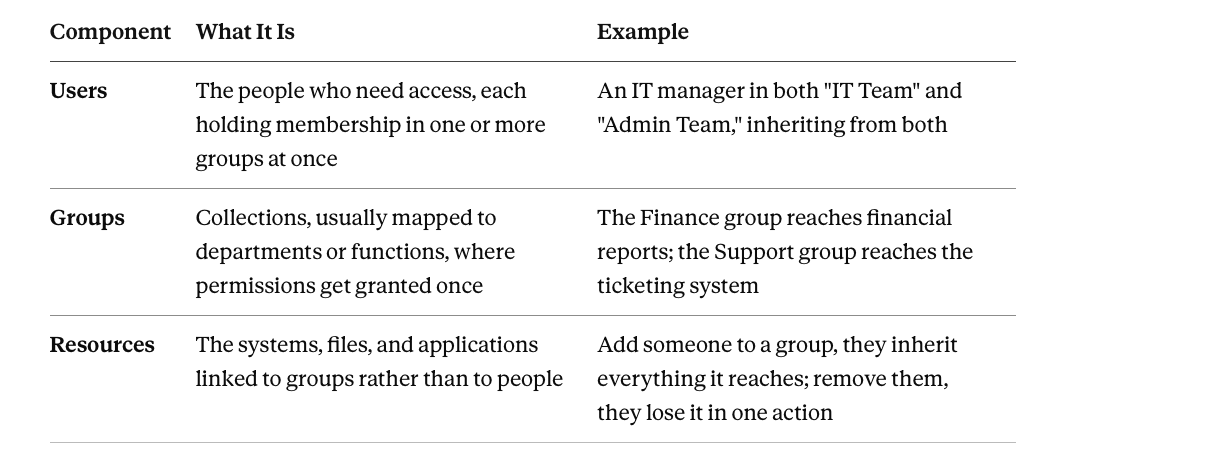
Users each hold membership in one or more groups simultaneously. An IT manager sitting in both the "IT Team" group and the "Admin Team" group inherits from both at once, which is normal and also the first place overlap-driven risk starts.
Groups exist specifically so permissions get granted once, at the group, instead of user by user.
Resources get linked to groups rather than to people, which is the entire mechanism that makes GBAC administratively cheap.
The appeal is immediate and real. A company with HR, Finance, and IT departments, each needing entirely different systems, can either configure access per person, which fails the moment a Finance employee accidentally inherits HR visibility, or configure it per group, once, correctly, and let membership do the rest.
Why This Is RBAC, Not an Alternative to It
The distinction matters because it changes what "best practice" actually means here. If GBAC were its own model, the advice would be about groups in isolation. Since GBAC is RBAC's deployment layer, the advice that actually applies is RBAC's discipline, translated into group-specific terms.
A role and a group are, in practice, the same object wearing different names depending on which layer of the stack you're looking at. The role model says Sales Manager gets the sales stack. The identity provider implements that as a Sales-Manager group with the sales stack's applications attached, and membership in the group is what makes someone a Sales Manager in any way the systems can act on. Every RBAC discipline, keep roles at job-function level, keep second dimensions out of role names, watch the exception rate, applies to groups directly, because groups are where the discipline either gets enforced or doesn't.
This also means every RBAC failure mode shows up here under a different name. Role explosion becomes group sprawl. The suffixed role, Sales Manager EMEA, becomes a suffixed group, Sales-Manager-EMEA, created for the identical reason and multiplying the identical way. Recognizing that GBAC and RBAC share a failure mode, not two separate failure modes, is what stops a team from solving the same problem twice under two different names.
Where GBAC Earns Its Keep
Four properties make GBAC worth the adoption cost, and each compounds at scale rather than staying flat.
Administrative simplicity that compounds. Onboarding becomes "add to the right groups" instead of a checklist of individual grants across a dozen applications.
Consistency that reviews can actually verify. Every member of a group holds identical access by construction, so a review can certify "the Marketing group has the right members" instead of forty individually configured employees.
Scale that doesn't multiply admin effort. Bulk changes execute as group operations. The process that works at fifty employees works at five thousand, because the unit of work stayed the group.
Targeted exposure by construction. HR reaches HR systems. Finance reaches financial tools. Neither reaches the other's territory, because the group boundary enforces it structurally, not because someone remembered to configure it correctly for every employee.
Where It Breaks, and Why the Break Is Different From RBAC's
RBAC's textbook failure mode is role explosion, driven by encoding attributes into role names. GBAC inherits that exact problem, and adds two more that are specific to how groups actually get implemented in real directories.
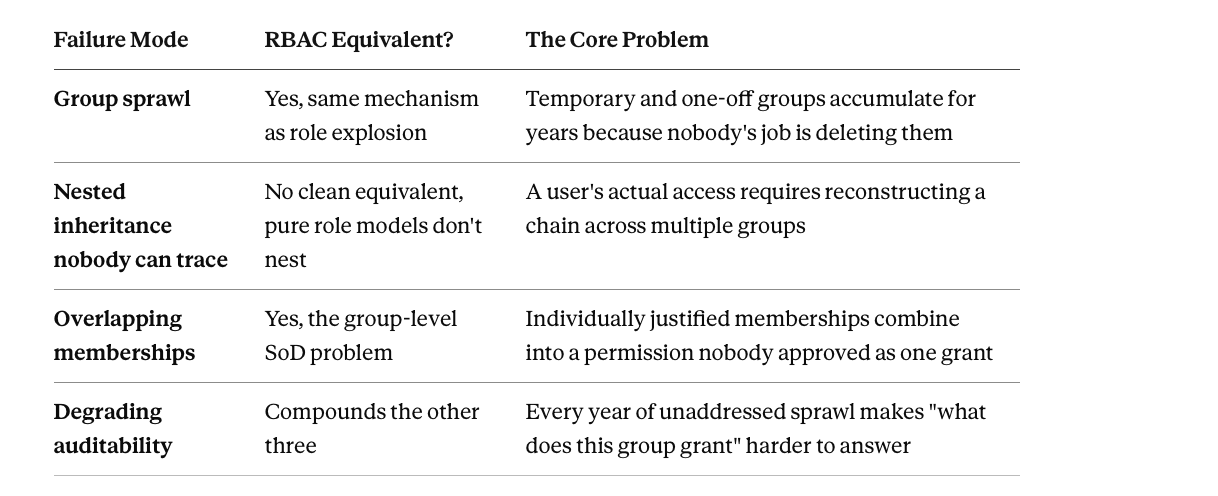
Group sprawl. The identical mechanism as role explosion. Temporary project groups, one-off exception groups, and department variants accumulate for years because nobody's job is deleting groups. A group created for a marketing campaign that wrapped up eighteen months ago still exists, still grants access, and still has members, because removing it requires someone to notice it's stale, and stale things are specifically the things nobody notices.
Nested group inheritance nobody can trace. This is GBAC's distinctive failure mode, and it doesn't have a clean RBAC equivalent, because pure role models don't nest. Groups do, routinely. Group A contains Group B, which contains Group C, and a user in Group C inherits everything A and B ever granted, through a chain nobody documented and nobody can reconstruct by looking at any single group's membership list. Ask "why does this contractor have production database access" in a nested-group environment and the honest answer is often a two-hour investigation, not a one-step lookup.
Overlapping memberships producing accidental combinations. A user holding both Finance and HR group membership, each individually justified, can end up with a permission combination nobody would have approved if they'd seen it as one grant. This is the group-level version of the segregation-of-duties problem, invisible to reviews that check group membership in isolation.
Auditing that degrades as sprawl compounds. Demonstrating that access matches policy requires knowing what every group grants, which groups nest inside which, and who holds membership through which chain. Each of those gets harder every year sprawl goes unaddressed.
Running GBAC Without the Sprawl
Treat groups as structured data, not folders. A group named "Finance" that everyone dumps into by default is a folder. A group named "Finance-Viewers-ReadOnly" versus "Finance-Approvers" is structured data, purpose-built and legible to anyone auditing it six months later without asking around.
Make every group time-bound by default, not permanent by default. Most access sprawl isn't malicious, it's permanent grants for temporary needs. A contractor's project group, a coverage arrangement, a campaign-specific team, all have natural expiry dates nobody encodes. Attaching an expiry at creation converts sprawl from the default outcome into something that requires deliberately overriding a default to happen.
Audit for redundant and unused groups on a schedule, not a hunch. Two differently named groups with identical membership and identical resource access are duplication waiting to diverge unpredictably. A group with zero logins across its membership for ninety days is a candidate for removal, not a candidate for "we'll look at it eventually."
Apply least privilege at the group level specifically, meaning the tier, not just the boundary. A group granting an application at all is one decision. A group granting Admin instead of Standard User within that application is a second, separate decision, and it's the one that quietly escalates over time as convenience wins over discipline.
Flatten nested inheritance before it becomes unreadable, not after. Every layer of group-within-group nesting is a layer someone has to mentally unwind to answer "what does this person actually have." Any inheritance chain nobody can explain in one sentence has already exceeded the practical limit.
How Zluri Helps
The gap between the tidy GBAC diagram and the messy reality of a five-year-old directory is exactly the gap Zluri's group handling is built to close. This section covers the core mechanism; for the full breakdown, including the honest limit on group-level spend data and the distinct playbook and review model built specifically for groups, see Group-Based Access Control in Zluri.
Discovery maps the real inheritance chain, not the intended one. Zluri traces every access path, direct and inherited, across nested group structures, and flattens it into a single, user-level view. The question "why does this person have this access" gets answered as a lookup instead of an investigation.
Directory Management keeps group membership synced to the actual source of truth. Groups tie back to Designation, Department, and the other attributes pulled from your HRMS or identity provider, so group membership reflects current reality rather than whatever was true when someone was first added.
Condition-based playbooks encode group logic the same way they encode role logic. Because GBAC is RBAC's deployment layer, the same Add and Apply Condition mechanics that provision role-based access provision group-based access, firing through Automation Rules on the same triggers, hires, role changes, departures.
Group-based access reviews certify the population reviews actually need to see. Reviewers get member counts, job titles, departments, and account types in one unified view across every identity provider, Okta, Google Workspace, JumpCloud, and more, rather than switching between consoles to reconstruct what a group means. Reviewer assignment follows role, App Owner or Reporting Manager, not a named individual, so the review survives personnel changes.
Risk-based prioritization targets the groups that matter first. Treating a dormant, low-sensitivity group the same as an admin group tied to a critical financial system wastes review effort on the wrong targets. Risk scoring and behavioral signals surface which groups need attention now.
Orphaned and stale group detection runs continuously. Groups with no current members, groups nobody's touched in months, and groups tied to unused applications surface automatically instead of waiting for the annual audit.
Groups Are the Implementation. Govern Them Like One.
GBAC was never a rival to role-based access control. It's the form RBAC takes the moment it leaves the whiteboard and enters an actual identity provider, and every discipline that keeps RBAC clean, job-function structure, disciplined naming, watched exception rates, applies to groups because groups are where that discipline either holds or quietly erodes.
The distinctive risk isn't the concept of grouping users. It's what groups specifically do that individual role assignments don't, nest silently, overlap unpredictably, and outlive the temporary need that created them.
Treat groups as structured, owned, time-bound data instead of permanent folders, and the administrative simplicity that made GBAC worth adopting in the first place stays a genuine advantage instead of becoming the thing an auditor spends a week untangling.
Frequently Asked Questions
Is group-based access control different from role-based access control?
Not conceptually. GBAC is how RBAC actually gets implemented in identity providers like Azure AD, Okta, and Google Workspace, none of which have a native "role" object, only groups. The role model designed on a whiteboard becomes group membership in practice, so RBAC's disciplines, job-function structure, disciplined naming, exception monitoring, apply directly to how groups get managed.
What's the biggest risk specific to group-based access control that doesn't show up in role-based models generally?
Nested group inheritance. Pure role models typically don't nest, but groups in real directories routinely do, Group A contains Group B contains Group C, and a member of the innermost group inherits everything the outer groups ever granted through a chain that isn't visible from any single group's membership list. Answering "why does this person have this access" in a heavily nested environment can require a genuine investigation rather than a lookup.
How is group sprawl different from role explosion?
They're the same underlying failure, unmanaged proliferation, expressed differently because of how groups get created in practice. Role explosion typically comes from encoding attributes into role names. Group sprawl comes from that plus temporary groups, project groups, and one-off exceptions that never get deleted once their purpose ends, because no one's job is removing them.
Should every group have an expiration date?
Groups tied to genuinely permanent organizational structures, core departments, don't need one. Groups tied to anything time-bound by nature, contractor engagements, project teams, temporary coverage arrangements, should have an expiry set at creation rather than left permanent by default. Most sprawl isn't malicious access, it's temporary access that was never told it was temporary.
How does Zluri handle the nested-group visibility problem specifically?
By mapping every access path, both direct and inherited, across nested structures and flattening it into a single user-level view. Instead of manually tracing through multiple layers of group-within-group inheritance to determine what someone actually has access to, the resolved chain is already visible, which converts an investigation into a lookup.