First time running access reviews? Start with our User Access Review Process: 5 Key Steps guide. This article is for organizations that have completed their first 1-3 reviews and are ready to scale, handle complexity, and optimize their process.
Beyond The First Access Reviews
You've done your first access review. It took 3 weeks, involved 23 people, and revealed 87 apps you didn't know existed. 600 access violations were identified.
You've done your second review. Same 3 weeks. Same coordination chaos. Same apps mysteriously reappearing outside your scope.
Now you're staring at Q3. The question isn't "how do I run a review." You know the steps.
The question is: "Is this sustainable? Can I do this every quarter without burning out my team?"
We've helped over 200 mid-market companies (500-5000 employees) evolve their access review processes from "we got through it" to "this actually works." We've watched IT teams discover they're reviewing 20-30 apps when they should be reviewing 50+.
We've seen Security leaders realize remediation delays are creating more risk than the reviews prevent. We've tracked organizations spending 149 person-days per cycle—nearly 3 FTEs—on what should take 55 person-days with the right approach.
You've proven you can execute reviews. Now you need to evolve them—from painful quarterly events to efficient, scalable governance.

We'll show you how. You'll learn how to scale from 20 apps to 50+, reduce effort by 60%+ each cycle, handle edge cases that break basic workflows, build remediation that actually closes violations, and move toward continuous governance.
Why Your Current Process Is Breaking
Most organizations hit the same wall after 2-3 review cycles. Each review takes as long as the first. Reviewers are rubber-stamping. Violations from Q1 are still unresolved in Q3.
The problem isn't execution—it's foundation. You're trying to scale a process built on incomplete visibility, manual coordination, and hope-based remediation.
Reason 1. The visibility gap compounds with every cycle
Your first review covered 40 apps from your IDP. You felt complete. Then Finance showed expense reports revealing 76 SaaS subscriptions. Multiple discovery methods detected 150+ apps in actual use. Your "complete" review covered roughly 40% of your risk.
The typical company has 94 apps visible in their IDP. Comprehensive discovery finds 187 in regular use. That gap—93 applications with identities and access relationships—grows every quarter.
If you're still doing quarterly exports and manual surveys, you're always behind. Apps adopted in Week 2 of the quarter won't appear in your review until Week 13. That's 11 weeks of unmanaged risk.
Reason 2. Remediation delays create accumulating debt
Q1 review identifies 284 violations. You create tickets. Q2 review happens. 47 violations from Q1 still exist because tickets are "in progress." Q2 adds 312 new violations. Now you have 359 outstanding. The backlog becomes unmaintainable.
41% of organizations say their reviews regularly miss deadlines. The main culprit? Remediation. The review itself completes on time. Then comes weeks of manual execution across 100+ apps.
Organizations with manual remediation often have the majority (50-70%) of violations persisting weeks after reviews close. That's not security governance. That's a security illusion.
Reason 3. Approval fatigue destroys accuracy at scale
In the first review, managers carefully evaluate 50 users. Approval rate: 87%. By the third review, the same managers see 50 familiar faces plus 30 new ones. Approval rate: 96%. They've stopped reading.
Without context, reviewers can't maintain quality at scale. They're making 500 decisions with zero intelligence about usage, risk, or policy fit.
Organizations with manual processes report 49% effective policy enforcement. Organizations with intelligent automation report 68%. That 19-point gap represents violations slipping through—exactly what reviews are supposed to prevent.
Advanced Review Framework: The 7-Phase Implementation Model
This framework integrates discovery, intelligence, routing, and remediation into a single cohesive process. You don't need to implement all seven phases at once—pick the ones that address your biggest pain points first.
Most organizations start with Phases 1, 2, and 6 (visibility, scoping, and remediation), then add intelligence and automation once those foundations are stable.
Modern access review platforms like Zluri provide these capabilities out-of-the-box. The goal isn't to build everything yourself—it's to understand what's possible and choose the right tools to implement it.
Phase 1: Continuous multi-method discovery with conflict resolution
Basic reviews export the IDP before each cycle. Advanced reviews run discovery continuously across multiple methods and reconcile conflicts when sources disagree.
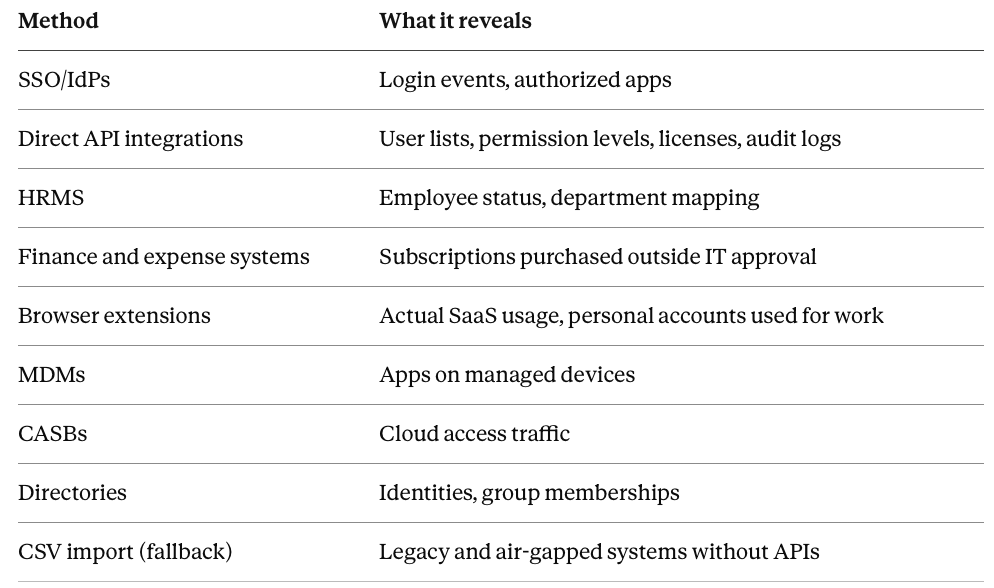
Discovery methods to enable:
Direct integrations (IDP, HRIS, SSO, CASB): Pull authoritative identity and access data via API. Update frequency: Real-time to hourly.
Finance systems (Expensify, Coupa, Brex): Capture SaaS subscriptions via expense data. Detects shadow IT purchasing. Update frequency: Daily.
Browser extensions: Detect SaaS usage as employees access tools. Captures apps accessed via personal accounts. Update frequency: Real-time.
Desktop agents: Inventory installed applications on endpoints. Finds desktop software outside SSO. Update frequency: Hourly.
Network traffic analysis: Capture API calls and cloud traffic. Discovers microservices and developer tools. Update frequency: Continuous.
CASB/proxy logs: Monitor cloud application access patterns. Validates SSO data with actual usage. Update frequency: Real-time.
API polling: Direct integration with SaaS apps. Pulls user lists and permission levels. Update frequency: Daily to weekly.
CSV imports: Manual upload for legacy systems without APIs. Handles on-prem and air-gapped systems. Update frequency: Pre-review.
Implementation approach:
Week 1: Enable IDP/HRIS/SSO integrations (foundational identity data). Platforms like Zluri connect to major IDPs out-of-the-box.
Week 2: Add finance system integration. Let it run for a full billing cycle. Document gap between IDP and purchased apps.
Week 3: Deploy browser extensions to 10% of users (early adopters). Monitor for false positives. Most platforms provide pre-built extensions.
Week 4: Expand browser extensions to 100% of users. Deploy desktop agents company-wide.
Week 5-6: Enable CASB/network analysis if available. Configure API polling for top 20 business-critical apps.
Week 7-8: Create CSV import templates for legacy systems. Platforms typically support bulk CSV import with field mapping.
Challenge: Reconciling conflicting data
You'll discover the same app reported differently across methods:
- IDP shows 45 users with Salesforce access
- Browser extension detects 67 users accessing Salesforce
- Finance shows 75 Salesforce licenses purchased
- Salesforce API reports 82 active users
Resolution workflow:
- Establish hierarchy of truth: API data > Browser detection > IDP > Finance. (API is most accurate for actual users, Finance only shows licenses)
- Create reconciliation rules:
- If user in API but not IDP → Flag as "shadow access" requiring immediate review
- If user in IDP but not API → Flag as "provisioned but not activated" (cleanup opportunity)
- If license count exceeds user count → Flag "unused licenses" (cost optimization)
- If user count exceeds license count → Flag "license violation" (compliance risk)
- Automated reconciliation: Platforms can run daily reconciliation jobs, surface gaps requiring investigation, and track trending.
- Exception documentation: Some mismatches are legitimate (shared accounts, service accounts, trial users). Document these once, auto-approve in future reconciliation.
Common failure points:
Discovery overload: Detecting 200 apps when you can only govern 50. Solution: Implement risk-based scoping (Phase 2) immediately. Don't try to review everything at once.
False positives: Browser extension flags personal Gmail as "corporate app." Solution: Platforms include pre-built exclusion rules. Whitelist known personal domains.
Data staleness: CSV imports from legacy systems are 30 days old by review time. Solution: Shorten import cycle to weekly. Or flag these apps for more frequent manual validation.
Outcome when implemented correctly: 99%+ application coverage. Gaps identified within 48 hours of new app adoption. Reconciliation automated with exceptions documented.
Phase 2: Risk-based scoping with dynamic classification
Most reviews either cover everything (overwhelming) or manually pick 20 apps (incomplete). Advanced reviews automatically classify apps into risk tiers and adjust review frequency accordingly.
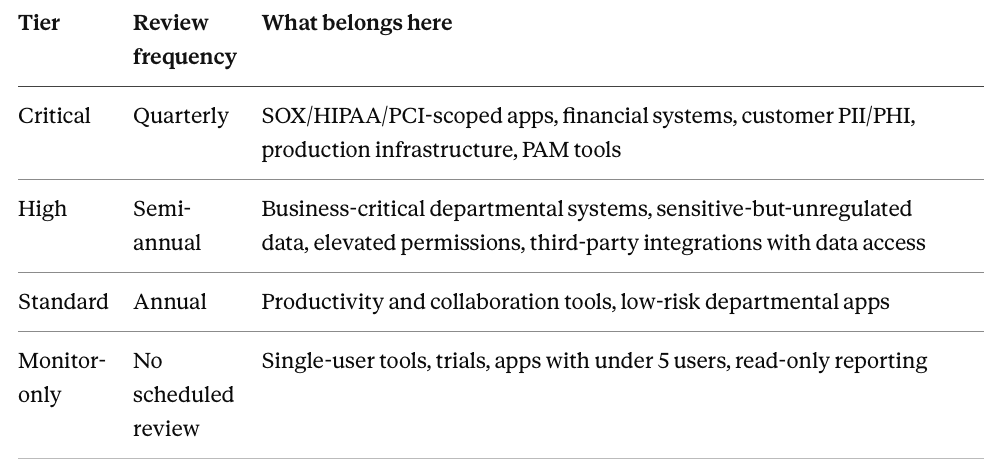
Risk classification framework:
Tier 1 - Critical (quarterly review)
- SOX/HIPAA/PCI scoped applications
- Financial systems (ERP, banking, payments)
- Systems with customer PII or PHI
- Production infrastructure and databases
- Privileged access management tools
Tier 2 - High (semi-annual review)
- Business-critical departmental systems
- Apps with sensitive but not regulated data
- Development/staging environments
- Systems with elevated permissions
- Third-party integrations with data access
Tier 3 - Standard (annual review)
- Productivity tools (email, docs, collaboration)
- Low-risk departmental apps
- Marketing/sales tools with public data only
- Non-sensitive internal systems
Tier 4 - Continuous monitoring only (no scheduled review)
- Single-user apps and personal tools
- Trial accounts under evaluation
- Low-adoption tools (< 5 users)
- Read-only reporting tools
Event-driven reviews (trigger-based, regardless of tier)
- Employee termination → Immediate (within 1 hour)
- Employee role change → Within 5 business days
- Contractor project completion → Within 10 days
- Security incident involving app → Immediate
- Failed login anomaly detected → Within 24 hours
- Privilege escalation granted → Auto-review in 30 days
Implementation approach:
Week 1: Export complete app inventory. Manually tag 20 critical apps (SOX/HIPAA/PCI). These are your Tier 1 baseline.
Week 2-3: Configure automated classification in your platform. Apply to remaining apps. Review edge cases where scores don't match intuition.
Week 4: Create a review schedule. Map Critical tier apps to the quarterly calendar. High tier to semi-annual. Standard tier to annual.
Week 5: Configure event triggers. Connect HRIS for termination/role change events. Connect security tools for incident triggers.
Common failure points:
Over-scoping: Classifying too many apps as Critical leads to quarterly review overload. Solution: Be disciplined. True critical apps are <15% of your landscape.
Under-scoping: Missing apps that should be Critical because they lack formal compliance tags. Solution: If an app receives data from a Critical app, it should also be Critical or High.
Static classification: Apps classified once, never revisited. Solution: Quarterly reclassification. Alert when apps move tiers.
Outcome when implemented correctly: 40% reduction in review workload by focusing effort on high-risk apps. Critical apps reviewed quarterly with 100% completion. Low-risk apps monitored continuously without manual review overhead.
Phase 3: Distributed ownership with intelligent routing
Basic reviews assign one owner to everything. Advanced reviews route access decisions to people with appropriate authority and context based on access type, risk level, and organizational structure.
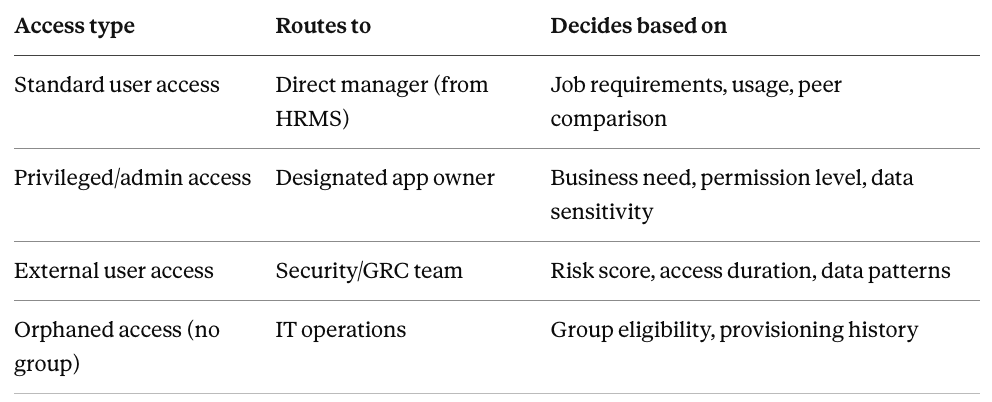
Routing logic framework:
Standard user access → Direct manager
- Route to: User's direct manager from HRIS
- Context provided: Employment status, last login, usage frequency, peer comparison
- Decision authority: Approve/revoke based on job requirements
Privileged/admin access → App owner
- Route to: Designated app owner from asset registry
- Context provided: Permission level, data sensitivity, justification requirement
- Decision authority: Approve/downgrade/revoke based on business need
External user access → Security team
- Route to: Security operations or GRC team
- Context provided: Risk scores, external domain, access duration, data access patterns
- Decision authority: Approve with conditions/revoke based on risk assessment
Orphaned access (no group membership) → IT operations
- Route to: IT operations team
- Context provided: Access provisioning history, group eligibility, role fit
- Decision authority: Assign to group/maintain exception/revoke
Implementation approach:
Week 1: Extract organizational structure from HRIS. Map reporting relationships. Identify managers with 5+ direct reports (primary reviewers).
Week 2: Create app owner registry. For each business-critical app, designate an owner (usually system admin or department head).
Week 3-4: Configure routing rules in your platform. Access review platforms pull HRIS data automatically and apply routing logic based on access type.
Week 5: Configure escalation workflows. Define SLAs: manager reviews due in 7 days, security reviews due in 3 days. Auto-escalate on deadline miss.
Week 6: Pilot with one department. Route their reviews through new logic. Gather feedback. Measure completion rates.
Challenge: Handling routing failures
Your routing logic sends a review to John (manager), but John left the company 2 weeks ago. Review sits unassigned.
Solution: Fallback routing hierarchy
- Primary route: Direct manager from HRIS (updated daily)
- Fallback 1: If manager record is null or terminated, route to manager's manager
- Fallback 2: If no manager hierarchy exists, route to department head from HRIS
- Fallback 3: If department head is null, route to default reviewer (IT director)
Platforms can monitor routing health with daily reports showing reviews in fallback routing.
Common failure points:
HRIS data lag: HRIS updated weekly, but routing needs daily data. Solution: Request daily HRIS sync for organizational structure. Zluri supports real-time syncs via webhooks.
Reviewer overload: One app owner responsible for 10 business-critical apps, receives 500 access reviews. Solution: Distribute ownership.
Missing app owners: 40% of apps lack designated owners. Solution: Default routing for unowned apps → IT operations. But require ownership assignment within 30 days.
Outcome when implemented correctly: Average reviewer workload drops by 60% (each person reviews what they're qualified to decide). Review quality increases because decisions made by people with appropriate context. IT stops being a bottleneck.
Phase 4: Context-rich review interface with layered intelligence
Basic reviews present user/app/last-login. Advanced reviews surface two layers of intelligence to make decisions obvious and reduce cognitive load.
Intelligence layer architecture:
Layer 1: Core identity and access data
- User full name, employee ID, department, location, hire date, employment status
- App name, permission level (admin/user/custom), access grant date
- Last login date, last activity date, authentication method
- License type assigned, monthly license cost
This is foundational data. Yet most platforms don't provide this. The last point is unique to Zluri.
Layer 2: Behavioral and risk intelligence
- Usage pattern classification: Daily active (logged in 20+ days/30), Weekly active (8-19 days/30), Monthly active (3-7 days/30), Dormant (0-2 days/90), Never used (0 logins since provisioned)
- Risk scoring: Critical (external admin + financial data access), High (admin access + policy violation), Medium (elevated permissions + data sensitivity), Low (standard user + active usage)
- Cost analysis: License utilization (dormant license = wasted spend), Per-user cost, Total spend on user across all apps
- Peer comparison: "8 of 12 other Marketing Managers have this access" (typical) vs. "Only 1 of 12 peers has this access" (unusual)
This is where platforms diverge. Advanced platforms provide behavioral analytics.
Implementation approach:
Week 1-2: Ensure Layer 1 (core data) is accurate. This is table stakes—must be 100% correct.
Week 3-4: Enable usage pattern classification. Platforms integrate login data from apps automatically. Calculate activity frequency.
Week 5-6: Enable risk scoring. Start simple: admin access + financial app = high risk. External user + PII access = high risk.
Week 7-8: Add cost analysis. Integrate licensing data from apps or finance systems. Calculate per-user costs.
Week 9-10: Enable peer comparison. Platforms query access patterns for users with the same role. Flag outliers.
Challenge: Intelligence quality monitoring
Scenario: Platform shows user is "dormant" (no login 90 days), but employee insists they use the app daily. Investigation reveals the app doesn't return accurate login data via API.
Solution: Intelligence quality flags
Platforms should flag unreliable data sources. Surface in review UI: "⚠️ Login data may be incomplete for this app."
Allow manual override: Reviewer can mark "User reports active usage despite dormant status." This creates an exception.
Building the review interface:
Poor interface (what to avoid):
User: John Smith | App: Salesforce | Last login: 15 days ago
[Approve] [Revoke]
The reviewer has to interpret everything. Zero context provided.
Good interface (layered information):
John Smith - Marketing Manager - Active Employee
Salesforce (Admin) - 🔴 High Risk
Last login: 15 days ago
Usage: Monthly active (4 logins in 90 days)
Permission: Admin (elevated)
Risk factors:
• Admin access unusual for Marketing Manager role
• 2 of 15 Marketing Manager peers have admin
Recommendation: Downgrade to User ⚠️
Reasoning: Active usage indicates business need, but admin access exceeds role requirements.
Cost: $150/month (Professional + Admin add-on)
[Approve Admin] [Downgrade to User] [Revoke] [Request Justification]
The reviewer instantly knows: active user, has legitimate need, but admin is excessive. Obvious decision: downgrade or request justification.
Outcome when implemented correctly: Reviewer time per access decision drops from 50 seconds to 20 seconds. Approval accuracy increases from 76% to 96%. False positives drop by 70%.
Phase 5: Bulk operations and intelligent automation
Basic reviews require clicking "approve" 500 times. Thus, advanced reviews provide bulk operations for low-risks reviews.
Bulk reviews automation framework:
Auto-approved access (no reviewer action needed):
Criteria:
- Active employee (status = active in HRIS)
- AND logged in within 30 days
- AND standard user permission level (not admin)
- AND access is role-appropriate (matches peer patterns)
- AND no anomalies detected (usage consistent, no policy violations)
Action: Automatically approve with audit trail. Log: "Bulk-approved based on active usage + standard permissions + role fit."
Notification: Reviewer receives summary report: "127 access items bulk-approved. Click to review list if desired."
Flagged for manual review (requires human decision):
Criteria (any of):
- Dormant access (no login 90+ days)
- Admin or elevated permissions
- External user or contractor
- Access unusual for role (only 20% of peers have this access)
- New access granted within last 30 days
- Policy violation flagged
- High-risk app + sensitive data access
Action: Surface to reviewer with full context and AI recommendation, if possible.
Bulk operation workflows:
Bulk approve by pattern: "Approve all active standard users in Engineering group" → One click approves 45 users at once.
Bulk revoke dormant access: "Revoke all dormant accounts (90+ days) across 10 productivity apps" → One click queues 87 revocations.
Bulk downgrade privileges: "Downgrade all admin to user for Finance team (except CFO and Controller)" → One click downgrades 12 users, retains 2 exceptions.
Bulk request justification: "Request justification for all external contractor access" → One click sends notification to 15 contractors + sponsors.
Implementation approach:
Week 1-2: Define auto-approve criteria. Start conservative (only approve if 95% confident). Get Security/Compliance sign-off. Configure in platform.
Week 3: Implement auto-approve for one low-risk app (e.g., Slack, Google Workspace). Measure accuracy.
Week 4: Expand auto-approve to all standard tier apps. Monitor false positive rate. Aim for <2%.
Week 5-6: Enable bulk operation capabilities on the platform. Some platforms provide bulk action UIs.
Week 7: Pilot bulk operations with one department. Measure time savings vs. individual review.
Challenge: Preventing bulk operation errors
Reviewer selects "Bulk revoke all dormant accounts" intending to revoke from one app. But button click accidentally queues revocation across 50 apps.
Solution: Bulk operation safeguards
Platforms should provide:
- Preview before execute: Show exactly what will happen. "This will revoke access for 200 users across 50 apps."
- Require explicit confirmation: "Type REVOKE to confirm this bulk operation."
- Scope limiting: Bulk operations default to current context (this app, this department).
Calibrating automation thresholds:
Start with conservative auto-approve criteria (only 50% of access auto-approved). Measure accuracy over 2 review cycles.
Target false approval rate: <2%
If the false approval rate is 5%, tighten criteria in platform settings. If the false approval rate is <1%, loosen criteria.
Outcome when implemented correctly: 500-user review that took 4 hours now takes 45 minutes. 70% of access auto-approved with <2% false approval rate. The reviewer focuses on 30% of items that actually require human judgment.
Phase 6: Integrated remediation with proof of completion
Basic reviews export denials to CSV and hope IT completes them. Advanced reviews execute remediation via API, guide manual remediations with proof capture, and verify completion automatically.
Remediation execution framework:
Tier 1: API-driven automated remediation (instant execution)
Apps with full API support: Access removed via API call. System logs API response. Verifies access revoked by attempting authentication. Notifies the reviewer with proof.
Platforms like Zluri support 300+ direct API integrations for automatic remediation.
Tier 2: Guided workflow (manual with proof capture)
Apps with limited API support: Platform generates step-by-step instructions. Guides IT through the removal process. Track evidence on the platform.
Tier 3: Manual task assignment (tracked with verification)
Apps with no API: Platform creates tracked tasks. Assigns to IT. Requires manual proof of completion. Follow up if not completed within SLA.
Service level agreements by risk tier:
Critical access: 24 hours from approval to completion
- SOX-scoped apps, production systems, privileged accounts
- If SLA missed → escalate to IT director
High access: 72 hours from approval to completion
- Business-critical apps, sensitive data access
- If SLA missed → escalate to IT manager
Standard access: 5 business days from approval to completion
- Productivity tools, non-sensitive systems
- If SLA missed → reminder at 7 days
Emergency revocations: 1 hour from approval to completion
- Triggered by terminations, security incidents
- If SLA missed → page on-call IT immediately
Implementation approach:
Week 1-2: Catalog apps by remediation capability. Identify which apps have API support.
Week 3-4: Enable API remediations in your platform for top 20 business-critical apps. Platforms typically have pre-built integrations.
Week 5-6: Configure guided workflow templates for apps with limited API support.
Week 7-8: Create manual task system for remaining apps. Define SLAs. Configure escalation logic.
Week 9-10: Implement SLA monitoring. Dashboard showing remediations in progress, SLA compliance rate, overdue items.
Challenge: Handling remediation failures
API call to remove access returns error: "User is primary admin. Cannot delete the last admin on account."
Solution: Remediation failure handling
Platforms should:
- Detect failure: API returns non-success code, timeout, hit API rate limit
- Classify failure type: Recoverable vs. dependency vs. permanent
- Notification: Alert IT with failure details and recommended action
- Tracking: Failed remediations go to exception queue
- Reporting: Weekly report of failed remediations
Verification and proof capture:
Automated verification (for API remediations):
- Attempt to authenticate as removed user → Should fail
- Query app API for user object → Should return 404 Not Found
- Check app audit logs → Should show "User deactivated" event
Manual verification (for guided/manual remediations):
- Screenshot showing user status = inactive/deactivated
- Email confirmation from vendor/app owner
- Before/after user lists (removed user absent from after-list)
All proof stored permanently in the audit trail. Platforms typically store evidence indefinitely with no retention limits.
Common failure points:
API credentials expiration: Remediation fails because API token expired. Solution: Platforms should monitor token expiration dates and auto-renew.
Dependent resource blocking: Cannot remove users because they own resources. Solution: Pre-remediation check identifies dependencies. Reassign resources before user removal.
Manual workflow abandonment: IT starts workflow, never completes. Solution: Workflows timeout after 48 hours. Auto-escalate to IT manager.
Outcome when implemented correctly: 100% of denials remediated within SLA. API-driven remediations complete in minutes. Manual remediations tracked with proof. Zero accumulating backlog quarter-over-quarter.
Phase 7: Automated evidence generation with indefinite retention
Basic reviews compile evidence manually when auditors ask (days of work). Advanced reviews generate evidence automatically during every review and store it indefinitely (minutes to retrieve).
Complete audit trail components:
Review planning evidence:
- Review schedule and scope definition
- Apps included/excluded with justification
- Reviewers assigned with routing logic
- Notifications sent with timestamps
Review execution evidence:
- Complete list of apps reviewed
- Complete list of users reviewed
- Reviewer assignments and completion status
- Individual access decisions with timestamps
- Reviewer comments and justifications
- Auto-approved items with criteria explanation
- Bulk operations performed
Remediation evidence:
- Access revocations approved
- Remediation execution logs
- Before/after state comparison
- Proof of completion
- SLA compliance metrics
Sign-off and attestation evidence:
- Reviewer attestations
- IT approval of remediation batch
- Management sign-off on review completion
Metrics and trending evidence:
- Completion rates
- Approval rates
- Remediation timelines
- Quarter-over-quarter trends
- Coverage metrics
Implementation approach:
Week 1-2: Define evidence requirements. Review audit frameworks (SOX, HIPAA, ISO 27001, SOC 2). Create evidence templates.
Week 3-4: Configure automatic evidence generation on platform. Every review action triggers logging.
Week 5-6: Platforms like Zluri store evidence in immutable append-only logs. No deletion capability.
Week 7-8: Create evidence retrieval interface. Auditors can query and receive complete evidence packages in seconds.
Week 9-10: Configure evidence export formats. PDF reports for humans. CSV for analysis.
Challenge: Evidence volume and performance
After 8 quarterly review cycles, the evidence database is large. Auditor queries may slow down.
Solution: Evidence archival and indexing
Platforms implement tiered storage:
- Hot storage (last 4 quarters): Evidence frequently accessed. Query performance <2 seconds.
- Warm storage (1-2 years old): Evidence occasionally accessed. Query performance <10 seconds.
- Cold storage (2+ years old): Evidence rarely accessed. Archived to object storage.
Evidence report templates:
Platforms provide pre-built report templates:
- SOX compliance report: All access reviews for SOX-scoped apps in last 12 months
- User access history report: All access reviews for specific user across all apps
- App access report: All users with access to specific app
- Remediation completion report: All access revocations from specific review cycle
Auditor requests evidence → Select report template → Specify parameters → Click generate → PDF ready in 30 seconds
Common failure points:
Evidence gaps: Realized during audit that specific evidence wasn't captured. Solution: Comprehensive evidence requirements defined upfront. Test with mock audit.
Retention compliance failures: GDPR requires user data deletion. But evidence must be retained for audit. Solution: Evidence redaction capability. User name replaced with anonymized ID.
Outcome when implemented correctly: Auditor requests evidence on Monday morning. You deliver a complete evidence package by Monday afternoon. Zero findings related to evidence completeness. Audit preparation time reduced 80%.
Reconciling Discovery Data Conflicts
You've implemented continuous multi-method discovery. Now you have 6 different sources reporting user counts for the same app—all showing different numbers. How do you reconcile this into a single trustworthy access list?
Conflict scenario example:
Slack access according to different sources:
- Okta SSO: 487 users with Slack access
- Slack API: 523 active users
- Browser extension: 489 users detected accessing Slack
- Finance system: 500 Slack licenses purchased
- Desktop agent: 467 users with Slack installed
Which number is correct? All of them, in different contexts.
Reconciliation methodology:
Step 1: Establish source hierarchy for different questions
For "Who should we review?": Slack API is source of truth (actual users with accounts)
For "Who is authorized?": Okta SSO is source of truth (approved via provisioning)
For "Who is using it?": Browser extension is source of truth (actual usage observed)
For "Who is paying for it?": Finance system is source of truth (licenses purchased)
Step 2: Identify the gaps
API (523) minus SSO (487) = 36 shadow users (have Slack accounts but not provisioned via SSO)
Licenses (500) minus API (523) = 23 over-licensed users (more users than licenses)
Browser detection (489) minus API (523) = 34 inactive accounts (have accounts but no usage detected)
Step 3: Classify each gap
Shadow users (36):
- Investigate: How did they create accounts?
- Risk: Unmanaged access outside governance
- Action: Review immediately, migrate to SSO or revoke
Over-licensed users (23):
- Investigate: Are these free users? Guests? Deactivated accounts still counted?
- Risk: License compliance violation
- Action: Work with vendor to reconcile count
Inactive accounts (34):
- Investigate: Are these legitimate users who access via mobile?
- Risk: Potentially dormant accounts
- Action: Cross-reference with mobile access logs
Step 4: Create unified access list with source attribution
Modern platforms automatically reconcile across sources and flag gaps:
Each user record includes:
- User ID: john.smith@company.com
- SSO status: Provisioned via Okta ✓
- API status: Active account ✓
- Usage detected: Yes (last seen 2 days ago) ✓
- License assigned: Yes ✓
- Access classification: Authorized + Active + Licensed = Approved baseline
Or for shadow user:
- User ID: john.personal@gmail.com
- SSO status: Not provisioned ✗
- API status: Active account ✓
- Usage detected: Yes (last seen 5 days ago) ✓
- License assigned: Unknown ⚠️
- Access classification: Shadow access = Flag for immediate review
Automated reconciliation:
Platforms run daily reconciliation jobs:
- Query all discovery sources
- Normalize identities (john.smith@company.com = John Smith = jsmith)
- Match users across sources
- Apply reconciliation rules
- Generate gap reports
- Alert on new shadow access detected
Reconciliation dashboard:
Slack access summary:
✓ 487 users: Authorized + Active + Licensed (baseline)
⚠️ 36 users: Shadow access detected (action required)
ℹ️ 34 users: Provisioned but inactive 90+ days (review recommended)
⚠️ 23 users: License discrepancy (investigate with vendor)
Common reconciliation challenges:
Identity matching failures: Same person appears as john.smith@company.com in SSO, jsmith@company.com in app API. Solution: Platforms implement fuzzy matching and identity resolution logic.
Source lag: SSO shows user provisioned today. The API won't show users until tomorrow. Solution: Reconciliation rules have 48-hour grace periods before flagging.
Shared accounts: sales-demo@company.com exists in app API but isn't a real user. Solution: Maintain shared account registry. Exclude from user reconciliation.
Outcome when implemented correctly: Single source of truth for "who has access" despite multiple discovery methods. Shadow access detected within 24 hours. Reconciliation automated with 95%+ accuracy.
Handling Complex Scenarios
How to review apps without SSO or API integration
You have 200 apps. 150 are SSO-integrated with APIs. 50 are not—legacy systems, vendor portals, personal subscriptions used for work, custom tools built in-house.
Basic review processes skip these 50 apps, leaving 25% of your risk invisible to governance.
Legacy apps with databases:
Access the database directly or use DB connectors to extract user tables. Most legacy apps store users in relational databases.
Implementation with platforms:
- Connect to database with read-only credentials
- Use platform's database connector or CSV import
- Review like any other app
- Remediation: Generate instructions for DBA, track via manual task workflow, capture proof
Vendor portals:
Vendors often provide portals for partners/customers but no API. Access is managed by the vendor, not you.
Implementation with platforms:
- Request user export from vendor (CSV or PDF)
- Import into platform, flag as "vendor-managed"
- Review identifies users who should lose access
- Remediation: Platform generates email to vendor with removal list, tracks via support ticket
- Proof: Vendor confirmation email + updated user export
Personal subscriptions:
Employees use personal Notion/Figma/ChatGPT accounts for work. Discovered via browser extension, but no corporate control.
Implementation with platforms:
- Browser extension detects usage patterns
- Platform flags as "personal account usage" requiring review
- Review decides: migrate to corporate account or prohibit usage
- Remediation: Platform sends notification to user, tracks data migration
- Proof: User confirms migration complete
Custom internal tools:
Your Engineering team built internal apps. No SSO, uses local auth.
Implementation with platforms:
- Use platform's SDK or API to integrate with internal app's auth system
- Pull user list programmatically
- Review alongside SaaS apps
- Remediation: Execute via internal tooling, platform tracks completion
Common challenges:
No last login data: Legacy apps don't track login timestamps. Solution: Use alternative activity signals or require manager attestation.
Vendor delays: Vendor takes 2 weeks to process removal requests, breaking SLA. Solution: Track vendor SLA separately in platform. Report to management.
CSV import errors: Manual import is error-prone. Solution: Platforms provide CSV templates with validation.
How to review shared accounts and service accounts
The production database has "prod-admin" shared by 5 engineers. API gateway has "service-api" with rotating credentials. Standard review processes expect 1 user = 1 account.
Shared accounts (human-shared):
Multiple people know the credentials and use the same login.
Review approach with platforms:
- Assign owner responsible for access decisions
- Platform maintains shared account registry: Account name, owner, authorized users, justification
- Review workflow: Owner receives list of authorized users, confirms each still needs access
- Remediation: Platform triggers credential rotation, tracks distribution to authorized users only
- Proof: Signed attestation from owner + updated authorized user list
Service accounts (machine-to-machine):
Non-human accounts used by applications/scripts/automation.
Review approach with platforms:
- Tie to application or service owner
- Platform tracks: Account name, purpose, owning application, owner, last credential rotation
- Review: Owner confirms service still operational, credentials rotated within policy
- Focus on: Excessive permissions, unclear ownership
- Proof: Owner attestation
Emergency/break-glass accounts:
High-privilege accounts used only in emergencies.
Review approach with platforms:
- Platform monitors usage, alerts immediately when emergency account logs in
- Automatic review trigger: Use detected → Review workflow triggered within 24 hours
- Review requires: Incident ticket, approver sign-off
- Remediation: Platform tracks credential rotation after each use
Default/generic accounts:
Accounts that come with applications (admin, root, default).
Review approach with platforms:
- Platform scans all apps for default account patterns
- Flag any default accounts still enabled
- Review requires justification for why account is enabled
- Remediation: Platform guides disabling or credential rotation
- Proof: Config screenshot showing account disabled
Common challenges:
Shadow sharing: Officially 3 people authorized, but credentials shared with 5 more. Solution: Regular credential rotation forces re-distribution to only authorized users.
Ownership gaps: Service account exists, but owning application decommissioned. Solution: Platform auto-flags orphaned service accounts. Default action: Disable after 30 days.
How to review contractors with project-based access
50 contractors working on 8 projects. Each needs access for 3-6 months. Projects end on different dates. Standard annual review misses most expirations.
Time-bound access with auto-expiration:
Access includes expiration date tied to project end. Platform enforces expiration automatically.
Implementation with platforms:
- When contractor onboarded, project end date entered as access expiration
- Platform sends automatic notification 30 days before expiration to project sponsor
- On expiration date: If no extension approved, platform auto-revokes access
- 7 days after: Platform verifies access actually removed
Project-based review at project completion:
When a project completes, immediate review of all contractor access.
Implementation with platforms:
- Integrate project management system (Jira, Asana) with access review platform
- When project status changes to "Complete," platform triggers review workflow
- Project sponsor confirms offboarding → Platform triggers immediate revocation
Quarterly contractor validation:
Separate review cycle specifically for contractors. Higher scrutiny than employee reviews.
Implementation with platforms:
- Platform generates list of all active contractors
- For each contractor: Show project assignment, project status, sponsor, expiration date
- Reviewer validates: Is the contractor still working? Project still active? Access still needed?
- Platform flags contractors where project complete but access still active
Common challenges:
Project end date uncertainty: Project supposed to end June 30, but still ongoing July 15. Solution: Extension grace period. Access doesn't revoke immediately. The platform sends weekly reminders during the grace period.
Contractor switching projects: Contractor finishes Project A, immediately moves to Project B. Solution: Platform allows overlapping access periods.
Zombie contractors: Contract ended 6 months ago, but still has access. Solution: Platform runs weekly reconciliation. Query HRIS for contractors with end_date < today. Auto-flag as "should be offboarded."
How to review access at acquired companies
You acquired a company with 200 employees and 80 apps. Their access governance is unknown. You need them reviewed within 90 days for audit compliance.
Rapid discovery phase (Week 1):
Deploy discovery across the acquired environment before integration planning completes.
Actions with platforms:
- Deploy browser extensions to acquired employees
- Connect acquired company's IDP to your platform
- Request access to acquired company's finance system
- Export acquired company's user list from their HRIS
Outcome: Complete inventory of acquired company's apps and users.
Integration review (Week 2-3):
Analyze overlap between parent and acquired companies using platform's analytics.
Analysis:
- App overlap: Which apps do both companies use?
- App redundancy: Where do companies have competing tools?
- Access model: Does the acquired company use SSO groups?
- Risk assessment: Which acquired apps need immediate review?
Planning:
- Phase 1 apps (0-90 days): Must review immediately
- Phase 2 apps (90-180 days): Review during normal integration
- Phase 3 apps (180-365 days): Decommission or review later
Accelerated certification (Week 4-8):
Run a special certification campaign for acquired users using the platform's campaign features.
Review scope:
- All acquired users (prioritize employees staying)
- All Phase 1 apps (critical systems)
- All admin/privileged access
- All external users in acquired environment
Review assignments in platform:
- Acquired company managers review their direct reports
- Parent company IT validates admin access
- Parent company Security reviews external users
Ongoing integration (Month 3-12):
Bring acquired apps into standard review cycles.
Month 3-6:
- Migrate acquired users to parent company IDP
- Consolidate overlapping apps
- Integrate acquired apps into continuous discovery
Month 6-9:
- Bring acquired apps into standard quarterly review cycles in platform
- Apply parent company policies to acquired apps
Month 9-12:
- Complete tool consolidation
- Full integration achieved
Common challenges:
Duplicate users: John Smith exists in both parent and acquired company IDP. Solution: Platforms provide identity resolution. Match on email domain + first/last name.
Access gaps during migration: SSO migration requires re-authentication. Solution: Staggered migration. Migrate non-critical apps first.
Zombie infrastructure: Acquired company had servers/apps no one remembers. Solution: Discovery-driven decommissioning. Platforms flag infrastructure with zero usage in 90 days.
Outcome when implemented correctly: 90-day compliance achieved. Critical apps reviewed immediately. Known violations remediated. 12-month integration plan on track.
Your UAR solution doesn't support multi-instance: Talk with your vendor or shift/choose to a platform that does.
Scaling from 200 to 5,000 Employees
You've managed reviews for 50 to 200 employees. Now you're growing to 1,000+. The coordination complexity explodes.
The group-based imperative
You hit 1,000 employees. User-based review becomes mathematically impossible.
Individual review: 1,000 users × 200 apps = 200,000 decisions
Group-based review: 50 SSO groups × 200 apps = 10,000 decisions
Result: 95% reduction in decision volume
If you're still doing user-based reviews at 1,000+ employees, the math doesn't work.
Prerequisites for group-based reviews:
1. Well-defined SSO group structure
Groups must follow consistent naming convention:
- Function-Department-Level: Engineering-Backend-Full vs. Engineering-Backend-Read
- Or Role-based: SalesManager, SalesRep, SalesAnalyst
Anti-patterns to avoid:
- Ad-hoc group names: tempgroup123, johns-team
- Overlapping groups: Engineering + FullStackEngineers
- Empty groups: Groups with zero members
2. Group owners designated
Every group must have a designated owner who understands what access the group grants and who should be in it.
Platforms can maintain group ownership registry and enforce ownership requirements.
3. Regular group hygiene
Monthly review of group health in platform:
- Empty groups: Delete after 30 days
- Orphaned groups: Groups with no owner → assign or delete
- Duplicate groups: Consolidate
- Stale groups: Review for relevance
Group-based review workflow in platforms:
Instead of: "Does John Smith need access to GitHub?" (asked for 1,000 users)
You ask: "Should John Smith be in the Engineering-Backend-Full group?" (one question that governs 15 apps)
Review interface for group-based:
Group: Engineering-Backend-Full
Owner: Sarah Chen
Members: 47 users
Recent changes:
+ Alice Johnson added 14 days ago
+ Bob Wilson added 32 days ago
- Charlie Brown removed 8 days ago
Members requiring review:
✓ 42 users: Active employees, appropriate role, no issues
⚠️ 3 users: Flagged for review
- David Lee: No activity in 90 days (dormant?)
- Emma Davis: Contractor, project ended (should be removed?)
- Frank Garcia: Role changed to Manager (still needs developer access?)
Apps granted by this group: (15 apps)
GitHub, AWS, Datadog, Sentry, ...
[Approve all active members] [Review flagged members]
Group owner reviews in 5 minutes instead of 47 individual decisions taking 35 minutes.
Exception handling:
User-level review still required for:
- Privileged/admin access
- External users
- Orphaned access (not granted via groups)
- Direct app assignments bypassing groups
Platforms automatically identify these exceptions.
Common challenges:
Over-granular groups: Creating 300 groups for 1,000 users defeats scalability. Solution: Balance granularity. Aim for 30-60 groups max.
Group membership drift: Users added but never removed. Solution: Platforms provide automated group cleanup. Quarterly job identifies dormant members.
Shadow group administration: Unauthorized adds outside review process. Solution: Platforms log all group membership changes. Weekly reports flag suspicious patterns.
Outcome when implemented correctly: 1,000-user review completed in 15 hours instead of 60 hours. 95% of access reviewed at group level. Review quality improves because group owners have appropriate context.
This strategy will take you from 200 to 1000 users and far beyond (5000+).
Choosing Your Implementation Path
You don't need to implement all seven phases simultaneously. Most organizations start with 2-3 phases that address their biggest pain points, then expand over time.
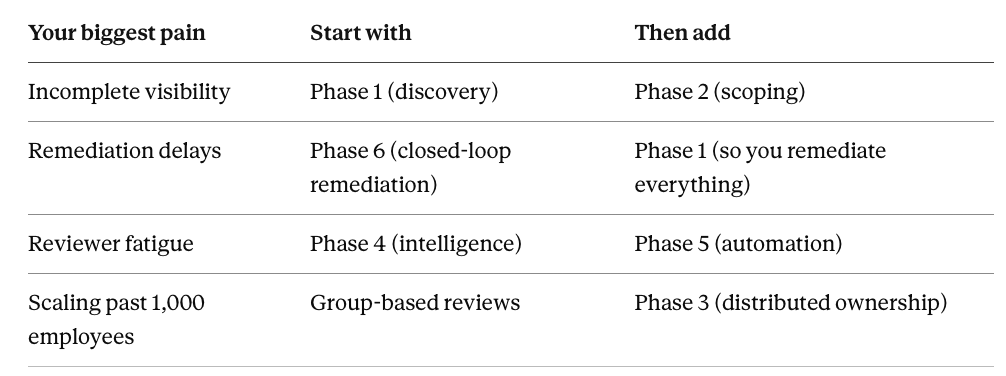
Common starting points:
If your biggest pain is incomplete visibility: → Start with Phase 1 (Continuous discovery) → Add Phase 2 (Risk-based scoping) once you know what you have
If your biggest pain is remediation delays: → Start with Phase 6 (Integrated remediation) → Add Phase 1 (Discovery) to ensure you're remediating everything
If your biggest pain is reviewer fatigue: → Start with Phase 4 (Context-rich intelligence) → Add Phase 5 (Automation) to reduce clicks
If you're scaling from 500 to 1,000+ employees: → Start with group-based reviews (Scaling section) → Add Phase 3 (Distributed ownership) to avoid bottlenecks
Implementation timeline:
Quarter 1: Pick 1-2 foundational phases (usually Discovery + Remediation)
Quarter 2: Add intelligence or automation
Quarter 3: Add remaining phases based on needs
Quarter 4: Optimize and move toward continuous governance
The key is progress, not perfection. Implement what you can with the resources you have. UAR platforms like Zluri provide most of these capabilities out-of-the-box, so you're choosing which features to enable rather than building everything from scratch.
Get Started
You've done the hard part—proving reviews can work. Now you need to evolve them from "we survived" to "this is sustainable."
Most organizations need comprehensive automation—complete visibility, intelligent reviews, API remediation, and permanent evidence. Modern user access review platforms provide these capabilities without requiring you to build everything yourself.
If you want to start with a pilot →Book Demo
If you want to see 1 min self-serve demo→ Check access reviews product tours
If you want to see what comprehensive automation looks like → Explore Zluri's Access Review Platform


.png)