.png)




A low-fatigue access review is not a shorter review. It's a review designed so the hundredth decision gets the same quality of attention as the first.
Most access reviews don't fail because reviewers don't care. They fail because the design asks people to do something humans can't sustain.
When a manager gets hundreds of rows, no context, and two buttons, quality decays row by row, and the review quietly turns into rubber-stamping. The fix isn't a sterner reminder email. It's a different review design: fewer decisions, better information per decision, smarter routing, and a process that runs itself between the decisions.
This is the foundation of any strong user access review program, and it's the part most programs skip. In this guide, we cover what low-fatigue actually means, where fatigue comes from, the six design levers that remove it, how those levers map to a working review in Zluri, and the metrics that tell you whether it's working.
What "Low-Fatigue" Actually Means
Low-fatigue is a property of the review design, not of the reviewer's stamina.
A review is low-fatigue when decision quality holds steady from the first row to the last, across every reviewer, without heroic effort. That's a higher bar than "completed on time," because a review can finish on schedule and still be exhausted: fast clicks, bulk approvals, and last-day completion spikes all produce a green dashboard and a weak control.
Completion measures whether reviewers finished. Fatigue determines whether they were thinking while they did.
That distinction matters because the cost of fatigue lands in two places at once. Security leaders link breaches to over-permissive access more than almost any other access factor, and fatigued reviews are exactly where over-permissive access gets re-certified instead of corrected. And the effort cost is real: survey data on review effort shows fully manual programs burning roughly 149 person-days per cycle, versus 55 for fully automated ones. Resources and time are the top two challenges teams cite, which is fatigue described from the program owner's side.
Where Reviewer Fatigue Comes From
Fatigue has four sources, and each one needs a different fix. We unpack the psychology and warning signs in our piece on reviewer fatigue, but the design view is simpler:
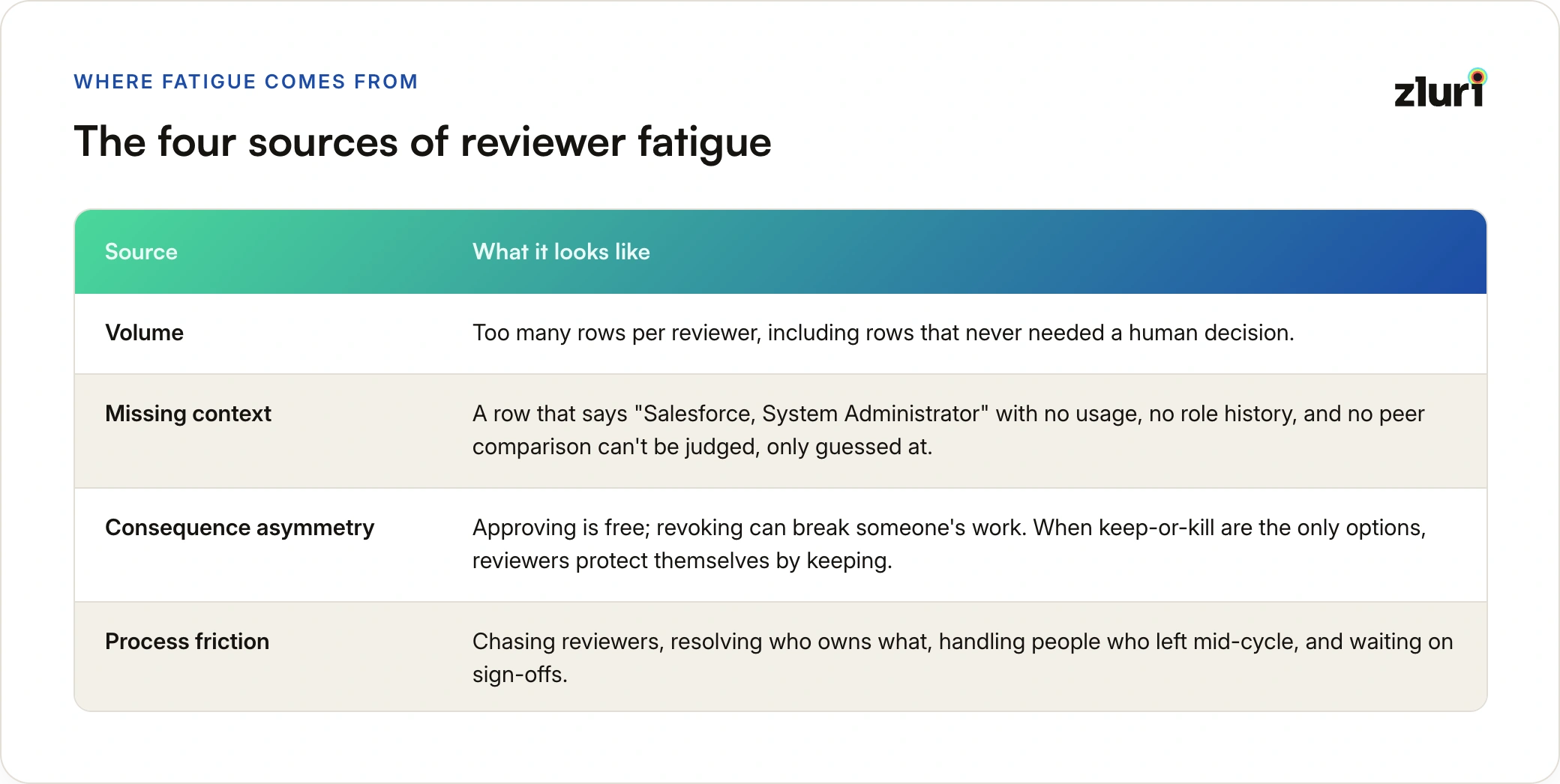
- Volume. Too many rows per reviewer, including rows that never needed a human decision.
- Missing context. A row that says "Salesforce, System Administrator" with no usage, no role history, and no peer comparison can't be judged, only guessed at.
- Consequence asymmetry. Approving is free; revoking can break someone's work. When keep-or-kill are the only options, reviewers protect themselves by keeping. We covered that dynamic in depth in why approve-or-revoke is the wrong decision model.
- Process friction. Chasing reviewers, resolving who owns what, handling people who left mid-cycle, and waiting on sign-offs. This is fatigue for the program owner, and it's what makes owners cut corners on scope and cadence.
Each design lever below targets one or more of these.
The Six Design Levers
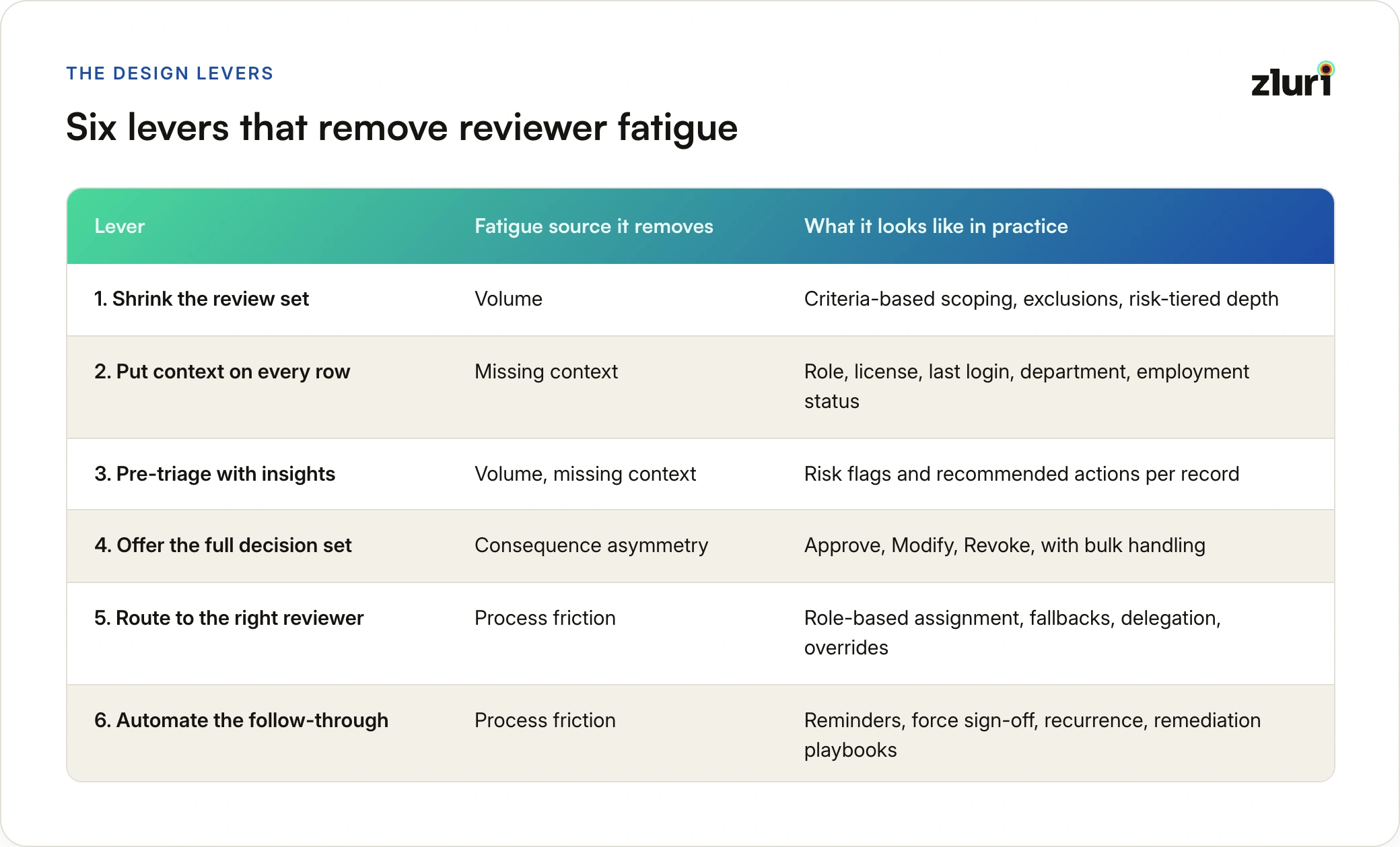
The prose summary first, then the table. Shrink the review set so reviewers only see decisions worth making. Put context on every row so judgment is possible. Pre-triage with risk signals and recommended actions so attention goes where it matters. Offer the full decision set and bulk handling so acting is safe and cheap. Route each record to the right reviewer, with fallbacks that never dead-end. And automate the follow-through so the process runs itself between decisions.
Lever 1: Shrink the Review Set
The cheapest way to reduce fatigue is to remove decisions that didn't need a human.
Scope by criteria, not by lists. Reviewing "all active employees with access to this app" is a different workload from "all users with an admin role, a license above standard, or no login in 90 days." Attribute-based scoping (department, employment status, app role, license, last login) lets you point full-depth review at the population that carries risk, and lighter-touch certification at the rest.
Tier by risk. Privileged roles, critical apps, recent role-changers, and contractors deserve deep review. Low-risk, unchanged access in productivity tools doesn't need the same depth every quarter. Our guide to privileged user access reviews covers why a small slice of access carries most of the risk, which is the logic behind tiering.
Pick the review type that fits the question. Asking "who has access to this app" and "who belongs in this group" are different questions with different workloads. Group-based reviews can collapse hundreds of per-user decisions into a membership decision against a group, which is often the single biggest volume reduction available.
Reviewers rubber-stamp 400 rows. They'll actually review 40. Scoping is how you get to 40 without lowering the bar.
Lever 2: Put Context on Every Row
A reviewer can only judge what they can see. The columns shown on each row decide whether the decision is a guess or a judgment.
For application reviews, the highest-value columns are app role, license type, last login, department, and employment status. For account-level reviews, the useful set shifts to account status, assigned roles and licenses, and the sources that discovered the account. Order the columns so the deciding information (usually role and last login) sits first.
The test is simple: for any row, can the reviewer answer "does this person still need this, at this level?" in a few seconds without opening another tab? If not, the review design is pushing the research work onto the reviewer, and fatigue is the predictable result.
Lever 3: Pre-Triage With Insights and Recommended Actions
Context makes decisions possible. Triage makes them fast.
Automated signals (high-risk assignments, inactive accounts still holding active access, access outliers against department norms, unusual privilege compared to peers) turn a flat list into a prioritized one. Recommended actions go one step further: suggest Revoke for an inactive user still holding a license, Modify for a high-privilege role out of line with peers, Approve where usage matches role expectations.
The design principle is that recommendations speed up triage without replacing judgment. The reviewer still decides, but they start from "here's what looks off" instead of "here's everything." Where a record carries conflicting signals, the strongest recommendation should win (Revoke over Modify over Approve), so the reviewer sees one clear starting point rather than a pile of competing flags. For teams running Segregation of Duties policies, surfacing open conflicts directly inside the review means the policy breach shows up exactly where the decision is made, with a recommended Modify, since a conflict is usually broken by adjusting one side rather than removing access entirely.
Lever 4: Offer the Full Decision Set and Bulk Handling
This is the lever that changes behavior most. When the only actions are keep or kill, acting carries risk and approving carries none. Adding Modify (downgrade a role, drop a license tier) makes the right answer available for the most common finding: access that's legitimate but oversized.
Two mechanics keep this from adding friction:
- Mandatory comments on Modify and Revoke, optional on Approve. The comment forces a moment of intent exactly where intent matters, and creates the audit trail as a by-product.
- Bulk actions. When forty rows deserve the same decision, forty clicks are pure fatigue. Bulk edit with a single required comment applied to every selected row keeps the decision deliberate and the effort proportionate.
Decisions should stay editable until sign-off, so a reviewer who changes their mind (or spots a pattern halfway through) can correct course. Reviewing and signing off are separate acts: the decision records the judgment, the sign-off locks it. Tracking both counts, rather than only "reviewed," is what stops a certification from sitting at a full progress bar with nothing actually finalized.
Lever 5: Route Each Record to the Right Reviewer
Wrong-reviewer routing is a hidden fatigue multiplier. A reviewer who doesn't know the person or the app either guesses or stalls, and every stalled record becomes a chase for the program owner.
Resilient routing has four parts:
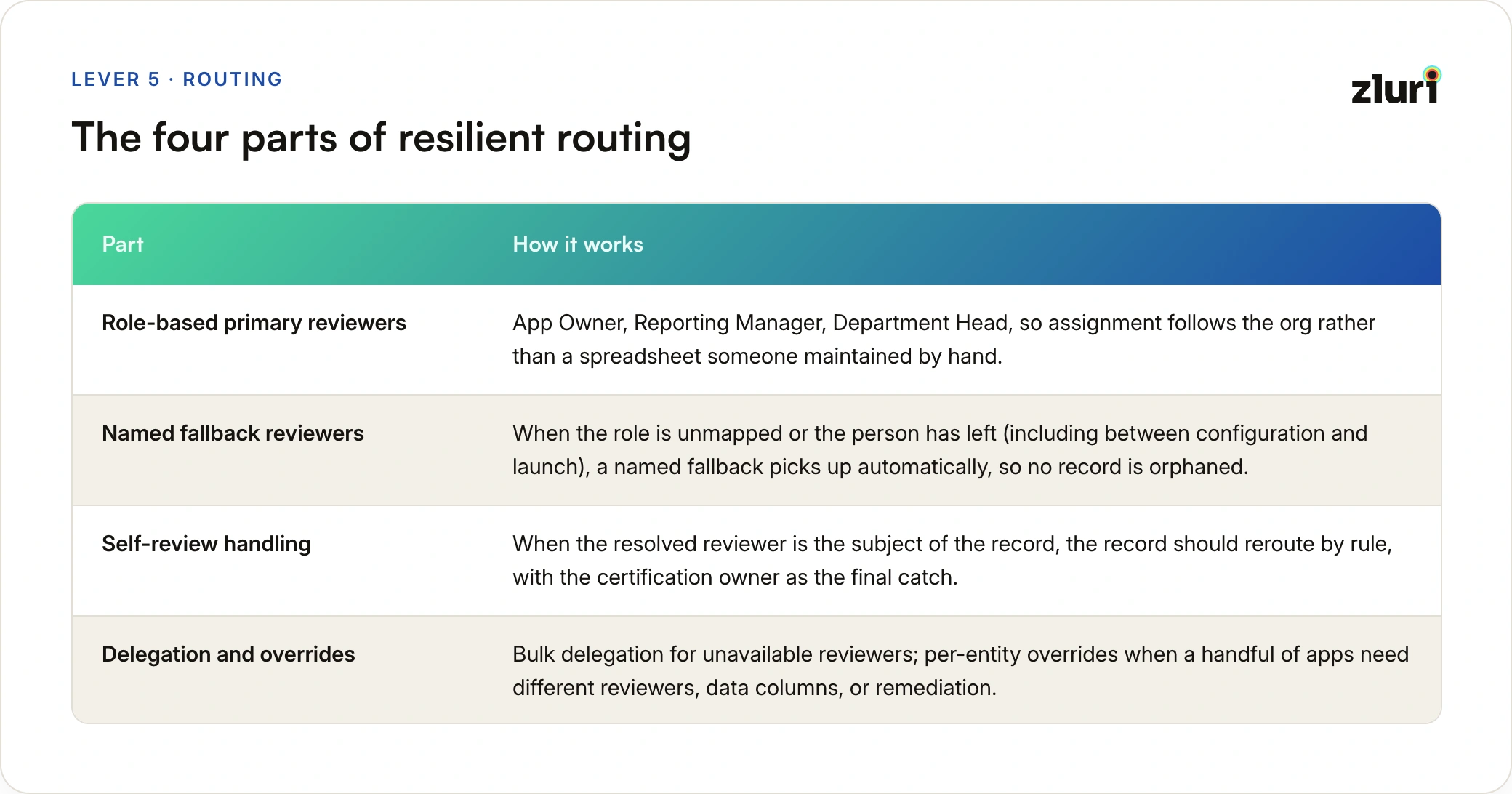
- Role-based primary reviewers. App Owner, Reporting Manager, Department Head, so assignment follows the org rather than a spreadsheet someone maintained by hand.
- Named fallback reviewers. When the role is unmapped or the person has left (including between configuration and launch), a named fallback picks up automatically, so no record is orphaned.
- Self-review handling. When the resolved reviewer is the subject of the record, the record should reroute by rule, with the certification owner as the final catch, so there's no dead-end state and no reviewer certifying their own access by accident.
- Delegation and overrides. Bulk delegation for unavailable reviewers; per-entity overrides when a handful of apps need different reviewers, data columns, or remediation without splitting into separate certifications.
Multi-level review deserves a deliberate word here. Four-eyes sign-off is the right control for the highest-risk access, but every added level is another person's attention. Used everywhere, it multiplies fatigue; used where scrutiny is warranted, it escalates without redundancy. Our explainer on multi-level access reviews covers where the extra level earns its cost. For a fuller treatment of who should review what, see our guide to review delegation models.
Lever 6: Automate the Follow-Through
A lot of fatigue lives outside the decisions: chasing, reminding, reconciling, and then discovering that approved Revokes never happened.
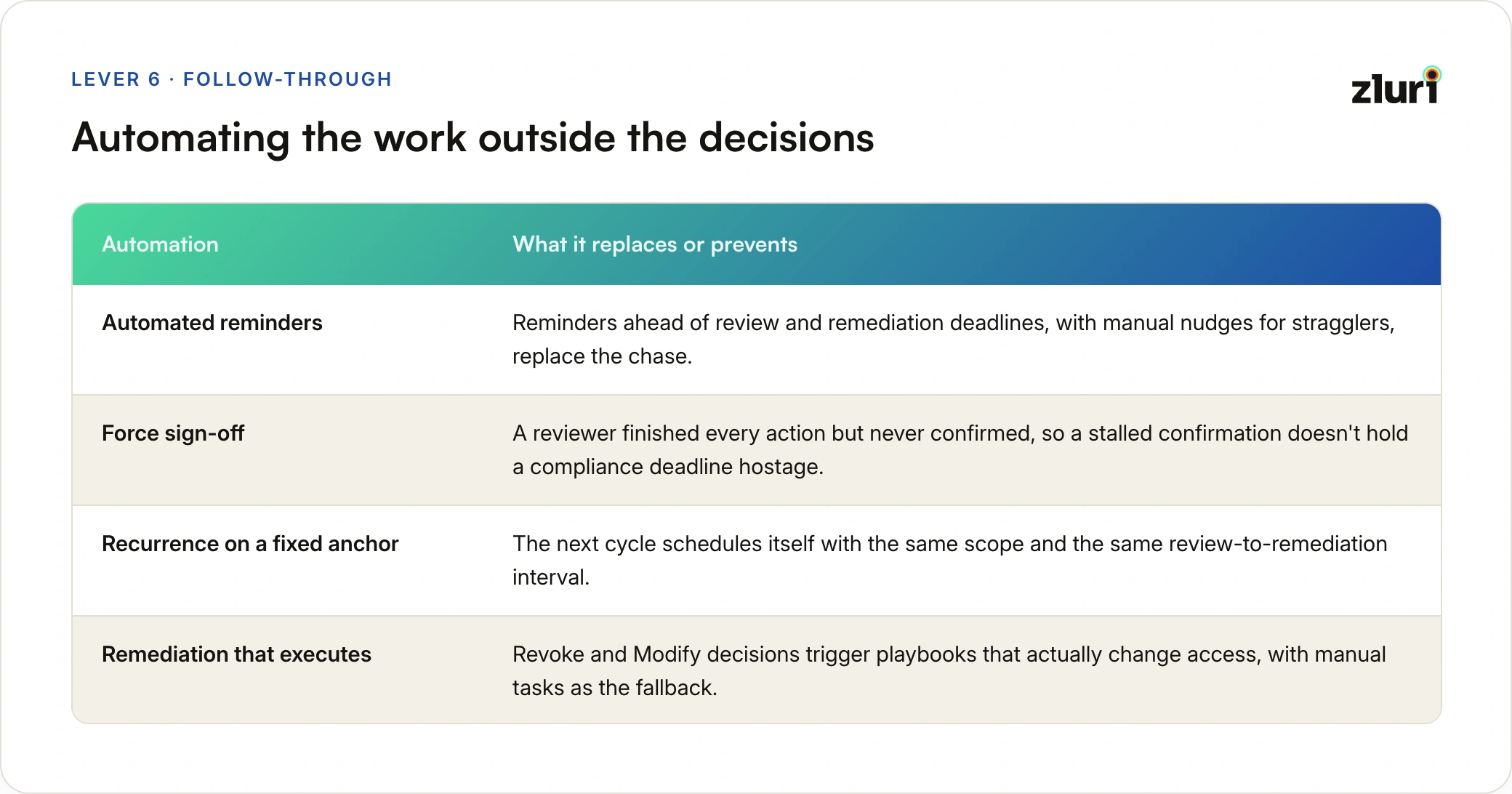
- Automated reminders ahead of review and remediation deadlines, with manual nudges available for stragglers, replace the chase.
- Force sign-off for the case where a reviewer finished every action but never confirmed, so a stalled confirmation doesn't hold a compliance deadline hostage.
- Recurrence on a fixed anchor so the next cycle schedules itself with the same scope and the same review-to-remediation interval. How often to run it is its own question, and we cover the trade-offs in how often access reviews should happen.
- Remediation that executes. Revoke and Modify decisions should trigger playbooks that actually change access, with manual tasks as the fallback when automation isn't possible. This is closed-loop remediation, and it matters for fatigue because reviewers who watch their findings die in a ticket queue stop bothering to raise findings.
The fastest way to teach reviewers that the review is a formality is to let their Revoke decisions go nowhere.
How This Maps to a Review in Zluri
The six levers aren't theoretical. They map directly onto how a certification is configured in Zluri's Access Reviews module:
If you want the click-by-click configuration, our walkthrough of setting up certifications in Zluri covers the wizard end to end, including defaults and overrides.
How to Tell Whether It's Working
A low-fatigue design should show up in numbers, not just in reviewer sentiment. Track a small set of quality signals alongside completion:
- Time per decision. Seconds-per-row that look like clicking, not reading, indicate fatigue regardless of completion.
- Action mix. The share of Modify and Revoke decisions, with comments. A review that never changes anything isn't a clean estate, it's a quiet one.
- Completion distribution. Steady progress across the window versus a spike in the final 48 hours.
- Sign-off lag. The gap between "reviewed" and "signed off," which exposes process friction.
- Flagged-to-remediated conversion. The share of Revoke and Modify decisions that actually changed access, and how quickly.
- Reviewer load. Rows per reviewer, tracked cycle over cycle, as scoping tightens.
Expect the action mix to move first. When fatigue drops and Modify becomes available, the share of non-Approve decisions often rises before it settles, because findings that were previously invisible start surfacing. That's the review starting to work, not the estate getting worse. For a fuller set of metrics, see our guide to review quality metrics.
Automation is what makes these metrics measurable at all, and it correlates with confidence in the outcome: in our survey data, 68 percent of fully automated programs rated their reviews very effective, versus 49 percent of manual ones.
A Practical First-Cycle Rollout
You don't need to redesign everything at once. A sequence that works:
- Pick one high-value application and scope by criteria instead of "everyone."
- Configure the context columns so every row answers the "still needed at this level?" question.
- Enable the full action set and set a mandatory-comment rule for Modify and Revoke.
- Set reviewers by role with a named fallback, and decide how self-review reroutes.
- Attach published remediation playbooks so decisions execute.
- Run the cycle, then read the six metrics and adjust scope and columns before expanding to more apps.
Expand application by application, using the first cycle's time-per-decision and action-mix numbers as the baseline.
Frequently Asked Questions
What is a low-fatigue access review?
A low-fatigue access review is one designed so decision quality stays consistent from the first record to the last. It reduces reviewer load through tighter scoping, richer context, pre-triaged risk signals, a full set of decision options, and automated follow-through, rather than relying on reviewers to push through volume.
Why does reviewer fatigue matter for security and audits?
Fatigued reviewers default to approving, which re-certifies excessive and dormant access instead of correcting it. Auditors increasingly test for this by sampling decision timestamps, approval rates, and remediation evidence, so a fatigued review can pass on completion and still fail on whether the control actually operates.
Does a low-fatigue review mean reviewing less access?
No. It means reviewing the right access at the right depth. High-risk access still gets full, sometimes multi-level scrutiny, while low-risk, unchanged access gets lighter treatment. The total number of decisions drops; the quality of each remaining decision goes up.
How do you reduce reviewer fatigue without automation?
You can tighten scope, simplify the spreadsheet columns, and shorten review windows manually, and each helps. The limit is context and follow-through: spreadsheets can't show live usage data, route around departed reviewers, or execute remediation, which is why the gains tend to plateau without automation.
What metrics show that reviewer fatigue is dropping?
Look at time per decision, the share of Modify and Revoke decisions with comments, whether completion is spread across the window rather than spiking at the deadline, sign-off lag, and the share of decisions that become executed access changes.
How does reviewer fatigue relate to rubber-stamping?
Fatigue is the cause and rubber-stamping is the symptom. Fatigued reviewers approve in bulk because it's the lowest-risk, lowest-effort option, so reducing fatigue is the most reliable way to stop rubber-stamping at its source.